


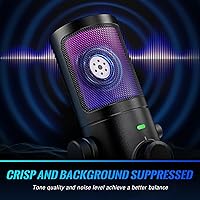
Overview

The FIFINE AmpliGame AM6 is a $49.99 USB condenser microphone that arrived in early 2024 and quickly climbed to #60 in Amazon's Computer Microphones category, earning a 4.4-star rating along the way. What separates it from the crowd at this price is the Game/Chat Balance dial — a physical knob for blending in-game audio with voice chat, something you rarely find without spending significantly more. Plug it in via USB-C and it works immediately on PC, Mac, PS4, or PS5 with zero driver installation. For anyone building out a streaming or Discord setup on a tight budget, it makes a compelling first impression.

Features & Benefits

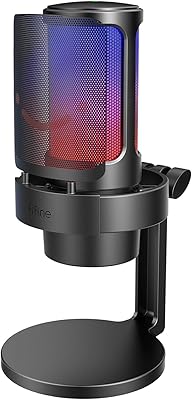
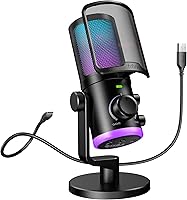
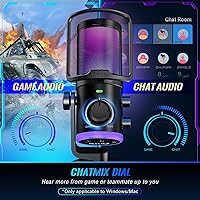
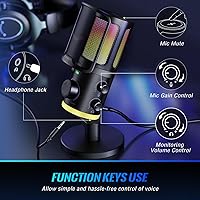
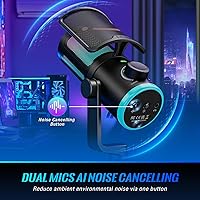
The Game/Chat Mix knob is the AM6's most practical hardware touch — spin it to prioritize footsteps or your squad's callouts without touching a single software menu. The dual-microphone noise cancellation does a respectable job filtering fan hum and light keyboard noise during quieter sessions, though it won't fully cut through a loud environment. A tap-to-mute button sits front-and-center for quick silencing, and the gain knob plus headphone volume wheel keep everything within arm's reach. Real-time monitoring runs through the 3.5mm jack, but it requires manual activation in Windows Sound settings — it is not enabled by default, which catches new users off guard. The dual-zone RGB rounds things out nicely.

Best For

This gaming mic makes the most sense for PC and Mac streamers who want hardware chat-mix control without investing in a full audio interface. If you run Discord or Twitch from a desktop, the physical knobs replace what would normally require digging through software. Console players can connect the AmpliGame AM6 to PS4 or PS5, but the Game/Chat dial is inactive on those platforms — worth knowing before you purchase. It also fits naturally into RGB desk builds, with lighting that pairs visually with glowing keyboards and mouse pads. Budget-conscious podcasters will find its feature-to-price ratio genuinely competitive against the HyperX SoloCast or Blue Snowball.

User Feedback

Buyers consistently highlight voice clarity and the no-fuss setup as the strongest selling points, with most reporting it working within seconds of plugging in. The RGB lighting also earns praise for looking more premium than the price suggests. On the downside, the ABS plastic construction feels noticeably light, and some users find it lacks the solidity of pricier alternatives. Noise cancellation gets mixed reviews — helpful in moderately noisy spaces, but less effective against loud mechanical keyboards or air conditioning. A recurring complaint is discovering that real-time monitoring is off by default, causing some to assume the headphone jack is broken. Overall, value-for-money sentiment leans positive for this price bracket.

Pros

  • Physical Game/Chat Balance dial blends game audio and voice chat without opening any software.
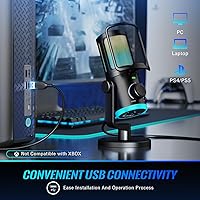
  • Plug-and-play USB-C setup works on PC, Mac, PS4, and PS5 within seconds of connecting.
  • Tap-to-mute button is large, front-facing, and responds with a satisfying tactile click.
  • Dual-zone RGB lighting looks noticeably more premium than the $49.99 price tag suggests.
  • Gain knob and headphone volume wheel keep key adjustments within arm's reach during live sessions.
  • Voice clarity is a clear step above typical gaming headset microphones for Discord and streaming.
  • The 6.5ft USB cable is long enough for most desktop tower setups without needing an extension.
  • Noise cancellation handles light ambient hum effectively in quieter home setups.
  • Integrated base stand keeps the desk tidy without requiring a separate boom arm or clip mount.
  • Feature-to-price ratio outperforms close competitors like the HyperX SoloCast at a similar cost.

Cons

  • Real-time monitoring is disabled by default on Windows and requires manual activation through Sound settings.
  • Game/Chat Balance knob is entirely non-functional when connected to PS4 or PS5.
  • ABS plastic body feels noticeably hollow and lightweight compared to metal-bodied alternatives.
  • Noise cancellation struggles against loud mechanical keyboards, strong fans, or open windows.
  • No mute status LED means it is easy to forget whether the mic is live or silenced in low-light setups.
  • Headphone output is underpowered for higher-impedance headphones, limiting comfortable listening volume.
  • RGB customization requires the FIFINE desktop app, which users describe as slow and limited in presets.
  • Gain range at the low end is narrow, making it hard to tame pickup in louder shared environments.
  • The knobs feel loose and low-resistance, which undermines confidence in long-term durability.
  • Sibilance and plosive sensitivity increase at higher gain without an included pop filter or windscreen.

Ratings

The scores below reflect an AI-driven analysis of verified global user reviews for the FIFINE AmpliGame AM6, with spam, bot submissions, and incentivized feedback actively filtered out. Each category is scored on real-world usage patterns drawn from streamers, Discord regulars, and home podcasters who have lived with this mic daily. Both the genuine strengths and the frustrations that keep surfacing in buyer feedback are represented without sugarcoating.

Voice Clarity
83%
For casual streaming and Discord calls, the AM6 captures voice with enough presence and warmth to sound noticeably better than a headset mic. Users regularly report that teammates and stream audiences picked up on the improvement immediately, especially in the mid-range frequencies where speech intelligibility matters most.
At louder gain settings, some sibilance creeps in, and the cardioid pattern can pick up plosives without a pop filter. Vocalists or podcasters chasing broadcast-quality audio will find the ceiling limiting compared to slightly pricier condensers.
Noise Cancellation
67%
33%
The dual-mic noise reduction handles light ambient noise reasonably well — gentle fan hum and distant air conditioning fade noticeably into the background during normal gaming sessions. Users in relatively quiet rooms consider it a genuine step up from single-capsule mics at this price.
Loud mechanical keyboards, aggressive desk fans, or open windows push the noise cancellation past its limits quickly. Several users noted that heavy typing bleeds through clearly, and the processing adds a subtle artifact to the voice at maximum cancellation levels that is noticeable in recordings.
Game/Chat Balance Control
88%
Having a physical dial to blend game audio and voice chat is genuinely rare under $50, and users who discovered it quickly made it a core part of their gaming routine. Rotating it mid-match to catch quiet footsteps or quickly amplifying a teammate's callout is intuitive and requires no software interaction.
The feature is completely inactive on PS4 and PS5, which frustrates console buyers who purchased specifically for this function. The dial travel is also fairly short, making precise incremental adjustments harder than they should be.
Ease of Setup
91%
Plug it in and Windows or macOS recognizes it within seconds — no drivers, no audio software, no configuration required. The included 6.5ft USB-A to USB-C cable is long enough to reach most desktop setups comfortably, and users appreciate not having to hunt for adapters.
Real-time monitoring is not active by default on PC, and the activation path through Windows Sound settings is buried enough that dozens of users assumed the headphone jack was defective. The manual explanation is unclear, and this single issue drives a disproportionate share of negative reviews.
Build Quality
61%
39%
The AM6 looks the part on a gaming desk — the shape is purposeful, the RGB zones add perceived value, and the integrated stand keeps things tidy without extra accessories. For the price, many users say it looks more expensive than it is.
The ABS plastic body feels noticeably hollow when handled, and the knobs have a loose, low-resistance feel that makes them seem cheap under regular use. Users coming from metal-bodied competitors like the HyperX SoloCast comment on the difference in hand-feel almost immediately.
RGB Lighting
84%
The dual-zone design — top capsule glow plus an underglow base — gives the AM6 a distinctive look that pairs naturally with lit keyboards, mouse pads, and PC cases. Users building themed desk setups consistently cite the lighting as one of the better visual features at this price tier.
RGB customization requires the FIFINE software, which some users found clunky to navigate. A small number of units also shipped with inconsistent underglow brightness between the two zones, though this appears to be a minority hardware variance rather than a widespread defect.
Real-Time Monitoring
58%
42%
Once properly activated through Windows Sound settings, monitoring through the 3.5mm jack works with virtually zero perceptible latency, which is genuinely useful for catching clipping or checking tone mid-session. Mac users report it activates more intuitively without the extra steps.
The non-default activation on PC is a recurring point of friction that should not exist on a product marketed to plug-and-play users. The headphone amplifier driving the jack is also underpowered for higher-impedance headphones, leading to noticeably low output volume for users with over-ear studio cans.
Tap-to-Mute Button
79%
21%
The mute button is large, front-facing, and responds with a light tactile click that is satisfying to use mid-game. Users who stream regularly appreciate being able to mute and unmute without reaching past their keyboard or breaking focus from the screen.
There is no LED status indicator for mute state, so in low-light gaming sessions users occasionally forget whether they are muted or live. A simple color change on the RGB would have solved this, and its absence feels like an oversight given how much visual feedback the mic already provides.
Gain Control
76%
24%
The physical gain knob lets users dial back sensitivity quickly when switching from a quiet room to a louder environment, without touching any app. Streamers who move between gaming and away-from-desk commentary find it more convenient than adjusting levels in software.
The gain range is somewhat narrow at the lower end, which limits how aggressively you can reduce pickup in louder spaces. Users in open-plan environments or shared rooms found that even minimum gain still captured too much ambient bleed for comfortable streaming.
Headphone Volume Control
72%
28%
Having a dedicated volume wheel for the monitoring output on the mic body itself is a practical convenience, particularly for users who do not want to reach for their keyboard or headset controls mid-session. It responds smoothly and adjusts output in small enough increments to be usable.
Output volume tops out lower than many users expect, especially with over-ear headphones above 32 ohms impedance. Several buyers noted they had to run their headphone volume at maximum on both the mic and their system to reach a comfortable listening level.
Platform Compatibility
74%
26%
The AM6 connects reliably to Windows, macOS, PS4, and PS5 without any fuss, making it one of the more versatile options at this price for households with mixed hardware. Mac users in particular note that setup is even smoother than on Windows.
The flagship Game/Chat Balance knob does nothing on consoles, which significantly narrows the AM6's value proposition for PS4 and PS5 users. Buyers who did not read the fine print before purchasing expressed clear disappointment, and this limitation should be front-and-center in any purchase decision.
Cable & Connectivity
81%
19%
The included 6.5ft USB-A to USB-C cable is a generous length that reaches most tower PC setups without extension, and the USB-C connection at the mic end feels more modern and secure than the micro-USB ports found on older competitors. No connectivity dropouts reported under normal use.
The cable itself is basic rubberized plastic without any braiding, and it tangles easily on a busy desk. A handful of users also reported that the USB-C port on the mic body felt slightly loose out of the box, raising early durability questions.
Value for Money
82%
18%
At $49.99, the AM6 packs more hardware controls than the HyperX SoloCast or Blue Snowball at comparable prices, and the Game/Chat dial alone justifies the cost for PC gamers who rely on it daily. Most buyers feel the feature count punches above its price tag for casual use.
The plastic construction and monitoring limitations mean you will likely feel the ceiling within a year if your setup or skill level grows. Buyers who push the mic harder than casual Discord or Twitch use tend to migrate upward and wish they had invested the extra $30 to $50 initially.
Software & Driver Experience
63%
37%
The core functionality runs entirely without software, which keeps the out-of-box experience friction-free. Users who only need plug-and-play operation with basic knob controls never have to open a single app.
Accessing RGB customization requires the FIFINE desktop app, which users describe as functional but dated-looking and occasionally slow to detect the mic. There is no mobile or browser-based alternative, and the app offers limited preset options compared to what the hardware lighting is visually capable of.

Suitable for:

The FIFINE AmpliGame AM6 is a strong match for PC and Mac gamers who want hands-on audio control without purchasing a dedicated audio interface or learning mixing software. If you spend meaningful time on Discord, Twitch, or in squad-based games where quickly balancing teammate voice against in-game audio actually affects your performance, the physical Game/Chat dial alone makes this mic worth serious consideration at $49.99. It also works well for casual podcasters and content creators who are just getting started and need a multi-function mic that sounds noticeably better than a headset without a steep learning curve. RGB desk builders will appreciate how the dual-zone lighting integrates visually with backlit keyboards and mouse pads without requiring a separate controller. Essentially, if your priority is maximum practical control per dollar spent on a PC setup, this gaming mic delivers a feature set that rivals options costing $20 to $30 more.

Not suitable for:

Buyers who plan to use the FIFINE AmpliGame AM6 primarily on PS4 or PS5 should think carefully before purchasing — the Game/Chat Balance dial, which is the mic's most distinctive feature, is completely non-functional on consoles, reducing it to a basic plug-in mic at that point. Streamers or podcasters who record in loud environments, like shared apartments or rooms with loud PC cooling setups, will likely find the noise cancellation insufficient for clean broadcast-quality audio. Anyone who needs reliable monitoring right out of the box on Windows should be warned that real-time headphone output requires navigating into Sound settings to activate manually, which is not intuitive and has caused genuine frustration. The ABS plastic build also means this is not the right choice for buyers who prioritize a premium, durable feel — if you want something that still feels solid after two years of daily desk use, stepping up to a metal-bodied alternative makes more sense. Musicians, voice actors, or anyone needing accurate studio-grade reproduction will outgrow this mic quickly.

Specifications

  • Price: Retails at $49.99 USD at launch, positioning it in the entry-to-mid range of the USB gaming microphone market.
  • Acoustic Principle: Uses a condenser capsule design, which provides greater sensitivity to voice nuance compared to dynamic microphones at this price tier.
  • Polar Pattern: Unidirectional (cardioid) pickup pattern focuses audio capture from directly in front of the mic while rejecting sound from the sides and rear.
  • Connectivity: Connects via USB using the included 6.5ft (2m) USB-A to USB-C cable, with no drivers or additional software required for basic operation.
  • Signal-to-Noise Ratio: Rated at 75 dB, indicating a reasonably clean signal floor suitable for casual streaming, voice chat, and home podcast recording.
  • Frequency Response: Covers 20 Hz to 20 kHz, spanning the full range of human hearing and capturing both low vocal warmth and high vocal clarity.
  • Noise Cancellation: Employs a dual-microphone architecture that processes signals from two capsules simultaneously to reduce ambient background noise during recording.
  • Headphone Jack: Features a 3.5mm headphone output on the mic body for real-time audio monitoring, though activation on Windows requires a manual step in Sound settings.
  • RGB Lighting: Dual-zone controllable RGB covers both the top capsule housing and an underglow base ring, with color and effect customization available through the FIFINE desktop app.
  • Dimensions: Measures 10.31 x 6.06 x 4.41 inches overall including the integrated base stand, making it a mid-footprint desktop mic.
  • Weight: Weighs 1.5 lbs (0.68 kg) complete with stand, which is light enough to feel portable but not so light as to tip easily on a desk.
  • Material: Primary body and stand are constructed from Acrylonitrile Butadiene Styrene (ABS) plastic, a common lightweight thermoplastic used across consumer electronics.
  • Compatible Platforms: Works on Windows, macOS, PS4, and PS5 as a plug-and-play USB audio device, though the Game/Chat Balance knob is only functional on PC and Mac.
  • Game/Chat Balance: A physical rotary dial on the mic body adjusts the blend ratio between in-game audio and voice chat output, exclusive to PC and Mac operation.
  • Controls: Onboard controls include a tap-to-mute button, a mic gain knob, a headphone volume wheel, and the Game/Chat Balance dial, all accessible without software.
  • Stand Type: Ships with an integrated fixed base stand; no boom arm or scissor arm is included, but the mic can be adapted to standard threading with compatible third-party mounts.
  • In the Box: Package includes the condenser microphone with integrated stand, one 6.5ft USB-A to USB-C cable, and a printed user manual.
  • Date Available: First made available for purchase on January 16, 2024, making it a relatively recent entry in FIFINE's AmpliGame product line.

Related Reviews
FIFINE AmpliGame A8
FIFINE AmpliGame A8
78%
78%
Sound Clarity
67%
Noise Rejection
61%
Build Quality
94%
Ease of Setup
86%
On-Mic Controls
More
FIFINE AmpliGame A20
77%
91%
Value for Money
78%
Audio Clarity
54%
Bass Performance
88%
RGB Lighting
93%
Ease of Setup
More
AmpliGame V3
AmpliGame V3
76%
91%
Setup & Ease of Use
78%
Capture Quality
67%
HDMI Passthrough
86%
Port Selection & Connectivity
88%
Software Compatibility
More
Fifine K054
Fifine K054
79%
93%
Value for Money
78%
Audio Clarity for Voice
96%
Ease of Setup
81%
Build Quality
88%
Mute Button & LED Indicator
More
Fifine N6 4-Channel Headphone Amplifier
77%
88%
Audio Signal Clarity
93%
Individual Volume Control
76%
Build Quality
91%
Value for Money
84%
Ease of Setup
More
FIFINE K678
FIFINE K678
79%
78%
Audio Clarity
91%
Value for Money
83%
Build Quality
96%
Ease of Setup
67%
Gain Control
More
FIFINE K683A
FIFINE K683A
80%
83%
Audio Clarity
67%
Background Noise Rejection
84%
Build Quality
93%
Ease of Setup
88%
On-Body Controls
More
FIFINE X3 Wireless Bluetooth Headphones
82%
88%
Value for Money
94%
Battery Life
77%
Noise Cancellation
84%
Comfort & Fit
89%
Portability
More
FIFINE K690
FIFINE K690
82%
84%
Audio Clarity
88%
Pickup Pattern Versatility
81%
Build Quality
93%
Ease of Setup
79%
Headphone Monitoring
More

FAQ

Unfortunately, no. The Game/Chat Balance knob is only functional on PC and Mac. When you connect the AM6 to a PS4 or PS5, it operates as a standard USB microphone but the dial does nothing to blend game and chat audio. If that feature is your main reason for buying, this mic is best suited to a PC setup.

Real-time monitoring is not enabled by default on Windows, which catches a lot of users off guard. To activate it, open the Windows Sound Panel, go to the Playback tab, double-click the FIFINE Chat device, navigate to Levels, and click the speaker icon next to the microphone level to switch it on. Once that is done, audio should pass through immediately. Mac users generally do not need this extra step.

No drivers are needed for basic use. Plug the USB cable into your PC, Mac, PS4, or PS5 and your operating system will recognize the FIFINE AmpliGame AM6 within seconds. The only reason to install the FIFINE desktop app is if you want to customize the RGB lighting beyond the default modes.

It will reduce some of the noise, but do not expect a complete solution. The dual-mic noise cancellation handles lighter ambient sounds like fan hum or distant background noise reasonably well. Loud clicky mechanical keyboards, however, tend to bleed through — especially at higher gain settings. If keyboard noise is a major concern, pairing the mic with a noise gate in your streaming software will give you better results.

Yes, the mic base is compatible with standard 5/8-inch threading found on most boom arms and scissor mounts, though you may need a 3/8-inch adapter depending on your specific arm. Removing the integrated stand and mounting it on a boom arm can free up desk space and let you position the mic closer to your mouth for better pickup.

You can cycle through lighting modes and turn the RGB off entirely using a dedicated button on the mic body, so you are not forced to have it on. For more advanced color and effect customization, you would need to download the FIFINE desktop app, which gives you additional options though users generally describe it as fairly basic in terms of preset variety.

For a reasonably quiet home office — light AC hum, gentle fan noise, or soft ambient sounds — the noise reduction does a decent job keeping your voice clean. Shared office spaces or rooms with loud HVAC systems are a different story; under those conditions, the processing has clear limits and you will likely still hear background bleed in recordings. Using a cardioid polar pattern also helps naturally reject noise that comes from behind and beside the mic.

Not necessarily. The headphone amplifier built into the AM6 is on the weaker side, and it struggles to drive higher-impedance headphones above about 32 ohms to a comfortable volume. Make sure both the headphone volume wheel on the mic and your system volume are set to maximum first. If it is still too quiet, lower-impedance headphones or earbuds will perform noticeably better with this mic than full-size over-ear studio cans.

The gain knob controls how sensitive the microphone capsule is — turning it up makes the mic pick up sounds from further away or amplifies quieter voices, while turning it down reduces sensitivity to cut out background noise. The headphone volume wheel is completely separate and only affects how loud the audio is in your monitoring headphones. Adjusting one has no effect on the other.

The AM6 offers more physical controls than either of those alternatives at a similar price — the HyperX SoloCast has no onboard headphone monitoring at all, and the Blue Snowball lacks a Game/Chat dial. Where those competitors have an edge is in build quality; both feel more substantial in hand than the AmpliGame AM6's ABS plastic body. If hardware controls and RGB matter to you, the AM6 wins on paper; if you want something that feels more durable or sounds a bit cleaner for podcast recording, the SoloCast is worth considering.