

Overview

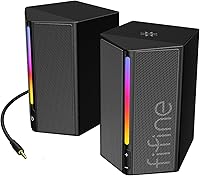
The FIFINE AmpliGame A20 is a compact stereo speaker set aimed at casual gamers and everyday desktop users who want a real audio upgrade without spending much. Plug in the USB for power, connect the 3.5mm aux cable, and you're done — no drivers, no software, no fuss. The pair sits comfortably on either side of a monitor without eating up desk space, and the plastic build keeps the combined weight just over 2 lbs. Since launching in early 2024, it has climbed into the top 400 computer speakers on Amazon, which says something about its appeal at this price tier.

Features & Benefits

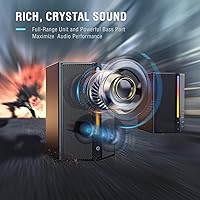
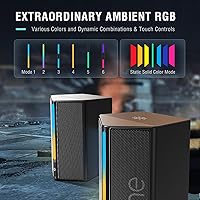
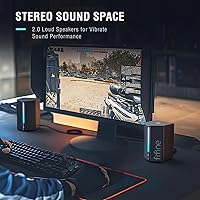
These desktop speakers pack a 2.3-inch dynamic driver alongside a 1-inch tweeter in each unit, giving you a noticeably wider soundstage than a single full-range driver would produce. Total output tops out at 5W — honest budget-speaker territory, meaning it's loud enough for a typical room at moderate volume but not a replacement for a serious audio setup. The RGB lighting offers six dynamic modes and seven color choices, all toggled from a dedicated button so you're never digging through menus. A front-facing volume knob and mute make in-session adjustments natural. The Bass Boost mode adds warmth, though it won't conjure deep sub-bass from 2.3-inch drivers.

Best For

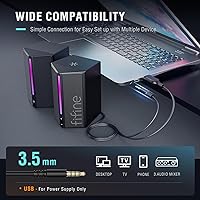
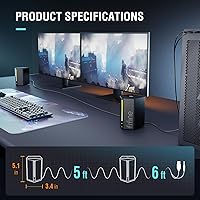
The A20 speakers make the most sense for budget-conscious gamers and students who want something that sounds meaningfully better than built-in laptop or monitor audio without any setup hassle. USB power and a 3.5mm aux cable cover virtually every common source device — computers, monitors, phones, tablets — without configuration. The 6ft cable to the source gives decent reach, and the 5ft inter-speaker cable makes proper left-right placement around a standard monitor straightforward. Just keep in mind there is no Bluetooth, no optical input — if your device lacks a 3.5mm jack or you need wireless flexibility, these fall short.

User Feedback

Buyers generally come away satisfied, with the most consistent praise going toward visual appeal and value — people are genuinely surprised by how polished the RGB looks at this price. Audio clarity earns positive marks for gaming sessions and video calls, where dialogue and directional cues come through cleanly. Recurring criticism, though, centers on thin bass response and a volume ceiling that feels modest in larger rooms at full output. Some note that the plastic housing feels lightweight — a detail some read as flimsy, others find perfectly acceptable for a compact desktop setup. Cable length draws mixed comments, but most users find the 6ft run works well for standard desk arrangements.

Pros

  • Instant plug-and-play setup requires no drivers, apps, or configuration of any kind.
  • Stereo separation is noticeably wider than typical built-in laptop or monitor audio.
  • RGB lighting is vibrant and easily controlled via a dedicated physical button — no software needed.
  • The volume knob and mute button are front-facing, making quick adjustments natural during calls or gaming.
  • Compatible with monitors, phones, tablets, and TVs — virtually any device with a 3.5mm output.
  • Cable lengths are practical for most standard desk arrangements out of the box.
  • The A20 speakers fit comfortably on compact desks without crowding the keyboard or work area.
  • Audio clarity for dialogue, gaming cues, and video calls is a clear upgrade over stock speakers.
  • USB power draw is minimal and works from laptops, hubs, or power banks with no dedicated adapter.

Cons

  • Bass response is thin even with the boost mode engaged — a consistent limitation at this driver size.
  • Maximum volume output feels restrained in medium-sized rooms and compresses slightly when pushed hard.
  • RGB lighting cannot sync with third-party ecosystems like Corsair iCUE or ASUS Aura Sync.
  • Preferred RGB color settings do not save between power cycles, resetting each time the speakers turn on.
  • The plastic housing feels noticeably hollow when handled, which undermines the perception of durability.
  • No Bluetooth or optical input means the setup is entirely dependent on a working 3.5mm connection.
  • There are zero audio customization options — no EQ, no companion app, no adjustable profiles.
  • The volume knob has a short rotation range, making fine low-volume adjustments feel imprecise.

Ratings

Our AI rating system analyzed thousands of verified global purchases of the FIFINE AmpliGame A20, actively filtering out incentivized reviews and bot activity to surface what real buyers actually experience day to day. The scores below reflect a balanced picture — where these desktop speakers genuinely over-deliver for the price, and where they fall short of expectations. Strengths and frustrations are weighted equally so you can make an informed call before buying.

Value for Money
91%
Most buyers feel they got more than they paid for, which is the clearest signal of value in any budget product category. The combination of RGB lighting, physical controls, and stereo separation at this price point consistently surprises first-time owners who expected basic mono sound.
A small portion of buyers who compare these directly against slightly pricier alternatives feel the audio quality gap is noticeable enough to justify stretching the budget. For pure audio performance per dollar, the value proposition weakens once you move past casual listening.
Audio Clarity
78%
22%
For gaming sessions, video calls, and YouTube content, the A20 speakers deliver clear, separated sound that feels like a genuine step up from built-in laptop or monitor audio. Dialogue in games and movies comes through with good definition, and the stereo imaging is convincing for the driver size.
Music listeners, particularly those who enjoy bass-forward genres, frequently note that the sound feels thin and slightly bright at higher volumes. The frequency response has an audible upper-mid emphasis that works well for speech but less so for cinematic or musical content where warmth matters.
Bass Performance
54%
46%
The Bass Boost mode does add a noticeable low-end bump that improves the listening experience for casual gaming and action movie audio. Users coming straight from built-in monitor speakers often perceive the bass as adequate for everyday use.
Anyone expecting punchy, room-filling bass will be disappointed — the 2.3-inch drivers simply cannot move enough air to produce meaningful sub-bass. Even with Bass Boost engaged, low frequencies in music and cinematic soundtracks feel thin and rolled off, which is a common and consistent complaint.
RGB Lighting
88%
The RGB implementation is one of the most praised aspects of this gaming speaker set, with buyers frequently noting how vibrant and well-synced the lighting looks on a dim gaming desk. Having six dynamic modes and seven color options controlled via a dedicated physical button — no software required — is a practical design choice that users appreciate.
The RGB cannot sync with third-party lighting ecosystems like Corsair iCUE or ASUS Aura Sync, which is a limitation for buyers with a coordinated RGB setup. A few users also report that the lighting modes cycle in a fixed sequence, with no way to save a preferred static color between power cycles.
Ease of Setup
93%
Plug the USB into any port for power, connect the 3.5mm aux cable to your source, and the speakers are ready — there is genuinely nothing else to do. This zero-configuration experience is consistently praised by users who are tired of driver installs and pairing screens.
The simplicity is also a ceiling: there are no EQ settings, no companion app, and no way to customize the audio profile beyond the physical Bass Boost toggle. Users wanting any level of audio tuning have no options with this setup.
Volume Output
62%
38%
At moderate volumes in a typical bedroom or small home office, the A20 speakers produce enough output for comfortable listening without distortion creeping in. For desk use within a few feet, the loudness is generally sufficient for gaming and background music.
At maximum volume, the output feels restrained for a medium-sized room, and some users report a slight muddiness in the high-mids when pushed to the upper end of the dial. These are not the right choice for anyone who needs to fill a larger space or prefers listening at higher SPL levels.
Build Quality
67%
33%
The plastic enclosures are lightweight and have a clean matte finish that looks tidy on a desk. Most users find the physical volume knob and button feel responsive and not cheap for the price bracket.
The all-plastic construction does feel noticeably lightweight when handled, and a meaningful number of buyers describe the overall build as slightly hollow-feeling. The housing is not flimsy per se, but it lacks the reassuring density of even moderately priced alternatives.
Cable Quality & Length
74%
26%
The 6ft run from the speaker to the audio source covers most standard desk configurations without leaving excess cable to manage. The inter-speaker cable at 5ft gives enough reach to place each unit at the left and right edges of a typical widescreen monitor.
The cables are not detachable, which means a damaged cable requires replacing the entire unit rather than a simple swap. A handful of users with non-standard desk setups — particularly those with the PC tower at a distance — find the 6ft source cable just barely long enough.
Control Usability
84%
Having the volume knob, mute button, and RGB toggle all on the front face of one speaker makes real-time adjustments quick and intuitive during a gaming session. The mute button in particular is frequently cited as a practical addition that users find themselves reaching for regularly during calls.
The volume knob has a relatively short rotation range, which makes fine adjustments at low volumes slightly tricky — small turns produce noticeable jumps in output level. There is no remote or inline control option, so adjustments always require reaching to the speaker unit itself.
Connectivity Options
51%
49%
The 3.5mm aux input is broadly compatible and works with monitors, phones, tablets, and virtually any device that has a headphone jack. USB powering from any port — including laptop USB-A, USB hubs, and power banks — adds genuine flexibility.
There is no Bluetooth, no optical input, and no USB audio transmission — the USB connector is strictly for power only. For users with newer devices that have dropped the 3.5mm jack, or those who want wireless convenience, this gaming speaker set simply does not fit the use case.
Stereo Separation
79%
21%
For a compact 2.0ch setup, the stereo imaging is wider than expected, largely because the inter-speaker cable gives enough length to position each unit well apart on a desk. Gaming audio benefits noticeably — left-right directional cues are distinct and help with spatial awareness.
The separation advantage disappears if both speakers are placed close together, which some users do out of habit or desk constraints. The soundstage is also fairly flat in depth, meaning three-dimensional audio mixes do not translate with much front-back dimensionality.
Compatibility
86%
The combination of 3.5mm audio and USB power makes these desktop speakers usable with an unusually wide range of devices — from gaming PCs and monitors to phones, tablets, and even smart TVs with aux outputs. Users frequently mention using them across multiple devices in the same home without any reconfiguration.
Devices that rely exclusively on USB-C or Bluetooth audio — such as certain iPads or newer Android phones without a headphone adapter — require an additional dongle or adapter that is not included. This is not a flaw unique to this product, but it is worth factoring in based on your specific device lineup.
Desk Footprint
89%
At just 3.8 inches wide and 5.1 inches tall, each unit occupies surprisingly little desk real estate. Users with compact workstations consistently note that the speakers fit naturally beside a monitor without crowding the keyboard or mousepad area.
The rectangular prism shape, while space-efficient, is not particularly elegant in profile, and the speakers look noticeably utilitarian when the RGB is off. Users who prioritize desk aesthetics in a non-gaming context may find the industrial proportions a poor fit.
Gaming Experience
82%
18%
For casual gaming — RPGs, strategy titles, MOBAs — the clarity of in-game dialogue and ambient audio is a real improvement over stock monitor speakers, and the sound positioning helps with basic directional awareness. The RGB adds atmosphere that pairs well with a lit gaming setup.
Competitive FPS gamers who need precise, high-fidelity positional audio will likely find the sonic performance limiting. The drivers lack the resolution for fine detail retrieval, and at peak volume the sound can compress slightly, which reduces the nuance needed in high-stakes gameplay.

Suitable for:

The FIFINE AmpliGame A20 is a smart pick for anyone who has been putting up with tinny built-in laptop or monitor audio and wants a real, immediate improvement without a significant outlay. Students setting up a first proper desk, casual gamers who want RGB ambiance alongside cleaner sound, and remote workers who spend hours on video calls will all notice a genuine step up in daily listening comfort. The plug-and-play setup — USB for power, 3.5mm aux for audio, done — makes it particularly appealing to people who have no interest in installing software or wrestling with Bluetooth pairing. Small desk setups benefit from the compact footprint, and the generous inter-speaker cable gives enough length to achieve proper left-right stereo spread across a standard monitor. If your source device has a 3.5mm output and a free USB port, these desktop speakers will work exactly as expected from day one.

Not suitable for:

The FIFINE AmpliGame A20 is the wrong tool for buyers who prioritize audio fidelity above all else, particularly anyone who listens seriously to music or uses speakers for mixing, production, or high-resolution media. The 5W output ceiling and compact driver size mean that bass-heavy content — EDM, hip-hop, cinematic scores — will sound noticeably thin regardless of whether Bass Boost is engaged. Competitive FPS gamers who rely on precise, high-resolution positional audio for a tactical edge will likely find the sonic detail insufficient compared to even a modest headset. The complete absence of Bluetooth and optical inputs also makes this gaming speaker set a poor fit for users with newer devices that have dropped the 3.5mm jack, or anyone who values wireless flexibility in their setup. Buyers looking to furnish a medium or large room with adequate fill volume should also look elsewhere — these speakers are genuinely desk-range devices, not room-filling ones.

Specifications

  • Speaker Type: 2.0ch stereo configuration with one active and one passive unit connected via a dedicated inter-speaker cable.
  • Driver Size: Each unit houses a 2.3-inch dynamic driver paired with a 1-inch tweeter for a two-way sound output per speaker.
  • Max Output Power: Total system output is 5W, suitable for close-range desk listening in small to medium rooms.
  • Frequency Response: The system reproduces frequencies up to 18 kHz, covering the mid and high-frequency range relevant to speech, gaming audio, and general media.
  • Audio Connection: Audio input is via a 3.5mm aux-in connector, compatible with any device that has a standard headphone or line output.
  • Power Supply: Powered exclusively by USB at 5V DC, with no external power adapter required — any standard USB-A port, hub, or power bank will work.
  • Source Cable Length: The cable running from the speakers to the source device measures 6ft (1.8m), providing reach for most standard desk configurations.
  • Speaker Cable Length: The inter-speaker cable connecting the two units is 5ft (1.5m), allowing proper left-right placement across a typical widescreen monitor.
  • RGB Lighting: Each speaker features built-in RGB lighting with 6 dynamic modes and 7 color options, toggled via a dedicated physical button on the active speaker.
  • Controls: The active speaker includes a front-facing analog volume knob, a mute button, and a dedicated RGB mode button for quick in-session adjustments.
  • Dimensions: Each speaker unit measures 3.4″ deep, 3.8″ wide, and 5.1″ tall, making them compact enough for tight desk setups.
  • Weight: The combined weight of both units is approximately 936g (around 2.06 lbs), keeping the pair light and easy to reposition.
  • Enclosure Material: Both speaker housings are constructed from plastic, finished in matte black.
  • Wireless Connectivity: No wireless connectivity is included — there is no Bluetooth, Wi-Fi, or RF pairing capability of any kind.
  • Optical Input: No optical (TOSLINK) input is available; the sole audio input is the 3.5mm aux connector.
  • USB Function: The USB connector is used strictly for power delivery and does not carry audio signal under any circumstances.
  • Compatible Devices: Works with any device that provides both a USB-A port for power and a 3.5mm audio output, including desktops, laptops, monitors, TVs, phones, and tablets.
  • Special Features: Includes a Bass Boost function toggled via the physical controls to add low-end emphasis beyond the default sound profile.
  • Box Contents: Package includes the wired speaker set with built-in USB and 3.5mm aux cables, plus a printed user manual.
  • Warranty: Covered by a limited manufacturer warranty; buyers should confirm current terms directly with FIFINE at time of purchase.

Related Reviews
FIFINE AmpliGame AM6
76%
83%
Voice Clarity
67%
Noise Cancellation
88%
Game/Chat Balance Control
91%
Ease of Setup
61%
Build Quality
More
FIFINE AmpliGame A8
FIFINE AmpliGame A8
78%
78%
Sound Clarity
67%
Noise Rejection
61%
Build Quality
94%
Ease of Setup
86%
On-Mic Controls
More
AmpliGame V3
AmpliGame V3
76%
91%
Setup & Ease of Use
78%
Capture Quality
67%
HDMI Passthrough
86%
Port Selection & Connectivity
88%
Software Compatibility
More
Fifine K054
Fifine K054
79%
93%
Value for Money
78%
Audio Clarity for Voice
96%
Ease of Setup
81%
Build Quality
88%
Mute Button & LED Indicator
More
Soundcore Sleep A20
Soundcore Sleep A20
68%
81%
Comfort for Side Sleepers
58%
Noise Reduction Effectiveness
88%
Battery Life
52%
Bluetooth Stability
63%
Fit & Tip Sizing
More
Fifine N6 4-Channel Headphone Amplifier
77%
88%
Audio Signal Clarity
93%
Individual Volume Control
76%
Build Quality
91%
Value for Money
84%
Ease of Setup
More
TENMIYA A20 Bluetooth Speaker
84%
88%
Sound Quality
91%
Bass Performance
85%
Battery Life
87%
Bluetooth Connectivity Range
65%
Microphone Performance
More
ORICO A20 1TB Portable SSD
88%
91%
Transfer Speed
89%
Compatibility
95%
Portability
88%
Build Quality
86%
Software Integration (Time Machine)
More
FIFINE K690
FIFINE K690
82%
84%
Audio Clarity
88%
Pickup Pattern Versatility
81%
Build Quality
93%
Ease of Setup
79%
Headphone Monitoring
More
FIFINE K683A
FIFINE K683A
80%
83%
Audio Clarity
67%
Background Noise Rejection
84%
Build Quality
93%
Ease of Setup
88%
On-Body Controls
More

FAQ

No, nothing to install at all. Plug the USB into any available port for power, connect the 3.5mm cable to your audio source, and they work immediately. Windows, macOS, and most other operating systems recognize them as a standard audio output without any additional setup.

They work with any device that has a 3.5mm headphone jack — phones, tablets, monitors with audio outputs, and even some TVs. The USB cable just needs a standard USB-A port for power, which you can supply from a phone charger, USB hub, or power bank if your device does not have one directly.

It is strictly for power. All audio goes through the 3.5mm aux cable exclusively. If your device does not have a 3.5mm output, you will need an adapter — the FIFINE AmpliGame A20 has no USB audio or Bluetooth fallback.

For a small room or a desk setup where you are sitting within a few feet, the volume is comfortable and adequate. In a medium-sized bedroom at full output, they will cover the space but without a lot of headroom — do not expect wall-shaking volume. They are genuinely best thought of as near-field desktop speakers rather than room-filling ones.

Yes, you can cycle through the RGB modes using the dedicated button on the active speaker, and one of the options is lights off entirely. You are not stuck with the lighting on if you prefer a cleaner look.

Unfortunately not — the lighting resets to a default mode each time the speakers power on. If you have a favorite static color, you will need to cycle back to it manually after each power cycle, which is a minor but recurring annoyance for some users.

No, the cables are built into the speaker unit and are not removable or replaceable by the user. If the cable is damaged, the practical fix is to contact FIFINE support under warranty, or replace the unit entirely.

Yes, this is actually one of the most common and practical use cases for the A20 speakers. Connect the 3.5mm cable to your monitor's headphone or audio output jack, plug the USB into a port on your monitor or PC for power, and your monitor's audio — including sound from the PC routed through HDMI or DisplayPort — will play through the speakers.

Honestly, bass is where these speakers have the most noticeable limitation. The Bass Boost mode helps and adds some warmth, but the 2.3-inch drivers cannot produce the kind of deep, physical low end that bass-heavy music genres really need. For gaming, videos, and casual listening they are fine, but if bass-forward music is your main use case, you may find them unsatisfying compared to larger bookshelf speakers.

Technically you can plug the 3.5mm cable into a controller's headphone jack, but the output level from controller jacks tends to be quite low, which may result in quiet audio even at maximum volume. You will generally get much better results connecting to the console's monitor or TV audio output, or directly to the console's optical or HDMI output via a DAC — though optical input is not natively supported by these desktop speakers.