Overview

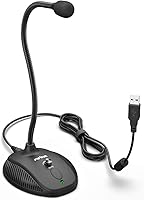
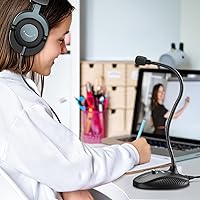
The Fifine K054 arrived in early 2021 as one of the more practical budget options in a crowded entry-level mic market. For around $20, this gooseneck USB mic targets home office workers, students, and casual creators who simply want to sound better on calls without any fuss. It holds a 4.5-star rating from nearly 500 buyers, which is a strong signal for a mic at this price point. Its cardioid polar pattern captures sound from directly in front while keeping keyboard clatter and room noise largely out of the picture — a practical step up from any built-in laptop microphone.

Features & Benefits

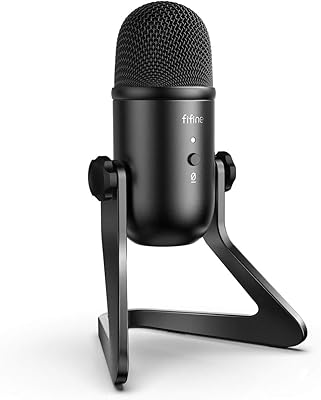
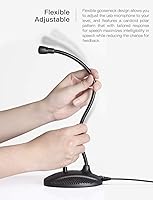
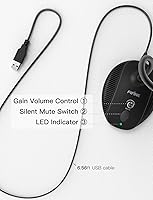
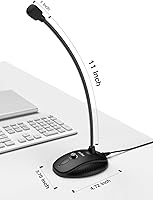
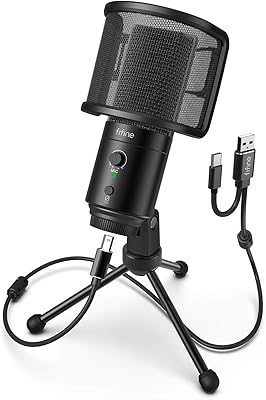
The flexible 12-inch gooseneck is genuinely one of the more useful design choices here — you can angle the mic capsule right where you need it without sliding the entire base around your desk. There is an inline volume knob so you can dial input levels up or down on the fly, and a one-touch mute button with a small LED tells you instantly whether you are live or silent. No drivers, no software installs — just plug into a USB port and Windows or Mac picks it up immediately. The weighted rubber base keeps the Fifine desktop microphone planted even when you are reaching over it.

Best For

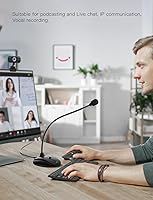
This budget desk mic makes the most sense for people who spend significant time on video calls — Zoom, Teams, Google Meet — and are tired of sounding muffled or distant. Students recording lectures, educators presenting remotely, and streamers who want cleaner audio than their webcam provides will find it more than adequate for daily use. It is also a solid pick for anyone who has never bought a standalone mic before and does not want to wrestle with drivers or audio interfaces. If you expect studio-grade vocal recording, look elsewhere — but for under $25, it covers everyday needs well.

User Feedback

Buyers tend to highlight two things right away: the build feels more solid than the price suggests, and the LED mute indicator is surprisingly handy during back-to-back calls. The value-for-money sentiment is strong across most reviews, with many noting it as a clear step up from a headset or webcam mic. On the critical side, a few users flag that the cable is permanently attached, which limits how cleanly you can pack it away or reposition your setup. Others point out that while voice clarity is perfectly acceptable for calls, this gooseneck USB mic is not built for music recording or demanding production work.

Pros

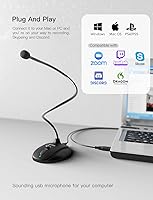
  • Plug-and-play USB setup works instantly on both Windows and Mac with zero driver installation.
  • Physical mute button with a clear LED indicator makes managing live calls noticeably less stressful.
  • The flexible 12-inch gooseneck holds its position reliably and makes precise mic placement easy.
  • Voice clarity on calls is a genuine step up from built-in laptop or webcam microphones.
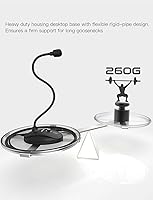
  • The weighted, rubber-footed base stays planted on smooth desk surfaces without sliding or tipping.
  • An inline volume knob lets you adjust input levels on the fly without touching any settings menus.
  • At roughly $20, this gooseneck USB mic delivers features that most similarly priced mics simply omit.
  • Cardioid pickup pattern does a reasonable job rejecting background noise from the sides and rear.
  • The 6.56ft cable length gives enough slack for most standard desk and laptop configurations.

Cons

  • The cable is permanently attached — if it frays or fails, the entire mic becomes unusable.
  • Audio quality hits a hard ceiling for anything beyond voice calls; music and voiceover recordings sound flat.
  • The mute LED is dim enough that it can be hard to read in brightly lit rooms or at an angle.
  • No USB-C connector means newer slim laptops require a separate adapter, adding a small hidden cost.
  • The volume knob is small and offers little resistance, making accidental adjustments easy to trigger.
  • Background noise rejection weakens considerably in louder home environments or rooms with hard surfaces.
  • The gooseneck joint can develop slight looseness after months of repeated repositioning.
  • No companion software means there is no way to apply noise reduction, EQ, or monitoring features.
  • The compact base can tip forward if the cable is routed at a low angle toward the front of the desk.

Ratings

The Fifine K054 scores here reflect an AI-driven analysis of verified global buyer reviews, with spam, incentivized posts, and bot activity actively filtered out before any scoring was applied. Across hundreds of real-world purchase experiences — from home offices and student desks to casual streaming setups — both the standout strengths and the genuine frustrations of this budget desk mic are transparently represented below.

Value for Money
93%
At roughly $20, this gooseneck USB mic consistently surprises buyers who expected much less. Remote workers and students repeatedly describe it as one of the better spending decisions for a home setup, especially when comparing it to headsets in the same price bracket that deliver noticeably worse voice clarity on calls.
A small number of buyers feel that slightly stretching the budget to a $35–$45 option unlocks a meaningful jump in audio fidelity, which can make this mic feel like a stepping stone rather than a long-term solution for users whose needs grow over time.
Audio Clarity for Voice
78%
22%
For Zoom calls, Teams meetings, and casual streaming, the cardioid pickup pattern does a solid job focusing on the speaker's voice while keeping background noise — fan hum, keyboard clicks, distant TV — reasonably contained. Colleagues and call participants consistently notice the improvement over built-in laptop microphones.
The clarity ceiling becomes obvious outside of voice-call use. Buyers who tried using this budget desk mic for voiceover work, music, or instrument recording found the output noticeably flat and lacking the detail needed for anything beyond spoken-word content.
Ease of Setup
96%
Plug it in and it works — no driver downloads, no audio interface, no configuration menus. Both Windows and Mac users report that the mic is recognized within seconds, making it genuinely accessible for first-time buyers or anyone who just wants to get on a call without troubleshooting.
Because there is no companion software, users have no way to apply noise reduction, EQ, or gain adjustments beyond the basic inline volume knob. Those coming from software-controlled mics may find the lack of digital control options limiting.
Build Quality
81%
19%
The weighted ABS base feels noticeably more substantial than competing mics at this price, and the metal gooseneck holds its position reliably without drooping mid-call. Several buyers mentioned keeping this mic in daily use for over a year with no structural issues.
The plastic housing on the mic capsule shows scuff marks and minor wear faster than expected with regular handling. A few users also noted that the gooseneck, while sturdy initially, developed slight looseness at the base joint after several months of repeated repositioning.
Mute Button & LED Indicator
88%
The one-touch mute with a visible LED light is one of the most frequently praised practical features by work-from-home users. Knowing at a glance whether the mic is live or muted during back-to-back meetings reduces the anxiety of accidentally broadcasting background noise to an entire call.
The LED is not especially bright, which can make it hard to confirm mute status in a well-lit room or when the mic is positioned away from direct eyeline. There is no tactile difference in the button feel between muted and active states, which causes occasional confusion.
Gooseneck Flexibility & Positioning
83%
The 12-inch adjustable neck gives users genuine freedom to position the capsule at the right angle and height without sliding the base around the desk. Taller users and those sitting farther back from their monitors specifically appreciate being able to direct the mic toward their mouth with precision.
The gooseneck length, while adequate for most setups, is fixed — users who want the mic capsule closer to their face while the base sits to the side of a keyboard find the reach occasionally falls just short. There is no detachable neck option or extension available.
Volume Knob Usability
74%
26%
Having a physical volume knob on the mic itself is a genuine convenience during live calls, letting users quickly pull back input levels if they lean closer or raise their voice without interrupting the conversation to dig into system settings.
The knob is small and offers little tactile resistance, making fine-tuned adjustments somewhat imprecise. Several users reported accidentally brushing it when repositioning the mic, causing unintended input level changes mid-call.
Background Noise Rejection
69%
31%
The cardioid pattern does reasonably well at reducing sound coming from behind and to the sides of the mic, which is useful in home environments where HVAC noise, nearby conversations, or a running appliance might otherwise bleed into recordings.
It is not a tight hypercardioid or a mic with active noise cancellation, so noisy environments — open-plan spaces, households with children or pets, rooms with hard reflective surfaces — can still result in noticeable background pickup that distracts call participants.
Cable Quality & Management
61%
39%
The 6.56ft attached USB cable gives most desktop and laptop users enough reach to route the cord comfortably without needing an extension. The cable itself feels reasonably durable and does not introduce any audible interference or noise into the signal.
The non-detachable cable is the most consistently cited practical frustration. Users who travel with the mic, store it in a bag, or want to swap cables cannot do so — and if the cable develops a fault, the entire unit becomes unusable with no repair option.
Desk Stability
87%
The rubber-footed weighted base does its job well. Users working on smooth glass or laminate desks — surfaces where lighter mics tend to slide — report that the Fifine desktop microphone stays planted even when the gooseneck is extended at an angle.
On heavily textured or uneven desk surfaces, the rubber feet occasionally fail to grip as expected, and the top-heavy gooseneck can cause minor tilting. The base footprint is also compact enough that a heavy cable pull toward the edge of a desk can tip it forward.
Compatibility
91%
USB bus-powered and universally recognized across Windows and Mac operating systems without any configuration, this mic works out of the box with Zoom, Teams, Discord, OBS, and virtually any other platform that accepts a standard audio input device.
There is no USB-C connector variant, which means users with newer MacBooks or slim laptops that lack USB-A ports will need a separate adapter — a minor but avoidable inconvenience that a few buyers flagged as a small hidden cost.
Portability
57%
43%
The mic is light enough at just over nine ounces that carrying it in a laptop bag is physically feasible, and the package dimensions are compact enough to fit in most standard compartments without taking up significant space.
The fixed cable, lack of a carrying pouch or case, and the gooseneck design make transport messier than it should be. Users who regularly move between locations find the Fifine desktop microphone less convenient than compact clip-on or foldable alternatives in the same price range.
Signal-to-Noise Performance
76%
24%
A rated SNR of 78 dB is respectable at this price tier, and in practice it translates to a relatively clean signal during quiet recording conditions. Voice calls and casual recordings come through without the persistent hiss that plagues cheaper mics with lower-quality capsules.
At higher input gain settings, some self-noise becomes audible in recordings, particularly in quieter passages. This is not an issue for video calls where minor noise is masked by compression, but it does become a problem for anyone attempting cleaner spoken-word or podcast-style audio.
Long-Term Durability
72%
28%
Many buyers report using this budget desk mic daily for a year or more without significant degradation in sound quality or structural integrity, suggesting the build holds up better than the price might imply under normal home-office conditions.
The long-term weak points tend to be the gooseneck joint and the cable entry point at the base, both of which show wear with heavy daily use. Given the non-replaceable cable, any damage at that connection point effectively ends the product's usable life.

Suitable for:

The Fifine K054 is a strong match for anyone whose primary need is sounding noticeably better on video calls without spending much money or time on setup. Remote workers who sit through daily Zoom or Teams meetings will find the cardioid pickup pattern and physical mute button genuinely useful — no more scrambling through software to silence yourself when the dog starts barking. Students recording lectures, attending online classes, or submitting audio assignments will appreciate that it simply works the moment it is plugged in, with no drivers or configuration required. Educators and small-group presenters who need a stable, fixed-position desk mic for classroom or webinar use will find the weighted base and adjustable gooseneck handle that role comfortably. It also makes a practical first microphone for casual streamers or YouTubers who want cleaner audio than their webcam or headset provides, without committing to a more complex and expensive setup.

Not suitable for:

The Fifine K054 is not the right tool for anyone who needs professional-grade audio output. Podcasters who care about production quality, musicians recording instruments or vocals, and voiceover artists will quickly run into the ceiling this mic imposes — the capsule simply does not have the sensitivity or frequency detail that those use cases demand. Users who frequently work in noisy environments should also temper expectations, as the cardioid pattern helps but does not perform like a mic with dedicated noise-cancellation hardware or a tighter pickup pattern. Anyone who moves regularly between locations — switching between a home office, a co-working space, or a client site — will find the permanently attached cable an ongoing annoyance that more portable options handle better. And if you are already using a decent headset mic or a mid-range standalone microphone, this budget desk mic is unlikely to feel like an upgrade worth making.

Specifications

  • Brand: Manufactured by Fifine Technology, a brand focused on affordable audio equipment for home and office users.
  • Model: Model designation is K054, a desktop gooseneck USB condenser microphone.
  • Connectivity: Connects via USB-A plug-and-play, requiring no drivers or additional software on Windows or Mac.
  • Polar Pattern: Cardioid (unidirectional) pattern captures sound primarily from directly in front of the capsule while rejecting noise from the sides and rear.
  • Signal-to-Noise Ratio: Rated at 78 dB, providing a reasonably clean signal for voice-call and casual recording applications under quiet conditions.
  • Gooseneck Length: Flexible metal gooseneck extends approximately 12 inches (32.5 cm), allowing precise capsule positioning without moving the base.
  • Cable Length: Comes with a permanently attached, non-detachable USB cable measuring 6.56 ft (2 m) in length.
  • Weight: The complete unit weighs 9.17 oz, with a heavy-duty base providing stability without making the mic difficult to handle.
  • Base Material: Base is constructed from ABS (Acrylonitrile Butadiene Styrene) plastic with non-slip rubber feet on the underside to prevent desk sliding.
  • Mute Control: Features a one-touch mute button with an LED status indicator that visually confirms whether the microphone is live or silenced.
  • Volume Control: An inline hardware volume knob allows direct input level adjustment without accessing system or software audio settings.
  • Power Source: Fully bus-powered via the USB connection, requiring no external power supply or batteries.
  • Channels: Records in mono (single channel), which is standard and appropriate for voice calls, podcasting, and spoken-word content.
  • Compatible Platforms: Officially compatible with Windows and Mac operating systems, and works with major conferencing and recording applications including Zoom, Discord, and OBS.
  • Package Dimensions: Retail packaging measures 5.98 x 4.17 x 2.44 inches, compact enough to store in a desk drawer or laptop bag compartment.
  • Microphone Type: Condenser capsule design, which offers greater sensitivity to voice frequencies compared to dynamic microphones at the same price point.
  • Form Factor: Desktop gooseneck style with a fixed standing base, designed for stationary desk use rather than boom arm or clip-on mounting.
  • Included Items: Package includes the gooseneck microphone unit with attached USB cable and a printed user manual; no additional accessories are bundled.

Related Reviews
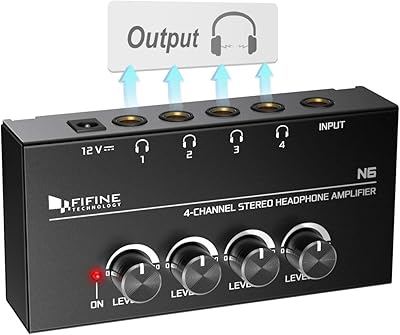
Fifine N6 4-Channel Headphone Amplifier
77%
88%
Audio Signal Clarity
93%
Individual Volume Control
76%
Build Quality
91%
Value for Money
84%
Ease of Setup
More
FIFINE K678
FIFINE K678
79%
78%
Audio Clarity
91%
Value for Money
83%
Build Quality
96%
Ease of Setup
67%
Gain Control
More
FIFINE AmpliGame AM6
76%
83%
Voice Clarity
67%
Noise Cancellation
88%
Game/Chat Balance Control
91%
Ease of Setup
61%
Build Quality
More
FIFINE AmpliGame A8
FIFINE AmpliGame A8
78%
78%
Sound Clarity
67%
Noise Rejection
61%
Build Quality
94%
Ease of Setup
86%
On-Mic Controls
More
FIFINE K683A
FIFINE K683A
80%
83%
Audio Clarity
67%
Background Noise Rejection
84%
Build Quality
93%
Ease of Setup
88%
On-Body Controls
More
FIFINE X3 Wireless Bluetooth Headphones
82%
88%
Value for Money
94%
Battery Life
77%
Noise Cancellation
84%
Comfort & Fit
89%
Portability
More
FIFINE AmpliGame A20
77%
91%
Value for Money
78%
Audio Clarity
54%
Bass Performance
88%
RGB Lighting
93%
Ease of Setup
More
FIFINE K690
FIFINE K690
82%
84%
Audio Clarity
88%
Pickup Pattern Versatility
81%
Build Quality
93%
Ease of Setup
79%
Headphone Monitoring
More
AmpliGame V3
AmpliGame V3
76%
91%
Setup & Ease of Use
78%
Capture Quality
67%
HDMI Passthrough
86%
Port Selection & Connectivity
88%
Software Compatibility
More

FAQ

No, none at all. The Fifine K054 is recognized automatically as a standard USB audio device by both Windows and Mac the moment you plug it in. You can be on a call or recording within seconds of connecting it.

Yes, it works with all of them, as well as Discord, Skype, OBS, and most other apps that accept a standard USB audio input. Just select it as your microphone input in your app or system audio settings and you are ready to go.

Quite noticeable for voice calls. The cardioid pattern focuses on your voice rather than picking up everything in the room, and the dedicated capsule captures speech with more presence and clarity than the small integrated mics found in most laptops. People on calls will hear a clear difference.

The cable uses a USB-A connector, so if your laptop only has USB-C ports, you will need a USB-A to USB-C adapter. These are inexpensive and widely available, but it is worth having one on hand before the mic arrives.

The LED lights up when the microphone is active and turns off when it is muted — or the reverse depending on your specific unit, so it is worth testing once when you first set it up. Either way, you always have a clear visual signal of your mic status without having to check your call software.

For most users, it holds its position well under normal use. The metal gooseneck has enough resistance to stay where you put it during a call. After extended daily use over many months, some users notice a slight loosening at the base joint, but it is not a common short-term complaint.

Unfortunately, no — the USB cable is permanently attached to the unit and cannot be detached or swapped out. If the cable is damaged beyond use, the microphone itself would need to be replaced. It is worth being mindful of how you store and route the cable to extend its life.

It is workable for casual podcast-style recordings where voice clarity is the priority, but it is not well-suited for music recording. The capsule lacks the frequency range and detail needed for instruments or vocal performance recording. If audio quality for content production matters to you, a step-up mic in the $50–$80 range will give you meaningfully better results.

The cardioid pickup pattern does filter out a good portion of ambient noise from the sides and behind the mic, which helps in moderately noisy spaces. That said, it has no active noise cancellation, so loud environments — nearby conversations, a running TV, or an open window — can still bleed into your audio. Positioning the mic close to your mouth helps keep your voice dominant in the signal.

The knob controls your microphone input level — meaning how loudly the mic picks up your voice and sends it to your computer. It does not affect headphone or speaker volume. It is a useful quick-adjust tool during calls if you need to pull back your input without pausing to open system settings.