Overview

The fanxiang MD85 M.2 NVMe SSD Enclosure landed in late 2024 and quickly climbed to #255 in Amazon's Enclosures category — solid traction for a brand-new listing. This M.2 enclosure handles both NVMe and SATA protocols, so you can slot in a spare drive from almost any source without second-guessing compatibility. The aluminum build feels appropriately sturdy, and the plug-and-play setup means zero driver hunting — you just connect it and get to work. One thing worth stating plainly upfront: the built-in fan is audible, running at 30–40 dB during operation. Not a dealbreaker at most desks, but worth knowing before you buy.
Features & Benefits

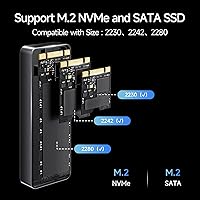
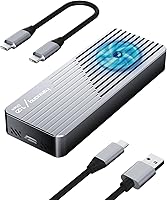
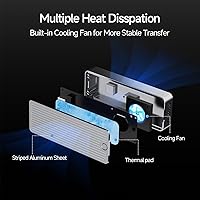
The MD85 runs over USB 3.2 Gen 2, which in practical terms means copying a 50GB folder of 4K footage takes roughly a minute rather than several — provided your host port and drive can keep pace. UASP acceleration helps push real-world throughput closer to those theoretical ceilings. Support for 2230, 2242, and 2280 form factors means it fits drives pulled from a Steam Deck, a thin laptop, or a full desktop build without any adapter fuss. Both USB-C and USB-A cables come in the box, and the aluminum shell works alongside the active fan to prevent thermal throttling during sustained copy sessions.

Best For

This fanxiang enclosure makes the most sense for anyone in the middle of a drive migration — the kind of multi-gigabyte job where an enclosure that throttles halfway through costs you real time. Steam Deck and PS5 owners repurposing stock SSDs as portable storage will find the multi-size support particularly handy. Content creators moving raw project files between workstations will appreciate the cooling keeping speeds consistent. Budget-conscious buyers who have looked at premium enclosures and hesitated will find the MD85 lands in a practical middle ground: active cooling, dual-protocol support, and a metal chassis at a genuinely approachable price.

User Feedback

Sitting at 4.2 out of 5 stars, buyer sentiment leans positive. Recurring praise centers on speed consistency — reviewers note that transfer rates hold up through large jobs rather than fading after the first few gigabytes, which separates this from cheaper passive options. The aluminum chassis draws compliments for feeling solid without being heavy. Criticism tends to fall into two buckets: fan noise and cable reliability. The hum is tolerable in a busy workspace but noticeably intrusive in quiet environments. A subset of reviewers flag intermittent USB-A cable issues, while the USB-C cable earns fewer complaints. Rare compatibility hiccups with certain NVMe controllers are worth watching if your drive is from a less common manufacturer.

Pros

  • Active cooling keeps drives from throttling during long cloning or backup jobs, unlike passive-only rivals.
  • Handles NVMe and SATA drives interchangeably with no configuration changes required.
  • Supports 2230, 2242, and 2280 form factors — rare flexibility at this price point.
  • Aluminum alloy chassis feels noticeably more solid than plastic enclosures in the same tier.
  • Plug-and-play recognition across Windows, Mac, PS5, and select Android OTG devices.
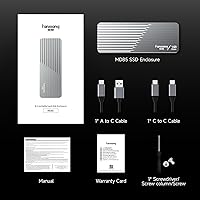
  • Both USB-C and USB-A cables included, so you can connect immediately out of the box.
  • Three-year warranty adds meaningful peace of mind for a budget-category purchase.
  • Backward compatible with USB 3.0 ports, so older host machines are not excluded.
  • The MD85 holds its real-world transfer speed consistently across multi-gigabyte jobs.

Cons

  • The fan runs continuously and is audible — not ideal for quiet or noise-sensitive environments.
  • Included USB-A cable has a documented reliability issue; worth replacing before any critical transfer.
  • No thermal monitoring software means you have no visibility into drive temperature during operation.
  • Sustained write sessions exceeding an hour may see gradual performance softening even with cooling active.
  • Some less common NVMe controller types are not reliably recognized without troubleshooting.
  • Brand support infrastructure is thinner than established enclosure makers with longer track records.
  • Fan engagement is not temperature-triggered — it spins up regardless of actual thermal load.
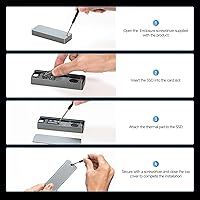
  • Drive installation requires a small screwdriver and a very small retention screw that is easy to lose.

Ratings

The fanxiang MD85 M.2 NVMe SSD Enclosure earns an overall score that reflects what real buyers actually experience — not what the spec sheet promises. These ratings were generated by AI after analyzing verified global user reviews, actively filtering out incentivized, bot-driven, and low-signal feedback to surface genuine sentiment. Both the strengths that make this enclosure worth recommending and the friction points that gave buyers pause are transparently reflected below.
Transfer Speed Performance
83%
Buyers consistently report that large file copies — think multi-gigabyte project folders or full game installs — complete noticeably faster than with older USB 3.0 enclosures they replaced. The UASP acceleration makes a tangible difference in real-world queued workloads, not just synthetic benchmarks.
Actual sustained speeds fall short of the theoretical ceiling, as they do on virtually every consumer enclosure at this tier. Users with high-end NVMe drives occasionally note that the bottleneck shifts to the enclosure itself during prolonged sequential writes.
Thermal Management & Cooling
88%
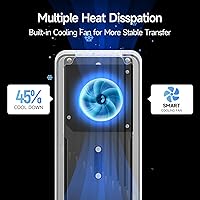
The active fan is the MD85's most distinctive feature in this price bracket, and buyers doing long drive clones or sustained backups say it makes a real difference — drives stay cool where passive aluminum-only enclosures would begin throttling. Steam Deck owners repurposing factory SSDs particularly appreciate the sustained performance.
The fan runs continuously during operation rather than spinning up only when needed, which means noise is constant rather than occasional. Users who hoped the fan would be smarter about when it engages will find that trade-off mildly frustrating.
Fan Noise Level
61%
39%
In a typical home office or desk environment with ambient noise, the fan hum blends into the background reasonably well. Users who run transfers and walk away entirely report that the noise is essentially a non-issue for their workflow.
At 30–40 dB, the fan is audible in quiet settings — home recording setups, late-night workspaces, or library environments where silence matters. A meaningful portion of critical reviewers flag this as their primary complaint, and it is a genuine limitation rather than an exaggeration.
Build Quality & Materials
81%
19%
The aluminum alloy shell feels substantively more solid than the plastic enclosures competing at similar prices, and buyers frequently mention that it does not flex or creak under normal handling. The heft is low enough to carry daily but high enough to feel purposeful.
The fit and finish is not quite at the level of premium brands — some users note slight unevenness around the seam where the shell halves meet. It is a minor cosmetic issue, not a structural one, but noticeable to detail-oriented buyers.
Protocol & Drive Compatibility
86%
Handling both NVMe and SATA drives without any configuration changes is genuinely useful when you are working with a mixed collection of salvaged or upgraded drives. Support across 2230, 2242, and 2280 sizes adds real flexibility for users pulling drives from different device generations.
A small subset of users report compatibility hiccups with less common NVMe controllers — particularly certain QLC drives from smaller brands. The enclosure works perfectly for mainstream drives but may require troubleshooting for edge cases.
Ease of Installation
92%
Plug-and-play is not just marketing copy here — buyers across Windows, Mac, and even PS5 setups confirm the enclosure is recognized immediately without any driver installation or firmware steps. Non-technical users repeatedly highlight this as a confidence boost.
The physical installation of the SSD into the enclosure requires a small screwdriver and a steady hand, and the retention screw is quite small — easy to lose if you are working over carpet or in a cluttered space.
Portability & Form Factor
84%
At 85 grams and roughly the length of a thick pen, this enclosure slips into a jacket pocket or laptop bag side pouch without adding noticeable bulk. Buyers who carry it daily alongside a laptop report it is genuinely unobtrusive.
The fan adds a small amount of thickness compared to fanless alternatives, so buyers prioritizing ultra-slim form factor over thermal management may find slimmer passive enclosures more pocket-friendly.
Cable Quality & Included Accessories
67%
33%
Including both USB-C and USB-A cables in the box is a practical touch that removes an immediate friction point on first use. The USB-C cable in particular earns positive comments for feeling sturdy and maintaining a secure connection.
The included USB-A cable draws a disproportionate share of complaints — some buyers report intermittent disconnects or slower-than-expected speeds traced back to it specifically. Swapping in a higher-quality third-party cable resolved the issue for most, but it should not be necessary out of the box.
Value for Money
89%
Active cooling, dual-protocol support, a metal chassis, and a three-year warranty at this price point is a combination that is hard to fault. Buyers who comparison-shopped note that similarly specced enclosures from premium brands cost considerably more without meaningfully better performance.
The occasional cable quality issue and the always-on fan are the two areas where the lower price shows. They are manageable trade-offs, but buyers expecting flagship-tier finish at this price will need to recalibrate expectations.
Device Compatibility (Host Side)
78%
22%
Works reliably across Windows 7 and above, recent macOS versions, PS5, Xbox Series consoles, and Android phones with OTG support — a broader compatibility list than many competitors offer at this tier. Backward compatibility with USB 3.0 ports means older laptops are not left out.
Performance on USB 3.0 host ports is significantly capped compared to USB 3.2 Gen 2 ports, and a few Android OTG users report inconsistent recognition depending on the phone model. The enclosure is at its best when the host system is modern enough to support it fully.
Sustained Write Endurance
74%
26%
For typical migration jobs — cloning a laptop drive, offloading a camera card backup, running a one-time archive transfer — the MD85 handles sustained writes well without the speed degradation that haunts passive enclosures with heat issues.
During very long write sessions exceeding an hour, some users note gradual performance softening even with the fan active. It remains functional, but buyers planning to run enterprise-style continuous workloads should manage expectations accordingly.
Software & Driver Experience
91%
No software installation, no driver downloads, no firmware tools — it simply appears as a removable drive the moment you plug it in. This is particularly appreciated by users who have dealt with finicky driver requirements on older enclosure models.
The lack of any companion app means there is no way to monitor drive temperature or fan speed from the host system. For power users who want visibility into thermal behavior, that absence is a gap worth noting.
Warranty & Brand Support
76%
24%
A three-year warranty is generous for a product at this price point and signals that fanxiang is reasonably confident in the hardware's longevity. Buyers who have had to contact support describe the experience as responsive for a smaller brand.
fanxiang is still building its reputation outside of storage drives, and some buyers feel less confident about long-term parts availability or support consistency compared to established enclosure brands with a longer track record.

Suitable for:

The fanxiang MD85 M.2 NVMe SSD Enclosure is a strong pick for anyone who regularly moves large volumes of data and cannot afford to have their enclosure slow down mid-job due to heat. Steam Deck and PS5 owners pulling out factory SSDs to replace them with larger drives will find this enclosure genuinely practical — it handles the smaller 2230 and 2242 form factors that many rivals skip entirely. Content creators who shuttle raw video footage between editing workstations will appreciate that sustained transfer speeds hold up across long sessions rather than fading after the first few gigabytes. It also makes sense for IT generalists and home lab users who manage a mix of NVMe and SATA drives and want one enclosure that covers both without fuss. Budget-conscious buyers who have priced out premium cooling-enabled enclosures and balked at the cost will find this M.2 enclosure hits a practical middle ground that is hard to argue with.
Not suitable for:

The fanxiang MD85 M.2 NVMe SSD Enclosure is not the right tool for buyers who need absolute silence during operation. The built-in fan runs continuously and produces an audible hum that will stand out in quiet home studios, late-night workspaces, or shared library environments — if noise is a dealbreaker, a quality passive enclosure is a better fit. Users with high-end NVMe drives and a specific need to push maximum sustained write speeds should also temper expectations; the enclosure performs well but does introduce a ceiling that a faster Thunderbolt or USB4 option would not. The included USB-A cable has drawn enough reliability complaints that it should not be trusted for mission-critical transfers without swapping in a known-good third-party cable first. Buyers with less common NVMe controllers — particularly certain drives from smaller regional brands — may encounter recognition issues that require troubleshooting, making this a slightly riskier choice if your drive is off the beaten path.
Specifications

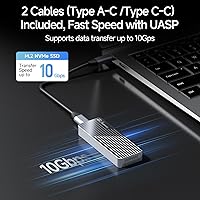
  • Interface: Connects to host devices via USB 3.2 Gen 2, delivering a maximum theoretical throughput of 10 Gbps with UASP acceleration enabled.
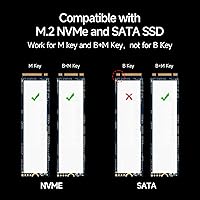
  • Protocol Support: Compatible with both NVMe and SATA M.2 drives, covering the two most common protocols found in modern and legacy SSDs.
  • Key Compatibility: Accepts M-Key and B+M Key M.2 drives, which covers the vast majority of consumer NVMe and SATA SSDs available today.
  • Form Factors: Supports 2230, 2242, and 2280 M.2 drive sizes, accommodating drives from compact handheld devices up to standard desktop and laptop configurations.
  • Max Capacity: Compatible with M.2 SSDs up to 4TB in capacity, covering current consumer drive sizes without restriction.
  • Cooling System: Features a built-in active cooling fan that runs continuously during operation to manage heat during sustained data transfers.
  • Noise Level: The integrated fan produces approximately 30–40 dB of sound during operation, which is audible in quiet environments.
  • Shell Material: Constructed from aluminum alloy, which provides structural rigidity, passive heat dissipation, and resistance to everyday drops and impacts.
  • Dimensions: Measures 103.2 × 38.6 × 14.2 mm, making it compact enough to fit in a jacket pocket or laptop bag side pouch.
  • Weight: Weighs approximately 85 g fully assembled without a drive installed, keeping the enclosure genuinely portable for daily carry.
  • Included Cables: Ships with both a USB-C cable and a USB-A cable, allowing immediate use with modern and older host systems without additional purchases.
  • Backward Compatibility: Works with USB 3.1 and USB 3.0 host ports, though maximum throughput is capped by the host port speed in those configurations.
  • Driver Requirement: Operates as a plug-and-play device requiring no driver installation on Windows 7 and above, macOS, and most other supported platforms.
  • Host Compatibility: Supported across Windows 7 and later, macOS, PS5, PS4, Xbox Series consoles, and select Android smartphones with USB OTG functionality.
  • Warranty: Covered by a three-year quality warranty provided directly by fanxiang, offering repair or replacement support for manufacturing defects.
  • UASP Support: UASP (USB Attached SCSI Protocol) acceleration is supported, reducing CPU overhead and improving real-world sequential transfer efficiency versus standard bulk-only transport.
  • Power Source: Bus-powered directly through the USB connection, requiring no external power adapter for standard operation.

Related Reviews

dockteck DH0002 M.2 NVMe/SATA SSD Enclosure

84%
88%
Transfer Speed (NVMe)
76%
SATA Drive Performance
83%
Build Quality
93%
Ease of Setup
79%
Thermal Management
More
ineo C2605-NVMe M.2 NVMe SSD Enclosure

77%
88%
Write Protection Reliability
79%
Transfer Speed Performance
82%
Thermal Management
61%
Fan Noise Level
76%
Build Quality & Materials
More
WAVLINK Dual-Bay NVMe M.2 SSD Cloner

75%
83%
Offline Cloning Reliability
78%
Transfer Speed
71%
Compatibility Range
76%
Build Quality
86%
Ease of Setup
More
Cable Matters USB4 40Gbps M.2 NVMe Enclosure

80%
88%
Data Transfer Performance
83%
Build Quality & Materials
79%
Thermal Management & Cooling
91%
Portability & Form Factor
74%
Compatibility Range
More
Plugable M.2 NVMe SSD Enclosure
87%
94%
Ease of Setup
92%
Data Transfer Speed
88%
Build Quality
90%
Port Compatibility
87%
Cooling & Thermal Management
More
GEWOKLIY 2230 M.2 NVMe SSD Enclosure
86%
88%
Performance & Speed
90%
Build Quality & Durability
93%
Portability & Design
91%
Setup & Ease of Use
85%
Compatibility with Devices
More
ORICO TCM2 M.2 NVMe SSD Enclosure
78%
83%
Transfer Speed
61%
Thermal Management
74%
Build Quality
91%
Ease of Installation
86%
Cable Bundle Quality
More
ANYOYO TB502Pro NVMe SSD Enclosure

78%
91%
Transfer Speed Performance
88%
Thermal Management
89%
Build Quality
86%
Thunderbolt 5 Compatibility
41%
TB3 Fallback Behavior
More
elecacc M.2 NVMe SSD Enclosure Adapter
87%
92%
Ease of Use
89%
Cloning Functionality
90%
Transfer Speed
86%
Compatibility with SSD Sizes
88%
Portability
More
fanxiang S770 2TB NVMe M.2 SSD
79%
88%
Sequential Read Speed
91%
PS5 Compatibility
86%
Value for Money
83%
Thermal Management
74%
Build Quality
More

FAQ

It handles both. You can slot in an NVMe drive one day and swap it for a SATA M.2 drive the next without any configuration change — the enclosure detects the protocol automatically. This makes it particularly handy if you have a mixed collection of old and new drives to work through.

It is genuinely noticeable. The fan runs at around 30–40 dB continuously while the enclosure is in use, which in practice sounds similar to a quiet desktop PC fan. In a busy office or at a normal desk it fades into background noise, but in a quiet room at night it will be audible. If silence matters to you, a passive enclosure would be a better fit.

Yes — both of those use 2230 form factor drives, which the MD85 supports alongside the more common 2242 and 2280 sizes. This is one of the practical reasons it stands out at this price point, since many enclosures only accommodate 2280 drives.

No drivers, no software, no firmware tools. Plug it into your computer and it shows up as an external drive within a few seconds. This applies to Windows 7 and above, modern macOS versions, and most other supported platforms.

In practice, when connected to a USB 3.2 Gen 2 port with a capable NVMe drive installed, you can expect sequential read speeds in the 800–950 MB/s range for large files — fast enough to copy a 50GB folder of 4K footage in roughly a minute. Speeds will be considerably lower on USB 3.0 ports, since those cap out much earlier regardless of the enclosure.

The USB-C cable gets good marks from buyers, but the USB-A cable has drawn enough complaints about intermittent disconnects and inconsistent speeds that it is worth swapping in a quality third-party USB-A cable if you plan to use that connection for anything important. It is a frustrating caveat, but the enclosure itself performs fine once the cable variable is removed.

It works with the PS5, but as external storage for games rather than as an internal expansion slot replacement. You can use it to store and transfer compatible game files, which is exactly what many PS5 owners use it for when repurposing their original factory SSDs after upgrading internally.

It runs constantly whenever the enclosure is powered and connected, regardless of whether data is actively being transferred. There is no temperature-based spin control. This is worth knowing if you leave it plugged in as a permanently attached drive, since the fan noise will be ongoing rather than occasional.

It is straightforward but does require a small Phillips screwdriver and a steady hand. The trickiest part is the small retention screw that secures the drive — it is easy to drop and lose, so working on a flat surface with good lighting is recommended. Beyond that, the drive slots in and the enclosure closes cleanly.

Mainstream NVMe drives from major brands work without issue for the vast majority of users. Where compatibility problems do surface, they tend to involve less common NVMe controllers — particularly drives from smaller regional manufacturers with non-standard firmware. If your drive is from a well-known brand, you are very unlikely to run into problems. If it is an off-brand or OEM pull, it is worth checking community forums for your specific controller before committing.