Overview

The Ergotron HX 49″ Single Monitor Arm exists to solve a specific, frustrating problem: most monitor arms tap out around 34 inches or 17 pounds, leaving owners of large curved ultrawides with few real options. Ergotron has been building monitor mounts long enough to earn genuine credibility in the space, and the HX is their answer for heavy-duty single-screen setups. It's a premium-tier product — the price reflects that without apology. But it also backs that up with 10-year warranty coverage and construction quality that holds up. If you don't have a large, heavy monitor, this arm is overkill. If you do, it's probably the most capable option available.
Features & Benefits

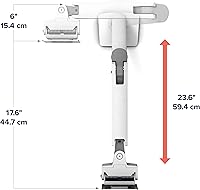
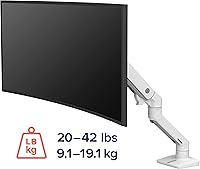
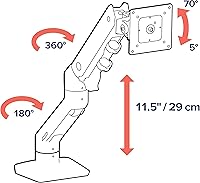
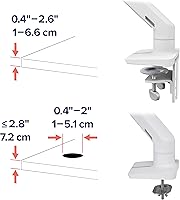
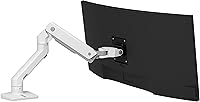
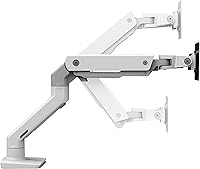
The range of motion here is genuinely impressive. The arm handles screens up to 49 inches diagonally and up to 42 pounds, which matters enormously when you're dealing with a curved ultrawide that weighs considerably more than a standard flat panel. You get 11.5 inches of vertical lift, meaning you can raise the screen to a comfortable eye level whether sitting or standing — that kind of range is rare. The 23.6-inch extension clears real desk space underneath. A full 360-degree rotation makes portrait mode possible, handy for developers or document-heavy workflows. Cable management is built in, and the clamp fits desk edges from 0.4 to 2.6 inches thick. One important caveat: Samsung Odyssey G9 owners need a separate pivot accessory — it does not come included.

Best For

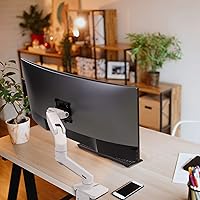
This ultrawide desk mount makes the most sense for anyone running a 38- to 49-inch curved monitor who has already tried cheaper arms and found them lacking. It's also a strong fit for home office power users who want to reclaim desk surface and dial in precise ergonomic positioning — the kind of setup you build once and don't revisit for years. Professionals who work in portrait orientation for coding or document review will appreciate the rotation freedom. That said, if your monitor is a standard 27-inch flat panel weighing under 20 pounds, lighter arms suffice and cost considerably less. The Ergotron HX arm is purpose-built for heavy, oversized displays, and that specificity is both its strength and its limitation.

User Feedback

Across thousands of reviews, this heavy-duty monitor arm lands at 4.5 stars — and the praise is consistent: buyers love how rock-solid it stays over time, especially compared to budget arms that gradually droop under a heavy curved screen. The tension adjustment is frequently called out as smooth and precise. On the downside, installation is not quick. The arm weighs close to 18 pounds, and several users recommend having a second person around during setup. The Samsung G9 caveat trips people up regularly — the standard pivot doesn't work with that monitor's mounting point, and the required accessory isn't included or clearly flagged. A number of reviewers admit the price gave them pause, but most conclude it was worth it after cheaper arms failed them first.

Pros

  • Handles monitors up to 49 inches and 42 pounds — a rare combination that covers nearly every consumer ultrawide available.
  • Holds its position over months and years without creeping down, which cheaper arms consistently fail to do.
  • The lift range lets you comfortably raise a large screen to standing eye level without adapters or risers.
  • Full 360-degree rotation makes portrait mode genuinely accessible for developers and document-heavy workflows.
  • Integrated cable management keeps a large, multi-cable monitor setup looking clean and organized.
  • The low-profile clamp works on thin desk edges and recessed surfaces where bulkier mounts cannot fit.
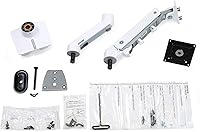
  • Desk clamp and grommet mount options are both included, giving flexibility for different workspace setups.
  • A 10-year warranty is unusually long for this product category and reflects real confidence in build quality.
  • Smooth tension adjustment means repositioning a heavy screen takes light effort rather than a fight.
  • Available in three finishes so it can match aluminum, white, or black desk setups without looking out of place.

Cons

  • At nearly 18 pounds, the arm itself is heavy and awkward to install without a second person helping.
  • Samsung Odyssey G9 owners must purchase a separate pivot accessory — this is not communicated clearly at the point of sale.
  • The price is a real barrier; buyers with standard monitors will find the cost hard to justify.
  • Installation is time-consuming even for experienced users, with multiple components and precise tension calibration required.
  • The arm's size and clamp footprint can feel physically imposing on smaller or minimalist desks.
  • No built-in USB hub or power pass-through, which some competing arms at this price tier include.
  • Buyers needing VESA patterns larger than 200x200mm must purchase an additional bracket adapter kit separately.
  • The weight capacity floor starts at 20 pounds, meaning it cannot be used with lighter monitors even at reduced settings.

Ratings

The scores below reflect an AI-driven analysis of verified global buyer reviews for the Ergotron HX 49″ Single Monitor Arm, with spam, bot-submitted, and incentivized feedback actively filtered out before scoring. Each category is assessed against real-world usage patterns — from daily home office setups to demanding studio configurations — capturing both what this ultrawide desk mount does exceptionally well and where it genuinely falls short.

Build Quality
94%
The all-metal construction earns consistent praise from buyers who have owned cheaper arms and know exactly what failure looks like. Users regularly describe it as feeling overbuilt in the best way — solid, creak-free, and unchanged in rigidity after months of daily repositioning.
A small number of buyers reported minor surface finish inconsistencies on the white variant, particularly around joints. These are cosmetic and do not affect function, but worth noting for buyers with a clean, minimal aesthetic in mind.
Load Stability
92%
Holding a 35- to 49-inch curved ultrawide steady — without drift, sag, or wobble — is the core promise of this heavy-duty monitor arm, and it delivers reliably. Reviewers who switched from arms that gradually drooped under their panels describe the difference as night and day.
Getting the internal tension calibrated correctly at setup is critical; arms installed with insufficient tension can feel less stable initially. A handful of users had to revisit the tension adjustment after a few weeks as the mechanism settled under load.
Ergonomic Range
88%
The 11.5 inches of lift and nearly 18-inch maximum height above the desk genuinely cover the seated-to-standing range, which matters for users with adjustable desks. The 70-degree upward tilt and full rotation make it practical for portrait mode or angling toward a standing collaborator.
The 5-degree downward tilt limit is narrow, and users who prefer a more pronounced downward angle — common in certain ergonomic setups — may find the range restrictive. Those with very tall monitor stands prior to switching may also find the maximum height just barely sufficient.
Installation Experience
58%
42%
The included hardware covers both desk clamp and grommet mounting without extra purchases, and the instructions are clear enough that experienced DIY users get through it without issues. The low-profile clamp design works well on narrower desk edges where bulkier mounts struggle.
The arm assembly weighs close to 18 lbs, making solo installation genuinely awkward — holding the arm in position while attaching a heavy monitor is a two-person job in practice. Multiple reviewers flagged the process as significantly more time-consuming than expected, with tension calibration alone requiring patience and iteration.
Desk Clamp Versatility
81%
19%
The clamp range of 0.4 to 2.6 inches handles most standard desk surfaces comfortably, and the low-profile design fits into tighter spaces where larger clamps would be obtrusive. Having both clamp and grommet options included in the box is a practical advantage over arms that bundle only one.
Very thin glass desktops or unusually thick surfaces outside the 2.6-inch ceiling are not supported without workarounds. A few users with specialty desk materials noted the clamp pressure marks were visible on softer wood finishes after extended use.
Cable Management
76%
24%
The integrated routing channels along the arm do a solid job of corralling cables from large monitors that often come with multiple connections — power, DisplayPort, USB-C, and audio running simultaneously. The result looks noticeably cleaner than an arm with no cable management at all.
The channels are external rather than fully enclosed, so cables are visible along the arm rather than hidden inside it. Users running thick or rigid cables — common with high-end ultrawide monitors — found fitting them into the channels fiddly and occasionally messy-looking.
Compatibility Range
73%
27%
Supporting four VESA patterns natively covers the vast majority of large flat and slightly curved monitors available today, and the optional bracket adapter extends that further. The weight floor of 20 lbs aligns well with the target audience of ultrawide panel owners.
The Samsung Odyssey G9 situation is the most cited compatibility frustration — the standard configuration simply does not work with that monitor without a separate pivot accessory that costs extra and is easy to miss at purchase. The 20-lb minimum weight also excludes a number of large but lighter monitors from compatibility.
Motion Smoothness
86%
Once properly tensioned, repositioning a heavy curved monitor feels controlled and fluid rather than stiff or jerky — something buyers who have wrestled with cheaper arms particularly appreciate. The swivel and extension movements in daily use require light, intentional force rather than a struggle.
The initial tension-setting process can result in motion that feels either too loose or too stiff until dialed in correctly, which requires some trial and error. Buyers less comfortable with mechanical adjustments occasionally left reviews expressing frustration before finding the right calibration.
Desk Space Reclaim
89%
With up to 23.6 inches of horizontal extension, this ultrawide desk mount pushes a large panel well away from the wall or desk back, freeing meaningful workspace underneath — particularly valuable for users who previously had a monitor stand eating into their surface area.
At full extension with a wide curved monitor, the arm's footprint on the desk edge can be noticeable, and the visual weight of the arm itself is substantial. Users with smaller desks reported that the arm, while functional, felt physically dominant in the space.
Value for Money
67%
33%
For buyers who have already tried two or three cheaper arms that failed under a heavy ultrawide, the long-term cost argument is straightforward — a 10-year warranty and proven stability under 40-plus-pound loads makes the premium defensible over a multi-year ownership horizon.
For anyone with a monitor under 30 inches or under 20 lbs, the price is genuinely hard to rationalize when capable alternatives exist for far less. Even some heavy-ultrawide owners describe a moment of sticker shock that took a period of ownership to fully resolve.
Aesthetic Design
82%
18%
The three finish options — white, black, and aluminum — cover the most common modern desk setups, and the arm has a clean, purposeful silhouette that does not look industrial or out of place in a home office. The low-profile clamp in particular is less visually disruptive than competitors.
The arm is physically substantial and its presence is noticeable, which suits some aesthetics and clashes with others — particularly minimalist setups where a hidden or smaller mount would be preferable. The joint and hinge design, while functional, is more utilitarian than refined up close.
Long-Term Durability
91%
The 10-year warranty is not just a marketing figure — buyers who have owned Ergotron products for five or more years consistently report that the tension holds, the joints remain solid, and the finish stays intact under daily use. This kind of track record is rare in the monitor arm category.
Long-term data specific to the HX model under maximum load over many years is still accumulating given its relatively recent release. A small number of users reported early tension loosening, though most resolved this through re-adjustment rather than a defect.
Portrait Mode Usability
77%
23%
Full 360-degree rotation works as advertised and is particularly appreciated by developers and legal professionals who spend hours in portrait mode reviewing long documents or codebases. The arm supports the rotated position stably without re-tensioning required for most monitors in the weight range.
Rotating a 40-plus-pound curved monitor to portrait and back is not something most users do casually — it takes deliberate effort and is better suited to a fixed orientation than frequent switching. The mechanical process of rotating such a heavy panel is also best done with care to avoid stressing the pivot.
Packaging & Unboxing
79%
21%
The packaging is protective and organized, with hardware grouped logically so buyers are not hunting through loose screws at the start of installation. The included hardware covers both mounting methods without needing to open a secondary box or separate bag.
The box is large and heavy, and some buyers noted that the instructions, while adequate, did not clearly flag the Samsung G9 compatibility caveat or emphasize the importance of tension calibration as a first step — both of which led to early confusion and negative early impressions that resolved later.

Suitable for:

The Ergotron HX 49″ Single Monitor Arm was built for a specific type of user, and that user will immediately recognize themselves: someone who owns a large, heavy curved ultrawide — think 38 to 49 inches, north of 20 pounds — and has either struggled to find a compatible arm or already burned money on one that couldn't hold the load. Home office professionals who spend long hours at their desk will benefit most from the generous lift range, which lets you position the screen at true eye level whether you're sitting or standing throughout the day. Portrait-mode workers — developers, legal professionals, editors dealing with long-form documents — will find the full 360-degree rotation genuinely useful rather than a gimmick. Studios and content creators who need to share screens with colleagues or reposition quickly between tasks will appreciate how smoothly the arm moves once properly tensioned. And if you're the type who hates revisiting hardware decisions every couple of years, the 10-year warranty and all-metal construction make this a legitimate long-term investment rather than a stopgap.
Not suitable for:

If your monitor is a standard flat panel in the 24- to 32-inch range and weighs under 20 pounds, the Ergotron HX 49″ Single Monitor Arm is simply more arm than you need — lighter, less expensive options handle everyday monitors without any meaningful trade-off. Budget-conscious buyers should also think carefully here; the price point is firmly in premium territory, and there is no stripped-down version of this product that gets you close for less. Anyone mounting a Samsung Odyssey G9 specifically should know upfront that the standard configuration does not work out of the box — a separate pivot accessory is required, and overlooking that detail leads to a frustrating experience that reviewers mention repeatedly. This ultrawide desk mount is also a solo-installation challenge given its near 18-pound weight, so buyers who plan to set it up alone should budget extra time and patience. Finally, renters or anyone frequently reconfiguring their workspace may find the grommet and clamp system less convenient than they expected for repeated moves.
Specifications

  • Max Screen Size: Supports single flat or slightly curved monitors up to 49 inches measured diagonally.
  • Weight Capacity: Designed for monitors weighing between 20 and 42 lbs, covering most large ultrawide panels on the market.
  • Vertical Lift: Offers 11.5 inches of lift range, with the screen reaching up to 17.8 inches above the desk surface at maximum height.
  • Horizontal Reach: Extends up to 23.6 inches horizontally from the mounting point, freeing substantial desk space underneath.
  • Tilt Range: Tilts 70 degrees upward and 5 degrees downward, allowing fine-tuned vertical angle adjustments for seated or standing use.
  • Rotation: Rotates a full 360 degrees, enabling portrait or landscape orientation and easy screen sharing with others nearby.
  • VESA Compatibility: Compatible with VESA mounting patterns of 75x75mm, 100x100mm, 200x100mm, and 200x200mm; larger patterns require a separate bracket adapter kit.
  • Clamp Range: The desk clamp accommodates surface edges between 0.4 and 2.6 inches thick; a grommet mount option is also included for through-surface installation.
  • Cable Management: Integrated cable routing channels run along the arm to keep monitor cables organized and out of sight.
  • Material: Constructed primarily from metal for structural rigidity and long-term load-bearing stability under heavy monitor weight.
  • Arm Weight: The arm assembly itself weighs approximately 17.95 lbs, which should be factored into solo installation planning.
  • Movement Types: Supports articulating, tilt, swivel, extension, and lift movement, giving full positional freedom once the monitor is mounted.
  • Mount Types: Ships with hardware for both desk clamp and grommet mounting, so no additional purchase is needed for either installation method.
  • Available Colors: Offered in white, black, and aluminum finishes to match a range of desk and workspace aesthetics.
  • Warranty: Backed by Ergotron's 10-year limited warranty, covering defects in materials and workmanship for the lifetime of most monitor setups.
  • Model Number: The standard white version carries model number 45-475-216; other color variants have distinct model codes.
  • G9 Compatibility: Using this arm with the Samsung Odyssey G9 requires the separate HX Heavy Duty Tilt Pivot accessory (model 98-540-216), which is not included.
  • Expansion Options: Optional dual-monitor and triple-monitor kit accessories are available separately for users who want to expand beyond a single screen.

Related Reviews

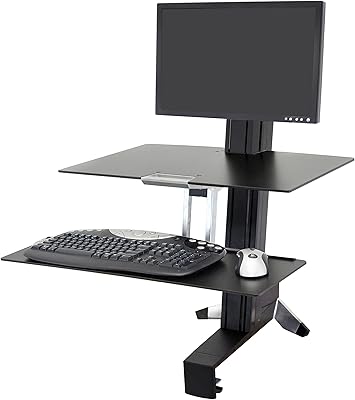
Ergotron WorkFit-S LD Single Monitor Standing Desk Converter
86%
94%
Ease of Adjustment
88%
Ergonomics & Comfort
85%
Build Quality
91%
Space-Saving Design
89%
Assembly & Setup
More
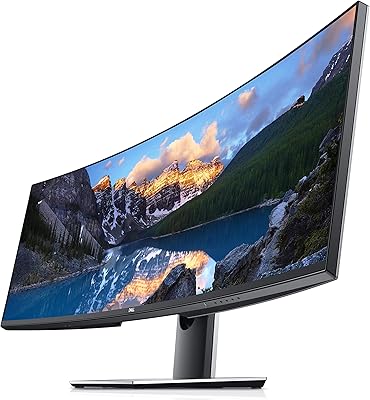
Dell UltraSharp U4919DW 49″ Ultrawide Monitor
75%
92%
Build Quality
88%
Image Clarity
94%
Multitasking Experience
59%
Value for Money
33%
Gaming Suitability
More
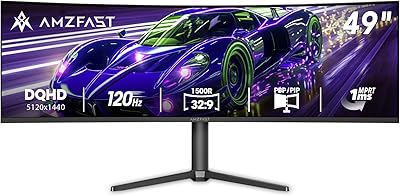
Amzfast AMZG49C7U 49-inch Curved Ultrawide Gaming Monitor
76%
88%
Image Clarity
81%
Refresh Rate Performance
84%
Color Accuracy
53%
HDR Quality
91%
Curvature & Immersion
More
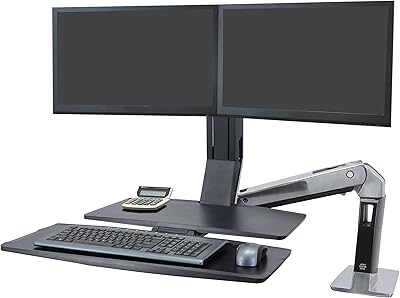
Ergotron WorkFit-A Dual Monitor Standing Desk Converter
85%
92%
Ergonomics & Comfort
89%
Ease of Assembly
85%
Sturdiness & Build Quality
91%
Height Adjustment Mechanism
88%
Monitor Compatibility
More
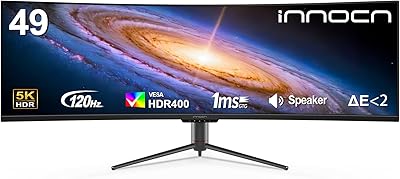
INNOCN 49C1R 49″ Curved Ultrawide Monitor
74%
88%
Display Immersion
84%
Contrast & Black Levels
76%
Color Accuracy
81%
Refresh Rate & Motion Handling
54%
HDR Performance
More
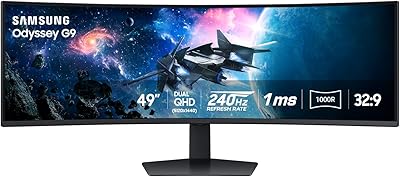
Samsung Odyssey G9 49-inch Curved Gaming Monitor
82%
93%
Visual Clarity
90%
Immersion & Curvature
94%
Gaming Performance (FPS)
60%
Ease of Setup
88%
Build Quality
More
MSI MPG 491CQPX 49-inch QD-OLED Monitor
76%
96%
Image Quality
93%
HDR Performance
91%
Gaming Performance
88%
Color Accuracy
94%
Ultrawide Immersion
More
Acer EI491CUR 49-inch Curved DQHD Gaming Monitor
87%
91%
Display Quality
88%
Immersion and Screen Size
90%
Performance for Gaming
84%
Color Accuracy
92%
Refresh Rate and Response Time
More
GIGABYTE AORUS CO49DQ 49-inch QD OLED Monitor
89%
96%
Display Quality
94%
Gaming Performance
92%
Color Accuracy
89%
Burn-in Protection
88%
Build Quality
More
ASUS ROG Swift PG49WCD 49-inch Gaming Monitor
77%
94%
Image Quality
91%
Color Accuracy
88%
Gaming Performance
78%
HDR Performance
67%
Value for Money
More

FAQ

Yes, and this is precisely the use case the Ergotron HX 49″ Single Monitor Arm was engineered for. The tension mechanism is adjustable and holds its calibration well under sustained heavy loads — something a lot of buyers specifically mention after switching from arms that gradually sagged under large curved panels. That said, getting the tension set correctly during installation makes a real difference, so take your time with that step.
Technically, the arm's weight range starts at 20 lbs, so a 19-lb monitor sits just below the stated minimum. In practice, the arm may still physically hold it, but the tension system is tuned for heavier loads and could feel difficult to balance properly at that weight. You'd likely get better results with an arm designed for the 5–20 lb range.

Not quite. The G9 has an unusual mounting point that requires a specialized pivot — specifically the HX Heavy Duty Tilt Pivot accessory (model 98-540-216) — which is sold separately. This catches a lot of buyers off guard, so if the G9 is your monitor, either purchase that accessory alongside the arm or look for the bundled kit version that includes it in the box.

Installation is manageable but takes longer than a typical monitor arm setup. The arm itself weighs close to 18 lbs, and maneuvering it while also attaching a heavy monitor is genuinely awkward solo. Having a second person to hold the arm steady while you secure the monitor makes the process much smoother. Plan for 30–60 minutes, read the instructions fully before starting, and don't rush the tension calibration.

It natively supports 75x75mm, 100x100mm, 200x100mm, and 200x200mm VESA patterns, which covers the vast majority of large monitors. If your monitor uses a larger pattern, Ergotron sells a separate VESA Bracket Adapter Kit (model 97-759) that extends compatibility.

The desk clamp fits surfaces between 0.4 and 2.6 inches thick, which handles most standard wood and laminate desks. Very thin glass desktops can be more complicated — the clamp pressure needed to support a heavy monitor could be a concern depending on the glass thickness and quality. In those cases, the grommet mount option, which installs through a hole in the desk surface, can be a more secure alternative.

Full 360-degree rotation is supported, so portrait mode is mechanically possible. Keep in mind that most ultrawide monitors are not practically usable in portrait orientation due to their extreme aspect ratios, but for standard widescreen monitors in the supported weight range, rotating to portrait works well for coding or document work.

The arm has built-in channels along its length where you route cables from the monitor down toward the desk. It keeps things tidy rather than leaving cables dangling freely. It is not a fully concealed conduit — cables are routed along the outside of the arm in the channels — but the result looks clean and organized in practice.

Ergotron's warranty reputation is generally solid among long-term customers. The 10-year coverage applies to defects in materials and workmanship, and their technical support team is staffed by people who know their products well. Warranty claims typically involve contacting support directly with proof of purchase, and replacement parts or units are usually provided without significant friction for legitimate issues.

The arm itself is designed as a single-monitor mount, but Ergotron does sell optional dual-monitor and triple-monitor kit accessories that expand the setup. These are separate purchases and work with the HX arm as the base, so it is worth knowing that option exists if your needs grow over time.