Overview

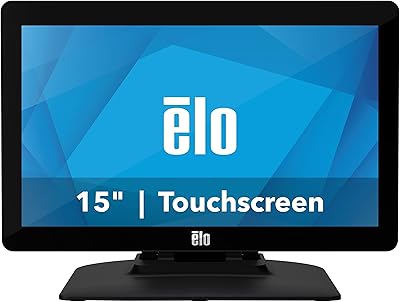
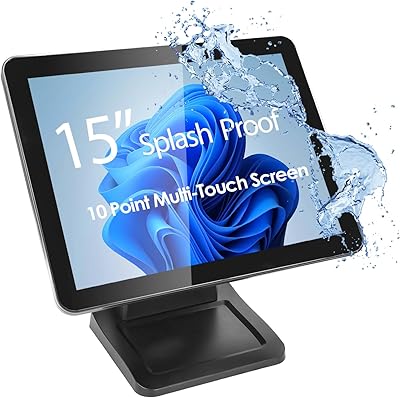
The Elo 1515L 15″ Touchscreen Monitor is a compact, commercial-grade display designed for interactive environments. Featuring IntelliTouch SAW technology, this touchscreen monitor provides precise and responsive touch input, making it suitable for point-of-sale or customer-facing applications. Its glossy 1024 x 768 display delivers clear visuals, while the included adjustable desktop stand and VESA compatibility offer flexible installation options. With a sealed surface that resists dust and liquids, the Elo 1515L is built for reliability in busy settings. Launched in 2017 by Elo Touch Solutions, this 15″ display combines durability with practical design for professional use, ensuring consistent operation in a variety of commercial spaces.

Features & Benefits

This 15″ display offers accurate touch performance that is particularly useful in retail and hospitality environments. Its robust construction withstands dust, dirt, and liquid exposure, maintaining long-term functionality. Installation versatility allows wall, pole, or desktop mounting depending on workspace needs, while dual and serial USB connections support a range of peripheral devices. Users benefit from tested reliability with over 50,000 MTBF hours, minimizing downtime in critical applications. The glossy screen ensures visibility in varied lighting conditions, and responsive touch input reduces input errors. Overall, these features combine to deliver a dependable, flexible, and user-friendly interactive monitor for professional settings.

Best For

This touchscreen monitor is well-suited for point-of-sale terminals in stores, restaurants, or cafes, providing intuitive interaction for employees and customers alike. It also works efficiently for customer-facing kiosks where compact, responsive screens are essential. Small business environments seeking interactive displays will appreciate its manageable size and professional design. Additionally, the monitor is ideal for users requiring a durable, long-lasting device that can endure high-traffic commercial environments. Flexible mounting options allow adaptation to various workspaces, while the sealed screen ensures minimal maintenance, making it a practical choice for settings demanding consistent performance and operational reliability.

User Feedback

Users generally report satisfaction with the Elo 1515L, highlighting its responsive touch and solid construction. Positive remarks frequently note the flexible installation and the monitor's durability in commercial settings. Some reviewers, however, mention that the 1024 x 768 resolution can feel limited compared to modern displays, especially for detailed graphics. Overall, feedback indicates that this 15″ display reliably meets the needs of retail and hospitality professionals. While not designed for high-resolution multimedia tasks, it is valued for its straightforward functionality, dependable operation, and suitability in demanding environments where touch precision and robustness are essential.

Pros

  • Provides accurate and responsive touch input ideal for retail or hospitality environments.
  • Durable construction resists dust, dirt, and liquid spills in busy workspaces.
  • Supports flexible mounting with both VESA wall/pole options and a desktop stand.
  • Dual and serial USB ports allow easy connection to peripherals and POS devices.
  • Sealed touch surface enhances longevity in commercial usage.
  • Compact 15″ size fits well in small kiosks or countertop setups.
  • High MTBF of 50,000 hours ensures reliable long-term operation.
  • Lightweight enough to reposition while maintaining a solid feel on desks.
  • Glossy display improves visibility under standard indoor lighting conditions.

Cons

  • Limited 1024 x 768 resolution may feel outdated for modern graphical interfaces.
  • Not suitable for tasks requiring high-definition or detailed visuals.
  • This touchscreen monitor can be cumbersome for frequent relocation due to its weight.
  • Some users note that the glossy screen can produce reflections in bright lighting.
  • No integrated speakers or advanced media features for multimedia applications.
  • Setup can be challenging for inexperienced users when using wall or pole mounts.
  • Not ideal for large-scale digital signage due to smaller screen size.
  • A few buyers found the touch calibration requires occasional adjustment.

Ratings

The Elo 1515L 15″ Touchscreen Monitor has been evaluated using verified user reviews collected worldwide across multiple languages and platforms. RR-AI filtered out spam, incentivized, duplicate, off-topic, and exaggerated reviews, ensuring only authentic, high-quality feedback shaped these scores. This analysis reflects both strengths and areas for improvement, providing a balanced view of how this device performs in real-world commercial settings.

Touch Responsiveness
94%
Many buyers highlight that this device reacts quickly and accurately to touch inputs, reducing errors in busy commercial environments. Several users note that the responsive surface makes navigating POS software smoother and more efficient. Professionals appreciate the consistent performance during daily use without lag or missed touches.
A few users mention that the touch sensitivity can feel overly precise in certain low-light or high-glare conditions, occasionally causing unintended selections. Some noted that stylus input can be less reliable than finger touches. Not everyone found it ideal for very fine-detail interactions.
Build Quality
91%
Reviewers praise the sturdy, commercial-grade construction of this device, noting that it feels solid and durable. The sealed design helps protect against dust and spills, which is especially appreciated in retail or kitchen settings. Many feel confident about its longevity given the robust materials and tested reliability.
A small number of users feel the monitor is heavier than expected, making relocation slightly cumbersome. Some reported minor cosmetic scratches during transport despite careful handling. A few suggested that the glossy finish can show fingerprints more visibly.
Installation Flexibility
88%
Several users value the multiple mounting options, including desktop, wall, and pole setups, which makes integrating this device into different workspaces straightforward. The included adjustable stand allows for fine-tuned positioning. This flexibility simplifies deployment across various commercial environments.
Some buyers mention that the VESA mounting process can be a bit tricky without prior experience. A few noted that certain wall or pole mounts require additional hardware not included in the package. Not all configurations allow the full tilt range due to space constraints.
Durability Against Liquids/Dust
92%
Users frequently comment on the sealed touchscreen surface, which keeps out dust and liquids effectively. Many report that this device maintains functionality even in busy restaurants or retail counters. The robust casing reassures buyers that it can withstand accidental spills or daily cleaning routines.
A limited number of users caution that while the surface is sealed, heavy or prolonged exposure to liquids could still damage internal components. Some found that residue from cleaning solutions may leave marks if not wiped carefully. Extreme environments are not fully covered by the durability design.
Visual Clarity
76%
24%
Most buyers find the screen clear and adequate for standard POS tasks, with colors and text easy to read under typical lighting. The 15″ size provides sufficient workspace for most interactive software. Several users appreciated the consistency in brightness across the screen.
Some reviewers note that the 1024 x 768 resolution can feel outdated, especially for detailed graphics or multimedia use. A few users mention glare issues in bright environments, which can affect readability. Overall, it may not meet expectations for high-resolution content.
Connectivity Options
85%
Users appreciate the dual and serial USB ports that allow connection to various peripherals. Many found the setup straightforward and compatible with existing POS equipment. The versatility supports integration without additional adapters in most commercial scenarios.
Some buyers report that USB cable placement can be limiting depending on workspace layout. A few users wished for additional modern connection options like HDMI or USB-C. Not all peripherals were fully supported without extra drivers.
Ease of Setup
89%
Several reviewers mention that this device is easy to unpack and set up quickly, even for non-technical staff. The intuitive stand adjustments and plug-and-play functionality reduce deployment time. Users appreciate the minimal configuration needed to get started in retail or kiosk environments.
A few users noted that driver installation can occasionally be required on older operating systems. Some found that mounting on non-standard poles or walls required extra tools or hardware. Minor troubleshooting was necessary for certain legacy software.
Long-Term Reliability
90%
Many users report consistent performance over extended periods without failure, even under high daily usage. The tested MTBF and commercial design inspire confidence for continuous operation in busy workplaces. Buyers appreciate that it maintains responsiveness and stability over months of frequent use.
Some reviewers mention occasional minor glitches after prolonged use, typically resolved with simple restarts. A few noted that the touchscreen can require recalibration after extensive handling. Extreme environmental conditions may accelerate wear on certain components.
Commercial Suitability
95%
This device is highly regarded for commercial environments, with users praising its reliability in stores, restaurants, and kiosks. The sealed construction and flexible mounts make it adaptable to different layouts. Several reviewers highlight that it meets professional standards for day-to-day operational use.
A small minority point out that in very large, high-traffic environments, multiple units may need additional support for maintenance. Some felt the display size could be limiting for highly detailed POS interfaces. Overall, concerns are minor compared to the overall suitability.
Screen Resolution
68%
32%
For standard POS or kiosk tasks, many users find the resolution sufficient, allowing text and buttons to appear clear. Several buyers noted that it works well for basic graphics and software interfaces. The 4:3 aspect ratio fits traditional business applications effectively.
Some users expressed dissatisfaction with the 1024 x 768 resolution, especially compared to modern widescreen displays. Detailed images and charts may appear less sharp, and certain applications feel cramped. It is less ideal for multimedia or high-resolution content creation.
Size & Portability
82%
18%
Many users like the compact 15″ form factor, which fits neatly on counters or small workspaces. The monitor is portable enough to reposition between stations if needed. Buyers note that it provides a balance of usable screen area and manageable footprint.
Some reviewers mention the weight of 10.6 pounds can make moving it cumbersome for frequent relocation. Portability is limited compared to lighter, smaller displays. A few buyers wanted a slimmer design for tighter spaces.
Customer Satisfaction
87%
Overall, users are pleased with the consistent performance, reliability, and touch accuracy of this device. Several reviewers emphasize that it meets daily business needs effectively. Positive experiences span across different industries and operational settings.
A few buyers reported minor frustrations with screen glare and the slightly older resolution. Some mentioned limited peripheral compatibility in specific setups. Occasional technical support was needed for initial configuration.
Maintenance Ease
86%
Many reviewers find that the sealed touchscreen surface makes cleaning and maintenance straightforward, reducing downtime. Dust and spills are less of a concern in busy environments. Users appreciate that routine upkeep is simple and fast.
Some users note that fingerprints and smudges are noticeable on the glossy surface, requiring frequent wiping. In rare cases, deeper cleaning requires careful handling to avoid damage. Heavy use may lead to minor wear on the stand over time.

Suitable for:

The Elo 1515L 15″ Touchscreen Monitor is particularly well-suited for retail environments, restaurants, and other commercial settings where reliable touch input is essential. Users managing point-of-sale systems or customer-facing kiosks will benefit from the responsive IntelliTouch surface and sealed design that protects against spills and dust. Small business owners looking for a compact 15″ touchscreen display will find this monitor versatile and durable, while staff requiring flexible mounting options can adapt it to desktops, walls, or poles. It is also suitable for environments demanding consistent operation over long hours, as its robust build and proven MTBF ensure stability throughout busy workdays.

Not suitable for:

This device may not meet the needs of users who require high-resolution displays or detailed graphics, as the 1024 x 768 resolution can feel limiting for modern applications. Professionals working with multimedia content, large-format data visualization, or high-definition interfaces may find it insufficient. Additionally, individuals needing lightweight, highly portable solutions might find the 10.6-pound unit cumbersome for frequent relocation. Very high-traffic or visually demanding environments may require larger or higher-resolution monitors, making this touchscreen less ideal for those specific scenarios.

Specifications

  • Brand: Manufactured by Elo Touch Solutions, Inc.
  • Model: Model number is 1515L.
  • Screen Size: Features a 15-inch display suitable for compact installations.
  • Resolution: Provides a 1024 x 768 pixel display with a 4:3 aspect ratio.
  • Touch Technology: Uses IntelliTouch surface acoustic wave (SAW) technology for accurate input.
  • Screen Surface: Glossy finish with a sealed surface to protect against dust and liquids.
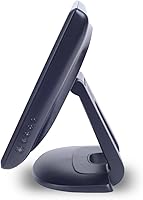
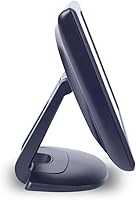
  • Mounting: Supports VESA wall or pole mounting and includes an adjustable desktop stand.
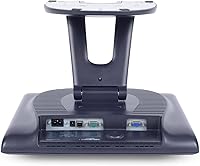
  • USB Ports: Includes dual USB and serial connections for peripheral compatibility.
  • Durability: Commercial-grade construction with a sealed design for long-term use.
  • MTBF: Rated at 50,000 hours mean time between failures.
  • Weight: Weighs approximately 10.6 pounds for flexible placement options.
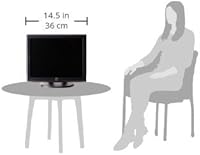
  • Dimensions: Measures 17.25 x 15.1 x 10.25 inches including stand.
  • Compatibility: Compatible with standard POS systems and devices supporting USB or serial touch input.
  • Installation: Can be deployed on desktop, wall, or pole with standard mounting hardware.
  • Commercial Use: Designed for retail, hospitality, and other interactive business environments.
  • Release Date: Released in October 2017 for commercial applications.
  • Input Accuracy: Provides responsive and precise touch input suitable for high-traffic environments.
  • Environmental Resistance: Resists dust, dirt, and light liquid spills for reliable operation.

FAQ

The Elo 1515L 15″ Touchscreen Monitor features IntelliTouch SAW technology, a 1024 x 768 glossy display, and a sealed commercial-grade design. It includes an adjustable desktop stand and supports VESA wall or pole mounts, making it versatile for retail and hospitality environments.
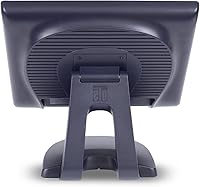
This monitor supports VESA wall or pole mounting as well as desktop placement using its adjustable stand. Ensure the mounting surface is stable, and use the included screws for secure installation. Wall or pole mounting may require additional tools or brackets depending on your setup.

Yes, this device is designed for POS systems in stores or restaurants. Its accurate touch input and compact 15″ size make it ideal for customer-facing kiosks and counter installations.

The Elo 1515L offers dual USB and serial connections, allowing integration with a wide range of peripherals and POS equipment. These ports support reliable data transfer for interactive applications and touch functionality.

This monitor is built for commercial use, with a sealed surface that resists dust, dirt, and liquid spills. Its construction supports long-term operation in busy environments, and the MTBF is rated at 50,000 hours.

Due to its 1024 x 768 resolution, this device is best suited for standard POS or kiosk interfaces rather than high-definition video or detailed graphics. Users seeking higher resolution displays may need to consider larger or more advanced monitors.

To maintain this touchscreen, use a soft, lint-free cloth and avoid harsh chemicals. Gently wipe the screen to remove fingerprints or dust, and ensure that liquids do not seep into the edges to preserve its sealed design.

This device generally works with Windows PCs and most POS terminals that support USB or serial touch input. Mac compatibility may be limited, so check driver support before installation for Apple devices.

Some users note that the 1024 x 768 resolution can feel outdated for modern interfaces, and reflections on the glossy screen may be an issue in bright lighting. A few buyers also report occasional calibration adjustments are needed for optimal touch accuracy.

Yes, this monitor is well-suited for small businesses needing reliable interactive displays. Its compact size, durable design, and flexible mounting options make it practical for counters, kiosks, and limited-space environments.