Overview

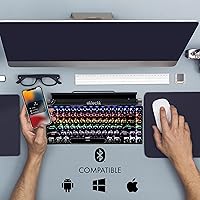
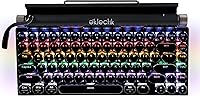
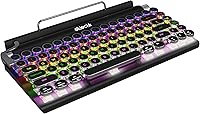
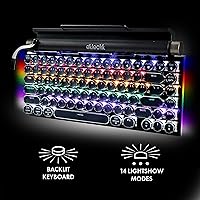
The Eklectik EKL-TWKB100 Wireless Mechanical Keyboard is the kind of desk accessory that turns heads before you type a single word. Launched in early 2023 by The Fesco Group under the Eklectik brand, it targets anyone who finds standard keyboards a bit... boring. The circular keycaps and matte black finish give it a genuine typewriter personality rather than a costume. It is a compact 83-key layout, so there is no number pad, but that trade-off buys you a tidier desk and real portability. Wired and wireless support makes it genuinely flexible across devices — and that dual connectivity is worth examining closely.
Features & Benefits

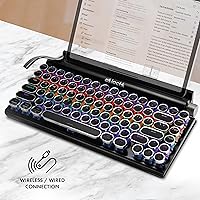
The blue mechanical switches are the heart of the typing experience here — tactile, clicky, and satisfying for touch typists. They are also loud. In a quiet office or shared space, expect your neighbors to notice. The Bluetooth connection pairs reliably with a single device, and switching to wired via USB-C is straightforward when you need a more stable link. The 14 RGB lighting modes range from calm single-color glows to animated cycling patterns — genuinely usable, not just spec-sheet filler. The integrated volume knob sits comfortably within reach during media playback, and the rechargeable battery means no hunting for AA cells.

Best For

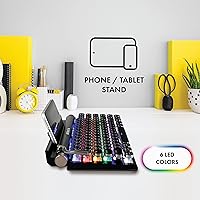
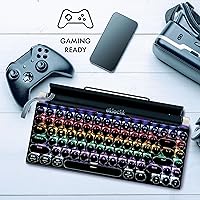
This retro mechanical keyboard fits a specific kind of buyer well. If you work from home and care about how your setup looks, the round keycaps and retro silhouette add real character to a desk without requiring a full aesthetic overhaul. Students who move between a laptop and tablet will appreciate the built-in device stand and the compact footprint. Casual gamers get responsive switches and RGB without paying enthusiast-tier prices. It is less ideal for open-plan offices — blue switches carry — and power users who want programmable macros or dedicated software control will hit a wall quickly. But for everyday typing with some style? It delivers.

User Feedback

With 54 ratings averaging 4.1 stars, the picture is cautiously positive but the sample is still relatively thin. Early buyers consistently highlight the aesthetic satisfaction — the Eklectik typewriter keyboard looks the part, and Bluetooth pairing reportedly goes smoothly. On the flip side, a handful of owners flag inconsistent build quality between units, which is worth keeping in mind. There is no dedicated software for remapping keys or customizing lighting beyond the onboard modes, which some users found limiting. The blue switch noise comes up repeatedly for anyone using this in shared environments. Solid first impressions overall, but more ratings over time will tell a clearer story.

Pros

  • Circular typewriter-style keycaps give the board a genuinely distinctive look that stands out on any desk.
  • Blue mechanical switches offer satisfying tactile feedback that makes long typing sessions feel engaged rather than flat.
  • Dual connectivity — Bluetooth and USB-C wired — adds real flexibility across different devices and setups.
  • The integrated volume knob is a small but genuinely useful addition for media users and casual gamers.
  • 14 RGB lighting modes go beyond basic on/off and include practical low-light options alongside animated effects.
  • Rechargeable via USB-C means one less cable type to manage and no disposable batteries to replace.
  • At 1.6 pounds with a compact footprint, this wireless typewriter-style board travels well without bulk.
  • The built-in phone and tablet stand is a handy bonus for hybrid workers switching between devices.
  • Early buyers consistently report easy, reliable Bluetooth pairing with minimal setup friction.
  • The matte black finish resists fingerprints better than glossy alternatives and holds up visually over time.

Cons

  • Blue switches are loud enough to disturb coworkers, roommates, or anyone nearby in a shared space.
  • No dedicated software means zero options for remapping keys, recording macros, or saving custom lighting profiles.
  • A handful of early buyers have flagged inconsistent build quality, suggesting unit-to-unit variation is a real concern.
  • The 83-key layout omits a number pad entirely, which is a dealbreaker for data-heavy workflows.
  • With only 54 ratings so far, the long-term reliability picture is still genuinely unclear.
  • Bluetooth appears limited to a single paired device, with no confirmed quick-switch multi-device support.
  • Battery life under heavy RGB use has not been independently verified, and no official runtime figure is published.
  • The built-in stand offers limited angle adjustment, which may not suit all screen sizes or viewing preferences.

Ratings

The scores below for the Eklectik EKL-TWKB100 Wireless Mechanical Keyboard were generated by our AI review engine after analyzing verified global buyer feedback, with spam, bot-submitted, and incentivized reviews actively filtered out. Based on 54 confirmed ratings at the time of analysis, the results reflect a candid picture — genuine strengths are recognized alongside recurring frustrations that real buyers have flagged. Nothing has been smoothed over to make the product look better than the evidence supports.
Typing Experience
83%
Early buyers consistently describe the blue switches as satisfying and engaging for extended writing sessions. The tactile bump and audible click give a sense of deliberate, confident keystrokes that flat membrane keyboards simply cannot replicate — something writers and coders working from home tend to appreciate immediately.
The clicky nature that typists love is precisely what frustrates anyone nearby. In shared apartments, open offices, or late-night sessions with others sleeping, the noise level of blue switches becomes a genuine social problem rather than a minor inconvenience.
Aesthetic Design
88%
The circular keycaps and matte black finish give this retro mechanical keyboard a cohesive, intentional look that stands apart from the sea of identical slab keyboards. Buyers frequently mention that it draws compliments on video calls and in desk setup photos — a rare outcome for a peripheral at this price tier.
Aesthetic appeal is subjective, and buyers expecting a premium artisan feel may notice that the plastics feel closer to mid-range than boutique. The retro charm is visual rather than tactile — the body does not have the weight or material quality of higher-end typewriter-inspired boards.
Wireless Connectivity
76%
24%
Bluetooth pairing is one of the most consistently praised aspects across early reviews, with buyers reporting a quick and stable initial connection across laptops, tablets, and phones. For solo-device users, the wireless experience is described as reliable enough for all-day use without frustrating dropouts.
The board appears to support pairing with a single Bluetooth device at a time rather than offering the multi-device quick-switch that many modern wireless keyboards provide. Users who regularly alternate between a PC and a tablet will find the re-pairing process more friction-heavy than expected.
Build Quality
63%
37%
For buyers who received a well-assembled unit, the keyboard feels adequately solid for daily desk use. The keycap fit is generally snug, and the overall structure does not flex noticeably during normal typing, which is a reasonable baseline for this price range.
Multiple early buyers flagged noticeable unit-to-unit inconsistency — some reported keys that felt slightly loose or a chassis with minor wobble, while others had no issues at all. This kind of variability is a red flag for buyers who need a dependable, long-term peripheral rather than a decorative one.
Value for Money
78%
22%
The combination of mechanical switches, RGB backlighting, Bluetooth connectivity, a volume knob, and a built-in device stand in a single mid-range package represents a compelling feature-per-dollar ratio. Buyers looking for a personality-driven keyboard without a premium budget tend to feel the price is justified.
The value calculation shifts if you receive an inconsistent unit or if the lack of software customization is a dealbreaker for your workflow. Paying mid-range prices for a board with no remapping capability and uncertain build consistency is a harder sell for users who prioritize utility over looks.
RGB Lighting
81%
19%
With 14 distinct LED modes, the lighting goes well beyond a token backlight feature. Buyers working in dim home offices note that the illuminated circular keycaps look particularly striking, and the range of modes — from calm static colors to animated cycling effects — means there is a setting for most preferences.
Without dedicated software, customization is limited to cycling through onboard presets. Users who want to set specific per-key colors, save profiles, or sync lighting with other peripherals will find the onboard-only approach restrictive compared to competing boards with full RGB software suites.
Portability
84%
At 1.6 pounds and a footprint of 13″ by 6.9″, the Eklectik typewriter keyboard slips into a backpack without dominating the space. Hybrid workers who commute between home and a coworking space report that the compact tenkeyless layout and wireless freedom make it a practical daily carry.
The keyboard lacks a hard travel case or pouch in the box, and the exposed circular keycaps are slightly more vulnerable to being scuffed or catching on bag fabric than flat-profile alternatives. Frequent travelers may want to invest in a separate sleeve for protection.
Volume Knob Usability
85%
Buyers who use their setup for media consumption or casual gaming consistently highlight the volume knob as a standout feature — the kind of small addition that feels obvious in retrospect. Adjusting audio during a video call or movie without hunting for on-screen sliders is a daily quality-of-life improvement.
The knob appears to control system volume only, without documented support for additional functions like media playback control or mute toggling on all platforms. Users hoping for a multi-function dial similar to those on premium productivity keyboards may find its scope limited.
Device Stand
67%
33%
Having a built-in stand for a phone or tablet is a genuinely convenient touch for users who want to reference a second screen or follow a recipe while typing. It removes the need for a separate desk accessory and fits naturally into a compact workspace.
The stand is a fixed-angle ledge rather than an adjustable cradle, so taller or heavier devices may feel precarious. Early buyers note it works best with standard-sized phones and smaller tablets — larger iPads or heavy cases push the limits of what the stand handles comfortably.
Software & Customization
41%
59%
The keyboard functions out of the box on PC, Mac, and mobile without needing any driver installation, which simplifies setup considerably. Onboard controls handle lighting adjustments adequately for users who just want to pick a mode and get on with their work.
The complete absence of companion software is a hard ceiling on this board's potential. There is no key remapping, no macro recording, no per-key RGB control, and no profile saving — limitations that are increasingly difficult to justify even at mid-range prices when competing options offer at least basic software support.
Bluetooth Pairing Setup
82%
18%
Initial Bluetooth pairing is one of the more consistently positive data points from early buyers. Across Windows laptops, iPhones, and Android tablets, the board is described as connecting quickly without unusual troubleshooting steps or driver conflicts.
Re-pairing to a different device after the initial setup is less frictionless, particularly for users switching between platforms frequently. The process is workable but not as polished as keyboards specifically designed for multi-device workflow switching.
Charging & Battery
72%
28%
USB-C charging is a welcome standard that means one fewer cable type in a modern setup. The dual-mode design — use wired while charging — means a dead battery never forces you to stop working, which is a practical failsafe for heavy daily users.
No official battery runtime figure has been published, making it genuinely difficult to plan around. Buyers running the keyboard with active RGB modes report faster than expected drain, and without a battery indicator, the first sign of a low charge is often an unexpected disconnection.
Noise Level
44%
56%
For solo users who enjoy audible feedback, the click of the blue switches is a feature rather than a flaw. Some buyers specifically sought out this keyboard because they wanted a loud, satisfying typing experience reminiscent of older mechanical office machines.
In any shared environment — open-plan office, coffee shop, or household where others are nearby — the noise is a consistent complaint. Blue switches rank among the loudest commonly available switch types, and buyers underestimating this impact tend to leave critical feedback after the fact.
Key Layout & Accessibility
74%
26%
The 83-key tenkeyless layout covers all standard typing and function row needs while shaving meaningful desk space compared to a full-size board. For students and writers who do not rely on a number pad, the compact arrangement feels complete rather than compromised.
Removing the number pad is a non-starter for professionals in accounting, data entry, or any field that depends on rapid numeric input. Additionally, the retro circular keycap profile has a slight learning curve for touch typists accustomed to standard sculpted rows, and some users report minor adjustment time before speed normalizes.

Suitable for:

The Eklectik EKL-TWKB100 Wireless Mechanical Keyboard is a strong fit for home office workers and students who want their desk setup to reflect some personality without spending premium prices. If you spend long hours typing solo — writing, coding, studying — the tactile blue switches reward that kind of focused, sustained use. Remote workers who toggle between a laptop and a tablet will get real value from the built-in device stand and the flexibility of both Bluetooth and USB-C wired connections. Casual gamers looking for a responsive, RGB-lit board at a reasonable entry point will find the circular keycaps and clicky switches more than adequate. Essentially, if aesthetics matter to you and you work or play primarily in a private space, this retro mechanical keyboard punches above its price tier.
Not suitable for:

The Eklectik EKL-TWKB100 Wireless Mechanical Keyboard is a poor match for anyone working in an open office, shared apartment, or any environment where keyboard noise is a genuine concern — blue switches are clicky by design, and that sound carries. Power users who rely on macro keys, per-key RGB customization, or dedicated configuration software will run into a hard wall, as no such software exists for this board. The 83-key tenkeyless layout drops the number pad entirely, so accountants, data entry professionals, or anyone who lives in spreadsheets should look elsewhere. Build quality reports from early buyers are somewhat inconsistent, which makes this a riskier pick if you need something that will hold up to heavy daily abuse over several years. Finally, buyers expecting true multi-device Bluetooth switching should verify that capability before purchasing, as the confirmed spec covers single wireless device pairing.
Specifications

  • Model Number: This keyboard is manufactured under the model designation EKL-TWKB100 by The Fesco Group's Eklectik brand.
  • Key Count: The layout includes 83 keys in a compact tenkeyless arrangement that omits the dedicated number pad.
  • Switch Type: Blue mechanical switches provide tactile, clicky actuation suited to typing and casual gaming.
  • Keycap Style: Circular, round-profile keycaps replicate the visual appearance of classic typewriter keys on a modern board.
  • Connectivity: The keyboard supports both Bluetooth wireless and USB-C wired connections for flexible device compatibility.
  • Backlighting: RGB backlighting is built in with 14 selectable LED modes, adjustable directly from the keyboard.
  • Volume Control: An integrated rotary volume knob allows direct audio adjustment without leaving the keyboard or using software.
  • Device Stand: A built-in stand accommodates smartphones and tablets for hands-free viewing during wired or wireless use.
  • Power Source: The keyboard charges via USB-C and also supports corded operation, with an internal rechargeable battery.
  • Dimensions: The board measures 13″ long by 6.9″ wide by 1.62″ tall, keeping the desktop footprint compact.
  • Weight: At 1.6 pounds, this retro mechanical keyboard is light enough for regular travel or bag storage.
  • Color: The keyboard is available in a matte black finish that resists visible smudging during daily use.
  • OS Compatibility: Compatible with PC, Mac, and mobile operating systems without requiring additional drivers for core functionality.
  • Device Compatibility: Works with laptops, desktop PCs, smartphones, tablets, and gaming consoles via Bluetooth or USB-C connection.
  • Release Date: This model was first made available on Amazon in March 2023, making it a relatively recent market entry.
  • Lighting Colors: The backlighting supports full RGB color output, enabling a wide range of color and animation mode combinations.
  • Layout Style: The compact tenkeyless retro layout prioritizes desk space efficiency while retaining all standard alphanumeric and function keys.
  • Manufacturer: Produced by The Fesco Group under the Eklectik brand, a consumer accessories label focused on retro-styled peripherals.

Related Reviews

Merdia Triple Mode 100-Key Wireless Mechanical Keyboard
74%
88%
Value for Money
84%
Wireless Connectivity
81%
Typing Experience
83%
Hot-Swap Functionality
67%
Build Quality
More
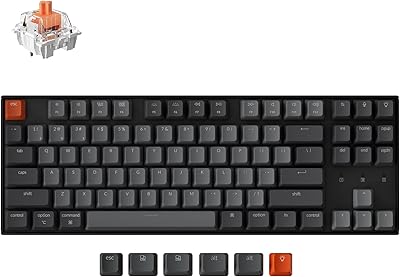
Keychron K8
Keychron K8
80%
91%
Typing Feel & Switch Quality
88%
Noise Level
86%
Multi-Device Connectivity
67%
Build Quality & Materials
72%
Battery Life
More
Pauroty 60% Wireless Mechanical Keyboard

86%
88%
Connectivity Options
75%
Battery Life
93%
Portability
84%
Ergonomics
91%
RGB Customization
More
Logitech MX Mechanical
81%
88%
Typing Feel & Switch Quality
91%
Noise Level
86%
Build Quality & Materials
93%
Battery Life
87%
Multi-Device Connectivity
More
Keychron K4 Bluetooth Wireless Mechanical Keyboard
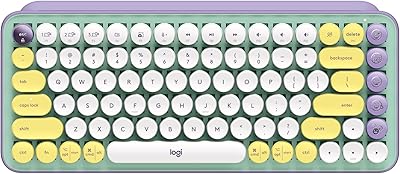
86%
91%
Build Quality
88%
Battery Life
85%
Typing Experience
90%
Connectivity & Versatility
82%
RGB Backlighting
More
Logitech POP Keys Mechanical Wireless Keyboard
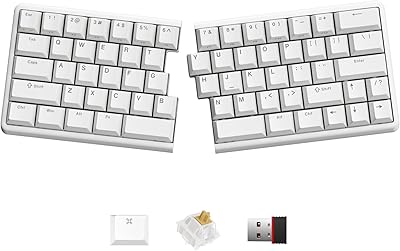
76%
88%
Typing Feel
84%
Build Quality
81%
Wireless Reliability
91%
Battery Life
93%
Design & Aesthetics
More
NocFree Wireless Ergonomic Split Mechanical Keyboard
81%
88%
Wireless Reliability
83%
Ergonomic Design
91%
Typing Experience
92%
Switch Customization
54%
Learning Curve
More
NuPhy Air75 V2 Wireless Mechanical Keyboard
85%
91%
Typing Feel
88%
Wireless Reliability
93%
Battery Life
87%
Build Quality
84%
Multi-Device Switching
More
Womier SK65 65% Wireless Mechanical Keyboard
78%
88%
Build Quality
84%
Typing Feel
81%
Wireless Performance
83%
Sound Profile
86%
Hot-Swap Experience
More
Keychron K2 V2 75% Mechanical Keyboard
79%
91%
Build Quality
84%
Typing Experience
86%
Wireless Connectivity
89%
Battery Life
88%
Hot-Swap Feature
More

FAQ

The confirmed specification covers single-device Bluetooth pairing, not simultaneous multi-device connections. You can re-pair to a different device, but do not expect the kind of quick one-button device switching you get on keyboards explicitly marketed as multi-device. If that feature is important to your workflow, verify before purchasing.

Honestly, yes — blue switches are among the noisier options in mechanical keyboards. The tactile click is satisfying for solo work, but in a shared office, library, or thin-walled apartment, you will almost certainly draw attention. If you need something quieter, consider boards with brown or red switches instead.

No dedicated software appears to be available for this board. Lighting mode changes are handled through onboard key combinations, and there is no known application for remapping keys or saving macro profiles. For users who need that level of control, this is a meaningful limitation worth factoring into the decision.

Yes, it connects via Bluetooth to iOS and Android devices without requiring special drivers. The built-in stand can also hold the tablet upright while you type, which makes the combination reasonably practical for on-the-go writing or note-taking.

The manufacturer has not published a specific battery runtime figure, which makes it difficult to give a precise answer. As a general reference, keyboards in this category with similar battery sizes typically run anywhere from a few days to a couple of weeks depending on lighting use. Keeping RGB modes active will drain the battery significantly faster than using the keyboard with backlighting off.

Yes — the USB-C connection doubles as both a charging port and a wired data connection, so you can plug it in and keep typing while the battery tops up. This is a practical fallback if you forget to charge it overnight.

Early buyers report it works well enough for everyday use, but the stand is a built-in ledge rather than an adjustable grip mount. Heavier or larger phones may feel less secure, and the viewing angle is fixed rather than adjustable. It is better treated as a convenient bonus than a precision tablet stand.

No dongle is required. The wireless typewriter-style board uses standard Bluetooth, so it pairs directly with any Bluetooth-enabled computer, tablet, or phone without occupying a USB port for a receiver.

It is compatible with both Mac and Windows, as well as mobile operating systems. The key labeling follows a standard PC layout, so Mac users may need to mentally remap a couple of modifier keys, but the board functions without any special drivers on either platform.

Lighting modes are controlled through built-in key combinations directly on the board — no software required. The exact key shortcuts are detailed in the included documentation. With 14 modes available, you can cycle through options ranging from static single colors to animated patterns until you find one that suits your setup.