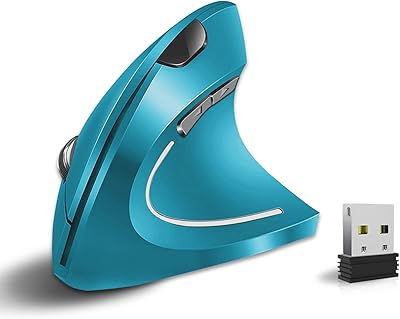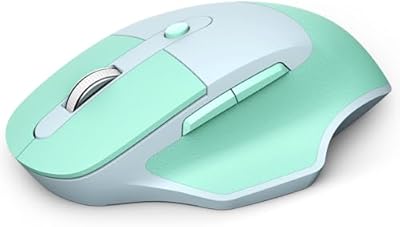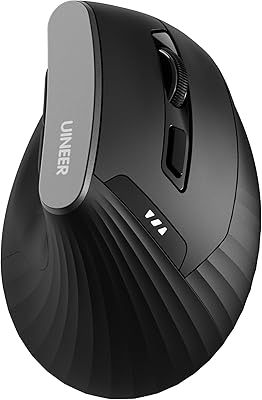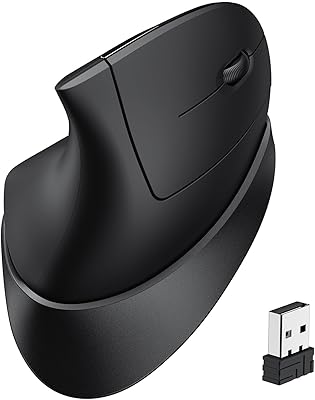
Overview

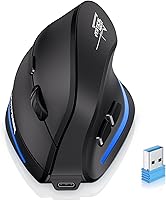
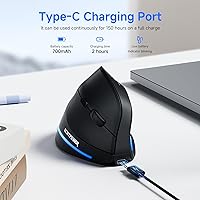
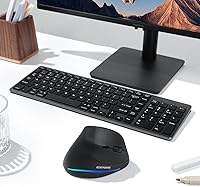
The ECHTPower Ergonomic Wireless Mouse F35B is designed to offer a more comfortable computing experience by reducing wrist strain. This wireless vertical mouse supports both Bluetooth 5.0 and 2.4GHz USB receiver connections, allowing you to use it with a variety of devices. It features a rechargeable battery that lasts up to 150 hours on a single charge (without RGB lighting), making it highly practical for long working sessions. With adjustable DPI settings, this mouse ensures smooth, accurate tracking on most surfaces, enhancing your productivity whether at home or in the office.

Features & Benefits

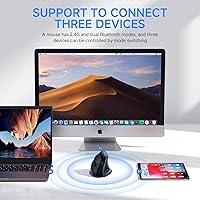
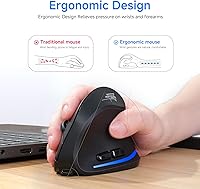
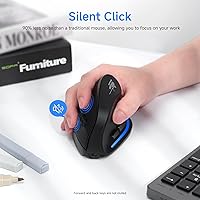
This ergonomic vertical mouse promotes natural hand positioning, which can significantly reduce the discomfort associated with traditional mice. It supports triple-mode connectivity, allowing you to seamlessly switch between up to three devices, whether they’re connected via Bluetooth or the USB receiver. The mouse’s silent-click buttons are perfect for quiet environments, reducing noise by 90%. Additionally, the dedicated forward and back buttons improve browsing efficiency, making it ideal for those who multitask frequently.

Best For

The F35B model is best suited for office workers and professionals who spend long hours at the computer and need an ergonomic solution. It’s also a great option for anyone who experiences wrist strain from traditional mouse designs. People who frequently switch between multiple devices, such as a PC, laptop, and Mac, will appreciate its versatile connectivity options. Additionally, those in shared or noise-sensitive environments will benefit from its silent click feature, making it a solid choice for quiet offices or libraries.

User Feedback

Users have praised the vertical design for offering significant relief from wrist pain, making it a popular choice for those with long hours at the computer. Many also appreciate the ability to switch between devices effortlessly via Bluetooth, which adds a level of convenience not found in many other mice. However, some users have reported that the forward/back buttons do not work as expected on macOS, which could be a downside for Mac users. On the positive side, the mouse’s long battery life and easy recharging process have received mostly favorable feedback.

Pros

  • The ergonomic vertical design helps alleviate wrist pain, making it ideal for long hours of use.
  • Triple-mode connectivity allows seamless switching between devices like PCs, tablets, and laptops.
  • The silent click buttons are a major advantage in quiet environments, reducing noise by 90%.
  • Long battery life of up to 150 hours ensures less frequent charging and more uninterrupted use.
  • The adjustable DPI settings provide precision for different surfaces and use cases.
  • The mouse is lightweight and compact, making it easy to carry for those who work on the go.

Cons

  • Some users report that the forward/back buttons don't work consistently on macOS devices.
  • The weight might be a bit too heavy for those used to lighter, more agile mice.
  • The vertical design may feel awkward for people who prefer traditional horizontal mouse shapes.
  • The mouse is not ideal for high-speed gaming, as it lacks some of the precision required for competitive play.
  • Setup can be a bit confusing for first-time users, especially with device switching.
  • It may not be as durable as some other ergonomic mice on the market, with reports of wear over time.

Ratings

After analyzing verified user reviews worldwide across multiple platforms and languages, the ratings for this ergonomic wireless mouse reflect a balanced mix of positive and negative feedback. Authentic, high-quality reviews were considered, filtering out any spam, bot-driven, or exaggerated opinions. Both the strengths and pain points of this device have been captured in the ratings, giving you an honest look at its performance and value across different use cases and regions.

Ergonomic Comfort
91%
Users consistently highlight the comfort of the ergonomic vertical design, which significantly reduces wrist strain. The natural hand positioning allows for extended use without discomfort, making it an ideal choice for those with long hours of work or gaming sessions.
While most users find the ergonomic design beneficial, some report an adjustment period to the vertical shape. It may feel awkward or uncomfortable for those used to traditional mouse designs, especially during initial use.
Battery Life
88%
The long battery life of up to 150 hours on a single charge is widely appreciated. Many users find it convenient for daily use without constantly needing to recharge, making it a reliable option for those who prefer minimal maintenance.
A few users mention that battery life can vary depending on usage patterns, and some report that the battery drains more quickly when using Bluetooth connectivity. Additionally, while impressive, it doesn’t always last as long when the mouse is used heavily for tasks like gaming.
Connectivity Options
85%
The mouse's versatile triple-mode connectivity is a standout feature. Users appreciate the ability to seamlessly switch between Bluetooth and the 2.4GHz USB receiver, making it suitable for multiple devices and providing flexibility for different work setups.
Although the triple-mode connectivity is convenient, some users report occasional connection drops, especially when switching between devices. While this happens infrequently, it can be frustrating for those who rely on uninterrupted performance.
Quietness of Clicks
93%
The silent click buttons are a major selling point for users in shared or quiet work environments. Many find the near-silent clicks a big improvement over traditional mice, ensuring minimal distraction during meetings or late-night work sessions.
While the quiet clicks are generally praised, a small subset of users noted that the lack of tactile feedback makes it harder to gauge whether a click has been registered. This can occasionally affect precision during tasks that require rapid clicking.
Device Compatibility
84%
The mouse works well with a wide range of devices, including PCs, Macs, laptops, and tablets. Many users have found it easy to pair with their devices, with no major issues in setup or compatibility.
Some users with specific setups, especially those on older operating systems or specialized configurations, report occasional issues with full compatibility. Notably, certain features may not function properly on macOS without additional adjustments.
Build Quality
82%
18%
The build quality of this vertical mouse is generally seen as solid, with a sturdy design that holds up well during regular use. Many users find it comfortable to handle, with a decent weight that balances portability and durability.
There have been some reports of the plastic feeling somewhat flimsy or cheap, particularly around the buttons. While it doesn't impact the overall performance, a few users feel it could benefit from a higher-end material feel for better long-term durability.
Setup & Installation
90%
Users consistently mention the quick and easy setup process. Whether using Bluetooth or the USB receiver, installation is straightforward, and the mouse is ready to use within minutes of unboxing.
A small number of users reported issues with the Bluetooth pairing process, especially with older devices. While not a common problem, some found it slightly more time-consuming to get connected initially.
Weight & Portability
87%
The weight of the mouse is considered just right by most users—it’s neither too heavy nor too light, providing a good balance of control and portability. Its compact size makes it a convenient choice for those who travel or work in different locations.
While many users find the weight comfortable, some feel the mouse is slightly heavier compared to traditional mice. This can be a downside for those who prefer a lighter option for fast, precise movements.
DPI Adjustability
80%
20%
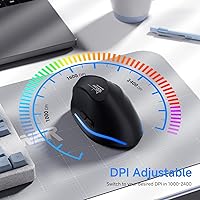
The adjustable DPI settings (up to 2400) are appreciated by users who need precise control, especially when working on different surfaces. Many find it a useful feature for various tasks, from general browsing to detailed design work.
Some users note that the DPI adjustment isn't as smooth as they would like, with noticeable jumps between settings. This can be frustrating for those who need a finer level of control for tasks like gaming or graphic design.
MacOS Compatibility
60%
40%
The mouse works well for most users, including those on macOS, with basic functions like pointing and clicking working seamlessly. The ergonomic design is also appreciated by those who use macOS for extended hours.
Unfortunately, several macOS users have experienced issues with the forward/back buttons not functioning as expected. This can be a deal-breaker for those who rely on this feature for web browsing and productivity tasks.
Price-to-Value Ratio
92%
At its price point, the mouse delivers excellent value, combining ergonomic comfort with multiple connectivity options and a long-lasting battery. Many users feel they get a lot for their investment, especially for those seeking a well-rounded, functional mouse for everyday use.
While most users consider it a good value, a few feel that it could be priced lower considering the occasional compatibility issues with macOS and the weightier build. These concerns don’t outweigh the benefits but may make some hesitant about the cost.
Long-Term Durability
75%
25%
Many users report that the mouse holds up well over time, continuing to perform reliably after months of daily use. The battery life, in particular, remains strong, even after several recharge cycles.
Some buyers express concerns over the mouse’s long-term durability, particularly around the buttons, which may wear down after extended use. A few users have noted that the overall build quality feels less premium compared to higher-end models.

Suitable for:

The ECHTPower Ergonomic Wireless Mouse F35B is a great option for office workers, professionals, and anyone who spends long hours at a computer. Its ergonomic vertical design helps reduce wrist strain, making it ideal for those with existing discomfort or for people who want to prevent strain over time. The triple-mode connectivity is especially useful for individuals who frequently switch between different devices, such as PCs, laptops, or tablets. This mouse is also perfect for individuals who work in quieter environments, as the silent click feature minimizes noise, allowing for a more peaceful workspace. With a long battery life of up to 150 hours, it’s a solid choice for those who prefer minimal maintenance and longer usage between charges.

Not suitable for:

While the ECHTPower Ergonomic Wireless Mouse F35B offers excellent comfort for most users, it may not be the best fit for those who prioritize ultra-lightweight devices. Its build may feel a bit heavy for users accustomed to lighter mice, especially for fast-paced gaming or high-precision tasks. Additionally, users with older macOS versions or those who rely heavily on forward/back navigation buttons might find compatibility issues, as some macOS users reported functionality problems with these buttons. Finally, those who need a mouse for highly demanding gaming tasks may want to look elsewhere, as the DPI adjustments, while useful, might not offer the level of precision that competitive gamers seek.

Specifications

  • Connectivity: Supports Bluetooth 5.0 and a 2.4GHz USB receiver for versatile device connections.
  • Design: Features an ergonomic vertical shape that promotes a natural hand position and reduces wrist strain.
  • DPI Settings: Adjustable DPI settings of 2400, 1600, and 1000 for precise tracking on various surfaces.
  • Battery: Equipped with a 700mAh rechargeable battery that offers up to 150 hours of usage without RGB lighting.
  • Sleep Mode: Automatically enters sleep mode after 15 minutes of inactivity to conserve battery life.
  • Button Type: Silent click buttons reduce noise by up to 90%, ideal for noise-sensitive environments.
  • Device Compatibility: Compatible with PCs, Macs, laptops, and tablets for broad device support.
  • Weight: Weighs 6.4 ounces for a balanced and stable feel during use.
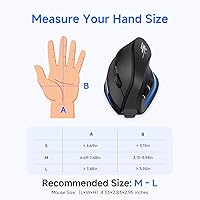
  • Dimensions: Measures 4.33 x 3.66 x 3.03 inches, offering a compact and ergonomic form factor.
  • Multi-Device Support: Can pair with up to three devices and allows seamless switching between them.
  • Forward/Back Buttons: Includes dedicated forward and back buttons for efficient web browsing and navigation.
  • Recharge Time: Rechargeable via USB, with a quick and easy connection to any USB port.
  • Surface Compatibility: Works on a variety of surfaces with adjustable DPI for smoother tracking.
  • Button Lifespan: Durable silent buttons designed for extended use without significant wear.
  • Software Support: May require specific software or driver updates for full functionality on macOS.
  • Usage Scenarios: Ideal for office workers, professionals, and users experiencing wrist discomfort from traditional mice.
  • Charging Cable: Comes with a USB charging cable for easy recharging when needed.
  • Ergonomic Benefits: The vertical design encourages a neutral wrist posture, reducing long-term strain.

FAQ

The F35B model is designed with an ergonomic vertical shape that promotes a natural hand position, reducing wrist strain compared to traditional mice. It also features triple-mode connectivity for seamless switching between devices, making it versatile for office, home, and multi-device environments.

You can connect this mouse via Bluetooth or a 2.4GHz USB receiver. Simply pair it through Bluetooth on supported devices or plug in the receiver for quick setup. The mouse supports both PC and Mac, as well as tablets.

The F35B model supports triple-mode connectivity, allowing you to pair it with up to three devices. You can easily switch between them by pressing the device selection button, which saves you the hassle of reconnecting each time.

This mouse offers up to 150 hours of battery life when not using RGB lighting. The rechargeable 700mAh battery ensures long usage between charges, and the mouse automatically enters sleep mode after 15 minutes of inactivity to conserve power.

Yes, the mouse has adjustable DPI settings (up to 2400) to accommodate a variety of surfaces. Whether you're working on a desk, mouse pad, or even a glass surface, you can adjust the DPI for smooth tracking.

The ECHTPower Ergonomic Wireless Mouse F35B works with both PC and Mac. However, some users have reported compatibility issues with the forward/back buttons when using macOS. This may require software adjustments or workaround solutions.

Many users find the vertical design of this mouse highly comfortable, as it reduces wrist strain during long hours of use. Its ergonomic shape encourages a more natural hand position, which can be a great solution for office workers or those with wrist discomfort.

Recharging the mouse is straightforward—just use the included USB cable to connect it to any USB port. The charging process is quick, and the battery life indicator lets you know when it's time to recharge.

While the F35B model is great for general use and office work, it may not be the best option for high-speed gaming. The adjustable DPI settings are more suitable for precision tasks, but the mouse may lack the responsiveness required for competitive gaming.

If you're experiencing issues, try troubleshooting by reconnecting the mouse via Bluetooth or re-plugging the USB receiver. If the forward/back buttons aren't working on macOS, check for driver or software updates. If problems persist, contact customer support for assistance.