Overview

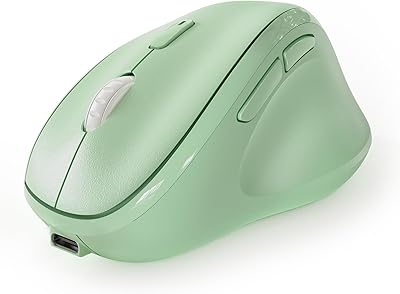
The KYSONA Ergonomic Vertical Wireless Mouse is one of the more accessible ways to try a vertical grip without spending a lot. Unlike flat mice that force your forearm into a pronated position all day, the 57° tilt holds your hand in a natural handshake-like posture that many people find noticeably less fatiguing. One important caveat upfront: this mouse is sized for small to medium hands, and KYSONA is clear about that. If your hands run large, this one will feel cramped. For everyone else, it offers tri-mode wireless connectivity at a budget-friendly price — a combination that is genuinely hard to find at this tier.
Features & Benefits

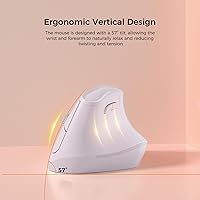
The 57° vertical angle is what this mouse is really built around. Keeping your forearm upright rather than twisted flat reduces the rotational stress that leads to wrist soreness during long work sessions. The silent click switches are genuinely quiet — useful in a shared office or if you work late at night without disturbing anyone nearby. Five DPI levels span from a slow 800 for precise cursor work up to 4000 for quick navigation across large displays. Bluetooth 5.0, Bluetooth 3.0, and a 2.4G USB dongle cover most device combinations. The auto-sleep function helps stretch battery life, which KYSONA rates at up to 12 months on two AAA batteries — though real-world results will vary by usage.

Best For

This wireless ergonomic mouse works best for people who spend hours at a desk and have started feeling it in their wrists. Office workers and students are the obvious fit — anyone who mouses heavily throughout the day and wants to try a more natural hand position without a large upfront investment. Multi-device users will appreciate being able to pair with a laptop, desktop, and iPad without swapping hardware. That said, the hand size limit is real: if you have large hands, the compact body will feel like gripping a bar of soap. For smaller hands and first-time vertical mouse users, it is a low-risk way to explore this style of ergonomic input.

User Feedback

Buyers who stick with the KYSONA ergo mouse consistently report reduced wrist discomfort after a week or two — the adjustment period is real, so do not judge it on day one. The quiet clicks earn steady praise from users in open offices and shared spaces. Pairing across Bluetooth is generally described as straightforward. On the downside, the scroll wheel draws mixed reactions — some find it stiff or imprecise. A handful of users with larger hands confirm the sizing issue firsthand. Build quality is light plastic, which is expected at this price; nobody calls it flimsy, but it does not feel premium. Battery longevity is hard to verify long-term, though most report no issues through several months of regular use.

Pros

  • The 57° vertical grip meaningfully reduces forearm pronation, which many users notice within the first week of regular use.
  • Silent click switches are genuinely quiet — a real advantage in shared offices or late-night work sessions.
  • Three wireless modes (BT 5.0, BT 3.0, and 2.4G dongle) cover nearly any device combination without extra adapters.
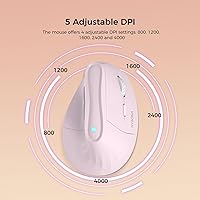
  • Five DPI levels from 800 to 4000 give practical flexibility from slow, precise cursor work to fast screen navigation.
  • Battery life is strong — manufacturer-rated at up to 12 months on two AAA batteries, with most users reporting no issues for several months.
  • No charging cable needed means one less cord to manage, and AAA batteries are easy to replace anywhere.
  • iPadOS support is a genuine bonus for tablet users who want a more comfortable pointing option.
  • At this price tier, the feature set — especially tri-mode wireless — represents solid value for a first ergonomic mouse.

Cons

  • Strictly sized for small to medium hands; larger-handed users will find the compact body uncomfortable quickly.
  • The scroll wheel feels stiff or imprecise to some users, which becomes noticeable during extended document or web browsing sessions.
  • New vertical mouse users should expect a 1 to 2 week adjustment period before the grip starts feeling natural.
  • Build quality is lightweight plastic throughout — functional, but it does not inspire confidence during heavy daily use.
  • The USB dongle has no dedicated storage slot on the mouse itself, making it easy to misplace during travel.
  • The 12-month battery claim is manufacturer-stated and likely reflects light use; heavier users should expect to replace batteries sooner.
  • Optical tracking performance is adequate for office work but lacks the consistency needed for detail-heavy creative tasks.
  • No software or companion app means button remapping and DPI customization beyond the physical toggle are not possible.

Ratings

The scores below were generated by AI after analyzing verified buyer reviews for the KYSONA Ergonomic Vertical Wireless Mouse from global marketplaces, with spam, bot activity, and incentivized feedback actively filtered out. Each category reflects the full spectrum of real user experience — where this vertical mouse genuinely delivers comfort and convenience, and where it falls short of expectations. Strengths and frustrations are weighted equally so you can make a confident, informed decision.
Ergonomic Comfort
83%
The 57° vertical tilt is the reason most buyers choose this mouse, and for small to medium hands it largely delivers. Office workers who previously dealt with forearm aching during long spreadsheet sessions report meaningful relief after a couple of weeks of regular use.
The comfort gains take time — new vertical mouse users almost universally describe an awkward adaptation period of one to two weeks before the grip stops feeling forced. Users who push through that window tend to be satisfied; those who quit early are not.
Hand Size Fit
61%
39%
For people with genuinely small to medium hands, the compact 10.7 x 7.4 x 7.1 cm body feels proportionate and well-balanced. Students and lighter-framed users in particular tend to find the grip natural once they adjust to the vertical angle.
This is the single most frequent source of buyer disappointment. Users with larger hands consistently report that the mouse feels cramped and forces an awkward pinch grip — a problem that no amount of adaptation time will fix. The sizing constraint is real and non-negotiable.
Wireless Connectivity
86%
Having three connection modes — Bluetooth 5.0, Bluetooth 3.0, and a 2.4G USB dongle — in a budget-tier mouse is a genuine advantage for multi-device users. People who switch between a work laptop, a home desktop, and an iPad find the flexibility surprisingly practical day to day.
The manual switching process between modes is functional but not elegant — there is no automatic device-switching logic. A small number of users also report occasional Bluetooth pairing hiccups on initial setup, particularly with older operating system versions.
Click Quietness
88%
The silent switches are consistently praised by buyers who share office space or work late at night near sleeping family members. The sound reduction compared to a standard click mouse is noticeable enough that several reviewers specifically called it out as a deciding factor in their purchase.
At very close range in a completely silent room, the muted thud is still audible — calling them truly silent would overstate it. A handful of users also feel the click feedback is slightly mushy compared to standard switches, which can affect typing rhythm when clicking rapidly.
Battery Life
74%
26%
The auto-sleep feature does a solid job of stretching battery life for moderate users, and many buyers report going several months without needing to swap batteries. Not having a charging cable to manage is a practical convenience that frequent travelers and minimalist desk setups appreciate.
The manufacturer-stated 12-month claim reflects light use with sleep mode doing heavy lifting — real-world heavy users report replacing batteries considerably sooner. There is no battery level indicator on the mouse itself, so the first warning you get is the cursor starting to stutter.
DPI Versatility
79%
21%
Five DPI steps from 800 to 4000 cover a practical range for most office and general productivity scenarios. The on-the-fly toggle button lets users drop to precise low sensitivity for detailed work and bump back up for navigating a large external monitor without diving into any settings menu.
There is no software to customize which DPI levels are active or to set exact values between the fixed steps. For users who want fine-tuned sensitivity control — or who find the jump between 1600 and 2400 too large — the fixed-step system feels limiting.
Scroll Wheel
58%
42%
The scroll wheel is functional for basic document and web page navigation, and it handles standard office tasks without major issues. Occasional users who scroll lightly throughout the day are unlikely to find it a significant pain point.
This is one of the more consistently criticized hardware elements. Users describe the wheel as stiff, with a coarse notch feel that becomes fatiguing during extended reading or browsing sessions. Compared to scroll wheels on mid-range mice, it feels like a clear cost-cutting compromise.
Build Quality
63%
37%
The plastic shell feels adequately solid during normal desk use and does not flex or creak under a standard grip. For buyers who understand the price tier they are buying into, the construction meets reasonable expectations for an entry-level ergonomic mouse.
The lightweight plastic finish does not hold up well to critical handling — the surface picks up fingerprints and light scratches easily, and the overall feel lacks the reassuring density of even modestly priced competing mice. Long-term durability over years of daily use remains an open question.
Button Layout
77%
23%
The two thumb-side buttons default to browser back and forward navigation, which is immediately useful without any setup for most Windows and macOS users. Having seven buttons total on a mouse at this price point is a reasonable offering for everyday productivity workflows.
Without companion software, button remapping is not possible — what the defaults are is what you get. For users who want to assign custom shortcuts or macros to those extra buttons, the lack of any customization app is a hard limitation with no workaround.
Setup & Pairing
82%
18%
Most buyers describe the initial pairing process as quick and uncomplicated, particularly in 2.4G dongle mode which works plug-and-play on Windows and macOS without driver installation. Switching over to Bluetooth for an iPad connection is also generally smooth for users following the standard pairing steps.
A subset of users reports that Bluetooth reconnection after the mouse wakes from sleep can lag by a second or two, which is mildly disruptive in fast-paced workflows. First-time Bluetooth pairing on some Linux systems is reportedly unreliable, though Linux is not an officially supported OS.
Dongle Storage
44%
56%
The USB dongle itself is a standard nano-receiver that stays out of the way once plugged into a desktop or laptop port. For users who leave it permanently inserted in a stationary machine, the lack of storage is a complete non-issue.
There is no slot or compartment on the mouse body to store the nano-receiver when traveling, which is a notable omission for a wireless mouse at any price. Multiple users report losing the dongle during travel or desk reorganization, and replacement is not straightforward.
Value for Money
81%
19%
At its price point, the combination of three wireless modes, silent clicks, and a genuine ergonomic design is a compelling package. For someone who wants to trial the vertical mouse format without a significant financial commitment, it represents one of the more feature-complete options available at this tier.
The value calculation breaks down sharply if you have large hands — you simply cannot use the mouse comfortably, making the purchase a total loss. Buyers who need software customization, premium build quality, or precision sensor performance will also find they need to spend more elsewhere.
Multi-Device Workflow
78%
22%
The ability to move between a work PC, a personal laptop, and an iPad with a single mouse is a practical convenience that multi-device users genuinely appreciate. iPadOS compatibility works reliably via Bluetooth, which is a useful feature for tablet-based productivity setups.
Switching between devices requires physically pressing a mode button and occasionally re-pairing, rather than offering the seamless one-click switching found on higher-end multi-device mice. For users who switch devices very frequently throughout the day, the process adds minor but repeated friction.

Suitable for:

The KYSONA Ergonomic Vertical Wireless Mouse is a strong pick for desk-bound workers and students who log long hours and have started noticing wrist or forearm discomfort with a standard flat mouse. The 57° vertical grip naturally positions the forearm in a less strained posture, and for people with small to medium hands, the compact body actually feels well-proportioned rather than undersized. Multi-device users will find the three connection modes practical — you can keep the USB dongle in a desktop, pair via Bluetooth 5.0 to a laptop, and connect to an iPad without buying separate hardware. The silent switches make it a considerate choice in quiet offices, libraries, or shared bedrooms. Anyone curious about vertical mice but unwilling to commit significant money to the format will find this a sensible, low-stakes first try.
Not suitable for:

If you have large hands, the KYSONA Ergonomic Vertical Wireless Mouse is likely to frustrate you — the body measures just 10.7 x 7.4 x 7.1 cm, and users with bigger palms consistently report that it feels cramped within days. Precision-focused users such as graphic designers or photo editors who need consistent, fine-grained cursor control may find the optical sensor and scroll wheel performance underwhelming compared to mid-range or premium alternatives. The lightweight plastic construction, while functional, does not hold up to scrutiny from buyers who expect a solid, premium-feeling device. Gamers should look elsewhere entirely — this is built for productivity comfort, not fast tracking or competitive response times. Anyone who prefers rechargeable devices over disposable batteries may also find the AAA-battery requirement inconvenient in the long run.
Specifications

  • Grip Angle: The mouse body is designed at a 57° vertical tilt to keep the forearm in a more natural, upright position during use.
  • Dimensions: The mouse measures 10.7 x 7.4 x 7.1 cm (4.2 x 2.9 x 2.8 in), sized for small to medium hands.
  • Weight: The mouse weighs 3.52 oz (99.8 g), making it light enough for extended daily use without fatigue.
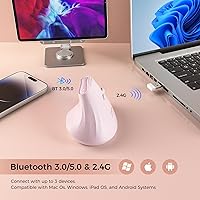
  • Connectivity: Three wireless modes are supported: Bluetooth 5.0, Bluetooth 3.0, and a 2.4G USB dongle for broad device compatibility.
  • DPI Settings: Five selectable DPI levels are available: 800, 1200, 1600, 2400, and 4000, switchable via a dedicated button.
  • Button Count: The mouse features 7 buttons, including left and right click, a scroll wheel click, DPI toggle, and additional thumb-side buttons for navigation.
  • Click Type: All primary clicks use silent switches designed to significantly reduce audible noise compared to standard mechanical click buttons.
  • Tracking: An optical sensor handles movement detection, suited for everyday productivity use on standard desk surfaces.
  • Power Source: The mouse runs on 2 x AAA batteries, which are not included in the box and must be purchased separately.
  • Battery Life: KYSONA rates battery life at up to 12 months under typical usage conditions, aided by an automatic sleep mode during inactivity.
  • Sleep Mode: A smart auto-sleep function activates during periods of inactivity to conserve battery power without requiring manual intervention.
  • OS Support: The mouse is compatible with Windows, macOS, and iPadOS, covering most common personal computing and tablet environments.
  • Hand Size Fit: KYSONA recommends this mouse for small to medium hands; measuring hand length before purchase is advised to confirm fit.
  • Brand: The mouse is designed and sold under the KYSONA brand, manufactured by Shenzhen Huihaikang Intelligent Equipment Co., Ltd.
  • Availability: This mouse was first listed for sale on December 25, 2023, and carries ASIN B0CQX1MBC4 on the Amazon marketplace.

Related Reviews

seenda Ergonomic Vertical Wireless Mouse
86%
90%
Wrist Comfort & Ergonomics
87%
Battery Life & Charging
91%
Quiet Click Performance
85%
Compatibility & Connectivity
88%
Build Quality & Durability
More
Lekvey XC-05 Vertical Wireless Mouse
75%
83%
Ergonomic Comfort
66%
Build Quality
88%
Battery Life
54%
Sleep Mode & Wake Responsiveness
81%
Wireless Connectivity
More
Woddlffy RAAVEE Ergonomic Vertical Wireless Mouse
75%
81%
Ergonomic Comfort
54%
Build Quality
83%
Wireless Connectivity
57%
DPI Range
63%
Button Functionality
More
Acer OMR241 Ergonomic Vertical Mouse
74%
83%
Ergonomic Comfort
67%
Build Quality
88%
Battery Life
61%
DPI and Precision
43%
Mac Compatibility
More
UGREEN Vertical Wireless Ergonomic Mouse
84%
88%
Ergonomic Comfort
84%
Connectivity Performance
80%
Ease of Use
91%
Design and Build Quality
82%
Battery Life
More
SHARE SUNSHINE Ergonomic Vertical Wireless Mouse
74%
83%
Ergonomic Comfort
79%
Adjustable Tilt Angle
71%
Build Quality
74%
Palm Rest Comfort
88%
Wireless Connectivity
More
Cherry MW4500 Wireless Vertical Ergonomic Mouse
83%
89%
Ergonomics & Comfort
74%
Battery Life
81%
DPI Performance
77%
Ease of Use
85%
Build Quality
More
DeLUX Seeker M618XSD Wireless Ergonomic Vertical Mouse
85%
88%
Ergonomics & Comfort
93%
Connectivity Options
85%
Customizability (DPI & RGB)
91%
Display & Functionality
82%
Battery Life
More
MEETION DirectorC Split Ergonomic Keyboard Mouse Combo
72%
83%
Ergonomic Comfort
71%
Typing Experience
77%
Mouse Performance
66%
Wrist Rest Quality
62%
Build Quality
More
Micropack MP-V01B Ergonomic Vertical Wireless Bluetooth Mouse
85%
88%
Ergonomics and Comfort
91%
Connectivity and Device Support
85%
Battery Life and Rechargeability
79%
Silent Click Mechanism
84%
Precision and Adjustable DPI
More

FAQ

Yes, the KYSONA Ergonomic Vertical Wireless Mouse is actually a sensible starting point for first-timers. That said, expect an adjustment period of about one to two weeks — the grip feels awkward at first, and that is completely normal. Most people find it starts to feel natural once their wrist and forearm muscles adapt.

KYSONA recommends it for small to medium hands, so it helps to measure your hand before buying. A rough guide: if your hand length from wrist crease to middle fingertip is under roughly 19 cm (about 7.5 inches), you should be fine. Larger hands frequently feel cramped with this body size, which is the most common complaint from dissatisfied buyers.

Not simultaneously, but you can switch between up to three devices using the different connection modes — Bluetooth 5.0, Bluetooth 3.0, and the 2.4G USB dongle. You switch between them manually. It is a practical setup if you regularly move between a desktop, a laptop, and a tablet.

Yes, it pairs with iPads running iPadOS via Bluetooth. The pairing process is the same as connecting any Bluetooth mouse to an iPad — go to Settings, Bluetooth, and select the device. Keep in mind you will need an iPadOS version that supports external mice, which has been standard since iPadOS 13.

They are noticeably quieter than a standard mouse — not completely silent, but the sound is a soft muted thud rather than the usual sharp click. In a quiet room you can still hear it up close, but across a desk in an office it is unlikely to bother anyone sitting nearby.

KYSONA states up to 12 months, which is their best-case figure under light or moderate use with auto-sleep doing its job. In practice, heavy daily users should expect less — somewhere in the range of several months is a more realistic expectation. The good news is AAA batteries are cheap and easy to find, so replacement is not a hassle.

The DPI button cycles through five sensitivity levels: 800, 1200, 1600, 2400, and 4000. Lower settings like 800 or 1200 move the cursor slowly and precisely, which is useful for detailed work or small screens. Higher settings like 2400 or 4000 let you cover a large monitor quickly with minimal hand movement. Most office users find 1200 or 1600 comfortable for day-to-day tasks.

The thumb-side buttons are typically mapped as back and forward browser navigation by default on Windows and macOS, which is handy for web browsing or moving through documents. There is no companion software to remap them, so what you see is what you get — but for most users, the default mapping is genuinely useful.

This is a minor but real inconvenience — there is no dedicated storage slot built into the mouse body for the dongle. You will need to keep it plugged into a port or store it separately. If you travel with this mouse, it is worth keeping the dongle in a small pouch or case so it does not get lost.

It is lightweight plastic, which is expected at this price point, but it does not feel flimsy in the hand. The buttons have reasonable resistance and the shell feels solid enough for standard desk use. Do not expect the weight or finish of a premium mouse — but for daily productivity in a typical office setting, it holds up fine.

Where to Buy