Overview

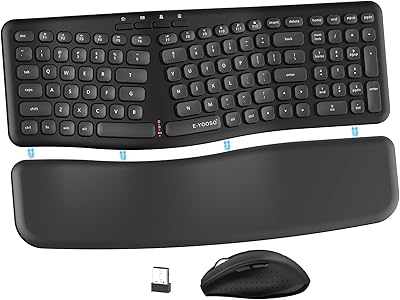
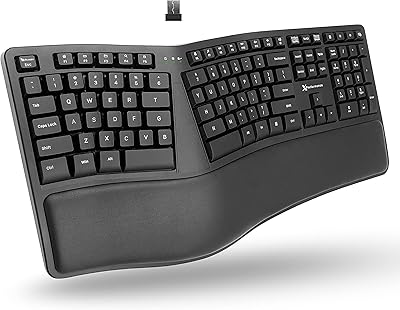
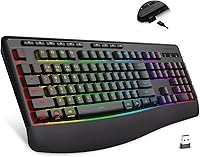
The E-YOOSO K787 Wireless Ergonomic Gaming Keyboard enters a crowded space with a clear pitch: a comfortable, wireless-capable full-size board aimed at home office workers and casual gamers who want more than a basic wired setup. What separates the K787 from comparably priced options — Redragon's budget wireless line, for example — is that it ships with a detachable palm rest already in the box, something brands typically charge extra for. The spill-resistant matte finish rounds out the package as a genuinely practical detail, offering desk-spill protection that most keyboards at this price tier quietly omit.
Features & Benefits

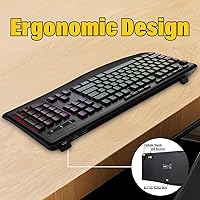
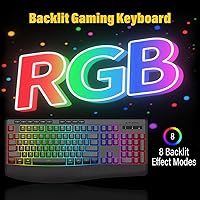
Where this wireless ergonomic keyboard genuinely earns its keep is in the connectivity options. The tri-mode setup — USB-C wired, 2.4GHz dongle, and Bluetooth 5.0 — lets you hop between devices without pulling cables. The RGB side offers 8 preset lighting modes with five brightness levels, handy for dimly lit setups. Ten dedicated multimedia keys and 12 hotkey combos add practical control without hunting through menus. The dual foldable stands and included palm rest let you dial in a comfortable wrist angle for long sessions. Worth noting: the claimed 365-day standby assumes the backlight is completely off — turn the RGB on and expect that figure to drop significantly. The spill resistance is real, but treat it as splash protection, not waterproofing.

Best For

The K787 is a natural pick for home office workers who want the freedom of wireless without committing to a high-end price point. It suits people who type for hours at a stretch — the wrist rest and adjustable tilt genuinely reduce fatigue over time. Multi-device users will appreciate the ability to pair across a PC, tablet, and laptop and toggle between them quickly. Casual and mid-level gamers will find the feature set solid, though competitive players who demand the lowest possible input latency should look at dedicated gaming keyboards instead. If you are upgrading from a no-frills wired board, this tri-mode board represents a meaningful step up in both comfort and versatility.

User Feedback

With a 4.4-star average across more than 200 reviews, this tri-mode board lands in solid territory. Buyers consistently praise the palm rest comfort and the ease of initial Bluetooth pairing, and the RGB lighting gets frequent mentions for looking better in person than in product photos. On the critical side, a handful of users report occasional Bluetooth dropout under heavy multi-device use, and a few note some key wobble on the outer columns. The typing feel gets mixed opinions — quieter than a traditional mechanical but not as hushed as a true low-profile membrane — which places it honestly somewhere in the middle. The spill-resistance claims appear to hold up in real-world use, and very few buyers have walked away feeling the value was lacking.

Pros

  • Tri-mode connectivity lets you switch between wired, 2.4GHz, and Bluetooth 5.0 without ever touching a cable.
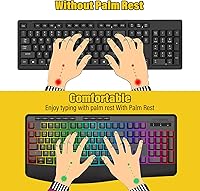
  • The detachable palm rest ships in the box — a detail most competitors at this price tier charge extra for.
  • Eight RGB lighting presets with five brightness levels look noticeably better in person than in product listings.
  • Full 104-key layout with 10 dedicated multimedia keys keeps everyday controls right at your fingertips.
  • Dual foldable stands let you dial in your preferred typing angle without buying a separate accessory.
  • Intelligent sleep modes help extend battery life meaningfully when the backlight is kept off or dimmed.
  • The matte spill-resistant surface holds up well against accidental coffee or water splashes on the desk.
  • Wireless range of up to 10 metres gives you real flexibility in how and where you position your setup.
  • WIN lock prevents accidental Start menu interruptions mid-session, a small but genuinely useful touch for gamers.
  • Broad compatibility across Windows, macOS, and tablets makes the K787 a practical single-keyboard solution for mixed-device households.

Cons

  • Bluetooth stability can be inconsistent under heavy multi-device use or in crowded wireless environments.
  • The advertised 365-day battery standby only applies with backlighting fully disabled — RGB use cuts runtime substantially.
  • Some users report noticeable key wobble on the outer columns, which can feel cheap during fast typing.
  • The membrane typing feel divides opinion; it lacks the tactile precision that mechanical switch users expect.
  • Auto-standby kicks in after just 3 minutes of inactivity, which can feel overly aggressive during reading-heavy work sessions.
  • Build quality is predominantly plastic, and the chassis flexes slightly under firm pressure at the center.
  • The 2.4GHz dongle adds a small but permanent USB port commitment on machines where ports are already limited.
  • Spill resistance covers minor splashes only — a proper liquid spill can still damage internal components if not dried quickly.
  • No dedicated per-key RGB customization software means you are limited to the 8 preset lighting modes as shipped.

Ratings

The E-YOOSO K787 Wireless Ergonomic Gaming Keyboard earned its 4.4-star aggregate through a consistent pattern of real-world praise that holds up under close scrutiny. These category scores were generated by AI after analyzing verified purchase reviews from buyers worldwide, with spam, bot-generated, and incentivized submissions actively filtered to protect scoring integrity. Both the genuine strengths and the recurring frustrations are reflected transparently across each category below.
Value for Money
88%
Buyers repeatedly call out the K787 as punching well above its price point, particularly because the palm rest and RGB lighting are included without any upselling. Compared to similarly priced boards from Redragon, the overall out-of-box package feels more complete, which resonates strongly with first-time wireless keyboard buyers.
A vocal segment of reviewers felt the build materials — predominantly matte plastic with noticeable chassis flex — did not quite justify even a modest investment over time. Those expecting the structural confidence of a Logitech MX Keys at a fraction of the cost will walk away at least slightly underwhelmed.
Wireless Connectivity
73%
27%
The 2.4GHz dongle connection gets consistent praise for staying stable during hour-long gaming and work sessions, with users noting minimal lag even at distances of 6 to 8 metres from the receiver. Bluetooth pairing for the first time was described as intuitive and fast across Windows and Android tablets.
Recurring complaints center on Bluetooth behaving erratically when two or more devices are paired simultaneously, with a noticeable delay when waking the keyboard from sleep in that mode. Users in apartments or offices with dense Wi-Fi and Bluetooth traffic report the most problems, while those in quieter wireless environments rarely mention dropouts.
Ergonomics & Comfort
84%
The detachable palm rest gets enthusiastic feedback from users who type for three or more hours straight — they specifically note reduced wrist tension compared to their previous flat-board setup. The two foldable stands add a real, adjustable tilt that lets most people find their ideal position without resorting to books or risers.
The palm rest surface is reported to feel slightly sticky after extended warm-weather use by a few reviewers, which is a common complaint with soft-finish plastic wrist rests. Users with very large hands also mentioned the wrist rest felt narrow relative to the full-size key span of the board.
Build Quality
66%
34%
The matte plastic finish resists fingerprint smudges noticeably better than glossy alternatives, which users working in naturally lit home offices particularly appreciated. The keyboard does not rattle or creak during normal typing, and the keycaps feel firmly attached with no signs of loosening reported after weeks of daily use.
The center of the keyboard chassis flexes when pressed firmly, which is a telltale sign of cost-cutting in the frame structure. Several reviewers flagged wobble on the outer column keys — particularly the backslash and right-side modifier keys — which disrupts typing rhythm during fast input sessions.
Battery Life
68%
32%
With the backlight turned off, the battery holds up impressively well for a wireless keyboard in this category, and the intelligent sleep mode kicking in after 20 minutes of inactivity genuinely helps stretch charge between sessions. Users who operate primarily in wired mode and charge opportunistically report rarely thinking about battery at all.
The 365-day standby claim only holds in optimal conditions with RGB completely off, and several buyers felt misled after finding their battery drained far faster during regular use with backlighting active. The auto-standby at just 3 minutes also frustrated users who pause frequently mid-task, requiring a keypress to wake the board each time.
RGB Lighting
79%
21%
Multiple reviewers noted the RGB looked significantly more vivid and dynamic in person than the product photos suggested, making the backlight one of the board's surprise highlights. With eight presets and five brightness levels adjustable directly from the keyboard, users appreciated not needing any software to get a lighting setup they liked.
The lack of per-key customization software is the most cited RGB complaint — you get 8 fixed presets and nothing beyond that, which feels limiting for users who want a specific static color or pattern. A handful of buyers also noted that some keys appeared slightly dim at the lowest brightness setting.
Key Feel & Typing
71%
29%
Users who came from cheap rubber-dome boards describe the K787's key feel as a clear step up — more consistent actuation and less mushy feedback than entry-level membranes. The quieter profile compared to clicky switches was a genuine selling point for those typing at night while others sleep nearby.
Anyone coming from a mechanical keyboard will feel the softness immediately and may find it hard to adjust, particularly for fast coding or gaming inputs where tactile precision matters. The pre-travel and actuation feel is consistent across the layout but ultimately unremarkable, doing its job without inspiring any enthusiasm.
Multi-Device Switching
77%
23%
Users who bounce between a work laptop and a personal PC during the day praised the ability to keep two Bluetooth devices and a 2.4GHz connection active without re-pairing from scratch each time. The dedicated connection-switch shortcuts are discoverable without reading the manual, which reviewers using this as a productivity tool appreciated.
A persistent frustration is the slight lag when switching between Bluetooth-paired devices — users describe a one-to-two-second reconnection window that breaks flow during quick task-switching. A few buyers also reported the board occasionally forgot a paired Bluetooth device after a system update, requiring a manual re-pair from scratch.
Spill Resistance
62%
38%
The splash-resistant matte surface held up to minor desk spills in real-world use, with a number of reviewers confirming that a small accidental coffee or water splash dried without lasting damage. The ability to gently tilt and shake out surface liquid is a practical recovery step that most users executed successfully.
The spill resistance does not extend to full liquid submersion or even a large-volume pour — buyers who experienced a full cup tipping directly onto the board did not share the same positive outcome. The matte coating is the only line of defense; there is no internal drain channel or sealed PCB protection.
Multimedia Controls
82%
18%
The 10 dedicated multimedia keys handle volume, playback, and screen brightness without requiring any Fn-layer acrobatics, which home office users working across multiple open applications found genuinely useful throughout the day. Reviewers upgrading from keyboards with buried media controls consistently called it a meaningful quality-of-life improvement.
A portion of macOS users noted that some multimedia key mappings did not translate correctly to Mac workflows without remapping, requiring workarounds for basic functions. The 12 Fn-based hotkey combos are not labeled on the keycaps themselves, so there is an initial learning curve before muscle memory kicks in.
Setup & Compatibility
93%
Nearly every reviewer across platforms praised how quickly this tri-mode board got up and running — plugging in the nano dongle or completing Bluetooth pairing took under a minute in almost all documented cases. The driver-free experience means nothing to install, update, or troubleshoot, which particularly benefits less tech-savvy users setting it up for the first time.
A small number of Linux users reported inconsistent key recognition in certain distributions, which is unsurprising given the officially supported OS list stops at Windows and macOS. Those using niche operating systems or older Bluetooth stacks should test compatibility carefully before relying on this board as a daily driver.
Noise Level
76%
24%
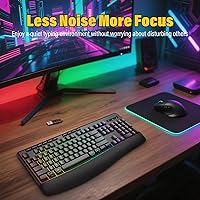
For buyers sharing a bedroom desk setup with a sleeping partner or working near others on video calls, the relatively muted keystroke sound came up repeatedly as a positive surprise. The membrane actuation keeps the overall sound floor well below what most mechanical or even budget linear switches produce.
It is not silent — users on live streaming setups or near recording microphones noted the keystrokes are audible enough to bleed into a nearby condenser mic at close range. Several reviewers described the sound as a slightly plasticky thud they grew accustomed to over time but found initially distracting.
Palm Rest Quality
83%
The fact that the palm rest detaches cleanly and requires no adhesive or tools makes it one of the more thoughtfully integrated accessories in this product category. Users with pre-existing wrist strain from extended typing sessions frequently noted it genuinely reduced end-of-day discomfort, particularly when combined with the highest stand angle.
The plastic palm rest surface lacks any cushioning layer or gel padding, placing it a clear step below dedicated ergonomic rests that use memory foam or gel inserts. A handful of users swapped it out for an aftermarket gel rest after a few weeks, keeping the keyboard but replacing the bundled accessory.

Suitable for:

The E-YOOSO K787 Wireless Ergonomic Gaming Keyboard is a strong match for home office workers and casual gamers who spend long hours at their desk and want genuine wrist comfort without paying a premium for it. If you regularly switch between a desktop, laptop, and tablet, the tri-mode connectivity — covering Bluetooth 5.0, 2.4GHz wireless, and USB-C wired — removes a lot of daily friction that a single-mode board simply cannot. The included palm rest and dual-angle foldable stands mean you are not hunting for accessories after unboxing; everything needed for a comfortable, customized setup is already in the package. People upgrading from a basic wired keyboard will find the jump in versatility and ergonomics immediately noticeable. It also works well for light evening gaming sessions where RGB ambiance matters but split-millisecond input response does not.

Not suitable for:

The E-YOOSO K787 Wireless Ergonomic Gaming Keyboard is not the right tool for competitive or professional-level gamers who need guaranteed low-latency input and rock-solid wireless stability under demanding conditions. Users who rely on Bluetooth across multiple simultaneous connections may find the occasional dropout frustrating, particularly in environments with heavy wireless interference. Anyone expecting true waterproofing should look elsewhere — the splash-resistant matte finish handles minor accidental spills, but it is not rated for anything beyond that, and submerging or saturating it will cause damage. Typists who prefer the crisp, tactile feedback of a high-end mechanical switch will likely find the membrane-style feel too soft and imprecise for their taste. Finally, buyers who need ultra-quiet keystrokes for shared office or studio environments may want to audition it before committing, as the sound level sits in an ambiguous middle ground rather than being definitively silent.
Specifications

  • Brand & Model: Manufactured by E-YOOSO under model number K787, sold under the XuanGui product listing on Amazon.
  • Connectivity: Supports three connection modes: USB-C wired, 2.4GHz wireless via nano dongle, and Bluetooth 3.0/5.0 for multi-device pairing.
  • Key Count: Full-size 104-key QWERTY layout, including 10 dedicated multimedia keys and 12 function-row hotkey combos.
  • RGB Lighting: Offers 8 preset backlight modes with 5 adjustable brightness levels and 5 speed settings, controllable directly from the keyboard.
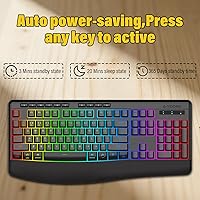
  • Battery Standby: Rated for up to 365 days of standby time with the backlight completely disabled; real-world runtime is significantly lower with RGB active.
  • Power Saving: Automatically enters standby mode after 3 minutes of inactivity and drops into sleep mode after 20 minutes; any keypress wakes the device instantly.
  • Wireless Range: Stable wireless transmission range of up to 10 metres in open conditions for both 2.4GHz and Bluetooth modes.
  • Palm Rest: Detachable ergonomic palm rest is included in the box; attaches magnetically or by clip to the keyboard base.
  • Tilt Adjustment: Two foldable rear stands provide dual-height tilt adjustment to help users find a comfortable typing angle.
  • Spill Resistance: Matte plastic surface offers splash resistance against minor liquid spills; the board is not waterproof and should be dried immediately if wet.
  • WIN Lock: Dedicated WIN lock key disables the Windows key during gaming sessions to prevent accidental Start menu interruptions.
  • Compatibility: Compatible with Windows, macOS, and tablet operating systems; no driver or additional software installation is required.
  • Switch Type: Uses membrane key switches, producing a quieter, softer keystroke compared to mechanical alternatives.
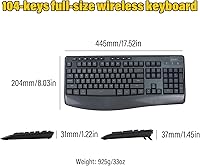
  • Dimensions: Package measures 17.87 x 8.58 x 1.46 inches, making it a standard full-size footprint suitable for most desk setups.
  • Weight: Complete unit weighs 2.01 pounds, which includes the attached palm rest and is typical for a full-size wireless keyboard.
  • Charging & Wired: Includes a detachable USB-C cable that supports both wired mode operation and battery charging simultaneously.

Related Reviews

E-YOOSO Ergonomic Wireless Keyboard and Mouse Combo
84%
88%
Ergonomic Comfort
91%
Wireless Connectivity
94%
Ease of Setup
82%
Design and Build Quality
85%
Mouse Performance
More
QUASIO Wave Keys Ergonomic Wireless Keyboard with Wrist Rest
75%
83%
Ergonomic Comfort
71%
Wrist Rest Quality
67%
Typing Feel & Key Travel
86%
Wireless Reliability
81%
Mac & Windows Compatibility
More
TECKNET TK-EKB01040BS01 Wireless Keyboard
76%
83%
Ergonomic Comfort
86%
Typing Noise Level
79%
Wireless Reliability
62%
Build Quality
88%
Value for Money
More
X9 Performance Wireless Ergonomic Split Keyboard
76%
83%
Ergonomic Comfort
58%
Key Feel & Typing Experience
86%
Wireless Performance
88%
Battery Life
62%
Build Quality
More
Alienware Pro Wireless Gaming Keyboard
87%
93%
Connectivity
89%
Customization (Hot-Swappable Switches)
91%
Ergonomics and Layout
88%
RGB Lighting
85%
Battery Life
More
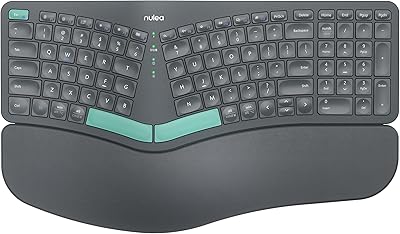
Nulea HD315 Wireless Ergonomic Split Keyboard
75%
83%
Ergonomic Design
81%
Wrist Rest Comfort
76%
Wireless Reliability
88%
Value for Money
58%
Typing Feel
More
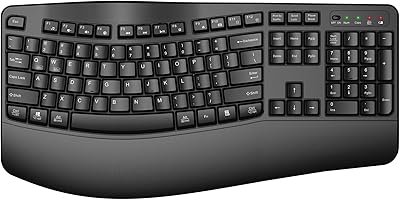
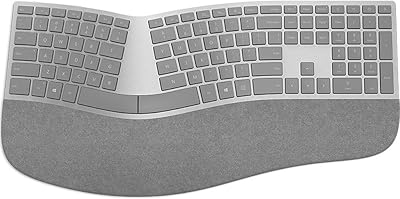
Microsoft Surface Ergonomic Wireless Keyboard
72%
88%
Ergonomic Design
84%
Build Quality
91%
Palm Rest Comfort
73%
Typing Experience
76%
Bluetooth Connectivity
More
HP 960 Ergonomic Wireless Keyboard
73%
84%
Ergonomic Design
81%
Wrist Rest Quality
88%
Detached Numpad
86%
Multi-Device Connectivity
67%
Key Feel & Typing Experience
More
GAMCATZ Ergonomic Wireless Keyboard and Mouse Combo
77%
83%
Value for Money
72%
Typing Feel
74%
Mouse Performance
87%
Wireless Reliability
68%
Wrist Comfort
More
PEIOUS Wireless Ergonomic Keyboard and Mouse Combo
74%
78%
Ergonomic Comfort
74%
Typing Feel & Key Response
69%
Mouse Ergonomics
83%
Wireless Reliability
61%
Build Quality & Durability
More

FAQ

No, the K787 is fully plug-and-play across all three connection modes. You just plug in the USB dongle or pair over Bluetooth and it works immediately, with no software download needed on Windows, macOS, or tablet platforms.

The E-YOOSO K787 Wireless Ergonomic Gaming Keyboard has dedicated hotkey shortcuts that let you toggle between your paired Bluetooth devices and the 2.4GHz connection. It takes a single key combination rather than diving into system settings, which makes jumping between a laptop and a tablet fairly quick once you have everything paired.
The 365-day standby figure only applies with the backlight completely switched off, so treat that as a best-case ceiling rather than an everyday expectation. With RGB lighting active at mid-brightness, most users report needing to recharge noticeably more frequently — think weeks, not months. If battery longevity matters to you, keeping the backlight off or at minimum brightness will help considerably.

Yes, the palm rest is fully detachable and ships included in the box. It clips onto the front edge of the keyboard and holds firmly during normal use. You can remove it just as easily if you prefer a more compact footprint on a tight desk.

Yes, the Bluetooth mode works with both iOS and Android tablets without any issue. You will get standard keyboard input, though some function-row shortcuts may behave differently depending on the operating system, since those combos are optimized for Windows and macOS.

Not really — this should be thought of as splash protection, not waterproofing. Minor surface drips or a small accidental splash can usually be shaken out and dried without lasting damage, but a full cup of liquid tipping directly onto the keyboard is a different story and could cause internal damage. If you spill on it, unplug or power it off immediately and let it dry completely before using it again.

Yes, the included USB-C cable supports both functions simultaneously. Plugging in gives you a wired connection for input while keeping the battery topped up, which is handy if you want to game without worrying about wireless latency or battery drain.

The membrane switches are noticeably quieter than a typical mechanical keyboard, but they are not completely silent either. Most users describe the sound as a soft, muted thud rather than a click or clack. It should be fine for shared home environments, though open-plan offices with very sensitive colleagues might still pick up on it.

For most users in a typical home or office environment, the Bluetooth connection holds steady. A small number of reviewers have noted occasional dropouts when switching between multiple paired devices or in areas with heavy wireless interference, so if your workspace is crowded with wireless devices, the 2.4GHz dongle mode tends to be the more reliable option.

The two rear stands click into position and hold reasonably well under normal typing conditions. They are made of plastic and could theoretically snap under rough handling, but for everyday use at a desk they stay put without wobbling. The adjustment gives you a noticeable difference in wrist angle, and most people find one of the two positions comfortable fairly quickly.