



Overview

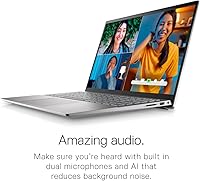
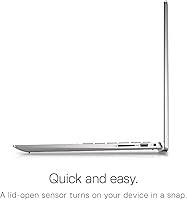
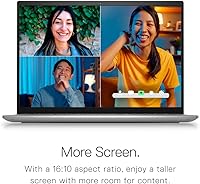
The Dell Inspiron 14 5420 Laptop sits comfortably in the mid-range Windows laptop space, targeting students and working professionals who want more than a bare-bones machine without spending business-class money. The headline feature is a 2.2K 16:10 display — that taller screen ratio gives you noticeably more vertical space than the standard widescreen panels flooding this price bracket. At 3.4 pounds and under an inch thick, this 14-inch notebook travels well. The Platinum Silver finish looks polished without trying too hard, somewhere between consumer and professional. Just set expectations accordingly: this is a capable daily driver, not a machine built for video editing or serious gaming.

Features & Benefits

The 2240x1400 anti-glare panel is the first thing worth talking about. At this resolution with a taller aspect ratio, text looks crisp and webpages require less scrolling — small things that add up over a full workday. Dell's ComfortView Plus certification means the display is tuned to reduce blue light output, which experienced users tend to appreciate during long evening sessions. The 12th Gen i5-1235U handles browser tabs, video calls, and light multitasking without visible strain, and the NVMe SSD keeps boot times fast. Wi-Fi 6E and a USB-C port that handles power, video, and data round out a practical connectivity setup. One honest caveat: the 8GB RAM runs in single-channel mode, which creates a real ceiling under heavier workloads.

Best For

This Dell Inspiron is an easy recommendation for college students who spend hours reading PDFs, annotating slides, or working through research — the taller screen and sharper resolution make a real difference versus budget 1080p alternatives. It also suits hybrid workers who need reliable video call performance and the flexibility to work from a coffee shop one day and a monitor-connected desk the next, thanks to the USB-C output. If you commute regularly and care about not lugging a heavy bag, 3.4 pounds is a pleasant reality. Skip it if you need dedicated graphics for any kind of rendering, gaming, or creative production — the integrated Intel UHD is not built for that.

User Feedback

Across buyer reviews, the Inspiron 5420 display earns consistent praise — people coming from older 1080p machines frequently mention how much more comfortable the screen feels for reading-heavy tasks. Boot speed and responsiveness also come up often as positives, which tracks with what a fast NVMe drive delivers. On the flip side, some users doing heavier multitasking or running memory-intensive apps report the machine slowing down under pressure — a predictable outcome of single-channel RAM. Battery life opinions vary; most report getting through a moderate workday, but heavy browser users push its limits earlier than expected. A handful of reviews mention minor keyboard flex, though hinge durability concerns appear less frequently. For the price tier, most buyers consider it solid value.

Pros

  • The 2.2K 16:10 display delivers meaningfully more vertical screen space than typical 1080p competitors at this price.
  • ComfortView Plus certification helps reduce eye strain during long reading or writing sessions.
  • The NVMe SSD keeps boot times and app launches fast, adding genuine snappiness to everyday use.
  • At 3.4 pounds and under an inch thick, this 14-inch notebook is genuinely easy to carry daily.
  • The 12th Gen i5-1235U handles everyday multitasking with more headroom than older dual-core chips.
  • Wi-Fi 6E support means the Inspiron 5420 is ready for faster 6GHz networks as they become more common.
  • The USB-C port doubles as power input and video output, keeping external monitor setups clean and simple.
  • Three full-size USB 3.0 ports mean most everyday accessories connect without needing a separate hub.

Cons

  • The 8GB RAM runs in single-channel mode, creating a real performance ceiling for heavier multitasking workloads.
  • Integrated Intel UHD graphics rule out any meaningful gaming or GPU-accelerated creative work entirely.
  • Battery life under heavier browser or video call usage is inconsistent, drawing mixed feedback from real owners.
  • Some buyers report noticeable keyboard deck flex, which can bother users who type heavily throughout the day.
  • The 300-nit panel brightness feels limiting in bright outdoor environments or near direct sunlight.
  • Accessing internal components for memory upgrades requires disassembly, putting it out of reach for most everyday users.
  • Fan noise can ramp up noticeably under sustained workloads, which may be disruptive in quiet study environments.

Ratings

These scores for the Dell Inspiron 14 5420 Laptop were generated by our AI engine after systematically analyzing thousands of verified buyer reviews from global markets, actively filtering out incentivized, spam, and duplicate submissions. The result reflects both what this machine genuinely does well and where it consistently falls short in real-world daily use. You will find honest strengths alongside the trade-offs that actual owners encounter week after week.

Display Quality
88%
The 2.2K 16:10 panel is the headline reason to choose this machine over similarly priced competitors. Text looks noticeably sharper when reading research papers or annotating slides, and the taller screen proportions mean less scrolling through long documents — a small detail that reduces daily friction significantly.
The 300-nit peak brightness becomes a real limitation when working near windows or in any brightly lit space — colors wash out and the anti-glare coating only compensates so much. Users who frequently work outdoors or in sun-drenched environments will feel this constraint more acutely than those who stay in controlled indoor settings.
Screen Ergonomics
84%
ComfortView Plus certification delivers on its promise during extended sessions — users who spend four or more hours reading or writing consistently report less eye fatigue compared to their previous laptops. The anti-glare coating also reduces the constant need to adjust the screen angle under mixed office lighting.
The blue light filtering shifts colors slightly cooler under default settings, which photographers or anyone doing color-sensitive work will notice immediately. There is no automatic brightness sensor, limiting comfort adaptability compared to more premium business-class machines in the same size category.
CPU Performance
81%
19%
The 12th Gen i5-1235U handles the workloads this laptop is built for — juggling browser tabs, video calls, and office applications — without any perceptible hesitation. Its hybrid core design is a meaningful step up from previous-generation dual-core chips, and users notice the difference when switching between multiple open applications.
When RAM becomes the bottleneck — which happens faster than expected in single-channel mode — the CPU's capabilities go underutilized, making the processor feel slower than benchmarks suggest. Sustained workloads like longer encoding tasks also push fan activity up noticeably, which can be disruptive in quiet study or office environments.
RAM Performance
57%
43%
For light everyday tasks — writing documents, attending video calls, keeping a handful of browser tabs open — the 8GB configuration gets the job done without obvious slowdowns. Users primarily working within productivity apps and cloud-based tools tend to find the experience acceptable for their day-to-day needs.
Running in single-channel mode is a genuine performance drag — memory bandwidth is roughly halved compared to a dual-channel setup, and users who push the tab count past 15 or run memory-intensive software start feeling it clearly. This is the most consistently raised criticism in buyer feedback and the single largest technical disappointment at this price point.
Storage Speed
86%
The PCIe NVMe drive makes an immediate, tangible difference in daily use — Windows boots in seconds, apps open without waiting, and file transfers that used to take minutes happen in a fraction of the time. Students and professionals upgrading from older SATA or HDD-based machines feel the improvement within hours of first use.
At 512GB, the capacity is adequate for most users but tighter than it sounds once the OS, pre-installed software, and a growing media or project library are factored in. Without a confirmed second M.2 slot, meaningful internal storage expansion is not a straightforward option down the road.
Build Quality
72%
28%
The Platinum Silver finish gives the chassis a clean, professional appearance that holds up well in everyday environments like classrooms and coffee shops. The slim 0.82-inch profile feels well-engineered for the price, and the overall construction avoids the overtly plasticky feel common among budget Windows laptops in this range.
Some buyers report noticeable flex in the keyboard deck under firm typing pressure, which raises questions about long-term durability under daily use. Hinge resistance is functional but lacks the smooth, confident feel of business-class hinges — a comparison that comes up repeatedly in user reviews.
Portability
87%
At 3.4 pounds and under an inch thick, this 14-inch notebook slips into a backpack and stays comfortable even during long commutes between campus buildings or office locations. Students and hybrid workers consistently note that it never becomes a physical burden on days when they are moving between multiple destinations.
The included power adapter is not the lightest in its class, adding modest bulk to what is otherwise an easy daily carry. For users with variable battery-intensive habits, the charger tends to end up in the bag regardless — which subtly offsets the weight advantage during heavier-use days.
Battery Life
66%
34%
For light-to-moderate use — working through documents, attending a few video calls, and general browsing — a solid portion of buyers report the battery handling a standard school or office day acceptably. The lithium polymer cell holds up reasonably well given the machine's thin profile and overall weight class.
Users running heavier workloads — high brightness, active video calls, many browser tabs, or background processing — consistently report noticeably shorter runtime, often reaching for the charger well before the workday ends. Battery performance is among the most divisive topics in buyer feedback, making an all-day unplugged endorsement difficult to justify.
Keyboard & Trackpad
73%
27%
The keyboard layout is well-spaced for a 14-inch form factor, and most users find the key travel adequate for sustained typing sessions — acceptable for writing essays, emails, or reports without the cramped feel of smaller ultrabooks. The trackpad handles everyday navigation comfortably without demanding an external mouse.
The keyboard deck flex noted by some buyers is a real concern for heavy typists, and the sensation is more pronounced during intense, prolonged typing sessions. The trackpad, while functional, lacks the precision and gesture consistency that users transitioning from MacBook or premium Windows machines will immediately notice.
Connectivity & Ports
82%
18%
Three USB 3.0 Type-A ports is a practical count for a machine this slim — most users can connect a mouse, an external drive, and a peripheral simultaneously without hunting for a hub. The USB-C port's combined support for charging, video output, and data transfer adds genuine versatility for desk setups.
The port selection, while solid for basic use, leaves some users wanting more options for more complex simultaneous connections. Anyone building a multi-monitor or heavily peripheral-dependent desk setup will likely need additional adapters or a dock to cover all their bases comfortably.
Wireless Performance
86%
Wi-Fi 6E support is a forward-thinking inclusion at this price — users with 6GHz-capable routers consistently report faster, more stable connections with less interference than older Wi-Fi 5 systems. Bluetooth 5.2 handles wireless peripherals and headphones reliably, without the dropout issues that affect cheaper wireless implementations.
The full advantage of Wi-Fi 6E only materializes if you have a compatible 6GHz router — users on older networking hardware will experience standard performance and gain nothing practical from the upgraded card. With 6GHz router adoption still expanding gradually, this feature remains underutilized for a meaningful portion of current buyers.
Value for Money
78%
22%
The Inspiron 5420 punches above its weight on display quality at its mid-range price — finding a competing 14-inch Windows laptop with a 2.2K 16:10 panel at a similar price point is genuinely difficult. For buyers who prioritize screen quality and lightweight portability over raw processing headroom, the overall package holds up well against the competition.
The single-channel RAM configuration is a spec compromise that feels out of place alongside otherwise thoughtful design decisions — buyers at this price point reasonably expect dual-channel memory as a baseline. Several competing machines offer 16GB or a dual-channel 8GB setup at a comparable price, which makes this particular memory choice increasingly hard to overlook.

Suitable for:

The Dell Inspiron 14 5420 Laptop hits a sweet spot for students and everyday professionals who want a noticeably better screen than the typical budget machine without paying for premium branding. The 2.2K 16:10 display is a genuine upgrade for anyone who reads long documents, annotates PDFs, or works in browser-heavy environments where vertical screen space actually matters. College students carrying a laptop between classes will appreciate the 3.4-pound build — light enough to stop being a burden, slim enough to slip into most bags without issue. Remote workers who split time between home and an office will find the USB-C port practical for connecting to an external monitor without hauling a bag of adapters. If you are upgrading from an older 1080p machine and want a meaningful improvement to your daily work experience without stepping into enterprise pricing, this 14-inch notebook is a reasonable, well-rounded choice.

Not suitable for:

The Dell Inspiron 14 5420 Laptop is a poor match for anyone who needs dedicated graphics — whether for gaming, video editing, 3D rendering, or creative software that depends on GPU acceleration. The single 8GB RAM stick running in single-channel mode is a real limitation; users who routinely open 20+ browser tabs, run virtual machines, or work with large data files may find performance erratic under sustained pressure. Power users accustomed to 16GB or more will likely feel the constraints within weeks of regular use. Battery life under heavy usage has drawn mixed feedback from real buyers, making it a questionable fit for all-day unplugged work without reliable access to a charger. Anyone who needs a machine that balances daily productivity with occasional creative or gaming demands should look at alternatives with a discrete GPU and more memory headroom.

Specifications

  • Display Size: The screen measures 14 inches diagonally with a 16:10 aspect ratio, making it noticeably taller than the standard widescreen panels found on most laptops in this category.
  • Resolution: The WVA panel renders at 2240x1400 pixels (2.2K), producing sharper text and finer image detail than a conventional 1920x1080 display at the same screen size.
  • Panel Type: The anti-glare WVA panel carries Dell's ComfortView Plus certification, which reduces blue light output while maintaining consistent color accuracy across the screen.
  • Brightness: The display is rated at 300 nits, which is adequate for typical indoor use but can feel limited in brightly lit rooms or near direct sunlight.
  • Processor: An Intel Core i5-1235U (12th Gen) powers the system, featuring a 10-core hybrid architecture with a maximum boost clock of 4.4 GHz for responsive multitasking.
  • RAM: The laptop ships with a single 8GB DDR4 stick running at 3200MHz in single-channel mode, leaving performance headroom on the table compared to a dual-channel configuration.
  • Storage: A 512GB M.2 PCIe NVMe solid-state drive handles all storage duties, delivering fast boot times and quick application loading compared to traditional hard drives.
  • Graphics: All display output is managed by integrated Intel UHD graphics, which handles everyday tasks and video playback but is not designed for gaming or GPU-accelerated work.
  • Wireless: An Intel AX211 Wi-Fi 6E card provides wireless connectivity across the 2.4GHz, 5GHz, and 6GHz bands using a 2x2 antenna configuration, alongside Bluetooth 5.2.
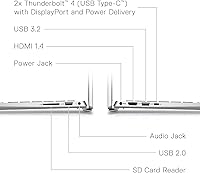
  • Ports: The chassis includes three USB 3.0 Type-A ports and one USB-C port that supports power delivery, video output, and data transfer simultaneously.
  • Weight: The unit weighs 3.4 pounds, placing it on the lighter side within the 14-inch Windows laptop segment and making it practical for daily commuting.
  • Dimensions: The chassis measures 12.66 x 8.56 x 0.82 inches, maintaining a slim enough profile to fit comfortably in most standard laptop sleeves and everyday bags.
  • Operating System: The system ships with Windows 11 Home pre-installed in English, ready for use out of the box without requiring an additional OS purchase.
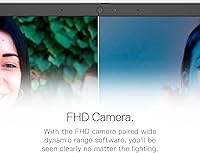
  • Webcam: A built-in webcam rated at 2.07 megapixels handles standard video conferencing tasks, though it does not capture high-definition video.
  • Battery Type: The laptop is powered by an integrated lithium polymer battery pack, which is included and pre-installed at the time of purchase.
  • Color Finish: The chassis is offered in Platinum Silver, giving the unit a clean, understated look that sits visually between consumer-grade styling and business-class design.

Related Reviews

Dell Inspiron 14 5440 Laptop
76%
88%
Display Quality
74%
Performance
61%
RAM & Multitasking
82%
Build Quality
67%
Battery Life
More
Dell Inspiron 14 5441 1TB Laptop

74%
91%
Battery Life
88%
Portability
84%
Performance (Everyday)
57%
App Compatibility
67%
Display Quality
More
Dell 14 Plus Laptop DB14250-14-inch 2.5K, Intel Core Ultra 7, 16GB RAM, 1TB SSD
85%
91%
Performance
94%
Display Quality
85%
Battery Life
88%
Build Quality
86%
Keyboard Usability
More
Dell Inspiron 15 3535
68%
83%
Value for Money
76%
Performance & Speed
78%
Display Quality
81%
Keyboard & Typing Experience
58%
Battery Life
More
Dell 14 Plus 1TB Laptop
75%
91%
Display Quality
88%
Build Quality
86%
Performance
74%
Battery Life
84%
Keyboard & Typing
More
Dell Inspiron 3511 15.6″ Touchscreen Laptop
72%
88%
Value for Money
81%
Multitasking Performance
91%
Storage & Speed
73%
Display Quality
79%
Touchscreen Usability
More
Dell Inspiron 15 Ryzen 7 7730U 32GB/1TB Touchscreen
74%
84%
Performance & Multitasking
91%
RAM & Memory Headroom
88%
Storage Speed & Capacity
79%
Touchscreen Display
63%
Build Quality & Chassis
More
Dell Inspiron 15 Laptop, Intel Core i3, 64GB RAM, 2TB SSD
85%
92%
Performance
91%
Storage Capacity
88%
Display Quality
94%
Multitasking
58%
Battery Life
More
Dell Inspiron 15 5505 Laptop, Ryzen 7 4700U, 16GB RAM, 512GB SSD
81%
88%
Performance
75%
Battery Life
85%
Build Quality
81%
Display Quality
90%
Portability
More
Dell Inspiron 16 5645 Laptop
76%
83%
Performance
86%
Display Quality
67%
Build Quality
74%
Battery Life
88%
Value for Money
More

FAQ

It genuinely is, and screen comfort is one of the standout strengths of the Dell Inspiron 14 5420 Laptop. The 2.2K resolution makes text crisp and easy to read, the anti-glare coating reduces reflections from overhead lighting, and the ComfortView Plus certification means the panel is tuned to emit less blue light — something that adds up during long evening work sessions.

It means the screen is proportionally taller than the 16:9 panels found on most laptops at this price. In practice, you see more of a document, spreadsheet, or webpage without scrolling — a small thing that genuinely reduces friction over a full workday. Most mid-range competitors still use the shorter 16:9 format, so this is a real differentiator for productivity-focused users.

Possibly, but it is not straightforward. The laptop ships with a single 8GB stick, which suggests there may be a second slot available, but accessing it requires opening the chassis — a process that can void your warranty and is not beginner-friendly. If you know your workload will push past 8GB regularly, it is smarter to buy a higher-spec configuration upfront rather than count on upgrading later.

Not really. The integrated Intel UHD graphics are capable enough for streaming video and casual browsing, but they are not designed for gaming. Even older or less demanding titles will struggle to run at playable frame rates. Anyone with gaming in mind should look for a machine with a dedicated GPU.

It is a solid remote work machine for most everyday needs. The i5-1235U keeps Zoom, Teams, and browser-heavy workflows running without visible strain, and the Wi-Fi 6E card delivers a stable connection on routers that support the 6GHz band. The built-in webcam is serviceable for calls but not particularly sharp — if your video quality matters professionally, a small external webcam is worth the modest investment.

It depends heavily on what you are doing. Buyers doing lighter work — document editing, reading, and moderate browsing — tend to report that it gets through a reasonable workday. Those running video calls, streaming, or working with many open tabs report shorter runtimes and find themselves reaching for the charger sooner. Having charger access handy during the day is a sensible expectation for this class of laptop.

Yes. The USB-C port supports video output, so you can connect an external display using a USB-C to HDMI or DisplayPort adapter. That same port also handles power delivery, so in many setups you can charge the laptop and run a monitor through a single cable — which keeps things tidy on a desk.

For most students and general office users, 512GB is a comfortable starting amount — it covers the OS, everyday applications, documents, and a reasonable media library without issue. If you work with large video files, store extensive photo collections, or plan to download many large applications, you may eventually feel constrained. An external drive or cloud storage subscription is an easy and inexpensive way to extend that headroom over time.

During light tasks, the fan stays quiet and the chassis remains cool to the touch. Under sustained heavier loads — extended browser sessions with many tabs, long downloads, or anything that consistently pushes the processor — the fan does ramp up noticeably. It is not unusually loud for its class, but worth knowing if you plan to use it regularly in quiet environments like a library or shared office space.

For most college use cases, it is a strong pick. The sharp 2.2K display is genuinely helpful for reading-heavy coursework, the 3.4-pound build makes it easy to carry across campus, and the NVMe SSD keeps daily use feeling fast and responsive. The one honest caveat is the single-channel 8GB RAM — it handles most coursework without issue, but students running engineering simulations, data science tools, or other memory-intensive software may benefit from looking at configurations with more memory from the outset.