Overview

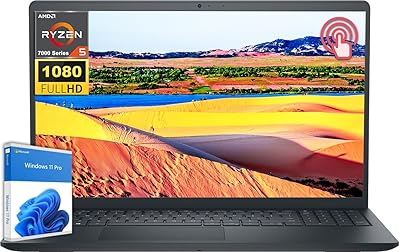
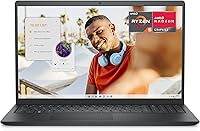
The Dell Inspiron 15 3535 sits squarely in the budget laptop category, but it brings a surprisingly capable package for students and everyday users who need a dependable Windows machine without overspending. Powered by AMD's Ryzen 5 7520U — a genuinely modern chip for this price tier — this budget Dell laptop pairs that processor with a 512GB SSD and a full HD display, which is more than most shoppers expect here. The slim 0.75-inch profile and Carbon Black finish keep things looking clean and unfussy. Just be clear going in: this is a productivity machine, not a powerhouse, and it performs best when treated accordingly.
Features & Benefits

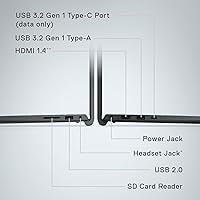
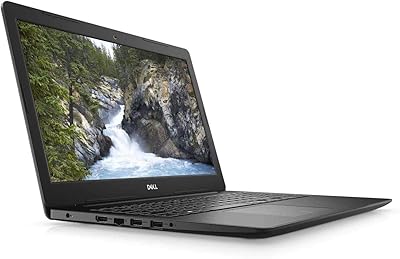
The 15.6-inch FHD anti-glare screen is genuinely pleasant for daily use — colors are decent, and Dell's ComfortView filter takes the edge off long screen sessions in a way that actually registers after a few hours. The Ryzen 5 7520U handles browsing, video calls, and office work without complaint; it keeps pace for everyday tasks without drama. A lift-hinge design tilts the keyboard at a comfortable angle, and the numeric keypad is a welcome addition for data entry. Port selection is practical — USB 3.0 slots, HDMI, and an SD card reader cover most needs. The 8GB RAM ceiling, however, is real once background apps start stacking up.

Best For

This budget Dell laptop is a natural fit for college students who need something reliable for notes, research, and the occasional video class without spending a fortune. It also holds up well for remote workers handling documents, spreadsheets, and calls throughout the day. Families looking for a dependable secondary device or a first laptop for a teenager will find it punches well above its price. If you are migrating from an aging Windows PC, the fast SSD and clean Windows 11 setup make the transition easy. Just do not expect it to handle photo editing, video rendering, or gaming — that is simply not what this machine was built for.

User Feedback

Owners of this Dell Inspiron tend to land in a positive place overall, with consistent praise for the keyboard feel and how sharp the display looks given what they paid. Boot times earn frequent compliments — the SSD makes a noticeable difference there. On the critical side, battery life comes up regularly, with some users reporting it falls shorter than expected during a full day away from an outlet. A few buyers mention the plastic chassis flexes under pressure, which is par for this price range but worth knowing upfront. Webcam and speaker quality are functional rather than impressive. Most conclude it offers solid everyday value, provided expectations are set realistically from the start.

Pros

  • The 512GB SSD delivers noticeably fast boot times and snappy app launches right out of the box.
  • A full HD anti-glare display with Dell ComfortView makes long reading or writing sessions easier on the eyes.
  • The Ryzen 5 7520U is a genuinely modern processor that holds its own for everyday productivity tasks.
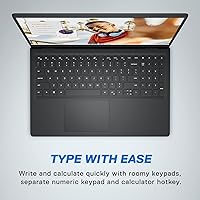
  • Keyboard feel earns high marks from users — comfortable key travel and a numeric keypad are welcome bonuses.
  • At this price, the combination of display quality, storage, and processing power is difficult to match.
  • The lift-hinge design provides a subtle but real improvement to typing comfort during extended use.
  • Port selection covers most daily needs without forcing users to immediately buy a hub.
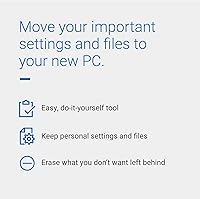
  • Setup is straightforward, and Dell Migrate makes transferring files from an old PC painless.
  • Weighing under four pounds, the Inspiron 15 3535 is manageable enough for regular commuting or campus use.
  • The anti-glare coating holds up well in bright rooms or near windows, reducing eye strain during daytime use.

Cons

  • 8GB RAM becomes a real bottleneck once multiple apps, browser tabs, and background processes stack up.
  • Battery life in real-world use regularly falls short of what buyers expect for a full day away from an outlet.
  • The plastic chassis flexes noticeably under moderate hand pressure, raising questions about long-term durability.
  • No USB-C port is a frustrating omission that limits compatibility with modern accessories and chargers.
  • Built-in speakers are thin and low-volume — barely adequate for anything beyond background listening.
  • Webcam performance degrades significantly in dim or mixed lighting, making it unreliable for professional video calls.
  • Wi-Fi is limited to the older 802.11ac standard, which can feel sluggish on busy or congested home networks.
  • Pre-installed bloatware requires manual cleanup before the system feels lean and responsive.
  • RAM upgradeability is not clearly documented, leaving budget-minded buyers uncertain about future expansion options.
  • Speaker output lacks any meaningful bass, making multimedia content feel flat without external audio.

Ratings

Our AI-generated scores for the Dell Inspiron 15 3535 are derived from analyzing thousands of verified global buyer reviews, with spam, incentivized, and bot-flagged submissions actively filtered out before scoring. The ratings below reflect a balanced synthesis of what real users consistently praised and where they ran into genuine frustrations. Both the strengths and the pain points are represented transparently so you can make an informed decision.

Value for Money
83%
Most buyers feel they got more than their money's worth at this price point — a modern AMD processor, a full HD display, and a 512GB SSD in one package is hard to argue with. Students and budget-conscious shoppers repeatedly call it one of the better deals they found in the sub-$400 Windows laptop category.
A handful of users felt the value proposition weakens if you need to buy accessories to compensate for the limited RAM or shorter battery life. A few noted that similarly priced competitors occasionally offer slightly better build materials, which nudges the value score down from excellent to simply good.
Performance & Speed
76%
24%
The Ryzen 5 7520U keeps everyday tasks moving briskly — booting into Windows, opening Chrome with several tabs, running Office apps, and joining video calls all happen without noticeable lag. Users migrating from older Intel Core i3 or i5 machines from five-plus years ago frequently describe the speed improvement as genuinely refreshing.
Once you push past light multitasking — think 15-plus browser tabs, background downloads, and a streaming app running simultaneously — the 8GB RAM starts to show its limits. Users doing any creative work, even light photo sorting in Adobe Lightroom, report sluggishness that becomes hard to ignore over a full workday.
Display Quality
78%
22%
The 15.6-inch FHD panel earns consistent compliments for its sharpness and the anti-glare coating that holds up well near windows or in brightly lit classrooms. Dell's ComfortView filter gets specific callouts from users who spend long hours reading or writing, noting their eyes feel less strained at the end of the day.
Color accuracy and brightness are average rather than impressive — graphic design students and anyone editing photos will likely find the display underwhelming compared to IPS panels in higher-priced laptops. At maximum brightness, outdoor use in direct sunlight is still a challenge despite the matte coating.
Keyboard & Typing Experience
81%
19%
The keyboard is one of the most consistently praised aspects across reviews. The key travel feels satisfying for a budget laptop, and the inclusion of a numeric keypad is a genuine plus for students in finance or accounting courses and remote workers handling spreadsheets daily.
The touchpad, while functional, receives more mixed feedback than the keyboard — some users find tracking slightly inconsistent, particularly when moving quickly across the screen. A small number of reviewers also noted that the keyboard flex under firm typing pressure feels noticeable on the right side near the numpad.
Battery Life
58%
42%
Under light use — primarily document editing and occasional web browsing with Wi-Fi on — some users manage to get through most of a school day on a single charge. Those who use it primarily for note-taking in class and offline reading report more comfortable longevity.
Heavy real-world use tells a different story. Multiple reviewers report the battery draining in four to five hours during normal college or work use with brightness at a comfortable level. This is a recurring pain point, and users who expected an all-day machine without their charger came away disappointed.
Build Quality & Design
67%
33%
The slim 0.75-inch profile gives the Inspiron 15 3535 a more polished look than many laptops at this price tier. The Carbon Black finish resists minor smudges reasonably well, and the overall footprint feels manageable for daily carrying in a backpack.
The plastic chassis construction is the most polarizing aspect of the build. Several users noticed flex around the display lid and keyboard deck when applying mild pressure, which raises mild durability concerns over a multi-year lifespan. It does not feel fragile, but it does not feel solid either.
RAM & Multitasking
54%
46%
For users who keep things simple — one browser, one document, and a music app — 8GB is perfectly functional for day-to-day tasks. Buyers who use this laptop specifically for lightweight productivity report no major slowdowns during their typical sessions.
The 8GB RAM ceiling is a real limitation, and the lack of clear official guidance on whether it can be upgraded leaves buyers in a difficult position. Power users who frequently switch between applications, run virtual meetings with screen sharing, or work with large spreadsheets will hit a wall faster than expected.
Port Selection & Connectivity
77%
23%
Having two USB 3.0 ports, an HDMI output, and an SD card slot covers the practical needs of most students and home users without requiring a hub. Connecting an external monitor, a USB mouse, and a card reader from a camera simultaneously is a realistic daily-use scenario this laptop handles without issue.
The single USB 2.0 port feels dated at this point, and the absence of a USB-C port is a notable omission for users who have invested in USB-C accessories or chargers. Wi-Fi is limited to 802.11ac rather than the newer Wi-Fi 6 standard, which may matter to users on congested home networks.
Webcam Quality
53%
47%
The built-in HD webcam gets the job done for routine video calls on Zoom or Teams in a reasonably lit room. Users who primarily call from home with decent ambient lighting report their image is clear enough for professional meetings and family calls.
In lower-light conditions or rooms with inconsistent lighting, the webcam image becomes noticeably grainy and washed out. Reviewers who had used laptops with better webcams consistently flagged this as a step down, and those working primarily from home on video calls found themselves wishing for an external camera.
Audio & Speakers
49%
51%
For casual background music or listening to a lecture recording, the built-in speakers produce audio that is intelligible and acceptable at moderate volume. Users who primarily use headphones or external speakers find the onboard audio irrelevant to their experience.
Anyone relying on the built-in speakers for entertainment or calls in a room with ambient noise will be disappointed. Volume tops out at a level that feels thin and tinny, and bass is essentially absent. Multiple reviewers specifically recommend budgeting for headphones or a small Bluetooth speaker alongside this laptop.
Thermal Management & Fan Noise
72%
28%
Under typical everyday workloads, the Inspiron 15 3535 runs quietly and the surface temperature stays comfortable even when used on a lap for extended periods. The adaptive thermal system does a reasonable job managing heat during prolonged document or browser sessions.
When the processor is pushed harder — running software updates in the background while streaming video, for example — the fan ramps up to an audible level that some users find distracting in quiet environments like libraries. It is not loud by laptop standards, but it is noticeable.
Setup & Out-of-Box Experience
79%
21%
Windows 11 Home comes pre-installed and the initial setup process is straightforward even for first-time laptop buyers. Dell Migrate is a convenient bonus for users transferring files from an old PC, and most reviewers note the machine is ready for productive use within minutes of unboxing.
Some users flagged a moderate amount of pre-installed bloatware that requires manual removal before the system feels clean. A few also noted that the included setup documentation is minimal, which may leave less tech-savvy buyers relying on online resources for basic configuration questions.
Portability & Weight
74%
26%
At 3.66 pounds, this budget Dell laptop sits in a reasonable range for a 15.6-inch machine — light enough for daily commuting students to carry in a shoulder bag without significant fatigue. The slim chassis fits cleanly into most standard laptop sleeves and backpack compartments.
Compared to premium ultrabooks in the 13- or 14-inch category, it is noticeably bulkier when carrying it all day. Users who prioritize extreme portability and regularly move between multiple locations throughout a workday may find the size and weight accumulate over time.
Graphics & Visual Output
44%
56%
For everyday visual tasks — watching HD video, light photo browsing, casual YouTube use — the integrated AMD Radeon graphics handle output cleanly without stutter. Connecting to an external monitor via HDMI works reliably for users who want a dual-screen home office setup.
Gaming or GPU-intensive creative work is simply not in this machine's wheelhouse. Even moderately demanding titles run at low settings with inconsistent frame rates, and any serious video editing or 3D rendering task will quickly overwhelm the integrated graphics. Buyers expecting more than casual visual performance will need to look elsewhere.

Suitable for:

The Dell Inspiron 15 3535 is a genuinely smart pick for college students who need a reliable, no-drama machine to carry between classes, knock out assignments, and sit through back-to-back video lectures. The full HD anti-glare display and comfortable keyboard make extended study sessions more bearable than most laptops in this price range, and the 512GB SSD means boot times and app launches stay snappy even after months of use. Remote workers whose daily routine revolves around email, spreadsheets, video calls, and web research will find this Dell Inspiron handles those tasks without complaint. It also works well as a household secondary laptop — something a parent can hand to a teenager or keep on the kitchen counter for quick tasks without worrying too much about the investment. Anyone upgrading from a five-plus-year-old Windows machine will likely be pleasantly surprised by how much faster and cleaner the overall experience feels, especially coming into a fresh Windows 11 setup.
Not suitable for:

The Dell Inspiron 15 3535 is not the right tool for anyone who regularly pushes hardware beyond light productivity work. Photographers editing RAW files in Lightroom, video editors working in Premiere, or even hobbyist streamers will hit the ceiling of both the 8GB RAM and the integrated AMD Radeon graphics faster than they expect — this is not false modesty, it is just the reality of what integrated graphics at this tier can handle. Gamers should look elsewhere entirely; even moderately demanding titles will run poorly or not at all at acceptable settings. Students in creative programs, engineering students running simulation or modeling software, or anyone who habitually keeps twenty or more browser tabs open alongside multiple apps will find the RAM limitation a constant source of frustration. If battery endurance is a top priority — particularly for people who move between locations all day without reliable access to a power outlet — the real-world battery performance reported by owners makes this budget Dell laptop a risky bet without your charger in the bag.

Specifications

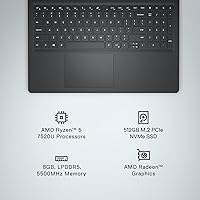
  • Display Size: The laptop features a 15.6-inch full HD IPS-level panel with a native resolution of 1920x1080 pixels and an anti-glare matte coating.
  • Processor: Powered by the AMD Ryzen 5 7520U, a 4-core processor with a base clock of 2.8GHz, built on AMD's efficient 4nm architecture.
  • RAM: Comes equipped with 8GB of DDR4 SDRAM running at 5500MHz, suitable for everyday productivity and light multitasking.
  • Storage: Includes a 512GB solid-state drive offering fast boot times, quick file access, and ample space for documents, media, and applications.
  • Graphics: Uses integrated AMD Radeon graphics, which handles everyday visual tasks, HD video playback, and light casual use without a discrete GPU.
  • Operating System: Ships with Windows 11 Home pre-installed, providing access to the full Microsoft ecosystem and regular security updates out of the box.
  • Wireless: Supports 802.11ac (Wi-Fi 5) dual-band wireless connectivity alongside Bluetooth for peripheral and accessory pairing.
  • Ports: Offers 2x USB 3.0 Type-A ports, 1x USB 2.0 Type-A port, 1x HDMI output, and an SD card reader for everyday connectivity needs.
  • Webcam: Built-in HD webcam positioned above the display, designed for standard video calls and online meetings in adequately lit environments.
  • Keyboard: Full-size backlit keyboard with a dedicated numeric keypad and a calculator hotkey, positioned on a lift-hinge base for an improved typing angle.
  • Blue Light Filter: Dell ComfortView software reduces harmful blue light emissions and carries TÜV Rheinland certification for extended screen use comfort.
  • Dimensions: Measures 14.11 x 9.27 x 0.75 inches (LxWxH), making it slim enough for most standard laptop sleeves and backpack compartments.
  • Weight: Weighs 3.66 pounds, which is manageable for daily transport between home, campus, or a workplace without excessive strain.
  • Battery: Powered by a built-in lithium polymer battery; real-world endurance typically falls in the four-to-six-hour range under mixed everyday use.
  • Chassis Material: The body is constructed from a lightweight plastic composite in a Carbon Black finish that resists minor surface smudges reasonably well.
  • Optical Drive: No optical drive is included, which is standard for slim modern laptops — an external USB drive is needed to read CDs or DVDs.
  • Audio: Stereo speakers are built into the chassis and deliver functional audio suitable for calls and background listening at moderate volume levels.
  • Migration Tool: Includes a 6-month subscription to Dell Migrate, a utility that helps transfer personal files and data from an older Windows PC.
  • Warranty: Covered by Dell's standard one-year limited hardware warranty with options to extend coverage through Dell's support service plans.
  • Model Number: The specific model identifier for this configuration is i3535-5131BLK-PUS, useful for referencing exact parts, drivers, or support documentation.

Related Reviews

Dell Inspiron 15 3535 Laptop, AMD Ryzen 5 7530U, 16GB RAM, 1TB SSD


83%
88%
Performance
85%
Display Quality
93%
Storage Capacity
61%
Battery Life
87%
Build Quality
More
Dell Inspiron 15 3000 3520 Laptop, 16GB RAM, 1TB SSD, 15.6″ FHD Touchscreen
82%
86%
Performance
90%
Display Quality
75%
Battery Life
80%
Build Quality
78%
Portability/Size
More
Dell Inspiron 15 3000 Laptop, 15.6-inch, Intel Core i5-1035G1, 8GB RAM, 256GB SSD
81%
91%
Value for Money
85%
Performance for Everyday Tasks
74%
Display Quality
88%
Portability/Weight
77%
Battery Life
More
Dell Inspiron 15 Ryzen 7 7730U 32GB/1TB Touchscreen
74%
84%
Performance & Multitasking
91%
RAM & Memory Headroom
88%
Storage Speed & Capacity
79%
Touchscreen Display
63%
Build Quality & Chassis
More
Dell Inspiron 15 3511 Laptop, 32GB RAM, 1TB SSD
80%
88%
Performance
85%
Display Quality
70%
Battery Life
92%
Multitasking Capability
80%
Build Quality
More
Dell Inspiron 15 Laptop, Intel Core i3, 64GB RAM, 2TB SSD
85%
92%
Performance
91%
Storage Capacity
88%
Display Quality
94%
Multitasking
58%
Battery Life
More
Dell Inspiron 15 5505 Laptop, Ryzen 7 4700U, 16GB RAM, 512GB SSD
81%
88%
Performance
75%
Battery Life
85%
Build Quality
81%
Display Quality
90%
Portability
More
Dell Inspiron 15 3525 Laptop, Ryzen 5 5500U, 16GB RAM, 512GB SSD
85%
88%
Performance
90%
Display Quality
81%
Battery Life
92%
Value for Money
85%
Build Quality
More
Dell Inspiron 15 3530 Laptop - Intel Core i7, 16GB RAM, 1TB SSD
83%
88%
Performance
90%
Display Quality
85%
Multitasking Capability
80%
Keyboard Comfort
74%
Battery Life
More
Dell Inspiron 15 3520 Laptop, 32GB RAM, 2TB SSD, Intel Core i5-1155G7
84%
89%
Performance
94%
Storage Capacity
83%
Display Quality
90%
Build Quality
80%
Battery Life
More

FAQ

This is one of the most common questions buyers have, and unfortunately the answer is not straightforward. Dell has not clearly documented whether the 8GB RAM in this specific configuration is soldered to the motherboard or seated in a removable slot. Before purchasing with the intention to upgrade, it is worth contacting Dell support directly or checking teardown resources online to confirm the exact configuration you receive.

Casual, older, or very low-demand titles may run, but do not expect a smooth experience with modern games. The integrated AMD Radeon graphics simply do not have the dedicated memory or processing headroom for anything graphically demanding. If gaming is a meaningful part of why you are buying a laptop, this machine will disappoint you fairly quickly.

Real-world battery life from user reports tends to land in the four-to-five-hour range under typical mixed use — browsing, documents, and the occasional video call with screen brightness at a comfortable level. If you plan to use it away from a power outlet for a full workday, carrying the charger along is genuinely advisable rather than optional.

Yes, there is a moderate amount of pre-installed software that most users will not need. It is not excessive by Windows laptop standards, but you will likely want to spend fifteen to twenty minutes uninstalling trial apps and manufacturer utilities before things feel clean. It is a minor annoyance rather than a serious problem.

For everyday streaming on Netflix, YouTube, or similar services, the 1080p anti-glare panel holds up well. Colors are decent and the matte coating reduces glare from room lighting, which makes it more comfortable for extended viewing than glossy panels at this price. It is not a vivid or color-accurate display by any technical measure, but for casual entertainment it works fine.

It is genuinely one of the better keyboards you will find on a budget laptop in this range. The key travel is satisfying, the layout is full-size, and having a numeric keypad is a practical bonus for students or anyone who regularly enters numbers. The lift-hinge also provides a slight upward tilt that makes sustained typing more comfortable than a completely flat keyboard deck.

For standard remote work calls, this Dell Inspiron handles video conferencing without technical issues in a well-lit room. The built-in webcam is adequate for everyday meetings, though it struggles in poor lighting. The processor manages screen sharing and background apps during a call without major slowdowns, provided you are not running too many other programs simultaneously.

No, this model does not include a USB-C port, which is a notable omission compared to newer laptops in a similar price range. If you rely on USB-C for charging accessories, external drives, or monitors, you will need an adapter or a USB-C hub, which adds both cost and inconvenience.

Under light everyday tasks the fan stays quiet and largely unnoticeable. When the processor is working harder — running updates, processing multiple background tasks, or handling a large file operation — the fan becomes audible but not particularly disruptive. In a quiet library or shared workspace it may draw a little attention, but it is not the kind of fan noise that becomes genuinely irritating.

For most students, yes — it covers the practical bases well. Note-taking, research, writing papers, online classes, and general productivity all fall comfortably within what this budget Dell laptop handles reliably. Just make sure the student's workload does not involve creative software, heavy multitasking, or gaming, as those scenarios will push beyond what this machine is built for. At its price point, the combination of keyboard quality, display comfort, and storage capacity makes it a genuinely sensible student purchase.