Overview

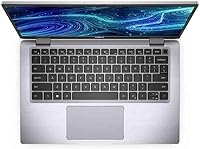
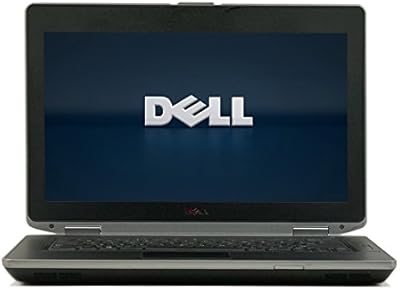
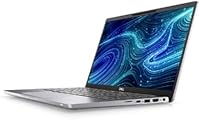
The Dell Latitude 7420 i5 16GB 256GB Grade A is a refurbished business laptop that punches well above its price bracket. Grade A certification means it passed both cosmetic and functional inspection — so you are not gambling on mystery wear or hidden damage. Under the hood sits Intel's 11th Gen Core i5-1145G7, capable of hitting 4.4GHz when tasks demand it. The 14-inch anti-glare display is genuinely comfortable for long work sessions, and Windows 11 Pro comes pre-installed so there is no setup headache. At under four pounds, this is a laptop built to travel light without sacrificing professional-grade hardware.
Features & Benefits

Pop open a few browser tabs, join a video call, and run your productivity apps simultaneously — the Latitude 7420 handles it without flinching, thanks largely to its 16GB DDR4 RAM. The 256GB NVMe SSD keeps things snappy; boot times are fast enough that you won't be staring at a loading screen when deadlines loom. Connectivity is solid too: Thunderbolt 4, HDMI, and USB 3.1 mean you can hook up an external monitor or transfer files without hunting for adapters. The backlit keyboard is a practical touch for evening work sessions, and the slim 0.5-inch chassis slips easily into almost any bag.

Best For

This refurbished Dell Latitude makes the most sense for people who need a dependable Windows laptop without paying a premium for a brand-new box. Remote workers, students, and office professionals who spend their day in productivity apps and video meetings will find it more than capable. Be honest, though, about what you need — if photo or video editing is part of your workflow, the integrated graphics will feel limiting. Heavy gamers should look elsewhere entirely. Where this business laptop truly earns its place is with the practical, mobile professional who wants compact, full-featured hardware that does not feel like a compromise.

User Feedback

Buyers who picked up the Latitude 7420 generally agree the Grade A condition holds up well — most reported no notable scratches or cosmetic surprises, which is reassuring in the refurbished space. The keyboard and build quality draw consistent praise; it feels solid rather than hollow or cheap. Where feedback gets more mixed is battery life — refurbished cells are inherently unpredictable, and a handful of users found the charge falling short of a full workday. Some also flagged outdoor visibility as a weakness, noting the display struggles in bright light. Overall sentiment on value, however, skews clearly positive.

Pros

  • Business-class build quality that feels durable and professional, not flimsy or cheap.
  • 16GB of RAM handles real-world multitasking — tabs, calls, and apps — without slowdowns.
  • The NVMe SSD makes boot times and app launches noticeably fast compared to older hardware.
  • Ships with Windows 11 Pro already activated, so setup time is minimal.
  • Thunderbolt 4 and HDMI mean you can connect monitors and peripherals without an adapter hub.
  • The backlit keyboard is well-regarded by users who type heavily throughout the day.
  • At under four pounds, this business laptop disappears into a bag without adding strain.
  • Anti-glare FHD display holds up well for long indoor work sessions without eye fatigue.
  • Strong value proposition compared to buying new at a similar performance level.
  • The Latitude 7420 arrives Grade A certified, and most buyers found the condition accurate to that description.

Cons

  • Battery health is unpredictable on refurbished units — some buyers got four hours or less.
  • 256GB of storage fills up faster than expected once Windows updates and project files accumulate.
  • Display brightness struggles in sunlit rooms or outdoor environments.
  • RAM appears soldered, removing any upgrade path if your workload grows over time.
  • Built-in webcam quality drops noticeably in lower-light conditions.
  • Grade A is a seller-defined label, not a standardized certification — condition can vary.
  • Some units shipped with residual software or OEM bloatware requiring a fresh install.
  • No SD card slot limits quick media transfers for photographers or content creators.
  • Fan noise increases meaningfully under sustained processor load.
  • Warranty coverage varies by seller, leaving some buyers with limited post-purchase protection.

Ratings

The Dell Latitude 7420 i5 16GB 256GB Grade A has been evaluated using AI-driven analysis of verified global buyer reviews, with spam, bot-generated, and incentivized feedback actively filtered out before scoring. The ratings below reflect a honest synthesis of what real users experienced day-to-day — from first boot to extended use — covering everything from build quality to the realities of buying refurbished. Strengths are acknowledged where earned, and recurring pain points are not glossed over.

Build Quality
88%
Users consistently praised the Latitude 7420 for feeling like a proper business machine rather than a budget afterthought. The magnesium-alloy chassis resists flex during typing, and the overall construction gives confidence that it can handle the bumps of daily commuting or tossing it into a backpack.
A small number of buyers noted minor signs of previous use — faint marks on the palm rest or slight keyboard wear — even on Grade A units. While these were mostly cosmetic, they were enough to disappoint buyers who expected near-new condition.
Value for Money
91%
This is arguably where the Latitude 7420 makes its strongest case. Getting 11th Gen processing power, 16GB of RAM, and a proper business-class chassis at this price point is genuinely difficult to match with new hardware. Most buyers felt they got significantly more than they paid for.
A few users compared it against similarly priced Chromebooks or entry-level new laptops and felt the refurbished element introduced an element of risk that undercut the value. Warranty terms also vary by seller, which left some buyers feeling exposed.
Performance
84%
For the core tasks this machine is built around — productivity apps, web browsing, video calls, and light document work — the i5-1145G7 handles everything without hesitation. Users running Microsoft 365, Zoom, and multiple browser tabs simultaneously reported no meaningful slowdowns.
Push it into anything more demanding, like video rendering or running multiple virtual machines, and the processor starts to show its limits. It is a capable chip, not a powerhouse, and buyers expecting workstation-level throughput will come away frustrated.
RAM & Multitasking
86%
16GB DDR4 is a comfortable amount for modern workflows, and buyers doing hybrid work — switching between video calls, spreadsheets, and research tabs — appreciated not having to think about memory. It handles the kind of chaotic browser sessions most office workers live in.
The RAM appears to be soldered on this configuration, meaning there is no upgrade path if your needs grow. For buyers planning to keep the machine for five or more years, that ceiling could become a genuine limitation.
Storage Speed
87%
The NVMe SSD made a noticeable impression on buyers upgrading from older spinning-disk laptops. Boot times are fast, app launches feel immediate, and large file transfers do not make you sit and watch a progress bar crawl.
256GB fills up faster than most people anticipate — especially once Windows updates, apps, and project files accumulate. Several users flagged that they needed an external drive within the first few months, which adds cost and friction.
Display Quality
76%
24%
The 14-inch FHD anti-glare panel is well-suited to indoor office work. Text is sharp, colors are accurate enough for documents and presentations, and the anti-glare coating reduces eye fatigue during long work sessions in artificially lit spaces.
Brightness is a recurring complaint. Outdoor use or working near a sunny window pushes the display to its limits, and several buyers noted it struggles to compete with ambient light. It is a functional screen, not an impressive one.
Battery Life
58%
42%
When the battery is in good health, users reported getting through a solid half-day of office work without reaching for the charger. For short commutes or desk-bound sessions with access to a power outlet, it gets the job done.
Battery life is the most divisive aspect of buying refurbished, and the Latitude 7420 is no exception. A meaningful portion of buyers found the battery degraded enough to last only three to four hours, forcing them to stay tethered. Replacement cells are available but add to the total cost.
Keyboard & Typing Experience
89%
The keyboard is one of the most praised elements across buyer feedback. Key travel is satisfying, the layout is logical, and the backlight works well at low levels without being distracting. Writers and data-entry users specifically called it out as a genuine pleasure to type on for extended periods.
A small subset of buyers received units where individual keys showed heavier wear from previous owners — letters slightly faded or keys with a slightly different feel from the rest. It is an occasional gripe rather than a systemic one, but worth knowing.
Portability
83%
Under four pounds and barely half an inch thick, this is a laptop that disappears into a bag. Buyers who commute or move between meetings found it easy to carry without strain, and it does not hog bag space the way thicker workstations do.
The slim profile does mean a slightly smaller battery footprint, which ties back into the battery life concerns. Portability and stamina are in tension here, and you feel that trade-off if you are away from a power outlet for an extended stretch.
Connectivity & Ports
82%
18%
Thunderbolt 4, HDMI, USB 3.1, and Bluetooth give this machine a genuinely useful port lineup without requiring a dock for most setups. Buyers connecting to external monitors or peripheral setups appreciated not immediately needing an adapter hub.
There is no SD card slot and no USB-A on every configuration, which some buyers found inconvenient for legacy peripherals. It is a minor point, but occasionally mentioned by users transitioning from older machines with more traditional port layouts.
Webcam Quality
63%
37%
The built-in webcam does its job adequately for video conferencing in well-lit environments. For standard Zoom or Teams calls from a home office with decent lighting, most coworkers will not notice anything amiss.
In lower light or with backlighting, the webcam quality drops noticeably — grainy footage and slow autofocus were mentioned by remote workers who rely on video calls regularly. Anyone broadcasting professionally or doing client-facing calls may want an external camera.
Software & OS Readiness
85%
Arriving with Windows 11 Pro already activated is a real convenience. Buyers who have gone through the headache of sourcing and activating operating systems on refurbished machines particularly appreciated being able to open the lid and get to work almost immediately.
Some units shipped with OEM bloatware or leftover software traces from previous configurations. A fresh Windows install is a straightforward fix, but it is an extra step buyers did not always anticipate having to take.
Refurbished Condition Accuracy
73%
27%
The majority of buyers found the Grade A label to be a reasonably accurate description — most units arrived with minimal cosmetic wear and fully functional hardware. For the price paid, most felt the condition met or exceeded expectations.
Grade A is a seller-defined term, not a standardized certification, and a handful of buyers received machines that they felt were closer to Grade B in cosmetic terms. Managing expectations on this front is important before purchasing any refurbished device.
Thermal Management & Fan Noise
71%
29%
Under normal workloads — documents, calls, light browsing — the Latitude 7420 runs quietly and stays cool. It is a good office companion in shared or quiet environments where fan noise would be a distraction.
Push the processor harder and the fan ramps up to a noticeable level. It is not unusually loud compared to similar machines, but users who expected near-silent operation during more intensive tasks were occasionally caught off guard.

Suitable for:

The Dell Latitude 7420 i5 16GB 256GB Grade A is an excellent fit for practical, productivity-focused buyers who want genuine business-class hardware without the price tag of a new machine. Remote workers juggling video calls, cloud apps, and document-heavy workflows will find the 16GB RAM and NVMe SSD more than adequate for a full working day. Students in demanding programs — law, business, architecture research — who need a fast, reliable Windows machine for writing, research, and presentations will get solid mileage here. Office professionals upgrading from a five-year-old or older laptop will notice an immediate and meaningful improvement in responsiveness. The slim, sub-four-pound form factor also makes it a natural choice for commuters or anyone who moves between a home office and a physical workspace regularly. If your daily workload lives inside a browser, a productivity suite, and a video conferencing app, this refurbished Dell Latitude covers all of it without compromise.
Not suitable for:

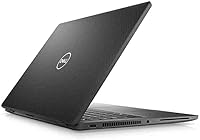
The Dell Latitude 7420 i5 16GB 256GB Grade A is a poor match for anyone whose work regularly pushes hardware beyond standard office tasks. Video editors, 3D modelers, or developers running heavy local builds will quickly hit the ceiling of the integrated Intel Iris Xe graphics and the mid-range processor — this is not a workstation replacement. Gamers should look elsewhere entirely; even moderately demanding titles will struggle on integrated graphics. Buyers who need to work untethered all day without access to a power outlet should think carefully, since refurbished battery cells are unpredictable and some units fall well short of a full workday. Anyone who needs significant local storage — for large media libraries, datasets, or offline project files — will find 256GB tight within a few months. Finally, buyers who require a standardized, certified refurbishment program with guaranteed battery health thresholds should verify seller warranty terms carefully before committing, as Grade A is not a universal standard.
Specifications

  • Processor: Powered by the Intel Core i5-1145G7 (11th Gen) quad-core processor with a 2.6GHz base clock and Turbo Boost up to 4.4GHz.
  • RAM: 16GB DDR4 SDRAM is installed, running at 1300MHz for stable multitasking performance across demanding office workloads.
  • Storage: A 256GB M.2 NVMe SSD provides fast read and write speeds, significantly reducing boot times and application load times.
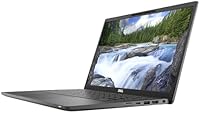
  • Display: 14″ Full HD IPS panel with 1920x1080 resolution and an anti-glare coating designed to reduce reflections during extended indoor use.
  • Graphics: Intel Iris Xe integrated graphics handles everyday display output, light media playback, and video conferencing without a discrete GPU.
  • Operating System: Windows 11 Professional comes pre-installed and activated, ready for business use without requiring additional licensing steps.
  • Ports: Connectivity includes Thunderbolt 4, USB 3.1, HDMI output, and a headphone/microphone combo jack for versatile peripheral support.
  • Wireless: Built-in Wi-Fi and Bluetooth provide wireless network access and peripheral pairing without requiring external adapters.
  • Webcam: An integrated webcam is included for video conferencing via platforms such as Zoom, Microsoft Teams, and Google Meet.
  • Keyboard: The full-size backlit keyboard supports comfortable low-light typing and features standard business-class key travel and layout.
  • Weight: The unit weighs 3.88 pounds, keeping it practical for daily commuting and transport between workspaces.
  • Dimensions: The chassis measures 12.9 x 8.4 x 0.5 inches, delivering a slim profile that fits easily into most laptop bags and sleeves.
  • Battery: One Lithium Ion battery pack is included; actual runtime varies by unit condition, as is standard with refurbished hardware.
  • Condition: This unit is Grade A refurbished, meaning it has passed both functional testing and cosmetic inspection prior to listing.
  • Chipset: The Intel chipset supports DDR4 memory architecture and the PCIe NVMe storage interface used in this configuration.
  • Optical Drive: No optical drive is included; the slim chassis design omits a DVD or Blu-ray unit entirely.
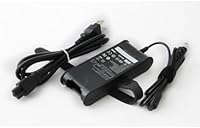
  • Power Input: The laptop operates at 15 volts input and ships with a compatible charging adapter.
  • Color: The unit ships in silver, consistent with the standard Dell Latitude 7420 professional colorway.

Related Reviews
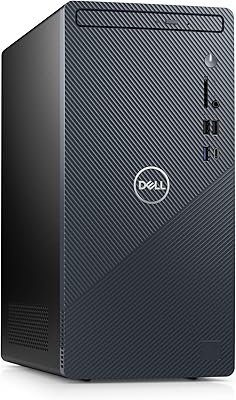
Dell Inspiron 3910 Desktop - 12th Gen Intel Core i5, 16GB RAM, 256GB SSD + 1TB HDD
86%
88%
Performance
85%
Build Quality
90%
Design
91%
Value for Money
89%
Storage Flexibility
More
Lenovo ThinkPad T480 Core i5-8350U 16GB RAM 256GB SSD
82%
91%
Value for Money
89%
Performance
85%
Build Quality
70%
Display Quality
78%
Portability
More
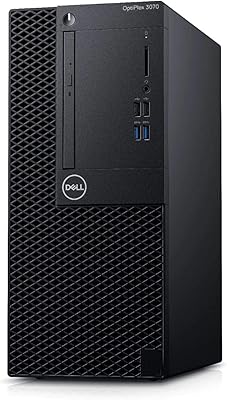
Dell OptiPlex 3070 Desktop - Intel Core i5-9500, 8GB RAM, 256GB SSD
86%
91%
Value for Money
89%
Performance for Everyday Tasks
88%
Build Quality & Durability
92%
Space-Saving Design
93%
Ease of Setup
More
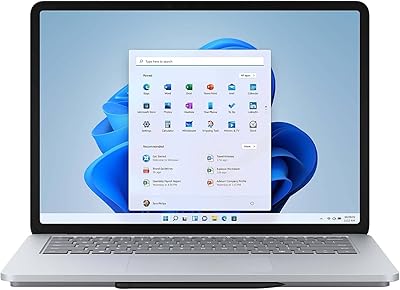
Microsoft Surface Laptop Studio 14.4″ - Intel Core i5, 16GB RAM, 256GB SSD
85%
92%
Display Quality
89%
Battery Life
90%
Performance
75%
Portability/Weight
88%
Build Quality
More
Dell OptiPlex 3050 Micro Desktop, Intel Core i5-7500T, 8GB RAM, 256GB SSD
87%
84%
Performance
91%
Build Quality
92%
Value for Money
89%
Reliability
95%
Compactness/Size
More
A-Tech 16GB DDR3 RAM Kit for Dell Latitude E7440 E7240 E6540 E6440 E5540 E5440
87%
88%
Performance Improvement
91%
Ease of Installation
94%
Compatibility with Dell Latitude Models
85%
Multitasking and Speed Boost
87%
Stability and Reliability
More
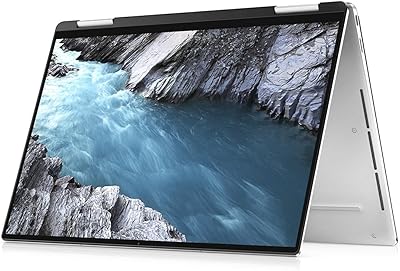
Dell XPS 13 7390 Laptop, 10th Gen Intel i5, 8GB RAM, 256GB SSD
81%
83%
Performance
92%
Portability
75%
Battery Life
88%
Build Quality
85%
Display Quality
More
Microsoft Surface Pro 7 i5 16GB 256GB
79%
93%
Display Quality
91%
Build Quality & Design
82%
Performance & Speed
94%
Portability
67%
Battery Life
More
Apple 2020 MacBook Air 13.3-inch Core i5 16GB RAM 256GB SSD
85%
96%
Portability & Weight
92%
Battery Life
90%
Display Quality
88%
Performance (General Use)
89%
Build Quality
More
Dell Latitude E6430 14-Inch Laptop, Intel Core i5-3210M, 8GB RAM, 320GB HDD
76%
87%
Performance for Office Tasks
92%
Build Quality and Durability
70%
Display Quality
60%
Portability and Weight
75%
Battery Life
More

FAQ

Unfortunately, no — and that is worth being upfront about. Refurbished batteries are not new cells, and health varies from unit to unit. Some buyers get a battery that lasts a solid six or seven hours; others find it closer to three or four. If you plan to work away from a power outlet regularly, factor in the potential cost of a replacement battery before purchasing.

Grade A indicates the unit passed both a functional test and a cosmetic inspection before being listed. In practice, that typically means no cracked screens, fully working keys and ports, and only minor cosmetic wear at most. That said, Grade A is a seller-defined standard rather than a universal certification, so it is worth reading the specific seller's grading criteria before you buy.

Yes, it ships with Windows 11 Professional pre-installed and activated. You should not need to purchase a separate license or enter a product key. That said, if you ever reinstall Windows from scratch, keep the original unit handy during setup so the license can be revalidated automatically.

Storage upgrades are generally possible — the M.2 NVMe slot is accessible on most Latitude 7420 configurations, so swapping in a larger SSD is a reasonable option. RAM, however, is soldered to the motherboard on many variants of this model, meaning it cannot be upgraded after purchase. If you think you will need more than 16GB down the road, that is worth factoring into your decision now.

For most students, absolutely. Writing papers, running research tools, attending online lectures, and managing productivity apps are all well within its capabilities. If your course involves heavy video editing, 3D modeling, or software development with intensive local builds, you may start to feel the limitations. For everything else a typical student needs, the Latitude 7420 handles it comfortably.

Quite well indoors. The anti-glare coating does a good job of cutting down on reflections under office lighting, and the 1080p resolution keeps text sharp and readable for hours. Where it falls short is in bright environments — near a sunny window or outdoors, the display can look washed out. It is a solid work display, not a high-brightness panel built for outdoor use.

The port lineup is genuinely practical for most users: Thunderbolt 4, USB 3.1, HDMI, and a combo audio jack cover the majority of everyday needs. If you only need one external monitor and a standard set of peripherals, you likely will not need a dock. Power users connecting multiple displays or legacy USB-A devices may find a Thunderbolt dock a worthwhile addition.

Yes, this is one of the strongest use cases for this machine. With 16GB of RAM and a capable 11th Gen processor, running Zoom, Teams, or Google Meet alongside other open apps is no problem. The built-in webcam is adequate for standard calls in good lighting, though for frequent client-facing meetings you might prefer an external webcam for better image quality.

It depends on your habits. For users who rely on cloud storage like OneDrive or Google Drive and do not store large local files, 256GB is workable. If you download a lot of software, keep large project files locally, or store media offline, you will likely fill it within a year. An external SSD or USB drive is an inexpensive way to extend your storage without replacing the internal drive.

Gaming, video production, and 3D rendering are the main areas where this business laptop falls short. The integrated Intel Iris Xe graphics simply is not built for that kind of sustained load. Similarly, developers running multiple virtual machines or large local containers may find the hardware limiting over time. For anything involving sustained GPU workloads or very heavy processor demands, a dedicated machine would serve you better.