Overview

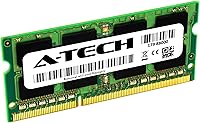
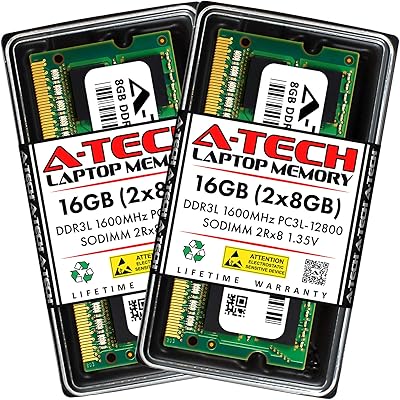
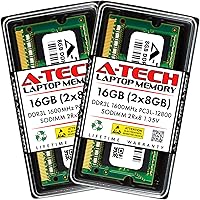
A-Tech 16GB (2x8GB) DDR3L SODIMM RAM is built for one specific job: breathing new life into a handful of Dell Latitude laptops that have been running on fumes for years. The kit splits its capacity across two 8GB sticks, which lets the system run in dual-channel mode instead of relying on a single module. It's aimed squarely at E7440, E7240, E6540, E6440, E5540, and E5440 owners whose machines originally came with just 4GB or 8GB installed at the factory. There's nothing flashy about it — no RGB, no marketing gimmicks — just a straightforward upgrade path backed by a limited lifetime warranty and a support team you can actually reach if something goes wrong. First released back in 2019, it's clearly positioned as a budget-friendly fix rather than a high-end component.
Features & Benefits

What stands out about this RAM kit is how deliberately it's tuned for these specific machines rather than being a generic stick that happens to fit. Dual voltage support means it plays nice whether your board wants 1.35V or the older 1.5V standard, so compatibility isn't a guessing game. Running at 1600MHz with a PC3L-12800 spec, it matches what these Latitude chipsets can actually take advantage of — going faster wouldn't help, and this hits the ceiling without overshooting it. The non-ECC unbuffered design keeps things simple for a business laptop chipset, and the dual rank configuration tends to pair well with 4th Gen Intel Core processors. Installation is plug-and-play in most cases, no BIOS wrestling required, and because it's a two-stick kit, you get real dual-channel bandwidth instead of a single-module bottleneck.

Best For

This memory upgrade makes the most sense if you own one of the listed Dell Latitude models — E7440, E7240, E6540, E6440, E5540, or E5440 — and want to squeeze a few more years out of it before retiring the machine. IT technicians managing a fleet of older corporate Latitudes will appreciate getting an exact-fit kit instead of gambling on a universal stick that may or may not play nice. It's also a solid pick for anyone who keeps a dozen browser tabs open, runs a virtual machine occasionally, or handles everyday office work and feels like their laptop is constantly catching its breath. That said, this isn't the right call for newer DDR4 laptops or anything outside the Dell Latitude lineup — trying to force compatibility there just won't work.

User Feedback

Feedback on this Dell-compatible kit skews strongly positive, with plenty of buyers reporting that installation took just minutes and the performance bump was noticeable right away — slow boot times and laggy multitasking became a thing of the past. The strong overall rating suggests it's genuinely reliable across the Latitude models it claims to support, which matters more than spec sheets when you're trusting a third-party stick in an aging machine. A number of reviewers also mention the warranty as real peace of mind rather than fine print nobody reads. On the flip side, a small handful of buyers ran into the usual RAM headaches — modules not seating fully on the first try, or a BIOS that needed a reset to recognize the new capacity. Compared to OEM Dell memory, though, most people still call it the better value.

Pros

  • Noticeably reduces lag and slow load times on older Dell Latitude laptops
  • Dual 8GB sticks enable proper dual-channel performance instead of a single bottlenecked module
  • Dual voltage support makes it flexible across slightly different board generations
  • Installation is generally plug-and-play with no BIOS adjustments needed
  • Backed by a limited lifetime warranty that buyers consistently mention as reassuring
  • Built specifically for named Latitude models, reducing compatibility guesswork
  • Strong overall customer rating reflects consistent real-world reliability
  • A noticeably more affordable alternative to OEM Dell memory upgrades

Cons

  • Only compatible with a narrow list of specific Dell Latitude models
  • Won't work at all in newer DDR4-based laptops or non-Dell systems
  • A few buyers reported modules needing reseating before being recognized
  • Occasional BIOS recognition hiccups reported, requiring a manual reset
  • DDR3L is aging technology, so long-term relevance is limited
  • Not designed to deliver gaming or heavy creative-workload performance gains
  • Some less tech-savvy users may find opening the memory panel intimidating
  • Speed is capped at 1600MHz, offering no headroom beyond current spec

Ratings

Our scores for A-Tech 16GB (2x8GB) DDR3L SODIMM RAM are generated by AI after analyzing a large pool of verified user reviews from across the globe, with spam, bot activity, and incentivized feedback filtered out before any scoring happens. The categories below reflect both the praise and the recurring frustrations real buyers reported, so you can see exactly where this memory upgrade shines and where it falls short.
Model Compatibility
89%
Buyers consistently confirm that this RAM kit fits the listed Latitude models exactly as described, with no surprises after unboxing. Owners replacing memory on E6440s and E7440s in particular report smooth recognition right out of the gate.
A small number of buyers admit they didn't double-check their exact model number first and ended up with a kit that wouldn't seat properly. Compatibility outside the named Latitude lineup is essentially nonexistent.
Installation Ease
91%
Most reviewers describe the install as a five-minute job involving little more than a screwdriver and the laptop's memory access panel. First-time upgraders frequently mention feeling more confident after this experience.
A few buyers without prior hardware experience found locating and removing the correct panel screws more fiddly than expected. Static precautions aren't always obvious to less technical users.
Performance Boost
84%
Users juggling multiple browser tabs, office documents, and the occasional VM report a clear drop in lag and faster app switching after upgrading. Boot times and resume-from-sleep also feel snappier on previously RAM-starved machines.
A handful of reviewers expected console-level performance gains and were reminded that this memory upgrade improves multitasking headroom rather than raw processing speed. Older CPUs still cap how far the boost goes.
Value for Money
88%
Compared to OEM Dell memory pricing, this kit is frequently called a smart way to extend a laptop's working life without buying new hardware. IT buyers refreshing multiple units especially appreciate the cost savings at scale.
Some users feel the value diminishes if their laptop is already nearing end-of-life for other reasons, like an aging battery or worn-out keyboard. RAM alone won't fix unrelated hardware fatigue.
Reliability & Stability
79%
21%
Most buyers report stable, crash-free operation for months after installation, with no degradation in performance over time. The dual-channel setup tends to run consistently under everyday office workloads.
A minority of reviewers experienced intermittent freezes or random restarts that required reseating the modules to resolve. These cases appear uncommon but are worth watching for during the first week of use.
Build Quality
82%
18%
The modules feel solidly constructed for their size, with components that buyers describe as on par with other reputable third-party memory brands. Contacts and PCB quality haven't raised complaints in most reviews.
A few users note the lightweight construction feels less premium than OEM Dell sticks, though this rarely affects actual function. There's no visible labeling on the module that some buyers wish were clearer.
Voltage Flexibility
86%
The 1.35V/1.5V dual support is praised by users who weren't sure which standard their exact Latitude generation required. This flexibility removes a common point of upgrade anxiety for less technical buyers.
A few reviewers mention they had to verify their board's voltage requirement through outside research, since this detail isn't always intuitive without checking the laptop's original spec sheet first.
Speed Accuracy
85%
Buyers running diagnostic tools after installation generally confirm the modules report the advertised 1600MHz PC3L-12800 speed accurately. This matches what these Latitude chipsets are built to use.
Some users expected to see speeds exceeding 1600MHz and were unaware their laptop's chipset caps performance there regardless. A bit more upfront explanation in the listing could prevent this confusion.
Warranty & Support
81%
19%
The limited lifetime warranty gives buyers real peace of mind, and several reviewers mention reaching out to A-Tech's support team with quick, helpful responses. This safety net matters for a long-term upgrade.
A few users found the replacement process slower than hoped, requiring some back-and-forth before a resolution. Documentation on how to initiate a warranty claim isn't always easy to find.
BIOS Recognition
68%
32%
Most systems recognize the full 16GB capacity automatically without any manual intervention, which is the experience the majority of reviewers report immediately after installation.
A noticeable subset of buyers had to manually reset their BIOS or reseat the modules before the system would recognize the correct capacity, which can be a frustrating troubleshooting step for non-technical users.
Dual-Channel Performance
83%
Reviewers who installed both modules together report better responsiveness than they experienced with a single stick, particularly during memory-heavy tasks like multiple open applications or background syncing.
A few buyers initially installed only one module and were confused why performance felt underwhelming, not realizing both sticks need to be paired to unlock dual-channel bandwidth.
Packaging & Presentation
74%
26%
The anti-static packaging is generally seen as adequate protection for shipping, and most buyers report receiving the modules undamaged and ready to install straight out of the box.
A handful of reviewers describe the packaging as fairly basic compared to more premium memory brands, with minimal included documentation or installation guidance inside the box.
Documentation & Instructions
61%
39%
Buyers who are already familiar with laptop hardware find the lack of detailed instructions a non-issue, since installation is intuitive enough without a manual for experienced upgraders.
First-time installers frequently mention having to search online for a model-specific installation guide, as no detailed printed instructions are included with this memory upgrade.
Long-Term Durability
77%
23%
Many reviewers who've used this Dell-compatible kit for a year or more report no degradation in performance, with modules continuing to run as reliably as the day they were installed.
Because the kit is built on older DDR3L technology, a few long-term users note it doesn't offer the same future-proofing as newer memory standards, limiting its relevance once a laptop is eventually replaced.

Suitable for:

A-Tech 16GB (2x8GB) DDR3L SODIMM RAM is the right call if you own one of the specific Dell Latitude models it supports and your laptop is starting to feel sluggish under everyday workloads. It's especially valuable for home office workers and remote employees who keep a dozen browser tabs, a video call, and a spreadsheet open at the same time on aging corporate hardware. IT technicians or small businesses managing a fleet of older Latitude machines will also benefit, since it offers an exact-fit upgrade instead of a gamble on generic memory. Power users running an occasional virtual machine or resource-heavy office application will likely notice the difference in responsiveness almost immediately. Anyone hoping to stretch a perfectly functional laptop a few more years without buying new hardware is the ideal candidate here.
Not suitable for:

This upgrade isn't a fit for anyone outside the specific Dell Latitude lineup it was engineered for, since DDR3L SODIMM memory simply won't work in newer DDR4 or DDR5 systems. Buyers expecting dramatic gaming or video-editing performance gains should look elsewhere too, as this kit is designed to relieve everyday multitasking bottlenecks, not transform a business laptop into a workstation. People who aren't comfortable opening their laptop's memory panel themselves may find the installation process more intimidating than expected, even though it's generally straightforward. If your Latitude model isn't on the supported list, A-Tech 16GB (2x8GB) DDR3L SODIMM RAM won't help and could even fail to be recognized by the system. Shoppers chasing the latest memory standards or planning to keep their laptop only another year or two may not see enough long-term value to justify the upgrade.
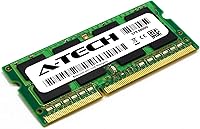
Specifications

  • Capacity: This kit includes 16GB of total memory, split across two matched 8GB modules.
  • Module Count: Two SODIMM sticks are included, designed to be installed together as a matched pair.
  • Memory Type: The modules use DDR3/DDR3L technology, compatible with boards expecting either standard.
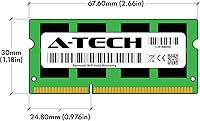
  • Form Factor: Each stick is a 204-pin SODIMM, the standard size for laptop memory slots.
  • Speed: The modules run at 1600MHz and follow the PC3L-12800 (PC3L-12800S) speed rating.
  • Voltage: Dual voltage support allows operation at either 1.35V or 1.5V depending on the host board.
  • ECC Type: The memory is non-ECC and unbuffered, matching standard consumer and business laptop requirements.
  • Rank Configuration: Each module uses a Dual Rank (2Rx8) layout for balanced memory access.
  • Compatible Models: The kit is built for Dell Latitude E7440, E7240, E6540, E6440, E5540, and E5440 laptops.
  • Processor Compatibility: It is designed to work with select 4th Generation Intel Core i3, i5, and i7 processors.
  • Warranty: A-Tech backs the kit with a limited lifetime warranty covering manufacturing defects.
  • Support: A dedicated technical support team is available to assist before and after purchase.
  • Item Weight: Each module weighs approximately 1.13 ounces according to listing specifications.
  • Dimensions: Each stick measures roughly 2.66 by 1.18 by 0.15 inches.
  • Brand: The kit is manufactured and sold under the A-Tech brand.
  • Installation Type: The modules are designed for tool-minimal, plug-and-play installation into compatible SODIMM slots.
  • Release Date: This kit first became available for purchase on October 21, 2019.

Related Reviews

A-Tech 16GB DDR3 1600MHz SODIMM Laptop RAM
81%
83%
Compatibility Range
91%
Installation Ease
78%
Performance Gains
89%
Value for Money
86%
Long-term Reliability
More
A-Tech 16GB DDR5 4800MHz SODIMM RAM
88%
91%
Performance Boost
95%
Ease of Installation
88%
Energy Efficiency
85%
Compatibility with Laptop Systems
92%
Value for Money
More
A-Tech 16GB DDR4 3200MHz SODIMM Laptop RAM
78%
83%
Compatibility
91%
Installation Ease
78%
Performance Uplift
86%
Value for Money
74%
Build Quality
More
A-Tech 16GB DDR4 2666MHz Desktop RAM
81%
91%
Value for Money
74%
Compatibility
94%
Ease of Installation
88%
System Stability
78%
Performance at Rated Speed
More
A-Tech 16GB DDR4 2400MHz SODIMM Laptop RAM
84%
74%
Compatibility
91%
Installation Ease
83%
Performance Improvement
88%
Value for Money
82%
Build & Component Quality
More
A-Tech 16GB (2x8GB) DDR4 2133 MHz Desktop RAM
85%
94%
Ease of Installation
87%
System Responsiveness
90%
Energy Efficiency
85%
Performance for General Use
92%
Price to Performance Ratio
More
A-Tech 48GB DDR5 4800MHz SODIMM Laptop RAM
83%
83%
System Compatibility
91%
Installation Experience
88%
Stability & Reliability
79%
Performance at 4800MHz
86%
Value for Money
More
Samsung 16GB DDR4 3200MHz SODIMM Laptop RAM
82%
93%
Reliability & Longevity
91%
Installation Ease
83%
System Compatibility
78%
Real-World Performance
84%
Value for Money
More
A-Tech 16GB DDR5 5600MHz RAM Kit
88%
96%
Installation Ease
89%
Performance Boost
92%
Value for Money
88%
Energy Efficiency
91%
Compatibility
More
NEMIX RAM 16GB DDR3 1600MHz SODIMM
86%
88%
Performance Boost
91%
Ease of Installation
85%
Compatibility
90%
Energy Efficiency
84%
Build Quality
More
Crucial 16GB DDR4-2666 SODIMM Laptop RAM Kit
86%
92%
Performance Gain
88%
Compatibility
91%
Value for Money
86%
Installation Ease
93%
Reliability & Longevity
More

FAQ

Yes, the E6440 is one of the specifically supported models for this kit. As long as your laptop hasn't been modified with non-standard memory slots, installation should be straightforward.

You'll get the best performance by installing both 8GB sticks together, since that enables dual-channel mode. Using just one stick still works, but you'd lose some of the bandwidth benefit the kit is designed to provide.

No, this memory upgrade is strictly DDR3/DDR3L and won't physically fit or function in a DDR4 slot. Always check your laptop's manual or existing RAM label before ordering.

Typically not. Most users report that installation is plug-and-play with no BIOS changes required, though a small number have needed to reset their BIOS for the system to recognize the new capacity.

It's a fairly beginner-friendly process if you're comfortable opening your laptop's memory access panel, usually secured by one or two screws. If you've never done it before, a quick video tutorial for your specific Latitude model will make it much easier.

A-Tech 16GB (2x8GB) DDR3L SODIMM RAM is covered by a limited lifetime warranty, so a defective module is generally eligible for replacement or support assistance. It's worth reaching out to their tech support team directly if you run into issues.
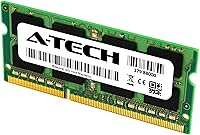
For best results and stability, it's usually recommended to replace all existing memory with this kit rather than mixing it with old modules. Mixing different speeds or types can sometimes cause the system to run at the lower common speed or create instability.

No, this is non-ECC unbuffered memory, which is standard for laptops in this category rather than servers or workstations. If your system requires ECC support specifically, this kit wouldn't be the right match.

Most buyers report a noticeable improvement in multitasking and load times, especially if your laptop is currently running on 4GB or low single-digit gigabytes. Going to 16GB tends to eliminate a lot of the slowdown that comes from running out of available memory.

Yes, this is actually one of its more popular use cases since it offers a tested, exact-fit upgrade across several Latitude models. That makes it easier to standardize upgrades across a fleet without testing compatibility on each individual machine.