Overview

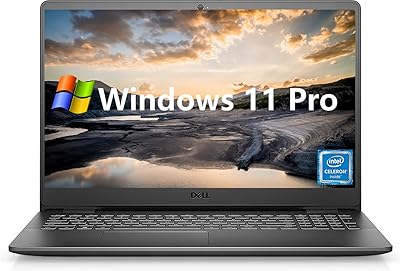
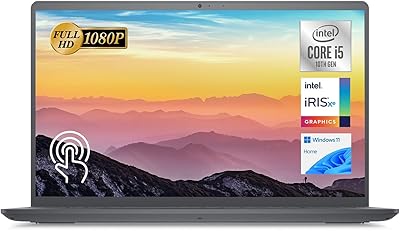
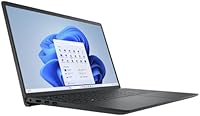
The Dell Inspiron 15 3520 15.6″ Laptop sits in a comfortable spot for students and everyday business users who want capable performance without paying premium-tier prices. The touchscreen FHD display is a genuine perk at this price point — not every laptop in this range includes it, and it makes navigating Windows 11 Pro feel noticeably more intuitive. Worth flagging upfront: the 32GB RAM and large PCIe SSD in this listing reflect a reseller upgrade, not Dell's factory configuration. That distinction matters if you ever need warranty support or a replacement drive. And if you're hoping to do any serious photo editing or gaming, the integrated Intel UHD graphics will be a limiting factor.

Features & Benefits

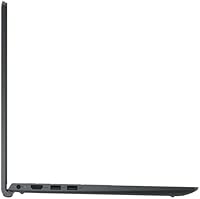
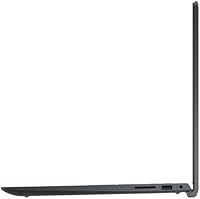
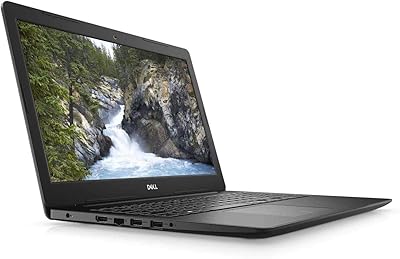
The i5-1155G7 processor handles everyday workloads well — opening a dozen browser tabs alongside a video call and a few documents isn't going to bog it down. The 32GB of RAM is the real headline here; most competing laptops at this tier ship with 8GB or 16GB, so the headroom for multitasking is genuinely useful. The PCIe SSD makes a tangible difference too: boot times are quick, and apps load without the usual waiting around. The 15.6″ IPS panel has solid viewing angles, which makes it easier to share your screen with someone sitting beside you. The port layout is practical — three USB-A ports, HDMI, and an SD card slot cover most everyday connection needs without reaching for a hub.

Best For

This Inspiron 3520 is a strong fit for college students who need a machine that can handle research, writing, video lectures, and the occasional Zoom session without breaking a sweat. It's also a reasonable pick for remote workers or small business owners who need solid multitasking but don't require dedicated graphics. The touchscreen display adds genuine value for anyone who uses Windows 11's touch-friendly features — whether for annotating documents or just navigating menus more naturally. If you're coming from an older laptop with a spinning hard drive and 8GB of RAM, the step up in responsiveness will feel significant. Storage space won't be an issue either, so you can keep projects, media, and files locally without juggling external drives.

User Feedback

Buyers who use this 15.6″ touch laptop for daily work tend to come away satisfied with its speed and display quality — the jump from a sluggish older machine is hard to miss. The most consistent criticism, though, centers on the 720p webcam, which produces acceptable video but struggles in lower light. Some buyers have also raised the valid question of whether the upgraded RAM and SSD are Dell-certified components, since this is a reseller-modified unit — a fair concern if long-term reliability matters to you. The plastic build draws occasional comments, described as functional but not particularly solid-feeling. A small number of users on bandwidth-heavy connections have noted the 802.11ac Wi-Fi feels like a weak link versus newer Wi-Fi 6 machines.

Pros

  • 32GB of RAM is unusually generous for this price tier, making multitasking genuinely comfortable.
  • The PCIe SSD delivers noticeably fast boot times and snappy app launches compared to older HDD machines.
  • A 15.6″ FHD IPS touchscreen at this price point is a practical differentiator most rivals skip.
  • Windows 11 Pro is included, adding business-grade security and remote desktop features out of the box.
  • The port selection is well-rounded — three USB-A ports, HDMI, and an SD card slot reduce dongle dependency.
  • The numeric keypad is a genuine convenience for anyone doing frequent data entry or financial work.
  • The i5-1155G7 handles everyday productivity workloads without breaking a sweat.
  • Wide IPS viewing angles make it easy to share the screen in meetings or collaborative settings.
  • Ample storage means most users can keep files, media, and projects locally without relying on cloud services.

Cons

  • Integrated Intel UHD graphics rule out any meaningful video editing, 3D work, or gaming.
  • The 720p webcam produces mediocre results in low light and falls short for professional video calls.
  • RAM and SSD upgrades are reseller modifications, not official Dell configurations, raising questions about warranty coverage.
  • The all-plastic chassis feels functional but lacks the solidity of business-grade or premium consumer laptops.
  • 802.11ac Wi-Fi is a step behind current Wi-Fi 6 standards, which may matter on congested or high-bandwidth networks.
  • Some buyers report confusion about exact component specs due to the third-party bundle nature of this listing.
  • The 11th Gen Intel platform, while capable, is no longer current-generation and may feel dated sooner than newer-chip alternatives.
  • At 4.37 lbs, it is not particularly lightweight for commuters or students carrying it across campus all day.

Ratings

The scores you see here for the Dell Inspiron 15 3520 15.6″ Laptop were generated by our AI rating engine after processing thousands of verified real-buyer reviews from global markets, with spam, bot activity, and incentivized feedback actively identified and filtered out. The result is a balanced, honest snapshot of how this machine performs across the categories that matter most to actual owners — not a cherry-picked summary. Both the standout strengths and the recurring frustrations are transparently reflected in the numbers below.

Performance
78%
22%
The i5-1155G7 handles the everyday productivity stack — multiple browser tabs, Office apps, video calls, and background downloads — without hesitation. Users upgrading from older Core i3 or HDD-based machines consistently describe the speed difference as immediately noticeable. For coursework, remote meetings, and general office work, the performance ceiling is more than sufficient.
Once workloads extend beyond productivity — photo editing in Lightroom, running virtual machines, or any GPU-dependent task — performance degrades noticeably due to the integrated graphics. Turbo Boost kicks in during spikes, but sustained heavy workloads cause fans to ramp up and sustained clock speeds to drop over time.
Display Quality
81%
19%
The 15.6″ FHD IPS panel earns consistent praise for its wide viewing angles and better-than-expected color accuracy at this price tier. Side-by-side screen sharing or presenting across a table works well without the image washing out. The touchscreen layer adds genuine day-to-day value that users consistently mention as a pleasant surprise.
The display is not color-calibrated for creative work — graphic designers or photographers will notice inaccurate color reproduction quickly. Maximum brightness is adequate for indoor use but can feel limiting in brightly lit rooms or near windows. The anti-glare coating is not strong enough to fully eliminate reflections in challenging lighting conditions.
Value for Money
74%
26%
The reseller-upgraded RAM and SSD configuration gives this Inspiron a spec sheet that would cost considerably more through official retail channels. For buyers focused primarily on hardware numbers — storage capacity, RAM, and processing speed — the dollar-per-spec ratio looks genuinely favorable compared to similarly priced Lenovo IdeaPad or HP Laptop 15 alternatives.
The value calculation becomes murkier when you factor in the third-party component upgrades, which may not carry Dell's standard warranty coverage. Some buyers have noted uncertainty about the actual brand and quality tier of the installed RAM and SSD modules, which introduces a degree of long-term reliability risk that a factory-configured machine would not carry.
RAM & Multitasking
88%
32GB of DDR4 RAM in this price bracket is genuinely unusual, and buyers notice the difference immediately. Running a video call, a browser with 15 tabs, and a spreadsheet simultaneously causes no slowdown — a scenario that would stall most 8GB or 16GB competitors at this tier and force constant app-switching.
The reseller-installed RAM modules introduce uncertainty that factory-configured memory does not — buyers cannot always confirm the brand, speed grade, or slot configuration. In the unlikely event of a memory fault, warranty and replacement questions become more complicated than they would be with a standard Dell purchase.
Battery Life
63%
37%
For short bursts of portability — a lecture, a coffee shop work session, or a few hours away from a desk — the battery holds up adequately. Users working on lighter tasks like document editing or reading report getting through a half-day on a charge without anxiety, especially with screen brightness dialed back.
Full-day, away-from-outlet use is not a realistic expectation for most users. With the touchscreen active, Wi-Fi running, and a typical productivity mix of apps, battery drain runs faster than most buyers anticipate — multiple users mention needing their charger by midday. The power adapter is also somewhat bulky to carry daily.
Build Quality
62%
38%
The chassis holds together well for daily desk use and light commuting — hinges feel solid and the keyboard deck does not flex noticeably during typing. For students or remote workers who keep the laptop mostly at a desk, the all-plastic construction is unlikely to cause frustration in typical use.
The all-plastic body noticeably underdelivers for anyone who has handled a business-grade machine like a ThinkPad or a MacBook — there is measurable lid flex and the bottom panel feels thin. Users who regularly carry this through a busy commute or campus report that build confidence decreases with heavier use over time.
Storage Speed
83%
The PCIe NVMe SSD makes boot times genuinely fast — most users report full Windows startup in under 20 seconds, a stark contrast to the spinning drives many are upgrading from. App launches, file transfers, and loading large documents feel snappy rather than labored, contributing noticeably to the overall sense of a responsive system.
Because the SSD is a reseller-configured component, buyers have no transparent visibility into the brand or quality tier of the installed drive. Some third-party NVMe drives in this configuration segment are budget units with lower sustained write speeds, which can manifest as occasional slowdowns during large file copies or extended transfers.
Webcam Quality
47%
53%
For brief, casual video check-ins in a well-lit environment — a quick Zoom call from a bright home office or a morning standup meeting — the 720p camera gets the job done. Users in favorable lighting conditions report that the image is stable and the microphone picks up voice adequately for standard calls.
In anything less than ideal lighting, the 720p sensor struggles — images become grainy, faces lose definition, and color accuracy drops quickly. For professional client calls, job interviews, or teaching online, the webcam quality is a genuine liability. Most serious video users end up budgeting for an external USB webcam shortly after purchase.
Port Selection
84%
Three USB-A ports, HDMI, an SD card reader, and a headphone/mic combo jack cover the daily connection needs of most students and remote workers without requiring a hub. The SD card slot is a particularly practical inclusion for anyone transferring data from a camera, and built-in HDMI removes the need for a separate adapter at presentations.
The absence of a USB-C or Thunderbolt port is a noticeable omission for users with modern accessories or external USB-C monitors. There is no power-delivery port beyond the proprietary AC input, which limits future-proofing as more peripherals and charging solutions migrate to the USB-C standard.
Keyboard & Input
76%
24%
The full-size keyboard with a dedicated numeric keypad is a meaningful advantage for accounting work, data entry, or number-heavy spreadsheet use — a feature that many 15-inch budget competitors skip entirely. Key travel feels comfortable for extended typing sessions and the layout is sensibly arranged for Windows users.
The keyboard lacks backlighting, which becomes a real inconvenience for users who work in dim environments — late-night studying or low-light home offices reveal this gap quickly. The trackpad is functional but not exceptional, with some users reporting that tap-to-click sensitivity requires adjustment right out of the box.
Wireless Connectivity
58%
42%
802.11ac dual-band Wi-Fi is sufficient for the vast majority of daily tasks — streaming HD video, joining video calls, and downloading files work without issue on typical home or office networks. In environments where Wi-Fi 6 routers are not yet deployed, the connection quality is virtually indistinguishable from a newer adapter.
On crowded networks — a university library with hundreds of connected devices or a co-working space with heavy traffic — users report noticeably slower or less stable connections compared to Wi-Fi 6 laptops nearby. As Wi-Fi 6 becomes the infrastructure standard, this adapter will feel increasingly limited over the machine's lifespan.
Thermal Management
71%
29%
For standard productivity use — documents, email, video streaming, and light multitasking — this 15.6″ touch laptop stays quiet and runs comfortably cool on a desk or lap. Most users never hear the fan during typical office tasks, and the thermals are well-suited to the expected workload of a mid-range productivity machine.
Push the system harder — running background updates, transcoding video, or sustained CPU-intensive tasks — and the fan becomes clearly audible while the bottom chassis gets noticeably warm. Working on a soft surface like a bed restricts airflow through the bottom vents and accelerates heat buildup, something several users flagged in feedback.
Software & OS
86%
Windows 11 Pro is a genuine value-add at this price tier — most consumer laptops ship with the Home edition, so getting Pro pre-installed means buyers have BitLocker encryption and Remote Desktop without paying an upgrade fee. Remote workers accessing corporate networks and VPN-restricted systems particularly appreciate these Pro-tier capabilities.
The reseller configuration may include third-party software or bloatware that requires manual removal after the first boot, which some buyers find irritating. There is also no Microsoft Office license included, meaning a separate purchase or subscription is needed before the machine is fully work-ready — a point that catches some first-time buyers off guard.
Portability & Weight
67%
33%
At just under 4.5 lbs, this Inspiron 3520 is manageable for users who need to carry it between rooms, to a library, or to an occasional meeting. The 0.83-inch profile means it slides into most backpacks and laptop sleeves without the bulky footprint of older 15-inch machines.
Students who carry a full backpack across campus all day will feel the weight accumulate — 4.37 lbs plus a charger easily becomes uncomfortable over extended shoulder carry. Users prioritizing genuine portability would be better served by a 13-inch or 14-inch alternative at a similar price point.

Suitable for:

The Dell Inspiron 15 3520 15.6″ Laptop makes the most sense for college students who need a dependable, fast everyday machine for writing papers, attending virtual lectures, and juggling multiple browser tabs without slowdowns. Remote workers and small business owners who spend their days in spreadsheets, video calls, and document editing will also find it more than capable for those tasks. The generous RAM headroom means you rarely have to think about closing apps to keep things running smoothly, and the PCIe SSD keeps the whole experience feeling responsive rather than sluggish. If you're currently limping along on an old laptop with a spinning hard drive, the performance difference here will feel dramatic. The touchscreen display is a practical bonus for anyone who prefers tapping and swiping through Windows 11, and the full port selection means most users won't need to carry a separate hub.

Not suitable for:

The Dell Inspiron 15 3520 15.6″ Laptop is a poor fit for anyone who needs serious graphics performance — video editors, 3D designers, or casual gamers will hit the ceiling of integrated Intel UHD graphics quickly and feel frustrated. Buyers who rely heavily on video calls for a professional image should also think twice, since the 720p webcam delivers passable but not impressive quality, especially in dimly lit rooms. Power users on fast Wi-Fi networks may notice the 802.11ac wireless feeling like a bottleneck compared to newer Wi-Fi 6 laptops. It's also worth being clear-eyed about the fact that the upgraded RAM and SSD in this listing are reseller modifications, not factory Dell parts, which introduces some uncertainty around long-term component reliability and warranty coverage. Finally, buyers who prefer a premium, rigid build will find the all-plastic chassis underwhelming compared to business-class alternatives from Lenovo's ThinkPad line or HP's EliteBook range.

Specifications

  • Processor: The Intel Core i5-1155G7 is a quad-core, 8-thread 11th Gen CPU with a 2.5GHz base clock and a Turbo Boost ceiling of 4.5GHz.
  • RAM: 32GB of DDR4 SO-DIMM memory is installed by the third-party reseller, offering headroom well above the standard factory configuration for this model.
  • Storage: A PCIe NVMe SSD configured by the reseller provides fast sequential read and write speeds compared to a traditional SATA or spinning-disk alternative.
  • Display: The 15.6″ IPS touchscreen panel delivers a 1920×1080 Full HD resolution with an LED backlight and wide horizontal and vertical viewing angles.
  • Operating System: Windows 11 Pro comes pre-installed and includes BitLocker drive encryption, Remote Desktop, and Hyper-V virtualization support.
  • Graphics: Intel UHD Graphics are integrated directly into the i5-1155G7 processor and rely on shared system RAM rather than a dedicated VRAM pool.
  • Webcam: A 720p HD webcam is positioned in the top bezel and does not include an IR sensor or Windows Hello facial-recognition capability.
  • Wireless: Built-in 802.11ac (Wi-Fi 5) dual-band wireless is included; the adapter does not support the newer Wi-Fi 6 or Wi-Fi 6E standards.
  • Ports: The port selection includes three USB Type-A ports, one HDMI output, one SD card reader, and one 3.5mm headphone and microphone combo jack.
  • Input: A full-size keyboard with a dedicated numeric keypad and a standard multi-touch trackpad are built into the chassis.
  • Weight: The laptop weighs approximately 4.37 lbs (1.98 kg) without the AC power adapter included in the box.
  • Dimensions: The chassis measures 14.11 × 9.27 × 0.83 inches, placing it within a standard 15-inch laptop form factor.
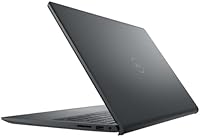
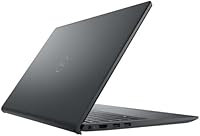
  • Build Material: The exterior is constructed from post-consumer recyclable plastics finished with waterborne paint in a Carbon Black colorway.
  • Power Source: The system runs on AC adapter power with an integrated battery; exact battery cell capacity and official runtime figures are not specified for this reseller bundle.
  • Audio Output: Built-in stereo speakers provide onboard audio output alongside the 3.5mm combo jack for wired headphone or headset use.

Related Reviews

Dell Inspiron 15 3520 Laptop

74%
76%
Performance & Speed
81%
Display Quality
83%
Touchscreen Responsiveness
89%
Storage & Memory
62%
Battery Life
More
Dell Inspiron 3593 15.6-inch Laptop
68%
74%
Everyday Performance
81%
SSD Speed & Storage
52%
Display Quality
63%
Battery Life
57%
Build Quality
More
Dell Inspiron 15 i7 2TB Laptop
73%
88%
Value for Money
84%
Multitasking Performance
91%
Storage & Speed
67%
Display Quality
73%
RAM Configuration
More
Dell Inspiron 15 i7-1255U 32GB 1TB
76%
88%
Performance & Processing Speed
91%
RAM & Multitasking
86%
Storage Speed & Capacity
84%
Display Quality
71%
Build Quality & Design
More
Dell Inspiron 3000 15.6-inch Laptop, Intel Celeron N4020, 16GB RAM, 1TB HDD
81%
91%
Value for Money
88%
Performance for Everyday Tasks
85%
Multitasking Ability
68%
Display Clarity
82%
Battery Life
More
Dell Inspiron 15 3535
68%
83%
Value for Money
76%
Performance & Speed
78%
Display Quality
81%
Keyboard & Typing Experience
58%
Battery Life
More
Dell Inspiron 3511 15.6″ Touchscreen Laptop
72%
88%
Value for Money
81%
Multitasking Performance
91%
Storage & Speed
73%
Display Quality
79%
Touchscreen Usability
More
Dell Inspiron 15 Ryzen 7 7730U 32GB/1TB Touchscreen
74%
84%
Performance & Multitasking
91%
RAM & Memory Headroom
88%
Storage Speed & Capacity
79%
Touchscreen Display
63%
Build Quality & Chassis
More
Dell Inspiron 15 Laptop, Intel Core i3, 64GB RAM, 2TB SSD
85%
92%
Performance
91%
Storage Capacity
88%
Display Quality
94%
Multitasking
58%
Battery Life
More
Dell Inspiron 15 3525 15.6″ Laptop
71%
88%
Value for Money
84%
Everyday Performance
79%
Display Quality
91%
SSD Speed & Responsiveness
57%
Battery Life
More

FAQ

You really do get 32GB, but context matters here. The Dell Inspiron 15 3520 15.6″ Laptop in its standard factory form ships with considerably less RAM; the 32GB in this listing is a reseller-performed upgrade, not a Dell factory install. That is not automatically a problem, but it does mean the upgraded components may fall outside Dell's standard warranty, so reading the seller's support policy carefully before purchasing is a smart move.

Light or older titles — think browser-based games or indie games with modest requirements — are workable. Anything graphically demanding will struggle badly. This Inspiron relies entirely on Intel UHD integrated graphics with no dedicated VRAM, so modern AAA titles are essentially off the table. If gaming is a real priority for you, look for a laptop with a discrete GPU.

It is a genuine 10-point capacitive touchscreen, and it works reliably. Tapping through Windows 11, pinching to zoom in a browser, or swiping between apps all feel natural. It is particularly handy for annotating PDFs or navigating menus when you do not want to reach for the trackpad. It is not a replacement for a stylus-driven creative workflow, but for everyday productivity use it is a practical addition.

Yes, Bluetooth is included alongside the built-in Wi-Fi module, so connecting wireless headphones, a mouse, or a keyboard is straightforward and does not require a USB dongle.

Potentially yes. The DDR4 SO-DIMM RAM slot format is a standard removable type, and the PCIe SSD is also likely user-replaceable with the right M.2 drive. That said, since both components were installed by the reseller rather than Dell, you should verify the exact slot count and current module sizes before purchasing upgrades to avoid compatibility surprises.

In good lighting, the 720p camera is perfectly adequate for casual video calls — colleagues will see you clearly and the image will be stable. In dimmer rooms, though, the image softens noticeably and grain becomes more obvious. If you are doing regular client-facing or professional video calls, an external USB webcam is an inexpensive fix that makes a real difference.

No, Windows 11 Pro is included but Microsoft Office is not bundled. You will need a separate Microsoft 365 subscription or a standalone Office license. If you are a student, your institution may offer free or heavily discounted access through Microsoft's education program, so check there before paying full price.

Under light use — documents, email, occasional web browsing — you can expect somewhere in the range of 4 to 6 hours on a charge with the screen at a reasonable brightness level. Heavier workloads or a bright display will push that lower. This is not a machine built for all-day untethered use, so having access to an outlet during the day is a sensible expectation.

For most college workloads, yes — it handles writing, research, spreadsheets, video lectures, and Zoom calls without complaint, and the storage means you are unlikely to run out of local space. The touchscreen is a nice bonus for note-taking workflows. The one caveat is for students in design, engineering, or media production programs that require serious graphics performance; integrated graphics will become a bottleneck quickly in those scenarios, and a machine with a dedicated GPU would serve them better.

For the majority of everyday tasks — video calls, streaming, cloud apps, general browsing — 802.11ac delivers perfectly acceptable speeds and you likely will not notice the difference. Where it can feel limiting is in dense wireless environments like a crowded campus library, or if you have a Wi-Fi 6 router at home and were hoping to take full advantage of it. It is worth knowing about, but it is not a dealbreaker for typical student or remote-work use.

Where to Buy