Overview

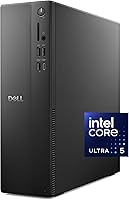
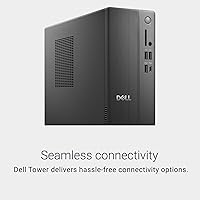
The Dell Slim ECS1250 Desktop PC makes a strong case for itself the moment you consider how little desk space it actually demands. Built around Intel's Core Ultra 5-225, it brings legitimate AI-assisted processing to everyday office tasks without requiring a full-tower footprint. This slim desktop sits comfortably alongside comparable machines from HP and Lenovo in the mid-range space, though the tool-less side panel gives it a practical edge for anyone who plans to add RAM or swap storage down the line. It ships with Windows 11 Home, a wired keyboard and mouse, and basic onsite service already included.
Features & Benefits

What sets the Dell ECS1250 apart from older-generation compact desktops is the quality of the hardware underneath that modest exterior. The Intel Core Ultra 5-225 includes a dedicated neural processing unit, which means AI-enhanced productivity tools actually run locally rather than leaning on the cloud. Paired with 16GB of DDR5 memory at 5600MT/s, multitasking feels genuinely responsive. The 512GB M.2 SSD keeps boot and load times quick, though serious content creators should verify whether a second storage slot is available before committing. Multi-monitor support is a standout feature — up to four FHD displays via daisy-chaining, or two 4K screens through HDMI 2.1 and DisplayPort.

Best For

This compact tower is best suited to people who spend their days in productivity software — spreadsheets, video calls, document editing — rather than those chasing frame rates in games or rendering 3D models. Remote and hybrid workers will find it particularly well-matched: it runs quietly, takes up minimal desk space, and the included onsite service agreement adds real reassurance for small businesses without dedicated IT staff. Students and educators get solid performance for their needs without overpaying for capabilities they won't use. Anyone upgrading from a Core i5 machine from a few years back will notice the difference immediately.

User Feedback

Buyers generally appreciate how quiet this slim desktop runs during typical workday tasks, though a handful of users report the fan becomes more noticeable under sustained load. The 512GB SSD draws criticism from people who store large media libraries or work with video files, and that limitation is worth flagging upfront. The bundled keyboard and mouse are functional but unremarkable — a common trade-off at this tier that most buyers accept and replace quickly. Display output compatibility has come up occasionally, so verifying cable and monitor specs before setup is advisable. Feedback on Dell's onsite service has been mostly favorable, with quick response times noted by small business users.

Pros

  • Intel Core Ultra 5-225 with built-in NPU handles AI-powered productivity tools natively, no cloud dependency needed.
  • DDR5 memory at 5600MT/s makes everyday multitasking noticeably more responsive than older DDR4 systems.
  • Supporting up to four monitors from integrated graphics alone is a genuine standout for a machine this size.
  • Wi-Fi 6 and Bluetooth are built in, so your desk stays cleaner without USB dongles cluttering ports.
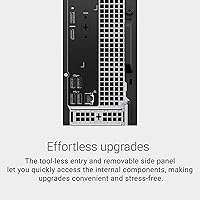
  • The tool-less side panel makes adding RAM or swapping storage straightforward, even for non-technical users.
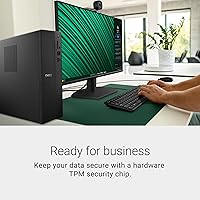
  • Hardware TPM, a built-in lock slot, and padlock loop make this slim desktop genuinely business-ready out of the box.
  • Basic onsite service is bundled in, which adds real peace of mind for small businesses without IT support on staff.
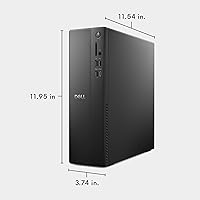
  • At under 8 pounds and roughly 3.7 inches wide, it fits comfortably in cramped office setups or under a monitor.
  • Windows 11 Home, a keyboard, and a mouse are all included, so there are no hidden day-one add-on costs.
  • Fan noise stays low during typical productivity workloads, making it a comfortable companion in quiet work environments.

Cons

  • The 512GB SSD fills up faster than expected for users who store large files, video footage, or photo libraries locally.
  • Integrated-only graphics rule out gaming, 3D rendering, and professional video work entirely — no upgrade path exists within this chassis.
  • The bundled keyboard and mouse are basic at best; most buyers will want to replace them fairly quickly.
  • Sustained heavy workloads can push fan noise to noticeable levels, which undercuts the otherwise quiet reputation.
  • Display output compatibility can be inconsistent depending on cable type and monitor model — testing before committing to a setup is wise.
  • No discrete GPU slot means the Dell ECS1250 cannot grow into more demanding creative or technical tasks as needs change.
  • Only 512GB of base storage with no confirmed secondary drive bay limits long-term flexibility for power users.
  • The wired-only peripherals included feel dated when wireless setups are increasingly standard at this price tier.
  • Thermal headroom under prolonged load is tighter than a full-sized tower, which could affect longevity in always-on business scenarios.
  • USB 2.0 ports are still present alongside the 3.0 ports, which may frustrate users connecting modern high-speed peripherals.

Ratings

The Dell Slim ECS1250 Desktop PC earns a well-rounded but nuanced score across our rating categories, based on AI analysis of verified global buyer reviews — with spam, bot activity, and incentivized submissions actively filtered out before scoring. This compact tower performs admirably in the areas that matter most for its target audience, though real user feedback makes clear there are trade-offs worth understanding before buying. Both the genuine strengths and the recurring frustrations are reflected transparently in the scores below.
Processing Performance
83%
Users upgrading from older Core i5 or Ryzen 5 machines consistently report a meaningful jump in day-to-day responsiveness. The Core Ultra 5-225 handles simultaneous video calls, browser-heavy workflows, and productivity suites without hesitation, and the built-in NPU adds genuine value for AI-assisted features in modern apps.
Under sustained CPU-intensive tasks — extended exports, large spreadsheet recalculations — some users notice thermal throttling kicking in sooner than they would like. Compared to full-sized mid-tower desktops in the same price range, the slim chassis limits headroom for prolonged peak performance.
Multitasking & Memory
86%
The 16GB of DDR5 at 5600MT/s is a tangible upgrade over DDR4 systems, and buyers who run multiple apps simultaneously notice the difference quickly. Switching between a video call, a spreadsheet, and a browser with dozens of tabs open stays fluid in a way that older-generation compact desktops struggle to match.
While 16GB is sufficient today, some power users flag that the slim form factor may restrict memory upgrade options down the line. There is also no 32GB configuration available at the base tier, which is a gap for users with more intensive multitasking demands.
Storage Capacity
57%
43%
The M.2 NVMe SSD delivers fast boot times and snappy application launches that users consistently praise. For buyers whose work lives primarily in cloud storage or who maintain lean local file habits, 512GB holds up reasonably well through the first year.
This is the most frequently cited frustration in buyer feedback. Content-heavy users, photographers, and educators storing local video files report running low within months. The 512GB baseline feels conservative for a machine positioned as a long-term productivity investment, and expansion slot availability is not guaranteed.
Multi-Monitor Support
89%
The ability to drive up to four FHD monitors — or two 4K displays — without a discrete GPU is something buyers genuinely did not expect at this size and price. Remote workers and traders who rely on expanded screen real estate highlight this as the single most compelling reason they chose this slim desktop over competing models.
A handful of users report compatibility hiccups depending on cable type and monitor brand — not every DisplayPort daisy-chain setup works without some troubleshooting. The documentation could be clearer about which cable standards are required to achieve the full four-display configuration reliably.
Build Quality & Design
81%
19%
The chassis feels solid and well-finished for its weight class, and the recycled-material construction comes across as genuinely considered rather than a marketing footnote. Buyers frequently mention that it looks noticeably more professional on a desk than similarly priced compact desktops from competing brands.
A small number of users note that the plastic side panel, while tool-less, feels slightly less premium than the rest of the unit when removed and reinstalled. At just under 8 pounds, the machine is light enough to shift accidentally if desk space is cramped.
Noise & Thermals
68%
32%
For the vast majority of working hours — calls, documents, light media consumption — this compact tower runs quietly enough that most buyers forget the fan exists. Its noise profile compares favorably to older-generation slim desktops in similar form factors.
Under extended load, the fan audibly spins up and the thermal headroom is noticeably tighter than a full-sized tower. Users doing long encoding jobs or running multiple heavy apps for hours report that the noise level becomes a distraction, particularly in quiet home office environments.
Connectivity & Ports
77%
23%
Having eight USB ports in total — split between 2.0 and 3.0 — covers most desk setups comfortably, and the built-in SD card reader adds day-to-day convenience for photographers or educators working with cameras. Wi-Fi 6 and Bluetooth being standard rather than add-ons is appreciated across the board.
The continued presence of four USB 2.0 ports feels dated when modern peripherals increasingly expect 3.0 speeds as a baseline. A USB-C port would also have been a welcome addition, and its absence is mentioned more than once in buyer feedback from users with newer accessories.
Wireless Performance
82%
18%
Wi-Fi 6 delivers the kind of stable, fast wireless connection that makes a wired ethernet cable genuinely optional for most users. Video calls, file syncing, and cloud app performance all benefit from the improved bandwidth and reduced congestion handling versus older Wi-Fi 5 machines.
A small segment of buyers in environments with older routers report that the Wi-Fi 6 advantage is essentially wasted if the network infrastructure has not been updated. Range at the far edges of larger homes or open-plan offices can also be inconsistent.
Security Features
84%
For small business buyers and IT-conscious users, the hardware TPM chip, lock slot, and padlock loop check the right boxes without requiring any third-party additions. Users deploying these machines in shared or semi-public office environments specifically call out these features as differentiators versus consumer-grade compact desktops.
The included security features cover physical and basic data security well, but there is no biometric login option like a fingerprint reader, which some business buyers have come to expect. Businesses with stricter compliance requirements may need to layer on additional software solutions.
Upgradeability
71%
29%
The tool-less side panel is as straightforward in practice as advertised — buyers who have never opened a desktop before report successfully accessing the internals without frustration. For RAM and storage upgrades, the chassis design is more accessible than most slim-form-factor competitors.
The slim chassis fundamentally caps upgrade potential: there is no room for a discrete GPU, and the power supply is not designed to support one. Users who anticipate significant hardware expansion beyond memory and storage will hit a hard ceiling relatively quickly.
Included Peripherals
52%
48%
The bundled keyboard and mouse mean the machine is immediately usable without any additional spend, which buyers on tight setups appreciate. For occasional or light-use scenarios, both peripherals are perfectly functional as a starting point.
The included keyboard and mouse are consistently described as budget-tier — stiff keys, lightweight construction, and an overall feel that does not match the machine itself. The majority of buyers who use them daily replace them within a few weeks, which somewhat undermines the value of including them at all.
Setup Experience
87%
Out-of-box setup is smooth and fast — Windows 11 Home is pre-installed and the machine reaches the desktop without unnecessary complications. The compact, lightweight chassis makes positioning and cable management easy, even in tight spaces.
A few users flag that the initial Windows 11 setup pushes Dell-specific software and bundled apps that require manual removal. The onsite service documentation could also be more clearly presented in the box, as some buyers were unsure how to register or activate it.
Value for Money
74%
26%
For a compact desktop with DDR5 memory, a current-generation AI-capable processor, Wi-Fi 6, and four-monitor support, the price positioning is competitive against comparable HP and Lenovo configurations. Buyers in the target audience — small business owners, hybrid workers — consistently rate it as fair given what is included.
The 512GB storage ceiling and integrated-only graphics start to feel like meaningful compromises when evaluated against the overall price. Buyers who need more storage or any discrete graphics capability will quickly find themselves spending additionally to compensate, which erodes the initial value calculation.
Dell Service & Support
78%
22%
The bundled Basic Onsite Service is a genuine differentiator for small business buyers, and user feedback on Dell's response times is mostly positive — technicians show up, problems get resolved, and the experience is described as professional. For non-IT businesses, this peace of mind has real dollar value.
Coverage terms vary by region and the onsite service is basic by design, meaning more complex or out-of-warranty issues fall outside its scope. A small number of users report longer-than-expected wait times for scheduling, which is more disruptive for businesses relying on the machine daily.

Suitable for:

The Dell Slim ECS1250 Desktop PC is a strong fit for anyone who needs a capable, low-profile machine that earns its place on a real desk rather than disappearing into a spec sheet. Remote workers juggling video calls, cloud apps, and multiple documents open simultaneously will find the DDR5 memory and fast SSD keep things moving without frustrating pauses. Small business owners who want reliable hardware with professional-grade security features — hardware TPM, a lock slot — and the reassurance of onsite service will appreciate that Dell has genuinely thought about the business context here. Educators and students running productivity suites, presentation software, and browser-heavy research workflows are squarely in the sweet spot. The multi-monitor capability is also a real draw for productivity-focused users: running three or four displays from integrated graphics alone is not something every compact desktop can offer, and it opens up genuinely flexible workspace arrangements.
Not suitable for:

Buyers expecting to run graphically intensive software — whether that means modern gaming, 3D rendering, or professional video production — will hit the ceiling of the Intel UHD Graphics 730 quickly, and this compact tower offers no practical upgrade path to a discrete GPU given its slim chassis constraints. The 512GB SSD, while fast, will feel tight within a year or two for anyone managing large media libraries, raw photo archives, or extensive local project files. Power users who routinely push a machine hard for hours at a stretch may also find the thermal headroom limited compared to a full-sized mid-tower desktop. If you are comparing it to something like the HP EliteDesk 800 G9 or a Lenovo ThinkCentre M90q, those machines may offer more mature business ecosystem integrations that some corporate buyers will value. In short, this compact tower is not designed for heavy-lifting workloads, and treating it as one will likely lead to disappointment.

Specifications

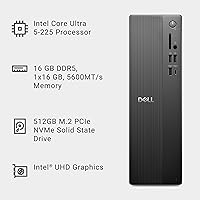
  • Processor: Powered by an Intel Core Ultra 5-225 running at a base clock of 2.7 GHz, with a built-in neural processing unit for AI-accelerated tasks.
  • Memory: Equipped with 16GB of DDR5 RAM running at 5600MT/s, providing fast, responsive multitasking across demanding productivity workloads.
  • Storage: Includes a 512GB M.2 NVMe SSD for quick boot times and fast application loading.
  • Graphics: Runs on Intel UHD Graphics 730 integrated graphics, capable of driving up to two 4K displays or up to four FHD monitors simultaneously.
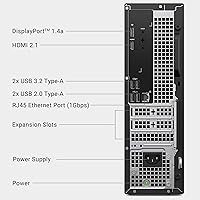
  • Display Output: Features one HDMI 2.1 port and one DisplayPort 1.4a port, with daisy-chaining support for up to four full HD monitors.
  • Wireless: Built-in Wi-Fi 6 (802.11ax) and Bluetooth provide fast, reliable wireless connectivity without requiring external adapters.
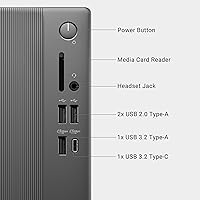
  • USB Ports: Offers four USB 2.0 ports and four USB 3.0 ports, giving ample connectivity for peripherals, drives, and accessories.
  • SD Card Reader: Includes a USB 3.0 SD card reader for straightforward file transfers from cameras and other compatible devices.
  • Operating System: Ships with Windows 11 Home pre-installed, ready to use out of the box.
  • Security: Equipped with a hardware TPM chip, a built-in lock slot, and a padlock loop to support physical and data security needs.
  • Dimensions: Measures 11.54 x 3.74 x 11.95 inches, making it compact enough for tight desk setups and small workspaces.
  • Weight: Weighs 7.69 pounds, light enough to reposition easily but sturdy enough to sit stably on a desk or shelf.
  • Chassis Access: The side panel is removable without tools, allowing straightforward access to internal components for upgrades or maintenance.
  • In the Box: Comes bundled with a wired keyboard and mouse, so the system is usable immediately without additional purchases.
  • Service Plan: Includes Dell Basic Onsite Service, providing on-location hardware support during the coverage period.
  • Form Factor: Slim tower desktop design, crafted from recycled materials with a black finish and refined corners suited to professional environments.
  • Chipset: Built on an Intel platform chipset optimized for the Core Ultra processor generation, supporting modern I/O and memory standards.
  • Power: Designed with a compact internal power supply appropriate for its slim chassis and integrated-graphics configuration.

Related Reviews
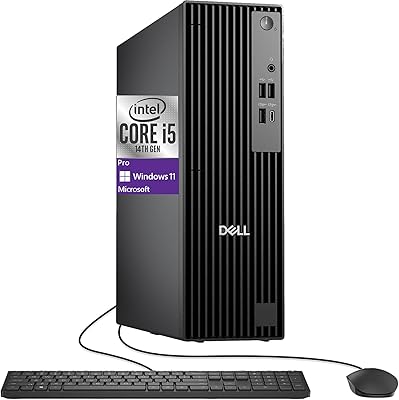
Dell Pro Slim QCS1250 Desktop
84%
88%
Performance
92%
Compact Design
89%
Setup & Installation
85%
Multitasking Capability
87%
Build Quality
More
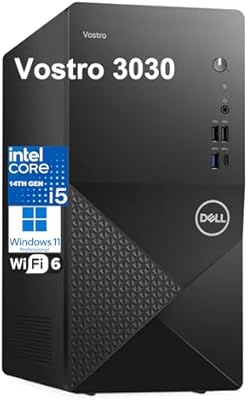
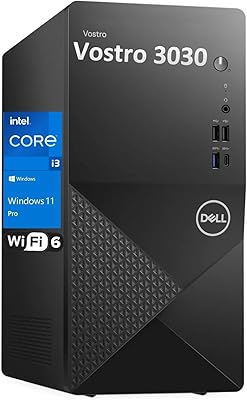
Dell Vostro 3030 Tower (Core i5-14400, 16GB DDR5, 512GB SSD)
80%
88%
Performance for Everyday Tasks
84%
Value for Money
93%
Setup & Out-of-Box Experience
79%
Build Quality & Chassis
71%
Storage Capacity & Speed
More
Dell Vostro 3910 Tower Desktop PC, 12th Gen Intel Core i3, 16GB RAM, 512GB SSD
85%
86%
Performance
92%
Value for Money
90%
Ease of Setup
88%
Quietness & Energy Efficiency
84%
Connectivity & Ports
More
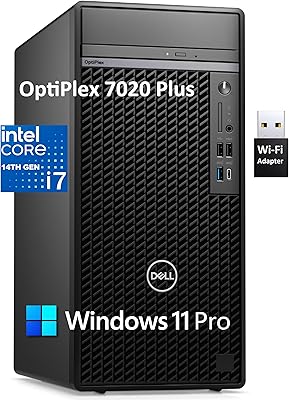
Dell OptiPlex 7020 Plus Tower Desktop
78%
93%
Processing Performance
91%
Multitasking Capability
89%
Storage & Boot Speed
48%
Wireless Connectivity
88%
Multi-Monitor Support
More
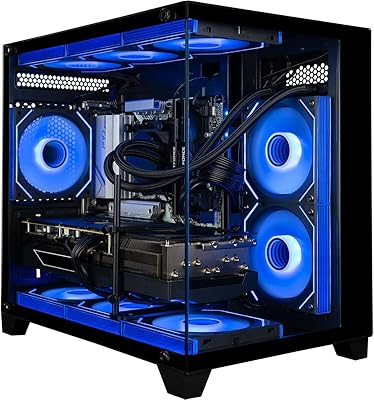
Empowered PC Panorama Gaming Desktop (RTX 5080, i9-14900KF, 96GB DDR5, 4TB)
83%
94%
Gaming Performance
91%
Out-of-Box Experience
67%
Value for Money
72%
Thermal Management
88%
Build & Component Quality
More
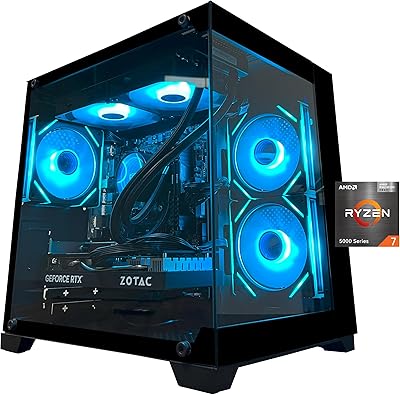
YAWYORE MX570 Gaming PC Desktop
87%
92%
Performance
89%
Value for Money
95%
Cooling and Noise Reduction
90%
Gaming Experience
87%
Build Quality
More
XKX XKX112A USB Computer Soundbar
82%
96%
Space Efficiency
93%
Setup Simplicity
88%
Vocal Clarity
84%
Volume Ceiling
82%
Clamp Security
More
MINISFORUM UM870 Slim Mini PC (Barebone)
80%
88%
CPU Performance
74%
Integrated Graphics
91%
Build Quality & Design
93%
Connectivity & I/O
89%
Multi-Monitor Support
More
iBUYPOWER Slate5MR 243i Gaming Desktop PC
79%
88%
1080p Gaming Performance
71%
Value for Money
93%
Setup Experience
82%
Build & Interior Quality
79%
CPU Performance
More
Skytech Gaming Azure Gaming PC Desktop
83%
89%
Value for Money
85%
Gaming Performance
92%
Setup and Ease of Use
84%
Build Quality
80%
Cooling and Thermals
More

FAQ

Yes, but with a caveat on resolution. You can connect up to four full HD monitors using DisplayPort 1.4a and daisy-chaining. If you want 4K output, you are limited to two displays — one through HDMI 2.1 and one through DisplayPort. Make sure your monitors and cables support the relevant standards before assuming everything will just work out of the box.

For most office-focused users — documents, emails, video calls, and browser work — 512GB is workable but not roomy. If you plan to store large photo libraries, downloaded video files, or a lot of locally installed software, you will likely feel the squeeze within a year or two. It is worth checking whether the chassis supports a second M.2 slot before buying, so you know your expansion options upfront.

The tool-less side panel makes getting inside the machine straightforward, which is a genuine plus. That said, always verify the exact memory configuration before purchasing extra sticks — DDR5 SO-DIMMs or DIMMs are not interchangeable, and the number of available slots matters. Dell's product documentation is the most reliable source for confirming upgrade compatibility.

During typical productivity tasks — web browsing, document editing, video calls — the fan stays quiet and mostly unnoticeable. Under sustained load, like long export jobs or running multiple demanding apps simultaneously, the fan does spin up and becomes more audible. It is not disruptive, but if you need near-silence for recording or focused work, that is worth keeping in mind.

Not in any meaningful sense. The Intel UHD Graphics 730 is integrated graphics designed for display output and light media tasks, not gaming workloads. Casual or older titles might run at low settings, but modern games will struggle badly. There is also no practical way to add a discrete GPU given the slim chassis design, so this machine is not a gaming PC and should not be bought with that in mind.

Dell's Basic Onsite Service means a technician comes to your location to handle qualifying hardware repairs, rather than you needing to ship the machine in. The exact coverage window depends on the region and plan terms, so it is worth reading the fine print. For small businesses without IT staff, it is a genuinely useful safety net.

Wi-Fi 6 is fast and stable for most home and office environments, and in practice most users will not feel the need to run a cable. That said, if your router is far away or your workspace has a lot of wireless interference, a wired connection is always more consistent. The compact tower does include an ethernet port if you prefer that reliability.

The Intel Core Ultra 5-225 includes a neural processing unit, which accelerates AI-assisted features in compatible software — things like real-time background blur in video calls, noise suppression, live captions, and AI writing tools in apps like Microsoft 365. It is not going to run large language models locally, but for the AI features baked into everyday productivity software, the NPU handles them without taxing the main CPU.

They are functional — both are wired and will get you set up immediately — but they are entry-level peripherals. Most buyers end up replacing them fairly quickly, especially if they spend long hours at the keyboard. Think of them as a stopgap rather than a long-term solution.

This slim desktop holds its own well in terms of raw specs at this price point. The HP EliteDesk and Lenovo ThinkCentre M-series are strong alternatives, particularly if you need deeper enterprise management features or prefer those brands' support ecosystems. Dell's advantage here is the multi-monitor flexibility and the tool-less chassis access, which are less common at this size and price. Ultimately, all three are solid choices — the right pick depends on your specific support and software environment needs.