Overview

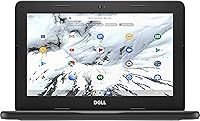
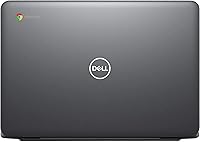
The Dell Chromebook 3100 11.6-inch Laptop is Dell's answer to the classroom's most practical question: what happens when a kid spills juice on it? Released in 2019 and built squarely for education, this Chromebook runs Chrome OS — a stripped-back, browser-centric system that behaves nothing like Windows. There's no antivirus to manage, no bloatware, and updates happen quietly in the background. The spill-resistant keyboard aside, the real appeal here is simplicity. If you're expecting to run Photoshop or juggle a dozen apps simultaneously, look elsewhere. But for web-based work, Google Classroom, and everyday student tasks, the Dell 3100 punches well within its weight class.

Features & Benefits

The Celeron N4000 processor is honest about what it is — a dual-core chip comfortable with browser tabs, Google Docs, and video calls, but not much more. Pair that with 4GB of RAM and you get a machine that handles a dozen Chrome tabs before it starts to breathe heavily. Storage is where you have to manage expectations: 32GB of eMMC fills up faster than you'd think, but leaning on Google Drive solves that almost entirely. The touchscreen display at 11.6 inches is a nice touch for younger students navigating apps. Battery life is a genuine highlight — nine hours is realistic, not marketing fiction.

Best For

This education laptop finds its best home in a K-12 classroom — or more specifically, in the backpack of a student who needs a reliable device for Google Classroom, online research, and video lessons without parents worrying about breakage every week. It's also a practical pick for IT administrators managing large fleets of school devices, since Chrome OS makes remote management genuinely painless. Budget-conscious families who live primarily in a browser will feel right at home. Seniors or first-time laptop users who find Windows intimidating also tend to respond well to Chrome OS's clean, minimal interface and automatic updates.

User Feedback

Owners consistently praise the build quality and battery — the chassis feels solid for the price, and the all-day endurance holds up in practice. Setup is nearly frictionless, which non-technical users especially appreciate. On the critical side, the 32GB storage draws regular complaints from buyers who didn't anticipate how quickly it fills without active cloud habits. Display brightness is another sticking point: outdoors or in bright classrooms, the screen can feel washed out. A few long-term owners note the hardware ages well for web use even after two or three years, thanks largely to Chrome OS handling updates automatically and keeping the system running clean.

Pros

  • Rugged, well-built chassis holds up to the daily punishment of school backpacks and clumsy desks.
  • Spill-resistant keyboard is a practical safeguard that parents and teachers will notice immediately.
  • Battery life comfortably covers a full school day without needing a charger nearby.
  • Chrome OS setup takes minutes, and there is virtually no ongoing maintenance required.
  • The touchscreen display adds useful interactivity for younger students navigating educational apps.
  • Automatic Chrome OS updates keep the system secure and running efficiently over the long term.
  • Dual USB-C and dual USB 3.1 ports offer more connectivity options than many rivals at this price.
  • Lightweight at under 3.5 pounds, making it easy for kids to carry between home and school.
  • Bluetooth 5.0 and Wi-Fi AC provide reliable wireless connectivity in busy school network environments.
  • Google Drive integration effectively sidesteps the limited local storage for cloud-comfortable users.

Cons

  • 32GB of local storage fills up fast and cannot be upgraded, requiring a cloud-first discipline from day one.
  • The Celeron N4000 slows noticeably when too many browser tabs are open simultaneously.
  • Screen brightness is underwhelming in well-lit classrooms or outdoor settings.
  • 1366x768 display resolution feels dated compared to sharper panels now available at similar price points.
  • Chrome OS locks out popular desktop applications, which can be a dealbreaker for students needing specific software.
  • The 1MP webcam produces mediocre video quality during calls, which has become more noticeable post-pandemic.
  • This education laptop offers no practical upgrade path — RAM and storage are soldered and fixed.
  • Heavy multitaskers will hit performance walls earlier than expected, even for basic productivity tasks.
  • Display color accuracy is average at best, limiting usefulness for any visual or creative coursework.
  • Older hardware means fewer years of guaranteed Chrome OS software support remaining going forward.

Ratings

The Dell Chromebook 3100 11.6-inch Laptop has been evaluated by our AI rating system after analyzing thousands of verified global user reviews, with spam, bot-submitted, and incentivized feedback actively filtered out. The scores below reflect an honest synthesis of what real buyers experienced day-to-day — strengths and frustrations alike — weighted against the expectations appropriate for this product's market tier and intended audience.

Build Quality
84%
Users consistently report that the chassis feels more robust than the price suggests — corners hold up after being dropped, and the lid doesn't flex alarmingly when opened one-handed. Parents buying this for school-age children were noticeably relieved by how solid it feels in daily backpack rotation.
The plastic construction does show scuff marks and minor surface scratches over time, and a handful of longer-term owners noted that hinge tension loosens after a year or more of heavy use, causing the display to wobble slightly on vibrating surfaces like a bus or train.
Battery Life
81%
19%
Most users confirm that the Dell 3100 comfortably covers a full school day on a single charge under normal conditions — web browsing, video calls, and Google Docs use without constant power anxiety. Teachers deploying this in classrooms specifically praised it for holding charge across back-to-back lessons.
Heavy streaming or running multiple tabs simultaneously cuts the advertised nine hours noticeably shorter, with some users reporting closer to six or seven hours under those conditions. A small number of buyers also noted that battery capacity appeared to degrade more quickly than expected after 18 months of daily use.
Performance
58%
42%
For its intended purpose — Google Classroom, basic web research, and Google Workspace documents — the Celeron N4000 handles the workload without obvious stuttering. Users who set realistic expectations and kept their tab count manageable reported a generally smooth day-to-day experience.
Open more than eight or ten browser tabs and things start to drag noticeably, with occasional lag when switching between apps or loading media-heavy pages. Users who tried using this Chromebook for anything beyond core browser tasks — including Android apps that are resource-hungry — were regularly disappointed by the performance ceiling.
Display Quality
61%
39%
The 11.6-inch touchscreen works well enough for classroom environments with controlled lighting — colors are acceptable for video calls and educational content, and the touch response is responsive enough for younger students navigating apps with their fingers.
Outdoor use and brightly lit classrooms are where this display consistently draws criticism: the brightness ceiling is low enough that glare becomes a genuine problem rather than a minor inconvenience. The 1366x768 resolution also looks noticeably dated compared to sharper panels now available at comparable price points.
Keyboard & Touchpad
74%
26%
The keyboard offers decent key spacing for an 11-inch form factor, and most users — including younger students — adapted to it quickly without complaints about cramped typing. The spill-resistant design earned specific praise from parents who have watched other laptops die from exactly that kind of accident.
The touchpad is serviceable but not particularly precise, with some users noting inconsistent palm rejection that occasionally moved the cursor mid-sentence. Feedback on key travel is mixed — some find it satisfying, while others feel the keys are a bit shallow for extended typing sessions.
Storage Capacity
43%
57%
Users who fully embraced Google Drive as their primary storage solution found the 32GB local limit manageable, particularly since Chrome OS is designed from the ground up around cloud-first workflows and does not require large local app installations.
This is the single most complained-about aspect of the Dell 3100 in user reviews — 32GB disappears faster than most buyers expect, especially once the OS overhead, cached files, and downloaded content add up. Users who were not already habituated to cloud storage found themselves constantly managing space, and there is no upgrade path available.
Ease of Setup
91%
Chrome OS setup is among the fastest and most friction-free of any laptop operating system — sign in with a Google account and the device is essentially ready to use within minutes, with no driver installations or bloatware to remove. Non-technical users and seniors in particular praised how approachable the onboarding experience felt.
Users coming from a Windows background occasionally found the absence of a traditional desktop and file system disorienting during the first few days. The initial setup also requires a Wi-Fi connection and a Google account, which created minor friction for a small number of buyers who expected a more offline-first setup experience.
Software & OS Experience
72%
28%
Chrome OS automatic updates run quietly in the background without interrupting the user, which IT administrators and non-technical parents repeatedly highlighted as a genuine time-saver. The system stays clean over time in a way that Windows machines at this price tier rarely do.
The inability to run standard Windows or macOS desktop applications is a hard limitation that catches some buyers off guard post-purchase. Android app support via the Google Play Store exists, but performance of those apps on the Celeron N4000 hardware is inconsistent enough that it cannot be relied upon for anything demanding.
Portability
83%
At under 3.5 pounds and with a slim profile, the education laptop slides easily into a backpack or school bag without adding meaningful weight to a child's daily load. Multiple parents noted that the compact 11.6-inch footprint is well-suited to smaller desks and shared classroom spaces.
The 11.6-inch screen, while great for portability, becomes a limitation when users want to work on more complex documents or split their attention across windows — the display simply does not have the real estate for that kind of multitasking comfortably.
Connectivity & Ports
78%
22%
Having both USB-C and USB-A ports is a practical advantage that users noticed quickly — most Chromebooks at this price force you to choose one ecosystem, but the dual configuration here means standard USB accessories work without an adapter. Bluetooth 5.0 also pairs reliably with wireless headphones and keyboards.
There is no native HDMI port, which means connecting to a classroom projector or external monitor requires a USB-C adapter that is sold separately. A few users also reported that the USB-C ports on their unit felt slightly loose after extended use with heavier cables.
Webcam Quality
47%
53%
The built-in webcam and microphone cover the basics for Google Meet and Zoom video calls in well-lit environments — acceptable for a quick check-in or a school video lesson where the bar is functional rather than high-fidelity.
The 1MP resolution was already modest at launch and feels increasingly underwhelming now that higher-quality cameras are standard even on budget devices. Low-light performance is poor enough that evening or indoor calls in dim rooms produce noticeably grainy, unflattering video that users found frustrating.
Value for Money
76%
24%
When evaluated strictly as a school device for K-12 students or a lightweight browsing machine for low-demand users, the Dell 3100 delivers enough reliable functionality to justify its position in the budget segment. Long-term users who stuck to web-based workflows reported satisfaction with the overall cost-to-utility ratio.
Buyers who did not research Chrome OS limitations before purchasing frequently felt the value proposition was weaker than it appeared — the hardware restrictions and OS constraints made it feel limiting faster than expected. As the device ages and its Auto Update Expiration date approaches, the value equation becomes harder to defend against newer alternatives.
Durability Over Time
69%
31%
A meaningful number of owners reported that the Dell 3100 held up well over two to three years of regular student use, with the build quality proving more resilient than its price might suggest. Chrome OS also contributes to perceived longevity, as the system does not slow down with accumulated software clutter the way Windows can.
Battery degradation after the 18-month mark drew consistent mentions in long-term reviews, with noticeable reductions in overall charge capacity. Some users also flagged that the display hinge and keyboard deck show cosmetic wear faster than premium alternatives, which becomes a visible issue on shared or hand-me-down units.

Suitable for:

The Dell Chromebook 3100 11.6-inch Laptop was built with a very specific buyer in mind, and if you fall into that group, it genuinely delivers. K-12 students are the obvious primary audience — it handles Google Classroom, Docs, Sheets, and web research without complaint, and the spill-resistant build means one knocked-over water bottle doesn't end in tears. Parents who want a dedicated school device that won't require constant IT support will appreciate how Chrome OS manages itself: updates are automatic, there's no real maintenance overhead, and kids can't accidentally download malware the way they might on a Windows machine. Schools and IT departments deploying devices at scale will find the Chrome OS management tools a practical asset. Seniors or first-time laptop users who find traditional operating systems intimidating also tend to adapt quickly to Chrome OS's focused, minimal environment.

Not suitable for:

If you're expecting a general-purpose laptop that can handle a wide range of software, the Dell Chromebook 3100 11.6-inch Laptop will frustrate you quickly. The Celeron N4000 processor is not built for multitasking beyond a handful of browser tabs — running video editing software, local applications, or anything outside the Chrome ecosystem simply isn't on the table. College students who need Microsoft Office desktop apps, specialized programs, or development tools will find Chrome OS too restrictive for serious academic work. The 32GB of local storage is genuinely tight if you're not fully committed to cloud-based workflows, and there's no practical way to upgrade it later. Anyone who regularly works outdoors or in brightly lit spaces will also find the display brightness a persistent annoyance rather than a minor quirk.

Specifications

  • Processor: Powered by an Intel Celeron N4000 dual-core processor clocked up to 2.6GHz with a 4MB cache and a 6W TDP, optimized for low-power, everyday computing tasks.
  • RAM: Equipped with 4GB of LPDDR4 memory running at 2400MHz, soldered to the motherboard and not user-upgradeable.
  • Storage: Includes 32GB of eMMC flash storage, which offers faster boot times than a traditional hard drive but is not expandable or replaceable by the user.
  • Display: Features an 11.6-inch HD touchscreen panel with a native resolution of 1366x768 pixels, suitable for classroom and light productivity use.
  • Operating System: Ships with Chrome OS, Google's browser-centric operating system that receives automatic background updates and requires a Google account to function fully.
  • Battery Life: Rated for up to 9 hours of typical use on a single charge, making it capable of lasting through a standard school or work day.
  • Weight: Weighs approximately 3.39 pounds, keeping it portable enough for students carrying it between classrooms or home and school.
  • Dimensions: Measures 12 x 8.2 x 0.8 inches, giving it a compact footprint that fits comfortably on a standard school desk.
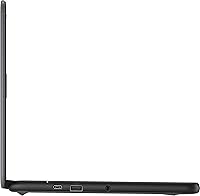
  • Ports: Includes two USB-C ports and two USB 3.1 Type-A ports, providing versatile connectivity for peripherals, charging, and external displays.
  • Wireless: Supports Intel Dual Band Wireless-AC 9560 (802.11ac) Wi-Fi and Bluetooth 5.0 for reliable connectivity in busy network environments such as school buildings.
  • Graphics: Uses Intel UHD Graphics 600 integrated into the processor, sufficient for HD video playback and web-based content but not designed for gaming or GPU-intensive tasks.
  • Webcam: Includes a 1-megapixel front-facing camera with a built-in microphone, adequate for video calls and basic virtual learning sessions.
  • Keyboard: Features a spill-resistant keyboard designed to tolerate minor liquid exposure, a practical consideration for younger users in school environments.
  • Connectivity: Supports Bluetooth 5.0, enabling pairing with wireless headphones, mice, keyboards, and other peripherals without occupying a USB port.
  • Power Input: Charges via USB-C, accepting standard USB-C power delivery adapters, which adds convenience and reduces the risk of proprietary charger loss.

Related Reviews

Samsung Chromebook 2 XE500C12-K01US 11.6-inch Laptop
81%
89%
Value for Money
85%
Battery Life
93%
Portability & Weight
80%
Build Quality
78%
Display Quality
More
Dell 3100 11.6-inch Touchscreen Chromebook
70%
83%
Value for Money
79%
Build Quality
67%
Performance
51%
Storage Adequacy
58%
Display Quality
More
HP Chromebook 11a 11.6-inch Laptop
73%
91%
Battery Life
83%
Value for Money
62%
Performance
49%
Storage Capacity
67%
Display Quality
More
Azeyou CG11Q6-US 11.6-inch Laptop
80%
90%
Value for Money
92%
Portability
86%
Battery Life
78%
Build Quality
64%
Display Quality
More
Samsung Chromebook 3 11.6″ Laptop
67%
83%
Value for Money
67%
Performance
72%
Build Quality
78%
Battery Life
58%
Display Quality
More
ASUS Chromebook CR11 11.6-inch Ruggedized Laptop
74%
88%
Build Quality
86%
Durability & Drop Resistance
67%
Performance
61%
Battery Life
63%
Display Quality
More
Acer Chromebook R11 11.6-inch Touchscreen Chromebook
71%
84%
Battery Life
76%
Value for Money
67%
Display Quality
78%
Touchscreen Responsiveness
58%
Performance & Speed
More
HP Stream 11 11.6-Inch Laptop
66%
83%
Value for Money
91%
Portability
88%
Battery Life
79%
Display Quality
58%
Performance
More
Dell Inspiron 3000 15.6-inch Laptop, Intel Celeron N4020, 16GB RAM, 1TB HDD
81%
91%
Value for Money
88%
Performance for Everyday Tasks
85%
Multitasking Ability
68%
Display Clarity
82%
Battery Life
More
NAIKLULU VenBook Laptop, 15.6-Inch, 8GB RAM, 512GB SSD, Celeron N4000, Windows 11 Pro
80%
89%
Value for Money
84%
Battery Life
82%
Display Quality
87%
Performance for Everyday Tasks
78%
Build Quality
More
Lenovo Thinkpad 11e 2-in-1 Laptop, 11.6-inch, Intel Celeron, 4GB RAM, 128GB SSD
80%
88%
Value for Money
75%
Performance
93%
Portability/Size/Weight
70%
Display Quality
80%
Battery Life
More

FAQ

Yes, the Dell 3100 handles Google Classroom very well. It runs the full suite of Google Workspace apps — Docs, Slides, Meet, and Forms — without any real friction. That is essentially the environment this machine was designed around, and it shows.

32GB is tight if you plan to store a lot of files locally, but Chrome OS is built to work with Google Drive, and most users find that offloading documents, photos, and downloads to the cloud solves the problem entirely. The key habit to build is saving to Drive by default rather than the local drive. If your child works offline regularly, you may need to manage storage more actively.

It depends on what the student needs. For web research, essay writing, presentations, and video calls, it handles the workload fine. However, high schoolers needing desktop software — like specific science, design, or coding applications — will find Chrome OS too limiting. It is a strong fit for Google Workspace-heavy schools and less ideal for students with varied software requirements.

Chrome OS is essentially a browser that runs everything through Google's ecosystem. There is no traditional desktop, no file management in the Windows sense, and no ability to install standard Windows programs. The upside is that it is extremely simple to use, nearly impossible to break through normal use, and requires zero maintenance. Most kids adapt within a day or two, especially if they already use Google apps.

The keyboard on this education laptop is designed to resist minor spills. That means a small amount of liquid should drain away without immediately damaging the internals. That said, spill-resistant is not the same as waterproof — a full glass of liquid tipped directly onto a running laptop is still a risk. It is a meaningful safeguard, not a guarantee.

Yes, both Zoom and Microsoft Teams run through the browser on Chrome OS and work reliably for standard video calls and meetings. The 1MP webcam and built-in microphone are functional, though not particularly sharp. For occasional video lessons, they get the job done without needing any additional setup.

There is no internal upgrade path — the eMMC storage is fixed. However, you can use a microSD card if the model supports a card slot, or more practically, rely on Google Drive for cloud storage. A USB flash drive also works for offline file access. For most students who adopt cloud habits early, the 32GB limitation becomes a non-issue.

Google provides a defined Auto Update Expiration date for each Chromebook model, after which the device stops receiving Chrome OS security and feature updates. For a 2019-era device, that window is narrowing, so it is worth checking Google's official AUE list before purchasing if long-term software support is a priority for you.

For normal student use — browsing, Google Docs, the occasional YouTube video — 9 hours is a reasonable estimate and holds up well in practice. Heavy video streaming or running multiple apps simultaneously will reduce that figure, but most users report comfortably lasting through a school day on a single charge.

Yes, but you will need a USB-C to HDMI adapter since there is no built-in HDMI port. The Dell 3100 supports display output through its USB-C ports, so with the right adapter, connecting it to a larger screen for presentations or home use works without any complicated setup.

Where to Buy