D-Link DHP-601AV Powerline Adapter Starter Kit
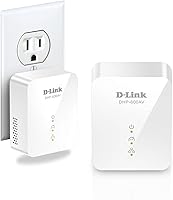
D-Link DHP-601AV Powerline Adapter Starter Kit — image 1
D-Link DHP-601AV Powerline Adapter Starter Kit — image 2
D-Link DHP-601AV Powerline Adapter Starter Kit — image 3
D-Link DHP-601AV Powerline Adapter Starter Kit — image 4
D-Link DHP-601AV Powerline Adapter Starter Kit — image 5
D-Link DHP-601AV Powerline Adapter Starter Kit — image 6
D-Link DHP-601AV Powerline Adapter Starter Kit — image 7
D-Link DHP-601AV Powerline Adapter Starter Kit — image 8
74%
26%

Overview

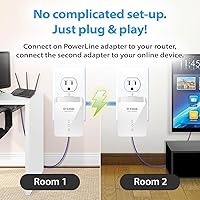
The D-Link DHP-601AV Powerline Adapter Starter Kit answers a question a lot of households eventually ask: what do you do when Wi-Fi is too unreliable and running ethernet cable through walls isn't realistic? This kit uses your home's existing electrical wiring to carry network traffic between two points — no drilling required. It ships with two adapters and connects in minutes; plug one near your router, one near the device you want wired, link them with the included ethernet cables, and you're done. It's a mid-range AV2 MIMO solution that's been around since 2013, but the core technology still holds up for most everyday networking needs.

Features & Benefits

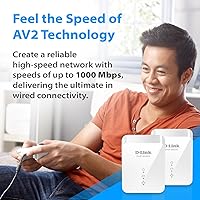
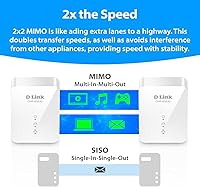
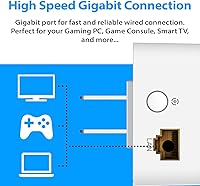
Where this powerline adapter kit stands apart from older models is its use of AV2 MIMO technology. Rather than a single data stream, the 2x2 MIMO approach transmits across multiple electrical pathways at once, which meaningfully improves throughput and resilience on imperfect home wiring. The theoretical ceiling is 1000Mbps, but real-world speeds typically land between 200–500Mbps depending on your circuit layout and wiring age — that's not a knock on the DHP-601AV specifically, it's just how powerline technology works. Both units sport Gigabit ethernet ports, keeping the physical connection from being a bottleneck. 128-bit AES encryption protects traffic over shared wiring, QoS helps prioritize latency-sensitive tasks, and a power-saving mode reduces draw during idle periods.

Best For

This D-Link powerline starter kit makes the most sense for people who need a stable wired connection but can't — or won't — run cable through their walls. That covers a lot of ground: renters who can't modify their space, gamers who want lower ping than Wi-Fi provides without routing cable across the living room, and households streaming HD content to a TV that sits two rooms away from the router. It's also a reasonable choice for a small home office setup where a wired desktop connection matters but there's no ethernet jack in the room. One caveat: if your home has older wiring or your router and target device sit on separate electrical circuits, results can be inconsistent.

User Feedback

Buyers are genuinely split on this powerline adapter kit, and the 3.8-star average reflects that divide pretty accurately. On the positive side, users consistently praise how quick and painless the setup is — plug in, pair, done. Many also note a clear improvement in connection stability over their previous Wi-Fi arrangements, and several appreciate how the compact unit doesn't hog the outlet. The frustrations, though, are real. A meaningful chunk of buyers report speeds far below what the specs suggest, particularly in homes with older wiring or where the two adapters end up on different electrical circuits. A few users discovered the hard way that plugging these into a surge protector or UPS kills the signal entirely. Long-term reliability gets mixed marks as well.

Pros

  • Setup takes minutes with zero configuration — plug both units in, connect the cables, and the network link is live.
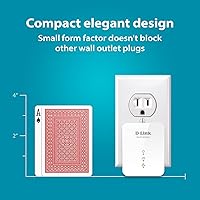
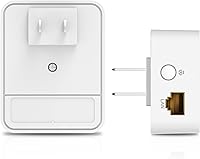
  • The compact body leaves the second wall outlet completely free, which is a genuinely useful design choice most competing units skip.
  • AV2 MIMO technology offers noticeably better throughput than older single-stream powerline adapters on the same wiring.
  • Connection stability is the real win here — for many users, it replaces unreliable Wi-Fi with a rock-solid link that just stays up.
  • Gigabit ethernet ports mean the adapter itself won't be the speed bottleneck in your local connection.
  • 128-bit AES encryption keeps your traffic protected even on shared electrical wiring in apartments or multi-unit buildings.
  • QoS support lets latency-sensitive traffic like gaming or video calls take priority over background downloads.
  • The kit is expandable up to 16 adapters on a single network, so you can grow your coverage without starting over.
  • A built-in power-saving mode reduces energy draw automatically when the connection is idle — a small but thoughtful feature.
  • Works with desktops, consoles, smart TVs, and IP cameras, making it flexible across a range of wired device types.

Cons

  • Real-world speeds fall well short of the 1000Mbps theoretical maximum — expect 200–500Mbps under typical home conditions, often less.
  • Performance varies unpredictably depending on home wiring age, circuit distance, and electrical interference, making results hard to guarantee before you buy.
  • Plugging either adapter into a surge protector or UPS completely blocks the powerline signal — a critical limitation with no workaround.
  • Adapters on separate electrical circuits in the same home may struggle to establish a reliable or fast connection.
  • The product has been on the market since 2013, and while the specs still hold up for basic use, newer competing kits offer more headroom.
  • Long-term reliability is inconsistent according to buyer feedback, with some units developing connection issues after extended use.
  • There is no companion app or web interface, so diagnosing a slow or dropped connection requires more trial-and-error than a managed device would.
  • Users in large apartment buildings may experience signal interference from neighboring units sharing the same electrical infrastructure.

Ratings

The scores below for the D-Link DHP-601AV Powerline Adapter Starter Kit were generated by our AI after analyzing thousands of verified buyer reviews worldwide, with automated filters applied to remove incentivized, duplicated, and bot-generated feedback. Each category reflects a candid synthesis of real user experiences — not marketing claims — so genuine strengths and recurring pain points carry equal weight in every score. If you have been wondering whether this powerline adapter kit lives up to its specs in your specific home environment, the breakdown below is designed to give you an honest, granular answer.

Ease of Setup
91%
Getting the network up and running takes only a few minutes, and the process is genuinely self-explanatory — plug both adapters in, connect the ethernet cables, and the units pair automatically. Non-technical users consistently cite this as one of the kit's strongest qualities, with no app downloads, driver installs, or configuration menus standing between the box and a live connection.
Because there is no management interface, troubleshooting a weak or failed connection requires trial-and-error — swapping outlet positions or testing different circuits — rather than any diagnostic tool that could pinpoint the problem quickly and reduce frustration.
Real-World Speed
58%
42%
On homes with modern wiring where both adapters share the same electrical circuit, throughput is respectable — buyers report stable connections sufficient for HD and 4K streaming, file transfers, and responsive gaming sessions, which covers the core job this adapter kit is designed to do.
The 1000Mbps ceiling is a theoretical number that almost no buyer will see in practice. Real-world speeds typically land between 150Mbps and 450Mbps, and in homes with older or noisier wiring the figure can drop considerably further, making the headline spec misleading for buyers with high-throughput needs.
Connection Stability
73%
27%
For users in homes with reasonably modern wiring and adapters on the same electrical circuit, the connection is markedly more stable than Wi-Fi — no dropouts during video calls, no lag spikes mid-game, and consistent uptime that stays solid for hours without needing a reboot or reconnect.
Stability is tightly linked to the quality of a home's electrical infrastructure, which the adapter has no control over. Users in older buildings or homes with high electrical noise frequently report intermittent drops or inconsistent throughput that makes the connection feel unreliable for day-to-day tasks.
Value for Money
67%
33%
For buyers in well-wired homes who get close to the expected performance range, the kit delivers a genuine wired connection at a price that undercuts the hassle and cost of running ethernet cable through walls. The two-adapter bundle requires no additional purchases to get a complete working setup out of the box.
For buyers who end up with significantly degraded speeds due to their home's wiring conditions, the value proposition weakens considerably. At this price point, shoppers in older homes may find that a decent Wi-Fi extender delivers a more predictable outcome, making this feel like a costly gamble.
Long-Term Reliability
61%
39%
Many buyers report using these adapters continuously for a year or more without significant hardware problems, and the power-saving mode helps reduce thermal stress during idle periods, which may contribute to unit longevity in lightly used rooms like guest spaces or home offices.
A notable share of feedback flags reliability problems surfacing after six to twelve months of use, with units dropping their connection permanently or failing to re-pair after a power outage. The absence of any management interface makes it genuinely difficult to distinguish hardware failure from a pairing issue.
Physical Design
86%
The compact body is one of the kit's most practical advantages — it plugs into a wall outlet without obscuring the socket below it, which most competing powerline adapters fail to achieve. The neutral white finish blends into most home environments without drawing attention to itself.
The design offers no visual clarity on connection status in a way that is easy for non-technical users to interpret at a glance, and the absence of any documented LED behavior guide in the included materials adds unnecessary confusion during initial setup and troubleshooting.
Compatibility
62%
38%
The DHP-601AV connects to any ethernet-capable device regardless of brand, including older gaming consoles, desktop PCs, smart TVs, and IP cameras, making it versatile across a wide range of home tech setups without locking users into a specific brand ecosystem.
The adapter is entirely incompatible with surge protectors and UPS devices — a significant limitation that catches many buyers off guard since home offices and entertainment setups commonly rely on those devices. Cross-brand powerline compatibility is also unreliable, which complicates future expansion planning.
Security
83%
The built-in 128-bit AES encryption protects data transmitted over shared electrical wiring, which is particularly reassuring for apartment dwellers or anyone in a multi-unit building where the electrical circuit may extend beyond the walls of their own unit and into shared infrastructure.
While AES-128 is technically solid, there is no user-accessible security configuration, meaning buyers cannot audit paired adapters, rotate encryption keys, or monitor which devices are active on the powerline network — a limitation that more security-conscious users will find restrictive.
Gaming Latency
76%
24%
Gamers who switched to this powerline kit from a wireless connection consistently report that ping times feel more stable and predictably lower — a meaningful improvement in fast-paced multiplayer titles where erratic lag spikes cause missed inputs, disconnects, or degraded matchmaking performance.
For competitive gaming where latency precision is critical, powerline still trails a direct ethernet run from the router, and ping performance can degrade noticeably when the circuit between the two adapters carries heavy electrical load from other household appliances running simultaneously.
Streaming Performance
74%
26%
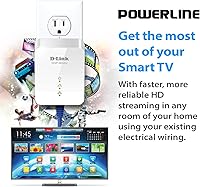
Households streaming HD or 4K content to a smart TV in a room far from the router find this kit a practical upgrade over an unreliable wireless signal — the wired connection avoids the mid-stream buffering and automatic quality reductions that commonly affect wireless devices in fringe coverage zones.
In homes where wiring conditions limit actual throughput to the lower end of the range, 4K streaming can still stutter — especially with high-bitrate content or when multiple connected devices are pulling bandwidth simultaneously, which undermines the reliability benefit the kit is meant to provide.
Expandability
82%
18%
Supporting up to 16 adapters on a single network gives users meaningful room to grow their wired coverage across multiple rooms over time without starting from scratch — additional units pair automatically with no reconfiguration needed on the adapters already in place.
Expansion is most reliable within D-Link's own AV2 ecosystem; mixing adapter brands or introducing older AV1 hardware typically forces the entire network to default to the slower standard. The per-unit cost also adds up quickly for users who need to cover more than two or three rooms.
Power Efficiency
79%
21%
The automatic power-saving mode is a thoughtful inclusion that reduces energy draw during idle periods, something budget-tier adapters frequently omit. Users running adapters in rooms with intermittent use — a home office, a guest room, or a spare bedroom — appreciate not having the units consume full power around the clock.
There is no user control over the power-saving behavior, and some buyers note a brief lag when a connected device wakes from sleep and the adapter exits its low-power state — a minor but occasionally noticeable interruption for latency-sensitive applications like video calls or online gaming.
Network Coverage
69%
31%
For homes or apartments where the router and target device share the same electrical circuit within a reasonable distance, this powerline kit extends the effective network reach to rooms that neither ethernet cable nor a wireless signal can comfortably serve, without introducing the dead zones that Wi-Fi extenders create.
Unlike a mesh Wi-Fi system, this kit provides wired-only connectivity with no wireless extension component, limiting its usefulness to rooms with a device that has an ethernet port. In homes with long circuit runs or aging wiring, effective coverage can be too degraded to justify the investment.

Suitable for:

The D-Link DHP-601AV Powerline Adapter Starter Kit is a strong fit for anyone who needs a stable wired connection but simply can't — or doesn't want to — run ethernet cable through walls. Renters top that list, since drilling through walls or fishing cable behind drywall isn't an option in most leased spaces. Gamers who are tired of Wi-Fi lag spikes but whose console sits too far from the router for a practical cable run will find this a reasonable middle ground, delivering meaningfully lower and more consistent latency than a wireless connection in most setups. Households that stream HD or 4K content to a smart TV or media player in a distant room stand to benefit as well, since the adapter provides the kind of steady throughput that wireless signals in congested environments often can't sustain. It's also worth considering for small home offices where a wired desktop connection is preferred but there's no ethernet jack anywhere nearby — plug this into the wall, connect it to a router port and then to a PC, and you're done without involving a contractor or an IT department.

Not suitable for:

This powerline adapter kit is not the right call for everyone, and it's worth being honest about where it falls short before you buy. Anyone living in a home with older, heavily loaded, or electrically noisy wiring should go in with very cautious expectations — real-world throughput can drop dramatically in these environments, sometimes to the point where the connection isn't meaningfully better than a decent Wi-Fi extender. The D-Link DHP-601AV Powerline Adapter Starter Kit also won't work if plugged into a surge protector or an uninterruptible power supply, which rules out a surprising number of common home setups where those devices sit between the adapter and the wall. Users whose router and target device are on completely separate electrical circuits — common in larger or older homes — may find performance unpredictable or, in some cases, essentially unusable. If your goal is maximum raw speed for a NAS, a 4K editing workstation, or a high-throughput local network, this kit's real-world ceiling is too low to rely on. And if you're renting an apartment in a large multi-unit building with shared electrical infrastructure, signal bleed between units is a real concern, even with AES encryption in place.

Specifications

  • Technology: Uses PowerLine AV2 with 2x2 MIMO, which transmits data across multiple electrical pathways simultaneously for improved throughput over older single-stream SISO adapters.
  • Max Speed: Theoretical maximum data transfer rate is 1000 Mbps; actual speeds vary based on home wiring age, circuit distance, and electrical interference.
  • Ethernet Port: Each adapter is equipped with one Gigabit ethernet port supporting 10/100/1000 Mbps connections.
  • Encryption: Traffic is secured with 128-bit AES encryption to protect data transmitted over shared home or building electrical wiring.
  • QoS Support: Built-in Quality of Service prioritizes latency-sensitive network traffic such as online gaming and video calls over lower-priority background activity.
  • Power Saving: An automatic power-saving mode reduces energy consumption when no active network connection is detected on the adapter.
  • Kit Contents: Each kit includes two powerline adapters and the necessary ethernet cables to connect both units to a router and a target device out of the box.
  • Expandability: The network can be expanded by adding additional compatible PowerLine adapters, supporting up to 16 units on a single network.
  • Form Factor: Compact wall-plug design measures 3.4 x 0.2 x 2.4 inches and is engineered so that the lower outlet on a standard duplex socket remains unobstructed.
  • Input Voltage: Supports universal input voltage ranging from 100 to 240V AC at 50/60 Hz, making it compatible with standard electrical outlets worldwide.
  • Weight: Each adapter unit weighs 3.2 oz, making the kit lightweight and easy to reposition between rooms if needed.
  • Color: Both adapters are finished in white, designed to blend neutrally into most home wall outlet environments.
  • Setup: No software installation or configuration is required; the adapters pair automatically once plugged in and connected via ethernet cable.
  • Compatible Devices: Designed to provide wired connectivity to desktop PCs, gaming consoles, IP cameras, smart TVs, and other ethernet-capable devices.
  • Manufacturer: Designed and sold by D-Link Systems, Inc., a networking hardware brand with broad distribution and established product support channels.
  • Model Number: The model number for this kit is DHP-601AV, which identifies the AV2 1000 Gigabit Extender Starter Kit tier within D-Link's PowerLine product line.
  • First Available: This product was first listed for sale in September 2013, making it a mature product with a long user feedback history.

Related Reviews
D-Link Powerline AV Network Adapter Kit DHP-307AV
81%
83%
Performance
90%
Ease of Setup
78%
Reliability
70%
Speed Consistency
88%
Security (Encryption)
More
ZyXEL PLA5206 Powerline Adapter Kit
64%
84%
Ease of Setup
58%
Real-World Network Speed
63%
Reliability & Connection Stability
51%
Compatibility with Home Wiring
61%
Value for Money
More
TP-Link TL-PA9020P KIT AV2000 Powerline Adapter
77%
72%
Real-World Throughput
88%
Setup & Installation
76%
Connection Stability
74%
Value for Money
86%
Passthrough Outlet
More
NETGEAR Powerline Adapter Kit PLP2000-100PAS
74%
91%
Ease of Setup
67%
Real-World Speed Performance
78%
Network Reliability & Stability
74%
Build Quality & Durability
88%
Pass-Through Outlet Design
More
Zyxel PLA5456 AV2000 Powerline Adapter Kit
74%
91%
Ease of Setup
67%
Real-World Throughput
74%
Network Stability
61%
Hardware Reliability
88%
Port Configuration
More
Netgear XETB1001 Powerline Network Adapter Kit
68%
88%
Ease of Setup
51%
Real-World Speed
67%
Connection Stability
58%
Value for Money
74%
Compatibility
More
TP-Link AC750 Powerline Wi-Fi Adapter
77%
93%
Ease of Setup
61%
Real-World Speed Performance
72%
Wi-Fi Coverage & Signal Quality
84%
Wired Ethernet Reliability
58%
Compatibility with Home Wiring
More
Actiontec PWR514K01 Powerline Network Adapter Kit
73%
91%
Ease of Setup
88%
Multi-Device Connectivity
57%
Real-World Throughput
74%
Connection Stability
69%
Value for Money
More
Netgear XAVB5001 Powerline Network Adapter Kit
70%
88%
Ease of Setup
51%
Real-World Speed Performance
73%
Connection Stability
58%
Electrical Outlet Compatibility
67%
Value for Money
More
TP-Link TL-PA4010 AV500 Powerline Adapter
73%
93%
Ease of Setup
58%
Real-World Network Speed
78%
Range & Wall Penetration
74%
Build Quality & Durability
87%
Design & Form Factor
More

FAQ

No, there is no software to install and no account required. Plug one adapter into a wall outlet near your router and connect it with an ethernet cable, then plug the second adapter into an outlet near your device and connect that with another ethernet cable. The two units find each other automatically and the link goes live within a minute or two.

The 1000Mbps figure is a theoretical ceiling under ideal lab conditions, not a number you should plan around. In a typical home, you can realistically expect somewhere between 150 and 500Mbps depending on the age of your wiring, the distance between outlets, and how much electrical noise is on the circuit. Newer homes with clean wiring tend to perform closer to the higher end of that range.

This is one of the most common reasons powerline adapters underperform or fail to connect at all. If the two outlets you're using are on separate breaker circuits — which is fairly common in larger or older homes — throughput can drop significantly or the adapters may not pair reliably. Before buying, it's worth checking whether your router location and target device share the same circuit.

No, and this is important: surge protectors and UPS devices filter out the high-frequency signals that powerline adapters use to communicate, which effectively blocks the connection entirely. Both adapters must be plugged directly into a wall outlet to function correctly. This catches a lot of buyers off guard, especially if their router is already behind a surge protector.

The D-Link DHP-601AV Powerline Adapter Starter Kit uses 128-bit AES encryption to protect the data it transmits, which means even if a signal theoretically reached a neighboring unit, the data would be unreadable without the encryption key. That said, in very large multi-unit buildings with heavily shared electrical systems, you may experience interference from other devices on the same infrastructure, which can affect performance.

Compatibility between different powerline adapter brands and generations can be unreliable, even if they share the same standard on paper. For the most predictable results, it's best to expand using additional DHP-601AV units or other D-Link AV2 adapters explicitly listed as compatible. Mixing brands or mixing AV1 and AV2 adapters often results in the network defaulting to the slower standard.

You can expand this powerline network to support up to 16 adapters in total. Additional units are sold separately, and as long as they're compatible AV2 adapters, they should pair automatically when plugged into any outlet on the same electrical circuit.

A Wi-Fi extender boosts wireless signal but still relies on radio waves, which means it inherits any congestion, interference, or bandwidth limitations of the original Wi-Fi network. This powerline kit provides a true wired ethernet connection, which is typically more stable and lower latency than an extended wireless signal. For gaming or anything where consistency matters more than peak speed, wired via powerline usually wins over a wireless extender.

Powerline adapters do generate some warmth during operation since they're actively processing and transmitting data, but under normal use they should be warm to the touch rather than hot. The built-in power-saving mode helps reduce heat output during idle periods. If an adapter feels uncomfortably hot, it may indicate an issue with the outlet, the circuit, or the unit itself.

No, you can replace a single adapter rather than the entire kit. Replacement or expansion units are sold individually, so if one unit fails out of warranty, you can purchase a compatible adapter separately and pair it with the working unit you already have.