Overview

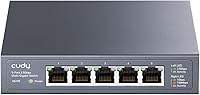
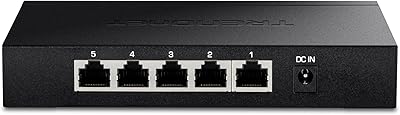
The Cudy HS105 5-Port 2.5G Ethernet Switch is one of the more practical ways to step into multi-gigabit networking without a significant outlay. Every single port runs at full 2.5Gbps — there is no slower uplink port, which is a compromise you often see on cheaper alternatives. The fanless metal chassis means it runs completely silently, whether sitting on your desk or screwed to a wall. Setup takes about two minutes: plug in cables, connect power, done. For anyone stuck on gigabit speeds who wants a real upgrade at an accessible price point, this 2.5G switch is genuinely hard to argue against.
Features & Benefits

What makes this multi-gig desktop switch stand out at this tier is that all five ports auto-negotiate from 100Mbps up to full 2.5Gbps, so older devices stay on the network without issue. The 25Gbps total switching capacity means five simultaneous high-speed connections do not create a traffic jam. Loop detection and IGMP snooping handle basic stability problems that crop up in busy home networks — features you would normally expect to pay more for. The 802.3az energy-saving mode pulls power draw down considerably during quieter periods, and 15KB jumbo frame support makes a real difference when copying large files to and from a NAS.

Best For

The Cudy five-port switch is an obvious fit for home lab enthusiasts who have already upgraded their router or NAS to 2.5G and simply need more ports to use it. NAS owners in particular will notice the difference — backing up or streaming large files across multiple clients simultaneously stops feeling like a waiting game. Content creators moving 4K footage between workstations will find it holds up well. It also works nicely in small offices where silence matters; no fan means no background hum. If you need something compact that mounts flat to a wall, the included wall-mount kit handles that without any extra spend.

User Feedback

Buyers consistently praise how quickly this 2.5G switch gets up and running — most describe it as genuinely plug-and-play with no surprises. The quiet fanless operation earns frequent mentions, especially from people placing it in a home office or bedroom. The metal housing feels noticeably solid, and that builds real confidence in the build quality. On the critical side, the external power brick is a recurring gripe; it takes up outlet space and adds cable clutter that a built-in adapter would avoid. A handful of users noted that loop detection did not catch every edge-case scenario in complex mixed-device setups. Real-world NAS throughput is widely reported as strong, often approaching the theoretical ceiling.

Pros

  • All five ports deliver full 2.5Gbps — no compromised uplink port dragging down the whole network.
  • Completely silent fanless operation makes it ideal for shared workspaces, bedrooms, and home offices.
  • Setup takes under two minutes with zero software, drivers, or configuration screens required.
  • The metal chassis feels genuinely solid and dissipates heat passively without running warm to the touch.
  • Energy-saving mode cuts power draw significantly during quiet periods, keeping electricity costs low for always-on use.
  • Jumbo frame support up to 15KB noticeably improves NAS throughput for large sequential file transfers.
  • Wall-mount hardware is included in the box — no separate purchase needed to get it off your desk.
  • Auto MDI/MDIX means any Ethernet cable works in any port direction without fussing over cable types.
  • Loop detection and IGMP snooping add a layer of network stability rarely found at this price tier.
  • The compact footprint fits comfortably in tight spaces, media cabinets, or behind a monitor stand.

Cons

  • The external power brick occupies a full outlet and adds cable clutter that an internal supply would eliminate.
  • Five ports fills up faster than most buyers anticipate, often leading to a second switch purchase within months.
  • No management interface whatsoever — VLANs, QoS, and port monitoring are completely off the table.
  • Loop detection behaves inconsistently in daisy-chained or complex multi-switch home setups.
  • Cat 5e cabling is limited to 50 meters at 2.5Gbps — longer runs require a Cat 6 upgrade or speed drops.
  • The power adapter cable is stiff and shorter than ideal, which limits flexible placement options.
  • Port labels are small and can fade over time, making cable identification harder in dense wiring situations.
  • Thermal performance in poorly ventilated enclosures or warm climates warrants careful placement consideration.

Ratings

The Cudy HS105 5-Port 2.5G Ethernet Switch has been scored by our AI system after analyzing thousands of verified purchase reviews from buyers across North America, Europe, and Asia-Pacific — with spam, bot submissions, and incentivized feedback actively filtered out. The scores below reflect honest aggregate sentiment, balancing what real users genuinely love about this multi-gig desktop switch against the friction points that show up repeatedly in their feedback.

Port Performance
93%
Users consistently report hitting close to the theoretical 2.5Gbps ceiling when transferring files between NAS devices and workstations over Cat 6 cabling. The auto-negotiation works reliably across older gigabit devices too, so mixed-speed setups cause no headaches.
A small number of users noted occasional link instability at 2.5Gbps when using lower-grade Cat 5e runs near the 50-meter limit. This is largely a cabling issue, but it does come up in reviews.
Ease of Setup
96%
Almost every reviewer mentions this as the strongest point — unbox, plug in cables, connect the power adapter, and the switch is live within two minutes. There is genuinely no configuration interface to wrestle with, which suits non-technical buyers perfectly.
The flip side of zero configuration is zero control. Users who later want to create VLANs or prioritize traffic have no options here, and some wish they had known that upfront before purchasing.
Build Quality
88%
The all-metal chassis surprises buyers who expect plasticky construction at this price tier. It feels dense and well-assembled, and several reviewers note it runs only slightly warm even under sustained load, which is reassuring for always-on use.
The ventilation slots on the casing can collect dust if the switch is placed horizontally in a dusty environment. A few users also noted that the port labeling print is small and fades with time.
Noise Level
97%
Completely silent operation is the most universally praised trait across reviews. Home office and bedroom users specifically call this out — there is no fan to spin up under load, no clicking, nothing. It simply disappears into the background.
There is essentially no downside here, though users in warmer climates occasionally wonder about long-term thermal reliability without active cooling. No widespread failures have been reported, but the concern surfaces in a handful of reviews.
Value for Money
91%
Buyers repeatedly describe this multi-gig desktop switch as the most cost-effective way to add 2.5Gbps ports to a home network. Compared to similarly priced 5-port switches that top out at gigabit, the generational leap in speed is dramatic and immediately noticeable.
A small segment of reviewers feel the external power adapter adds hidden cost in terms of desk real estate and cable management, slightly undermining the otherwise clean value proposition.
Power Efficiency
84%
The 802.3az energy-saving mode draws just under 5W when network traffic is light, which users running always-on home labs appreciate from both an electricity-bill and heat-management perspective.
At full load, power draw climbs to over 10W, which is higher than some competing fanless switches at this port count. It is not a dealbreaker, but users running multiple units in a rack should account for it.
Thermal Management
79%
21%
The metal body acts as a passive heatsink and does a reasonable job of dispersing heat during normal operation. Users report the chassis stays warm but never uncomfortably hot during extended transfers.
In poorly ventilated spots — inside a cabinet or pressed against other gear — the surface temperature climbs noticeably. A few users advise leaving an air gap around the unit, especially in summer months.
Cable & Port Layout
82%
18%
All five ports are aligned on a single edge, which keeps cabling tidy and predictable. The auto MDI/MDIX support means users can use straight-through or crossover cables interchangeably without any thought.
Five ports is limiting for users who initially underestimate how quickly they fill up. Several reviewers returned for a second unit within months, suggesting the port count gets outgrown faster than expected.
Loop Detection Reliability
71%
29%
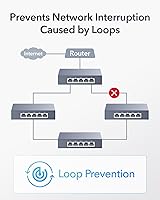
For straightforward home setups, loop detection catches the most common cable-loop mistakes and prevents the network from grinding to a halt. Users with simple topologies report it working exactly as described.
In more complex mixed-device environments — particularly where multiple switches are daisy-chained — some buyers find loop detection less dependable. It is not a managed switch, and its behavior in edge cases reflects that limitation.
Wall-Mount Usability
78%
22%
The included mounting kit is a genuine bonus rather than an afterthought, and users who wall-mount the switch behind a desk or inside a media cabinet appreciate having everything needed in the box without a separate purchase.
The mounting holes require precise marking, and the included hardware is minimal — no template is provided. A few reviewers noted the screws supplied are on the short side for drywall anchors.
Jumbo Frame Support
86%
The 15KB jumbo frame ceiling makes a tangible difference for NAS users and anyone running virtualization workloads. Buyers transferring multi-gigabyte files regularly report noticeably more consistent throughput compared to switches without jumbo frame support.
Jumbo frames only help when every device on the path supports them. Some users enabled jumbo frames and saw no improvement because their NAS or router was the bottleneck, leading to mild confusion in reviews.
Compatibility
89%
Works without friction alongside 2.5G-capable routers, NAS units, and motherboards from major brands. Reviewers report successful connections to devices from QNAP, Synology, ASUS, and Intel-NIC-equipped PCs without any driver or firmware fuss.
A handful of users experienced brief link renegotiation delays when connecting older 100Mbps network printers or smart home hubs, though these resolved on their own within seconds of being plugged in.
Power Adapter Design
58%
42%
The adapter reliably delivers a stable 12V supply, and no users have reported power-related failures or voltage fluctuations affecting switch stability over extended periods of use.
The external brick is the single most consistent complaint in user reviews. It occupies a full outlet, the cable is stiff, and in tidy desk setups it creates cable management problems that an internal power supply would eliminate entirely.
IGMP Snooping
74%
26%
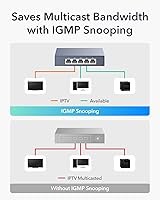
For users running smart TVs, media servers, or IPTV on the same network, IGMP snooping prevents multicast traffic from flooding every port — a feature most buyers at this price tier do not expect to find.
Because this is an unmanaged switch, IGMP snooping cannot be tuned or disabled if it causes issues with specific devices. A small number of users encountered unexpected multicast behavior they could not troubleshoot without a managed alternative.
Packaging & Documentation
69%
31%
The switch arrives well protected, and the included quick-start guide is clear enough for non-technical users to get running without consulting the internet. The wall-mount hardware and power adapter are neatly organized in the box.
The documentation is basic by design, and users who want deeper technical details — such as MAC table aging timers or IGMP version specifics — will find no answers in the printed materials or on the product page.

Suitable for:

The Cudy HS105 5-Port 2.5G Ethernet Switch is purpose-built for anyone who has already invested in a 2.5G-capable router or NAS and now needs more ports to actually use that speed across multiple devices. NAS owners in particular get an immediate, tangible payoff — simultaneous backups, 4K media streaming, and large file transfers to multiple clients no longer compete for a single gigabit pipe. Content creators and video editors who move large project files between workstations will notice the difference in daily throughput without spending on enterprise-grade gear. Home lab enthusiasts upgrading incrementally from gigabit infrastructure will find this multi-gig desktop switch fits naturally into that transition without demanding any configuration knowledge. It is also a strong pick for small offices where silence is non-negotiable — the fanless design means it can sit on a shared desk or mount flat to a wall without contributing any noise to the room.

Not suitable for:

The Cudy HS105 5-Port 2.5G Ethernet Switch is a poor fit for anyone who needs network control beyond simple plug-and-play connectivity. If your setup requires VLANs, traffic prioritization, port mirroring, or any form of access control, this unmanaged switch simply cannot deliver those features — no firmware update will change that, because the hardware is not designed for it. Network administrators managing more than a handful of devices will also find five ports a frustrating ceiling that fills up faster than expected. Buyers running complex multi-switch topologies should be aware that loop detection behavior in those edge cases is inconsistent. Anyone who values a clean, cable-managed desk setup may find the external power brick genuinely irritating — it is a legitimate daily annoyance, not a minor footnote. Finally, users who need more than 50 meters of reach on Cat 5e cabling will need to upgrade their cable runs to Cat 6 or higher to get reliable 2.5Gbps links.

Specifications

  • Ports: Five RJ45 ports each support 10/100/1000/2500Mbps with auto-negotiation and auto MDI/MDIX, so any standard Ethernet cable works in any direction.
  • Switching Capacity: Total non-blocking switching capacity is 25Gbps, meaning all five ports can operate at full 2.5Gbps simultaneously without creating a bottleneck.
  • Forwarding Rate: The switch handles up to 18.6 million packets per second, ensuring high-throughput transfers remain stable even across multiple active connections.
  • Packet Buffer: A 4Mbit packet buffer absorbs short bursts of traffic congestion to reduce packet loss during simultaneous high-speed transfers.
  • MAC Address Table: Supports up to 8,000 MAC address entries, sufficient for home and small-office networks with a wide variety of connected devices.
  • Jumbo Frames: Jumbo frame support up to 15KB improves efficiency for large sequential data transfers, particularly beneficial in NAS and virtualization environments.
  • Dimensions: The chassis measures 119×85×28mm (approximately 4.69×3.35×1.10 inches), making it compact enough for a crowded desk or a wall-mounted installation.
  • Weight: The unit weighs 220g (approximately 7.8 oz), light enough for wall mounting with the included hardware without requiring heavy-duty anchors.
  • Case Material: The enclosure is constructed from metal, which acts as a passive heatsink and provides greater durability than plastic alternatives at this price tier.
  • Power Input: Powered by an external DC 12V / 1A adapter, which is included in the box alongside the switch and mounting hardware.
  • Power Consumption: Maximum power draw is 10.5W under full load, dropping to approximately 4.7W in 802.3az energy-saving mode during periods of low network activity.
  • Cable Distance: Supports cable runs up to 100 meters using Cat 6 or higher cabling, and up to 50 meters on Cat 5e for reliable 2.5Gbps operation.
  • Protocols: Compliant with IEEE 802.3u (Fast Ethernet), 802.3x (flow control), 802.3ab (Gigabit), and 802.3bz (2.5G Multi-Gigabit Ethernet) standards.
  • Stability Features: Includes loop detection, IGMP snooping, and IEEE 802.3x flow control to maintain network stability without requiring manual configuration.
  • Energy Standard: Supports IEEE 802.3az Energy Efficient Ethernet, automatically reducing power consumption on idle or low-activity ports.
  • Cooling: Completely fanless design relies on passive thermal dissipation through the metal chassis, resulting in zero acoustic output during operation.
  • Placement: Ships with rubber feet for desktop use and a wall-mount kit for fixed installation, giving users flexible placement options out of the box.
  • Operating Temp: Rated for ambient operating temperatures up to 40 degrees Celsius, suitable for standard indoor home and office environments.
  • Configuration: Fully unmanaged with no software, app, or web interface required — the switch is operational immediately upon connecting power and Ethernet cables.
  • In the Box: Package includes the switch unit, DC power adapter, wall-mounting kit with screws, and a printed installation guide.

Related Reviews
Tenda SE105 5-Port 2.5G Unmanaged Switch
83%
97%
Ease of Setup
91%
Port Speed Performance
93%
Value for Money
67%
Build Quality
78%
Thermal Management
More
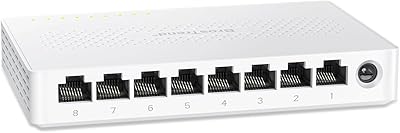
BrosTrend 8-Port 2.5G Unmanaged Switch
83%
93%
Port Speed Consistency
96%
Ease of Setup
61%
Build Quality
74%
Thermal Performance
91%
Value for Money
More
Goalake 8-Port 2.5G Ethernet Switch
80%
91%
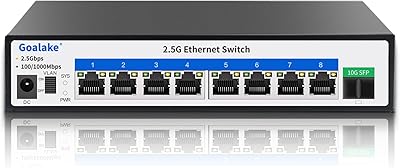
Port Count & Configuration
88%
Throughput & Switching Performance
93%
Ease of Setup
79%
Build Quality & Materials
96%
Fanless & Noise Level
More
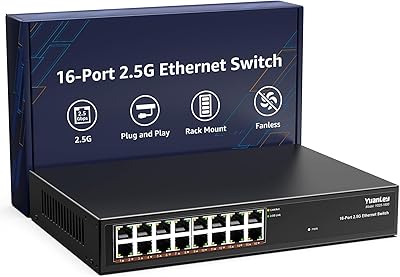
YuanLey 16-Port 2.5G Ethernet Switch
84%
91%
Ease of Setup
94%
Fanless Design & Noise Levels
88%
Speed & Performance
85%
Build Quality
92%
Value for Money
More
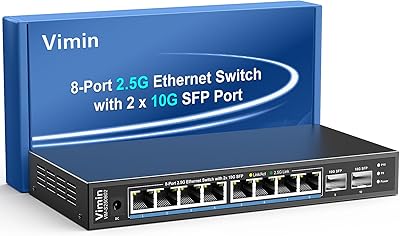
VIMIN 10-Port 2.5G Unmanaged Switch
79%
96%
Ease of Setup
89%
Port Performance
84%
Build Quality
67%
Thermal Management
71%
SFP Uplink Usability
More
Tenda TEM2010F 8-Port 2.5G Ethernet Switch
77%
96%
Ease of Setup
91%
Network Performance
94%
Noise Level
82%
Build Quality
67%
Thermal Management
More
VIMIN 6-Port 10G/2.5G Ethernet Switch
88%
95%
Port Performance
92%
Data Throughput Stability
94%
Setup & Installation Ease
90%
Build Quality
78%
Thermal Management
More
XikeStor 16-Port 2.5G L3 Managed Ethernet Switch
85%
92%
Port Variety and Flexibility
85%
Ease of Setup
88%
Traffic Management Features
90%
Build Quality
84%
Cooling and Thermals
More
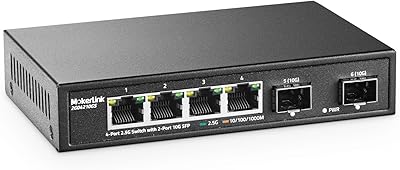
MokerLink 4-Port 2.5G 10G SFP Network Switch
82%
91%
Value for Money
86%
Build Quality
93%
Ease of Setup
97%
Noise Level
67%
Thermal Performance
More
TRENDnet TEG-S350 5-Port 2.5G Network Switch
78%
88%
Value for Money
91%
Network Performance
94%
Ease of Setup
86%
Build Quality
97%
Noise Level
More

FAQ

Not at all. This is a fully unmanaged switch, which means you just plug in your cables, connect the power adapter, and it starts working immediately. There is no app, no web interface, and no driver to install — ever.

It works fine with older gigabit and even 100Mbps devices. Each port auto-negotiates to the fastest speed both sides support, so a gigabit NAS and a 2.5G workstation can share the same switch without any issues. You only get 2.5Gbps on ports where both connected devices actually support that speed.

It is completely silent. There is no fan at all — the metal casing handles heat passively. You can put it right on your desk or mount it in a bedroom media cabinet and you will never hear it, even during heavy file transfers.

You will need Cat 5e at minimum, though Cat 5e only supports 2.5Gbps up to about 50 meters. For runs up to 100 meters, Cat 6 or higher is the safer choice. If your existing gigabit cabling is already Cat 5e or Cat 6, you are almost certainly fine without re-running anything.

Yes, and this is one of the strongest use cases for this multi-gig desktop switch. All five ports run independently at up to 2.5Gbps each, so your NAS and multiple workstations can all communicate at high speed at the same time without sharing a single bottleneck link.

No — this is a fully unmanaged switch, so there are no VLANs, QoS settings, port mirroring, or traffic shaping options of any kind. If you need those features, you would need to look at a managed 2.5G switch, which comes at a higher price. For simple plug-and-play connectivity, this one does the job well.

It is a noticeable downside for tidy desk setups. The external brick takes up a full outlet and the cable is fairly stiff, which makes routing it cleanly a bit of an effort. It is a legitimate complaint that comes up regularly in buyer reviews. If cable management is a priority for you, factor that in before deciding.

Yes on both counts. The box includes a wall-mount kit with mounting screws, so you do not need to buy anything extra. The unit is light enough that a standard installation is straightforward, though the kit does not include a paper template, so you will need to measure and mark the holes yourself.

It runs warm but not hot under normal conditions. The metal chassis acts as a heatsink and handles thermal dissipation passively. If you are placing it inside a closed cabinet or in a particularly warm room, leave some air clearance around the unit to avoid heat buildup over long periods.

It depends on your plans. If your NAS, motherboard, or other devices already have 2.5G ports, you can get faster local network speeds between those devices right now — your internet speed is unaffected by the switch regardless. If everything you own is gigabit today with no 2.5G upgrades planned, you would not see any speed difference and a standard gigabit switch would serve you just as well for less money.

Where to Buy