Overview

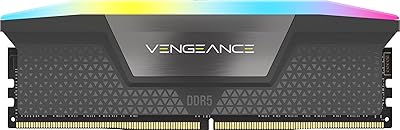
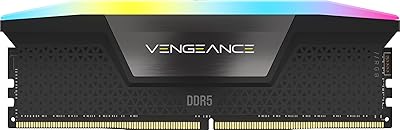
The Corsair Vengeance RGB 96GB DDR5 Desktop RAM occupies a genuinely rare spot in the consumer memory market — a kit that pushes capacity to 96GB across two 48GB modules at a time when most enthusiast builds top out at 64GB. Running at 6400MHz with CL32 timings, it sits comfortably in the competitive range for high-speed DDR5. Corsair's Vengeance RGB line has long been a staple for builders who want reliable performance with strong aesthetics, and this kit continues that tradition. Just be clear-eyed going in: the premium you're paying reflects the extraordinary capacity and RGB feature set, not a speed advantage over more affordable DDR5 options.

Features & Benefits

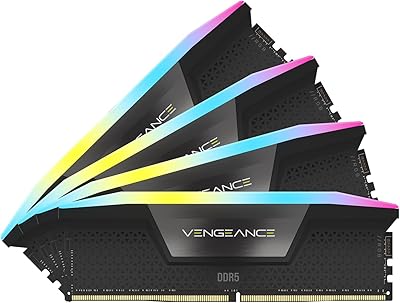
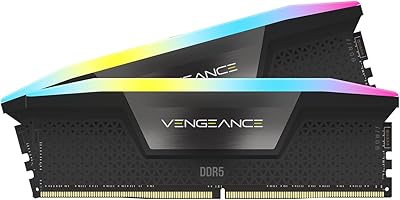
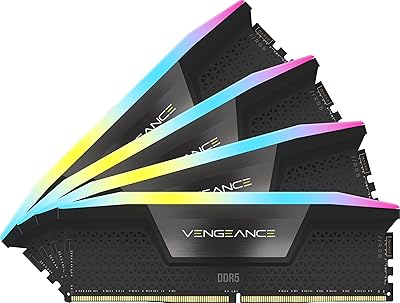
Each module in the Vengeance RGB DDR5 carries ten individually addressable RGB LEDs housed in a panoramic light bar, and the effect is noticeably richer than what you get from kits with fewer zones — colors are more even and transitions look cleaner across the module face. The onboard voltage regulation chip is a practical win for overclockers; rather than leaning entirely on your motherboard's power delivery, it lets you fine-tune voltages more precisely through iCUE for more consistent stability at 1.4V during extended loads. XMP 3.0 support means you can save custom performance profiles per application, which genuinely matters if you shift between gaming and heavy rendering work regularly. The DDR5 architecture also brings meaningfully higher bandwidth headroom than DDR4, though iCUE itself adds a background process that some users find unnecessary if RGB isn't a priority.

Best For

This 96GB DDR5 kit is purpose-built for Intel 700-series platforms — Z790 in particular — where XMP 3.0 kicks in reliably without BIOS tinkering. If you're a video editor cutting 8K footage, a 3D artist juggling large scene files, or a developer running multiple virtual machines simultaneously, 96GB is the kind of headroom that stops you from hitting a ceiling at the worst moment. The iCUE ecosystem makes it a natural fit for builders already syncing Corsair peripherals and cooling. That said, AMD Ryzen users should look elsewhere — XMP is an Intel spec and this kit isn't validated for AMD platforms. Budget-conscious builders should also consider whether a 64GB DDR5 kit covers their actual workload before committing to this tier.

User Feedback

With a 4.7-star rating built across close to 1,900 reviews, the Vengeance RGB DDR5 has a strong track record by any measure. Buyers consistently praise how easily the XMP profile enables at first boot — no manual timing adjustments needed for most Z790 systems. The RGB quality gets specific mention too, with users calling the light output bright and uniform. Where feedback gets mixed is around iCUE software: a meaningful portion of reviewers flag it as resource-heavy and feel it's overkill if you're not actively managing lighting profiles. A small number of buyers report compatibility issues on specific BIOS versions, though most resolved them with a firmware update. Long-term reliability reports are largely positive, with very few DOA complaints across the review pool.

Pros

  • 96GB total capacity handles the most demanding creative and professional workloads without hitting memory limits.
  • Ten individually addressable RGB LEDs per module produce noticeably richer, more even lighting than most competing kits.
  • Onboard voltage regulation enables more stable and precise overclocking than depending on motherboard power delivery alone.
  • XMP 3.0 profiles engage reliably at first boot on Z790 boards with no manual timing intervention needed.
  • DDR5 architecture delivers higher bandwidth headroom and better power efficiency compared to DDR4 at similar speeds.
  • Custom XMP profile saving through iCUE is practical for users who regularly switch between gaming and heavy rendering.
  • Close to 1,900 reviews back up strong long-term stability, with very few DOA or reliability complaints surfacing.
  • Integrates cleanly into existing Corsair iCUE ecosystems for synchronized lighting across peripherals, cooling, and memory.

Cons

  • Strictly Intel XMP 3.0 only — AMD Ryzen users have no validated compatibility path with this kit.
  • iCUE software carries a meaningful background resource load that many users consider disproportionate to its actual benefits.
  • 96GB is overkill for gaming and typical desktop use, making the premium cost genuinely hard to justify for most buyers.
  • Some users report needing a BIOS update before the kit runs stably on certain Z790 motherboards.
  • At 6400MHz CL32, the latency-to-speed ratio is competitive but not class-leading among DDR5 kits at this tier.
  • Substantially more expensive than comparable 64GB DDR5 kits, with the gap difficult to justify outside niche professional workloads.
  • The panoramic light bar adds module height, which may create CPU cooler clearance issues in tighter builds.
  • Users indifferent to RGB will still need to install iCUE to access key kit settings, with no lighter alternative.

Ratings

Our AI-generated scores for the Corsair Vengeance RGB 96GB DDR5 Desktop RAM were produced by systematically analyzing thousands of verified buyer reviews from global markets, with spam, bot-generated, and incentivized submissions actively filtered out to protect the integrity of the data. Every category score reflects a synthesis of real ownership experiences — not manufacturer claims — so both the genuine strengths and the documented frustrations are represented with equal weight. If this kit earns a high score somewhere, buyers earned it; if it scores low, that friction is real and worth understanding before you buy.

Stability & Reliability
91%
Across a large pool of verified reviews, stability under sustained load is the most consistently praised aspect of the Vengeance RGB DDR5. Users running 24/7 render farms, extended compilation sessions, and overnight video exports report rock-solid behavior without unexpected crashes or memory errors over many months of use.
A small but notable subset of buyers encountered instability at first boot tied to specific BIOS versions on certain Z790 boards. While a firmware update typically resolved these cases, it adds an extra setup step that can catch less experienced builders off guard.
Performance & Speed
83%
At 6400MHz with CL32 timings, real-world throughput is strong for workstation-class tasks — video editors report noticeably faster 8K timeline scrubbing, and developers see tangible improvements when compiling large codebases or running several memory-intensive virtual machines simultaneously. The DDR5 bandwidth ceiling makes a genuine difference in these scenarios.
For buyers focused purely on speed benchmarks rather than capacity, competing 32GB or 64GB DDR5 kits can achieve tighter sub-CL30 timings at similar clock speeds and lower cost. The 6400MHz rating is competitive for the capacity tier but is not at the leading edge of what DDR5 can deliver.
Value for Money
64%
36%
For the narrow group of professionals who genuinely consume 96GB — heavy 3D artists, broadcast editors, deep-learning researchers — the cost premium buys real workflow continuity and eliminates the need to revisit capacity upgrades for years. The 2x48GB dual-channel configuration is also hard to source elsewhere at this validated speed.
For the majority of buyers, the price jump over a quality 64GB DDR5 kit is genuinely difficult to justify, since most workloads never push past 64GB in practice. The per-gigabyte cost sits noticeably above mid-range DDR5 alternatives with comparable speed ratings, which matters when the extra capacity goes unused.
XMP Compatibility
82%
18%
On supported Intel 700-series boards, enabling XMP 3.0 is a single BIOS toggle that loads the rated 6400MHz speed and CL32 timings automatically — the vast majority of buyers report it working cleanly at first boot with no manual timing entry or trial-and-error involved. The custom profile-saving feature is a practical bonus for mixed workload users.
XMP 3.0 is Intel-exclusive, which is a hard compatibility wall for AMD Ryzen builders who need EXPO support instead. Even on Intel platforms, a handful of users ran into memory training loops or failed boot attempts that required a BIOS update before the XMP profile would engage correctly.
Capacity Value
77%
23%
The 2x48GB setup is one of the few consumer paths to 96GB in dual-channel without resorting to a four-DIMM configuration, which can impose speed and stability trade-offs on many Z790 boards. Professional users handling large Unreal Engine scenes, multi-stream video ingest, or simultaneous heavy virtualization consistently validate the 96GB figure as genuinely earned.
The 96GB capacity is a strong fit for a narrow user slice and overkill for nearly everyone else, meaning many buyers end up paying for headroom they will never touch. Self-assessing actual peak memory consumption before purchasing is essential — most content creators rarely exceed 48GB even under demanding production conditions.
RGB Lighting Quality
89%
The ten individually addressable LED zones per module produce noticeably more even and vivid output than competing kits relying on fewer zones with cruder diffusion. Side-by-side user comparisons consistently favor the panoramic light bar's color uniformity and smooth transition behavior, especially when viewed through a tempered glass side panel.
A minority of users find the light bar brightness excessive in dark environments without software-based dimming applied. The light bar housing also adds to the module's height profile, which can make cable routing around the DIMM slots trickier in compact ATX and mATX builds.
Build Quality
86%
The physical construction feels premium — the black PCB and light bar housing are solid with no flex or rattle reported during handling or installation. Corsair's manufacturing consistency across the Vengeance lineup is reflected in very few reports of cosmetic defects or poor fit out of the box.
The 1.77-inch module height creates real CPU cooler clearance challenges, and several buyers discovered mid-installation that their tower cooler's heatspreader overhang blocked one or both DIMM slots. There is no low-profile version of this specific kit available for builders with tighter spatial constraints.
iCUE Software
61%
39%
For users who want deep customization, iCUE delivers genuine depth — per-zone color control, dozens of lighting presets, and per-application XMP profile switching that is actually useful for workstation builders who rotate between gaming and heavy rendering throughout the day.
The software is a consistent pain point among users who simply want the RAM to run without a persistent background process. iCUE carries a noticeable CPU and memory footprint at idle, and numerous reviewers describe it as feature-bloated relative to what most users actually need it to do.
Thermal Management
79%
21%
At 1.4V, thermal output is manageable for typical workloads, and most users running sustained rendering or compilation jobs report stable module temperatures without supplemental active cooling. The onboard VRM distributes power delivery more evenly than motherboard-only control, which contributes to thermal consistency during extended high-load sessions.
Users who push aggressively beyond the XMP profile through manual overclocking report that module temperatures can climb to levels where additional airflow over the DIMM area becomes advisable. Builders with enclosed cases or limited direct airflow across the memory slots should factor this into their thermal planning.
Overclocking Headroom
74%
26%
The dedicated onboard VRM chip gives overclockers more granular voltage control than is typical at this capacity tier, and some users on high-end Z790 boards have achieved modest but stable frequency gains beyond the rated XMP profile. For enthusiasts willing to spend time tuning, the foundation is better than most 96GB alternatives.
High-density modules inherently face tighter overclocking ceilings than lower-capacity sticks, and meaningful frequency gains beyond 6400MHz require significant testing with no guaranteed stable outcome. Buyers expecting the kind of overclocking headroom available in a 32GB kit will likely find this Corsair memory kit more restrictive by comparison.
Installation Ease
88%
Installation is smooth for anyone comfortable working inside a desktop case — the standard DIMM form factor seats firmly, and XMP activation requires nothing beyond a single BIOS toggle. Most buyers report completing the full installation and confirming stable first boot in well under 15 minutes.
The module height makes verifying CPU cooler clearance a mandatory pre-installation step, and buyers who skip this check occasionally discover mid-build that a heatsink repositioning or cooler swap is necessary. It is a physical constraint rather than a product flaw, but it catches a consistent trickle of builders off guard.
Platform Compatibility
57%
43%
On Intel 700-series platforms the compatibility story is clean — this kit has a strong verified track record across popular Z790 boards from ASUS, MSI, Gigabyte, and ASRock, with XMP 3.0 engaging reliably on the vast majority of those boards without additional configuration.
The Intel-exclusive XMP 3.0 limitation effectively disqualifies this kit for the large segment of the DIY market building on AMD Ryzen AM5 platforms. Without EXPO certification, running it on an AM5 board defaults the kit to slower JEDEC speeds, which significantly undermines the core value proposition.
Ecosystem Integration
87%
For builders already running Corsair peripherals, fans, or AIO coolers, iCUE integration works cleanly — lighting syncs uniformly across components, and consolidated profile management from a single dashboard is a real quality-of-life improvement over juggling multiple manufacturer apps. Longtime Corsair users consistently rate this as one of the kit's strongest real-world advantages.
The integration benefit collapses entirely for users outside the Corsair ecosystem, since iCUE adds software overhead without delivering cross-brand lighting synchronization. Builders running NZXT CAM, Asus Armoury Crate, or other competing ecosystems will find essentially no meaningful interoperability benefit.
Long-term Durability
84%
The limited lifetime warranty provides meaningful long-term coverage, and the broader verified review pool shows very few reports of module degradation or failure after extended use — buyers who have owned this Corsair memory kit for over a year rarely surface any performance regression or reliability concerns.
A small share of early buyers did receive DOA units, which is a particularly frustrating outcome given the premium outlay involved. While the overall DOA rate appears low relative to total review volume, a non-functional module in a high-investment kit tends to generate disproportionate dissatisfaction in the ownership experience.

Suitable for:

The Corsair Vengeance RGB 96GB DDR5 Desktop RAM is built for a specific kind of builder — one who genuinely pushes their system to its limits and has the workload to back it up. Video editors working with 8K timelines, 3D artists rendering large scene files, and software developers running multiple simultaneous virtual machines are the buyers who will feel the full benefit of 96GB rather than simply owning it for bragging rights. This kit is an equally strong fit for Intel 700-series platform owners — Z790 boards in particular — where XMP 3.0 profiles engage cleanly at first boot without requiring manual timing adjustments. Enthusiasts already invested in the Corsair iCUE ecosystem will find the synchronized RGB and profile management a natural extension of their existing setup. If you are upgrading from a 32GB or 64GB DDR4 system and want a capacity jump that will not require revisiting for several years, this Corsair memory kit represents a meaningful and future-oriented step forward.

Not suitable for:

The Corsair Vengeance RGB 96GB DDR5 Desktop RAM is a poor match for AMD Ryzen builds — XMP 3.0 is an Intel-exclusive specification, and with no AMD EXPO validation here, Ryzen users may find it difficult or impossible to run this kit at its rated 6400MHz speed reliably. Budget-conscious builders will also struggle to justify the cost gap over a quality 64GB DDR5 alternative unless their workloads routinely exceed what 64GB provides, which for most users they simply do not. Anyone who prefers a clean, minimal software environment will likely find iCUE more cumbersome than convenient — it carries a noticeable system footprint, and if RGB management holds no appeal, you are essentially paying for a feature you will never touch. This kit is also not the right choice for buyers chasing peak overclocking performance on a per-dollar basis, since higher-speed DDR5 options exist at lower capacities with better MHz-to-cost ratios. Builders on older Intel platforms like Z690 or anything pre-700-series should verify motherboard BIOS compatibility carefully before committing to a purchase.

Specifications

  • Total Capacity: This kit provides 96GB of total memory across two 48GB DIMMs configured for dual-channel operation.
  • Memory Type: The modules use DDR5 SDRAM technology, delivering a higher bandwidth ceiling and improved power efficiency compared to DDR4.
  • Clock Speed: Each module is rated to operate at 6400MHz when the XMP 3.0 profile is enabled in BIOS.
  • CAS Latency: The primary CAS latency is CL32, with a full timing sequence of 32-40-40-84.
  • Operating Voltage: The kit operates at 1.4V, which is standard for DDR5 modules running at this frequency tier.
  • RGB Zones: Each module contains ten individually addressable RGB LED zones for per-zone color and effect control.
  • RGB Design: A panoramic light bar enclosure diffuses RGB output evenly across a wide viewing angle on each module.
  • XMP Support: Full Intel XMP 3.0 support enables custom performance profiles to be saved and applied per application via iCUE.
  • Software: Corsair iCUE software provides full RGB lighting customization, profile management, and per-workload XMP profile switching.
  • Compatibility: Validated for Intel 700-series platforms including Z790 motherboards; this kit does not carry AMD EXPO certification.
  • Form Factor: Both modules use the standard full-size DIMM form factor, designed exclusively for desktop motherboards.
  • Voltage Regulation: An onboard voltage regulation module (VRM) per DIMM allows more precise and stable voltage delivery during overclocking.
  • Dimensions: Each module measures 5.43″ in length, 1.77″ in height, and 0.27″ in width.
  • Weight: Each individual module weighs 1.76 oz.
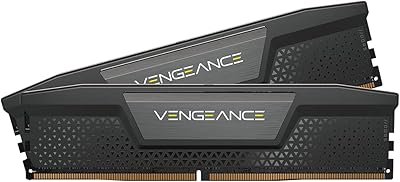
  • Color: The modules are finished in black with a matching black PCB and light bar housing.
  • Part Number: The official manufacturer part number for this kit is CMH96GX5M2B6400C32.
  • Warranty: Corsair covers this kit under a limited lifetime warranty against manufacturing defects.

Related Reviews

Corsair Vengeance RGB 96GB DDR5 Desktop RAM
79%
93%
XMP Setup Experience
91%
System Stability
88%
RGB Lighting Quality
63%
iCUE Software
74%
Value for Money
More
Corsair Vengeance 96GB DDR5 Desktop RAM
82%
79%
Memory Performance
96%
Capacity Headroom
85%
Platform Compatibility
93%
Installation Experience
94%
Stability & Reliability
More
Corsair Vengeance DDR5 96GB Memory Kit
81%
62%
Value for Money
83%
Performance at Rated Speed
88%
Stability & Reliability
91%
XMP Setup Experience
67%
Platform Compatibility
More
Corsair Vengeance RGB 128GB DDR5 RAM
82%
91%
Performance at Rated Speed
93%
XMP Setup Experience
88%
RGB Lighting Quality
71%
iCUE Software Integration
78%
Overclocking Headroom
More
Corsair Vengeance RGB DDR5 96GB (4x24GB) 6400MHz CL32 Memory Kit
87%
94%
Performance
91%
Reliability
89%
Ease of Installation
93%
RGB Lighting Customization
90%
Overclocking Capability
More
Corsair Vengeance DDR5 96GB 6000MHz
88%
94%
Performance
92%
Overclocking Capability
89%
Compatibility with Systems
90%
Build Quality
87%
Ease of Installation
More
Corsair Vengeance RGB DDR5 16GB RAM
80%
91%
Installation Ease
88%
RGB Lighting Quality
84%
Performance at Rated Speed
58%
Single-Channel Trade-off
67%
iCUE Software Experience
More
Corsair Vengeance RGB 16GB DDR5 Desktop RAM
79%
91%
XMP Setup & BIOS Compatibility
78%
Memory Performance
88%
RGB Lighting Quality
82%
iCUE Software Integration
86%
Build & Heatspreader Quality
More
Corsair Vengeance RGB 64GB DDR5 Desktop RAM
81%
88%
Memory Performance
91%
Installation Experience
83%
Platform Compatibility
86%
RGB Lighting Quality
87%
Thermal Management
More
Corsair Vengeance SODIMM DDR5 32GB Laptop RAM
80%
93%
Installation Ease
89%
Speed Detection & XMP
84%
Real-World Performance
76%
Platform Compatibility
67%
Latency & Timings
More

FAQ

No — XMP 3.0 is an Intel-specific specification, so the Vengeance RGB DDR5 will not run at its rated 6400MHz speed on AMD platforms. AMD uses its own EXPO standard for memory overclocking, and this kit lacks EXPO validation. If you are building on a Ryzen platform, look for DDR5 kits that explicitly carry AMD EXPO certification instead.

Not strictly, but iCUE is the only way to fully customize the RGB lighting and save custom XMP profiles. Without it, the kit will still operate at XMP speeds, but the LEDs will default to a basic preset you cannot change. Worth noting: iCUE runs as a persistent background process, so if software overhead is a concern, factor that in before installing.

It may be tight. Each module stands 1.77″ tall, and large tower coolers with wide heatspreader overhangs can sometimes block the first one or two DIMM slots. Always cross-reference your cooler's DIMM clearance specification against the module height before purchasing, especially on Z790 boards where the primary memory slots sit closest to the CPU socket.

It depends entirely on your workload. If you regularly edit multicam 8K projects, work with very large After Effects compositions, or run multiple memory-intensive applications simultaneously, the extra headroom is genuinely useful. For most 4K editing pipelines, a quality 64GB DDR5 kit handles the load comfortably and costs considerably less — so be honest with yourself about where your actual ceiling sits.

For dual-channel operation, you generally need to seat the two modules in the matching color-coded slots on your board — typically slots A2 and B2, meaning the second and fourth slots counting from the CPU socket. The exact configuration varies by motherboard, so check your manual before installing, since using the wrong slots can significantly reduce performance.

Standard DDR5 modules already include some power management circuitry, but this kit adds a dedicated VRM per module that gives you finer, more stable control over voltage delivery directly on the DIMM. In practice, this means less reliance on your motherboard's power circuitry when overclocking or running sustained heavy workloads, which translates to better stability at higher speeds. It is particularly useful if you plan to push beyond the rated XMP profile.

On most compatible Z790 boards, enabling XMP is a single toggle in BIOS and the kit loads its 6400MHz speed and CL32-40-40-84 timings automatically — no manual entry needed. A small number of users have reported needing a BIOS update before the profile loads cleanly, so it is worth checking your motherboard manufacturer's support page for the latest firmware before installing.

Through iCUE, you get access to dozens of preset lighting effects as well as a full custom profile editor where you can control each of the ten LED zones per module individually. It syncs natively with other iCUE-compatible Corsair products including fans, coolers, keyboards, and headsets, so you can run a unified lighting theme across your whole system. Without iCUE, you get a default lighting pattern with no customization options.

At this capacity tier, 6400MHz CL32 is a competitive and well-balanced specification — the bandwidth benefits matter most for workstation-style tasks like large file rendering, data processing, and heavy multitasking. Lower-capacity DDR5 kits can sometimes achieve tighter sub-CL30 timings at similar speeds, but for the workloads that justify 96GB, the raw throughput at 6400MHz is generally the more impactful variable than a few nanoseconds of latency difference.

This Corsair memory kit is covered by a limited lifetime warranty, so a defective module can be replaced through Corsair's support process. A small share of early reviewers did report modules that were not recognized at initial boot, but most resolved this through a BIOS update or a straightforward RMA with Corsair. Corsair's warranty handling for memory products has a generally reliable track record based on user feedback.

Where to Buy