Overview

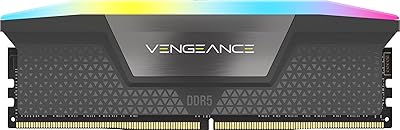
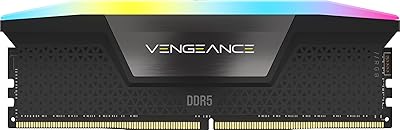
The Corsair Vengeance RGB 96GB DDR5 Desktop RAM arrived in mid-2023 as one of the few kits occupying that unusual 96GB territory — enough for users who have genuinely outgrown 64GB but are not ready to spend on a full 128GB configuration. Running at 6000MHz on Intel DDR5 platforms, it hits a speed point that most Z790 motherboards handle well without aggressive BIOS tuning. This is not a budget kit by any measure; the RGB light bars, build quality, and iCUE integration all signal a product aimed squarely at enthusiasts who care about how their build looks just as much as how it performs. Expect to pay a premium accordingly.

Features & Benefits

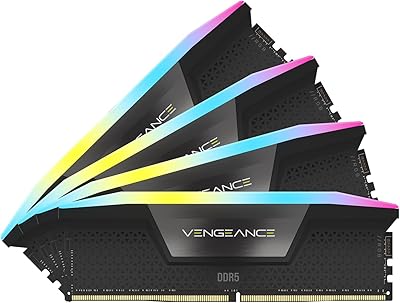
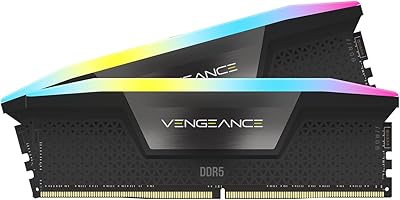
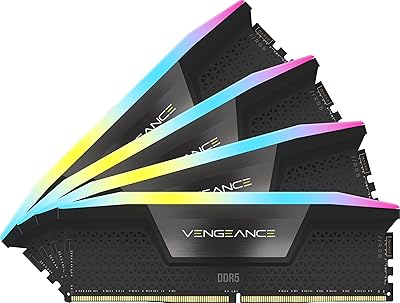
The most visible feature is the ten-zone RGB light bar running across each module — the difference versus a single-zone strip is immediately noticeable, producing smooth gradients or multi-color effects rather than a flat wash of color. Less visible but arguably more practical is the onboard voltage regulation, which helps the kit hold stable clocks under load without leaning entirely on the motherboard's power delivery. The CL30 timings at 1.4V are competitive for the speed class — not class-leading, but solid. Custom XMP 3.0 profiles through iCUE let you save separate configurations for different workloads, though the software is resource-hungry and carries a real learning curve. At 1.77 inches tall, cooler clearance is worth double-checking before you commit.

Best For

This 96GB DDR5 memory kit makes the most sense for Intel Z790 platform builders who want XMP to just work at 6000MHz without spending an afternoon wrestling with the BIOS. It also genuinely serves video editors or 3D artists running heavy timelines, and developers spinning up multiple virtual machines simultaneously — workloads where pushing past 64GB actually produces measurable results. If you are already invested in the Corsair iCUE ecosystem, the lighting sync alone is a compelling reason to stay in that family. It is a poor fit for AMD builds, and if your primary goal is raw performance at the tightest possible latency, there are kits available that skip the RGB overhead entirely.

User Feedback

The Vengeance RGB DDR5 holds a 4.8 out of 5 rating across more than 445 verified buyers, which is unusually strong for a premium memory kit where expectations tend to run high. Recurring praise focuses on how reliably it reaches 6000MHz via XMP without manual intervention — a legitimate concern with DDR5, which has historically been fussier than DDR4 out of the box. The most common criticism points at Corsair iCUE software, which some users find bloated or unstable, particularly on fresh Windows installations. A handful of buyers reported compatibility friction with certain B760 motherboards. On the upside, many purchasers specifically cite the 96GB capacity as their deciding factor, noting it was the only dual-module kit at that size they could source at the time.

Pros

  • Hits 6000MHz via XMP 3.0 on Intel Z790 reliably without manual BIOS adjustments in most reported setups.
  • The 96GB (2x48GB) dual-module configuration is a rare capacity that fills a genuine gap in the market.
  • Ten individually addressable RGB zones per stick produce noticeably richer lighting effects than single-zone alternatives.
  • Onboard voltage regulation contributes to stable overclocking without over-relying on motherboard power delivery.
  • Saving separate XMP profiles per workload through iCUE is a practical feature for users who switch between gaming and rendering tasks.
  • Exceptionally strong user satisfaction rating across a meaningful volume of real-world buyers.
  • This 96GB DDR5 memory kit allows a significant capacity upgrade path without committing to the cost of a 128GB kit.
  • CL30-36-36-76 timings at 1.4V are competitive within the 6000MHz DDR5 speed tier.
  • Build quality feels premium and consistent with what Corsair delivers across its high-end product lines.

Cons

  • Corsair iCUE software is resource-intensive and can feel bloated, especially on systems not already committed to the Corsair ecosystem.
  • Officially limited to Intel 700 Series compatibility, leaving AMD platform buyers without a supported option.
  • At 1.77 inches tall, clearance conflicts with large air coolers are a real risk that requires pre-purchase verification.
  • The RGB premium is baked into the price whether you want the lighting features or not — no plain-heatspreader equivalent at this capacity.
  • Some users have reported compatibility friction specifically with B760 motherboards, which technically support DDR5 but may need BIOS updates.
  • iCUE has a genuine learning curve; new users often find the interface unintuitive before getting lighting and profiles configured correctly.
  • The Vengeance RGB DDR5 does not offer the tightest timings available in the 6000MHz class for buyers prioritizing raw latency performance.
  • 96GB may be overkill for users who only game or run standard productivity workloads, making the investment harder to justify.

Ratings

The scores below reflect an AI-driven analysis of verified global user reviews for the Corsair Vengeance RGB 96GB DDR5 Desktop RAM, with spam, bot-submitted, and incentivized feedback actively filtered out to ensure accuracy. Ratings cover everything from out-of-box setup to long-term stability, capturing both the genuine strengths enthusiast buyers praise and the friction points that surface after extended real-world use. Nothing here is polished to sell — the numbers reflect what actual owners experienced.

XMP Setup Experience
93%
The most consistently praised aspect of this kit is how reliably it hits 6000MHz with a single XMP toggle in the BIOS. Users on Z790 boards report that the rated speed just works on the first boot without additional manual intervention, which is not something DDR5 users could always take for granted in the platform's early days.
A small subset of users on B760 motherboards reported needing a BIOS update before the XMP profile engaged correctly. Those cases are the exception rather than the rule, but buyers on non-flagship chipsets should verify BIOS version before assuming plug-and-play results.
System Stability
91%
Long-term stability at the rated 6000MHz speed is a recurring point of praise across hundreds of reviews, with users running the kit continuously through demanding workloads — heavy rendering sessions, multi-VM environments, and extended gaming — without encountering crashes or memory errors. The onboard voltage regulation appears to contribute meaningfully to this consistency.
A handful of users reported intermittent instability when attempting to push beyond the rated XMP speed through manual overclocking. The kit performs exactly as advertised at its rated profile, but those hoping to extract additional headroom through aggressive tuning have had mixed results.
RGB Lighting Quality
88%
The ten individually addressable LEDs per module produce noticeably more refined lighting than the single-zone strips found on budget alternatives. Users who prioritize a cohesive build aesthetic specifically call out the smooth gradient transitions and the even light diffusion across the full length of each stick as visually superior to competing kits.
A few users noted that the light bar, while visually impressive, can create some bleed or bloom on lighter-colored cases or side panels in certain viewing angles. It is also worth noting that without iCUE running, the default lighting pattern cannot be customized and defaults to a cycling rainbow effect that not everyone finds tasteful.
iCUE Software
63%
37%
For users already inside the Corsair ecosystem, iCUE unlocks genuinely useful functionality — syncing the RAM lighting with keyboard, mouse, and fans in a single interface, and saving distinct memory profiles for different workloads like gaming versus rendering. Those who invest time in learning the software tend to appreciate the level of control it offers.
iCUE is frequently cited as the weakest link in the ownership experience. Multiple users describe it as bloated, resource-hungry, and occasionally crash-prone, particularly after Windows updates. For users who are not already Corsair ecosystem members, the software overhead can feel like an unwelcome tax on an otherwise high-performing product.
Value for Money
74%
26%
The 96GB capacity at 6000MHz represents a genuinely rare configuration in the DDR5 market, and buyers who specifically need that headroom — video editors, 3D artists, and developers — find the price justifiable relative to the cost of a 128GB kit. For those users, the premium makes rational sense given the scarcity of this capacity tier.
For anyone who does not genuinely require 96GB, the value case falls apart quickly. A meaningful portion of the price premium reflects RGB hardware and iCUE integration that performance-only buyers would rather not pay for. Budget-conscious builders can find 64GB DDR5 kits at this speed class for considerably less.
Build Quality
89%
The heatspreader feels solid and well-fitted, and the panoramic light bar does not exhibit the flex or rattle that cheaper kits sometimes develop over time. Users who have handled multiple DDR5 kits describe the physical construction of the Vengeance RGB DDR5 as noticeably more premium than entry-level alternatives in the same speed bracket.
The modules are on the taller side at 1.77 inches, which some users flagged as a minor design trade-off — the extra height accommodates the light bar but creates real compatibility issues with certain large air coolers. A few buyers discovered this problem only after installation, requiring a cooler swap they had not planned for.
Cooler Clearance
58%
42%
For builds using an AIO liquid cooler or a low-profile air cooler, the module height is a complete non-issue. Users in those configurations report the sticks install cleanly without any proximity concerns, and the light bar remains fully visible from the side panel which suits the aesthetic intent of the product.
This is a genuine pain point for a specific group of buyers. Users with tower coolers like the Noctua NH-D15, be Quiet! Dark Rock Pro, or similar large heatsinks have reported that the modules either physically contact the cooler or come close enough to raise concern. It requires pre-purchase research that Corsair's product listing does not prominently surface.
Compatibility Range
67%
33%
On supported Intel Z790 platforms, the compatibility story is strong — users across a wide range of Z790 motherboard brands report the kit being recognized correctly and running at full speed with no issues. The XMP 3.0 implementation works predictably within its intended platform.
The hard exclusion of official AMD support limits the addressable audience significantly, especially as AMD AM5 gains adoption. Users on B760 or H770 Intel boards have also reported edge cases requiring BIOS intervention, and cross-brand memory mixing for capacity expansion is unsupported and frequently unstable.
Latency Performance
76%
24%
At CL30 for a 6000MHz DDR5 kit, the timings land in a solid middle ground that most users running real workloads will not find limiting. In everyday rendering, compilation, and gaming scenarios, the difference between CL30 and tighter alternatives is negligible for the vast majority of buyers.
For latency-sensitive use cases — competitive gaming at very high frame rates or benchmarking — the CL30-36-36-76 timings are not class-leading. Buyers who have specifically optimized their system around tight DDR5 sub-timings may find this kit underwhelming compared to more aggressive alternatives that trade RGB for tighter tuning.
Capacity Options
84%
The 96GB (2x48GB) configuration is genuinely uncommon in the DDR5 market, and buyers who land on this page because they have specifically outgrown 64GB tend to have few alternatives at this speed. It fills a real gap for professionals who need more than a standard 64GB kit but are not ready for the full cost of a 128GB configuration.
The 96GB capacity is also a limitation in disguise — you are locked into a two-module configuration that fills half your DIMM slots, and expanding further with a matching second kit risks instability from mixing. Users who anticipate needing more than 96GB in the future have limited upgrade paths with this specific kit.
Installation Experience
87%
Physical installation is straightforward and follows standard DDR5 DIMM conventions. Most users report the modules seating firmly without excessive force, and the lack of any proprietary tooling or accessories means the process is no different from installing any other desktop memory kit.
The installation experience is only complicated by the height concern mentioned elsewhere, and by the fact that first-time DDR5 users sometimes forget to enable XMP and are briefly confused about why their system is running at JEDEC default speeds. These are user-side oversights rather than product flaws, but they do generate a small number of negative early impressions.
Lighting Ecosystem Sync
79%
21%
For users already running Corsair peripherals — keyboards, mice, headsets, or case fans managed by iCUE — the RGB synchronization across all devices is cohesive and genuinely impressive in practice. Matching dynamic lighting effects across a full build is one of the stronger arguments for staying within the Corsair ecosystem.
Outside the Corsair ecosystem, cross-brand RGB sync with tools like Razer Synapse or ASUS Aura Sync is unreliable and not officially supported. Users trying to integrate the 96GB DDR5 memory kit into a mixed-brand lighting setup often end up running two separate applications just to manage different zones, which partially defeats the purpose.
Overclocking Headroom
69%
31%
The onboard voltage regulation gives this kit a more stable foundation for overclocking experiments than boards that rely entirely on motherboard-side power delivery. Users pushing modestly beyond 6000MHz — into the 6200MHz to 6400MHz range — report that the kit can sometimes hold those speeds with careful manual tuning on capable Z790 boards.
The overclocking ceiling is not particularly high compared to kits that are purpose-built for extreme frequency tuning. Beyond 6400MHz, stability drops off for most users, and Corsair does not provide official guidance or support for out-of-spec configurations. Those chasing maximum frequency records will want to look at purpose-built overclocking-tier kits instead.
Warranty and Support
82%
18%
The limited lifetime warranty is a strong safety net for a premium-tier purchase, and Corsair's support reputation within the enthusiast community is generally positive. Users who have gone through RMA processes describe them as functional and reasonably responsive compared to some competitors.
Warranty claims require direct engagement with Corsair support rather than a simple retail return in most cases, which adds steps for buyers who encounter a DOA module. A small number of users reported slower-than-expected response times during peak periods, though these represent a minority of the overall support experience reported.

Suitable for:

The Corsair Vengeance RGB 96GB DDR5 Desktop RAM is built for a specific kind of buyer: someone on an Intel Z790 or Z790E platform who needs more memory than a typical 64GB kit provides, but is not quite ready to jump to a 128GB configuration. Video editors working with 4K or 8K multicam timelines, 3D artists rendering complex scenes in Blender or Cinema 4D, and software developers running several virtual machines in parallel are the users who will actually feel the difference that extra headroom delivers. It also fits enthusiast builders who want their system to look as good as it performs — the ten-zone RGB implementation is genuinely impressive in person, and if you are already using Corsair peripherals managed through iCUE, keeping memory in that ecosystem simplifies your lighting setup considerably. Users upgrading from a DDR4 platform who want a single high-capacity kit without paying the ceiling price of a 128GB configuration will find this a practical middle ground.

Not suitable for:

The Corsair Vengeance RGB 96GB DDR5 Desktop RAM is not a good fit for AMD Ryzen builds — Corsair officially lists compatibility with Intel 700 Series platforms, and DDR5 tuning behavior on AMD can differ enough to create instability headaches that undermine the plug-and-play promise. Buyers chasing absolute minimum latency for competitive gaming or latency-sensitive workloads should also look elsewhere; the CL30 timings are respectable but not the tightest available at this speed, and you are paying in part for the RGB hardware that has no performance value. If your build uses a large tower air cooler like a Noctua NH-D15 or similar tall heatsink, verify clearance before ordering — at 1.77 inches tall, these modules can physically conflict with cooler mounting arms on certain motherboard layouts. Finally, users who prefer a clean, minimal desktop environment and have no interest in RGB lighting or Corsair iCUE software will find they are paying a meaningful premium for features they will never use.

Specifications

  • Capacity: This kit provides 96GB of total memory across two 48GB DDR5 modules in a dual-channel configuration.
  • Memory Type: Uses DDR5 SDRAM technology, the current-generation standard offering improved bandwidth and efficiency over DDR4.
  • Speed: Rated at 6000MHz, a well-regarded frequency for Intel DDR5 platforms that balances performance and stability.
  • Latency: Ships with CL30-36-36-76 primary timings at 1.4V, which are competitive for a 6000MHz DDR5 kit.
  • Voltage: Operates at 1.4V, slightly above the DDR5 JEDEC baseline of 1.1V to support the rated XMP frequency.
  • XMP Support: Supports Intel XMP 3.0, allowing the rated 6000MHz speed to be enabled with a single BIOS toggle on compatible motherboards.
  • Compatibility: Officially validated for Intel 700 Series (Z790) motherboards; AMD platform compatibility is not guaranteed by Corsair.
  • RGB Lighting: Each module houses ten individually addressable RGB LEDs enclosed in a panoramic light bar for multi-zone color effects.
  • Software: Integrates with Corsair iCUE software for lighting customization, voltage monitoring, and custom XMP profile management.
  • Form Factor: Standard DIMM form factor designed exclusively for desktop systems; not compatible with laptop or SO-DIMM slots.
  • Module Height: Each module measures 1.77 inches tall, which may conflict with large tower air coolers depending on motherboard layout.
  • Module Length: Modules measure 5.43 inches in length, consistent with standard full-size desktop DIMM specifications.
  • Module Width: Each stick is 0.27 inches wide, fitting standard dual in-line memory module slots without special adapters.
  • Weight: Each individual module weighs 1.76 ounces, reflecting the heatspreader and light bar construction.
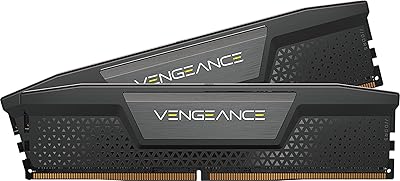
  • Color: Available in black heatspreader finish with RGB illumination; no white or alternative colorway is listed for this model.
  • Voltage Regulation: Onboard voltage regulation circuitry is built into each module to support more consistent and stable overclocking behavior.
  • Model Number: The official part number is CMH96GX5M2B6000C30, which can be used to verify compatibility with motherboard QVL lists.
  • Release Date: First made available in July 2023, giving the kit a reasonable track record of real-world user feedback to draw from.
  • Manufacturer: Designed and sold by Corsair, a long-established brand in the PC memory and peripherals market.
  • Warranty: Corsair backs this kit with a limited lifetime warranty, which is standard practice for their premium memory product lines.

Related Reviews

Corsair Vengeance 96GB DDR5 Desktop RAM
82%
79%
Memory Performance
96%
Capacity Headroom
85%
Platform Compatibility
93%
Installation Experience
94%
Stability & Reliability
More
Corsair Vengeance DDR5 96GB Memory Kit
81%
62%
Value for Money
83%
Performance at Rated Speed
88%
Stability & Reliability
91%
XMP Setup Experience
67%
Platform Compatibility
More
Corsair Vengeance RGB 96GB DDR5 Desktop RAM
79%
91%
Stability & Reliability
83%
Performance & Speed
64%
Value for Money
82%
XMP Compatibility
77%
Capacity Value
More
Corsair Vengeance RGB 128GB DDR5 RAM
82%
91%
Performance at Rated Speed
93%
XMP Setup Experience
88%
RGB Lighting Quality
71%
iCUE Software Integration
78%
Overclocking Headroom
More
Corsair Vengeance RGB DDR5 96GB (4x24GB) 6400MHz CL32 Memory Kit
87%
94%
Performance
91%
Reliability
89%
Ease of Installation
93%
RGB Lighting Customization
90%
Overclocking Capability
More
Corsair Vengeance DDR5 96GB 6000MHz
88%
94%
Performance
92%
Overclocking Capability
89%
Compatibility with Systems
90%
Build Quality
87%
Ease of Installation
More
Corsair Vengeance RGB DDR5 16GB RAM
80%
91%
Installation Ease
88%
RGB Lighting Quality
84%
Performance at Rated Speed
58%
Single-Channel Trade-off
67%
iCUE Software Experience
More
Corsair Vengeance RGB 16GB DDR5 Desktop RAM
79%
91%
XMP Setup & BIOS Compatibility
78%
Memory Performance
88%
RGB Lighting Quality
82%
iCUE Software Integration
86%
Build & Heatspreader Quality
More
Corsair Vengeance DDR5 32GB (2x16GB) 6800MHz RAM
88%
91%
Overall Performance
94%
Gaming Performance
88%
Ease of Overclocking
89%
Software Integration (iCUE)
92%
Compatibility with Intel Systems
More
Corsair Vengeance DDR5 32GB (2x16GB) 7200MHz RAM
89%
93%
Performance
94%
Speed and Responsiveness
88%
Ease of Installation
90%
Overclocking Stability
91%
Compatibility with Modern Motherboards
More

FAQ

Corsair officially lists the Vengeance RGB DDR5 as validated for Intel 700 Series platforms only. While DDR5 is physically compatible with AMD AM5 boards, XMP is an Intel specification, and achieving the rated 6000MHz speed on AMD typically requires using AMD EXPO profiles or manual tuning, which this kit does not officially support. If you are on an AMD platform, you may get it working but you are outside of Corsair's supported configuration.

On a supported Intel Z790 motherboard, you typically just need to enter the BIOS after first boot and enable XMP. The kit will load its 6000MHz profile automatically from there. Most users report this works without any additional manual tuning, which is one of the most consistently praised aspects of this kit.

This is a real concern worth checking before you buy. These modules stand 1.77 inches tall, and large tower coolers like the NH-D15 can hang over the first one or two DIMM slots on many ATX motherboards. Check your specific motherboard layout against your cooler's clearance spec before ordering. If clearance is tight, a 240mm or 360mm AIO liquid cooler sidesteps the issue entirely.

No, iCUE is not required for the memory to function at its rated speed. XMP activation is handled entirely through the BIOS. iCUE is only needed if you want to customize the RGB lighting, sync it with other Corsair devices, or create and save custom XMP profiles. That said, the RGB will still light up without iCUE installed — it just defaults to a preset pattern.

For most gamers and general PC users, 64GB is already more than sufficient. The 96GB capacity starts making a practical difference for video editors working with large uncompressed or RAW footage caches, 3D artists rendering complex scenes, developers running multiple virtual machines, or anyone doing machine learning work locally. If none of those workloads describe you, the extra capacity will likely sit unused and you would be better served by a less expensive 64GB option.

Most Intel Z790 motherboards have four DIMM slots, and this kit occupies two of them. You could theoretically add a second kit in the remaining slots, but mixing memory kits — even from the same brand and model line — is not guaranteed to be stable and is not officially supported. If you think you might need more than 96GB down the road, it is worth considering a 128GB kit from the start rather than mixing later.

iCUE is known within the PC enthusiast community for having a noticeable background resource footprint. It is not crippling on a modern high-end system, but it does consume CPU cycles and RAM even when you are not actively using it. If you run a tightly optimized workstation or gaming rig and prefer minimal background processes, this is worth factoring in. Some users choose to install iCUE only when they want to change lighting settings and then disable it at startup.

The Corsair Vengeance RGB 96GB DDR5 Desktop RAM is validated for Intel 700 Series boards, with Z790 being the primary target platform. For specific motherboard compatibility, Corsair maintains a QVL (qualified vendor list) on their website where you can search by motherboard model. You can also check your motherboard manufacturer's own memory QVL for the part number CMH96GX5M2B6000C30. A few users have noted occasional friction with some B760 boards, so verifying before purchase is worthwhile.

It is more substantial than a single LED strip. Each module has ten individually addressable LEDs spread across a panoramic light bar that runs the full length of the top of the stick. The result is a smooth, even spread of light that supports proper gradient and multi-zone color effects. Compared to older single-zone kits or budget RGB sticks with visible hotspots, the lighting on this kit is noticeably cleaner and more visually polished.

Yes, Corsair covers this kit with a limited lifetime warranty, which is the standard for their premium memory lineup. If a module fails under normal use, Corsair's support process involves contacting them directly to arrange a replacement. Their customer support reputation in the enthusiast community is generally solid, and the lifetime coverage on a RAM kit of this caliber is a reassuring safety net.