Overview

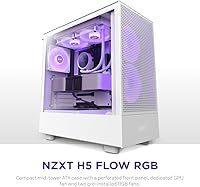
The NZXT H5 Flow RGB Mid-Tower PC Case sits in an interesting spot — it's NZXT's answer to builders who want real airflow performance without giving up a clean, attractive build. The white finish and tempered glass side panel make it genuinely easy on the eyes, but this isn't a case designed around looks alone. ATX compatibility means you're not boxed into a smaller form factor, and the build quality feels solid for the price tier. Think of it as a practical mid-range choice for someone who cares about thermal headroom just as much as they care about how their rig looks through that glass.

Features & Benefits

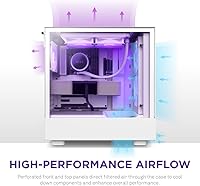
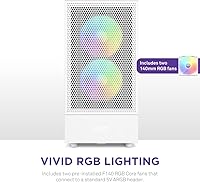
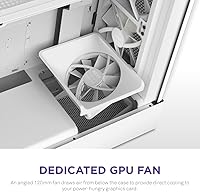
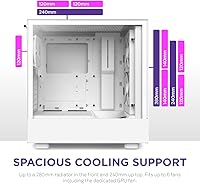
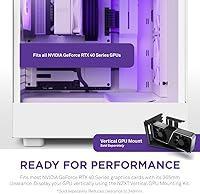
The front and top panels are heavily perforated, and that design choice has real consequences for thermals — air moves through this airflow-focused case freely rather than fighting restricted vents. Two pre-installed F140 RGB Core fans connect directly to a standard 5V ARGB header, so plugging them into an existing lighting setup takes minutes. What actually stands out is the angled 120mm fan positioned beneath the GPU bracket; it pulls fresh air directly toward your graphics card, a practical touch for anyone running a power-hungry card. Radiator support reaches 280mm in front and 240mm on top, and with 400mm GPU clearance, even the bulkiest RTX 40 Series cards fit without issue.

Best For

This airflow-focused case is a natural fit for first-time PC builders — NZXT's reputation for clean interior layouts and accessible documentation makes the process less intimidating than it might be with a more complex chassis. If you're running a modern high-wattage GPU, that dedicated underside fan is worth paying close attention to. ARGB users will appreciate the plug-and-play fan headers. The H5 Flow RGB also suits builders who want full ATX motherboard support but don't have room for a full tower. One honest caveat: if near-silent operation is your top priority, the perforated panels let air in efficiently but don't do much to muffle fan noise.

User Feedback

Across close to a thousand ratings, the H5 Flow RGB holds a 4.7-out-of-5 average, and reading through owner comments, the high score doesn't feel inflated. Builders consistently mention how approachable the interior layout is to work in, and ARGB syncing draws few complaints. The dedicated GPU fan gets credited for keeping temperatures respectable under sustained load. That said, acoustics come up regularly as a real limitation — with open perforations on multiple sides, fan noise is noticeable once your system spins up hard. A handful of owners also flag that the front panel filter is awkward to pull out for cleaning, a minor friction point worth knowing about before you commit.

Pros

  • Dedicated 120mm GPU fan actively cools your graphics card from below, a thoughtful touch most cases at this tier skip.
  • Two F140 RGB fans come pre-installed and connect to any standard 5V ARGB header without adapters or extra hardware.
  • Supports up to a 280mm front radiator, giving serious cooling headroom for CPU-intensive builds.
  • 400mm of GPU clearance accommodates most large modern graphics cards without modification.
  • The tempered glass side panel and white finish look genuinely premium for the price point.
  • Interior layout is widely praised by first-time builders as one of the more approachable they have worked in.
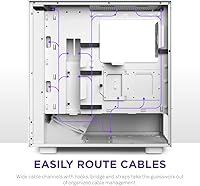
  • Cable management channels are well-positioned and keep the build looking clean without extra effort.
  • Holds up to 6 fans total, leaving room to expand cooling as your build grows.
  • ATX compatibility means no sacrifices on motherboard choice despite the compact footprint.
  • Strong owner satisfaction rating across a large number of verified real-world builds.

Cons

  • Fan noise is noticeably audible under load — the open panels that aid airflow do nothing to contain sound.
  • Front panel filter is awkward to remove, making routine dust cleaning more of a chore than it should be.
  • USB port selection on the front I/O feels dated, with no USB-C port included.
  • Vertical GPU mounting requires a separately purchased kit, which is easy to overlook when budgeting.
  • Using the vertical GPU mount also reduces available GPU clearance, which may rule out certain larger cards.
  • Storage expansion options are limited compared to larger mid-towers in a similar price range.
  • The case is not well-suited for silent or near-silent build goals without significant aftermarket fan swaps.
  • Lighter construction means the chassis can feel less substantial compared to some steel-heavy competitors.
  • No USB-C header on the front panel is a meaningful omission as more motherboards and peripherals adopt the standard.

Ratings

The NZXT H5 Flow RGB Mid-Tower PC Case scores below are generated by AI after systematically analyzing thousands of verified owner reviews worldwide, with spam, bot-submitted, and incentivized feedback actively filtered out before scoring. The results reflect where this airflow-focused case genuinely impresses builders and where real frustrations consistently surface — no category has been softened or inflated.

Airflow Performance
93%
Owners running demanding rigs consistently report lower component temperatures compared to similarly priced cases with solid front panels. The perforated front and top panels work as advertised, and the dedicated GPU fan underneath is a practical differentiator that builders with high-TDP cards genuinely notice during extended gaming sessions.
The open design means airflow performance is sensitive to dust accumulation over time, and filter maintenance is less convenient than it should be. Users in dustier environments report needing more frequent cleaning to maintain optimal throughput.
Noise Level
54%
46%
At idle and light loads, the included F140 fans run quietly enough that most users in typical home setups don't find them intrusive. The fan speed scaling under moderate workloads is reasonable and not jarring.
Under sustained gaming or rendering loads, the perforated panels that make this case breathe so well also let fan noise escape freely — and owners are candid about it. For anyone with this case sitting close to them on a desk in a quiet room, the acoustic trade-off is a real daily annoyance.
Build Quality
82%
18%
The steel chassis feels solid for a mid-range case, and the tempered glass panel is thick enough to inspire confidence during handling. Panel fitment is consistently described as tight and rattle-free out of the box.
A handful of owners note the case feels lighter and less substantial than premium steel-heavy competitors, and the front panel clips can feel slightly plasticky under repeated removal for filter cleaning. It is not a durability concern, but it does affect the perceived quality ceiling.
Ease of Building
91%
First-time builders consistently single out this case as one of the most approachable they have worked in — the interior is uncluttered, cable routing channels are well-positioned, and NZXT's documentation removes much of the guesswork. Experienced builders appreciate how quickly a clean build comes together.
The PSU shroud, while tidy-looking, can make it slightly awkward to route modular PSU cables neatly in the lower chamber without planning ahead. It is a minor friction point, but worth being aware of before you start.
Cable Management
84%
The routed channels and tie-off points behind the motherboard tray are well-thought-out, and most builders achieve a genuinely clean-looking interior without resorting to creative improvisation. The PSU shroud does a good job hiding lower cable runs from the glass side.
The cable management area behind the motherboard tray is tighter than some rivals at the same price, which makes it harder to stuff excess cable lengths out of sight. Builders using non-modular PSUs in particular may find it cramped.
RGB Lighting
88%
The two pre-installed F140 RGB Core fans produce vibrant, even lighting across the blades, and plugging them into a standard 5V ARGB header for software control takes minutes. Owners using ASUS Aura, MSI Mystic Light, or Gigabyte RGB Fusion report the fans show up and sync reliably.
The case itself does not include an integrated RGB controller, so users without a motherboard ARGB header need a separate controller to manage lighting. For entry-level builds on boards with limited headers, this is a real extra cost.
GPU Compatibility
89%
With 400mm of clearance in the standard configuration, this NZXT mid-tower accommodates the overwhelming majority of RTX 40 Series cards including bulky triple-fan models that cause problems in tighter cases. Builders report the GPU area feels spacious and the dedicated underside fan adds genuine thermal benefit.
The optional vertical GPU mount, sold separately, reduces clearance to 384mm — a meaningful cut that rules out certain large aftermarket coolers. Users who want to show off their card vertically need to budget and plan for that kit explicitly.
Cooling Headroom
87%
Supporting a 280mm front radiator and a 240mm top radiator gives serious builders real options for custom loop or high-end AIO configurations without compromising on air cooling simultaneously. The ability to run up to six fans total in a compact chassis is a genuine advantage.
The 280mm front radiator limit rules out popular 360mm AIOs, which is a hard constraint for builders who planned around larger coolers. Compared to some slightly larger mid-towers in the same price range, the maximum cooling configuration ceiling is lower.
Front I/O
61%
39%
The front I/O is neatly integrated into the top bar and the power button has a clean, responsive feel. USB 3.0 Type-A is available for fast peripheral connections without reaching around to the back of the machine.
The absence of a USB-C port on the front panel is a notable gap that owners mention with frustration, especially as more peripherals and devices rely on it for fast data transfer and charging. The two USB 2.0 ports feel like a dated inclusion for a case launched in 2023.
Dust Filtration
67%
33%
Filters are present on the front and top panels to catch particulate before it reaches components, and the top filter in particular is straightforward to remove and rinse. Owners in moderate-dust environments find the filtration adequate for keeping internals reasonably clean between maintenance sessions.
The front panel filter is the consistent complaint — accessing it requires removing the front panel entirely, which is more involved than the slide-out or magnetic designs found on competing cases. Users who do regular maintenance find this genuinely annoying in practice.
Value for Money
86%
Considering you get three pre-installed fans including a GPU-specific intake fan, a tempered glass panel, solid ATX compatibility, and a well-engineered airflow layout, the H5 Flow RGB delivers a competitive feature set for its mid-range price. Most buyers feel the out-of-box cooling configuration alone justifies the cost.
Buyers who also want vertical GPU mounting, a USB-C front port, or a 360mm AIO will need to spend additional money to compensate for what the case lacks, which erodes the value proposition for those specific builds.
Aesthetics
91%
The white finish is clean and consistent, and the large tempered glass panel gives builds a genuinely premium presentation. The H5 Flow RGB is one of the better-looking perforated cases at this price, managing not to look utilitarian despite the airflow-first front panel design.
The perforated front panel, while functional, is a polarizing design choice aesthetically — some buyers specifically prefer the blacked-out solid panel look and find the mesh grille less refined up close. Color uniformity across the white panels is generally good but a small number of owners report minor inconsistencies.
ATX Compatibility
94%
Full ATX support in a footprint this compact is a genuine selling point for builders who want a smaller desk presence without limiting their motherboard options. The interior layout accommodates ATX boards without the tight clearances that can make cable routing difficult in smaller cases.
While ATX support is strong, the compact dimensions do limit options for builders who want to run very tall air coolers alongside a front-mounted radiator simultaneously — the interior is spacious but not unlimited.
Documentation & Setup Experience
89%
NZXT's build documentation is consistently cited as among the clearest in the industry, and the H5 Flow RGB benefits from that ecosystem-wide investment. New builders report being able to follow the process confidently without resorting to third-party YouTube guides.
For experienced builders who do not need documentation, the manual-first design philosophy means some panel removal and internal access points are less immediately intuitive than on cases designed with veterans in mind.

Suitable for:

The NZXT H5 Flow RGB Mid-Tower PC Case is a strong pick for builders who want genuine thermal performance without wrestling with a complicated chassis. It's particularly well-matched to first-time builders — NZXT's clean interior layout, straightforward cable routing channels, and well-documented build process take a lot of the anxiety out of putting together a first rig. Gamers running modern high-power graphics cards will also appreciate the dedicated underside GPU fan, which actively pulls cooler air toward the card rather than relying solely on case airflow passing by passively. If you're already running an ARGB lighting setup, the included F140 fans connect to a standard 5V header and sync without much fuss. Compact-minded builders who still want a full ATX motherboard will find this case hits a practical sweet spot in footprint versus compatibility.

Not suitable for:

The NZXT H5 Flow RGB Mid-Tower PC Case is not the right call for every builder, and being honest about that matters. If low noise is a genuine priority — say you're building a workstation that sits close to you on a desk and you work in quiet environments — the open perforated panels that make this case breathe so well also let fan noise out freely, and that trade-off is real under any kind of sustained load. Builders chasing the absolute maximum storage configuration will also find limitations here; the case is compact by mid-tower standards, and drive bay options are not its strong suit. Those who want a vertical GPU display should know the mounting kit required to do that is sold separately and reduces available GPU clearance, so factor that in before purchasing. Finally, if you're coming from a heavily sound-dampened case and expect similar acoustics, this airflow-focused case will likely feel like a step backward on that specific front.

Specifications

  • Form Factor: ATX Mid-Tower chassis compatible with ATX, Micro-ATX, and Mini-ITX motherboards.
  • Dimensions: The case measures 20.94″ long, 11.46″ wide, and 20″ tall.
  • Weight: The unit weighs approximately 2.2 lbs without installed components.
  • Side Panel: A full tempered glass panel on the left side provides a clear view of internal components.
  • Front Panel: Heavily perforated steel front panel maximizes intake airflow while maintaining structural rigidity.
  • Included Fans: Two 140mm F140 RGB Core fans come pre-installed at the front as intake fans.
  • GPU Fan: One dedicated 120mm fan is angled beneath the GPU bracket to direct airflow at the graphics card.
  • Fan Support: The case supports up to 6 fans in total across front, top, and rear positions.
  • Radiator Support: Accepts up to a 280mm radiator in the front and a 240mm radiator on the top.
  • GPU Clearance: Standard configuration allows up to 400mm of GPU length clearance.
  • CPU Cooler Height: Supports CPU air coolers up to approximately 165mm in height.
  • PSU Clearance: Rear-mounted PSU shroud accommodates standard ATX power supplies up to 200mm in length.
  • ARGB Header: Included fans connect to a standard 5V 3-pin ARGB header for lighting synchronization.
  • Front I/O Ports: Front panel includes two USB 2.0 ports and one USB 3.0 Type-A port.
  • Power Button: Integrated front-panel power button with LED indicator is built into the top I/O bar.
  • Cable Management: Routed cable channels and tie-off points behind the motherboard tray keep wiring organized.
  • Material: Primary construction uses steel for the chassis frame with a tempered glass side panel.
  • Color: Available in White (model CC-H51FW-R1); a black variant is also offered separately.
  • PSU Mount: Power supply mounts at the rear bottom with a shroud that conceals cabling from the main chamber.
  • Model Number: The official model identifier for the white RGB variant is CC-H51FW-R1.

Related Reviews
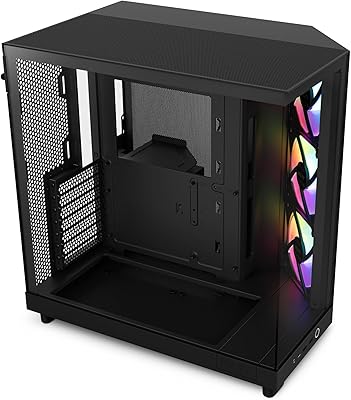
NZXT H6 Flow RGB Mid-Tower Case
80%
88%
Build Quality & Materials
84%
Airflow Performance
91%
Cable Management
79%
Glass Panel Quality
82%
Included RGB Fans
More
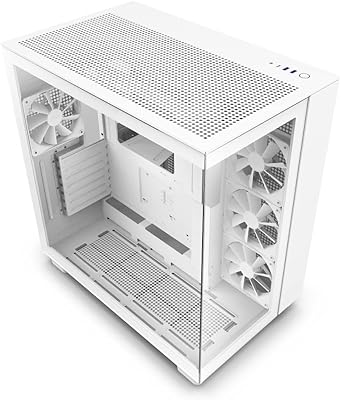
NZXT H9 Flow ATX Mid-Tower Case
79%
88%
Airflow Performance
91%
Build Quality
93%
Cable Management
94%
Aesthetic Design
84%
Ease of Assembly
More
NZXT H7 Flow 2024 Mid-Tower ATX Case

87%
92%
Cooling Performance
88%
Build Quality
91%
Airflow Optimization
85%
Ease of Installation
80%
Cable Management
More
SAMA V60 Mid Tower PC Case
80%
93%
Out-of-Box Cooling Value
78%
Airflow Performance
91%
AIO & Radiator Flexibility
88%
Tempered Glass & Aesthetics
71%
Build Quality & Materials
More
Corsair FRAME 4000D RS Mid-Tower Case
82%
91%
Airflow Performance
88%
Build Quality
86%
Modularity & Upgradability
83%
Fan Mounting System
78%
GPU Compatibility
More
SAMA V Mesh Mid Tower PC Case

79%
91%
Airflow Performance
88%
Included Fans
86%
Value for Money
67%
Build Quality
83%
Ease of Assembly
More
Zalman S2 ATX Mid-Tower PC Case
76%
88%
Airflow Performance
63%
Build Quality
91%
Value for Money
86%
Ease of Assembly
84%
Cooling Expandability
More
Zalman S3 ATX Mid-Tower PC Case
74%
83%
Value for Money
71%
Build Quality
58%
Airflow & Cooling Performance
86%
Ease of Assembly
67%
Acrylic Side Panel
More
darkFlash DS900 ATX Mid-Tower PC Case
75%
76%
Build Quality
83%
Cooling Potential
91%
Aesthetics & Visibility
88%
Value for Money
74%
Cable Management
More
Vetroo AL800 Mid Tower ATX PC Case
76%
78%
Build Quality
84%
Tempered Glass Panel
76%
Airflow Performance
61%
Fan Included & Expandability
69%
Cable Management
More

FAQ

It ships with two 140mm F140 RGB Core fans pre-mounted at the front as intake, plus a dedicated 120mm fan positioned below the GPU area. You get three fans out of the box, which is a decent starting point for most builds. If you want to fill all available fan slots, you can add up to three more fans yourself.

In the standard configuration, the case offers 400mm of GPU clearance, which covers the vast majority of RTX 40 Series cards including most triple-fan 4080 and 4090 models. That said, always double-check the physical length of your specific card against that limit before purchasing, since a small number of oversized aftermarket coolers push beyond it.

No — the largest supported radiator size is 280mm in the front and 240mm on top. If you're planning a 360mm custom loop or AIO, this case won't accommodate it, and you'd need to look at a larger chassis.

Honestly, noise is one area where this airflow-focused case makes a real trade-off. The perforated front and top panels move air efficiently, but they also let fan noise out without much dampening. Under heavy gaming or rendering loads, the fans are audible — not annoyingly loud, but noticeable. If near-silence is a hard requirement for you, a case with sound-dampening foam and solid panels would be a better match.

Yes, the F140 RGB Core fans use a standard 5V 3-pin ARGB connector, which is compatible with most major motherboard RGB ecosystems including ASUS Aura Sync, MSI Mystic Light, Gigabyte RGB Fusion, and ASRock Polychrome. Just plug them into the ARGB header on your motherboard and they should show up in your lighting software automatically.

Vertical GPU mounting is possible, but the mounting kit required to do it is sold separately — it does not come in the box. Also worth knowing: installing the vertical mount reduces the available GPU clearance from 400mm down to 384mm, so factor that in if you have a particularly long card.

It's one of the more approachable cases in its class. The interior layout is uncluttered, cable routing channels are clearly positioned, and NZXT provides solid documentation. Most first-time builders report a straightforward experience without needing to force anything or improvise cable runs.

The top panel filter can be slid or lifted off with relative ease. The front panel filter, however, is the one owners find more awkward — it requires removing the front panel itself to access, which is a minor but real inconvenience if you're doing regular maintenance. Plan to clean it every few months depending on your environment.

No, the front I/O only includes two USB 2.0 ports and one USB 3.0 Type-A port. There is no USB-C on the front panel, which is a notable omission if you rely on front-panel USB-C for fast device connections or charging. If that matters to you, it's worth factoring in before committing.

The H5 Flow RGB supports air CPU coolers up to approximately 165mm tall, which covers most popular tower coolers including options like the Noctua NH-D15 in its standard configuration. If you're running a particularly tall aftermarket cooler, verify its height spec against that limit to be sure.

Where to Buy