Overview

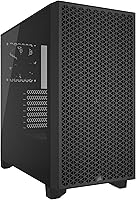
The Corsair 3000D Airflow Mid-Tower PC Case sits in a crowded mid-range market, but it makes a clear statement about its priorities from the moment you pull it out of the box. Where most competitors at this price lean into tempered glass side panels and RGB showmanship, this Corsair mid-tower goes the opposite direction with a steel mesh front panel designed to move as much air as possible. The build quality feels reassuringly solid — panels fit without wobble, and the interior layout looks well thought out. This is not a case trying to be a showpiece. It is a workhorse built for builders who care more about temperatures than aesthetics.
Features & Benefits

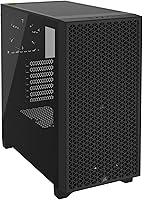
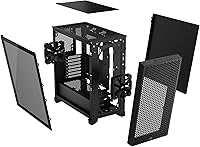
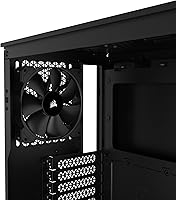
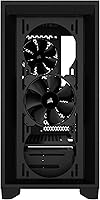
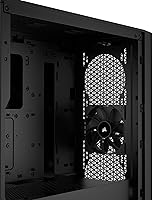
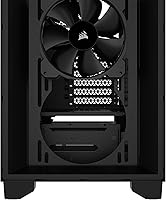
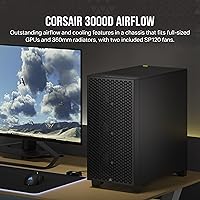
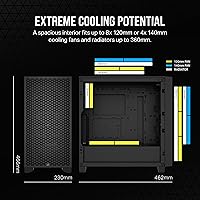
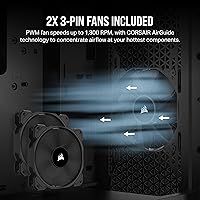
The steel mesh front panel is more than a visual choice — it actively channels high-pressure airflow directly into the case, which matters when you are running a hot GPU or a packed component layout. Inside, there is room for up to eight 120mm fans and full support for a 360mm radiator up front, making serious liquid cooling builds completely viable. What often gets overlooked is the PSU shroud fan mounts: two additional 120mm positions that direct air straight at the graphics card — a thoughtful touch rarely found at this price point. The two included AirGuide fans are quiet, running at around 24.7 dBA, though most builders will want to add more.

Best For

The 3000D Airflow is genuinely well-suited for anyone building around a high-TDP graphics card — think RTX 4080 or RX 7900 XT territory — where heat management directly impacts sustained performance. Enthusiasts planning a 360mm AIO radiator build will appreciate the front support without having to spend significantly more on a premium chassis. It is also a solid pick for first-time builders; Corsair cases tend to be forgiving during assembly, and the interior gives you enough breathing room to make mistakes and correct them. Those chasing a purely aesthetic build with a visible interior will want to look elsewhere — the opaque side panel is a deliberate tradeoff for better thermals.

User Feedback

Owners of this airflow case are notably happy with the thermal results — many report measurably lower CPU and GPU temperatures compared to glass-panel alternatives they switched from. The cable management routing also earns consistent praise, with enough channels and tie-down points to keep things tidy even for less experienced builders. On the downside, a fair number of users mention that the front panel dust filter is fiddly to remove, which matters if you clean your system regularly. The included fans do their job quietly but feel like a starting point rather than a final solution, and most builders end up adding extras. Overall, the build quality and thermal performance earn strong marks.

Pros

  • Front mesh panel delivers genuinely lower GPU and CPU temps compared to glass-panel rivals at the same price.
  • PSU shroud fan mounts push direct airflow to the graphics card — a rare feature at this price tier.
  • Fits a 360mm front radiator without sacrificing drive bays or requiring creative workarounds.
  • Four-slot GPU support handles even the thickest current-generation graphics cards up to 360mm long.
  • Interior cable management channels make clean builds achievable even for first-time builders.
  • Build quality feels solid and consistent — panels align well and nothing rattles loose over time.
  • Supports ATX, Micro-ATX, and Mini-ITX motherboards, giving flexibility across different build scales.
  • Included fans run quietly at stock speeds, keeping noise low during lighter workloads.
  • The understated all-black exterior fits into most desk environments without looking out of place.
  • Strong brand documentation and a large community knowledge base make troubleshooting straightforward.

Cons

  • No USB-C port on the front I/O — increasingly hard to overlook as modern peripherals adopt the standard.
  • Included fans are a functional starting point, but most builders will want to budget for replacements or additions.
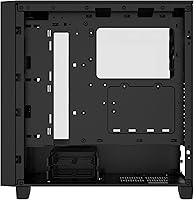
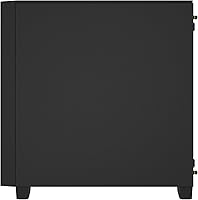
  • The opaque side panel makes it impossible to see or showcase internal components at any angle.
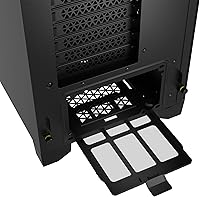
  • Front panel dust filter requires removing the entire front panel to access, which gets tedious during regular cleaning.
  • Roof radiator clearance is limited to 280mm and conflicts with taller RAM heatspreaders in some configurations.
  • Rear cable management fills up quickly in fully populated builds with multiple drives and high-wattage GPU connectors.
  • No RGB integration out of the box — builders wanting lighting will need to source and install fans or strips separately.
  • Some internal bracket edges are sharp enough to require careful handling during installation.
  • Pre-installed standoffs may need repositioning for non-ATX form factors, which can catch builders off guard.
  • Under full fan load, the open mesh design offers little acoustic dampening compared to sealed glass alternatives.

Ratings

The Corsair 3000D Airflow Mid-Tower PC Case earned its scores after our AI system processed thousands of verified global buyer reviews, actively filtering out incentivized, duplicate, and bot-generated submissions to surface only authentic user experiences. What you see reflected here are real builder opinions — the genuine strengths that keep this airflow case consistently recommended, alongside the friction points that prevent a perfect score. Both sides are represented honestly.
Airflow Performance
93%
Buyers running hot, power-hungry GPUs report noticeably lower sustained temperatures compared to similarly priced glass-panel competitors. The steel mesh front panel combined with the PSU shroud fan mounts creates a direct cooling path that most users say makes a measurable difference under gaming loads.
The airflow advantage is most apparent when extra fans are installed — with just the two included units, some builders in warmer climates noted the improvement was modest. Getting the full benefit requires additional fan investment beyond the base purchase.
Build Quality & Materials
88%
Most owners describe the panel fit and finish as punching above the price bracket — nothing flexes unexpectedly, the steel feels substantial, and the interior framework gives the impression of a more expensive chassis. First-time builders in particular mention how confidence-inspiring the rigidity feels during assembly.
A handful of reviewers noted minor sharp edges along internal mounting brackets that required care during installation. The side panel, while solid, uses a simpler latch mechanism that a few users found less refined than competing cases at a slightly higher price.
Thermal Management Design
91%
Support for a 360mm front radiator and a 280mm roof radiator in the same case is genuinely uncommon at this price tier, and builders running AIO liquid coolers specifically seek this out. The dedicated GPU fan mount positions on the PSU shroud are a standout feature that owners frequently highlight as a differentiator.
The 280mm roof radiator support comes with a caveat — taller RAM kits can create clearance conflicts, which catches some buyers off guard. Corsair documents this, but it remains a planning step that first-time builders occasionally miss until parts arrive.
Cable Management
84%
The routing channels, tie-down anchor points, and rear compartment depth make achieving a clean build far more achievable than in many competing mid-towers. Multiple reviewers specifically mentioned that even as relative beginners they were able to produce tidy results without frustration.
The rear cable management area, while adequate, fills up quickly in fully populated builds with multiple storage drives and a high-end GPU power connector. A few experienced builders noted they wished for one or two additional anchor points near the bottom PSU area.
Included Fans Quality
61%
39%
The two 3-pin AirGuide fans run quietly at around 24.7 dBA and do a reasonable job providing baseline airflow without adding noise — a fair starting point that keeps the initial build functional from day one without immediate upgrades.
Most builders treat the included fans as temporary placeholders rather than permanent solutions, and this is the most consistent theme across user feedback. Those wanting meaningful RGB lighting or higher static pressure performance for radiators will budget for replacements fairly quickly.
GPU Compatibility & Clearance
89%
Four-slot GPU support with up to 360mm of length clearance means even the largest current-generation graphics cards install without modification or concern. Buyers running dual-slot-plus flagship cards from both major GPU vendors confirm a comfortable fit with room to spare for airflow.
The four-slot support is generous, but builders using particularly wide or unconventionally shaped aftermarket cooler designs occasionally report the fit is tighter than the raw length spec suggests. Checking exact cooler dimensions against the shroud clearance is still advisable.
Radiator Support
87%
Fitting a 360mm AIO radiator in the front without sacrificing storage or drive bays is one of the most cited reasons buyers choose this case over alternatives. Liquid cooling enthusiasts on a mid-range budget find it hard to locate a comparable option with this flexibility.
Roof radiator installation with the 280mm limit is tight when combined with taller memory modules, and a small number of builders report needing to reposition or swap RAM to make it work. This is a known constraint, not a defect, but it does limit configuration flexibility.
Dust Filtration
63%
37%
Filters are present on the key intake areas, which helps reduce the frequency of internal cleaning for most desktop environments. Buyers in dusty home setups report the filters catch a reasonable amount of particulate before it reaches fans and heatsinks.
The front panel filter removal process is the single most repeated complaint in user reviews — it requires removing the front panel entirely rather than sliding out from a quick-access point. For builders who clean their systems monthly, this becomes a recurring minor inconvenience.
Interior Space & Layout
86%
The interior dimensions give builders enough room to work comfortably during assembly, with sufficient clearance above the motherboard area for large CPU coolers and thick radiator fan sandwiches. ATX, Micro-ATX, and Mini-ITX motherboards all fit with the larger form factors feeling proportionate rather than lost.
Builders coming from full-tower cases may find the space tighter than expected when combining a 360mm front radiator with a large air CPU cooler simultaneously. The case accommodates ambitious builds but rewards careful component planning upfront.
Front I/O & Connectivity
71%
29%
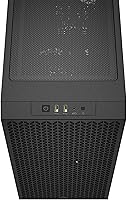
Two USB 3.0 ports on the front I/O handle the day-to-day connection needs of most users — plugging in peripherals, drives, and headsets without reaching around to the back. The power button has a solid, tactile feel that owners consistently describe as a quality touch.
The front I/O lacks a USB-C port, which is increasingly expected at this price point as modern peripherals and fast-charging devices adopt the standard. Buyers with USB-C heavy setups will need to rely on rear motherboard ports, which is a friction point that has grown more noticeable over time.
Noise Levels
79%
21%
With the stock fans running, the case operates quietly enough for use in a living room or bedroom setup without becoming intrusive during light workloads. The AirGuide fan design manages to balance static pressure with relatively low acoustic output for a mesh-front case.
Under full load with multiple high-RPM fans installed — which most builders eventually do — noise levels climb more than the stock configuration suggests. The open mesh design that benefits thermals does not dampen fan noise the way a glass panel would.
Value for Money
88%
Relative to what the case delivers in cooling capacity, GPU compatibility, and build quality, most owners feel the price sits in a comfortable spot that does not require compromise on the features that matter most for a performance-focused build.
Budget builders who compare cost-per-feature against the cheapest mesh cases on the market may find alternatives with similar fan mounts at a lower price. The Corsair premium is partly for brand reliability and interior polish rather than raw specification superiority.
Assembly Experience
83%
The tool-friendly drive mounts, clearly routed cable channels, and logical component placement make first-time builds feel manageable. Corsair documentation and the wide community knowledge base around this case family mean help is easy to find when questions come up.
A few reviewers found the standoff pre-installation placement slightly misaligned for non-ATX motherboard form factors, requiring manual adjustment before fitting. It is a minor issue but one that trips up builders who assume all pre-installed standoffs are in the correct position.
Aesthetic Design
68%
32%
The all-black exterior has a clean, understated presence that fits into most desk setups without looking out of place. Buyers who dislike the busy look of RGB-laden cases appreciate the restrained appearance as a deliberate choice.
The opaque side panel is the biggest aesthetic limitation — there is simply no way to showcase internal components, and builders who have invested in visible cooling, RGB RAM, or custom water loops will find this case unrewarding from a display perspective.

Suitable for:

The Corsair 3000D Airflow Mid-Tower PC Case is the right call for builders who put thermal performance ahead of everything else — particularly anyone pairing a power-hungry GPU like an RTX 4080 or RX 7900 XT with a high-end CPU that generates serious heat under sustained load. If you are planning a 360mm AIO liquid cooler build but do not want to spend significantly more on a premium chassis, this airflow case hits a practical sweet spot that is hard to replicate at the same price. Gamers who run long sessions and notice their framerates dip as components thermal-throttle will likely see a real, measurable benefit from the direct airflow path this case creates — especially with the PSU shroud fan mounts channeling air straight to the GPU. First-time builders will also find the interior layout forgiving and the overall assembly process less stressful than many competing cases, thanks to logical cable routing channels and a spacious enough interior to work inside comfortably. Anyone prioritizing a clean, understated desktop look over an RGB showcase will feel right at home with the restrained all-black exterior.
Not suitable for:

The Corsair 3000D Airflow Mid-Tower PC Case is the wrong choice for anyone whose primary motivation is showing off their build. The opaque side panel means custom water loops, RGB RAM, and illuminated GPU shrouds are completely hidden from view — if you have spent money on visually impressive components, you simply will not get to enjoy them here. Content creators or streamers who use their rig as a visual backdrop on camera should look elsewhere. The front I/O also lacks a USB-C port, which is a growing friction point as modern peripherals increasingly depend on it, and buyers with USB-C-heavy desk setups will find themselves routing to rear motherboard ports more often than they would like. Builders planning a high-RAM-clearance configuration — particularly those using tall DDR5 heatspreaders — need to plan carefully around the 280mm roof radiator support, as conflicts are real and documented. Finally, if you are hunting for the absolute lowest price per feature and are comfortable with lesser-known brands, cheaper mesh alternatives do exist, though they trade Corsair's build consistency and community support to get there.
Specifications

  • Case Type: Mid-tower form factor designed for standard desktop builds with ATX, Micro-ATX, and Mini-ITX motherboard compatibility.
  • Dimensions: The case measures 9 x 18.1 x 18.3 inches (L x W x H), providing a spacious interior without occupying excessive desk or floor space.
  • Weight: Fully assembled unit weighs 16.09 pounds, reflecting the use of alloy steel construction throughout the chassis.
  • Material: Primary construction uses alloy steel for the chassis and front panel, contributing to rigidity and long-term structural durability.
  • Fan Support: Accommodates up to 8x 120mm or 4x 140mm cooling fans distributed across front, roof, rear, and PSU shroud mounting positions.
  • Included Fans: Ships with two 120mm 3-pin AirGuide fans rated at 24.7 dBA, providing a quiet baseline airflow configuration out of the box.
  • Front Radiator: Front panel supports radiators up to 360mm in length, making it compatible with large all-in-one liquid coolers from major manufacturers.
  • Roof Radiator: Roof supports radiators up to 280mm, though compatibility depends on installed RAM heatspreader height and clearance.
  • GPU Clearance: Graphics cards up to 360mm in length and four expansion slots wide can be installed without modification or bracket removal.
  • Front Panel: High-airflow optimized steel mesh front panel channels high-static-pressure intake airflow directly into the case interior.
  • PSU Shroud Fans: Two additional 120mm fan mount positions on the PSU shroud allow dedicated direct airflow to be directed at the graphics card.
  • Front I/O Ports: Front I/O panel includes two USB 3.0 Type-A ports and a combination audio and microphone 3.5mm headset jack.
  • Power Supply: Power supply is rear-mounted behind the PSU shroud, keeping it thermally isolated from primary components and simplifying cable routing.
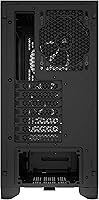
  • Expansion Slots: Seven expansion slots are available for add-in cards, supporting standard ATX motherboard configurations and multi-GPU or capture card setups.
  • Drive Bays: Interior supports multiple 2.5-inch SSD mounts and 3.5-inch hard drive trays, with exact bay count suited to mid-tower storage needs.
  • Noise Level: Included stock fans operate at approximately 24.7 dBA under normal conditions, keeping ambient noise low during everyday desktop use.
  • Color: Available in Black with a uniform matte finish across the steel chassis, front panel, and side panel exterior surfaces.
  • Model Number: Official Corsair model identifier is CC-9011251-WW, which should be used when searching for compatible accessories or filing warranty claims.

Related Reviews
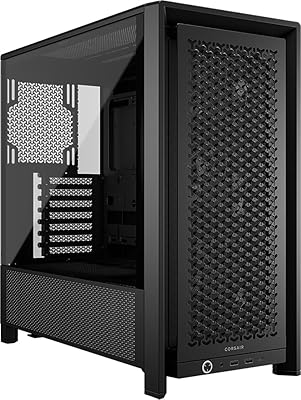
Corsair 6500D Airflow Mid-Tower ATX Case
85%
88%
Cooling Performance
93%
Build Quality
91%
Airflow Efficiency
85%
Ease of Setup
90%
Cable Management
More
Corsair FRAME 4000D RS Mid-Tower Case
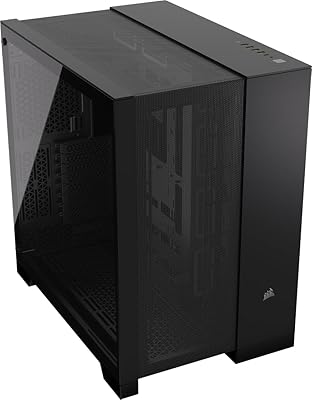
82%
91%
Airflow Performance
88%
Build Quality
86%
Modularity & Upgradability
83%
Fan Mounting System
78%
GPU Compatibility
More
Corsair 3500X ARGB Mid-Tower ATX PC Case
84%
92%
Cooling Performance
87%
Build Quality
90%
Design & Aesthetics
85%
Ease of Installation
89%
Airflow Support
More
SAMA V60 Mid Tower PC Case

80%
93%
Out-of-Box Cooling Value
78%
Airflow Performance
91%
AIO & Radiator Flexibility
88%
Tempered Glass & Aesthetics
71%
Build Quality & Materials
More
Vetroo AL800 Mid Tower ATX PC Case
76%
78%
Build Quality
84%
Tempered Glass Panel
76%
Airflow Performance
61%
Fan Included & Expandability
69%
Cable Management
More
AMANSON H9 Mid-Tower ATX Gaming PC Case

76%
88%
Value for Money
81%
Airflow Performance
67%
Pre-Installed Fan Quality
63%
Build Quality
79%
Tempered Glass Panels
More
Corsair 7000D Airflow Full-Tower PC Case
80%
93%
Build Quality
91%
Airflow Performance
94%
Interior Space & Layout
89%
Cable Management
96%
Cooling Potential
More
SAMA V Mesh Mid Tower PC Case
86%
94%
Cooling Performance
88%
Build Quality
91%
Airflow Efficiency
89%
Ease of Maintenance
87%
Compatibility with Components
More
Zalman S2 ATX Mid-Tower PC Case
83%
88%
Cooling Performance
80%
Build Quality
85%
Ease of Setup
70%
Cable Management
92%
Value for Money
More
ANSAITE W9 Mid-Tower Gaming PC Case
84%
89%
Cooling Performance
92%
Build Quality
85%
Cable Management
90%
Aesthetics
75%
Size/Space
More

FAQ

Yes, the front panel is built to accommodate a full 360mm radiator without sacrificing internal drive bays. Corsair designed the front mounting area specifically with large AIO coolers in mind, so you will not need to make any structural modifications. Just confirm your specific AIO brand has standard 120mm fan spacing and you should be good to go.

You can fit a 280mm radiator in the roof, but there is an important caveat — taller RAM heatspreaders, particularly on DDR5 kits with large cooling fins, can create clearance conflicts. If you are planning both front and roof radiators simultaneously, check your RAM height spec against the available clearance before buying. Low-profile RAM kits eliminate this issue entirely.

It is one of the more practical features on this airflow case and genuinely underappreciated. The two additional 120mm fan positions on the PSU shroud let you direct a dedicated airstream straight at the underside of your graphics card. For high-TDP GPUs running hot under sustained gaming load, this can meaningfully reduce GPU temperatures without relying solely on the card's own fans.

The two stock fans will keep things functional, but they are not enough on their own for a high-end build — most experienced builders treat them as a starting point rather than a finished configuration. If you are running a flagship GPU and a demanding CPU simultaneously, adding at least two or three more 120mm fans is worth budgeting for. The good news is the mounting positions are plentiful and standard sizing makes aftermarket options straightforward.

No, E-ATX is not officially supported. The case is designed around standard ATX as the largest compatible motherboard size, along with Micro-ATX and Mini-ITX. If you are planning an HEDT or workstation build on an E-ATX board, you will need a larger chassis.

It is genuinely the most common complaint from owners, and it is valid. Unlike cases with a simple pull-out bottom filter or a quick-release front filter, the 3000D Airflow requires you to remove the entire front panel to access the mesh filter behind it. It is not difficult, but if you clean your system every few weeks it does become a minor recurring inconvenience. Budget some patience for regular maintenance.

Yes, four-slot cards up to 360mm in length install without issue, and most current flagship cards including large triple-fan 4090 models fall within that clearance. The PSU shroud is designed to accommodate these wider cards, so you will not hit the shroud or lose expansion slots unexpectedly. Just measure your specific card's length against the 360mm limit before purchasing.

It is one of the better options at this price for a first build. The interior is spacious enough that working inside does not feel cramped, the cable routing channels are clearly laid out, and the component layout follows a logical order during assembly. Corsair also has solid documentation and an active community, which makes troubleshooting easier when something does not go as planned.

You can absolutely add RGB fans — any standard 120mm or 140mm fan with a compatible connector will fit. However, the side panel is solid and opaque, meaning you will not be able to see the RGB lighting from outside the case. If a light show is part of your build goals, this is the wrong case for it. The airflow-focused design trades visibility for thermal performance.

Based on consistent owner feedback, the 3000D Airflow tends to run measurably cooler than glass-panel competitors at the same price — sometimes by several degrees Celsius under gaming load. The mesh front pulls in more air, and the PSU shroud fan mounts add a cooling path that glass cases simply do not offer. The tradeoff is that you give up the visual showcase, so the right choice really comes down to whether you prioritize thermals or aesthetics.

Where to Buy