Overview

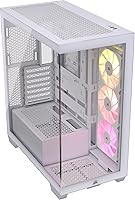
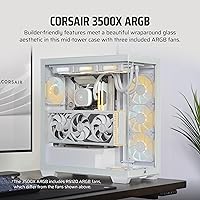
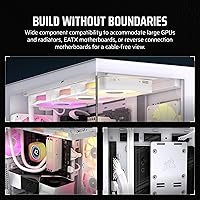
The Corsair 3500X ARGB Mid-Tower PC Case sits in a compelling spot within Corsair's lineup — affordable enough for a solid mid-range build, yet refined enough to anchor a genuine showpiece. The wraparound tempered glass is the first thing that grabs you; both the front and side panels are glass, giving the interior an almost display-cabinet quality that pushes it past typical windowed cases. The white colorway is particularly appealing for builders chasing coordinated RGB themes. What makes this Corsair mid-tower stand out beyond pure aesthetics is its readiness for reverse-connection motherboards, a forward-looking choice in a market still catching up. Style-first, yes — but with real thermal potential behind those glass panels.

Features & Benefits

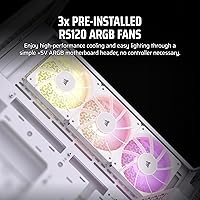
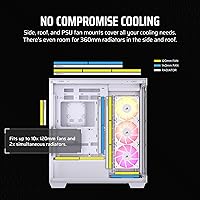
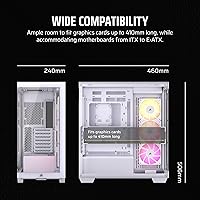
Both the front and side glass panels lift off without tools, which makes the actual building process far less frustrating than cases that require unscrewing panels mid-build. Inside, the fan mounting capacity is genuinely impressive for a glass-front design — up to ten 120mm positions spanning the side, roof, and PSU shroud. The three included RS120 ARGB fans plug directly into a standard +5V header, so there is no separate controller cluttering the interior. Motherboard support runs from Mini-ITX all the way through E-ATX, which is broader than most similarly priced competitors. The 3500X ARGB carries validated reverse-connector support for ASUS BTF and MSI Project Zero boards specifically — not a blanket claim, so double-check compatibility before committing.

Best For

This glass-panel case is a natural fit for anyone building a showcase-style gaming rig where the internals are part of the visual experience. If you are planning a white-themed build with matching ARGB components, the included RS120 fans and the bright interior give you a strong starting point without buying extras. Early adopters of reverse-connection motherboards — particularly ASUS BTF or MSI Project Zero users — will appreciate having a case explicitly validated for those boards rather than hoping for the best. It also works well for first-time builders who want glass aesthetics without the usual friction; the tool-free panel removal and pre-installed fans reduce the intimidation factor considerably. Less ideal if maximum airflow is your priority over looks.

User Feedback

With a 4.6 out of 5 rating across nearly a thousand reviews, this Corsair mid-tower has earned a broadly positive reception. Buyers consistently praise the glass panel quality and how clean the interior looks once components are seated. That said, a few recurring themes are worth knowing before you buy. Some users find the cable management clearance behind the motherboard tray tighter than expected, especially with thicker power cables. Dust filtration is another common point — glass-front designs simply do not breathe like mesh panels, so expect more frequent cleaning. Occasional reports of minor fitment issues and shipping damage do appear in lower-rated reviews, though nothing widespread enough to suggest a consistent pattern.

Pros

  • Panoramic glass on both the front and side panels creates a genuinely impressive showcase effect for ARGB-heavy builds.
  • Three RS120 ARGB fans come pre-installed and connect directly to a standard motherboard header — no hub needed.
  • Motherboard compatibility spans Mini-ITX through E-ATX, covering more configurations than most comparably priced options.
  • One of the few cases in its price tier explicitly validated for ASUS BTF and MSI Project Zero reverse-connector boards.
  • Both glass panels remove without tools, making the initial build and any post-build maintenance noticeably less frustrating.
  • The white interior reflects ARGB lighting effectively, making even modest lighting setups look clean and cohesive.
  • Up to ten 120mm fan mounting positions offer serious thermal headroom once you populate those slots.
  • Bottom PSU placement and thoughtful cable routing keep the glass-facing interior tidy without demanding expert cable management skills.
  • A 4.6-star average across nearly a thousand buyer reviews points to consistent build quality and broad real-world satisfaction.

Cons

  • Glass-front panels restrict intake airflow compared to mesh, which can push temperatures higher in demanding, heat-intensive builds.
  • No front-panel USB-C port is a notable omission that feels increasingly out of step with current motherboard standards.
  • Cable management clearance behind the motherboard tray is tighter than expected, particularly with thicker or stiffer power cables.
  • Reverse-connector compatibility covers only validated ASUS BTF and MSI Project Zero boards — other brands carry no guarantee.
  • Glass panels provide essentially no dust filtration, requiring more frequent cleaning intervals than mesh-front alternatives.
  • Isolated reports of minor panel fitment inconsistencies and shipping damage do appear in lower-rated buyer reviews.
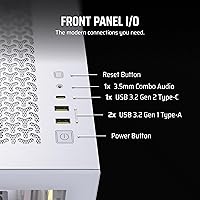
  • Front I/O is limited to one USB 2.0 and one USB 3.0 port, which feels thin for a case at this tier.
  • Weighing in at 20 pounds, this glass-panel case is on the heavier side and can be cumbersome to move or reposition.

Ratings

The Corsair 3500X ARGB Mid-Tower PC Case scores below are generated by our AI rating system after deep analysis of thousands of verified global buyer reviews, with spam, incentivized feedback, and bot activity actively filtered out before any scoring takes place. Our model weighs both the enthusiasm behind consistent praise and the frequency and specificity of reported pain points, so each score reflects the full picture rather than just the highlights. Both strengths and real-world frustrations are accounted for transparently, giving you a grounded view of what actual builders experience.

Aesthetic Design
93%
The panoramic wraparound glass is legitimately one of the more striking designs in its price range, and builders running white-themed ARGB builds consistently describe the finished look as cleaner and more intentional than cases sold at noticeably higher prices. The white interior reflects ARGB lighting in a way that makes even a modest component lineup look polished and cohesive.
The all-glass exterior means fingerprints and smudges become visible quickly, particularly on the outward-facing side panel, and keeping it looking pristine requires regular wiping. A portion of reviewers also feel the glass-forward design came at a direct cost to airflow performance, which is a conscious trade-off buyers need to accept before purchasing.
ARGB Lighting
91%
The combination of the white painted interior and the pre-installed RS120 fans creates a noticeably strong ARGB effect that outperforms similarly priced competitors in terms of visual impact. Syncing through a standard +5V motherboard header means the lighting works cleanly with whatever software ecosystem the builder is already in — no proprietary software required for basic control.
The overall lighting impact depends heavily on what ARGB components a builder brings — without lit RAM, a GPU shroud, or a cooler, the three fans alone can feel underwhelming in a large interior. A small number of users have also noted slight uniformity differences between the three fans at lower brightness settings.
Build Quality
88%
The tempered glass panels feel solid and well-fitted on the majority of units, with a thickness that reflects Corsair's positioning above entry-level build quality. The steel chassis shows no noticeable flex during handling, and the overall fit and finish inside is clean enough that builders frequently note how professional the completed result looks.
A recurring minority of buyers have flagged minor panel alignment inconsistencies and fitment gaps, which are particularly frustrating on a case where the glass is the entire visual focus. Isolated reports of shipping damage — typically a chipped or cracked panel — also appear often enough in the review pool to be worth noting before ordering.
Interior Space
87%
The interior is genuinely roomy for a mid-tower — builders report fitting large air coolers and triple-fan GPUs without clearance anxiety, and the E-ATX support means even oversized boards are not fighting for space. Working inside the case during the build feels less cramped than many competitors in the same price tier.
While the main chamber is spacious, the PSU shroud and cable routing zone eat into the lower interior in ways that can feel restrictive when managing thicker cables or larger power supply units. Builders planning complex multi-drive storage setups may also find the drive mounting options more limited than expected.
Fan Inclusion
86%
Getting three ARGB fans pre-installed is a meaningful practical advantage — first-time builders are not immediately forced into an additional hardware purchase just to get the system running with decent airflow and lighting. The RS120 fans connect directly to a standard +5V motherboard header, keeping the setup process straightforward and accessible.
While three fans is a reasonable starting point, builders running high-heat components will need to add more to fill the remaining positions for adequate thermal control. Some enthusiasts also note that the RS120 fans are mid-tier performers at best, and cooling-focused builders often replace them with quieter or higher-static-pressure alternatives.
Value for Money
84%
For a case that bundles three ARGB fans, panoramic tempered glass panels, and validated reverse-connector motherboard support, the price point sits competitively within its tier. Buyers consistently note that the visual output — especially on white-themed builds — rivals cases sold at meaningfully higher prices.
Builders who prioritize raw airflow or front-panel connectivity may feel the value equation weakens when comparable mesh-front alternatives exist at similar prices. The absence of USB-C on the front I/O is a specific friction point that buyers on modern peripherals and devices find increasingly difficult to overlook.
Ease of Build
83%
The tool-free glass panel removal is one of the more practically useful features for anyone who has wrestled with thumbscrews mid-build — both panels come off cleanly and reattach without fuss. The interior layout is logically arranged and spacious enough that builders can work without constantly repositioning the case on the desk.
Despite the welcoming panel access, the rear cable management area adds real friction during the final stages of a build, particularly for those newer to the process. A handful of users also noted that aligning certain drive mounting points required more patience than the rest of the build experience suggested.
Motherboard Compatibility
82%
18%
Supporting the full range from Mini-ITX through E-ATX is broader than most direct competitors at this price point, making it a flexible chassis for a wide variety of build types. Builders using the validated reverse-connector boards — specifically ASUS BTF and MSI Project Zero — report that the compatibility works as advertised in real-world use.
The reverse-connector validation is limited to those two specific motherboard families and does not extend to other brands experimenting with similar designs. Builders outside the validated lineup who assume compatibility with their specific reverse-connector board are taking a risk that Corsair has not officially accounted for.
Noise Levels
77%
23%
At moderate system load, the three included RS120 fans run quietly enough that most builders do not find them disruptive during regular gaming or everyday desktop tasks. The glass panels help absorb some vibration, keeping the overall acoustic profile respectable for a case at this price tier.
When fan curves ramp up under heavier system load, some buyers notice a hum from the RS120 fans that becomes apparent in quieter environments or open-plan rooms. A portion of users targeting near-silent builds have opted to replace the stock fans with lower-noise alternatives to hit their acoustic targets.
Shipping & Packaging
73%
27%
The majority of buyers receive their unit in good condition, with Corsair's standard packaging doing a reasonable job of protecting both the chassis and the glass panels during transit. Most builders report the case arrives ready to work with, without any damage-related complications to address before starting.
A notable minority of reviewers — particularly those ordering from third-party sellers or during high-volume shipping periods — report receiving panels with chips, cracks, or alignment issues that appear transit-related rather than manufacturing defects. Glass panels are inherently more vulnerable to shipping stress, and this case is not immune to that category of risk.
Airflow & Cooling
71%
29%
The chassis supports up to ten 120mm fan mounting positions across the side, roof, and PSU shroud — which is generous headroom for a glass-aesthetic design. Builders who populate the roof and additional side positions with extra fans report that temperatures remain manageable even for mid-to-high-end component combinations.
A solid glass front panel inherently limits intake airflow compared to mesh designs, and this is the most consistent thermal criticism across buyer discussions and review communities. Builders running hot CPUs or high-TDP GPUs without supplementary fans will likely encounter temperatures they would not tolerate in a mesh-front alternative.
Cable Management
67%
33%
The bottom PSU shroud and dedicated cable routing channels do a solid job of keeping cables away from the glass-facing interior, which matters significantly when both panels are transparent. Builders following basic cable discipline report a clean-looking finished build without needing to invest in custom cables.
The space behind the motherboard tray is genuinely tighter than what most competing cases at this tier offer, and this is one of the most repeated criticisms from experienced builders in the review pool. Those running thick modular cables or high cable counts will need to plan their routing carefully and budget extra time on the back of the tray.
Front I/O
58%
42%
The front panel covers the basics with a USB 3.0 port for reasonably fast peripheral access during everyday use, which is adequate for builders who primarily rely on rear I/O for connected devices. For those who rarely plug and unplug devices from the front panel, the existing ports will not be a daily friction point.
One USB 2.0 and one USB 3.0 is a noticeably limited front I/O package for a case targeting mid-to-high-end builds, particularly given that USB-C has become a standard expectation at this price tier. The absence of USB-C is the single most unanimously flagged hardware criticism across the buyer review base for this case.
Dust Filtration
53%
47%
The bottom of the chassis includes basic filtering around the PSU intake area, which addresses one of the more common dust ingress points in bottom-mounted PSU designs. The glass panels themselves do not trap or accumulate dust the way fabric or mesh filter surfaces can over time.
A fully glass front panel provides essentially no filtration for the primary intake airflow path, meaning the interior accumulates dust significantly faster than mesh-front alternatives. Buyers in dustier environments report that cleaning every few weeks — rather than every few months — becomes a practical necessity to keep the build looking presentable.

Suitable for:

The Corsair 3500X ARGB Mid-Tower PC Case is built squarely for builders who want their system to look as good as it performs — particularly those putting together a white-themed showcase rig where every visible component is part of the visual design. If you are running coordinated ARGB lighting across your GPU, RAM, and cooler, the panoramic glass panels give those parts the stage they deserve without any visual obstruction. Builders moving to reverse-connection motherboards will find this one of the few cases in its price range with explicitly validated support for ASUS BTF and MSI Project Zero boards, removing a lot of the compatibility guesswork. It also suits first-time builders well: the tool-free glass panel removal is genuinely straightforward, and three fans come pre-installed and pre-wired to a standard motherboard header, so you are not starting from scratch on cooling. Mid-range to high-end gaming builds that prioritize a clean, display-worthy interior will get the most from what this case offers.

Not suitable for:

The Corsair 3500X ARGB Mid-Tower PC Case is not the right pick for builders whose top priority is raw airflow over aesthetics. Glass-front designs create an inherent intake restriction compared to mesh panels — if you are pairing this with a high-TDP CPU and a demanding GPU, you may find temperatures running warmer than expected and wish you had gone with a more open front. Builders who rely on front-panel USB-C will hit a wall here; the front I/O tops out at one USB 3.0 and one USB 2.0 port, which feels limited by current standards. Those planning to use reverse-connection motherboards outside the validated ASUS BTF and MSI Project Zero lineup should also be cautious, as compatibility with other brands is not confirmed. Finally, if dust management or low-maintenance operation matters to you, glass panels offer no meaningful filtration and will demand more frequent cleaning than any mesh-front alternative.

Specifications

  • Form Factor: Mid-Tower ATX chassis supporting motherboard form factors from Mini-ITX through E-ATX.
  • Dimensions: The case measures 19.92 x 9.45 x 18.11 inches (L x W x H).
  • Weight: The unit weighs approximately 20 pounds.
  • Panel Material: Both the front and side panels are constructed from tempered glass.
  • Included Fans: Three Corsair RS120 ARGB 120mm fans come pre-installed from the factory.
  • Max Fan Capacity: The chassis supports up to ten 120mm fans across side, roof, and PSU shroud mounting positions.
  • PSU Mount: The power supply is bottom-mounted behind a shroud that keeps cables out of the glass-facing interior.
  • Front I/O: Front panel connectivity includes one USB 2.0 port and one USB 3.0 port.
  • ARGB Header: Included fans connect to a standard +5V 3-pin ARGB motherboard header with no proprietary hub required.
  • Cooling Method: Cooling is air-based via fan circulation; no liquid cooling hardware is included in the box.
  • Panel Removal: Both front and side tempered glass panels are tool-free removable for convenient build access and maintenance.
  • Color: The case ships in white with a white-painted interior that enhances the visibility of ARGB lighting.
  • Model Number: The official manufacturer model number is CC-9011279-WW.
  • Brand: Manufactured by Corsair, a well-established name in PC cases, cooling, and components.
  • Reverse-Connector: Validated for use with ASUS BTF and MSI Project Zero reverse-connection motherboards specifically.

Related Reviews
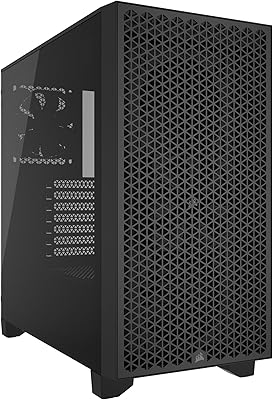
Corsair 3000D Airflow Mid-Tower PC Case
81%
93%
Airflow Performance
88%
Build Quality & Materials
91%
Thermal Management Design
84%
Cable Management
61%
Included Fans Quality
More
AMANSON H9 Mid-Tower ATX Gaming PC Case
76%
88%
Value for Money
81%
Airflow Performance
67%
Pre-Installed Fan Quality
63%
Build Quality
79%
Tempered Glass Panels
More
Corsair FRAME 4000D RS Mid-Tower Case
82%
91%
Airflow Performance
88%
Build Quality
86%
Modularity & Upgradability
83%
Fan Mounting System
78%
GPU Compatibility
More
Antec C5 ARGB
Antec C5 ARGB
84%
93%
Out-of-Box Value
88%
Build Quality
84%
Airflow & Thermal Performance
86%
Cable Management
91%
ARGB Lighting Quality
More
PCCOOLER C3D310 M-ATX Mid Tower PC Case
74%
62%
Build Quality
83%
Value for Money
68%
Airflow & Cooling
86%
Ease of Assembly
71%
ARGB Lighting
More
Zalman i3 Neo ATX Mid Tower PC Case
77%
91%
Value for Money
78%
Build Quality
88%
Ease of Building
63%
Airflow & Thermals
69%
Lighting & RGB
More
SAMA V60 Mid Tower PC Case
80%
93%
Out-of-Box Cooling Value
78%
Airflow Performance
91%
AIO & Radiator Flexibility
88%
Tempered Glass & Aesthetics
71%
Build Quality & Materials
More
Zalman S4 Mid-Tower ATX PC Case

75%
72%
Build Quality
88%
Value for Money
91%
Ease of Assembly
67%
Airflow Performance
63%
Cable Management
More
SAMA NEVIEW 4503 Mid Tower PC Case
76%
91%
Value for Money
78%
Build Quality
83%
Airflow Performance
76%
ARGB Lighting
82%
Hardware Compatibility
More
Corsair 5000T RGB Mid-Tower PC Case
79%
89%
Build Quality
93%
RGB Lighting
67%
Airflow Performance
74%
Cable Management
86%
Cooling Flexibility
More

FAQ

Corsair has validated it specifically for ASUS BTF and MSI Project Zero boards. Other reverse-connector motherboards might physically fit, but there is no official compatibility confirmation beyond those two lineups. If you are using a different brand's reverse-connector board, you would be going in without a guarantee, so it is worth checking community reports for your specific model.

Yes, as long as your motherboard has a standard +5V 3-pin ARGB header, the three RS120 fans plug straight in and respond to whatever software your board uses — whether that is ASUS Aura Sync, MSI Mystic Light, Gigabyte RGB Fusion, or similar. No proprietary Corsair hub or controller is needed for basic lighting control.

Yes, the roof supports up to a 360mm radiator, and the side panel position also accommodates liquid cooling options. Just keep in mind the three pre-installed RS120 fans occupy some of those side mounting slots, so plan your radiator placement before you start the build to avoid conflicts.

It is workable but tighter than some builders expect, particularly if you are running a modular PSU with thick cables or using premium aftermarket sleeved cables. For a standard build it is fine, but if you are the type who likes meticulously routed cable aesthetics, budget extra time and patience for the back of the tray.

The case handles up to E-ATX, so a standard ATX board is comfortably within spec. GPU length clearance is generous enough for most high-end triple-fan cards. That said, it is always worth checking the specific GPU clearance dimensions against your exact card before committing, especially if you are running one of the longer models on the market.

Both the front and side glass panels are tool-free, and in practice the mechanism is genuinely simple — no screwdriver needed. Most builders report getting them off on the first try without any real frustration. It also makes post-build access much less of an ordeal compared to cases with thumbscrews on every panel.

The Corsair 3500X ARGB Mid-Tower PC Case ships with three 120mm fans and supports up to ten 120mm positions in total, so air cooling is entirely viable here. The one honest caveat is that the glass front panel restricts intake airflow more than a mesh design would, so if you are running a hot-running build purely on air, adding extra fans to the roof is a smart move. You are not forced into liquid cooling, but you do need to be thoughtful about fan placement.

It is one of the more attractive interiors at this price point. The white paint reflects ARGB lighting in a way that makes even a modest lighting setup look intentional and clean. Builders running white-themed components or bright RGB tend to get the most visual impact out of it.

Glass-front cases are inherently limited when it comes to dust filtration — there is no mesh layer on the front intake the way there would be on a dedicated airflow case. Realistically, expect to dust the interior more frequently than you would with a mesh-front alternative. Keeping a can of compressed air nearby and doing a quick clean every month or two will keep it looking presentable.

It is actually a reasonable choice for a first-timer. The tool-free glass panel removal reduces fiddling, the fans arrive pre-installed and pre-wired to a standard header, and the interior is spacious enough to work in comfortably. The trickiest part will be routing cables behind the motherboard tray, which can be snug, but that challenge is common across most mid-towers and is a useful skill to develop early anyway.

Where to Buy