Overview

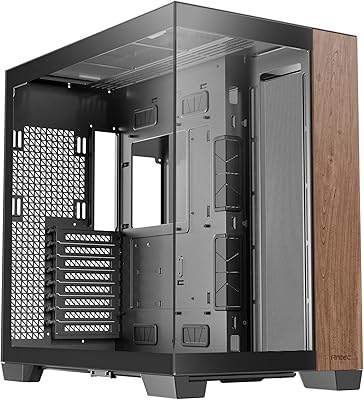
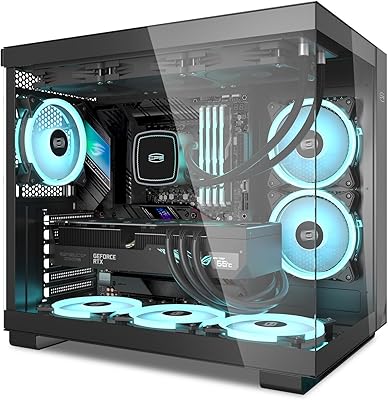
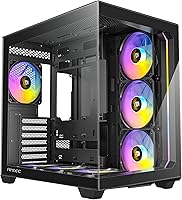
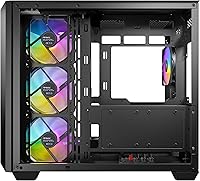
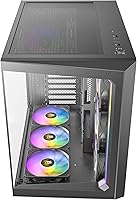
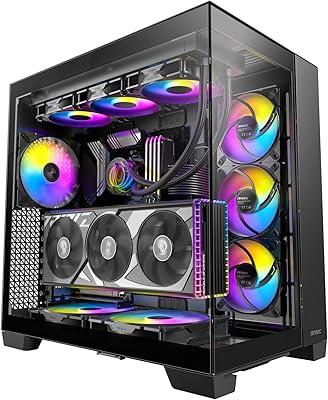
The Antec C5 ARGB arrived in early 2024 as a mid-tower that punches well above its price bracket, and it makes a strong first impression before you even open the box. The front and side panels are tempered glass with no visible frame interrupting the view — a small detail that makes a real visual difference. Inside, the layout splits the PSU and cabling into their own compartment, keeping the main build area tidy without requiring obsessive cable management skills. It also supports back-connect motherboards, which is genuinely uncommon at this price and opens up cleaner build possibilities for enthusiasts chasing a minimal look.

Features & Benefits

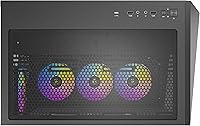
Seven 120mm ARGB PWM fans come pre-installed, which alone would justify serious consideration — six of them are reverse-mounted by design to push air through the case more efficiently, not a factory mistake. The built-in fan controller handles up to 10 fans at once for both ARGB lighting and PWM speed, so you can add more without hunting for a separate hub. Up front, a Type-C 3.2 Gen 2 port sits alongside two USB 3.0 ports, keeping connectivity modern. For cooling ambitions, the front supports a 360mm radiator, and the top-mounted PSU placement helps keep heat zones separated inside the chassis.

Best For

This mid-tower case makes the most sense for builders who want an eye-catching ARGB setup without sourcing fans separately — the out-of-box lighting situation is genuinely ready to go. It suits anyone experimenting with back-connect motherboard builds, where hiding cables behind the board dramatically changes how the interior looks through the glass. Gamers planning a 360mm AIO install will appreciate having that headroom built in from the start. It also works well for first-time builders who want solid airflow coverage handled for them, letting them focus on component selection rather than fan configurations.

User Feedback

Across more than 380 ratings, this Antec build holds a 4.6-star average — a score that carries real weight for a case released less than two years ago. Buyers consistently highlight the glass panel quality and the generous cable management space behind the motherboard tray. The fan quantity gets frequent praise, though some users note the controller takes a few minutes to understand during initial setup. A handful of reviewers mention that front panel airflow could be slightly restricted depending on fan orientation choices. Compared to similarly priced alternatives, most buyers feel the overall build quality holds up well, with few complaints about structural integrity or finish consistency.

Pros

  • Seven ARGB PWM fans included out of the box — no extra fan purchases needed for most builds.
  • The borderless tempered glass front and side panels give this mid-tower case a premium look at a mid-range price.
  • Back-connect motherboard support is genuinely rare at this price point and enables exceptionally clean interior builds.
  • Built-in controller manages up to 10 fans for both lighting and speed without needing a separate hub.
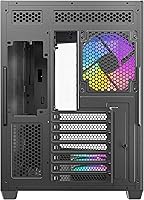
  • Dual-chamber layout keeps PSU cables and heat sources separated from the main build area.
  • Front 360mm radiator support gives real cooling headroom for high-end AIO configurations.
  • Type-C 3.2 Gen 2 front port keeps connectivity current for modern storage and peripherals.
  • Supports E-ATX through ITX, making the C5 ARGB a flexible platform for a wide range of build sizes.
  • 4.6-star average across 380-plus verified buyers reflects consistently strong real-world satisfaction.
  • Cable routing channels and tie-off points are well-placed, making tidy builds achievable without expert-level effort.

Cons

  • Front glass panel restricts airflow intake compared to mesh alternatives — noticeable with high-TDP components.
  • Fan controller mode-switching is not clearly documented and can confuse first-time builders during setup.
  • Only available in black, with no white or alternative colorway currently offered.
  • Non-modular PSU users may struggle to close the side panel cleanly due to tighter rear cable space.
  • Included fans are not the strongest performers under heavy static-pressure demands like dense radiator mounting.
  • At full PWM speed, seven simultaneous fans generate noticeable collective noise in quiet environments.
  • Some plastic trim and internal clips feel less refined than the glass panels when handled directly.
  • Syncing the built-in ARGB controller with proprietary motherboard lighting software requires extra configuration steps on some platforms.
  • Larger E-ATX boards need careful pre-planning around CPU power cable routing near the top of the chassis.

Ratings

The Antec C5 ARGB earns a strong overall position in the mid-tower market, and the scores below reflect that — but they also surface a few areas where real buyers have run into friction. These ratings were generated by AI after analyzing verified global user reviews, with spam, bot activity, and incentivized feedback actively filtered out, so both the highs and the genuine pain points are represented fairly.

Out-of-Box Value
93%
Getting seven ARGB PWM fans included at purchase is something buyers repeatedly call out as a deciding factor. Most competing cases in this price range ship with two or three fans at best, so the C5 ARGB effectively saves buyers a meaningful extra spend right from the start.
A small number of users felt the included fans, while plentiful, are not the highest-performing units available and may want to swap them out for higher-static-pressure options when building around dense radiator configurations.
Build Quality
88%
The tempered glass panels — particularly the borderless front — feel solid and well-fitted straight out of packaging. Buyers frequently note that the chassis does not flex or creak when carrying it, which builds confidence about long-term structural durability.
A few users reported that the glass alignment required minor adjustment during installation, and some found the plastic trim pieces around the panels feel slightly less premium than the glass itself when handled closely.
Airflow & Thermal Performance
84%
Seven pre-installed fans with six running in reverse orientation create a deliberate pressure-based airflow strategy that keeps temperatures well controlled in typical gaming builds. Buyers running mid-range GPUs report noticeably cool idle and load temps without any additional fan purchases.
The front glass panel, while visually striking, does restrict air intake compared to mesh-front alternatives. Users running high-TDP graphics cards in warm ambient environments occasionally mention needing to supplement with extra intake fans or an AIO to stay comfortable.
Cable Management
86%
The dual-chamber layout genuinely changes how cable management feels — routing power cables behind the motherboard tray and into the PSU compartment keeps the visible side of the build looking intentional rather than crammed. Builders consistently praise the routing channels and tie-off points.
A handful of users with thicker PSU cable sets found the space behind the tray tighter than expected, particularly when using non-modular power supplies. Getting the side panel to close cleanly required some extra effort in those cases.
ARGB Lighting Quality
91%
With seven ARGB fans running simultaneously through the built-in controller, the lighting output inside the case is genuinely impressive — vivid, consistent, and easy to synchronize. Buyers building showcase rigs describe the results as attention-grabbing without needing any additional LED strips.
Some users running motherboards with proprietary lighting ecosystems found syncing the built-in controller with their board software required extra steps or a manual override. It works, but it is not always plug-and-play depending on the platform.
Fan Controller Usability
74%
26%
Having a built-in ARGB and PWM controller that handles up to 10 fans without an external hub is a practical convenience that first-time and experienced builders both appreciate. It simplifies the build process considerably and reduces clutter inside the chassis.
Several buyers describe the controller as functional but not immediately intuitive — the mode-switching process is not clearly documented, and a few users spent time troubleshooting lighting modes before finding the right sequence. A clearer quick-start guide would help.
Cooling Headroom
89%
Front support for a 360mm radiator is a feature that opens this case up well beyond basic air-cooled builds. Buyers planning high-end AIO installations appreciate not having to compromise on radiator size, which is a real constraint in many competing mid-towers.
Top-mount radiator support is more limited, and users wanting to run both a front and top 360mm setup will find the configuration options narrower than in larger or more cooling-focused chassis. This is a mid-tower trade-off rather than a flaw.
Motherboard Compatibility
87%
Supporting E-ATX through ITX in a single mid-tower chassis gives this case genuine flexibility across build types. Buyers upgrading from smaller boards or planning future platform changes find it reassuring not to need a new case down the line.
E-ATX support is noted, but a few users with larger E-ATX boards found clearances tighter than expected near the top of the board, especially when routing CPU power cables. It works, but larger boards benefit from some pre-planning.
Back-Connect Motherboard Support
82%
18%
Being one of the few mid-range cases to explicitly accommodate back-connect motherboard designs puts this Antec build ahead of most competitors at its price. Buyers using newer connector-hidden boards describe the end result as a remarkably clean interior.
Buyers using traditional motherboards see no benefit from this feature, and the specific routing cutouts optimized for back-connect layouts can occasionally feel redundant or slightly awkward when used with standard ATX wiring.
Front Panel Connectivity
83%
A Type-C 3.2 Gen 2 port on the front panel is genuinely useful for users who regularly plug in external SSDs, modern smartphones, or high-speed peripherals. Paired with two USB 3.0 ports, the front I/O covers most everyday connectivity needs without reaching around to the back.
There is no USB 3.2 Gen 2x2 or Thunderbolt option, which will not matter to most users but may feel limiting to those with a professional workflow that depends on peak-speed external storage throughput.
Installation Experience
71%
29%
The dual-chamber layout and dedicated cable routing zones make component installation more organized than a standard single-chamber case. Experienced builders find the process intuitive once they understand the PSU bay approach.
First-time builders report that the chamber separation and fan controller wiring add complexity that is not always clearly covered in the included instructions. A few buyers needed to consult online guides before feeling confident the build was wired correctly.
Aesthetic Design
92%
The borderless front and side glass panels give this mid-tower case a high-end visual identity that stands out at its price. Buyers frequently mention that the case draws comments from visitors, and the all-black exterior looks composed even when the lighting is turned off.
The all-black-only color option limits buyers who want a white or neutral-toned build aesthetic, which is an increasingly popular choice. There is currently no white variant available, which has come up in buyer wish-list comments.
Noise Levels
76%
24%
At lower PWM speeds, the seven included fans run quietly enough for everyday desktop use, and the PWM controller allows users to set a comfortable baseline speed curve for quiet workloads or media consumption.
At full speed, seven fans in a single chassis produce a noticeable collective noise level. Users in quiet home office environments have mentioned the fans at 100% are louder than expected, so proper PWM curve configuration is important for noise-sensitive setups.
Radiator & Liquid Cooling Compatibility
86%
Front 360mm radiator support means buyers can drop in a high-end AIO without compromise, which significantly extends the thermal ceiling of the build. This is a practical advantage for users pairing the case with high-core-count CPUs.
Fitting a 360mm front radiator alongside all seven pre-installed fans requires removing and rerouting some of the included fans, which adds steps to the build process and may require extra screws or brackets not included in the box.
Long-Term Durability
78%
22%
The steel chassis feels solid and shows no early signs of finish degradation based on user reports from builds now approaching a year of regular use. The tempered glass panels have not drawn significant complaints about scratching or clouding over time.
The plastic elements — particularly the front panel trim and some internal clips — are the most commonly cited durability concerns in longer-term reviews. They function well but are the first place users expect wear to appear after extended handling.

Suitable for:

The Antec C5 ARGB is a strong match for builders who want a visually impressive, ready-to-run setup without sourcing every component separately — the seven included fans alone remove a meaningful decision and expense from the process. It suits gamers and enthusiasts who care about how their build looks through the glass, particularly anyone using or planning to use a back-connect motherboard, where hiding cables behind the board transforms the interior into something genuinely clean. First-time builders will find the built-in fan and lighting controller removes one layer of complexity, since airflow coverage is handled from the moment the case arrives. Anyone planning a serious liquid cooling setup will also appreciate the front 360mm radiator clearance, which leaves room to grow without needing a case upgrade. If you want a mid-tower that covers aesthetics, airflow, and compatibility in one package, this Antec build delivers that combination with few compromises at its price point.

Not suitable for:

Buyers who prioritize maximum airflow above aesthetics should think carefully before committing — the front tempered glass panel restricts intake compared to a mesh-front case, and in warm rooms with high-TDP GPUs, that difference can show up in temperatures. The Antec C5 ARGB is also not the right pick for anyone building a white or light-toned system, since it currently ships only in black with no alternative finish available. Builders using non-modular power supplies with thick cable sets may find the space behind the motherboard tray frustrating to work with, and getting the panel to close cleanly can require patience. Users who want a completely silent build may find managing seven fans at once more of a challenge than a convenience, since dialing in a quiet PWM curve takes effort. Finally, anyone expecting the fan controller to integrate effortlessly with every motherboard lighting ecosystem may hit compatibility friction, particularly on platforms with proprietary RGB software.

Specifications

  • Case Type: Mid-tower form factor designed to accommodate a wide range of standard consumer and enthusiast builds.
  • Dimensions: The chassis measures 18.46 x 11.22 x 15.75 inches (LxWxH), providing ample internal volume for full-sized components.
  • Weight: The case weighs 16.72 pounds without components installed, reflecting a solid steel and glass construction.
  • Motherboard Support: Compatible with E-ATX, ATX, M-ATX, and ITX motherboard form factors, including back-connect motherboard designs.
  • Included Fans: Seven 120mm ARGB PWM fans are pre-installed, with six of the seven mounted in a reverse orientation for directed airflow.
  • Fan Capacity: The built-in controller supports up to 10 fans simultaneously, covering both ARGB lighting and PWM speed signals.
  • Fan Controller: An integrated ARGB and PWM fan controller is built into the chassis, eliminating the need for a separate hub or external controller.
  • Radiator Support: Supports up to a 360mm radiator mounted at the front panel, suitable for high-performance all-in-one liquid cooling systems.
  • Front Panel I/O: Front connectivity includes one Type-C 3.2 Gen 2 port, two USB 3.0 Type-A ports, and combined audio and microphone jacks.
  • PSU Mounting: The power supply mounts at the top of the chassis as part of the dual-chamber layout separating it from the main build area.
  • Panel Material: Both the front and left side panels are tempered glass with a borderless, seamless edge design for an unobstructed interior view.
  • Back-Connect Support: The case includes dedicated routing and clearance features to support back-connect motherboards that route all cables behind the board.
  • Chamber Design: A dual-chamber internal layout physically separates the PSU and cable management zone from the main motherboard and GPU compartment.
  • Color: Available exclusively in black, with a matte-finished steel body and tinted tempered glass panels.
  • Release Date: The case was first made available in March 2024, positioning it as a current-generation platform with modern connectivity standards.

Related Reviews
Antec C8 ARGB Full-Tower E-ATX PC Case
84%
91%
Cooling Performance
89%
Build Quality
94%
Airflow Efficiency
82%
Installation Ease
88%
ARGB Lighting Customization
More
Antec C8 Wood
Antec C8 Wood
89%
94%
Build Quality
91%
Aesthetic Design
88%
Ease of Installation
89%
Cable Management
86%
Cooling Potential
More
PCCOOLER C3T500 ARGB PC Case
85%
88%
Cooling Performance
91%
Build Quality
85%
Ease of Installation
90%
Aesthetic Design
72%
Cable Management
More
AKG C5 Professional Condenser Microphone
88%
94%
Sound Quality
92%
Durability
88%
Ease of Use
72%
Weight/Ergonomics
91%
Build Quality
More
Antec VSK10 Micro-ATX Case
82%
88%
Cooling Performance
85%
Build Quality
70%
Cable Management
90%
Airflow Support
78%
Ease of Installation
More
COOAU C5 Solar Security Camera
85%
91%
Value for Money
88%
Solar Charging Efficiency
85%
Color Night Vision Performance
93%
Ease of Setup
77%
Motion Detection Accuracy
More
Cooler Master MasterFan MF200R ARGB 200mm
77%
93%
Noise Level
82%
Airflow Performance
89%
ARGB Lighting Quality
86%
Motherboard Compatibility
71%
Case Compatibility
More
Redragon HL360 ARGB Liquid Cooling System
89%
92%
Cooling Performance
88%
Noise Level
85%
RGB Customization
90%
Build Quality
91%
Installation Ease
More
Asiahorse Dawn 120mm ARGB Case Fan
88%
88%
Cooling Performance
92%
Noise Level
84%
RGB Customization
89%
Build Quality
91%
Ease of Installation
More
MSI MPG EZ120 ARGB-3B Fan
86%
94%
Ease of Installation
87%
RGB Customization
88%
Noise Levels
92%
Build Quality
85%
Fan Speed & Airflow
More

FAQ

They come pre-installed in the case. You will need to connect their cables to the built-in controller, but the physical mounting is already done. It saves a meaningful amount of setup time compared to buying fans separately.

Completely intentional. Six of the seven fans are oriented in reverse to create a specific airflow pattern inside the chassis. It is a deliberate design choice Antec made to optimize how air moves through the case, not a packing or shipping error.

It works with standard ATX boards just fine. Back-connect motherboard support is an added compatibility feature, not a requirement. Any ATX, M-ATX, ITX, or E-ATX board will fit without any special considerations.

A 360mm radiator fits at the front, but installing one means repositioning or removing some of the pre-installed fans in that area. It is manageable, but you should plan the layout before you start building rather than trying to work around it afterward.

At lower PWM speeds the noise level is quite reasonable for everyday use. At full speed, seven fans together do produce noticeable collective noise. Setting a sensible PWM curve through your motherboard BIOS or the controller makes a real difference, and most users find a comfortable middle ground without much trial and error.

It depends on your platform. Many motherboards with standard ARGB headers will sync without issues, but some proprietary ecosystems like certain Asus Aura or MSI Mystic Light setups may require extra configuration steps. If deep software sync matters to you, check your motherboard compatibility before assuming it will be plug-and-play.

For most builds, especially with modular PSUs, the space behind the tray is well-organized and the routing channels are thoughtfully placed. Users with non-modular power supplies and thick cable bundles have reported the fit is tighter, and getting the panel to close cleanly can take some patience in those cases.

It is a reasonable option for first-time builders who want airflow and lighting sorted from the start. The main caveat is that the fan controller wiring and dual-chamber layout add a small amount of complexity that is not always clearly covered by the included documentation. Spending a few minutes with an online build guide before starting will make the process much smoother.

The case supports standard mid-tower GPU lengths and CPU cooler heights typical for this chassis class. If you are running an especially long triple-slot GPU or a very tall air cooler, it is worth confirming specific clearance measurements against Antec's published specs before purchasing, since the dual-chamber layout does affect internal proportions slightly.

As of the current release, the case is only available in black. There is no white or alternate colorway offered at this time, which has been a common request in buyer feedback for those building light-toned systems.