Overview

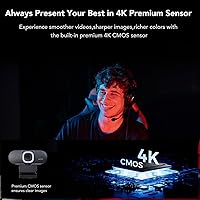
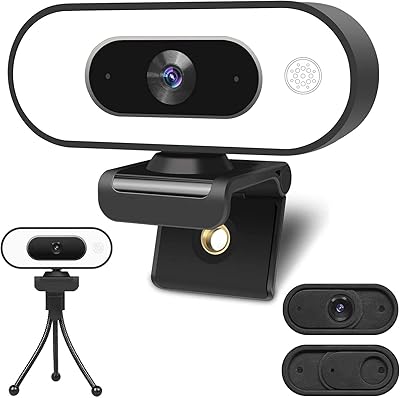
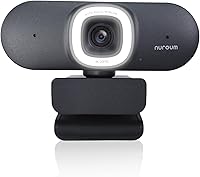
The NUROUM V32AFL 4K Webcam with Ring Light is a high-performance webcam designed for streaming, video calls, and remote work. This 4K webcam combines professional-grade video with built-in features such as an adjustable ring light and AI-powered auto-framing. It offers smooth and detailed visuals, while noise-canceling microphones enhance audio quality. Perfect for content creators and professionals, this webcam provides a seamless experience whether you're recording, conferencing, or live-streaming. With its autofocus and automatic lighting adjustments, it ensures clarity even in low-light settings, making it an all-in-one solution for high-quality video communication.
Features & Benefits

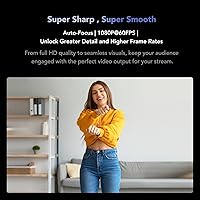
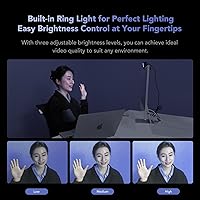
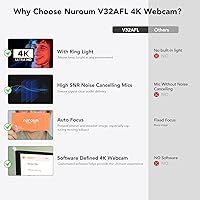
This webcam's standout feature is its 3-level adjustable ring light, providing enhanced lighting in dark rooms, which is essential for both video calls and streaming. The true autofocus ensures your face is always sharp, while AI-powered auto-framing keeps you centered during movement or when other participants join. With 4K resolution at 60 FPS, it captures every detail with smooth motion, making it ideal for professional-grade content. The noise-canceling microphones also minimize background disturbances, offering clear audio, even in noisy environments. These features come together to deliver a seamless, high-quality video experience.

Best For

The NUROUM V32AFL 4K Webcam is perfect for a variety of users. Content creators will appreciate the high-quality video and audio for streaming on platforms like Twitch and YouTube. Remote workers and professionals who rely on video calls via Zoom or Microsoft Teams will benefit from its easy setup and superior image quality. Gamers or vloggers looking for a versatile webcam with an adjustable field of view will find it highly useful. Additionally, anyone working in low-light conditions will love the adjustable ring light that provides consistent, flattering lighting during video calls or streams.

User Feedback

User reviews highlight the webcam’s impressive 4K video quality and smooth performance. Many appreciate the adjustable ring light, especially for creating a professional look in poorly lit rooms. The noise-canceling microphones also receive praise for providing clearer audio during calls and streams. On the downside, some users have encountered difficulties with the software setup for adjusting the field of view, which can be a bit finicky. Despite this, most find it easy to use and a solid choice for both casual and professional video communication.

Pros

  • This 4K webcam delivers sharp, high-quality video with excellent clarity for streaming and video calls.
  • The adjustable ring light provides effective illumination in low-light conditions, enhancing video quality.
  • AI-powered auto-framing and autofocus ensure you're always in focus, even with movement during calls.
  • Noise-canceling microphones reduce background noise, providing clear and crisp audio for both meetings and streams.
  • The device is compatible with popular platforms like Zoom, OBS, and Skype, making it ideal for professional use.
  • Mounting options, including desk, monitor, laptop, and tripod, offer versatility for various setups.

Cons

  • Some users reported issues with the software setup, especially when adjusting the field of view.
  • The ring light may not provide enough brightness in larger or very bright rooms.
  • The device may be challenging for users seeking a plug-and-play solution without additional software configuration.
  • While the webcam is highly effective in controlled lighting, it struggles in very bright or shadowed environments.
  • Several users mentioned the need for more robust customer support, especially with installation-related questions.
  • Occasional compatibility hiccups with certain third-party applications or systems can disrupt seamless use.

Ratings

After analyzing global user reviews from multiple languages and platforms, we've compiled feedback on the NUROUM V32AFL 4K Webcam with Ring Light. Reviews from verified buyers were carefully considered, filtering out spam, bot, or incentivized content. The scores reflect authentic insights into the product's strengths and weaknesses, giving a comprehensive view of its performance and value across various use cases.

Video Quality
92%
Users consistently praise the sharp, crisp 4K video quality of this webcam. Many mention that it delivers detailed visuals for both streaming and professional video calls, ensuring a clean, lifelike experience during meetings or content creation. This makes it a top choice for those prioritizing video clarity.
A few users report that the video quality may not reach its full potential in dim lighting, despite the built-in ring light. Some also mention occasional fluctuations in focus or resolution when moving or adjusting the camera mid-stream.
Lighting Performance
88%
The 3-level adjustable ring light is highly appreciated by users, especially those streaming or video calling in low-light conditions. It enhances the overall lighting, providing a well-balanced glow for clear visuals without harsh shadows. Many buyers find this feature incredibly useful for improving their stream quality.
While the adjustable lighting works well in most situations, some users feel that the brightest setting could be more powerful for larger spaces. A few also note that the light doesn't have a very wide spread, making it less effective in very dark environments.
Microphone Quality
85%
The built-in noise-canceling microphones perform well in filtering out background noise. Many users are impressed with the clear, natural audio it captures, making it ideal for professional calls, streaming, or recording. The mic quality provides a significant improvement over typical built-in laptop or desktop microphones.
Some users feel that the microphone volume could be a bit higher, especially in noisy environments. A few have mentioned that while the noise cancellation works, it doesn't completely eliminate all background sound in louder settings, requiring some adjustment for optimal results.
Ease of Setup
81%
19%
Most users find the webcam relatively easy to set up, especially with its plug-and-play USB connectivity. Installation is quick for major platforms like Zoom, Skype, and OBS, allowing users to get started without hassle. The setup process is intuitive for those familiar with webcams.
A small number of users encountered difficulties with initial software installation, particularly for customizing the field of view. Some mention that the accompanying software could be more user-friendly, and not all users could easily adjust the camera's settings without external help.
Software Experience
75%
25%
The included software offers a variety of customization options, such as fine-tuning video settings and adjusting the field of view. Several users appreciate the ability to personalize settings to suit different lighting or framing preferences.
A recurring complaint is the software's user interface, which some users find unintuitive. Additionally, there are reports of occasional bugs, such as the software not recognizing the camera or failing to apply settings changes. This results in a somewhat frustrating experience for users seeking seamless operation.
Build Quality
90%
The webcam's solid, compact design stands out, with many users commenting on its durability. It's lightweight and easy to mount on various surfaces, such as desks, monitors, or tripods. The materials used are high-quality, contributing to its overall reliability.
Although most users are satisfied with the build, a few have pointed out that the webcam's plastic body can feel a bit flimsy in certain situations. Some also mentioned that the mount could be sturdier for more secure placement on larger monitors or setups.
Autofocus Accuracy
90%
The autofocus is precise and quick, making it ideal for both professional and casual users who need a camera that stays in focus even with movement. Many buyers noted that it consistently keeps them in sharp view during meetings or content creation, which is essential for live-streaming.
While the autofocus is generally reliable, some users mention that it struggles slightly with quick movements or low-contrast backgrounds. In certain cases, it can take a moment to adjust, which may be inconvenient during fast-paced streams or presentations.
AI-powered Framing
88%
The AI-powered auto-framing feature is a standout for content creators and streamers. It ensures that the user remains centered and properly framed during video calls or streams, even if they move around. This hands-free adjustment adds significant value for users who want professional-level framing without constant manual tweaks.
Not all users were thrilled with the AI framing. A few report occasional issues with it over-correcting, especially when multiple people are in the frame or when the user moves too much. While it's a useful feature, some users feel it could be refined for more natural movement.
Field of View Adjustment
77%
23%
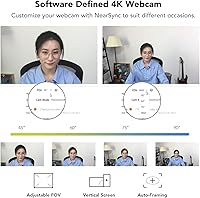
The adjustable 90° field of view allows users to customize the camera's perspective to suit different settings. This flexibility is helpful for various applications, from solo video calls to group streaming sessions. The wide angle captures a good portion of the space without distortion.
Some users report difficulties in adjusting the field of view smoothly. The accompanying software sometimes fails to apply these changes as expected, leading to frustration when trying to optimize the frame for different use cases. This feature could benefit from improved responsiveness.
Compatibility
93%
Users appreciate the wide compatibility of this webcam with major platforms like Zoom, Teams, OBS, Discord, and more. It works seamlessly with both Windows and Mac systems, ensuring it fits well into a variety of setups, from casual calls to professional streams.
A few users experienced occasional issues with compatibility when using the webcam with third-party software or devices not officially listed in the specs. Some non-Windows users mentioned minor connectivity hiccups, but these issues were generally easy to resolve with software updates.
Value for Money
92%
Most buyers feel that this webcam offers excellent value for the price, given the combination of 4K video quality, noise-canceling mics, and the adjustable lighting. Many consider it an affordable solution for both work and play, making it ideal for content creators, remote workers, and gamers.
While the value is strong for most users, some feel that the price could be a bit lower considering some of the software-related issues. A small number of customers believe that certain competing webcams offer similar features at a slightly lower price point.
Customer Support
70%
30%
When contacted, customer support has generally been responsive and helpful in addressing issues related to setup and software. Some users found their support interactions satisfactory, especially when dealing with compatibility or software installation issues.
Several buyers expressed dissatisfaction with the support team, citing slow response times or unhelpful solutions. Some issues, particularly with software or settings adjustments, were not resolved quickly, leading to frustration for those needing immediate assistance.

Suitable for:

The NUROUM V32AFL 4K Webcam with Ring Light is well-suited for content creators, remote workers, and anyone requiring high-quality video and clear audio for streaming or video calls. Users who need a webcam for professional-grade video calls or streaming will benefit from its 4K resolution, noise-canceling microphones, and adjustable ring light. This device is ideal for vloggers, gamers, and professionals who often attend virtual meetings or create content in low-light environments. Additionally, the AI-powered auto-framing and autofocus ensure that users remain sharp and well-lit, making it an excellent choice for those who want a reliable webcam that handles movement and lighting fluctuations seamlessly.
Not suitable for:

This webcam may not be the best choice for users on a tight budget or those seeking a simple, plug-and-play solution without the need for software customization. While it offers high-quality features, some users report issues with the software setup and field of view adjustments, which may be a hassle for those who want minimal setup time. Additionally, users in very bright or large environments might find that the adjustable ring light doesn't provide enough coverage, especially for larger spaces. Finally, those who need a webcam with more robust support for third-party applications or systems may encounter occasional compatibility hiccups.

Specifications

  • Resolution: Supports 4K video resolution for high-quality, detailed video capture.
  • Frame Rate: Captures video at 60 FPS for smooth, fluid video playback.
  • Field of View: Adjustable 90° field of view allows flexibility in framing your shot.
  • Auto Focus: Equipped with true autofocus to keep you in focus during calls or streaming.
  • Auto Framing: AI-powered auto-framing ensures you're always centered, even if you move.
  • Microphone Type: Noise-canceling microphones filter background noise for clearer audio.
  • Ring Light: Built-in ring light with 3 adjustable brightness levels for improved lighting.
  • Connectivity: Connects via USB, making it compatible with most modern computers.
  • Compatibility: Works with Zoom, Teams, OBS, Discord, Skype, Mac/PC for seamless video calls and streaming.
  • Mounting Options: Offers multiple mounting options, including desk, monitor, laptop, and tripod.
  • Software: Comes with NearSync software for adjusting settings like field of view and autofocus.
  • Lighting Control: The adjustable ring light helps optimize your appearance in low-light environments.
  • Weight: Lightweight design makes it easy to transport and set up for remote work or streaming.
  • Dimensions: Compact form factor for easy storage and setup in various environments.
  • Frame Rate Adjustment: Supports 60 FPS for smooth video, ideal for professional streaming and video calls.
  • Software Requirements: Requires compatible software (NearSync) for advanced settings adjustments.
  • Mounting Flexibility: Can be mounted on various surfaces or tripods for versatile use.
  • Operating Systems: Fully compatible with both Windows and macOS operating systems.

FAQ

This 4K webcam is ideal for streaming thanks to its high-quality video resolution, AI-powered auto-framing, and noise-canceling microphones. The built-in ring light also provides customizable lighting to ensure clear visuals, even in low-light environments.

Setting up this webcam is easy—just connect it to your computer via USB. You can adjust the field of view (90° adjustable) using the NearSync software, which also lets you tweak other settings. Make sure to follow the software instructions for optimal setup.

Yes, this webcam works with both Mac and Windows computers. It’s compatible with popular video conferencing platforms like Zoom, Teams, and Skype, as well as streaming software like OBS and Discord.

Yes, the webcam comes with a built-in ring light with 3 levels of brightness, which helps improve lighting in dark or poorly lit environments. It’s particularly useful for streaming and video calls in dimly lit rooms.

The AI-powered auto-framing and autofocus features help keep you centered and in focus during calls or streaming, even if you move around. This ensures a smooth and professional appearance without manual adjustments.

This webcam features noise-canceling microphones that filter out background noise, providing clear and crisp audio. This is especially useful in noisy environments or during video calls where clear communication is key.

You’ll need the NearSync software to adjust settings like the field of view, autofocus, and ring light brightness. The software is easy to download and install, and provides you with full control over the webcam’s performance.

Absolutely. The NUROUM V32AFL 4K Webcam is great for content creators, vloggers, and gamers due to its 4K resolution, smooth 60 FPS video, and adjustable field of view. It’s also versatile enough for live streaming or recording in different lighting conditions.

Yes, the webcam offers multiple mounting options including a desk stand, monitor clip, laptop clip, or tripod, giving you flexibility to choose the best setup for your needs, whether you're working from home or streaming.

Some users have reported challenges with the software installation process for adjusting the field of view. However, once installed, the software provides an intuitive interface for fine-tuning your settings.