Overview

The Calibrite ColorChecker Passport Video 2 Calibration Chart is Calibrite's refined answer to one of photography and video production's most persistent headaches: getting consistent, accurate color across different cameras and lighting conditions. This second-generation tool builds on the original with a redesigned exterior, improved labeling, and a rethought case — small upgrades that matter when you're working fast on set. Color accuracy isn't a luxury for professionals; it's the difference between a quick grade and hours of corrective work in post. Compact enough to slip into any bag at under three ounces, this color calibration passport punches well above its size.
Features & Benefits

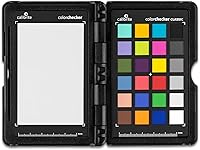
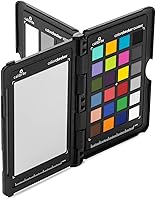
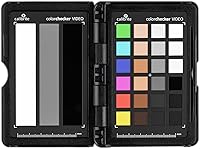
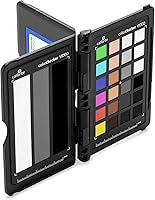
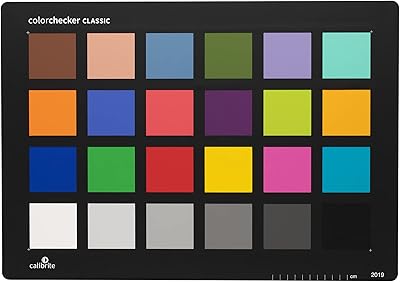
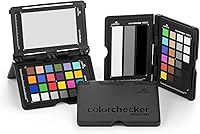
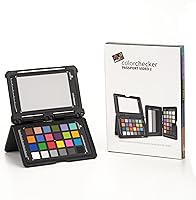
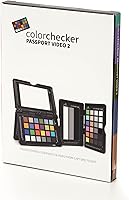
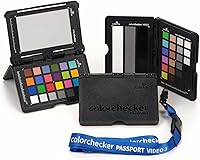
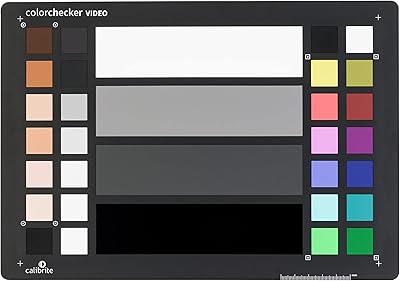
At the core of this calibration tool are four distinct targets, each serving a specific purpose. The 24-patch ColorChecker Classic target is the workhorse — photograph it under your shooting conditions and the bundled Camera Calibration software generates a custom DNG or ICC profile for your raw files. The white balance target lets you lock in accurate in-camera white balance in seconds, cutting guesswork entirely. Then there are the two video targets, which is where the V2 earns its name — one for on-set reference framing, one for post-production grading. The hard case holds everything securely and adjusts to multiple positions, so incorporating the targets into a shot is straightforward.

Best For

The CCPPV2 makes the most sense for hybrid shooters and videographers who regularly juggle multiple camera bodies and need them to match. Shoot a wedding with two different camera models, or a documentary across three days with shifting natural light, and the value of a repeatable calibration process becomes obvious fast. Still photographers dealing with tricky mixed lighting — think office fluorescents mixed with window daylight — will find the white balance and profiling workflow equally useful. Colorists working in post will appreciate having an actual on-set reference rather than guessing. It's less suited to casual hobbyists, where the investment may outweigh the practical need.

User Feedback

Users consistently highlight build quality and portability as standout strengths — the redesigned case and lanyard get specific praise from shooters who keep it clipped to a bag and ready to go. The V2's cleaner labeling over its predecessor is a minor but appreciated detail. Where opinions diverge is the software: the Camera Calibration application has a real learning curve, and some users note compatibility questions with less common raw workflows. The premium price point draws mixed reactions — professionals shooting color-critical work rarely question it, while enthusiasts occasionally wonder if the cost fits their shooting volume. No significant durability complaints have surfaced.

Pros

  • Custom camera profiles dramatically reduce corrective color grading time on complex, multi-light shoots.
  • The white balance target delivers neutral, reliable results in a single capture — even under tricky mixed lighting.
  • At under three ounces, this color calibration passport fits in any bag without adding meaningful weight.
  • The 24-patch target produces noticeably truer skin tones compared to relying on generic in-camera profiles.
  • Two dedicated video targets make on-set reference framing and post-production grading substantially more efficient.
  • The hard case holds up well to regular travel and bag use, keeping targets protected and scratch-free.
  • Supports both DNG and ICC output formats, covering the major raw photo workflows without workarounds.
  • Matching color across multiple camera bodies on the same production becomes a structured, repeatable process.
  • The lanyard and redesigned case mean the CCPPV2 is immediately accessible on set without unpacking anything.

Cons

  • The bundled software interface feels dated and the initial setup process is poorly documented for new users.
  • Video target workflow is not covered by the Camera Calibration software, which surprises many buyers expecting an integrated solution.
  • No official support for Linux or less mainstream raw processing environments, limiting options for some professionals.
  • The case hinge and lanyard attachment point feel underbuilt relative to the overall price point.
  • Supported camera model lists in the software have gaps, particularly for older or niche systems.
  • First-time users frequently need third-party tutorials just to complete a basic profiling workflow successfully.
  • Value is difficult to justify for photographers who shoot infrequently or work primarily in controlled studio lighting.
  • Targets require careful storage to avoid surface scuffs that can affect calibration accuracy over time.
  • In fast-moving or run-and-gun shooting situations, stopping to capture a calibration frame disrupts workflow noticeably.

Ratings

The ratings below for the Calibrite ColorChecker Passport Video 2 Calibration Chart were generated by our AI after systematically analyzing verified purchase reviews from buyers worldwide, with spam, incentivized, and bot-flagged submissions actively filtered out. Each score reflects the honest distribution of real shooter experiences — from working professionals who rely on it daily to enthusiasts testing it for the first time. Both the genuine strengths and the recurring frustrations are weighted transparently in every category.
Color Accuracy
94%
This is where the CCPPV2 genuinely earns its reputation. Shooters consistently report that profiles built from the 24-patch target produce noticeably truer skin tones and neutral shadows compared to generic in-camera profiles, especially under mixed artificial lighting in event or corporate environments.
A small number of users working with very niche or older camera systems found the resulting profiles slightly less precise, suggesting the accuracy ceiling is partly dependent on the quality of the raw file itself rather than the tool alone.
Build Quality
88%
The physical targets feel solid and well-manufactured, with a matte surface that resists unwanted glare during capture. The hard protective case has impressed users who toss it into gear bags regularly — it has held up across shoots without the targets showing wear or color shift.
A handful of users noted that the case hinge feels slightly less robust than expected at this price tier, raising questions about long-term durability under heavy travel use. The lanyard attachment point also received minor criticism for feeling like an afterthought.
Portability
91%
Weighing under three ounces and roughly the size of a passport, this calibration tool disappears into any camera bag or coat pocket without issue. On-location shooters particularly appreciate being able to pull it out, capture a reference frame, and move on within seconds.
For videographers using larger rigs or shoulder mounts, the small form factor can occasionally make positioning the targets accurately within the frame more fiddly than expected, requiring an extra set of hands or a small stand.
Software Usability
67%
33%
Once the Camera Calibration software clicks, the DNG and ICC profile generation workflow is reliable and repeatable. Experienced raw shooters working in Lightroom or Capture One report a straightforward pipeline once they have completed it once or twice.
The learning curve is real and frequently mentioned by new users. The interface is functional but dated, and first-time setup — particularly understanding where generated profiles need to be installed — causes genuine frustration. Some users spent significant time troubleshooting before achieving their first successful profile.
Video Target Performance
82%
18%
The two dedicated video targets are a meaningful addition for colorists working in DaVinci Resolve or Premiere Pro. Users shooting documentary or branded content report that having a physical on-set reference dramatically reduces the back-and-forth between camera operator and colorist in post.
Some buyers — particularly those coming from the photo side — are confused about how to actually use the video targets, as the workflow differs from the photo profiling process and is less thoroughly documented. The bundled software does not directly support video profile generation, which surprises some purchasers.
White Balance Accuracy
89%
The dedicated white balance target delivers clean, neutral results in a single capture. Wedding and event photographers working under mixed tungsten and LED lighting report cutting their white balance correction time in post by a significant margin after adopting this workflow.
In extremely mixed or rapidly shifting lighting environments — live concerts being a common example — users note that a single white balance reference capture has limited usefulness, requiring repeated captures throughout a shoot.
Multi-Camera Consistency
86%
For hybrid shooters running two or more camera bodies simultaneously, the ability to generate matching profiles per body is one of the most practical real-world benefits. Users pairing mirrorless and cinema cameras on the same production cite noticeably tighter color matching in the edit.
Achieving truly tight consistency across cameras from different manufacturers requires careful technique and some trial and error during profile creation. A few users found the results between very different sensor generations required additional manual grading despite using identical targets.
Value for Money
72%
28%
Working professionals who bill by the hour almost universally justify the cost through time saved in post-production correction. For studios or production companies running consistent color workflows, the return on investment becomes clear after just a handful of projects.
Enthusiast photographers and part-time videographers who shoot occasionally find the price harder to justify. Some note that free or lower-cost white balance tools cover a portion of the use cases, making the full feature set feel underutilized relative to what they paid.
On-Set Ease of Use
83%
The adjustable case positions and the lanyard design mean this calibration tool is practically always ready to deploy. Photographers working solo on event or portrait shoots appreciate being able to grab it quickly without fumbling with a bag or unpacking accessories.
In fast-moving scenarios — street photography, run-and-gun video, or documentary work — stopping to capture a calibration frame can feel disruptive to the flow. A few users wished the targets were slightly larger to make accurate framing faster under pressure.
Software Compatibility
74%
26%
The generated DNG and ICC profiles integrate well with the major raw processing platforms, and Calibrite has maintained software updates since the V2 launched in late 2023. Most users on current versions of Lightroom Classic and Capture One report no compatibility issues.
Users working on Linux or with less mainstream raw processors run into walls, as official support is limited to the primary Windows and macOS environments. Some professionals using specialized camera systems also flagged gaps in supported camera model lists.
Case & Accessory Design
79%
21%
The redesigned case with adjustable positioning is a practical improvement over older versions, allowing users to prop the targets at angles that work in tight spaces or on tabletops. The lanyard is a small but genuinely useful addition for keeping the passport accessible during long shoots.
The case, while functional, has drawn some criticism for not feeling as premium as the targets it protects. The lanyard attachment point has been described as flimsy by a subset of users, and a couple of reviewers reported it loosening after extended daily use.
Documentation & Learning Resources
61%
39%
Calibrite provides basic instructions and there is a reasonable body of third-party tutorial content online that helps fill the gap. Users who invested time in watching community-produced walkthrough videos generally got up to speed without needing direct support.
The included documentation is widely considered insufficient for first-time users, particularly around the video target workflow. Several reviewers expressed frustration that a product at this price point does not include clearer step-by-step guidance specifically for video use cases.
V2 Upgrade Value
69%
31%
Users upgrading from the original passport version generally appreciate the cleaner labeling, redesigned case, and lanyard — small refinements that improve the practical experience of using it on set every day.
Some existing owners felt the V2 changes were incremental enough that upgrading from a fully functional original unit was hard to justify financially. The core calibration science and target patches remain largely unchanged, which tempers the upgrade narrative for current owners.
Durability of Targets
85%
The target patches themselves have proven resilient across extended real-world use. Photographers who have used their CCPPV2 across dozens of shoots report no visible fading, scratching, or color shift on the patch surfaces when stored properly in the case.
Users who left targets exposed or stored them improperly noted surface scuffs affecting patch accuracy over time. The matte coating, while effective for reducing glare, does show fine surface marks with careless handling that can theoretically affect calibration precision.

Suitable for:

The Calibrite ColorChecker Passport Video 2 Calibration Chart is purpose-built for anyone whose work demands repeatable, accurate color across varying conditions. Hybrid shooters running two or more camera bodies on the same production — think a mirrorless paired with a cinema camera — will find the multi-camera color matching workflow genuinely saves hours in the edit. Event and wedding photographers dealing with unpredictable mixed lighting will benefit immediately from the white balance and custom profile pipeline, even if they only use those features on every other job. Colorists and post-production editors who want an on-set reference to anchor their grading sessions, rather than eyeballing neutrals from scratch, will get direct, practical value from the video targets. Traveling filmmakers and content creators who move between studios, outdoor locations, and conference rooms in the same week will appreciate how much the compact form factor reduces friction in building consistent color across a varied shoot schedule.
Not suitable for:

The Calibrite ColorChecker Passport Video 2 Calibration Chart is a harder sell for casual hobbyists or beginners who are still shooting JPEG, have not yet adopted a raw workflow, or rarely deal with multi-source lighting. The bundled software has a real learning curve, and if you are not already comfortable with concepts like DNG profiles, ICC color spaces, or raw processing pipelines, the initial setup can feel more like a technical obstacle than a productivity boost. Shooters working exclusively in auto white balance for social media content, or those who do minimal color work in post, are unlikely to recoup the value from the premium price. Users on Linux or those working with niche raw processors outside the mainstream Windows and macOS ecosystem may also hit compatibility walls. And if you already own a fully functional original ColorChecker Passport that is in good condition, the V2 improvements — while welcome — are incremental enough that an immediate upgrade is difficult to justify purely on feature grounds.
Specifications

  • Dimensions: The unit measures 4.72 x 3.54 x 0.39 inches, compact enough to fit in a shirt pocket or clip to a camera bag without bulk.
  • Weight: Complete with case, the CCPPV2 weighs 2.82 ounces, making it one of the lightest professional calibration tools available.
  • Model: This is the second-generation release, carrying the official model designation CCPPV2.
  • Manufacturer: Designed and manufactured by Calibrite, a brand with dedicated focus on color science and calibration hardware for imaging professionals.
  • Color Targets: Includes a 24-patch ColorChecker Classic target, a dedicated white balance target, and two video-specific reference targets — four targets in total.
  • Profile Formats: The bundled software generates custom camera profiles in both DNG and ICC formats, covering the primary raw photo workflow standards.
  • Bundled Software: Comes with Calibrite Camera Calibration software for Windows and macOS, used to create DNG and ICC profiles from raw image captures of the 24-patch target.
  • Case Type: A hard protective case is included, with an adjustable interior design that allows the targets to be positioned at multiple angles for on-set use.
  • Accessory: A lanyard is included for keeping the passport accessible around the neck or attached to a gear bag during active shoots.
  • Use Cases: Designed for still photography profiling, in-camera white balance capture, on-set video reference, and post-production color grading workflows.
  • OS Support: The Camera Calibration software is officially supported on current versions of Windows and macOS; Linux is not supported.
  • Release Date: The CCPPV2 was first made available in September 2023, replacing the original ColorChecker Passport Video as the current-generation model.
  • Market Rank: Holds a Best Sellers Rank of number 7 in the Photographic Light Meter Color Calibration Charts category on Amazon.
  • Target Material: The patch surfaces use a matte finish specifically engineered to minimize glare and specular reflection during calibration captures.
  • Profile Application: Generated profiles are designed for use in major raw processing applications including Adobe Lightroom Classic and Capture One.
  • Video Workflow: The two video targets are intended for use either directly on set as a framing reference or in post-production software for grading baseline establishment.
  • White Balance Use: The white balance target is designed for direct in-camera custom white balance capture, compatible with most current mirrorless and DSLR systems.

Related Reviews
Calibrite ColorChecker Video Color Calibration Chart
78%
93%
Color Accuracy
91%
Gray Scale Precision
89%
White Balance Reliability
67%
Build Quality
84%
Usability On Set
More
Calibrite ColorChecker Studio Color Calibrator
78%
93%
Display Profiling Accuracy
86%
Printer & Paper Profiling
81%
Camera Calibration Workflow
54%
Software Setup Experience
88%
Ambient Light Measurement
More
Calibrite ColorChecker Classic Color Calibration Chart
80%
94%
Color Accuracy
83%
Build Quality
78%
Ease of Use
81%
Software Compatibility
74%
Value for Money
More
Calibrite ColorChecker Classic XL Color Calibration Chart
81%
94%
Color Accuracy
92%
Size & Coverage
78%
Portability
71%
Build & Durability
67%
Value for Money
More
Calibrite ColorChecker Digital SG Calibration Chart
72%
94%
Color Accuracy
92%
Patch Range & Variety
78%
Build & Surface Quality
71%
Size & Usability
67%
Software Compatibility
More
Calibrite ColorChecker Classic Nano Color Calibration Chart
80%
96%
Target Size Utility
93%
Color Patch Accuracy
88%
Software Compatibility
61%
Value for Money
94%
Portability
More
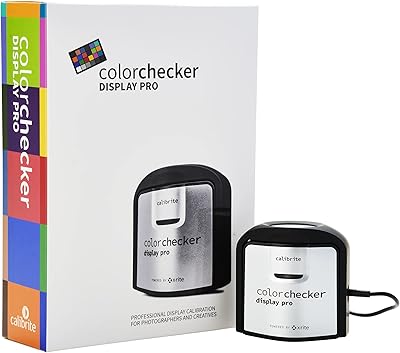
Calibrite ColorChecker Display Pro Colorimeter
78%
91%
Calibration Accuracy
88%
Cross-Panel Consistency
67%
Software Experience
84%
Projector Profiling
82%
Ambient Light Measurement
More
LOENTIR DV105 2.7K Camcorder
70%
83%
Value for Money
91%
Ease of Use
62%
Video Quality
57%
Build Quality
67%
Battery Performance
More
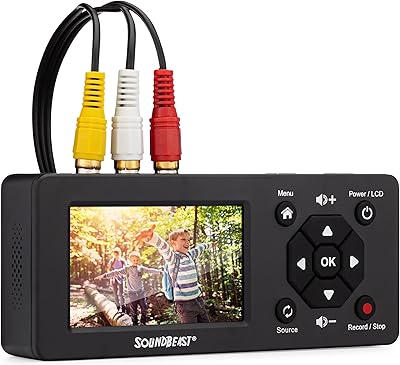
SoundBeast Video Capture Box 2.0
83%
91%
Ease of Use
88%
Video Quality
85%
Audio Recording Quality
80%
Compatibility with Older Devices
79%
Build Quality
More
VIDBOX VCP1M
VIDBOX VCP1M
67%
78%
Ease of Setup
54%
Software Quality
61%
Video Output Quality
67%
Hardware Build Quality
82%
Included Accessories
More

FAQ

In most cases, yes. The white balance target works with virtually any camera that supports custom in-camera white balance capture, which includes nearly all current Sony mirrorless bodies. For the profiling software, check Calibrite's supported camera list on their website before purchasing, as coverage for very new or niche models can lag slightly behind hardware releases.

These are genuinely two separate workflows. The 24-patch ColorChecker Classic target feeds into the bundled Camera Calibration software to produce a custom DNG or ICC profile for your raw still images — that is the photo side. The two video targets are physical reference charts you either frame at the start of a scene or use as a grading reference in post; they do not go through the same software. Many buyers expect the software to handle video profiles too, and it does not, so it is worth understanding that distinction upfront.

If your original is in good working condition, the V2 is a modest rather than essential upgrade. The core targets and calibration science are largely unchanged. The improvements are practical — cleaner exterior labeling, a redesigned case, and the lanyard — but they are refinements rather than reinventions. Most users upgrading report satisfaction, but nobody is leaving significant calibration performance on the table by sticking with a functional original.

Essentially yes, though with a bit more intention. At the start of a scene or whenever lighting changes, you frame one of the video targets in shot for a few seconds. In post, your colorist can use that reference frame as a baseline for grading, ensuring consistent color treatment across the scene. Some productions also keep it visible in the first frame of each new setup purely as a visual reference for matching cuts.

It is real, especially if you are new to color profiling concepts. The actual process — photograph the target under your shooting light, import into the software, generate the profile, install it in Lightroom — is not complicated once you have done it, but the first time through takes most users longer than expected. The included documentation is minimal, so plan to spend time with a community tutorial or video walkthrough before your first paid shoot.

Under normal use with proper storage in the included case, the patches hold up well. Users who have run the CCPPV2 through dozens of shoots report no visible degradation. The main risk is surface scuffing from careless handling, which can theoretically affect accuracy. Keeping it in the case when not in use is genuinely important, not just a suggestion.

Yes. The generated ICC profiles are compatible with Capture One, and many professional photographers use this calibration tool specifically within Capture One workflows. DNG profiles are more tightly associated with Adobe products, so ICC is the format to use if Capture One is your primary editor.

That is genuinely one of its strongest real-world use cases. By creating custom profiles for each body under the same lighting conditions using the same target, you give yourself a consistent color baseline to work from in post. You will still likely need some manual grading to close the gap between very different sensors, but the calibration passport gets you significantly closer than starting from scratch.

Two things come up regularly. First, the software does not generate video color profiles — that is a common misunderstanding. Second, this tool does not replace a full monitor calibration or printer profiling setup; it specifically addresses camera-to-software color accuracy for raw stills and provides video reference targets. If you are expecting a solution for display calibration, you need a different product category entirely.

The lanyard and compact case design are specifically there to help with this. Most photographers develop a quick habit of framing the white balance target at the start of a new lighting setup — it takes about ten seconds once you are practiced. For video, the common approach is to keep it clipped and visible to an assistant or second shooter, who holds it in frame at the top of each new setup without breaking the shooting rhythm significantly.

Where to Buy