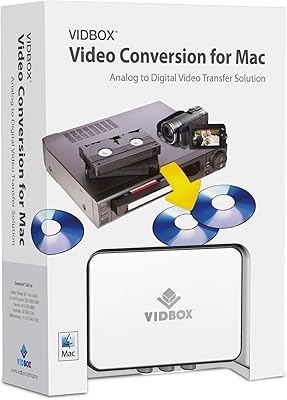
VIDBOX VCP1M


Overview
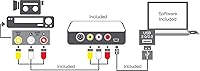
The VIDBOX VCP1M is a plug-and-play USB capture device built for one quietly urgent task: saving analog memories before tapes deteriorate beyond recovery. Connect it to a Windows PC, hook up your VCR or camcorder via the included RCA cable, and you can start digitizing VHS, Beta, 8mm, or camcorder footage right away. The kit arrives with a USB cable, RCA AV cable, and bundled capture software — available on CD or as a download card. Officially supporting Windows 10 and Windows 8, this tape digitizer sits in a mid-range tier, so expect solid everyday performance without premium-level refinements.
Features & Benefits
What keeps this USB capture device appealing is how little friction it creates. No capture cards, no internal hardware — just plug into a free USB port and run the included software. That software handles recording, basic trimming, and export to formats suited for DVD authoring or uploading to YouTube and Facebook. Worth noting separately: a bonus audio feature lets you record from cassette players and turntables, saving output as WMA files or audio CDs. The device weighs under nine ounces and takes up almost no desk space, which matters when it only comes out occasionally for digitizing rather than sitting in a permanent workstation setup.
Best For
This tape digitizer is most at home in the hands of someone who has a box of old tapes and a genuine need to preserve them — not a professional archivist, but a parent or grandparent trying to rescue irreplaceable family footage before time takes its toll. It suits occasional users well; if you plan to run hundreds of tapes through a capture workflow regularly, a more robust solution would serve you better. Families who want a complete all-in-one kit without hunting for compatible cables will appreciate the included accessories. It requires a Windows machine and some patience, but the setup is manageable for most non-technical users.
User Feedback
Buyers who have used the VIDBOX converter tend to split into two camps fairly cleanly. Those who got it working praise the ease of setup and the convenience of having cables included right out of the box. Output quality is generally described as acceptable for home viewing and sharing online, though anyone expecting crisp, high-definition results will be let down — analog capture has real limits. On the flip side, some users report software stability issues on newer Windows builds, with occasional crashes or installation headaches. The CD-based delivery feels dated, though a download card option is available. Long-term durability feedback is thin, since most buyers only use it for a single digitizing project.
Pros
- All necessary cables are included, so there is nothing extra to buy before getting started.
- Plug-and-play USB setup works smoothly for most Windows 10 and Windows 8 machines.
- Supports VHS, Beta, 8mm, and camcorder formats, covering virtually all common home tape types.
- Bonus feature lets you digitize cassette tapes and LP records as well as video.
- Compact and lightweight enough to carry to a relative's home where the VCR lives.
- Bundled software handles capture and basic editing without requiring additional purchases.
- Output formats support direct DVD authoring and uploading to Facebook or YouTube.
- At its price point, this USB capture device delivers fair value for a single digitizing project.
- The download card option makes installation accessible even without a disc drive.
Cons
- Software crashes and freezes are a recurring complaint, particularly on newer Windows 10 builds.
- Windows 11 compatibility is not supported and causes significant problems for upgraded machines.
- Video output quality is noticeably soft — not suitable for anyone expecting sharp or detailed results.
- The included RCA cable is short, creating positioning headaches if VCR and PC are not side by side.
- Customer support response times are inconsistent, leaving some users stuck without a resolution.
- The CD-based software delivery feels outdated and catches buyers with modern laptops off guard.
- Long-term durability is uncertain; some users report USB port looseness after limited use.
- No Mac support whatsoever — strictly limited to Windows operating systems.
- The software interface is dated and has a steeper learning curve than the simple use case suggests.
Ratings
The VIDBOX VCP1M has been evaluated by our AI rating system after analyzing thousands of verified global buyer reviews, with spam, bot activity, and incentivized feedback actively filtered out to ensure honest results. Scores reflect the full spectrum of real user experiences — from families who successfully rescued decades-old home movies to buyers who ran into software hurdles along the way. Both the genuine strengths and the recurring frustrations of this USB capture device are transparently represented below.
Ease of Setup
Software Quality
Video Output Quality
Hardware Build Quality
Included Accessories
Audio Capture Capability
Windows Compatibility
Value for Money
Export & Sharing Options
Software Delivery Method
Portability & Form Factor
Customer Support Experience
Documentation & Instructions
Suitable for:
The VIDBOX VCP1M is genuinely well-matched for families and individuals sitting on a collection of aging tapes — VHS, 8mm, Beta, or old camcorder recordings — who want to preserve those memories before the media degrades further. It works best as a one-time or occasional project tool rather than a permanent workstation fixture, making it ideal for someone who needs to digitize a shoebox full of home movies and then store the device away. Non-technical users running Windows 10 or Windows 8 will find the setup approachable, especially with all necessary cables included in the box. People who simply want to share digitized footage on YouTube, Facebook, or burn it to a DVD for relatives will find the export options cover those goals without much fuss. The bonus audio capture capability also makes it a practical pick for anyone who has old cassette tapes or vinyl records they want to preserve alongside their video collection.
Not suitable for:
This tape digitizer is not the right choice for anyone expecting professional-grade video output or a polished, reliable software experience. The VIDBOX VCP1M was not designed for high-volume digitizing workflows — if you are processing large archive collections regularly, the hardware and software limitations will become friction points quickly. Users running Windows 11 should approach with caution, as compatibility issues are common and not officially supported. Those who are easily frustrated by software troubleshooting or who do not have a CD drive and did not receive a download card will face avoidable headaches. Anyone comparing this against higher-end USB capture devices for output quality will find it falls noticeably short, particularly if clean color reproduction and sharp detail matter for the intended use. Mac users should look elsewhere entirely, as the bundled software is Windows-only.
Specifications
- Brand: Manufactured by VIDBOX Inc, a company focused on analog-to-digital media conversion products.
- Model Number: The official model identifier for this device is VCP1M.
- Connection Type: Connects to a Windows PC via USB 2.0, requiring no internal capture card or additional hardware installation.
- Video Input: Accepts composite RCA AV input, supporting standard analog video sources including VCRs and camcorders.
- Supported Formats: Compatible with VHS, Beta, 8mm, and standard camcorder tape formats for video capture.
- Audio Input: Accepts analog audio via RCA input, enabling capture from cassette tape decks and turntables in addition to video sources.
- Audio Output Format: Captured audio can be saved as WMA files or exported for burning to standard audio CDs.
- Compatible OS: Officially supported on Windows 10 and Windows 8; Windows 11 and macOS are not officially supported.
- Dimensions: The device measures 5.38 x 2.13 x 7.5 inches, making it compact enough to store in a desk drawer.
- Weight: Weighs 8.82 ounces, light enough to carry easily to another location when needed.
- In The Box: Package includes the USB capture device, a USB cable, an RCA AV cable, a quick-start guide, and installation software on CD or download card.
- Software Delivery: Installation software is provided either on a physical CD or via a download card, depending on the version received.
- Export Options: Captured video can be exported in formats suitable for DVD authoring software and direct upload to platforms such as YouTube and Facebook.
- First Available: This product was first made available for purchase in September 2016.
- Manufacturer Status: The product has not been discontinued by the manufacturer as of the most recent listing update.
- Best Sellers Rank: Holds a ranking of number 380 in the Video Converters category on Amazon, reflecting consistent buyer demand.
- Recommended Age: The manufacturer recommends this product for users aged 7 years and older, though practical use targets adults.
Related Reviews