
Overview

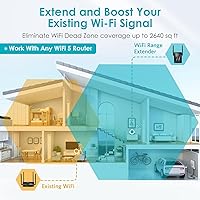
The rockspace AC1200 WiFi Range Extender is a compact, no-frills solution aimed squarely at apartment renters and small homeowners who have one or two rooms where the router signal simply doesn't reach. It plugs directly into a wall outlet, keeping cables out of the picture and making repositioning easy if your first placement doesn't pan out. Sitting in the AC1200 dual-band tier, it's a step above the most basic single-band boosters without approaching the price or complexity of a full mesh system. rockspace isn't a household networking name, but this wall-plug booster holds its own at its price point. Just don't expect it to replace a proper mesh system.

Features & Benefits

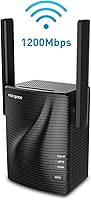
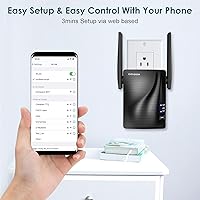
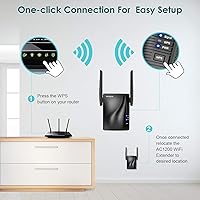
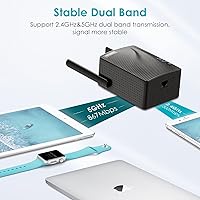
On the spec sheet, this range extender runs a dual-band setup — 300Mbps on 2.4GHz for coverage reach and 867Mbps on 5GHz for devices that need more throughput. Worth noting: that combined 1,200Mbps figure is a theoretical ceiling, not what your laptop will actually see. A small LED placement indicator on the unit helps you find a strong signal location before you commit to a socket, which is genuinely useful. There's also a Gigabit Ethernet port on the bottom, letting you run it as a wired access point for a TV or console. Setup is straightforward — WPS button pairing takes under a minute on compatible routers, and a browser-based option covers everything else.

Best For

This wall-plug booster makes the most sense for apartment dwellers or homeowners dealing with a specific dead zone — a back bedroom, a corridor, or a bathroom that your router simply can't reach. If you need a quick fix without reconfiguring your whole network, this is a reasonable option. It handles HD streaming and light gaming on a handful of devices without much fuss, though pushing several bandwidth-heavy connections simultaneously may test its limits. The built-in Ethernet port is a quiet bonus for anyone who wants to hardwire a smart TV or streaming stick without running cable across the room. If you're already eyeing a mesh system, this range extender probably won't satisfy you long-term.

User Feedback

Across more than 2,270 ratings, this wall-plug booster sits at 3.8 out of 5 stars — a score that reflects a real split in buyer experience rather than broad consensus. On the positive side, easy setup and noticeable signal improvement in dead-zone rooms come up repeatedly. Critics point to inconsistent speeds near the outer edge of its range and the occasional need to reboot after a drop. A few buyers also flag that this is a repeater, meaning it creates a separate network name — which can trip up devices that don't hand off between networks automatically. The access point mode, however, earns consistent praise from users who skip wireless repeating entirely and just run a cable to it instead.

Pros

  • Plugs directly into a wall outlet with no extra cabling required, making placement fast and flexible.
  • The built-in LED signal indicator helps you find the strongest extension point before committing to a spot.
  • WPS setup takes under a minute on compatible routers — no app download needed.
  • Works with virtually any router brand that supports 802.11 a/b/g/n/ac standards.
  • The Gigabit Ethernet port doubles as a wired access point connection for TVs or game consoles.
  • Dual-band operation lets speed-sensitive devices use 5GHz while older ones stay on 2.4GHz.
  • Compact build at 3 x 2.5 x 2.5 inches stays out of the way in any room.
  • For a single dead-zone fix in an apartment or small home, it reliably delivers a noticeable improvement.

Cons

  • The 1,200Mbps headline speed is theoretical; real-world throughput is significantly lower on both bands.
  • Creates a separate network SSID by default, forcing manual device switching as you move around.
  • Coverage claims of up to 1,292 sq ft assume ideal open-space conditions with no walls or obstructions.
  • Some users report occasional disconnects that require a manual reboot to restore the connection.
  • Speeds near the outer edge of its range can drop inconsistently under real-world conditions.
  • Cannot be paired with other units — it is not a mesh node and does not support whole-home expansion.
  • The 3.8-star average across thousands of reviews reflects a meaningful share of unsatisfied buyers.
  • Heavy multi-device households running simultaneous 4K streams or large downloads will likely find it underpowered.

Ratings

The rockspace AC1200 WiFi Range Extender has been scored using AI-assisted analysis of thousands of verified global buyer reviews, with bot-generated, incentivized, and outlier feedback actively filtered out to ensure accuracy. Scores reflect the genuine balance of real-world experience — capturing both the aspects that earn consistent praise and the pain points that surface most frequently across buyer demographics. Nothing is glossed over: where this wall-plug booster earns its keep and where it lets buyers down are both represented transparently in the breakdown below.

Value for Money
79%
21%
For buyers who just need a signal fix in one dead room without spending much, this wall-plug booster delivers noticeable results at a price that carries little financial risk. Users frequently note that even a modest improvement in a bedroom or hallway justifies the low outlay compared to doing nothing at all.
The value equation weakens when buyers realize the speed ceiling is theoretical and real throughput is a fraction of what the box implies. Those expecting a meaningful upgrade across multiple rooms or floors often feel the money would have been better directed toward a mesh system from the start.
Ease of Setup
88%
WPS pairing is genuinely fast — most users report the entire process taking under two minutes from unboxing to a working connection. Even less technical buyers, including older first-time users, consistently praise how little friction is involved in getting the unit online and extending their existing network.
The browser-based setup, while functional, can trip up users who accidentally close the configuration page or lose the temporary connection mid-process. A small number of buyers also report that WPS failed on the first attempt, requiring a factory reset and a second pass before successfully pairing.
Signal Coverage
71%
29%
For apartments and smaller homes with one or two localized problem areas, the coverage improvement is real and consistent according to buyer feedback. A back bedroom, a far hallway, or an outdoor area just off the back of the house — these contained fixes are precisely where this range extender earns its keep.
The rated 1,292 sq ft figure applies to open floor plans with no obstructions, which rarely reflects reality in furnished homes with walls, doors, and appliances. Buyers in homes with thick walls or on multiple floors often find the coverage improvement underwhelming, particularly at the furthest edge of the extender's reach.
Real-World Speed
57%
43%
For light use cases — browsing, HD streaming on one or two devices, or casual online gaming — the speeds delivered by this range extender are sufficient and get the job done adequately. Users in previously dead zones consistently report a meaningful quality-of-life improvement over having no usable signal at all.
The 1,200Mbps combined headline is a theoretical ceiling that real-world conditions make essentially unattainable. Users who run speed tests frequently report throughput well below their router's direct output, and speeds near the far edge of the extender's range can drop inconsistently depending on load and interference.
Connection Stability
61%
39%
Users in straightforward setups — single-room extension in a smaller apartment, placed at a sensible midpoint between the router and the dead zone — generally report stable connections for everyday streaming and casual browsing without frequent disruptions. Firmware updates have addressed some of the early instability issues cited by initial buyers.
Occasional drops requiring a manual reboot are among the most cited frustrations in buyer reviews, appearing more often when the extender is pushed toward the outer limit of its range. A recurring pattern of stable operation for several days followed by an unexplained disconnect is mentioned consistently across negative feedback.
Dual-Band Performance
73%
27%
Having both 2.4GHz and 5GHz available means newer devices like phones and laptops can use the faster band while older smart home gadgets stay on 2.4GHz without competing for the same bandwidth. Users appreciate that band assignment happens automatically without requiring manual configuration in the router or extender settings.
Automatic band-steering is not always smart — some capable devices end up on the slower 2.4GHz band when they could benefit from 5GHz, with no simple way to force a specific device to one band without renaming the networks separately. The 5GHz band's shorter range also limits its practical value in larger or obstructed spaces.
Ethernet and AP Mode
83%
The Gigabit Ethernet port is a genuinely useful inclusion that distinguishes this unit from simpler extenders at the same price. Users who connect a smart TV or gaming console by cable, or who run it in Access Point mode with a wired backhaul, consistently report more stable and faster results than wireless-only configurations.
Access Point mode requires a physical Ethernet cable run from the router to the unit, which is impractical for anyone without the cable infrastructure already in place or the ability to route one through their walls. Mode switching is buried inside the web interface and is not clearly labeled for buyers unfamiliar with networking terminology.
Signal Indicator
76%
24%
The LED placement guide is one of those small features that saves real time during setup without requiring any technical knowledge. Rather than running repeated speed tests from different sockets, buyers can plug it in, read the light color, and know immediately whether the base signal is strong enough to extend from that location.
The indicator relies on a simple two-color system — green for adequate signal, red for weak — without any gradient or percentage display, which limits how precisely users can fine-tune their placement. Several buyers also mention the LED being an unwanted source of ambient light when the extender is placed in or near a bedroom.
Build Quality
67%
33%
The plastic casing is clean and unobtrusive for a device that lives in a wall socket — it does not stick out awkwardly or draw attention in a living space. The compact 3 x 2.5 x 2.5 inch frame avoids blocking adjacent outlets in most standard two-socket configurations.
The construction feels standard for the price tier but does not inspire much long-term confidence. A number of users note the unit running noticeably warm during extended operation, and the absence of any visible ventilation design raises reasonable questions about heat management over months of continuous use.
Router Compatibility
91%
Compatibility is one of the clearest strengths here — the unit pairs with any 802.11 a/b/g/n/ac router regardless of brand, including ISP-supplied gateway devices that sometimes create friction for third-party accessories. Buyers who switch internet providers report no issues continuing to use the extender with a completely different router.
Users with older 802.11n-only routers will see reduced performance since the extender cannot leverage its full 5GHz capability in that configuration. Gigabit internet subscribers may also find the extender introduces a throughput ceiling that prevents them from fully utilizing the speeds their broadband plan is capable of delivering.
Placement Flexibility
82%
18%
Plugging directly into any standard wall outlet means repositioning takes seconds — no mounting hardware, no cable management, and no tools required. Users who found their first placement underperforming could simply unplug and try a different outlet without repeating any configuration steps whatsoever.
Being outlet-dependent does constrain placement options — if the ideal midpoint between a router and a dead zone happens to fall along a wall with no nearby socket, users are forced to compromise on positioning. The unit also occupies a full outlet, which creates an inconvenience in rooms where spare sockets are limited.
Device Handoff
43%
57%
Users who manually configure both the router and extender networks to share the same SSID and password can approximate a more unified experience, reducing how often devices need to be switched manually. In a small studio or one-bedroom apartment where movement between zones is minimal, this limitation rarely becomes a day-to-day issue.
As a traditional repeater rather than a mesh node, this unit creates a separate network by default, meaning phones and laptops routinely cling to the weaker original signal instead of transitioning to the extended one automatically. This is the single most disruptive real-world limitation and accounts for a disproportionate share of the one- and two-star reviews.
Multi-Device Load
63%
37%
For households with two or three devices drawing on the extended signal simultaneously — a TV streaming HD content while someone browses on a laptop — the rockspace AC1200 holds up reasonably well under moderate load. The dual-band setup helps distribute traffic across both frequencies, reducing contention between different device types.
Adding more devices or increasing bandwidth demand reveals the unit's limits quickly, particularly when several users are video conferencing, streaming, or gaming at the same time. Buyers in active multi-person households describe a clear and consistent degradation in speed and reliability once more than three or four devices rely on the extender concurrently.

Suitable for:

The rockspace AC1200 WiFi Range Extender is a practical pick for renters and homeowners who have one specific room — a back bedroom, a hallway, or a bathroom — that their router signal simply never reaches. If your living space is a one- or two-bedroom apartment or a mid-sized house under roughly 1,300 square feet, and your problem is clearly localized rather than whole-home, this wall-plug booster can solve it without any real network overhaul. It works well for households that mostly stream HD video, browse, or run a handful of devices at once — think a bedroom TV, a laptop, and a phone — rather than heavy multi-user setups. The Gigabit Ethernet port also makes it a quiet win for anyone who wants a stable wired connection for a smart TV or game console in a room where running a long cable from the router is not practical. Budget-conscious buyers who are not ready to spend on a full mesh system will find it a sensible, low-effort solution for everyday dead-zone problems.

Not suitable for:

The rockspace AC1200 WiFi Range Extender is not the right tool for larger homes, demanding power users, or anyone expecting mesh-level performance from a budget repeater. The advertised 1,200Mbps is a combined theoretical maximum across both bands, and real-world throughput is noticeably lower once you factor in signal loss from walls, floors, and distance. If multiple people are simultaneously streaming 4K, gaming online, and video conferencing, this range extender will likely become a bottleneck rather than a fix. It also creates a separate network name by default, which means devices will not automatically hand off as you move between your router and the extender — a genuine nuisance in homes where you roam between rooms. Anyone in a home over 1,500 square feet, dealing with thick concrete or brick construction, or simply frustrated by a network that underperforms throughout the house should skip this and invest in a proper mesh Wi-Fi system instead.

Specifications

  • Brand: This range extender is manufactured by rockspace, a brand focused on budget-tier networking accessories.
  • Model Number: The official model number is F-253, part of the AC1200 product series.
  • Wi-Fi Standard: The unit supports the 802.11 a/b/g/n/ac wireless standard, ensuring compatibility with virtually all modern and legacy consumer routers.
  • Frequency Bands: It operates simultaneously on both the 2.4GHz and 5GHz frequency bands for dual-band coverage.
  • 2.4GHz Speed: The 2.4GHz band has a theoretical maximum of 300Mbps, prioritizing range and compatibility with older devices.
  • 5GHz Speed: The 5GHz band has a theoretical maximum of 867Mbps, better suited for throughput-sensitive devices located closer to the unit.
  • Combined Speed: The combined theoretical maximum across both bands is up to 1,200Mbps under ideal, controlled conditions.
  • Coverage Area: Coverage is rated at up to 1,292 sq ft, a figure that assumes an open, obstacle-free environment with no walls or interference.
  • Ethernet Port: One Gigabit Ethernet port is built into the bottom of the unit, supporting both wired device connections and Access Point mode operation.
  • Operating Modes: The unit supports two modes: Repeater mode for wirelessly extending an existing network, and Access Point mode for creating a network via a wired Ethernet backhaul.
  • Setup Methods: Initial configuration can be completed via WPS one-button pairing or through a standard web browser on any supported platform.
  • Compatible OS: Browser-based setup is supported on Windows XP through 10, Mac OS, Linux, iOS, and Android.
  • Signal Indicator: An LED smart signal indicator displays the current signal strength to assist users in identifying the most effective placement location.
  • Antenna Design: The unit uses an internal 360-degree antenna layout intended to distribute the extended signal omnidirectionally.
  • Dimensions: The extender measures 3 x 2.5 x 2.5 inches, sized to plug directly into a standard wall outlet.
  • Weight: The unit weighs 9.1 oz, which is typical for a wall-plug Wi-Fi extender in this class.

Related Reviews
TODAAIR AC1200 WiFi Range Extender
82%
88%
Wireless Coverage
85%
Dual-Band Performance
90%
Setup & Installation
82%
Device Capacity
80%
Speed Consistency
More
NETGEAR WiFi AC1200 Range Extender EX6200
85%
88%
WiFi Performance
85%
Setup & Installation
91%
Build Quality
84%
Range & Coverage
90%
Ethernet Connectivity
More
rockspace AC2100 Dual Band WiFi Extender
69%
88%
Ease of Setup
74%
Dead Zone Coverage
61%
Real-World Speed
58%
Long-Term Reliability
82%
Value for Money
More
WAVLINK WN572HP3 AC1200 Outdoor WiFi Extender
72%
78%
Outdoor Signal Range
71%
Ease of Setup
66%
PoE Implementation
73%
Build Quality & Weatherproofing
74%
Dual-Band Performance
More
INEAUTO AC1200 Outdoor WiFi Extender
75%
91%
Weather Durability
88%
PoE Installation
83%
Signal Range
62%
Setup & Configuration
78%
Throughput Performance
More
NETGEAR EX6120 WiFi Range Extender
74%
83%
Ease of Setup
76%
Signal Coverage
61%
Connection Speed
79%
Value for Money
58%
5GHz Band Performance
More
BrosTrend AC1200 Outdoor WiFi Extender
79%
91%
Weather Durability
74%
Signal Coverage
82%
Ease of Installation
78%
Value for Money
86%
Build Quality
More
NETGEAR EAX12 WiFi 6 Range Extender
76%
91%
Ease of Setup
73%
WiFi Coverage
67%
Real-World Speed
69%
Router Compatibility
74%
Connection Stability
More
WAVLINK WN570HP2 Outdoor WiFi Range Extender
71%
61%
Wireless Range
78%
Installation Ease
83%
Build Quality & Weatherproofing
53%
Throughput & Speed
74%
Value for Money
More
TP-Link RE300 WiFi Range Extender
76%
88%
Ease of Setup
82%
Signal Coverage
61%
Throughput & Speed Performance
78%
Device Capacity
84%
Build Quality & Form Factor
More

FAQ

It is compatible with any router or gateway that supports 802.11 a/b/g/n/ac standards, which covers virtually every consumer router made in the past decade. Brand does not matter — Netgear, TP-Link, Asus, Linksys, and others all work without any special configuration.

No app is required at any point. If your router has a WPS button, setup takes about two minutes — press WPS on the router, then on the extender, and they pair automatically. If WPS is not available, you can complete setup through any web browser on Windows, Mac, Linux, iOS, or Android by connecting temporarily to the extender's default network and following the on-screen prompts.

By default, this wall-plug booster creates a separate network with a different name — usually your existing network name with a suffix added to it. Your devices will not switch over to it automatically as you move around the house. You can manually rename the extender's network to match your router's SSID, though doing so occasionally causes devices to connect to the wrong signal depending on placement.

The 1,200Mbps figure on the packaging is a combined theoretical maximum across both bands — that is not what you will measure in practice. Actual throughput depends on your distance from the extender, wall materials, and how many devices are active at once. Expect a solid improvement over having no signal in a dead zone, but speeds near the far edge of the extender's range will be noticeably lower than what you get standing next to your router.

Yes, and that is honestly one of the better use cases for this unit. The Gigabit Ethernet port lets you connect a smart TV, console, or desktop directly by cable for a more stable connection than Wi-Fi. If you switch it to Access Point mode and connect it to your router via that same port, it acts as a proper wired access point rather than a wireless repeater, which generally delivers better and more consistent speeds.

The manufacturer rates it at up to 1,292 sq ft, but that number is based on open-space testing with no obstructions. In a typical home with walls, doors, appliances, and furniture, expect real coverage to fall short of that figure — especially through concrete or brick. Think of it as a solution for one or two rooms rather than a tool for blanket whole-home coverage.

A good starting point is roughly halfway between your router and the room where you need better signal. The built-in LED indicator tells you whether the signal from your router is strong enough at that location — green means you are good, red means you need to move closer to the router. Avoid tucking it behind large appliances, inside cabinets, or in corners, as all of those reduce range.

In Repeater mode, the unit picks up your Wi-Fi signal wirelessly and rebroadcasts it — this is the standard setup for most people extending a dead zone. In Access Point mode, you connect the unit to your router with an Ethernet cable, and it creates a wireless network from that wired connection, which typically gives you faster and more reliable speeds. If you have an Ethernet cable you can run to it, Access Point mode is usually the better choice.

Intermittent drops are the most common complaint with this range extender, and a few steps tend to help. Start by moving the unit closer to your router to strengthen the base signal it is working from. If that does not resolve it, a factory reset followed by a clean setup often clears persistent instability. Checking for firmware updates through the web interface is also worth doing, as updates occasionally address connection reliability issues.

Not really — they solve different problems. A mesh system uses multiple coordinated nodes to create one unified network across your entire home, with devices transitioning between nodes automatically as you move around. This range extender is a single-unit repeater that addresses a localized dead zone, creates a separate network by default, and cannot be expanded with additional units. If dead zones exist throughout your home or you want consistent coverage on multiple floors, a mesh system is the more appropriate long-term solution.

Where to Buy