Overview

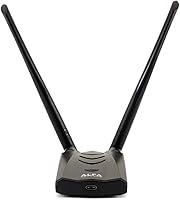
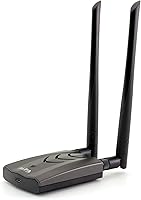
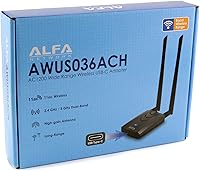
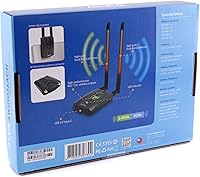
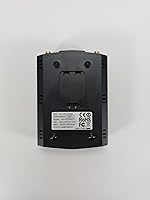
The Alfa AWUS036ACH AC1200 USB Wi-Fi Adapter is built for one purpose: getting a strong, reliable wireless signal where your computer's built-in card simply cannot. It sits firmly in prosumer territory — popular among network engineers, security researchers, and power users who know exactly what they need from an external adapter. The dual-band AC1200 rating and two external antennas set it apart from the cheap dongles cluttering the market. It also offers broad Linux compatibility, which is genuinely rare in this category. One thing to be clear about upfront: this is not a pocket-sized dongle. It is a desk-bound unit with real physical presence.

Features & Benefits

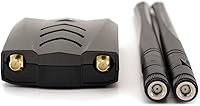
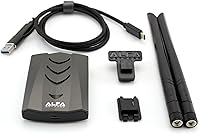
Running on dual-band AC1200, this long-range USB adapter splits traffic across 2.4GHz (up to 300Mbps) and 5GHz (up to 867Mbps), letting you choose the band that actually fits your environment — not just the one your router defaults to. The two detachable 5dBi antennas make a real difference in practice; higher gain means the adapter can pick up weaker signals that a flat internal card would miss entirely. A built-in signal amplifier pushes that reception even further. USB 3.0 keeps throughput from becoming a bottleneck, and a Type-C adapter is included for modern ports. Multi-standard 802.11ac/a/b/g/n support means it works with virtually any router you will encounter.

Best For

The AWUS036ACH earns its keep on desktops where built-in Wi-Fi is either non-existent or unreliable — a common frustration for PC builders. But its biggest following comes from Linux users and security researchers. The chipset supports monitor mode and packet injection, which are essential capabilities for network auditing and tools like Kali Linux. Remote workers dealing with a router two rooms away will also appreciate the range improvement. If you are stuck on a congested 2.4GHz network and want to shift to the cleaner 5GHz band, this dual-band adapter handles that switch without issue. It is purpose-built for people comfortable with a tool that rewards a little technical engagement.

User Feedback

With a 4.5-star average across nearly 3,000 ratings, reception for this long-range USB adapter is broadly positive, particularly among users who switched from weak built-in cards. The Linux community response is notably enthusiastic — drivers are well-documented and the chipset has strong community support. That said, it is not without friction. Several buyers mention that driver setup on certain Linux distributions is not plug-and-play and requires some command-line comfort. Physically, the adapter is bulky by design; it is not something you clip onto a laptop for travel. Mac users should also know that support stops at macOS 10.12 Sierra — anyone on a modern Apple system will hit a wall.

Pros

  • Delivers a meaningful range boost over built-in laptop and desktop Wi-Fi cards, especially at distance.
  • Dual-band support lets you move to the less congested 5GHz band when your 2.4GHz network is sluggish.
  • The two detachable 5dBi antennas provide noticeably stronger signal reception in weak-coverage areas.
  • Linux driver support is well-documented and actively maintained by a large, knowledgeable community.
  • Monitor mode and packet injection support make it a go-to for network security research and auditing tools.
  • USB 3.0 connection prevents the adapter from becoming a throughput bottleneck during heavy data transfers.
  • A Type-C adapter is included, so modern laptops and desktops without standard USB-A ports are covered.
  • Backward-compatible with older 802.11a/b/g/n routers, so it works across a wide range of home setups.
  • Has held a top-200 ranking in its category for years, reflecting sustained buyer satisfaction over time.

Cons

  • macOS support cuts off at Sierra (10.12), leaving users on any newer Apple operating system without driver options.
  • The physical size is substantial — this is not a discreet or portable adapter by any measure.
  • Driver installation on certain Linux distributions requires command-line work and is not plug-and-play.
  • Casual Windows users are paying a premium for capabilities — like monitor mode — they will never actually use.
  • The added bulk means the adapter can block adjacent USB ports depending on your machine's port layout.
  • No official driver support has been added for macOS versions released after 2016, with no updates expected.
  • For users close to their router with a modern built-in card, the real-world speed gains may be hard to notice.

Ratings

The scores below are generated by AI after analyzing thousands of verified global user reviews for the Alfa AWUS036ACH AC1200 USB Wi-Fi Adapter, with spam, bot submissions, and incentivized feedback actively filtered out. Each category reflects the honest distribution of real buyer experiences — strengths and frustrations weighted equally. Where this adapter excels, the scores show it clearly; where it falls short for certain users, that is reflected just as transparently.

Wireless Range
93%
This is the category where the AWUS036ACH consistently earns its reputation. Users in large homes and office spaces report picking up networks that their built-in cards could not detect at all, and maintaining stable connections from rooms far removed from the router. The combination of two 5dBi antennas and a built-in amplifier makes a measurable real-world difference.
A small number of users in extremely dense urban environments report that range gains are less dramatic than expected, likely due to heavy interference from neighboring networks rather than any fault of the adapter itself. Maximum theoretical range also assumes line-of-sight conditions that most indoor setups cannot fully provide.
Linux Compatibility
91%
Few adapters at any price point match this long-range USB adapter for Linux support. The chipset is recognized by major distributions and is one of the most documented wireless chipsets in the security research community. Users running Kali Linux, Parrot OS, and Ubuntu report reliable driver availability and active community maintenance.
The setup process is not always automatic, and users on less common or rolling-release distributions occasionally encounter kernel compatibility issues that require manual driver compilation. For Linux beginners without command-line confidence, the installation can turn into a frustrating multi-hour exercise.
Signal Stability
88%
Once connected, the AWUS036ACH holds its link well. Users working from home offices far from their router describe sustained, consistent connections during video calls and large file transfers — the kind of reliability that cheaper adapters fail to deliver under the same conditions. Switching between bands is also handled cleanly.
A handful of users note occasional disconnection events during extended sessions, which some attribute to driver behavior rather than hardware. These appear to be edge-case issues concentrated on specific OS and driver version combinations rather than a widespread hardware defect.
Dual-Band Performance
86%
The ability to operate on both 2.4GHz and 5GHz gives users genuine flexibility, and the 5GHz band in particular performs well in apartment buildings where the 2.4GHz spectrum is saturated. Users who made the switch from congested 2.4GHz networks describe a noticeable improvement in both speed and connection consistency.
Band switching is not automatic in the way a modern mesh router manages it; users need to manually select the preferred band in their OS network settings. For less technical users, this added step can be confusing, and some report inadvertently staying on the slower band without realizing it.
Driver Installation (Windows)
84%
On Windows 10, the installation experience is largely painless. Most users report that the OS detects the adapter quickly, and ALFA provides downloadable drivers on their website as a reliable fallback. The overall process rarely takes more than a few minutes for Windows users, which reflects well in feedback from that demographic.
Windows 7 and 8.1 users encounter a slightly more manual process, and a few users report that automatic Windows Update drivers occasionally conflict with ALFA's recommended drivers, requiring a clean reinstall to resolve. These issues are infrequent but not rare enough to ignore.
Build Quality
79%
21%
The adapter feels solid and purposefully constructed. The antenna connectors are firm, the casing has no flex or rattle, and the unit sits stably on a desk without tipping. Users who have owned the adapter for several years report no degradation in physical condition, which suggests the materials hold up well over time.
The housing is utilitarian plastic that does not feel particularly premium given the price point. The USB cable connecting the adapter to the port is functional but not especially robust, and a few long-term users report fraying at the connector end after extended daily use.
Ease of Setup
67%
33%
For Windows users and experienced Linux users, the setup process is manageable and well-documented. ALFA provides a driver disc and downloadable resources, and the wider community has produced extensive guides covering most common OS and distro configurations. Prepared users rarely hit a wall they cannot get past.
Casual users expecting a true plug-and-play experience may be caught off guard. macOS users on Sierra and older have a workable but dated experience, and newcomers to Linux often underestimate the steps involved. The setup friction is a recurring theme in lower-star reviews and is worth factoring into your purchase decision.
macOS Compatibility
41%
59%
For users still running macOS 10.12 Sierra or earlier, the adapter works as advertised. Drivers were functional and stable during the supported macOS era, and users in that window report no significant issues with connectivity or performance on Apple hardware.
Support officially ends at macOS 10.12 Sierra — a version that dates back to 2016 — and there are no official drivers for Mojave, Catalina, Big Sur, Monterey, Ventura, or Sonoma. This is a hard dealbreaker for the vast majority of current Mac users, and it is the single most common source of negative reviews on the product.
Portability
38%
62%
The adapter is not designed for portability, but for its intended desktop use case, the size is justified. The physical footprint accommodates the dual-antenna design and internal amplifier components that make the range performance possible, so the trade-off is at least logical.
At 9.1 ounces and over five inches across, this is simply not a travel adapter. Users who purchased it hoping to use it with a laptop on the go almost universally regret the decision. It is bulky, conspicuous, and occupies significant desk real estate — a consistent complaint from buyers who underestimated the dimensions.
Value for Money
74%
26%
For the specific users this adapter is built for — Linux power users, security researchers, and desktop users with genuine range problems — the price reflects a specialized, high-performing tool that delivers on its core promises. The long product lifespan and sustained community support add to the overall value calculation.
For everyday users who just want a simple Wi-Fi upgrade, the price is hard to justify against smaller, cheaper alternatives that cover basic needs without the complexity. The value equation only makes sense if you are actively using the capabilities that set this adapter apart.
Antenna Design
87%
The detachable RP-SMA antennas are a practical feature that goes beyond aesthetics. Users can reposition them to optimize signal direction, and the standard connector type means upgrading to higher-gain aftermarket antennas is straightforward for those who want to push range even further.
The antennas add meaningful height to the overall unit, which can create clearance issues under desks or in tight setups. A small number of users also report that the connector threads feel slightly loose on one antenna out of the box, though this does not appear to consistently affect performance.
USB 3.0 Throughput
82%
18%
The USB 3.0 interface ensures the connection between the adapter and the host machine does not become a speed bottleneck, which is a real concern with USB 2.0-based adapters at AC speeds. Users transferring large files over the 5GHz band report that throughput feels consistent and does not degrade under sustained load.
The USB 3.0 advantage is only realized when plugged into a USB 3.0 port, and users who plug into older USB 2.0 ports — common on budget desktops and older laptops — will see the connection cap at USB 2.0 speeds. This is an easy oversight that catches some buyers by surprise.
Community Support
92%
The AWUS036ACH has one of the strongest community support ecosystems of any USB wireless adapter on the market. Forums, GitHub repositories, and YouTube tutorials covering driver installation, monitor mode configuration, and troubleshooting are abundant and actively maintained. For users willing to engage with that ecosystem, help is rarely far away.
Relying on community support is not the same as having official vendor support, and ALFA's own customer service documentation has not kept pace with newer operating systems. Users on cutting-edge Linux kernels occasionally find that community fixes lag behind kernel updates by weeks or more.
Long-Term Reliability
81%
19%
Buyers who have owned this dual-band adapter for two to four years frequently return to leave updated reviews praising its continued performance. The hardware itself ages well, and the lack of a manufacturer discontinuation notice suggests ongoing production and support intentions from ALFA Network.
Driver longevity is less certain than hardware longevity. As operating systems evolve, the gap between what ALFA officially supports and what users actually need continues to widen — particularly on macOS, where the adapter has effectively become incompatible with the current installed base of Apple machines.

Suitable for:

The Alfa AWUS036ACH AC1200 USB Wi-Fi Adapter is the right tool for anyone whose current wireless setup consistently lets them down due to distance, interference, or a weak built-in card. Desktop PC builders who skipped a Wi-Fi card entirely will find it a straightforward and capable fix. Remote workers sitting far from their router — think a home office at the opposite end of the house — will notice a genuine improvement in signal stability rather than just marginal gains. It has earned an especially strong following among Linux users and security researchers, largely because the chipset supports monitor mode and packet injection, features that many competing adapters simply do not offer. If you work with tools like Kali Linux or conduct network auditing, this adapter is one of the most consistently recommended options in the community for good reason.

Not suitable for:

The Alfa AWUS036ACH AC1200 USB Wi-Fi Adapter is not the right choice for everyone, and it is worth being honest about where it falls short before you buy. At over five inches square and weighing more than nine ounces, this is a desk-bound unit — anyone hoping to toss it in a laptop bag for travel will find it impractical and cumbersome. macOS users should pay close attention to the OS compatibility ceiling: support stops at macOS 10.12 Sierra, meaning anyone running a modern Apple system will get no official driver support at all. Casual users who just want to plug something in and have it work without any configuration effort may also find the setup process on certain Linux distributions more involved than expected. If your needs are simple — browsing, streaming, occasional video calls on a Windows machine close to your router — a smaller, cheaper adapter would likely serve you just as well without the added bulk.

Specifications

  • Brand: Manufactured by ALFA Network, a company specializing in long-range wireless networking equipment.
  • Model: The chipset and model designation is AWUS036ACH, which is widely referenced in networking and security communities.
  • Wi-Fi Standards: Supports 802.11ac, 802.11a, 802.11b, 802.11g, and 802.11n for broad router compatibility across generations.
  • Frequency Bands: Operates on both 2.4GHz and 5GHz bands, giving users the flexibility to connect on whichever band performs better.
  • Max Data Rate: Delivers up to 867Mbps on the 5GHz band and up to 300Mbps on the 2.4GHz band.
  • Interface: Uses a USB 3.0 connection and includes a Type-C adapter for compatibility with modern ports.
  • Antennas: Comes with two detachable 5dBi high-gain external antennas that can be repositioned for optimal signal reception.
  • Signal Amplifier: Includes a built-in signal amplifier to extend reception range beyond what passive antenna designs typically achieve.
  • Dimensions: Measures 5.51″ x 5.51″ x 2.36″, making it a desktop-sized unit rather than a compact dongle.
  • Weight: Weighs 9.1 ounces, which reflects its robust construction and external antenna design.
  • OS Support: Compatible with Windows XP through Windows 10, macOS 10.4 through 10.12 Sierra, and a range of Linux distributions.
  • Linux Support: The chipset supports monitor mode and packet injection under Linux, which are critical functions for network security tools.
  • Backward Compatibility: Multi-standard support ensures the adapter works with older 802.11a/b/g/n routers in addition to modern AC routers.
  • BSR Ranking: Ranked #169 in the USB Computer Network Adapters category on Amazon at time of review.
  • User Rating: Holds an average rating of 4.5 out of 5 stars based on approximately 2,969 verified ratings.
  • Release Date: First made available in May 2015 and has remained in active production since, with no discontinuation announced.
  • GTIN: The Global Trade Identification Number for this unit is 04718050302222.
  • Compatible Devices: Designed for use with desktop computers, laptops, and tablets that support USB connectivity.

Related Reviews
Alfa Network AWUS036ACS AC600 USB Wi-Fi Adapter
78%
93%
Linux Compatibility
74%
Windows Compatibility
31%
macOS Compatibility
84%
Signal Strength & Range
77%
Ease of Setup
More
Cudy TR1200 AC1200 Pocket-Sized Wi-Fi Travel Router
85%
93%
Portability & Size
87%
Wi-Fi Performance
91%
Ease of Use
85%
Setup & Installation
90%
VPN & Security Features
More
RIVA Arena
RIVA Arena
76%
84%
Sound Quality
68%
Bass Performance
89%
Multiroom & Ecosystem Integration
61%
Setup & App Experience
91%
Streaming Platform Support
More
RIVA Concert Wi-Fi Bluetooth Smart Hi-Fi Speaker
85%
93%
Sound Quality
85%
Alexa Integration
88%
Connectivity Options
90%
Ease of Setup
87%
Multiroom Audio Compatibility
More
BrosTrend AC3L AC1200 Linux USB WiFi Adapter
75%
88%
Linux Compatibility
63%
Driver Installation Experience
83%
5GHz Signal Stability
81%
Antenna Range & Performance
71%
Windows Plug-and-Play
More
WAVLINK AX1800 USB WiFi Adapter
72%
83%
Wireless Speed
79%
Signal Stability
88%
Antenna Design & Placement
71%
Setup & Installation
77%
Multi-Device Performance
More
Synology RT2600ac Wi-Fi Router
85%
88%
Performance
91%
Wi-Fi Speed & Coverage
80%
Setup & Installation
90%
Security Features
84%
Ease of Use
More
Shure X2u XLR-to-USB Audio Interface
82%
88%
Audio Quality
93%
Ease of Setup
91%
Phantom Power
82%
Preamp Quality
89%
Zero-Latency Monitoring
More
YFDSPSM Mini Projector with Wi-Fi and Bluetooth
83%
84%
Image Quality
91%
Ease of Setup
95%
Portability
89%
Wi-Fi & Bluetooth Connectivity
88%
Projection Angle Flexibility
More
WAVLINK AX5400 WiFi 6E USB Adapter
71%
88%
Ease of Setup
71%
Wireless Speed Performance
83%
6GHz Band Access
67%
Build Quality & Antenna Design
74%
Network Stability
More

FAQ

Not entirely out of the box, but it is one of the most compatible adapters available for Kali Linux. The chipset supports monitor mode and packet injection, which are essential for most wireless security tools. You may need to install drivers manually depending on your kernel version, but documentation and community guides are widely available and the process is well-trodden territory for Linux users.

No — and this is a firm limitation worth knowing before you buy. The Alfa AWUS036ACH AC1200 USB Wi-Fi Adapter officially supports macOS only up to version 10.12 Sierra, which was released in 2016. There are no official drivers for any newer macOS versions, and community workarounds are unreliable. Mac users on anything newer than Sierra should look elsewhere.

Yes. The adapter connects via USB 3.0, and a Type-C adapter is included in the box, so you can plug it directly into a USB-C port without buying anything extra. Just be aware that the adapter itself is physically large, so it may stick out noticeably from a slim laptop.

It depends on your starting point, but users with weak built-in adapters typically report a noticeable difference — picking up networks that were previously invisible or connecting more reliably from rooms far from the router. The two 5dBi antennas and the built-in amplifier both contribute to this. That said, it is not magic; walls, interference, and router quality all still play a role.

It works fine for everyday tasks, but you would be paying for capabilities you do not need if that is all you plan to do. This long-range USB adapter is built for users who need extended range, dual-band flexibility, or Linux monitor mode support. For casual home use near a router, a smaller and cheaper adapter would do the job without the added bulk.

Yes, both antennas are fully detachable and use a standard RP-SMA connector. This means you can replace them with higher-gain aftermarket antennas if you want to push the range even further, which is a useful option for more advanced setups.

Potentially, yes. The adapter's base is over five inches wide, and depending on how your USB ports are spaced, it could obstruct neighboring ports. It is worth checking your PC or hub layout before assuming all your ports will remain accessible with this plugged in.

Yes, the AWUS036ACH supports both 2.4GHz and 5GHz bands. The 5GHz band tops out at 867Mbps and is generally less congested than 2.4GHz, which tends to be crowded in apartment buildings or dense neighborhoods. If your router supports 5GHz and you are in range, connecting on that band usually means faster, more stable speeds.

On Windows 10, most users find the installation straightforward. Windows will often detect the adapter and install a working driver automatically, though ALFA also provides drivers on their website if needed. The more involved setup experiences reported by users tend to be on specific Linux distributions, not Windows.

For most of its intended use cases, yes. The underlying chipset remains highly capable for dual-band wireless, and its Linux driver support and monitor mode functionality have not been superseded by many newer alternatives at a comparable price point. It is not cutting-edge hardware, but it is proven, reliable, and still actively sold — which says something about its staying power in a competitive category.

Where to Buy