Overview

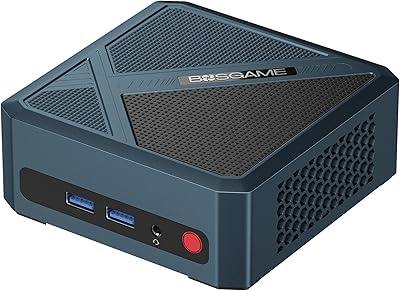
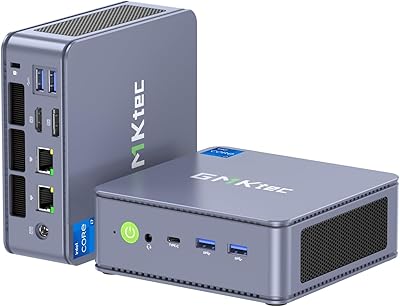
The BOSGAME P2 Mini PC (Intel Core i5-12600H, 32GB RAM, 512GB SSD) is a surprisingly capable little box that fits in the palm of your hand yet replaces a full desktop for most everyday workloads. At just 5.1 x 5.0 x 1.8 inches and barely over a pound, it disappears behind a monitor or tucks into a bag without fuss. What makes it stand out at this price tier is the combination of a 12th-gen hybrid processor, 32GB of RAM, and a 512GB NVMe drive shipped ready to use — no penny-pinching on base specs. It also drives three 4K displays simultaneously, which is genuinely unusual for something this compact.
Features & Benefits

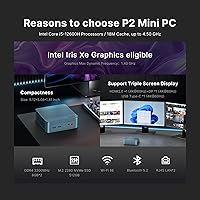
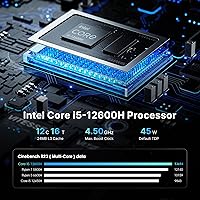
Intel's i5-12600H is where this mini PC earns its keep. The chip splits workload between four performance cores and eight efficiency cores, so it handles a browser loaded with tabs, a video call, and a background download without breaking a sweat. Dual-fan cooling keeps the chassis from getting uncomfortably warm even during longer stretches of active use, and fan noise stays low under moderate loads. Two M.2 slots and two SO-DIMM slots mean you can double the storage or push RAM to 64GB down the road. The dual 2.5GbE LAN ports are a genuine differentiator — handy for home lab setups or anyone running a lightweight server. The USB-C port handles display, data, and power delivery together, which tidies up the back of a desk noticeably.

Best For

The BOSGAME P2 fits a specific kind of buyer well. Remote workers who need multi-monitor productivity without a tower cluttering the floor will find it a natural fit. Students and teachers dealing with video calls, documents, and light media editing get enough performance without overpaying. Home lab tinkerers will appreciate the dual LAN and Linux compatibility for running lightweight network services or a small NAS. Retro gaming and emulation work reasonably well thanks to the Intel Iris Xe graphics, though anyone expecting modern 3D titles should look elsewhere — there is no discrete GPU. If your primary goal is reclaiming desk space while keeping solid everyday performance, this compact desktop delivers.

User Feedback

Buyers broadly report that boot times are fast and day-to-day responsiveness feels snappy for office work and browsing. The setup experience earns consistent praise — most people have it running within minutes of unboxing. Where things get more nuanced is under sustained load; a minority of reviewers note the fans spin audibly faster during extended video encoding or large file transfers. Linux users report mostly positive results, though some needed minor driver adjustments after install. Long-term reliability data is still limited given how recently the brand entered the market, so the one-year warranty and 24/7 support carry real weight here. Value for specs remains the single most repeated positive across buyer reviews.

Pros

  • Ships with 32GB RAM and a 512GB NVMe SSD — no immediate upgrade tax required.
  • Triple 4K display output from a box smaller than a paperback book is genuinely uncommon at this price.
  • Dual 2.5GbE LAN ports open practical home server and network appliance use cases most rivals skip.
  • RAM and storage are both user-upgradeable, giving the BOSGAME P2 meaningful long-term flexibility.
  • WiFi 6 and Bluetooth 5.2 handle modern wireless peripherals and fast networks without adapters.
  • Dual-fan cooling keeps everyday workloads quiet and thermals comfortable during normal use.
  • VESA mount included in the box means zero extra cost to hide it behind a monitor.
  • Windows 11 comes pre-installed and activated with minimal bloatware reported by buyers.
  • Wake-on-LAN and Auto Power-On support make it practical for always-on or remote-access setups.
  • Four USB 3.2 Gen 2 ports at 10Gbps each is a generous allocation for a device this small.

Cons

  • Sustained CPU-heavy workloads trigger thermal throttling, pulling real-world performance below peak spec.
  • No discrete GPU means modern 3D gaming and GPU-accelerated creative software are effectively off the table.
  • Brand reliability data is thin — BOSGAME is too new for meaningful long-term failure rate evidence.
  • The power adapter is a separate brick, adding travel bulk for buyers who move this mini PC frequently.
  • Linux setup is not fully plug-and-play; Bluetooth and sleep behavior may need manual driver work.
  • No SD card reader is a friction point for photographers, educators, and content creators.
  • PCIe 3.0 on both M.2 slots means premium NVMe drives will not hit their rated speeds here.
  • Fan noise becomes noticeable during extended encoding or large file transfer sessions.
  • Sparse user manual creates friction for less technical buyers during initial configuration.
  • No built-in audio output beyond a 3.5mm jack — no speakers, no optical, no USB audio by default.

Ratings

The BOSGAME P2 Mini PC (Intel Core i5-12600H, 32GB RAM, 512GB SSD) has been put through its paces by buyers across home offices, classrooms, and home labs worldwide — and our AI has processed those verified reviews carefully, filtering out incentivized and bot-driven submissions to surface what real users actually experience. Scores reflect the full picture, not just the highlights, so genuine strengths and recurring frustrations are both represented transparently here.
Performance for Everyday Tasks
88%
For the kind of work most buyers actually do — spreadsheets, video calls, browser-heavy multitasking, and light media editing — this compact desktop handles everything without hesitation. The 12th-gen hybrid architecture means even a crowded taskbar stays responsive, and boot times consistently land under 15 seconds on the stock SSD.
Push it into heavier workloads like 4K video exports or extended Handbrake encodes and you will notice throttling after sustained periods, since the chassis has thermal limits any small form factor box faces. It is not a workstation replacement for CPU-intensive professionals.
Value for Money
91%
Shipping with 32GB of RAM and a 512GB NVMe drive at this price tier is genuinely rare — most competing mini PCs at similar price points ship with half the memory or slower storage. Buyers repeatedly flag this as the single biggest reason they chose this unit over alternatives.
The value calculus shifts if you need discrete graphics or PCIe 4.0 storage speeds, since neither is available here. Buyers who compare it against budget laptops also point out that you still need to supply a monitor, keyboard, and mouse separately.
Build Quality & Design
74%
26%
The chassis feels solid enough for a desk or VESA-mounted deployment, and the matte plastic exterior resists fingerprints reasonably well. At just over a pound it travels easily, and the port layout on the back and front is thoughtfully arranged so cables do not bunch up awkwardly.
It does not feel premium — flex in the chassis and lightweight plastic construction remind you this is a value-tier device. A handful of buyers reported minor cosmetic inconsistencies out of the box, and the overall finish lacks the machined-metal quality of pricier competitors.
Thermal Management & Noise
76%
24%
Under typical office workloads the dual-fan setup runs quietly enough that most users in normal rooms will not consciously notice it. The automatic fan control ramps up smoothly rather than suddenly surging, which makes the noise profile easier to tolerate during long work sessions.
Sustained heavy loads — like running a Plex transcoder overnight or rendering video — do push the fans into audible territory, and some buyers found the exhaust air notably warm. Thermal throttling under prolonged peak CPU load is a real constraint rather than a theoretical one.
Display & Multi-Monitor Support
86%
Triple 4K output from a sub-two-inch-tall box is a legitimate capability that most buyers in this category do not expect. Running two external monitors plus a TV simultaneously works without driver headaches on Windows 11, and the USB-C port handling display plus data plus power delivery in one cable is a practical desk-tidying win.
The Intel Iris Xe graphics cap becomes visible in GPU-intensive scenarios — color grading in DaVinci Resolve or running a game at native 4K will expose the integrated GPU's limits quickly. Refresh rate ceiling on the DisplayPort output also disappointed a small number of enthusiast buyers.
Connectivity & Port Selection
89%
Four USB 3.2 Gen 2 ports running at 10Gbps each, dual 2.5GbE LAN, WiFi 6, and Bluetooth 5.2 in a five-inch box is a genuinely strong connectivity package. Home lab users specifically praised the dual LAN for running pfSense or setting up isolated network segments without needing a separate adapter.
There is no SD card reader, which matters to photographers and educators who swap cards regularly. A small number of buyers also wished for a Thunderbolt port, though at this price point its absence is understandable rather than surprising.
Upgradeability
83%
Two SO-DIMM slots and two M.2 slots give this mini PC more upgrade headroom than most of its direct competitors. Buyers who added a second NVMe drive or bumped RAM to 64GB reported the process was straightforward with a basic screwdriver and about ten minutes of effort.
The RAM is not soldered, which is great, but the M.2 slots max out at PCIe 3.0 speeds — so upgraders chasing the fastest NVMe drives available today will not unlock their full potential here. Warranty implications of opening the chassis also concerned a portion of buyers.
Setup & Out-of-Box Experience
87%
Most buyers report being up and running within minutes — plug in a monitor, keyboard, and mouse, and Windows 11 walks you through the rest. The included VESA mount and HDMI cable are practical touches that reduce the immediate need for extra accessories.
A few buyers encountered a prolonged Windows update cycle on first boot that stretched the setup process considerably. The included user manual is sparse, which was a friction point for less technically confident users who wanted more guidance.
Linux Compatibility
71%
29%
The listing explicitly advertises Ubuntu and Linux compatibility, and most buyers who tried it report the core system runs well after install. WiFi and LAN connectivity worked without manual intervention on recent Ubuntu and Debian-based distributions for the majority of testers.
Bluetooth and sleep/wake behavior needed driver adjustments on some Linux builds, and the experience is far from guaranteed plug-and-play. Buyers expecting the same effortless Linux experience as on established business-class hardware may need patience and some command-line comfort.
Cooling System Effectiveness
73%
27%
Having a dedicated CPU fan plus a secondary airflow fan is a meaningful design choice that helps the i5-12600H sustain reasonable clock speeds longer than single-fan alternatives in this form factor. Day-to-day temperatures stay within comfortable ranges for office use.
Under peak load the cooling system reaches its limits and thermal throttling kicks in, pulling clock speeds down noticeably. The small chassis simply cannot dissipate heat as efficiently as a larger tower, and this is a physical constraint no firmware update will fully resolve.
Software & OS Experience
78%
22%
Windows 11 comes pre-installed and activated, which removes a common pain point with budget mini PCs that ship with home editions requiring manual upgrades. Buyers found the OS installation clean with minimal pre-loaded bloatware compared to some competitors in this segment.
A small but consistent group of reviewers noted that the included Windows build prompted a significant update batch immediately after first login, adding setup time. Some buyers also flagged unfamiliar BIOS branding that made configuration feel less polished than expected.
Brand Trust & Warranty
67%
33%
BOSGAME backs this mini PC with a one-year manufacturer warranty and advertises 24/7 customer support, which is a reasonable safety net for a lesser-known brand. Several buyers who contacted support reported reasonably prompt responses and helpful guidance for troubleshooting.
BOSGAME is a relatively new entrant in Western markets, and long-term reliability data simply does not exist yet. Buyers accustomed to established brands like ASUS or Minisforum expressed hesitation, and finding independent repair support outside the manufacturer warranty window would be challenging.
Wireless Performance
82%
18%
WiFi 6 delivers noticeably faster and more stable throughput compared to older WiFi 5 mini PCs, especially in environments with many competing devices. Bluetooth 5.2 paired reliably with keyboards, mice, and headphones in buyer testing with minimal dropout reports.
A few buyers in dense apartment buildings or offices noted occasional WiFi instability, though it is difficult to isolate whether this was a unit defect or environmental interference. The antenna placement inside the compact chassis limits range slightly compared to larger desktop adapters.
Audio Output
58%
42%
The 3.5mm audio jack handles headphones and external speakers cleanly with no reported ground hum or interference issues, which is a problem that plagues some budget mini PCs with poorly shielded audio circuits. HDMI and DisplayPort carry audio correctly to compatible monitors.
There are no built-in speakers, which is expected for a unit this size but still a limitation if you occasionally need audio without headphones plugged in. Buyers using USB audio interfaces or higher-end DACs reported no issues, but the onboard audio has no impressive qualities beyond basic functionality.
Portability & Form Factor
85%
At just over a pound and smaller than most hardcover books, this compact desktop genuinely earns its portability credentials. Several buyers use it as a travel machine that slips into a laptop bag alongside a folding keyboard, which is a use case traditional mini towers cannot touch.
The power adapter is a separate brick that adds to travel bulk, and the unit lacks a battery, so it is only as portable as your nearest power outlet allows. The power cable length also drew minor complaints from buyers working in less accessible setups.

Suitable for:

The BOSGAME P2 Mini PC (Intel Core i5-12600H, 32GB RAM, 512GB SSD) is a strong fit for remote workers who want a clean, quiet desk and need to run two or three monitors simultaneously without a tower taking up floor space. Teachers and students will find it more than capable for video conferencing, document work, and light media tasks — and the compact size makes it easy to move between rooms or pack for travel. Home lab enthusiasts will genuinely appreciate the dual 2.5GbE LAN ports, which open up practical options for running a lightweight router, NAS, or network appliance without extra hardware. Retro gaming and emulation fans get a surprisingly capable integrated GPU in a box smaller than most console controllers. Anyone upgrading from an aging desktop who wants to keep a rich port selection — four fast USB ports, WiFi 6, Bluetooth 5.2, and a versatile USB-C — while clearing clutter will find this compact desktop a well-rounded daily driver.
Not suitable for:

The BOSGAME P2 is not the right tool for buyers who need serious graphical horsepower — there is no discrete GPU option, and the Intel Iris Xe graphics will hit a hard ceiling on modern 3D games, GPU-accelerated video rendering, or any task that leans heavily on dedicated VRAM. Content creators working with high-resolution video timelines or large RAW photo libraries will find the PCIe 3.0 storage interface and integrated graphics a bottleneck compared to purpose-built creative workstations. Buyers who demand long-term brand confidence and established repair networks may feel uneasy with a relatively new manufacturer, even with a one-year warranty in place. This mini PC also has no built-in display, speakers, keyboard, or mouse, so total cost of ownership is higher than the unit price alone suggests for buyers starting from scratch. If your workload routinely involves sustained CPU-intensive tasks like compilation, simulation, or encoding, thermal throttling in this chassis will frustrate you over time.

Specifications

  • Processor: Intel Core i5-12600H with 4 performance cores and 8 efficiency cores across 16 threads, base clock 2.7GHz and boost up to 4.5GHz, with 18MB cache.
  • Graphics: Intel Iris Xe Graphics with 80 execution units running up to 1.4GHz — integrated, with no discrete GPU option available.
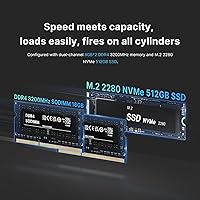
  • Memory: 32GB DDR4-3200MHz RAM installed as two 16GB SO-DIMM modules, expandable to a maximum of 64GB via two accessible SO-DIMM slots.
  • Storage: 512GB M.2 2280 NVMe PCIe 3.0 x4 SSD installed, with a second M.2 slot supporting an additional drive up to 2TB (not included).
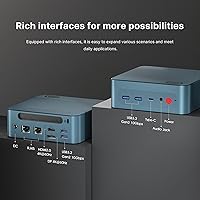
  • Display Output: Supports up to three simultaneous 4K displays via one HDMI 2.0 port, one DisplayPort, and one USB-C port (which also carries data and power delivery).
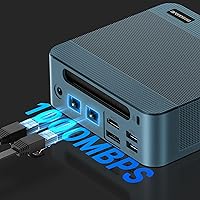
  • Networking: WiFi 6 (802.11ax) and Bluetooth 5.2 for wireless connectivity, plus two 2.5 Gigabit Ethernet LAN ports for wired network use.
  • USB Ports: Four USB 3.2 Gen 2 ports running at 10Gbps each, plus one USB-C port supporting display output, data transfer, and power delivery.
  • Audio: Single 3.5mm combo audio jack for headphones or external speakers; no built-in speakers or optical audio output.
  • Dimensions: 5.1 x 5.0 x 1.8 inches — smaller than most hardcover books and roughly 80% more compact than a standard mid-tower desktop chassis.
  • Weight: Approximately 1.19 pounds for the unit alone, not including the separate power adapter brick.
  • Power Supply: External power adapter with universal input (100–240V, 50/60Hz) and 19V/6.3A DC output, compatible with international wall sockets.
  • Operating System: Windows 11 Home pre-installed and activated; officially compatible with Linux distributions including Ubuntu.
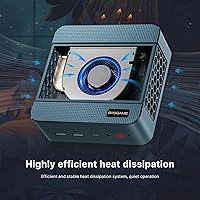
  • Cooling System: Dual active cooling fans — one dedicated to the CPU and one managing internal airflow — with automatic speed adjustment based on workload.
  • Mounting: VESA mount bracket included in the box, allowing the unit to be attached directly to the back of a compatible monitor or display stand.
  • Extra Functions: Supports Wake-on-LAN and Auto Power-On, enabling remote startup and automated boot scheduling without manual intervention.
  • Bluetooth: Bluetooth 5.2 provides stable, low-latency pairing with keyboards, mice, headphones, and other modern wireless peripherals.
  • Package Contents: Includes the mini PC unit, power adapter, VESA mount bracket, one HDMI cable, and a printed user manual.
  • Warranty: One-year manufacturer warranty from BOSGAME, with advertised 24/7 customer support access for troubleshooting and claims.

Related Reviews
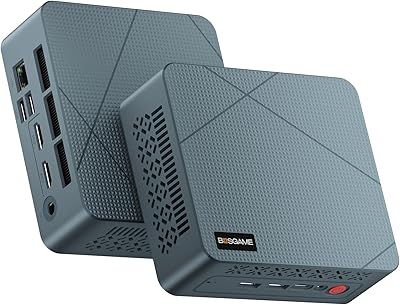
BOSGAME Mini PC E3 (N150, 16GB/512GB)
79%
88%
Value for Money
74%
Processing Performance
91%
Multi-Display Support
89%
Connectivity & Ports
76%
Build Quality & Design
More
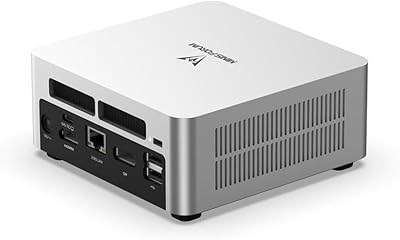
MINISFORUM UN1290 (32GB/512GB)
77%
89%
CPU Performance
63%
Thermal Management
91%
Multi-Monitor Support
86%
RAM & Expandability
84%
Storage Performance
More
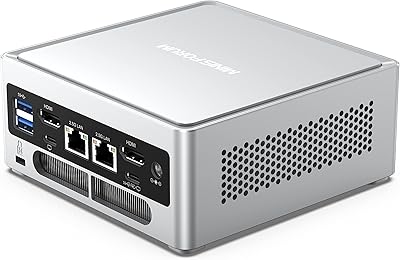
BOSGAME P5 Mini PC with AMD Ryzen 7 6800H, 32GB RAM, 512GB SSD
86%
88%
Performance
85%
Value for Money
94%
Compactness & Size
90%
Multitasking Ability
86%
Cooling & Noise Control
More
Beelink EQi12 Mini PC (i5-1235U, 16GB, 500GB)
80%
83%
Processing Performance
67%
Thermal Management
79%
RAM & Expandability
86%
Storage Speed & Flexibility
88%
Display Output
More
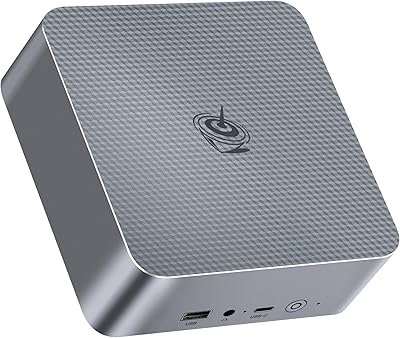
MINISFORUM NAB6 Lite Mini PC Core i5-12600H 16GB RAM 500GB SSD
85%
92%
Performance
87%
Value for Money
88%
Build Quality
90%
Network Connectivity
89%
Multi-Display Setup
More
GMKtec NucBox K10 Mini PC (Intel Core i9-13900HK, 32GB DDR5, 1TB SSD)
79%
88%
CPU Performance
67%
Thermal Management & Cooling
82%
RAM Speed & Capacity
91%
Storage Performance
89%
Multi-Monitor Support
More
Beelink SEI14 Mini PC with Intel Core Ultra 9 185H, 32GB RAM, 1TB SSD
86%
92%
Performance
87%
Build Quality
94%
Usability & Setup
88%
Display Support
85%
Connectivity
More
Beelink EQI13 PRO Mini PC, Intel Core i7-13620H, 32GB RAM, 500GB SSD
87%
88%
Performance
91%
Multitasking
84%
Build Quality
93%
Connectivity
89%
Display Quality
More
GMKtec NucBox K7 Plus 32GB/2TB
80%
88%
Processing Performance
63%
Thermal Management & Cooling
91%
Memory & Storage Configuration
94%
Networking — Dual 2.5G LAN
84%
Display Output & Multi-Monitor Support
More
GMKtec M3 Ultra Mini PC with Intel Core i7-12700H, 32GB RAM, 1TB SSD
86%
88%
Overall Performance
91%
Multitasking & Processing Power
78%
Graphics Performance
84%
Build Quality & Design
93%
Ease of Setup
More

FAQ

Yes, and it works as advertised. You connect displays via the HDMI 2.0 port, the DisplayPort, and the USB-C port simultaneously. All three can output at 4K resolution. Just keep in mind that driving three 4K screens puts a real load on the integrated graphics, so this setup is best suited for productivity work rather than video playback on all three displays at once.

Neither is soldered, which is one of the genuine advantages of the BOSGAME P2 over many competing mini PCs. The two SO-DIMM slots are accessible after removing the bottom panel, and you can push RAM up to 64GB. The second M.2 slot accepts an additional NVMe drive up to 2TB, so storage expansion is straightforward too.

For typical office tasks — browsing, video calls, documents — most users describe the fan noise as barely noticeable. It ramps up under heavier loads like video encoding or large file transfers, and at peak it becomes audible but not distracting in a normal room. If you work in a very quiet environment, you may notice it during intensive tasks.

It runs Linux reasonably well, but it is not entirely plug-and-play. Most buyers report that Ubuntu and Debian-based distributions install without major issues, and wired and WiFi networking typically work out of the box. Bluetooth and sleep/wake behavior sometimes need manual driver attention, so if Linux is your primary OS, budget a little time for initial configuration.

You will need a monitor, keyboard, and mouse at minimum — none are included. The box does include an HDMI cable and VESA mount, which is a nice touch. If you plan to use the USB-C port for display output, make sure your monitor supports USB-C or DisplayPort Alt Mode, or you will need an adapter.

It handles retro gaming and emulation quite well. The Intel Iris Xe graphics are capable enough for emulating consoles up through the PS2 and GameCube era smoothly, and lighter PS3 or Wii U titles are manageable. Do not expect it to run modern AAA titles at playable frame rates — there is no discrete GPU, and that ceiling is real.

Yes, and this is one of the more practical features of this compact desktop for home lab users. You can connect both ports to separate networks simultaneously, which makes it useful for running a lightweight router, a pfSense instance, or an isolated lab segment without needing a USB adapter. It is a feature you rarely see at this price point.

This is genuinely one of its strongest use cases. Video conferencing, browser tabs, office applications, and cloud tools all run without hesitation, and the system stays quiet during the kind of mixed workloads a typical remote work day involves. The multi-monitor support is a real productivity boost if you work across several windows or applications.

BOSGAME offers a one-year manufacturer warranty and advertises 24/7 customer support. Buyer feedback on support responsiveness is mixed but generally positive for basic troubleshooting requests. The main caveat is that this is a newer brand without a broad independent repair network, so if something fails outside the warranty window, your options beyond the manufacturer are limited.

Almost certainly yes. The four USB 3.2 ports handle standard keyboards, mice, and hubs without issue, and the HDMI, DisplayPort, and USB-C outputs cover the vast majority of modern monitors. Bluetooth 5.2 pairs reliably with wireless peripherals. The only common friction point is if you have older USB-A-only devices and need all four ports simultaneously — a basic hub resolves that easily.