Overview

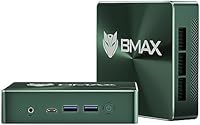
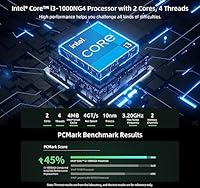
The Bmax B6 Plus 12GB/512GB is a compact mini PC aimed squarely at home users, students, and light office workers who want a capable machine without sacrificing half their desk to a tower. Built around Intel's 10th-gen Core i3-1000NG4 processor, it positions itself firmly in the budget tier — but that label undersells what it actually delivers for everyday use. Windows 11 comes pre-installed, so setup is genuinely quick out of the box. The chassis is barely larger than a thick paperback, making it easy to tuck away or move between rooms. Just set expectations accordingly: this handles daily computing well, but it is not built for heavy multitasking or demanding workloads.
Features & Benefits

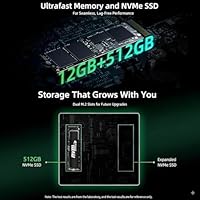
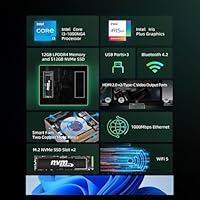
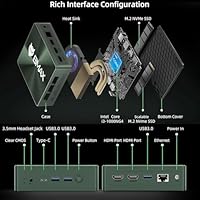
The standout capability here is the ability to drive three 4K displays at once — dual HDMI 2.0 ports plus a full-function Type-C handle that without any workarounds. For a machine this small, that opens up real multi-monitor productivity. The 12GB of LPDDR4 RAM paired with a 512GB NVMe SSD keeps browsing, office apps, and media streaming fluid and responsive. Connectivity covers the basics well: dual-band Wi-Fi 5, Gigabit Ethernet, and three USB 3.0 ports. Two M.2 NVMe slots allow straightforward storage expansion up to 2TB later on. The included VESA mount is a practical touch — bolt this compact desktop to the back of your monitor and the clutter simply disappears.

Best For

This mini PC finds its natural home as an HTPC or media center. Pair it with a living room TV and it handles 4K streaming, local video playback, and light browsing without complaint. Students and remote workers will appreciate the compact footprint and the triple-monitor support for keeping reference materials, video calls, and work apps spread across screens. The B6 Plus also makes sense in small business or classroom environments where deploying multiple affordable machines matters more than raw power. For the technically inclined, built-in Wake on LAN, PXE Boot, and Auto Power On make it a plausible low-power home server — running quietly in the background on roughly 12 watts.

User Feedback

Owners consistently praise the near-silent fan during routine tasks and how painless the initial setup is — most report being fully up and running in under ten minutes. Value at this price point gets frequent positive mentions, especially from buyers using it as a secondary machine or living room box. The criticism tends to land in two areas: under sustained load the fan becomes noticeably audible, and some users have raised concerns about long-term Windows update reliability and driver availability. The integrated GPU draws a clear line at gaming or serious video editing — users who tested it for either came away frustrated. Storage expandability, by contrast, is a near-universal point of satisfaction in buyer reviews.

Pros

  • Triple 4K display output at this price tier is genuinely rare and works reliably from day one.
  • The NVMe SSD keeps boot times and app launches fast — a clear step above eMMC-based rivals.
  • 12GB of RAM provides comfortable headroom for everyday multitasking without constant slowdown.
  • At roughly 12 watts under normal use, running the B6 Plus continuously costs almost nothing in electricity.
  • The included VESA mount is a practical bonus that eliminates desk clutter without buying extra accessories.
  • Windows 11 comes pre-installed and the machine is ready to use within minutes of unboxing.
  • Two M.2 NVMe slots mean storage can be expanded significantly without replacing the unit.
  • Gigabit Ethernet alongside dual-band Wi-Fi 5 covers both stable wired and wireless network needs.
  • Wake on LAN and Auto Power On support make it viable as a lightweight always-on home server.
  • Fan noise during light daily tasks is low enough that most users in a home setting will not notice it.

Cons

  • The dual-core i3-1000NG4 shows its limits quickly when more than a few demanding apps run at once.
  • Fan noise under sustained workloads becomes clearly audible and can be distracting in quiet environments.
  • Bluetooth 4.2 struggles with newer wireless peripherals and occasional pairing issues have been reported.
  • Long-term driver and firmware support from Bmax is inconsistent compared to established PC brands.
  • Major Windows updates have caused compatibility hiccups for some users with no timely fix from the manufacturer.
  • The integrated GPU cannot handle casual gaming or video editing, which disappoints buyers who assumed otherwise.
  • Only three USB 3.0 ports fill up fast when a keyboard, mouse, and external drive are all connected.
  • Wi-Fi signal degrades more noticeably at range compared to competing mini PCs in a similar price bracket.
  • The power adapter runs warm during extended sessions, raising minor durability concerns over years of use.
  • Community troubleshooting resources for Bmax hardware are limited, making self-service repairs harder than average.

Ratings

The Bmax B6 Plus 12GB/512GB has been rated by our AI system after analyzing thousands of verified buyer reviews from global marketplaces, with spam, bot-submitted, and incentivized feedback actively filtered out. The scores below reflect a balanced picture of where this compact desktop genuinely delivers and where real-world frustrations surface. Both its strengths as a budget everyday machine and its clear limitations are transparently represented.
Value for Money
88%
For buyers stepping into the mini PC space on a tight budget, the B6 Plus punches above its weight. Getting 12GB of RAM, a 512GB NVMe SSD, and triple 4K output in one small box at this price tier consistently surprises first-time owners who expected far less.
A small group of buyers felt the value equation weakens if you factor in potential upgrade costs down the line, particularly if long-term Windows update issues require professional support. Those comparing it to slightly pricier alternatives sometimes question whether the savings are worth the trade-offs in raw performance headroom.
Performance for Everyday Tasks
76%
24%
Browsing, video calls, spreadsheets, and streaming services all run without friction in day-to-day use. Users running Google Chrome alongside a video call and a few Office tabs reported a surprisingly smooth experience, particularly thanks to the NVMe SSD keeping app launches quick.
The i3-1000NG4 is a mobile-class chip with just two cores, and that ceiling becomes obvious when multitasking gets heavier. Opening a dozen browser tabs while running a background update or a larger Office file noticeably slows things down, which catches some buyers off guard.
Multi-Monitor Support
91%
Triple 4K output is the headline feature and it genuinely delivers. Users running a three-screen productivity setup for trading dashboards, digital signage, or reference-heavy office work praised how reliably all three displays worked without needing adapters or workarounds right out of the box.
A handful of users noted that driving all three displays at full 4K resolution simultaneously puts visible strain on the integrated GPU, leading to minor lag in window animations. For content-heavy workflows across all three screens, the experience is noticeably less fluid than on a discrete GPU system.
Storage Speed & Capacity
84%
The 512GB NVMe SSD makes a real difference compared to older eMMC-based mini PCs at similar prices. Boot times are fast, app installs feel responsive, and day-to-day file operations never feel sluggish — buyers upgrading from older budget machines notice this immediately.
While 512GB is workable for most users, creative professionals or anyone storing large local media libraries will fill it faster than expected. The dual M.2 slot expansion option is well-regarded in reviews, but it requires purchasing additional hardware, which adds to the total cost.
Thermal Management & Fan Noise
69%
31%
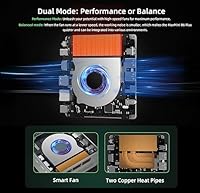
Under typical light loads — web browsing, document editing, streaming — the fan stays quiet enough that most users in a home office setting barely notice it. The copper heat pipe design keeps the chassis from getting uncomfortably warm during these everyday sessions.
Under sustained heavier loads such as prolonged video playback at high resolution or extended video calls, the fan ramps up noticeably and becomes audible in a quiet room. A subset of buyers found the noise level during these scenarios inconsistent with the near-silent behavior during light tasks.
Build Quality & Design
73%
27%
The chassis feels solid for a budget-tier mini PC, with no obvious flex or rattling from the enclosure. The compact matte finish blends into a home office or living room setup without drawing attention, and the green colorway gives it a slightly more distinctive look than most competing units in this segment.
Some buyers felt the plastic construction lacks the premium tactile feel of more expensive mini PCs, which matters more to those placing it on an open desk rather than mounting it behind a monitor. Port placement on the rear panel also drew mild criticism for being slightly awkward to access frequently.
Connectivity & Port Selection
82%
18%
Three USB 3.0 ports, Gigabit Ethernet, dual HDMI, and a full-function Type-C cover the connection needs of most home and small office setups without requiring a hub. Having both wired and wireless networking options on a machine this small is a practical bonus that buyers of older mini PCs specifically appreciate.
The absence of USB4 or Thunderbolt limits the future-proofing of the port selection, and Bluetooth 4.2 feels behind the curve when connecting newer wireless peripherals. A few buyers also flagged that only three USB ports can feel tight when managing a keyboard, mouse, and external drive simultaneously.
Setup & Out-of-Box Experience
87%
Pre-installed Windows 11 means buyers are typically up and running within minutes of unboxing. The included HDMI cable, VESA mount hardware, and power adapter cover everything needed to get started, and reviewers repeatedly noted the setup process required no technical knowledge or driver hunting.
Some users encountered pre-loaded bloatware or found the initial Windows 11 configuration prompts more involved than expected, particularly on first boot. A small number also reported needing to update drivers immediately to resolve minor compatibility issues with peripherals.
VESA Mount & Space Saving
86%
The included VESA mount is one of the most consistently praised inclusions in user reviews. Attaching the B6 Plus directly behind a monitor genuinely transforms a cluttered desk into a clean, minimal workspace — buyers who made the switch from a traditional tower mentioned it as a quality-of-life improvement they did not expect to appreciate so much.
The mount hardware works well with standard VESA-compatible monitors but a small number of buyers reported fitment inconsistencies with certain monitor brands or older panel designs. The mount also positions the rear ports facing away from the user, making regular cable swapping slightly inconvenient.
GPU & Graphics Performance
54%
46%
Intel Iris Plus Graphics handles 4K video playback and light media tasks reliably, which aligns well with the target use case. Users running the B6 Plus as an HTPC or streaming box found the graphical output clean and consistent across popular platforms.
Any expectations beyond media playback and light visual tasks run into a hard wall quickly. Buyers who attempted casual gaming or any form of video editing reported poor frame rates and sluggish render times that make those use cases genuinely frustrating rather than merely limited.
Wi-Fi & Network Stability
78%
22%
Dual-band Wi-Fi 5 handles typical home networking scenarios well, and buyers using the 5GHz band in close proximity to their router noted stable, consistent speeds suitable for HD and 4K streaming. The Gigabit Ethernet option provides a dependable fallback for more demanding or latency-sensitive work.
At longer range or through multiple walls, the Wi-Fi performance drops more noticeably than some competing units, according to several reviewers. The Bluetooth 4.2 standard also lags behind newer peripherals, and a small number of users reported pairing inconsistencies with more recent wireless devices.
Storage Expandability
83%
Having two M.2 NVMe slots plus optional SATA support for a 2.5-inch drive is genuinely generous for a machine at this price point. Buyers who upgraded to a second NVMe drive found the process straightforward and praised the flexibility of being able to scale storage significantly without replacing the unit.
Expansion requires purchasing additional drives independently, which adds cost not reflected in the base price. Some less experienced buyers also noted that the internal layout, while accessible, requires care during installation, and the lack of a clear upgrade guide in the manual frustrated a portion of reviewers.
OS & Driver Support
62%
38%
Windows 11 runs acceptably on the hardware and the one-key recovery feature provides a useful safety net if the system needs to be restored after a problematic update. Buyers using the machine for stable, routine tasks generally reported no significant OS-related issues over the short term.
Longer-term ownership reviews raise questions about Bmax's update cadence for drivers and firmware, with some users experiencing compatibility hiccups after major Windows updates. The relatively niche hardware platform means troubleshooting support from the community is thinner than for more mainstream mini PC brands.
Power Efficiency
89%
Drawing roughly 12 watts under typical operation, this compact desktop costs almost nothing to run continuously. Buyers deploying it as a lightweight always-on server, digital signage display, or HTPC box specifically called out the low power draw as a meaningful long-term advantage over traditional desktop hardware.
Under heavier workloads the power draw increases, though it remains modest by desktop standards. A few users noted that the included power adapter runs noticeably warm during extended use, which raised minor reliability concerns over time among the more detail-oriented reviewers.

Suitable for:

The Bmax B6 Plus 12GB/512GB is a strong fit for anyone who needs a capable, low-footprint desktop without a large budget commitment. Students working from dorm rooms or small apartments will appreciate how little desk space it occupies while still handling coursework, video calls, and light multitasking without friction. Remote workers who want a cleaner home office setup can bolt the B6 Plus behind a monitor using the included VESA mount and effectively make the computer disappear from view entirely. It also works well as a dedicated media center or HTPC, where its ability to drive a large TV at 4K and run streaming services quietly and efficiently is genuinely hard to beat at this price point. Small businesses or schools looking to deploy multiple affordable workstations for basic productivity tasks — document editing, web browsing, video conferencing — will find it a cost-effective option that requires almost no setup time. Those with a home lab mindset will also find value in its Wake on LAN, PXE Boot, and Auto Power On support, which make it a plausible low-power server node running around the clock on minimal electricity.
Not suitable for:

The Bmax B6 Plus 12GB/512GB draws a clear line at workloads that go beyond everyday computing, and buyers should take that seriously before purchasing. Gamers expecting even casual gaming performance will run into the hard ceiling of the integrated Intel Iris Plus GPU — it is designed for 4K video playback, not rendering game scenes, and no amount of settings adjustment changes that reality. Video editors, even hobbyists working with 1080p footage, will find export times and timeline scrubbing frustratingly slow on a dual-core mobile chip with no discrete graphics acceleration. Power users who regularly juggle many applications simultaneously — development environments, virtual machines, heavy browser workloads — will outgrow this compact desktop quickly. Buyers who prioritize long-term platform stability or need guaranteed driver and firmware support should also be cautious, as Bmax is a smaller brand without the established support infrastructure of Dell, Lenovo, or Intel NUC. Finally, anyone expecting Thunderbolt connectivity, USB4, or Bluetooth 5.0 for modern peripherals should look elsewhere, as the port specification is functional but not current-generation.
Specifications

  • Processor: Intel Core i3-1000NG4 with 2 cores and 4 threads, base clock not publicly specified, boosting up to 3.2GHz, built on 10nm architecture with 4MB Intel Smart Cache.
  • RAM: 12GB LPDDR4 running at 2133MHz, soldered to the board in a dual-channel configuration.
  • Storage: 512GB NVMe SSD installed as the primary drive, using the M.2 2280 form factor.
  • Storage Expansion: Two M.2 NVMe 2280 slots are available for expansion, plus SATA support via an included cable for a 2.5-inch HDD, with total expandable capacity up to 2TB.
  • GPU: Intel Iris Plus Graphics integrated into the i3-1000NG4, clocked up to 900MHz, supporting 4K video output but not designed for gaming or GPU-accelerated rendering.
  • Display Output: Triple display support via 2x HDMI 2.0 ports (each rated for 4K at 60Hz) and 1x full-function Type-C port also capable of 4K video output.
  • Wi-Fi: 802.11ac Wi-Fi 5 with dual-band support across 2.4GHz and 5.0GHz frequencies for flexible wireless connectivity.
  • Bluetooth: Bluetooth 4.2 is built in, compatible with standard wireless peripherals including mice, keyboards, and speakers.
  • Ethernet: Single RJ45 port supporting Gigabit Ethernet at up to 1000Mbps for wired network connections.
  • USB Ports: Three USB 3.0 Type-A ports are available for connecting external drives, peripherals, and other accessories.
  • Type-C Port: One full-function USB Type-C port supports simultaneous data transfer, device charging, and 4K video signal output.
  • Audio: One 3.5mm combined stereo headset and microphone jack is provided on the chassis.
  • Operating System: Windows 11 comes pre-installed from the factory, and a one-key recovery function is built in to restore the system to its original state.
  • Cooling System: Active cooling via a smart variable-speed fan paired with two copper heat pipes to distribute heat away from the processor.
  • Power Consumption: Rated at approximately 12 watts under typical operating conditions, supplied by a 12V 3A DC power adapter with a US standard plug.
  • Form Factor: Ultra-compact mini PC chassis with an approximate 4.9-inch footprint and a total weight of around 16 oz.
  • Package Dimensions: Retail packaging measures approximately 9.09 x 5.67 x 2.68 inches including all accessories.
  • VESA Mount: A VESA-compatible mounting bracket and screws are included in the box, allowing the unit to be attached to the rear of a compatible monitor or display.
  • Remote Features: Supports Wake on LAN, PXE Boot, RTC Wake, and Auto Power On for remote management and always-on server-style deployment scenarios.
  • In the Box: Package includes the mini PC unit, DC power adapter, VESA mount with screws, one HDMI cable, and a printed user manual.

Related Reviews
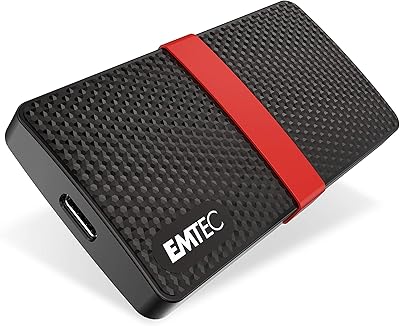
Emtec X200 Power Plus 512GB mSATA Portable SSD
86%
88%
Performance
90%
Build Quality
85%
Transfer Speed
92%
Portability
87%
Durability
More
Samsung FIT Plus USB 3.2 Flash Drive 512GB
85%
89%
Performance & Speed
93%
Build Quality & Durability
91%
Portability & Design
85%
Compatibility
88%
Ease of Use
More
BNCF NewBook 11 2-in-1 Laptop, 12GB RAM, 512GB SSD
84%
87%
Performance
82%
Display Quality
91%
Portability
65%
Battery Life
89%
Value for Money
More
AOOSTAR N1 PRO N150 Mini PC 12GB RAM 512GB SSD
85%
87%
Performance
92%
Value for Money
85%
Build Quality
88%
Display Quality
90%
Ease of Setup
More
Lenovo Yoga C740 15.6″ i7-10510U 12GB 512GB SSD
83%
88%
Performance
92%
Display Quality
80%
Battery Life
78%
Portability
85%
Build Quality
More
GMKtec Nucbox G5 Mini PC Intel N97 12GB RAM 512GB SSD
85%
85%
Performance
94%
Compact Design
88%
Connectivity Options
90%
4K Display Support
91%
Noise Level
More
GMKtec Nucbox G2 Plus Mini PC Intel N150 12GB RAM 256GB SSD
85%
88%
Performance for Everyday Use
91%
Connectivity Options
93%
Multi-Display Support
94%
Energy Efficiency
85%
Size & Portability
More
Lenovo IdeaPad 15.6-inch Laptop, 12GB RAM, 512GB SSD, Intel Celeron N4500
82%
92%
Value for Money
89%
Battery Life
75%
Display Quality
85%
Performance for Basic Tasks
88%
Portability
More
Bmax B6 Plus Mini PC
75%
74%
Everyday Performance
88%
Multi-Monitor Setup
86%
Boot & Load Speed
61%
Thermal Management & Fan Noise
63%
Build Quality & Design
More
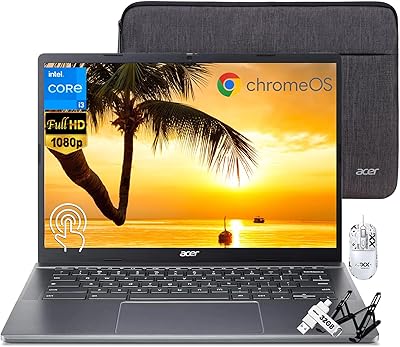
Acer Chromebook Plus 514 Touchscreen Laptop, Intel i3-N305, 8GB RAM, 512GB SSD
85%
88%
Overall Performance
90%
Display Quality
85%
Battery Life
87%
Portability
92%
Value for Money
More

FAQ

It genuinely supports three simultaneous displays — you connect two via the HDMI ports and the third through the full-function Type-C port. All three can run at 4K resolution. That said, driving all three at once puts a real load on the integrated GPU, so you may notice slightly less fluid window animations compared to running just one or two screens.

Unfortunately, no. The 12GB of LPDDR4 RAM is soldered directly onto the motherboard, which means it cannot be swapped or upgraded. The good news is that 12GB is a reasonable amount for the everyday tasks this machine is designed for, and most users find it sufficient for browsing, office work, and media playback.

During light tasks like browsing, streaming, or working in Office apps, the fan is barely audible — most people in a home office setting will not notice it at all. Under sustained heavier loads, such as long video calls or extended HD playback, the fan ramps up and becomes noticeable in a quiet room. It is not disruptive, but it is not silent either under pressure.

Yes, and this is one of the more practical features of the B6 Plus. There are two M.2 NVMe 2280 slots inside, meaning you can add a second drive without removing the existing one. There is also a SATA cable included in the box for connecting an optional 2.5-inch hard drive, bringing total potential storage up to 2TB.

Not really. The Intel Iris Plus Graphics handles 4K video playback well, but it is not built for gaming. Very old or extremely undemanding titles might technically run, but anything from the last several years will either struggle badly or refuse to launch at playable settings. If gaming is on your list, this compact desktop is the wrong tool for that job.

It is actually one of the stronger use cases for this machine. It handles 4K streaming from Netflix, YouTube, and similar services without issue, runs quietly enough for a living room environment during playback, and the HDMI output connects directly to any modern TV. Pair it with a wireless keyboard and mouse and it makes a clean, low-profile media center.

There is a built-in one-key recovery function that restores the system to its factory Windows 11 state. This is useful if a bad update or software issue causes problems, and the process is designed to be straightforward without needing external installation media. Just keep in mind that a factory reset will wipe any personal files, so back up anything important beforehand.

The mount hardware is included in the box and attaches the mini PC to the rear of any VESA-compatible monitor. It is a simple bracket-and-screw setup that most people can complete in a few minutes without special tools. Once mounted, the computer effectively disappears behind your screen, which makes a noticeable difference in desk tidiness. The main trade-off is that the rear ports become slightly harder to reach for frequent cable swapping.

Very light editing tasks, like trimming short clips or basic cuts in a simple timeline, are possible but not smooth. Anything involving effects, color grading, or exporting longer files will be slow and potentially frustrating. The two-core mobile processor and integrated GPU simply do not have the headroom for video editing workflows, even casual ones. If you plan to edit video regularly, this machine will let you down quickly.

Yes, and it is well-suited for this role in a limited capacity. The roughly 12-watt power draw makes it cheap to run continuously, and features like Wake on LAN, PXE Boot, RTC Wake, and Auto Power On are all supported. It works well for tasks like file sharing, lightweight self-hosted applications, or acting as a print server. For anything compute-intensive or running multiple simultaneous services, you will hit the processor ceiling fairly quickly.