Overview

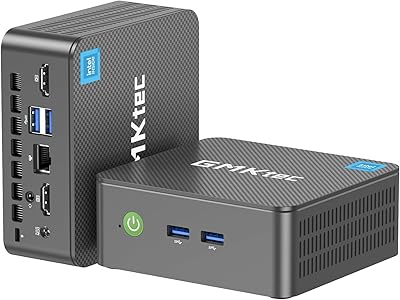
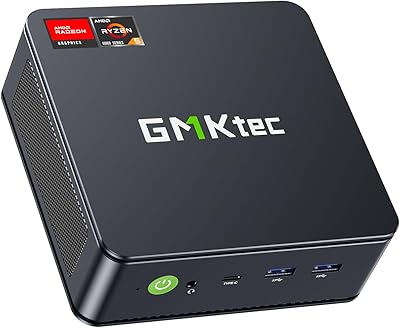
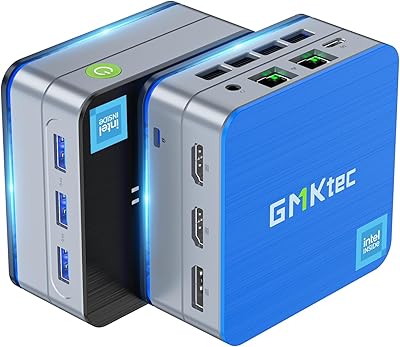
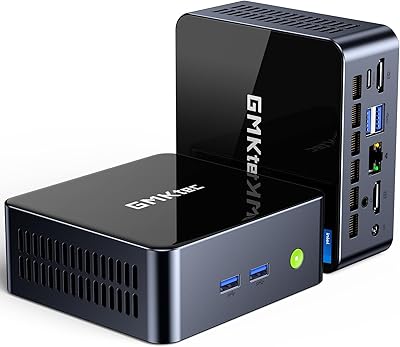
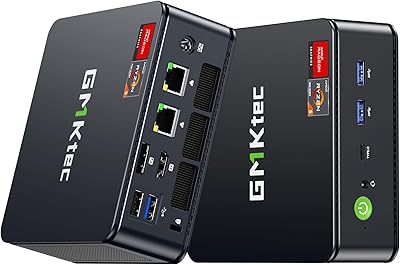
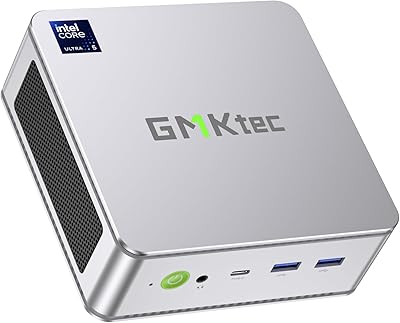
The GMKtec Nucbox M3 i5-12450H Mini PC fits an Intel 12th-gen Core i5-12450H — a chip that punches well above its mobile-class origins — into a chassis roughly the size of a thick paperback. Out of the box, you get 16GB dual-channel DDR4 and a 512GB NVMe SSD, so there's nothing to configure before getting to work. An included VESA bracket lets you tuck this mini PC behind a monitor or mount it flat on a wall, keeping your desk clear. It runs Windows 11 Pro natively, with solid Linux and Ubuntu compatibility for those who prefer open-source environments. In a crowded mid-range field that includes Beelink and Minisforum alternatives, the Nucbox M3 holds its own on paper and in practice.
Features & Benefits

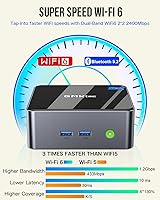
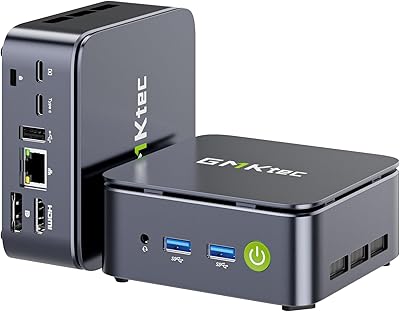
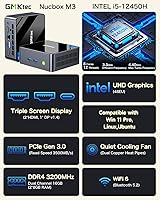
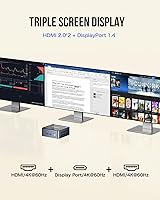
The i5-12450H's 8-core, 12-thread design is where this compact desktop earns its keep. Compared to older single-core-heavy chips like the i7-10810U, real-world multitasking feels genuinely snappier — juggling a video call, a dozen browser tabs, and a spreadsheet without hesitation. The dual-channel memory setup matters more than it might seem: integrated graphics lean heavily on RAM bandwidth, and having two sticks instead of one makes a measurable difference in display smoothness. Three simultaneous outputs — two HDMI and one USB-C DisplayPort — open up a legitimate triple-monitor workspace. Toss in WiFi 6 and 2.5GbE Ethernet, and this compact desktop handles fast network transfers, NAS streaming, and remote access without issue. Storage and RAM are both user-upgradeable, which extends the machine's useful lifespan considerably.

Best For

If your desk is already crowded or you've been putting off replacing an aging tower, the Nucbox M3 makes a strong case. Home office workers will appreciate how much horsepower is packed into something that disappears behind a monitor. Students can carry it between campus and home without a backpack rethink. It's also an increasingly popular choice for Proxmox or ESXi hobbyists who want a low-power home lab node — the 2.5GbE port and Wake-on-LAN support make headless operation genuinely practical. HTPC fans running Plex or Kodi from the living room will find the dual 4K HDMI outputs more than adequate. Where it doesn't fit is heavy creative workloads or gaming — integrated graphics have a firm ceiling.

User Feedback

Buyers tend to respond positively to the out-of-box experience: Windows 11 Pro arrives activated, drivers load cleanly, and cold boot times are quick enough to impress. The build quality earns frequent praise too — the chassis feels more solid than the price suggests. That said, sustained workloads do push the fan noticeably, and a handful of reviews mention thermal throttling under extended stress tests, which is worth keeping in mind if you plan to run long renders or compile jobs. A small number of users hit USB-C display handshake quirks with specific monitors, so testing your display early is wise. For everyday productivity, the consensus is quite positive; for power-user or creative tasks, expectations need tempering.

Pros

  • Ships ready to use with Windows 11 Pro pre-activated and drivers installed cleanly out of the box.
  • The 12th-gen i5-12450H delivers noticeably snappier multitasking than older mobile i5 or i7 chips from previous generations.
  • Dual-channel RAM configuration improves integrated graphics performance compared to cheaper single-stick competitors.
  • Triple-display support — two HDMI and one USB-C DisplayPort — is rare at this price point in the mini PC segment.
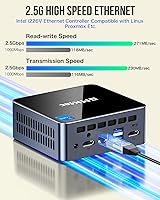
  • 2.5GbE Ethernet makes the Nucbox M3 a practical pick for NAS access, fast file transfers, and home-lab networking.
  • WiFi 6 ensures stable wireless throughput even in congested environments with many connected devices.
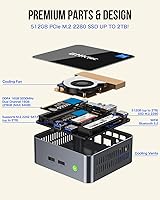
  • RAM is upgradeable to 64GB and storage to 2TB, giving this compact desktop genuine long-term headroom.
  • The included VESA bracket adds real mounting flexibility without needing a separate purchase.
  • Linux and Ubuntu compatibility broadens its appeal well beyond typical Windows-only mini PCs.
  • Build quality feels more substantial than the price suggests, according to consistent buyer feedback.

Cons

  • Fan noise ramps up audibly under sustained workloads, which may bother users in quiet environments.
  • Thermal throttling has been reported during extended stress tests, limiting performance consistency in demanding tasks.
  • Integrated graphics impose a hard ceiling — casual gaming is possible, but anything demanding is not.
  • A small number of users have encountered USB-C display handshake issues with specific monitors, requiring workarounds.
  • Only one USB 2.0 port among the four USB-A slots, which can be limiting if you use older peripherals simultaneously.
  • No Thunderbolt support limits high-bandwidth peripheral options like external GPU enclosures or ultra-fast docks.
  • The 512GB SSD uses PCIe 3.0 rather than the faster PCIe 4.0 standard now available in rival units.
  • GMKtec's after-sales support infrastructure is less established than larger brands, which may concern business buyers.
  • No SD card slot is included, which is a minor but recurring inconvenience for photographers or content creators.

Ratings

The scores below were generated by AI after analyzing thousands of verified global user reviews for the GMKtec Nucbox M3 i5-12450H Mini PC, with spam, incentivized submissions, and bot activity actively filtered out to ensure accuracy. Each category reflects real buyer experiences across diverse use cases — from home offices and student setups to home lab experiments and living room media centers. Both the genuine strengths and the recurring frustrations are represented transparently so you can make a confident, well-informed decision.

Value for Money
88%
Most buyers feel they're getting genuinely mid-range performance without paying a premium price, which is the core appeal of this compact desktop. The inclusion of Windows 11 Pro pre-activated, a VESA bracket, and an HDMI cable in the box adds tangible out-of-box value that competitors at similar price points don't always match.
A small but vocal group of reviewers feel the value equation weakens if you compare it against slightly pricier units with PCIe 4.0 storage or a newer chip generation. For buyers who need to upgrade RAM immediately to get the most out of it, the total cost of ownership rises faster than the sticker price suggests.
Processing Performance
83%
The i5-12450H consistently impresses users coming from older office machines or previous-gen mini PCs — everyday multitasking, video calls, spreadsheets, and light content work all feel responsive and snappy. The 8-core design handles parallel workloads noticeably better than older dual- or quad-core mobile chips that previously dominated this segment.
Under sustained CPU loads — extended compile jobs, batch video exports, or prolonged rendering — thermal throttling has been reported, pulling performance back meaningfully. Users comparing it to desktop-class processors in similarly priced tower builds note that sustained throughput doesn't quite match the chip's peak burst numbers.
Thermal Management
61%
39%
For the target use cases — office work, media playback, light browsing — the cooling system handles heat adequately and the chassis stays comfortable to touch during normal operation. The fan is genuinely quiet at idle, which matters for desk or living room environments where background noise is a consideration.
This is the most polarizing aspect of the Nucbox M3: sustained workloads push temperatures high enough to trigger throttling, and the fan ramps to an audible pitch that some users describe as distracting in quiet rooms. The compact chassis leaves little thermal headroom, and there's no user-accessible way to improve airflow beyond ambient room temperature management.
Build Quality
79%
21%
The chassis feels denser and more substantial than many budget mini PCs in this category, and buyers frequently note it doesn't creak or flex under normal handling. The matte finish resists fingerprints well, and the VESA bracket — often a flimsy afterthought on competing units — is sturdy enough to hold the machine reliably behind a monitor.
It's not a premium aluminum build, and closer inspection reveals some plastic panel tolerances that feel slightly mismatched on certain units. A handful of reviewers noted minor cosmetic inconsistencies on arrival, though functional defects appear rare based on overall feedback patterns.
Connectivity & Ports
77%
23%
The 2.5GbE Ethernet port is a standout feature at this price point, making the Nucbox M3 genuinely practical for NAS access, fast local transfers, and home lab networking. WiFi 6 performs well in dense wireless environments, and the triple-display output capability is something most competing mini PCs in this bracket simply don't offer.
The single USB 2.0 port feels like a bottleneck when you have multiple older peripherals to connect simultaneously, and the absence of Thunderbolt limits options for external GPU enclosures or high-speed docks. A small number of users hit USB-C display compatibility issues with specific monitors, requiring adapter swaps or firmware checks to resolve.
Out-of-Box Experience
86%
Windows 11 Pro arrives activated and the system is genuinely ready to use within minutes of first power-on — a detail that matters to non-technical buyers who don't want to wrestle with license keys or driver hunting. Boot times are fast, and the included accessories mean most users can have a full workstation running before they've finished their morning coffee.
A minority of users reported that certain peripheral drivers — particularly for niche USB audio interfaces or older printers — required manual installation. Linux users get a smooth installation experience overall, but occasional firmware quirks with suspend and resume have been noted in community forums.
Display Output Quality
84%
Both HDMI ports deliver clean, stable 4K at 60Hz output with no reported signal dropouts during normal use, making this compact desktop a credible triple-monitor productivity machine or a capable HTPC. Media playback in 4K looks sharp and fluid through both HDMI outputs, which living room users consistently praise.
The USB-C DisplayPort output has caused compatibility headaches for a subset of users whose monitors require specific Alt Mode support — not all USB-C cables work, and the unit offers no on-screen indication of what's wrong when handshaking fails. HDR support is limited by the integrated graphics, which is a noticeable gap for home theater enthusiasts with HDR-capable displays.
Noise Levels
67%
33%
At idle and during light tasks like document editing or video streaming, the fan is barely perceptible — well-suited to a shared office desk or a living room shelf where silence matters. Many users specifically mention they were surprised by how unobtrusive it is during a standard workday.
Push the CPU with anything intensive and the fan behavior changes noticeably; it's not loud by gaming laptop standards, but it's audible enough in a quiet room to break concentration. There's no fan curve adjustment in the default firmware without third-party tools, which limits the ability to tune the noise-versus-temperature tradeoff.
Upgrade Potential
91%
Two accessible SO-DIMM slots and a secondary M.2 slot make this one of the more upgrade-friendly mini PCs in its class — you can realistically double the RAM, replace the SSD, and add a secondary drive without voiding the warranty or needing specialized tools. This headroom meaningfully extends the machine's useful lifespan compared to soldered-RAM competitors.
The CPU is soldered to the board, so the i5-12450H is the ceiling for processing performance — there's no upgrade path if you eventually outgrow it. PCIe 3.0 on the primary M.2 slot means even a high-end NVMe replacement drive won't reach the speeds available on platforms using PCIe 4.0.
Gaming Capability
42%
58%
Lightweight and older titles — think casual 2D games, retro emulation, or modest indie releases — run acceptably on the Intel UHD graphics at reduced resolution and settings. For users who only want to play non-demanding games between work tasks, the integrated GPU gets the job done without complaints.
This is the category where the Nucbox M3 falls shortest: modern 3D games at any meaningful resolution and settings are simply out of reach for integrated Intel UHD graphics. Buyers who purchased expecting playable performance in mainstream titles have been the most disappointed, and this is consistently the source of the lowest individual user ratings.
Software & OS Compatibility
85%
Windows 11 Pro compatibility is comprehensive and well-tested, and the Linux support is meaningfully broader than many mini PCs — Ubuntu, Debian, and even niche distributions install with minimal friction. Virtualization enthusiasts running Proxmox or ESXi report good compatibility with the network and storage controllers, which is a real differentiator for this use case.
Some users running ESXi have noted that the Intel i225/i226 Ethernet controller requires a specific community-sourced driver for full support, adding a small setup hurdle. macOS is not supported, and users hoping to run Hackintosh builds will find the 12th-gen Intel platform less cooperative than older generations.
Networking Performance
89%
The 2.5GbE Ethernet port is rock-solid in real-world use — users copying large files to a NAS or running it as a lightweight server node consistently hit speeds that saturate the connection without dropouts. WiFi 6 throughput in dual-band environments is strong enough that most users never feel limited by the wireless option.
The 2.5GbE benefit is only realized if the rest of your network infrastructure supports it — users with standard gigabit routers see no improvement over a standard Ethernet port. A small number of users reported the Intel i226 controller needing a driver update on initial Linux setup to perform reliably at full 2.5G speeds.
Size & Portability
93%
The footprint is genuinely compact — small enough to tuck behind a monitor with the included VESA bracket, slip into a backpack pocket, or sit unobtrusively on a bookshelf. Educators and students who move between locations specifically call out how easy it is to carry a full desktop setup in a bag alongside a laptop.
The included power brick is larger than the unit itself and adds meaningful bulk when packing for travel — it's not a dealbreaker, but it's a recurring observation from users who expected a more laptop-like total carry size. The barrel DC connector is also less universal than USB-C charging, making it harder to use third-party power solutions on the road.
Long-Term Reliability
72%
28%
The majority of buyers who have owned the unit for six months or more report no hardware failures, and the chassis shows minimal wear over time. GMKtec's one-year warranty covers workmanship defects, and the brand's after-sales responsiveness is generally rated positively by users who needed to engage with support.
GMKtec's service network is less established than larger brands, and buyers outside major markets have reported slower warranty resolution times. Long-term reliability data beyond 18 months is limited given the product's age, which introduces some uncertainty for buyers planning a multi-year deployment.

Suitable for:

The GMKtec Nucbox M3 i5-12450H Mini PC is a strong fit for anyone who needs a capable, low-footprint desktop without the bulk or cost of a full tower build. Home office workers handling video calls, document editing, and light multitasking will find it more than adequate for a full day's work. Students and educators benefit from its portability — it's easy to pack up and move between locations — while the included VESA mount makes it equally at home bolted behind a classroom monitor. IT-minded hobbyists running Proxmox, ESXi, or lightweight virtualization will appreciate the 2.5GbE Ethernet and Wake-on-LAN support, which make headless home-lab setups genuinely practical. Small businesses looking to deploy tidy, low-maintenance workstations at multiple desks will also find the value proposition compelling, especially given the triple-display output capability and user-upgradeable internals that can extend the machine's lifespan well beyond the initial purchase.
Not suitable for:

Buyers expecting gaming performance should look elsewhere — the GMKtec Nucbox M3 i5-12450H Mini PC relies entirely on Intel UHD integrated graphics, which handle lightweight titles at modest settings but cannot compete with any discrete GPU. Video editors, 3D artists, or anyone processing large media files will hit the integrated graphics ceiling quickly and may also run into sustained thermal throttling under the kind of extended workloads those tasks demand. If your workflow involves compiling large codebases or running intensive simulations for hours at a stretch, the compact chassis and its air-cooling design may not keep the chip at full speed consistently. Users who need a dense port selection — multiple USB-A slots for peripherals, SD card readers, or Thunderbolt connectivity — may find the port layout a bit lean. Finally, anyone who prefers buying from an established brand with long-term regional service infrastructure may find GMKtec's support network less reassuring than larger players in the space.
Specifications

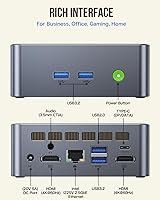
  • Processor: Intel Core i5-12450H, 12th-generation, with 8 cores, 12 threads, a base clock of 3.3GHz, and a turbo boost up to 4.4GHz.
  • RAM: 16GB DDR4 running at 3200MHz in a dual-channel configuration using two 8GB SO-DIMM modules.
  • Storage: 512GB PCIe 3.0 NVMe SSD in M.2 2280 form factor, with sequential read speeds up to 3000MB/s and write speeds up to 2500MB/s.
  • Graphics: Intel UHD integrated graphics clocked at 1.20GHz, sharing system memory with no discrete GPU option.
  • Display Output: Three simultaneous display outputs: two HDMI 2.0 ports supporting 4K at 60Hz, plus one USB-C port with DisplayPort 1.4 support.
  • Wireless: WiFi 6 (802.11ax) with dual-band 2.4GHz and 5GHz support, plus Bluetooth 5.2 for peripheral connectivity.
  • Ethernet: 2.5GbE RJ45 port powered by an Intel i225/i226 controller, delivering up to 2500Mbps wired throughput.
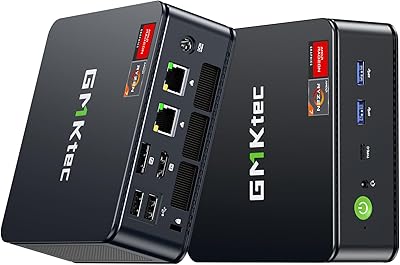
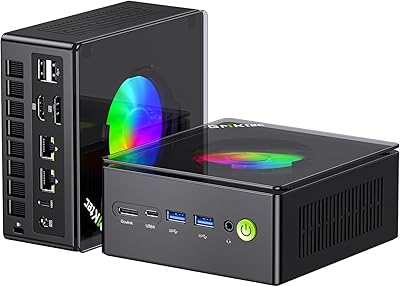
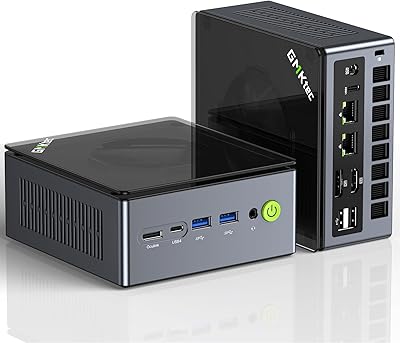
  • USB Ports: Four USB-A ports (three USB 3.2 Gen 1 and one USB 2.0), plus one USB-C port that supports both data transfer and power delivery.
  • Dimensions: The unit measures approximately 4.48 x 4.17 x 1.67 inches, making it comparable in footprint to a thick paperback book.
  • Weight: The unit weighs approximately 3.23 pounds including its chassis, making it light enough to carry in a bag without issue.
  • RAM Expandability: The two SO-DIMM slots support up to 64GB of DDR4 RAM using standard aftermarket modules.
  • Storage Expansion: The M.2 2280 slot supports NVMe drives up to 2TB, and a secondary M.2 2242 slot accepts SATA drives up to 2TB.
  • Operating System: Ships with Windows 11 Pro pre-installed and pre-activated, with confirmed compatibility for Ubuntu and other Linux distributions.
  • Power Supply: Includes a 100W DC power adapter (20V/5A) with a 5.5/2.5mm barrel connector; the unit has a 45W TDP under load.
  • Cooling: Active air cooling via an internal fan; the system runs quietly at idle and light loads, with fan speed scaling under sustained workloads.
  • Smart Power: Supports Wake-on-LAN, PXE boot, and Auto Power On, enabling headless or always-on deployment scenarios.
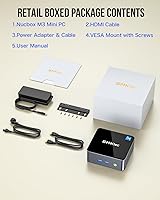
  • In the Box: Package includes the mini PC, a 100W power adapter, a VESA mounting bracket with screws, one HDMI cable, and a user manual.
  • Warranty: GMKtec provides a one-year limited warranty from the date of purchase, covering defects in design and workmanship.

Related Reviews

GMKtec Nucbox G3 Plus N150 Mini PC
76%
78%
Value for Money
74%
Performance for Intended Use
58%
Thermal Management
54%
Fan Noise
91%
Connectivity & Ports
More
GMKtec Nucbox M6 32GB/1TB Mini PC
76%
88%
Everyday Performance
61%
Gaming Capability
83%
Build Quality
59%
Thermal Management
64%
Fan Noise
More
GMKtec Nucbox G2 Plus Mini PC Intel N150 12GB RAM 256GB SSD
85%
88%
Performance for Everyday Use
91%
Connectivity Options
93%
Multi-Display Support
94%
Energy Efficiency
85%
Size & Portability
More
GMKtec Nucbox G10 Ryzen 5 Mini PC
75%
83%
Value for Money
74%
Performance
88%
Connectivity & Ports
86%
Display Output
67%
Thermal Management
More
GMKtec M3 Ultra i7-12700H Mini PC
77%
88%
Processing Performance
67%
Thermal Management
93%
Multi-Monitor Support
84%
Value for Money
74%
Build Quality
More
GMKtec NucBox M5 Ultra Mini PC
77%
84%
Performance & Speed
88%
Value for Money
93%
Networking Capability
87%
Multi-Monitor Support
61%
Graphics & Display Quality
More
GMKtec Nucbox K11 (Ryzen 9 8945HS, 32GB, 2TB)
89%
94%
CPU Performance
96%
Expansion & Upgradability
92%
Connectivity & Ports
87%
Thermal Management
89%
Build Quality
More
GMKtec Nucbox K9 Mini PC
80%
88%
CPU Performance
67%
GPU & Graphics
91%
Memory & RAM
86%
Storage Speed
93%
Networking
More
GMKtec NucBox M7 (32GB/2TB)
82%
88%
Processing Performance
74%
Gaming & Graphics
69%
Thermal Management & Cooling
63%
Fan Noise
91%
Connectivity & Ports
More
GMKtec Nucbox K6 Mini Gaming PC AMD Ryzen 7 7840HS 1TB SSD 16GB RAM
83%
89%
Gaming Performance
88%
Multitasking Ability
82%
Build Quality
90%
Network Performance
72%
Cooling System
More

FAQ

Yes, it ships with Windows 11 Pro pre-installed and activated — you can power it on and be at your desktop within minutes. Driver installation is handled out of the box, so there's no setup headache for most users.

Absolutely. The two SO-DIMM slots accept standard DDR4 modules up to 64GB total, and the M.2 2280 slot supports NVMe drives up to 2TB. There's also a secondary M.2 2242 slot for an additional SATA drive, which is a nice bonus for storage-heavy setups.

Yes, the GMKtec Nucbox M3 i5-12450H Mini PC supports three simultaneous displays — two via HDMI 2.0 and one through the USB-C DisplayPort output. Just make sure your USB-C cable or adapter explicitly supports DisplayPort Alt Mode, as a generic charging cable won't work for video.
Under light to moderate use — web browsing, office apps, video calls — the fan is barely noticeable. It does spin up audibly when the chip is pushed hard for extended periods, so if you're running something CPU-intensive for hours at a stretch, you'll hear it. For everyday desk use, most people won't find it disruptive.

Yes, and it's actually well-suited for that use case. Ubuntu and other major Linux distributions install cleanly, and the 2.5GbE Ethernet plus Wake-on-LAN support make it a practical headless home lab machine. Several users in the enthusiast community have reported good results running Proxmox on it.

Light gaming is possible — older titles, indie games, and casual games at low to medium settings should run acceptably. That said, the integrated Intel UHD graphics have a firm ceiling, and you shouldn't expect playable framerates in anything graphically demanding. If gaming is a priority, a machine with discrete graphics is a better fit.

The USB-C port serves double duty: it supports DisplayPort output for a third monitor and also handles data transfer. It does support power input in some configurations, but the unit is primarily powered via the included DC barrel connector. Always check your monitor's USB-C spec before assuming video will work through it.

It's a solid choice for that role. The two HDMI 2.0 ports both support 4K at 60Hz, and it handles Plex, Kodi, and most streaming services without issue. The fan noise at idle is low enough to be unobtrusive in a living room setting, and the VESA mount means you can hide it behind your TV.

If you have a NAS, a modern router with a 2.5GbE port, or a multi-gig switch, this port lets you transfer files at up to 2.5 times the speed of standard gigabit Ethernet. For most home users it won't matter much, but for anyone moving large files around a local network regularly, it's a genuinely useful upgrade over standard 1GbE.

The general buyer consensus is that it feels more solid than the price suggests — the chassis has a reasonable heft to it and doesn't creak or flex. It's not a premium aluminum unibody, but it's a step above the flimsiest budget mini PCs. The included VESA bracket is functional and well-made, which is a small but appreciated detail.