Overview

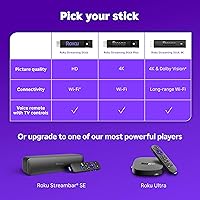
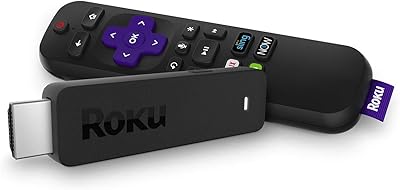
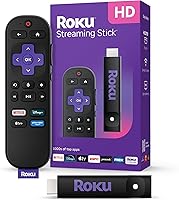
The Roku Streaming Stick HD 2025 is Roku's entry-level pick for anyone ready to cut the cord without overspending. It plugs directly into any HDMI port and can draw power from your TV's USB port, leaving no extra cords cluttering the back of your set. At roughly the size of a thumb drive, this Roku stick is light enough to toss in a travel bag — a genuinely useful feature if you've ever endured a hotel's slow smart TV interface. One thing to know upfront: this compact streamer outputs 1080p HD, not 4K. If your television is a 4K set and picture sharpness is a priority, that distinction is worth pausing on before buying.
Features & Benefits

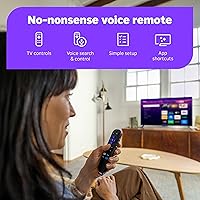
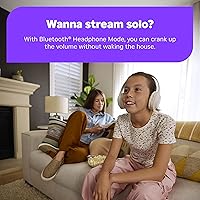
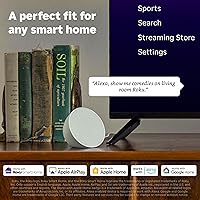
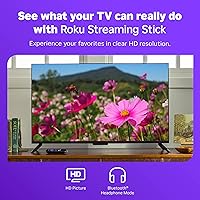
The stick's slim profile doesn't block neighboring HDMI ports — a small but genuinely appreciated detail on TVs where ports are crammed together. The included voice remote handles TV power and volume directly, which means you can leave your TV's original remote in a drawer. One of the more practical extras is Bluetooth Headphone Mode: pair your own headphones to the stick itself and stream without disturbing anyone nearby. Smart home integration is quiet but solid — it works with Alexa, Google Home, and Apple AirPlay if you're already in any of those ecosystems. The Roku interface is fast, familiar, and genuinely easy to navigate, even for people who aren't particularly tech-savvy.

Best For

This Roku stick makes the most sense for a few specific types of buyers. If you're outfitting a bedroom or guest TV and don't want to spend a lot, it's a practical fit. Frequent travelers will appreciate it too — plug it into a hotel's HDMI port, connect to Wi-Fi, and you're watching your own apps in under five minutes. It's also a solid upgrade for anyone running an older stick that's gotten sluggish. That said, if your main living room TV is 4K and you actively use that resolution, this compact streamer won't cover that base — a 4K-capable device would be worth the extra cost.

User Feedback

With over 7,600 ratings and a 4.7-star average, this Roku stick has clearly found an audience. Most of the praise focuses on effortless setup, how quickly the remote responds, and how the interface doesn't get in the way of just watching something. On the flip side, the most consistent complaint comes from buyers who expected 4K and only got HD — a misread of the specs that happens often enough to be a real pattern. A few users in densely connected homes also flag occasional Wi-Fi hiccups, though these reviews are the minority. The overall picture is a device that does what it promises for the people it's built for, with few genuine surprises on either end.

Pros

  • Plugs directly into any HDMI port and can draw power from the TV's USB port — zero extra cables.
  • Setup takes under ten minutes for most users, with no technical knowledge required.
  • The voice remote controls TV power and volume, replacing the need for a separate TV remote.
  • Bluetooth Headphone Mode lets you stream privately without any phone app or workaround.
  • The Roku interface is fast, uncluttered, and genuinely easy to navigate for all ages.
  • All major streaming services are available in one place with quick, reliable app switching.
  • Compact enough to pack in a laptop bag and use on hotel or Airbnb TVs without logging into someone else's device.
  • Works naturally with Alexa, Google Home, and Apple AirPlay for users already in those ecosystems.
  • At its price point, it delivers more than enough capability for HD-only viewing scenarios.
  • A 4.7-star average across thousands of verified reviews reflects consistent real-world satisfaction.

Cons

  • No 4K output — owners of 4K televisions will not be able to use their screen's full resolution.
  • Dolby Atmos is not supported, which matters to anyone with a capable soundbar or home theater setup.
  • Remote buttons are not backlit, making nighttime use in a dark room mildly frustrating.
  • No remote finder feature, which becomes annoying when the remote slips between couch cushions.
  • Hotel captive portal Wi-Fi logins cannot be completed through the stick, often requiring a mobile hotspot workaround.
  • Bluetooth headphone pairing can be inconsistent with certain third-party or older headset models.
  • Free live TV channels are ad-supported and content quality varies widely — not a substitute for a paid service.
  • No wired ethernet adapter support, leaving users with no fallback option for weak or congested Wi-Fi.
  • The plastic housing feels lightweight, which can give an impression of fragility even if durability holds up in practice.
  • No included HDMI extender cable in the box, which some TV panel layouts genuinely require.

Ratings

The Roku Streaming Stick HD 2025 earns its strong reputation among everyday streamers, and the scores below reflect what real buyers actually experienced — not marketing promises. Our AI analyzed thousands of verified global reviews, actively filtering out incentivized and bot-generated feedback, to surface both the genuine strengths and the friction points that matter to real households. The result is an honest snapshot of where this compact streamer excels and where it asks for compromise.
Ease of Setup
94%
Users across all age groups consistently report having the stick up and running in under ten minutes, often without needing to consult any instructions. The plug-and-play nature — especially drawing power directly from the TV's USB port — removes the friction that trips people up with other devices.
A small number of users on older televisions ran into HDMI handshake issues that required unplugging and reinserting the stick. These cases are rare, but worth noting if you're working with a TV that's more than a decade old.
Interface & Navigation
91%
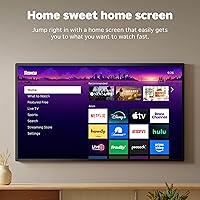
Roku's home screen is genuinely one of the cleaner interfaces in this category — apps are easy to find, load times feel snappy, and even less tech-savvy family members tend to figure it out quickly. There's no algorithmic clutter pushing unfamiliar content in your face the way some smart TV platforms do.
Users who have experience with more advanced platforms sometimes find the interface slightly basic, and the inability to deeply customize the home screen layout frustrates a subset of power users who want more control over their viewing dashboard.
Streaming Performance
86%
Day-to-day playback on Netflix, Disney+, and Prime Video is reliably smooth for 1080p content, with minimal buffering reported on average home networks. Reviewers using the stick in hotel rooms — often on weaker public Wi-Fi — also noted it handled connectivity drops better than expected.
In apartments or homes with congested Wi-Fi networks and multiple connected devices, some users flagged occasional stuttering during peak usage hours. The stick doesn't support a wired ethernet adapter, so there's no easy fallback if Wi-Fi becomes unreliable.
Remote Quality
88%
The voice remote is one of the more appreciated aspects of this streamer — it replaces the TV's own remote for power and volume, which genuinely reduces the number of remotes on the coffee table. Voice search works accurately for titles and actors, and the button layout feels intuitive after a few minutes.
The remote lacks a headphone jack for wired listening, and the buttons aren't backlit, which becomes mildly annoying when using the stick in a dark bedroom. A remote finder feature is also absent at this price tier, something a few reviewers specifically wished for.
Picture Quality
78%
22%
For 1080p HD content, the image output is clean and accurate, with no noticeable compression artifacts during normal streaming. Users watching on 1080p televisions — common in bedrooms and secondary rooms — report that the picture looks exactly as good as they'd expect.
This stick simply does not support 4K output, which is a hard ceiling that disappointed a visible portion of buyers who didn't read the specs carefully before purchasing. If your television is a 4K set and you care about using that resolution, this streaming stick will not deliver — and that gap is meaningful.
Bluetooth Headphone Mode
83%
The ability to pair Bluetooth headphones directly to the stick — rather than through a phone app — is a feature that earns consistent organic praise in reviews. Night-shift workers, light sleepers sharing a room, and anyone who just doesn't want to disturb others found this feature surprisingly practical.
Pairing can occasionally be finicky with certain third-party headphones, and audio sync issues were reported by a small number of users using older Bluetooth headsets. The mode also doesn't support simultaneous TV speaker and Bluetooth output, which limits flexibility for some setups.
App & Content Selection
89%
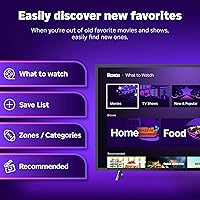
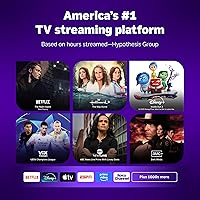
Every major streaming service is available, and the free live TV library through The Roku Channel adds genuine value for users who want news and entertainment without a subscription. Having Netflix, Hulu, Disney+, Apple TV+, and Prime Video all in one place with quick switching is a real daily convenience.
The free channels are ad-supported and the content quality varies considerably — it skews toward older titles and lower-profile programming. Users expecting the free tier to carry the experience on its own will likely be underwhelmed without at least one paid subscription running alongside it.
Smart Home Integration
81%
19%
Compatibility with Alexa, Google Home, Apple AirPlay, and HomeKit covers the major smart home ecosystems without requiring any extra setup steps. For users already running a smart home setup, the ability to turn on the TV and switch inputs via a voice assistant genuinely fits into existing routines.
Integration works best when everything is on the same network and properly configured, and a handful of reviewers found that AirPlay connectivity dropped intermittently during longer sessions. It's a useful extra rather than a polished core feature, so expectations should be set accordingly.
Portability & Travel Use
87%
The stick's compact size and USB power draw make it one of the more practical travel companions in this product category — it fits in a jacket pocket and works on virtually any hotel TV with an available HDMI port. Reviewers who travel frequently for work cited this as one of the primary reasons they chose it over a box-style player.
Travelers relying on hotel Wi-Fi may hit captive portal login screens that can't be completed through the Roku interface, requiring a mobile hotspot workaround. It's a known limitation across all streaming sticks, but worth flagging for frequent hotel users specifically.
Value for Money
92%
At its price point, this Roku stick competes in a category where spending significantly more doesn't always translate to a noticeably better experience for HD-only viewers. For a secondary TV, a bedroom setup, or a first-time cord-cutter, the balance between capability and cost is hard to argue with.
If you factor in a 4K-capable alternative that costs only marginally more, the value proposition weakens slightly for buyers who plan to upgrade their television soon. The calculus shifts depending on your current and planned screen resolution.
Build & Physical Design
79%
21%
The stick's narrow profile is well-engineered to avoid blocking adjacent HDMI ports, which sounds minor until you're working with a TV that has ports crammed into a tight panel. At just over two ounces, it's light and sturdy enough to stay firmly seated without wobbling.
The housing is entirely plastic and feels lightweight in the hand, which some users interpret as fragile even if it holds up fine in practice. There's no included HDMI extender cable in the box, which can occasionally be needed for tight TV panel configurations.
Audio Performance
74%
26%
For standard stereo and Dolby Digital passthrough, the stick handles audio reliably without introducing noticeable latency or dropouts during normal use. Users watching through a soundbar or home theater receiver reported clean audio handoff via their TV's output.
Dolby Atmos is not supported, which is a limitation for users who have invested in Atmos-capable sound systems and want to use object-based audio with their streaming content. This is a spec gap that matters to audio enthusiasts but will go unnoticed by casual viewers.
Wi-Fi Reliability
71%
29%
On a standard home network with a reasonably modern router, most users report stable, consistent connectivity for everyday streaming. The dual-band Wi-Fi handles typical household environments without issue for the majority of buyers.
In denser living situations — apartments with dozens of competing networks, or homes with many connected devices — users flagged drops and speed inconsistencies more than competing devices at the next price tier. Without an ethernet option, there's no workaround for persistently weak wireless conditions.
Voice Search Accuracy
82%
18%
Voice search handles titles, actors, genres, and even vague queries with solid accuracy, reducing the time spent hunting through menus. It works across multiple apps simultaneously rather than searching within one service at a time, which is a practical advantage over some built-in smart TV search tools.
Accents and pronunciation variations occasionally trip up the voice recognition, and a small number of users reported the remote's microphone requiring them to speak louder than expected to get reliable results. It functions well but doesn't quite match the responsiveness of dedicated smart speaker ecosystems.

Suitable for:

The Roku Streaming Stick HD 2025 is a natural fit for anyone who wants a reliable, no-fuss streaming upgrade without overcomplicating their setup or their budget. It works especially well as a bedroom or guest room TV solution — plug it in, connect to Wi-Fi, and you have every major streaming service accessible within minutes. Frequent travelers are another strong match: the stick is small enough to pack in a carry-on, and having your own familiar interface on a hotel TV is a genuinely better experience than fumbling with whatever the room provides. People who are frustrated by their smart TV's sluggish built-in apps will also find this compact streamer a meaningful improvement — it's faster, cleaner, and doesn't push you through a bloated manufacturer interface every time you want to watch something. If you're upgrading from an older Roku or a first-generation streaming stick, the performance jump will feel immediately noticeable. And for households where multiple family members share one remote, the unified voice remote that also controls TV power and volume is a quiet but practical daily win.
Not suitable for:

If crisp 4K picture quality on a large-screen television is a priority, this streaming stick is simply not the right tool — and that's worth being direct about before anyone clicks buy. The device outputs 1080p HD only, which looks perfectly fine on smaller screens or in secondary rooms, but will leave 4K TV owners underutilizing their display. Dedicated home theater enthusiasts will also run into the absence of Dolby Atmos support, which matters if you've invested in an Atmos-capable soundbar or surround system. People living in dense apartment buildings with congested Wi-Fi environments may experience more buffering and connectivity inconsistency than they'd like, and since there's no wired ethernet option, there's no clean fix for that scenario. If you're looking for a primary streaming device for your main living room setup and want the best possible picture and audio specs your current hardware can support, a step-up model is the more honest recommendation. The Roku Streaming Stick HD 2025, for all its strengths, is optimized for simplicity and portability — not for squeezing maximum performance out of a premium home theater arrangement.

Specifications

  • Resolution: Outputs video at up to 1080p Full HD; 4K output is not supported on this model.
  • Connector: Features a built-in HDMI connector designed to fit any standard HDMI port without blocking adjacent inputs.
  • Power Source: Powered via USB, allowing it to draw power directly from a compatible TV USB port with no wall outlet required.
  • Dimensions: Measures 3.7 x 0.8 x 0.5 inches, making it one of the more compact sticks in its category.
  • Weight: Weighs 2.12 oz, light enough to pack in a travel bag without adding noticeable bulk.
  • Wireless: Supports dual-band Wi-Fi connectivity for standard home and travel network environments.
  • Bluetooth: Includes Bluetooth support for pairing headphones directly to the device via the built-in Headphone Mode.
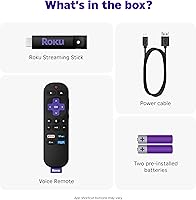
  • Remote Type: Ships with a Roku Voice Remote that controls TV power, volume, and input in addition to device navigation.
  • Voice Assistants: Compatible with Amazon Alexa and Google Home for voice-activated control through external smart speakers or displays.
  • AirPlay & HomeKit: Supports Apple AirPlay 2 and Apple HomeKit, allowing integration with Apple devices and the Home app.
  • Streaming Apps: Provides access to Netflix, Hulu, Disney+, Prime Video, Apple TV+, and thousands of additional streaming channels.
  • Free Channels: Includes access to 500+ free ad-supported live TV channels through The Roku Channel at no subscription cost.
  • Model Number: Sold under model number 3840R, which is Roku's internal identifier for this specific 2025 HD stick variant.
  • Release Date: First made available on April 23, 2025, positioning it as a current-generation entry-level device.
  • Manufacturer: Designed and sold by Roku, Inc., the company behind one of the most widely used TV streaming platforms in the US.
  • User Rating: Holds a 4.7 out of 5 star average across more than 7,600 verified ratings on Amazon as of mid-2025.
  • Sales Rank: Ranked #3 in Streaming Media Players and #18 overall in Electronics on Amazon at time of review.
  • Color & Finish: Available in black with a matte plastic finish that keeps the device discreet when plugged behind a television.

Related Reviews

Roku Streaming Stick Plus 2025
84%
94%
Ease of Setup
88%
Picture Quality
91%
Remote Usability
58%
Audio Support
93%
Portability & Travel Use
More
Roku Streaming Stick 4K
82%
93%
Ease of Setup
88%
Picture Quality
79%
Wi-Fi Performance
84%
Remote Usability
91%
App & Content Library
More
Roku Streaming Stick (2018)
87%
92%
Value for Money
95%
Ease of Setup
88%
Streaming Performance
89%
Voice Remote Functionality
90%
Portability
More
Roku Express HD Streaming Media Player (2018)
87%
92%
Value for Money
95%
Ease of Setup
90%
Picture Quality (1080p)
88%
Remote Control Functionality
65%
Wi-Fi Connectivity
More
Roku Ultra 4K Streaming Player (2017)
85%
92%
Streaming Quality (4K & HDR)
89%
Voice Remote Functionality
74%
Wi-Fi Connectivity
95%
Ease of Setup
88%
App Compatibility
More
Roku 3903 SE Streaming Media Player
82%
91%
Value for Money
95%
Ease of Setup
85%
Streaming Performance
88%
User Interface
72%
Remote Functionality
More
Acer GP.OTH11.037 1080p Webcam
73%
78%
Video Call Clarity
93%
Ease of Setup
58%
Microphone Quality
61%
Low-Light Performance
63%
Build Quality & Materials
More
Razer Ripsaw HD Game Streaming Capture Card
84%
88%
Performance
92%
Setup & Installation
89%
Latency
91%
Video Quality
77%
Audio Mixing Features
More
Roku Streambar 9102MX Spanish Edition
82%
93%
Bilingual Interface & Language Support
78%
Audio Quality
82%
4K & HDR Picture Performance
86%
Value for Money
91%
Ease of Setup
More
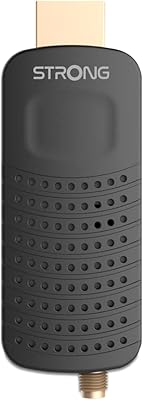
Strong SRT82
Strong SRT82
75%
88%
Ease of Setup
83%
Picture Quality
71%
Signal Reception
74%
USB Recording Function
81%
Audio Quality
More

FAQ

No, it does not. The Roku Streaming Stick HD 2025 is an HD-only device that maxes out at 1080p. If your television is a 4K set and you specifically want to watch content in 4K, you will need to step up to a 4K-capable Roku model instead.
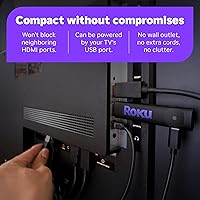
Yes, and this is one of the more practical things about this Roku stick. It draws power over USB, so if your TV has a USB port that stays active while the TV is on, you can run the stick entirely from the TV itself. No power brick, no extra cord running to the wall.

In most cases, yes. As long as the hotel TV has a free HDMI port and a USB port or you bring a small USB power adapter, the streaming stick works just like it would at home. The one catch is hotel Wi-Fi that uses a captive portal login page — those logins can't be completed through the Roku interface directly, so you may need to connect through your phone's hotspot instead.

You go into the audio settings on the streaming stick and pair your Bluetooth headphones directly to the device — not through your phone or TV. Once paired, audio routes entirely through your headphones. It works with most standard Bluetooth headphones, though some older or less common models may have pairing compatibility issues.

Yes. The included voice remote is set up to control your TV's power, volume, and input switching, so you don't need to keep your original TV remote nearby for basic functions. It takes a couple of minutes to configure during initial setup and works with most televisions made in the last fifteen years.

Yes, the streaming stick integrates with both Amazon Alexa and Google Home, so you can use a smart speaker or display to control playback and launch apps by voice. Apple AirPlay 2 and HomeKit are also supported if you're in the Apple ecosystem. None of this requires any extra hardware beyond what you already own.

Most people are up and running in under ten minutes. You plug the stick into the TV, follow the on-screen prompts to connect to Wi-Fi and create or log into a Roku account, and that's essentially it. The interface walks you through each step clearly, and there's nothing that requires technical knowledge.

It depends on what you're looking for. The free channels through The Roku Channel are ad-supported, which is the trade-off for not paying a subscription fee. There's a reasonable mix of news, older movies, and lifestyle content, but the library skews toward catalog titles rather than new releases. Think of it as a solid bonus rather than a replacement for a paid streaming service.

The stick is specifically designed to avoid that problem. Its narrow profile is slim enough that it typically leaves neighboring ports clear, which is a real issue with some bulkier streaming devices. If your TV's port placement is particularly tight, the stick's compact form factor generally handles it well.

The streaming stick performs well on average home networks, but it can struggle in environments with heavy network congestion — dense apartment buildings with dozens of competing networks being the most common scenario people flag. There is no wired ethernet option available, so if your Wi-Fi is persistently unreliable, there's no cable fallback. A strong router signal in the same room as your TV makes a noticeable difference.