Overview

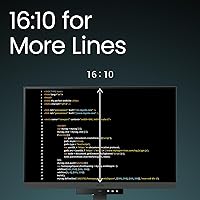
The BenQ RD240Q 24.1-inch Programming Monitor is not trying to be everything to everyone — it is built specifically for developers who live inside code editors all day. The most distinctive choice here is the 16:10 aspect ratio, which is genuinely rare at this screen size. That extra vertical height compared to a standard 16:9 display means more lines of code visible at once, less scrolling, and less context-switching. At a premium price point, you should expect thoughtful ergonomics and eye-care features baked in as core priorities, not added as marketing checkboxes. Worth noting upfront: at 24.1 inches, this is a compact display, and developers accustomed to 27-inch or dual-monitor setups may need an adjustment period.
Features & Benefits

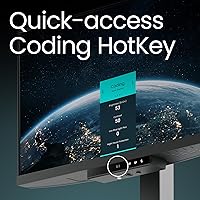
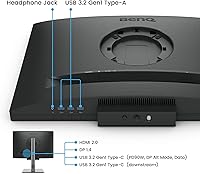
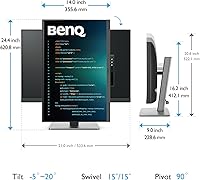
What sets this developer-focused display apart starts with the Coding HotKey bar — a dedicated shortcut button on the function row that cycles through display presets tuned for different coding scenarios. The underlying panel runs at a native 2560x1600 WQXGA resolution, giving text a crispness that makes long reading sessions noticeably less taxing. Connectivity is a real practical strength: the 90W USB-C port handles both video input and laptop charging over a single cable, cutting desk clutter significantly. The ergonomic stand covers the full range of height, tilt, swivel, and pivot adjustments. BenQ's Brightness Intelligence Gen2 adapts screen luminance automatically based on ambient light, pairing well with the Circadian protection mode for late-night work.

Best For

The RD240Q makes the most sense for professional developers and engineers who spend serious hours inside an IDE each day. The single-cable docking setup is a particularly strong draw for laptop users who want to sit down, plug in one cable, and get to work without fumbling with a separate charger and adapter. If you are prone to eye fatigue or regularly code past midnight, the adaptive brightness and night-mode protections will feel meaningful rather than gimmicky. This is also a smart pick for minimalists who want the vertical screen space of a taller monitor without physically installing one. It is not the right choice for gamers, graphic designers, or anyone who needs color-accurate output.

User Feedback

With around 144 ratings and a 4.5-star average, this coding monitor has a respectable early reception, though the sample size is modest enough that the picture could shift as more buyers weigh in. The most consistent praise centers on text rendering quality — reviewers repeatedly describe how clean fonts look at this resolution, which matters more than most specs on a programming display. USB-C convenience also draws frequent appreciation. On the critical side, glossy panel reflections surface in brighter room conditions, and a handful of buyers question whether the price is fully justified for a 24-inch form factor. Coding display modes get generally positive mentions, with users noting that switching between them mid-session is quick and practical.

Pros

  • The 16:10 aspect ratio provides noticeably more vertical screen space, reducing how often you scroll through long code files.
  • Text rendering at 2560x1600 WQXGA resolution is sharp and easy on the eyes during extended reading sessions.
  • 90W USB-C power delivery means a single cable handles both display input and laptop charging simultaneously.
  • The dedicated Coding HotKey makes switching between display presets fast enough to actually use in daily workflow.
  • Brightness Intelligence Gen2 adjusts screen luminance automatically, so you are not manually dimming the display every evening.
  • The ergonomic stand supports full height, tilt, swivel, and pivot adjustments, making it easier to dial in a comfortable posture.
  • Built-in USB hub with multiple USB-A and USB-C ports handles keyboard, mouse, and peripheral connections without a separate dock.
  • Early buyer feedback is consistently positive on build quality, with the monitor feeling solid and well-constructed out of the box.
  • Circadian and night-hours protection modes are practical features for developers who routinely work past sunset.
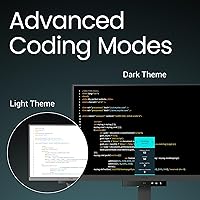
  • Display modes designed for syntax differentiation help reduce visual fatigue when parsing dense, color-coded code.

Cons

  • The glossy panel surface creates noticeable reflections in bright rooms or near windows, which is a real daily frustration.
  • At 24.1 inches, the screen size feels compact to anyone accustomed to 27-inch or ultrawide setups.
  • The premium price is harder to rationalize purely on screen size when larger general-purpose monitors cost less.
  • Only around 144 ratings exist so far, meaning long-term reliability data is still limited compared to more established models.
  • No high-refresh-rate option makes this coding monitor a poor fit if you want one display for both work and gaming.
  • Color accuracy is not a priority here, ruling out use cases like photo editing or design work requiring true-to-life hues.
  • The glossy coating, while enhancing contrast indoors, fingerprints easily and requires more frequent cleaning than matte alternatives.
  • Buyers in bright office environments may need to rearrange their desk setup to minimize the impact of panel reflections.
  • The specialized coding presets add value for developers but offer little benefit to users outside that specific workflow.
  • No built-in speakers means you will need external audio hardware, adding to desk setup complexity for some users.

Ratings

Our AI-generated scores for the BenQ RD240Q 24.1-inch Programming Monitor were produced by analyzing verified purchase reviews from buyers worldwide, with automated filtering applied to remove incentivized, duplicate, and bot-generated feedback. The ratings reflect an honest synthesis of both what developers love about this display and where real frustrations surface in daily use. Nothing has been softened — the scores transparently capture the full picture, strengths and trade-offs alike.
Text Clarity & Readability
93%
Developers consistently single out how clean code looks on this panel at its native resolution. The 2560x1600 pixel density means fonts render with sharp edges at comfortable sizes, and reviewers frequently mention spending full workdays without the eye fatigue they experienced on previous displays.
A small number of users note that the glossy surface can introduce subtle glare that slightly undermines text clarity in bright rooms, particularly when working near windows during daytime hours.
16:10 Aspect Ratio Utility
91%
Buyers who switched from 16:9 monitors describe the extra vertical height as immediately noticeable when reading long files or comparing two code windows stacked vertically. The additional screen rows reduce how often developers need to scroll, which accumulates into a meaningful productivity gain over a full day.
Users who primarily work in landscape-heavy applications or split their screen horizontally report that the 16:10 advantage is less impactful for them. A handful of reviewers also note that some applications do not scale ideally to the non-standard ratio without minor adjustments.
USB-C Connectivity
89%
The single-cable docking experience draws consistent praise from laptop users, particularly MacBook owners who appreciate eliminating a separate power brick from their desk. At 90W, the charging output handles demanding laptops without throttling, which was a genuine concern buyers had before purchasing.
A few reviewers using older or non-standard laptops report compatibility hiccups where full 90W delivery was not achieved, requiring them to keep a backup charger nearby. The USB-C cable included in the box is also described by some as shorter than ideal for flexible desk arrangements.
Eye Care & Comfort
86%
The adaptive brightness system earns real appreciation from developers who work across morning and evening sessions without manually adjusting their display. Night-mode users describe a noticeable reduction in the harsh blue-light exposure that previously disrupted their sleep after late coding sessions.
Some users find the automatic brightness transitions slightly aggressive in mixed lighting conditions, such as rooms with both natural and artificial light sources. A minority also note that the circadian mode shifts color temperature in ways that make certain UI color schemes look slightly washed out.
Coding Display Modes
84%
Reviewers who use the coding presets regularly describe the difference as subtle but genuinely useful — certain syntax colors become more distinct under the tuned profiles. The physical HotKey button makes switching presets fast enough that users actually adopt it as part of their workflow rather than ignoring it after setup.
For developers working in very dark or low-contrast themes, the preset differences can feel minor and harder to appreciate. A few buyers also note that the number of preset options is limited and that finer customization within each mode is not available through the on-screen menu.
Ergonomic Stand
82%
18%
The stand's full range of adjustments — height, tilt, swivel, and pivot — covers what most desk configurations need without requiring an aftermarket arm. Reviewers in home office setups appreciate being able to reposition the display during long sessions to shift posture and reduce neck fatigue.
Some users describe the stand's pivot mechanism as slightly stiff, requiring deliberate effort to rotate into portrait mode. Others note that the stand base occupies a larger desk footprint than expected given the monitor's overall size.
Build Quality
88%
The physical construction receives consistent positive comments, with buyers describing the chassis and stand as solid and free of flex or wobble. Out-of-box assembly is described as straightforward and the materials feel appropriate for a monitor at this price tier.
The matte plastic body shows fingerprints and dust more readily than some competitors, and a small number of buyers noted minor cosmetic scuffs on delivery packaging, though screen damage reports are rare.
USB Hub Functionality
77%
23%
Having six USB ports built into the monitor is a practical convenience that reduces cable management complexity for users connecting a keyboard, mouse, webcam, and external drives simultaneously. The USB 3.0 ports offer fast enough transfer speeds for most peripheral workflows.
A subset of reviewers note that the USB 2.0 ports feel redundant when faster alternatives exist, and power output for charging phones through the hub ports is described as slow. Port placement on the monitor body is also noted as slightly inconvenient to reach once the display is positioned on a desk.
Glossy Panel Trade-off
61%
39%
In controlled lighting environments, the glossy surface delivers noticeably richer contrast and color depth compared to matte alternatives, which some users genuinely prefer for text-heavy work. Buyers in dedicated home offices with controllable lighting rarely mention reflections as an issue.
This is the most commonly flagged frustration in negative reviews — offices with overhead lighting or windows behind the user create persistent reflections that cannot be fully managed by repositioning. Unlike a matte coating, there is no user-side fix, making this a permanent trade-off for buyers in bright environments.
Value for Money
68%
32%
For developers who fully utilize the 16:10 panel, the coding-specific features, and the 90W USB-C docking, the pricing feels defensible as a purpose-built professional tool. Buyers who see it as replacing both a monitor and a laptop dock in one unit tend to rate the value more favorably.
Reviewers who compare this to larger general-purpose monitors available at similar or lower prices frequently question the cost-per-inch math. The 24.1-inch screen size is the most cited factor making the value proposition feel harder to justify, particularly for buyers who do not prioritize the coding-specific features.
Setup & Out-of-Box Experience
83%
Assembly is consistently described as quick, with the stand clicking into place without tools and the on-screen menu being navigable within a few minutes of first power-on. Most buyers report the display was usable and adjusted to their preference within 15 to 20 minutes of unboxing.
The included documentation is sparse for users unfamiliar with BenQ's display preset system, and a few reviewers note they did not discover the Coding HotKey functionality until days after setup because it was not prominently called out in the quick-start materials.
Screen Size Satisfaction
66%
34%
Developers replacing a 24-inch 16:9 monitor with this display generally feel satisfied, as the added vertical space makes the transition feel like a meaningful upgrade rather than a lateral move. The compact desk footprint is also appreciated in tighter workspaces.
Buyers upgrading from 27-inch or ultrawide displays are the most dissatisfied group, frequently describing the 24.1-inch size as a step backward despite the resolution improvement. The size-to-price ratio is the single most consistent source of buyer regret in lower-star reviews.
OSD Menu & Controls
71%
29%
The physical button layout for navigating the on-screen display is straightforward once learned, and the Coding HotKey shortcut meaningfully reduces how often users need to enter the full menu for common adjustments. Preset switching is faster than comparable monitors using touch-sensitive controls.
Several reviewers describe the OSD menu structure as slightly cluttered, with settings distributed across sub-menus in ways that are not immediately intuitive. Fine-tuning color or brightness manually requires more button presses than users of competing displays are accustomed to.
Compatibility Across Devices
79%
21%
The RD240Q works reliably with macOS, Windows, and Linux systems, and reviewers across all three platforms describe stable signal recognition and consistent display behavior. USB-C compatibility is particularly noted as solid across recent MacBook Pro and Dell XPS models.
A small number of users with older workstations relying on DisplayPort or HDMI report that the USB-C-centric design means they need an adapter to achieve optimal resolution, and adapter compatibility is not guaranteed across all third-party options.

Suitable for:

The BenQ RD240Q 24.1-inch Programming Monitor was designed with a clear target user in mind: the professional developer or software engineer who spends most of their working day reading and writing code. If that describes you, the 16:10 aspect ratio alone is a genuinely practical advantage — you see more lines of code per screen without increasing desk footprint, which adds up meaningfully over a long session. Laptop users will find the 90W USB-C single-cable setup especially convenient, replacing the need for a separate power adapter and reducing desk clutter to one tidy connection. Those who regularly work late into the night will appreciate the adaptive brightness and circadian protection features, which are implemented thoughtfully rather than just listed on a spec sheet. If you value a clean, ergonomically sound workstation and want display modes actually tuned for code readability, this monitor addresses those needs more directly than most general-purpose alternatives at this tier.

Not suitable for:

The BenQ RD240Q 24.1-inch Programming Monitor is a purpose-built tool, and that specificity is also its biggest limitation for certain buyers. If you primarily do graphic design, photo editing, or any work requiring precise color accuracy, the display tuning here is optimized for text contrast and eye comfort, not color fidelity — look elsewhere. Gamers will find no meaningful high-refresh-rate support or low-latency gaming features, so this is not a dual-purpose gaming and work monitor. Users accustomed to 27-inch or larger displays may find the 24.1-inch size frustratingly compact, particularly if they rely on a single monitor without secondary screens. The glossy panel surface is a real issue in bright or sunlit rooms, where reflections can undercut the otherwise excellent text clarity. Finally, buyers expecting a large screen for the price may feel the value proposition is harder to justify compared to larger general-purpose monitors available at similar or lower cost.
Specifications

  • Screen Size: The display measures 24.1 inches diagonally, offering a compact footprint suited to single-monitor desk setups.
  • Resolution: Native panel resolution is 2560x1600 pixels (WQXGA), delivering sharp, high-density text at the default scaling level.
  • Aspect Ratio: The 16:10 aspect ratio provides more vertical screen space than a standard 16:9 panel of equivalent diagonal size.
  • Panel Surface: The screen uses a glossy coating, which enhances contrast and color depth but can produce reflections in bright environments.
  • USB-C Power: The USB-C port delivers up to 90W of power delivery, sufficient to charge most modern laptops through a single cable connection.
  • USB Ports: The integrated USB hub includes three USB 2.0 ports and three USB 3.0 ports for connecting peripherals directly to the monitor.
  • Ergonomic Stand: The included stand supports height adjustment, tilt, swivel, and pivot (portrait rotation), covering the full range of posture adjustments.
  • Eye Care: Brightness Intelligence Gen2 automatically adjusts screen luminance based on ambient room lighting to reduce eye strain during long sessions.
  • Circadian Mode: The Circadian and Night Hours Protection mode reduces blue light output during evening hours to support healthier sleep patterns.
  • Coding Modes: Multiple dedicated display presets are included, each tuned to improve readability and syntax color differentiation for coding workflows.
  • HotKey Bar: A physical Coding HotKey button on the function bar lets users cycle between display presets without navigating on-screen menus.
  • Dimensions: The monitor with stand measures approximately 20 x 9 x 21 inches (width x depth x height) in its standard upright position.
  • Weight: Total unit weight including the stand is 16.8 pounds, which is typical for a monitor of this size and build quality.
  • Color: The monitor is finished in black with a consistent matte plastic body, excluding the glossy display surface itself.
  • Availability: The RD240Q was first made available in April 2024, making it a relatively recent release still accumulating long-term user data.
  • Rating: The monitor holds a 4.5-out-of-5-star average rating based on approximately 144 customer ratings on Amazon as of mid-2024.
  • Brand: Manufactured by BenQ, a company with a long history of producing displays targeted at professional and enthusiast user segments.
  • Model Number: The official model designation is RD240Q, part of BenQ's RD series focused on developer and programming use cases.

Related Reviews
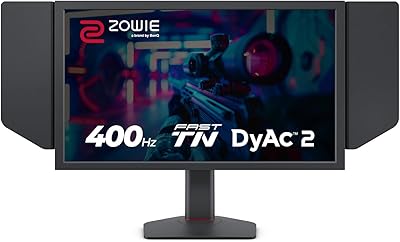
BenQ Zowie XL2566X+ 24-inch Gaming Monitor
80%
96%
Motion Clarity
93%
Refresh Rate Performance
91%
Responsiveness & Input Lag
88%
Build Quality & Stand
61%
Color Accuracy
More
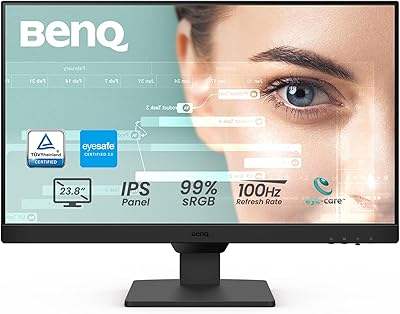
BenQ GW2490 24-inch IPS Monitor
81%
93%
Eye Care Performance
88%
Color Accuracy
82%
Refresh Rate & Motion Clarity
96%
Value for Money
54%
Ergonomics & Stand
More
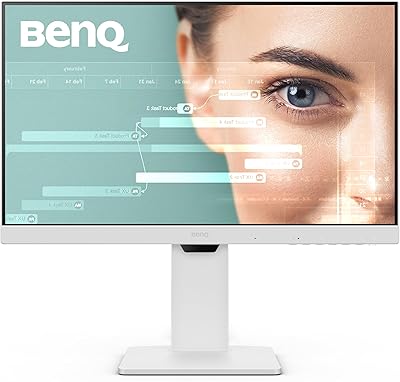
BenQ GW2486TC 24-inch USB-C Monitor
82%
88%
Image Clarity
91%
USB-C Charging & Connectivity
84%
USB Hub Functionality
86%
Eye Comfort & Brightness Tech
83%
Build Quality & Stand
More
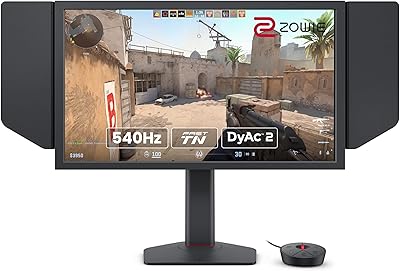
BenQ Zowie XL2586X 24.1″ 540Hz Gaming Monitor
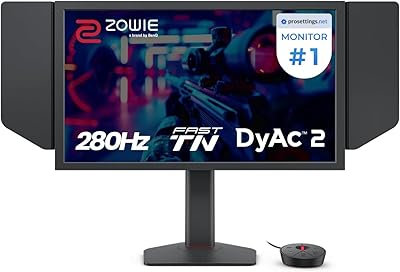
88%
96%
Performance
94%
Motion Clarity (DyAc2 Technology)
91%
Build Quality
89%
Ergonomics & Adjustability
92%
Color Accuracy (DCI-P3)
More
BenQ Zowie XL2546X+ 24.1-inch Gaming Monitor
78%
93%
Motion Clarity
94%
Refresh Rate Performance
41%
Color Accuracy
62%
Value for Money
91%
Competitive Feature Set
More
ViewSonic VG2456A 24-inch IPS Monitor
79%
92%
USB-C Docking Functionality
89%
Connectivity Range
86%
Ergonomics & Stand
63%
Display Sharpness
83%
Eye Comfort
More
ZZA Z24A 24-Inch Curved Gaming Monitor
67%
83%
Image Quality
86%
Contrast & Black Levels
78%
Refresh Rate & Smoothness
61%
Motion Clarity
74%
Color Accuracy
More
ASUS VA24DQSB 24-inch IPS Monitor
78%
93%
Ergonomic Adjustability
88%
IPS Panel Color Accuracy
61%
Brightness & Glare Handling
91%
Eye Comfort & Fatigue
84%
Build Quality & Stability
More
Dell P2425 24″ WUXGA IPS Monitor
82%
88%
Image Quality
84%
Color Accuracy
93%
Connectivity
87%
Build Quality
83%
Ergonomics & Stand
More
CRUA 24-Inch Curved Monitor
84%
88%
Display Quality
91%
Value for Money
84%
Ease of Setup
80%
Gaming Performance
79%
Build Quality
More

FAQ

The 16:10 aspect ratio is the most tangible real-world difference. You genuinely see more lines of code at once compared to a standard 16:9 monitor of similar size. The coding display presets are useful too, particularly for adjusting contrast in ways that make syntax colors easier to distinguish during long sessions. It is not a gimmick, but the benefits are most noticeable if you spend several hours a day inside an IDE.

Yes, that is one of the more practical features of the RD240Q. The USB-C port supports up to 90W of power delivery, which covers most modern MacBooks and Windows laptops. One cable carries both the display signal and charging current simultaneously, so you can fully replace your laptop charger in a desk setup.

It depends entirely on your lighting conditions. In a controlled environment with indirect lighting or behind you, the glossy panel looks excellent and text appears crisp. If you sit facing a window or work under strong overhead lighting, reflections can become genuinely distracting. It is a real trade-off worth thinking about before buying if your workspace is bright.

Think of it as getting roughly 11 percent more vertical height for the same screen width. On a 24-inch 16:9 monitor you might see 45 lines of code; on this display you might see 50 or more at the same font size. It is not a dramatic visual transformation, but it does reduce how often you scroll, and that adds up across a full workday.

General productivity tasks like writing, spreadsheets, and document work benefit from the extra vertical space just as much as coding does. It is not well suited to photo or video editing because color accuracy is not its priority. Gaming is also a poor fit since there is no high refresh rate support to speak of.

The stand is genuinely flexible — it covers height adjustment, tilt, swivel left and right, and full pivot into portrait orientation. Most users should be able to dial in a comfortable position without needing an aftermarket arm, which is not always the case at this price tier.

In practice, the adjustments are gradual rather than abrupt, so you rarely notice a sudden shift. It works similarly to automatic brightness on a phone — the transitions happen slowly enough that they do not interrupt your focus. If you prefer full manual control, you can disable the automatic mode from the OSD menu.

That really depends on your current setup. If you are coming from a 27-inch monitor, the RD240Q will feel noticeably smaller at first. The high resolution and 16:10 ratio help compensate, but screen size is subjective. Developers who use multiple monitors or an ultrawide will likely find it compact; those replacing a 24-inch 16:9 display will feel right at home.

The hub includes three USB 2.0 ports and three USB 3.0 ports, which is enough for a keyboard, mouse, webcam, and a couple of other devices without needing a separate hub. The USB 3.0 ports handle faster data transfers if you plug in an external drive.

BenQ typically provides a three-year warranty on their monitors, though you should verify the specific terms included with your purchase. Their support reputation is generally solid for a display manufacturer, with phone and online channels available. Given that this is a relatively new model, documenting your purchase date is worth doing from day one.