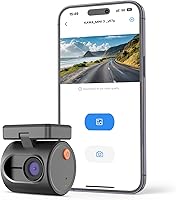
Overview

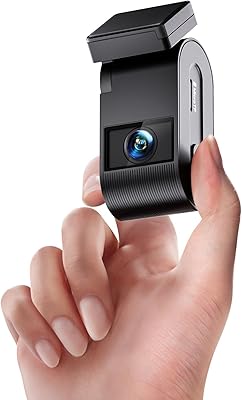
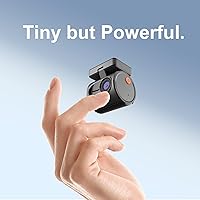
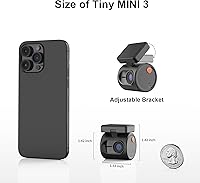
The KAWA Mini 3 Compact Dash Cam is one of those rare budget devices that actually earns its place on the windshield — or more accurately, hides there so well you barely notice it. At just over an inch and a half tall, it tucks behind the rearview mirror without blocking your sightline or cluttering the cabin. KAWA isn't a household name, but the Mini 3 has carved out a real niche in the budget dash cam market by stuffing a genuinely capable feature set into a tiny footprint. That said, it's worth setting clear expectations: this is a solid everyday recorder, not a professional-grade unit, and a few missing accessories may catch you off guard.

Features & Benefits

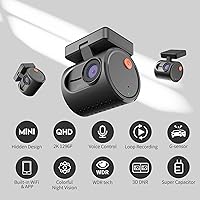
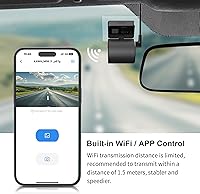
The KAWA Mini 3 records in 1296P QHD, delivering crisp footage — license plates, road signs, nearby vehicles — without burning through your SD card, thanks to H.265 compression. Night driving is handled by WDR and 3D DNR technologies, which genuinely improve visibility in low-light urban conditions, though don't expect miracles on a pitch-dark rural road. Where this compact camera really earns points is voice control: say the command and it locks a clip or takes a photo without you taking your hands off the wheel. The built-in Wi-Fi connects to the KAWA AUTO app for wireless video access, and the supercapacitor design means it won't cook itself in a parked summer car the way lithium battery units sometimes do.

Best For

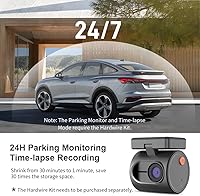
This mini dash cam fits a very specific kind of driver particularly well. If you want something that practically disappears behind your mirror — no chunky housing, no dangling cables in your field of view — the KAWA Mini 3 is worth serious consideration. It's especially practical for rideshare and delivery drivers who can't afford to fumble with buttons mid-fare; voice commands handle the quick tasks without distraction. Hot-climate drivers will also appreciate the supercapacitor build, which holds up where lithium batteries tend to swell and fail. And if you park in a city overnight, the 24-hour parking mode adds a real layer of security — just know the hardwire cable is a separate purchase.

User Feedback

With 151 ratings and a 3.8-star average, buyer sentiment sits in that zone where most people are satisfied but not blown away. The most consistent praise centers on easy installation, the discreet size, and clean daylight video quality. The friction starts with a few recurring issues: some users report spotty Wi-Fi pairing with the KAWA AUTO app, turning a quick download into an exercise in patience. There's also frustration that the parking monitoring cable isn't included in the box, and neither is an SD card — details that catch first-time buyers off guard at this price tier. These aren't dealbreakers, but they're real considerations worth weighing before you commit.

Pros

  • Extremely compact size tucks behind the rearview mirror without blocking any part of your windshield view.
  • 1296P QHD footage is sharp enough to clearly capture license plates and road details in daylight.
  • H.265 encoding keeps file sizes manageable, stretching your SD card storage significantly further.
  • Voice control works hands-free for locking clips or taking photos, which is genuinely useful mid-drive.
  • Supercapacitor power source holds up in hot climates where lithium battery units often fail prematurely.
  • G-sensor automatically locks and protects collision footage so critical evidence never gets overwritten.
  • Loop recording runs fully automatically, so you never have to manually manage storage or delete old files.
  • Installation is quick and straightforward — adhesive or static sticker mount, no tools required.
  • Wi-Fi connectivity lets you pull footage wirelessly when the app cooperates, avoiding the hassle of card removal.
  • 140-degree field of view captures a wide lane perspective without heavy fisheye distortion at the edges.

Cons

  • No microSD card is included in the box, which is an easy-to-miss extra cost at checkout.
  • The parking monitoring hardwire cable is sold separately, making 24-hour surveillance mode an added expense.
  • Wi-Fi pairing with the KAWA AUTO app is inconsistent for some users, turning a quick task into a repeated frustration.
  • Night vision performance, while improved by WDR processing, falls noticeably short on very dark or unlit roads.
  • No built-in screen means you cannot review footage directly on the device without a phone or computer.
  • Single front-facing lens only — no rear camera option for drivers who want full front-and-back coverage.
  • The 3.8-star average across real buyers signals that a meaningful portion of purchasers ran into issues worth noting.
  • Brand support and long-term firmware updates are less established compared to more recognized dash cam manufacturers.

Ratings

Our AI-powered scoring for the KAWA Mini 3 Compact Dash Cam was built by analyzing verified global buyer reviews, actively filtering out incentivized, bot-generated, and duplicate submissions to surface what real drivers actually experience. The scores below reflect both the genuine strengths and the recurring frustrations that emerged across hundreds of ownership accounts. Nothing has been smoothed over — where buyers ran into trouble, the numbers show it.

Discreet Design
93%
This is the category where the KAWA Mini 3 genuinely stands apart from the competition at its price point. Drivers consistently praised how easily it disappears behind the rearview mirror, leaving the windshield clear and the cabin looking uncluttered — a real benefit for rideshare drivers who prefer not to advertise surveillance equipment.
A small number of buyers noted that the ultra-compact size makes physical button operation slightly fiddly, particularly for drivers with larger hands who prefer tactile control over voice commands.
Video Quality (Daytime)
83%
Daytime footage consistently drew positive reactions, with reviewers noting clean, sharp images that held up well when identifying license plates at intersections or capturing lane details at highway speeds. The 140-degree field of view covers a wide enough area that most relevant road events stay in the frame.
Some buyers felt the footage looked better on the device preview than when exported and viewed on a larger screen, suggesting the H.265 compression, while efficient, does introduce some fine-detail trade-offs at full zoom.
Night Vision Performance
67%
33%
On well-lit city roads and suburban streets with streetlamps, the WDR and 3D DNR processing does a reasonable job of keeping footage readable and reducing the grain that plagues cheaper night-vision implementations. For everyday urban commuters, it covers the basics adequately.
On darker roads without ambient lighting, the footage quality drops noticeably — detail in shadowed areas becomes murky and plate recognition becomes unreliable. Buyers who frequently drive rural or poorly lit routes reported real disappointment here, and the gap versus premium-tier sensors is hard to ignore.
Voice Control
78%
22%
Reviewers who used voice control regularly found it genuinely practical — being able to lock a clip or snap a photo without lifting a hand off the wheel is a meaningful safety feature, especially for rideshare and delivery drivers managing a busy cabin environment.
Recognition accuracy drops in noisy driving conditions, such as with music playing or windows open at highway speed. A subset of users found themselves repeating commands or reverting to manual button presses when the voice system failed to register, which undermines the hands-free appeal.
App & Wi-Fi Connectivity
57%
43%
When the KAWA AUTO app connects cleanly, wirelessly browsing and downloading clips directly to a smartphone is genuinely convenient — no fumbling with card adapters or cables. Initial pairing is straightforward for most users on a first attempt.
This is the most consistently criticized aspect across buyer reviews. A notable share of users reported intermittent connection drops, the app failing to detect the camera after initial setup, or needing to reconnect manually on almost every use. For a feature that should be plug-and-play, the reliability falls short of expectations.
G-Sensor & Emergency Lock
84%
The automatic impact detection worked reliably for the majority of buyers who tested it — hitting a pothole, a curb, or a minor fender-bender triggered the lock function and preserved the clip without requiring any manual action. That kind of passive protection is exactly what you want from a dash cam.
A few drivers reported the G-sensor triggering too easily on rough road surfaces, causing clips to lock unnecessarily and gradually eating into usable storage space between manual reviews.
Supercapacitor Reliability
88%
Buyers in warmer climates — Texas, Florida, Southern California — specifically called out the supercapacitor design as a reason they chose this compact camera over comparable units. Not having to worry about a swollen or dead battery after a summer of hot parked cars is a real, practical advantage that pays off over time.
The supercapacitor cannot store power for extended periods the way a battery does, meaning the camera loses any buffered clip if power is cut suddenly. Without the separately purchased parking cable, there is no power-independent memory to fall back on.
Installation Ease
89%
Buyers across skill levels found the setup fast and frustration-free — mount the camera, run the power cord along the headliner and A-pillar, plug into the 12V socket, and you're recording. The dual-mount option (adhesive tape or static sticker) gives useful flexibility for drivers who are hesitant to commit to permanent adhesive.
The power cord routing can look untidy without careful cable management, and the included cord length may feel just short for certain vehicle configurations, requiring buyers to be creative with clip placement.
Loop Recording
91%
Loop recording runs completely automatically and requires zero intervention once set up — the camera manages storage on its own by overwriting the oldest unprotected clips. For everyday drivers who never want to think about managing storage, this is exactly how it should work.
The loop segment length options are standard but limited, and buyers who prefer finer control over clip duration or want more sophisticated file management will find the system a bit basic compared to higher-end units.
Parking Mode
61%
39%
The underlying hardware supports 24-hour parking surveillance and time-lapse recording, which is a meaningful capability for anyone who parks on a busy street or in an urban lot overnight. The automatic voltage cutoff at 11.8V is a thoughtful safeguard that prevents draining the car battery.
The hardwire cable required to activate parking mode is not in the box and must be purchased separately, which catches many buyers off guard. The added cost and the need for professional installation to tap the fuse box make this feature far less accessible than the product listing implies.
Value for Money
76%
24%
For buyers who understand what they are getting — a capable, discreet 2K recorder with solid daytime performance and voice control — the price-to-feature ratio is genuinely competitive. The supercapacitor alone is a spec upgrade that costs more to include than many rivals at this tier bother with.
The value equation weakens once you factor in the mandatory extra purchases: an SD card and a parking cable together can add meaningful cost to the total outlay. First-time buyers who did not anticipate these additions felt the real-world value was lower than the sticker price suggested.
Build Quality
72%
28%
The camera feels solid for its weight class — seams are tight, the casing does not flex under handling, and the overall construction does not feel hollow or cheap. Multiple buyers reported using it for six-plus months without any structural issues.
The all-plastic body shows smudges and fingerprints easily, and the mount connection point — while secure — has a slightly loose tolerance that causes minor camera wobble on particularly rough roads, which can show up as subtle vibration artifact in footage.
Storage Compatibility
74%
26%
Supporting microSD cards up to 256GB is generous for this category, giving drivers the option to store a substantial amount of continuous footage before the oldest clips cycle out. H.265 encoding helps stretch whatever card capacity you have further than older H.264-based cameras.
No card is included, and the listing does not clearly specify a minimum recommended card speed, leading some buyers to pair the camera with slower cards and experience choppy or interrupted recording. A bundled card — even a small one — would meaningfully improve the out-of-box experience.

Suitable for:

The KAWA Mini 3 Compact Dash Cam is a strong fit for drivers who prioritize a clean, unobtrusive cabin over flashy hardware. Everyday commuters who just want reliable footage running quietly in the background will find it checks all the right boxes without overcomplicating things. Rideshare and delivery drivers get particular value here — the voice control means locking a clip or capturing a photo mid-trip requires no physical interaction, which matters when you're navigating traffic and managing passengers at the same time. If you live somewhere that sees intense summer heat, the supercapacitor design is a genuine practical advantage over battery-based units that tend to swell or fail when left in a hot parked car. City dwellers who want the option to add 24-hour parking surveillance later will also appreciate that the hardware supports it, even if the cable is a separate buy.

Not suitable for:

Buyers expecting a plug-and-play, everything-included experience may find the KAWA Mini 3 Compact Dash Cam frustrating right out of the box — neither a microSD card nor the parking hardwire cable is included, which means extra spending before the camera is fully functional. Drivers who rely heavily on companion apps for quick video review should be aware that Wi-Fi pairing has been inconsistent for a subset of users, making wireless access less reliable than advertised. This compact camera also isn't the right call for anyone who needs top-tier low-light performance; the WDR and 3D DNR processing helps in urban nighttime conditions, but it won't match the sensor quality of pricier units designed specifically for dark environments. If you want a front-and-rear dual-channel setup, look elsewhere — this is a single-lens device. Power users who want on-device playback via a built-in screen will also be disappointed, as footage review requires either the app or pulling the card to a computer.

Specifications

  • Model: The device is manufactured by KAWA under the model designation MINI 3.
  • Resolution: Video is recorded at 1296P QHD, which is commonly referred to as 2K quality.
  • Video Format: Footage is encoded using the H.265 codec, which reduces file size without significant loss in image quality.
  • Field of View: The lens captures a 140-degree wide-angle field of view, covering multiple lanes of traffic ahead.
  • Dimensions: The camera body measures 1.42 x 1.82 x 1.53 inches, making it one of the smaller units in its class.
  • Weight: The unit weighs 6.4 ounces, light enough to be securely held by the included adhesive or static sticker mount.
  • Power Source: The camera is powered by a built-in supercapacitor rather than a lithium battery, offering more stable performance in high-heat environments.
  • Night Vision: Low-light recording is supported by both Wide Dynamic Range (WDR) and 3D Digital Noise Reduction (3D DNR) technologies.
  • Connectivity: The camera includes built-in Wi-Fi for wireless pairing with the KAWA AUTO app on iOS and Android devices.
  • Storage Support: The device supports microSD cards up to 256GB, though no card is included in the box.
  • Loop Recording: Loop recording runs continuously and automatically overwrites the oldest footage once storage capacity is reached.
  • G-Sensor: An integrated G-sensor detects sudden impacts and automatically locks the current clip to prevent it from being overwritten during loop recording.
  • Voice Control: Built-in voice control allows drivers to issue commands — such as locking a video or taking a photo — without touching the device.
  • Parking Mode: 24-hour parking monitoring and time-lapse recording are supported via a hardwire cable, which must be purchased separately.
  • Mounting Type: The camera mounts to the windshield using either an adhesive tape strip or a static cling sticker, both of which are included in the box.
  • App Compatibility: The KAWA AUTO app is available for both iOS and Android and connects to the camera via Wi-Fi for video playback, download, and sharing.
  • In the Box: The package includes the dash cam unit, a car charger and power cord, adhesive tape, a static sticker mount, and a user manual.
  • Voltage Cutoff: The camera is designed to automatically shut down when the connected vehicle's battery voltage drops below 11.8V to prevent car battery drain.

Related Reviews
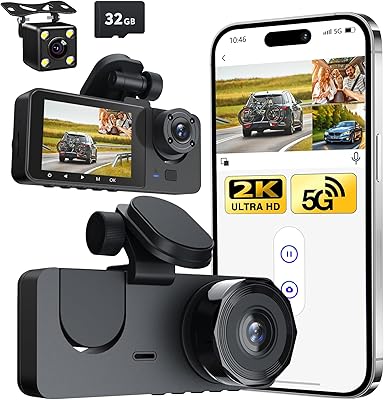
Zengest 3 Channel Dash Cam
86%
88%
Video Quality
85%
Ease of Installation
92%
Night Vision Performance
72%
App Control Experience
90%
Parking Mode Reliability
More
VIOFO VS1 Mini 2K Dash Cam
82%
88%
Video Clarity
82%
Night Vision Performance
94%
Form Factor & Discretion
67%
App & Wi-Fi Connectivity
86%
GPS Accuracy & Data Logging
More
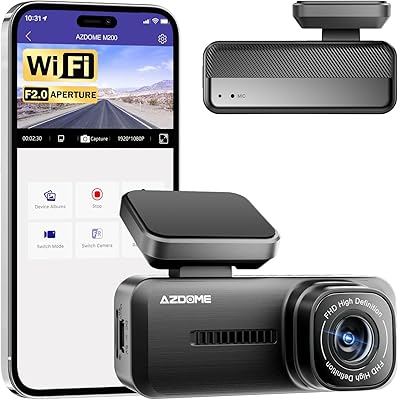
Azdome M200 Mini Dash Cam
74%
91%
Discreetness & Form Factor
78%
Video Quality (Daytime)
54%
Night Vision Performance
67%
WiFi App Experience
88%
Installation Ease
More
KAWA D6 2K WiFi Dash Cam
74%
83%
Video Clarity
67%
Night Vision
58%
App Experience
74%
Build Quality
86%
Ease of Installation
More
Vantrue N4S 3-Channel Dash Cam
77%
88%
Front Camera Video Quality
91%
Night Vision Performance
86%
Cabin IR Recording
83%
Rear Camera Quality & Weatherproofing
71%
Parking Mode Reliability
More
Icesky M4 Three-Channel Dash Cam
71%
83%
Daytime Video Clarity
67%
Night and Low-Light Performance
61%
App Experience
69%
Installation Process
72%
Build Quality
More
VIOFO A119 Mini 2
VIOFO A119 Mini 2
80%
91%
Video Quality
88%
Night Vision Performance
83%
Build Quality & Durability
93%
Compact Design & Discreetness
72%
Wi-Fi & App Experience
More
iZEEKER iD230 3-Channel Dash Cam
75%
83%
Front Camera Quality
88%
Cabin Night Vision
61%
Rear Camera Quality
79%
Ease of Installation
67%
G-Sensor Reliability
More
AZDOME M580 3-Channel Dash Cam
85%
93%
Video Quality
88%
Ease of Setup
85%
GPS Tracking Accuracy
90%
Night Vision Performance
82%
Build Quality
More
Vantrue N4 3-Channel Dash Cam
70%
88%
Video Quality
92%
Interior Night Vision
86%
Build & Durability
89%
Heat & Cold Resistance
74%
Parking Mode
More

FAQ

No, a microSD card is not included in the box. You will need to purchase one separately — the KAWA Mini 3 Compact Dash Cam supports cards up to 256GB, and a Class 10 or U3 card is generally recommended for smooth 2K recording.

Not immediately. Parking mode requires a hardwire cable that connects the camera directly to your car's fuse box for constant low-draw power, and that cable is sold separately. Without it, the camera powers off when you remove your key, so you won't get overnight surveillance out of the box.

You say a specific command — something like telling it to lock the video or snap a photo — and the camera responds without you needing to press anything. It's genuinely useful when you're driving and don't want to reach up and fiddle with a small button. That said, it works best in a reasonably quiet cabin; loud music or wind noise can interfere with recognition.

Better than most. Because this compact camera uses a supercapacitor instead of a lithium battery, it handles high temperatures far more reliably. Lithium batteries can swell or fail when a car bakes in direct sun, whereas supercapacitors are designed to tolerate those extremes. It's one of the more practical advantages of this unit for anyone in a warmer climate.

It's decent for its price range, not exceptional. The WDR and 3D DNR processing does improve visibility on lit roads and in urban nighttime conditions — you'll generally still make out plates and lane markings. On completely unlit roads, however, you'll notice the limits pretty quickly. If low-light performance is your top priority, you'd want to budget more for a camera with a larger image sensor.

It works well for a lot of users, but it's one of the more mixed areas in buyer feedback. Some people connect without issue, while others report dropped connections or difficulty getting the KAWA AUTO app to recognize the camera consistently. If wireless transfer is important to you, it might be worth having a backup plan — like pulling the card directly — just in case.

Yes, that's genuinely one of its strengths. At under two inches tall, it fits neatly behind the rearview mirror and is difficult to spot from outside. For anyone who has had a dash cam stolen from a parked car, or who just prefers a clean-looking interior, that discreet profile is a real practical benefit.

The built-in G-sensor detects the impact and automatically locks the current clip, flagging it so the loop recording system won't overwrite it. This means the footage from the moments around a collision is preserved even if the camera keeps running afterward. It's a standard but important feature that works automatically — you don't have to do anything.

Not for basic recording. The camera records continuously as soon as it gets power from your car's 12V socket, and voice commands work independently of your phone. The KAWA AUTO app is only needed if you want to review or download footage wirelessly. Otherwise, you can pull the microSD card and play videos on a computer.

The box includes both an adhesive tape mount and a static cling sticker as alternatives. The static sticker leaves no residue and can be repositioned if needed, making it the lower-commitment option for anyone worried about windshield damage. The adhesive tape holds more firmly if you find the camera shifts position with vibration.

Where to Buy

KAWA Official Website
In stock $47.99