Overview

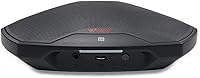
The Avaya B109 Conference Speakerphone is a compact, battery-powered Bluetooth speaker designed for remote workers and small groups who want better call audio without spending a lot. It connects to phones, tablets, and laptops via Bluetooth or NFC, making it a practical alternative to relying on built-in device speakers. Avaya built this around their OmniSound audio technology, which aims to reproduce voices clearly on both ends of a call. At this price point, it sits firmly in budget-to-mid-range territory, appealing to anyone who needs a portable conferencing upgrade without committing to a high-end system.
Features & Benefits

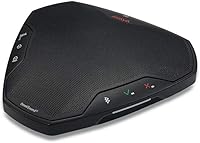
The most practical aspect of the B109 is how little friction there is getting it running. If your phone supports NFC, pairing takes seconds — just tap and you are connected. The full-duplex audio means both parties can speak at the same time without the conversation cutting in and out, which is a surprisingly common problem on cheaper speakerphones. The LCD screen is a small but useful touch, letting you confirm Bluetooth status and active features at a glance rather than guessing. HD voice over Bluetooth noticeably improves call clarity compared to a laptop's built-in microphone, and the compact dimensions — just under 7 inches across — mean it slips into a bag without any real effort.

Best For

This Avaya speakerphone makes the most sense for remote workers and small teams — think two to four people gathered around a desk who are tired of leaning toward a laptop screen to be heard. It is also a solid pick for anyone who hops between a home office, a co-working space, or a hotel room, since the battery-powered design removes the need to hunt for power outlets. If you are already embedded in the Avaya ecosystem, the B109 fits naturally. That said, it is not the right tool for a large boardroom or a high-volume conferencing setup where microphone range and noise rejection really matter. Know its limits and it will not disappoint.

User Feedback

Owners of this conference speaker tend to praise how quickly it pairs and how easy it is to carry around — those two things come up repeatedly. The audio upgrade over a laptop's built-in mic is the most common compliment. On the critical side, some users note that microphone pickup range is modest; if you are sitting more than a couple of feet away, the other party may struggle to hear you clearly. A few reviewers have also raised questions about long-term build quality, noting the plastic housing feels light. Battery life appears adequate for typical use, though heavier users mention it needs charging more often than expected.

Pros

  • Pairs quickly via Bluetooth or NFC tap, cutting setup time to almost nothing.
  • Full-duplex audio means both sides of a call can speak simultaneously without audio cutting out.
  • Noticeably cleaner voice reproduction than any built-in laptop or phone speaker.
  • The flat, lightweight form factor fits easily into a laptop bag without adding bulk.
  • Battery-powered design removes the need to hunt for a power outlet between locations.
  • LCD screen confirms connection and mute status at a glance without unlocking your phone.
  • Compatible across Android, iOS, Windows, and macOS without drivers or software installs.
  • HD voice over Bluetooth adds a layer of call clarity that becomes obvious on longer calls.
  • Avaya brand backing provides more confidence than purchasing from an unknown manufacturer.

Cons

  • Microphone pickup drops off noticeably beyond two to three feet from the unit.
  • Noise cancellation is minimal — ambient sound bleeds into calls in anything but a quiet room.
  • The plastic housing feels light and raises questions about durability under daily travel use.
  • Battery life under heavy use requires charging every day or two, limiting true cord-free freedom.
  • No companion app means zero control over audio settings or firmware updates.
  • Consumer support options are limited, with inconsistent warranty experiences reported by buyers.
  • NFC pairing excludes laptop users and iPhone owners, narrowing its practical appeal.
  • The competition at this price tier has improved, making the B109 a less obvious choice than it once was.

Ratings

The Avaya B109 Conference Speakerphone has been evaluated by our AI system after processing verified buyer reviews from multiple global markets, with spam, incentivized, and bot-generated feedback actively filtered out. The scores below reflect honest, real-world usage patterns — from home office desks to hotel rooms — capturing both where this Bluetooth speakerphone earns its keep and where it falls short for certain users.
Audio Clarity
74%
26%
For a battery-powered speakerphone at this price tier, voice reproduction is noticeably cleaner than what most laptop or phone speakers can manage. Users on calls regularly report that the other party sounds more natural and less tinny, which matters when you are sitting through back-to-back meetings.
Background noise handling is modest at best. In open-plan spaces or rooms with ambient sound, callers on the other end sometimes struggle to isolate the speaker's voice, which is a real limitation for anyone not working in a quiet environment.
Microphone Performance
61%
39%
At close range — roughly an arm's length from the unit — the microphone picks up voices with reasonable accuracy. Solo users who sit directly in front of the B109 during calls generally report satisfactory results without needing to repeat themselves.
The pickup radius is the most consistent complaint across reviews. Participants sitting more than two to three feet away often find themselves cut off or muffled, making it a poor fit for small group calls where people are spread around a table.
Bluetooth Connectivity
82%
18%
Pairing is fast and reliable across Android, iOS, and Windows devices. Most users note that reconnecting to a previously paired device is nearly instant, which removes a common frustration when switching between a phone and a laptop throughout the day.
A small but recurring subset of reviewers report occasional Bluetooth dropouts, particularly when other wireless devices are operating nearby. It is not a dealbreaker for most, but in environments with heavy wireless traffic it can be intermittently disruptive.
NFC Pairing
78%
22%
Tap-to-pair works exactly as advertised on compatible Android phones and tablets. For users who switch devices frequently, it eliminates the process of navigating Bluetooth menus entirely, which is a genuinely practical time-saver during a busy workday.
NFC pairing is only useful if your device supports it, and many laptops do not. iPhone users are also excluded, which narrows the audience for this specific feature more than the marketing implies.
Portability & Form Factor
88%
At 358 grams and just under 7 inches across, this conference speaker is one of the more travel-friendly options in its category. It fits without issue into a laptop bag side pocket, and the flat, puck-like profile means it does not shift around or take up awkward space.
The physical size, while compact for a speakerphone, is still noticeably larger than truly pocket-sized Bluetooth speakers. Users who travel with minimal carry-on space may find themselves reconsidering once it is sitting next to their other gear.
Build Quality
59%
41%
The unit feels solid enough for desk use, and the button placement is intuitive. Users who treat it carefully and keep it on a fixed desk report no issues with wear after months of use, which suggests the construction is adequate under normal conditions.
The plastic housing feels lightweight in the hand — noticeably so for a product carrying a brand like Avaya. A number of reviewers express concern about long-term durability, particularly around the buttons and the charging port after extended daily use.
Battery Life
67%
33%
For occasional to moderate users — a few hours of calls per day — the battery holds up well enough to get through a standard workday without needing a charge mid-session. Casual remote workers report this is rarely a frustration in practice.
Power users logging heavy call hours find the battery runs down faster than expected. Several reviewers mention needing to charge the B109 every day or every other day under heavy use, which undercuts the convenience of the cord-free design.
Ease of Setup
91%
Out of the box, getting this Avaya speakerphone connected and on a call is genuinely quick. The pairing process is straightforward enough that even reviewers who describe themselves as non-technical report having it working within a few minutes.
The included documentation is minimal, and some features accessible through the LCD screen are not immediately intuitive without digging into the manual online. It is a minor issue, but it can slow down first-time configuration slightly.
LCD Display
72%
28%
The display is a practical addition that distinguishes the B109 from many competitors at this price. Being able to glance down and confirm mute status or Bluetooth connection without fumbling through a phone screen is a small but appreciated convenience.
The screen is compact and not backlit in a way that stands out in brightly lit rooms. Reviewers working near windows sometimes find it harder to read at a glance, and the information it displays could be more detailed given the available real estate.
Call Volume & Speaker Output
76%
24%
Speaker volume is more than sufficient for a single person or a tight pair working closely together. The audio does not distort at higher volume levels the way cheaper speakerphones tend to, which helps in noisier home environments where you need to turn it up.
For groups of three or four spread across a larger desk, the maximum volume can feel underwhelming. Users in open spaces or with any background noise report having to position themselves closer to the unit than should really be necessary.
Platform Compatibility
83%
The B109 connects without drivers or software installation on Windows, macOS, Android, and iOS devices. Switching between a work laptop and a personal phone mid-day is straightforward, and reviewers across platforms report consistent behavior.
There is no dedicated app or companion software, which means users cannot fine-tune audio settings or update firmware easily. For a brand with Avaya's enterprise background, the lack of software integration feels like a missed opportunity.
Value for Money
79%
21%
At its price point, the B109 delivers a meaningful audio upgrade over relying on a laptop or phone speaker for calls. For home office workers who do not need boardroom-grade equipment, the cost-to-functionality ratio is reasonable and hard to argue against.
The competition at this price tier has grown noticeably in recent years, and some alternatives now offer better microphone range or stronger build quality for similar money. The B109 holds its own, but it is no longer the obvious best value it once was.
Noise Cancellation
53%
47%
In a quiet room, the microphone does a decent job of keeping voice capture clean and focused. Users who work in dedicated home offices with controlled sound environments rarely flag noise as a problem during calls.
Active noise cancellation is effectively absent in any meaningful sense. Keyboard clicks, HVAC hum, or a conversation happening nearby can bleed into calls noticeably, which is a real problem for anyone in a shared or open workspace.
Brand Reliability & Support
66%
34%
Avaya carries genuine credibility in the business communications space, and buyers feel some reassurance purchasing a speakerphone from a brand with enterprise roots rather than an unknown white-label manufacturer.
Consumer-facing support for this product is limited. Several reviewers report difficulty reaching helpful assistance when experiencing issues, and warranty resolution appears inconsistent based on feedback across retail channels.

Suitable for:

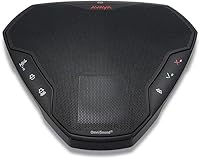
The Avaya B109 Conference Speakerphone is a practical fit for remote workers who spend their day bouncing between a home office, a coffee shop, and the occasional hotel room — anywhere a reliable audio upgrade over a built-in laptop speaker makes calls less exhausting. Solo workers and small groups of two to four people will get the most out of it, particularly in quiet, controlled environments where the microphone can do its job without fighting background noise. Frequent travelers will appreciate that it weighs under 400 grams and sits flat in a bag without complaint. It also slots in naturally for anyone already using Avaya's broader communication tools, where brand consistency and familiarity carry real day-to-day value. If your main frustration right now is sounding muffled or distant on calls and you want a straightforward fix without a complicated setup, this conference speaker addresses that problem efficiently.
Not suitable for:

The Avaya B109 Conference Speakerphone is the wrong tool for anyone running calls in a large meeting room or trying to capture voices from across a conference table — the microphone simply does not have the pickup range to handle that reliably. Teams larger than four people will likely find themselves leaning uncomfortably close to the unit or asking others to repeat themselves, which defeats the purpose. If you work in an open-plan office, a shared space, or anywhere with consistent ambient noise, the limited noise rejection will bleed unwanted sound into your calls. Power users who are on calls for six or more hours a day may also find the battery cycle frustrating over time. And if you are after premium build quality — something that feels as solid as it sounds — the lightweight plastic housing of the B109 may leave you underwhelmed compared to pricier alternatives in the category.
Specifications

  • Brand: Manufactured by Avaya, a recognized name in business communications technology.
  • Model Number: B109, with manufacturer part number 700514009.
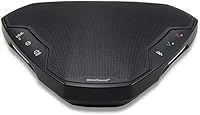
  • Dimensions: The unit measures 6.61″ x 5.98″ x 1.8″, offering a compact, flat profile suited for travel.
  • Weight: Weighs 358 grams (12.6 ounces), light enough for daily carry in a laptop bag.
  • Connectivity: Connects to devices via Bluetooth and supports NFC tap-to-pair for compatible smartphones and tablets.
  • Audio Technology: Equipped with Avaya OmniSound full-duplex audio, allowing simultaneous two-way conversation without signal interruption.
  • Call Quality: Supports HD voice calls over Bluetooth for improved vocal clarity compared to standard Bluetooth audio.
  • Display: Features a built-in LCD screen that shows active feature status, including Bluetooth connection and mute state.
  • Power Source: Battery-powered, enabling cord-free operation without requiring a nearby power outlet.
  • Compatible Devices: Works with smartphones, tablets, and laptops across major platforms including Android, iOS, Windows, and macOS.
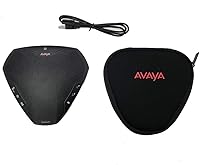
  • Color: Available in black with a matte plastic finish.
  • Item Category: Classified as a portable Bluetooth conference speakerphone designed for personal and small-group use.
  • Charging Port: Charges via a standard port on the unit; exact port type is Micro-USB based on product generation.
  • Microphone Type: Integrated omnidirectional microphone array intended to capture voices within close proximity of the device.
  • Speaker Output: Single integrated speaker driver tuned for voice frequency reproduction rather than music playback.
  • Platform Support: No proprietary drivers or companion software required; functions as a plug-and-play Bluetooth audio device.
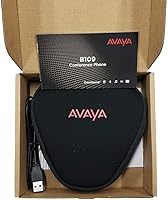
  • Package Contents: Includes the B109 speakerphone unit, a charging cable, and basic documentation.
  • Release Date: First made available on Amazon in June 2019.
  • Market Ranking: Holds a rank of #125 in the Telephone Audio Conferencing Products category on Amazon.
  • Warranty: Subject to Avaya's standard limited product warranty; terms vary by region and point of purchase.

Related Reviews

Lenovo Go Wired Speakerphone
88%
91%
Audio Quality
88%
Noise Cancellation
94%
Ease of Setup
93%
Microsoft Teams Compatibility
85%
Build Quality
More
LitONES 618
LitONES 618
87%
92%
Build Quality
89%
Lighting Accuracy
91%
Mounting Stability
87%
Eye Comfort
93%
Adjustability & Reach
More
Kungfuking Conference Table Power Hub
77%
88%
Build Quality
61%
Installation Experience
84%
USB-C Charging Speed
71%
HDMI Performance
86%
Ethernet Reliability
More
Logitech P710e Mobile Conferencing Speakerphone
87%
94%
Audio Quality
92%
Portability
90%
Battery Life
89%
Ease of Use
88%
Build Quality
More
TONOR TM310
TONOR TM310
79%
83%
Voice Clarity
76%
Noise Rejection
68%
Noise Reduction Feature
94%
Ease of Setup
79%
Clip Design & Mounting
More
WISE TIGER USB Conference Microphone
77%
94%
Ease of Setup
76%
Audio Clarity for Calls
58%
Noise & Background Pickup
91%
Mute Button Functionality
63%
Build Quality & Durability
More
ANSTEN OSM09 Conference USB Microphone
75%
83%
Voice Clarity on Calls
78%
Omnidirectional Pickup Coverage
94%
Ease of Setup
89%
Mute Button Usability
61%
Background Noise Reduction
More
TONOR TM20
TONOR TM20
78%
83%
Voice Clarity
71%
Noise & Echo Handling
96%
Ease of Setup
91%
Mute Button & LED Indicator
76%
Omnidirectional Coverage
More
TONOR G11 Conference USB Microphone
81%
96%
Ease of Setup
83%
Voice Clarity
77%
Omnidirectional Pickup Range
52%
Background Noise Rejection
81%
Build Quality
More
Bonke UM02
Bonke UM02
78%
94%
Ease of Setup
71%
Audio Clarity
63%
Noise Handling
78%
Build Quality
82%
Mute Button
More

FAQ

Yes, the Avaya B109 Conference Speakerphone is recognized as a standard Bluetooth audio device by most operating systems, so it works with Zoom, Teams, Google Meet, and similar platforms without any special drivers. You just need to select it as your audio output and microphone input in your app settings before the call.
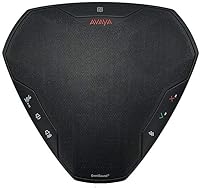
NFC pairing is only available for compatible smartphones and tablets. For laptops, you simply use standard Bluetooth pairing — go to your device's Bluetooth settings, put the B109 into pairing mode by pressing the Bluetooth button, and select it from the list of available devices. It connects quickly and remembers the pairing for future sessions.

It works best for one to three people sitting fairly close to the unit. Two people across a small desk is the sweet spot. If you have four people or more, or if anyone is sitting more than a few feet away, the microphone may struggle to pick up everyone clearly.

Yes, it pairs with iPhones over Bluetooth without any issues. The NFC tap-to-pair feature does not work on iPhones due to Apple's NFC restrictions, but standard Bluetooth pairing works perfectly fine.

Battery life varies depending on usage, but most users report getting through a standard workday of moderate call activity on a single charge. If you are on calls for five or more hours a day, you will likely need to charge it every evening. It is not designed for multi-day use between charges under heavy load.

Yes. When paired to your smartphone via Bluetooth, the B109 functions as a hands-free speakerphone for regular cellular calls just as it does for VoIP or video calls. You can answer, speak, and hang up using the controls on the unit.

Yes, there is a dedicated mute button on the unit. The LCD screen also confirms when mute is active, so you can check at a glance rather than having to look at your phone or laptop screen.

The B109 is designed primarily for Bluetooth connectivity and does not function as a USB audio device. If you need a wired USB speakerphone for your setup, this particular model is not the right fit.

The speaker volume is adequate for a quiet or moderately quiet room. If your home office has a lot of background noise — kids, traffic, or an open floor plan — you may find yourself turning it up and still wishing it had a bit more output. It is not underpowered, but it is not a room-filling speaker either.

The build is functional but not rugged. The plastic housing is lightweight, which is good for portability but raises some questions about long-term resilience if it gets knocked around frequently in a bag. A soft sleeve or pouch is worth using if you travel with it regularly, just to protect the surface and the charging port over time.

Where to Buy