Overview

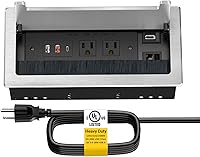
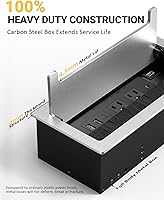
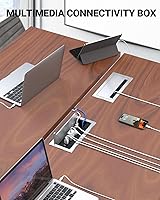
The Kungfuking Conference Table Power Hub is a flush-mount connectivity box that drops into a rectangular cutout in your desk surface, putting power and data ports within arm's reach while the tabletop stays clutter-free. It carries a UL Listed certification and handles up to 1500W, which covers most everyday office loads without issue. The brushed carbon steel housing feels genuinely solid in hand — heavier than you might expect — and the soft brush strip across the opening does a decent job keeping dust out when nothing is plugged in. It targets conference rooms, home offices, and kitchen islands alike.

Features & Benefits

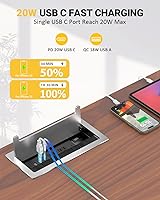
Pack seven connections into one cutout and you start to appreciate how much this desktop connectivity hub can simplify a meeting room setup. The two AC outlets handle standard plugs — a laptop brick and a monitor cable, for instance — while the 20W USB-C port delivers enough Power Delivery to fast-charge a modern smartphone or small tablet without hunting for an adapter. One USB-A port supports Quick Charge for compatible Android devices. The HDMI port is a passthrough, not a switcher, so it routes one display signal cleanly. A wired RJ45 Ethernet port brings reliable network access directly to the tabletop.

Best For

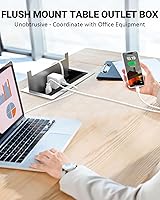
This recessed power outlet box earns its place in a permanent meeting room or boardroom where the desk cutout installation makes practical sense long-term. Co-working spaces and hot-desking environments also benefit, since anyone sitting down gets instant access to power, charging, display, and a wired network drop without touching an extension cord. IT managers standardizing connectivity across multiple rooms will find the setup effort worthwhile. It suits home offices and kitchen islands too — anywhere a clean, uncluttered surface matters more than the flexibility to reposition things on a whim.

User Feedback

Buyers consistently praise the build quality of this conference table power box, noting the steel casing feels substantial rather than hollow. The USB-C charging speed earns positive mentions, with users reporting noticeably faster top-ups compared to a standard wall adapter. On the flip side, several buyers caution that the desk cutout demands precision and comfort with power tools — it is not a casual weekend job. Thinner tabletops may present depth clearance issues, and the six-foot cord can run tight if the nearest floor outlet is awkwardly positioned. Worth flagging: there is no surge protection included, which matters for sensitive equipment.

Pros

  • UL Listed certification provides genuine peace of mind for office and commercial installations.
  • The 20W USB-C Power Delivery port charges modern smartphones and tablets noticeably faster than a standard outlet adapter.
  • A built-in RJ45 Ethernet port delivers a reliable wired network connection directly at the table surface, no separate switch needed.
  • Carbon steel construction feels reassuringly solid and shows no flex or rattle even with multiple cables plugged in simultaneously.
  • The brushed metal finish blends naturally with professional office furniture and looks far more polished than a plastic power strip.
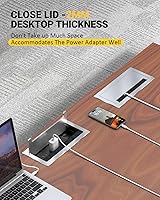
  • The soft brush cover keeps the port area relatively dust-free when the hub is not in active use.
  • Having HDMI, Ethernet, USB, and AC outlets in one cutout dramatically reduces visible cable clutter on the tabletop.
  • The QC 18W USB-A port handles quick charging for compatible Android devices without any adapter.
  • At its price point, this conference table power box offers a combination of connectivity options that would otherwise require multiple separate accessories.
  • Installation hardware is included, simplifying the mounting process for those comfortable with basic tools.

Cons

  • Only two AC outlets is a real limitation if a meeting room typically has multiple laptop users needing simultaneous power.
  • No surge protection is included, which is a meaningful gap for environments with sensitive or expensive electronics.
  • The desk cutout requirement is permanent and unforgiving — a measuring mistake is costly and hard to fix.
  • The six-foot power cord may not reach a floor outlet depending on desk placement, and an extension cord adds complexity.
  • Table depth clearance can be an issue with thinner or hollow-core desktops, ruling out some popular home office furniture.
  • The HDMI port handles only a single passthrough connection, with no switching or multi-source capability whatsoever.
  • Buyers without experience using hole saws or jig saws may find the installation genuinely stressful and may need professional help.
  • The unit is heavy enough that improper mounting could cause it to sag or shift over time if the table material is soft.
  • No power indicator light means there is no quick visual confirmation that the hub is live and receiving power.

Ratings

The scores below reflect our AI-driven analysis of verified buyer reviews for the Kungfuking Conference Table Power Hub, collected from customers worldwide and actively filtered to exclude incentivized, bot-generated, and duplicate submissions. Every category captures both the genuine strengths buyers repeatedly praise and the friction points that caused frustration or regret. The goal is a transparent, balanced picture so you can make a confident decision before committing to a permanent desk installation.

Build Quality
88%
Buyers consistently describe the carbon steel housing as one of the first things they notice when the unit arrives — it has real weight and feels nothing like the hollow plastic power strips it replaces. The brushed metal finish holds up well under daily contact, and the port area shows minimal wear even after months of regular use in busy conference rooms.
A small number of users noted that the soft brush cover, while functional, can feel slightly flimsy compared to the solid steel body it is attached to. A few buyers also reported minor surface scuffs arriving straight out of the box, suggesting packaging protection could be tighter.
Installation Experience
61%
39%
Once the cutout is made correctly, buyers report that the actual mounting process is logical and the included hardware covers everything needed. IT professionals and handy home office users found the fit snug and the finished result visually clean and professional.
The installation process is the single biggest source of negative feedback. Cutting a precise 252mm x 120mm rectangle into a desk is genuinely stressful for buyers without power tool experience, and several reported cracked laminate edges or misaligned cutouts on first attempts. This is not a plug-and-play product, and the instructions could do more to prepare first-timers.
USB-C Charging Speed
84%
The 20W Power Delivery port earns strong praise from daily users who previously relied on slower standard outlets. Smartphone users report noticeably faster top-ups during short meeting breaks, and tablet users find it sufficient for maintaining or recovering charge during a full workday.
Users with power-hungry 15-inch laptops found the 20W output underwhelming during active use, often observing the battery holding steady rather than gaining meaningful charge. Those expecting laptop-grade fast charging from a single port may need to recalibrate their expectations.
HDMI Performance
71%
29%
For straightforward single-display setups — connecting a laptop to a room monitor for a presentation — the HDMI passthrough works reliably and without signal degradation that some cheaper units introduce. Conference rooms with a fixed display configuration find this port genuinely useful for reducing desk cable mess.
The passthrough nature of the port trips up buyers who expected switching or multi-source capability. Several reviewers expressed frustration when they realized they could not alternate between two presenter laptops without a separate HDMI switch, which adds cost and complexity to the setup they were trying to simplify.
Ethernet Reliability
86%
The RJ45 port performs exactly as a passive passthrough should — buyers report stable, full-speed wired connections that behave identically to plugging directly into a wall jack. In meeting rooms where Wi-Fi congestion is an issue, having a reliable wired drop at the table surface makes a real difference.
Because it is a passive passthrough, the hub requires a network cable to be run from beneath the desk to a wall jack or switch, which means cabling infrastructure still needs to exist. Buyers in spaces without existing Ethernet runs found this port less immediately useful than they anticipated.
AC Outlet Count
57%
43%
Having two AC outlets built directly into the table surface — rather than an extension cord snaking across the floor — is a quality-of-life improvement that buyers in small meeting rooms appreciate. For one or two regular users, the pair of outlets covers daily needs without issue.
Two outlets is the most frequently cited limitation across buyer reviews. In any meeting with three or more participants needing to charge laptops simultaneously, the outlet count falls short immediately. Several buyers noted they still needed a power strip plugged into one of the two outlets, partly defeating the purpose of the unit.
Cord Length & Management
67%
33%
The six-foot cord gives enough slack for most standard desk-to-floor-outlet runs, and buyers who planned their installation carefully found the cord length worked without tension or awkward routing. The fact that the cord exits below the desk surface keeps the visible tabletop area completely clear.
In rooms where the nearest floor outlet is more than a few feet from the desk, six feet runs tight or falls short entirely. Several buyers had to use an extension cord beneath the desk, which introduces the cable clutter they were trying to eliminate in the first place.
Value for Money
78%
22%
Buyers who needed all seven connection types — AC, USB-C, USB-A, HDMI, and Ethernet — in a single flush-mount unit generally feel the price reflects fair market positioning for a UL-listed, metal-housed product. IT managers standardizing across multiple conference rooms found the per-unit cost reasonable at scale.
Buyers who primarily need power outlets and USB charging found the price harder to justify when simpler recessed units cost significantly less. Without surge protection included at this price tier, some reviewers felt an important safety feature was left out that competitors include.
Dust Protection
73%
27%
The soft brush strip across the opening does a credible job of passively keeping dust, crumbs, and small debris out of the port area when the hub is not in use. Office environments with high foot traffic reported the cover kept the interior noticeably cleaner than open-faced alternatives.
The brush cover is not a sealed closure, so it offers limited protection in environments with fine dust or near kitchen areas where grease particles are present. A few users noted the bristles began to look worn and matted after several months of daily use.
Compatibility
81%
19%
The hub works across a wide range of devices without any configuration — phones, tablets, laptops, and standard office peripherals all connect without issue. The USB-C port negotiates Power Delivery reliably with both Apple and Android devices that support the standard.
Older devices that do not support Quick Charge or USB Power Delivery protocols charge at standard speeds only, which some buyers found confusing when charging did not feel as fast as expected. The HDMI port also lacks support for HDMI 2.1 bandwidth, which limits use with very high-refresh or ultra-high-resolution displays.
Aesthetic Integration
83%
The brushed silver finish and low-profile flush-mount design genuinely complement modern office furniture in a way that a traditional power strip simply cannot. Buyers setting up premium home offices or renovated boardrooms frequently mentioned the hub looking like it belongs rather than looking like an afterthought.
The silver finish is the only available option, which can clash with darker or walnut-toned furniture aesthetics. A handful of buyers wished the product came in black or dark bronze to match their specific desk color without modification.
Port Layout & Spacing
76%
24%
The port arrangement keeps the HDMI and RJ45 ports separated from the charging ports in a logical way, reducing cable overlap during typical meeting room use. Standard plug adapters for the AC outlets fit without blocking the adjacent ports, which is a genuine design win over poorly spaced competitors.
Buyers using bulkier USB-A adapters or right-angle connectors reported occasional spacing conflicts. The overall panel width is fixed by the cutout size, leaving little room for creative port arrangement, and users with large-bodied AC adapters found one outlet could partially obstruct the other.
Safety Certification
91%
The UL Listed rating is one of the few objectively verifiable quality signals available for electrical products, and buyers — especially corporate purchasers and IT managers — cited it as a primary reason they chose this unit over cheaper unlisted alternatives. It covers the basics that matter in a permanent office installation.
UL certification confirms the unit met safety standards at the time of testing but does not guarantee surge suppression or advanced protection features. Buyers who assumed UL Listed implied surge protection were surprised to discover that is a separate and absent feature in this unit.

Suitable for:

The Kungfuking Conference Table Power Hub is purpose-built for anyone who wants to permanently centralize power and connectivity at a fixed desk or table surface. It makes the most sense in dedicated conference or boardroom settings where the one-time installation effort pays off every single day through cleaner tables and faster meeting setups. IT teams outfitting multiple rooms will appreciate having a standardized solution that provides AC power, fast USB charging, a wired Ethernet drop, and an HDMI passthrough all in one cutout. Co-working spaces and hot-desking environments are strong fits too, since any user who sits down can immediately plug in without searching for a power strip or adapter. Home office workers who want a polished, professional-looking desk without visible cable chaos will also find this desktop connectivity hub a natural choice, especially on thicker countertops or kitchen islands where a permanent installation is realistic.

Not suitable for:

The Kungfuking Conference Table Power Hub is a poor match for anyone who is not comfortable committing to a permanent desk cutout, because once you have made that rectangular hole, there is no clean way to reverse it. Renters, people who frequently rearrange their workspace, or anyone using a thin or hollow-core desk should think twice, since the unit requires meaningful table depth to recess properly and the cutout demands precision cutting. With only two AC outlets, it will also frustrate users who need to run several high-draw appliances simultaneously, and the absence of surge protection is a real concern for anyone powering sensitive electronics like monitors or recording equipment. Users who need to drive multiple displays from a single hub will be disappointed, as the HDMI port is a simple passthrough for one source only. If portability matters at all, this recessed power outlet box is simply not designed for that use case.

Specifications

  • Safety Rating: This unit carries a UL Listed certification, confirming it has been independently tested to meet North American electrical safety standards.
  • AC Rating: The power hub operates at 125V with a maximum current of 12A and a total load capacity of 1500W.
  • AC Outlets: Two standard three-prong AC outlets are included, positioned to accommodate typical laptop bricks and other bulky plugs side by side.
  • USB-C Port: One USB-C port supports 20W Power Delivery, enabling fast charging for smartphones, tablets, and smaller laptops without a separate wall adapter.
  • USB-A Ports: Two USB-A ports are provided, with one supporting Qualcomm Quick Charge at up to 18W for compatible devices.
  • HDMI Port: One HDMI passthrough port routes a single video signal from a source device to a display without any switching or signal processing.
  • Ethernet Port: One RJ45 port delivers a wired network connection directly at the table surface, compatible with standard Cat5e and Cat6 cables.
  • Power Cord: A 6-foot attached power cord connects the hub to a standard wall or floor outlet beneath the desk.
  • Housing Material: The outer shell is constructed from carbon steel, providing resistance to dents, deformation, and everyday physical wear in office environments.
  • Finish: A brushed metal surface treatment gives the hub a polished, professional appearance that blends with most office and furniture aesthetics.
  • Dust Cover: A soft brush strip spans the opening of the hub to passively block dust and debris when ports are not actively in use.
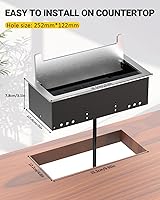
  • Cutout Size: The required desk cutout measures 252mm x 120mm (approximately 9.9″ x 4.7″), which must be cut precisely before installation.
  • Product Dimensions: The installed unit measures 265mm x 130mm x 78mm (approximately 10.4″ x 5.1″ x 3.1″) including the recessed body below the table surface.
  • Weight: The unit weighs 3.36 pounds, reflecting the density of its carbon steel construction rather than lightweight plastic alternatives.
  • Compatible Surfaces: Designed for installation in conference tables, kitchen islands, countertops, office desks, and cabinets with sufficient thickness and structural integrity.
  • Mounting Hardware: All necessary mounting hardware is included in the package, allowing the unit to be secured underneath the table surface after insertion.
  • Total Port Count: The hub provides seven connection points in total: two AC outlets, two USB-A ports, one USB-C port, one HDMI port, and one RJ45 port.

Related Reviews
YoLink YS6801-UC Smart Power Strip with Hub
80%
93%
Wireless Range
89%
Reliability & Uptime
78%
Value for Money
71%
Setup & Onboarding
74%
App Experience
More
Vari Power Hub Desk Mount Charging Station
79%
96%
Ease of Installation
88%
Build Quality
93%
Clamp Stability
84%
Outlet Layout & Design
67%
USB Charging Performance
More
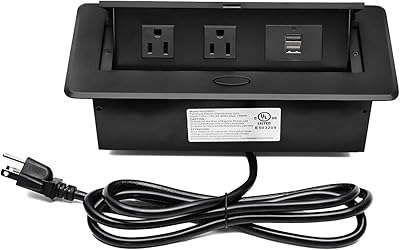
Kungfuking Pop Up Power Strip with Dual USB Ports
86%
88%
Ease of Installation
94%
Space-Saving Design
85%
Durability & Build Quality
90%
Power Delivery Performance
87%
USB Charging Efficiency
More
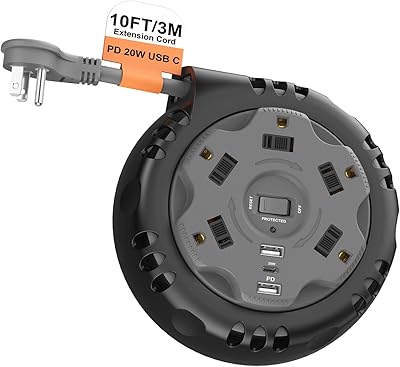
Kungfuking 10FT Retractable Power Strip
78%
88%
Cord Reel Mechanism
91%
Portability & Form Factor
83%
Outlet Count & Layout
86%
USB-C PD Charging
79%
Surge Protection
More
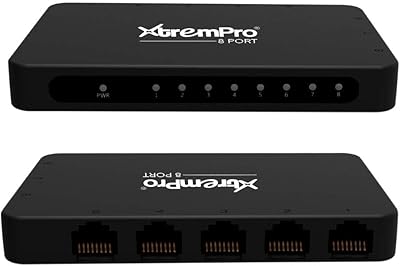
XtremPro 61026 8-Port Network Switch Hub
74%
91%
Ease of Setup
58%
Build Quality
83%
Port Count & Layout
61%
Network Speed Performance
64%
USB Power Reliability
More
j5create JVU368 360° Conference Camera
74%
93%
Ease of Setup
86%
360° Coverage
74%
AI Tracking Accuracy
67%
Video Clarity
82%
Microphone Quality
More
Pivot Power Genius Power Strip
86%
89%
Ease of Use
85%
Voice Control Integration
90%
Surge Protection Effectiveness
92%
Pivoting Outlet Flexibility
70%
Setup and Installation
More
Pailvens P10 Power Conditioner
77%
83%
Build Quality
74%
Noise Filtering Performance
88%
LED Display Usefulness
79%
Outlet Layout & Usability
81%
Overvoltage Protection
More
be quiet! Straight Power 12 1000W Power Supply
88%
94%
Quiet Operation
92%
Energy Efficiency
89%
Build Quality
90%
Modular Design and Cable Management
88%
Stability Under Load
More
Champion Power Equipment 201174 Power Distribution Box
85%
92%
Build Quality & Durability
89%
Safety Features
90%
Weather Resistance
85%
Ease of Setup
65%
Portability
More

FAQ

The cutout needs to be 252mm x 120mm, which works out to roughly 9.9 by 4.7 inches. Precision matters here, so take your time measuring twice before you cut. A jig saw or hole saw kit designed for furniture is the typical tool of choice.

Probably not comfortably. The recessed body of this desktop connectivity hub extends about 3 inches below the table surface, so you need a desk or countertop with enough clearance underneath for the unit to hang without hitting a frame or drawer component. Solid wood or thick composite tops tend to work best.

No, the HDMI port is a straight passthrough — it connects one source to one display. There is no switching or multi-input functionality built in, so if you need to alternate between two laptops feeding the same monitor, you would still need a separate HDMI switch.

It can charge smaller or more efficient USB-C laptops at a moderate pace since the port delivers 20W of Power Delivery. That is enough for most ultrabooks in a pinch, but a power-hungry 15-inch laptop may charge slowly or just maintain its battery level rather than gaining charge quickly during heavy use.

No, the Kungfuking Conference Table Power Hub does not include surge protection. If you are connecting sensitive equipment like monitors, external drives, or audio interfaces, it is worth running the hub through a separate surge protector at the wall outlet as an extra precaution.

It is manageable but not a beginner project. You need to cut a precise rectangular hole in your desk, which requires a steady hand and the right tools. The mounting hardware is included, and once the hole is cut correctly the rest of the install is straightforward. If you have never used a jig saw before, it may be worth asking someone experienced to help with the cutting step.

Yes, as long as the combined load stays within the 1500W limit, which two standard laptop chargers will comfortably fit within. Just keep in mind there are only two AC outlets total, so a third person needing a wall plug would be out of luck without a separate power strip.

None at all. The RJ45 port is a passive passthrough that simply connects your cable from the table surface to your network. Just plug a Cat5e or Cat6 cable into the port on the hub and another cable from the hub down to your router or wall jack — it behaves exactly like a standard wall Ethernet port.

The carbon steel construction is noticeably tough and holds up well to the kind of incidental contact you get in a busy office. Fingerprints do show up on the brushed surface under certain lighting, but a quick wipe with a dry microfiber cloth clears them easily. It does not feel fragile or thin the way some plastic-housed alternatives do.

You would need to use an extension cord to bridge the gap, which is a common workaround. Just make sure any extension cord you use is rated to handle the potential load from all the devices you plan to plug into this recessed power outlet box, and try to keep the extension cord tucked away cleanly to avoid the very cable clutter you installed this hub to eliminate.