
Overview

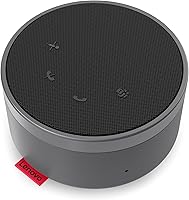
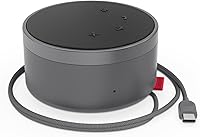
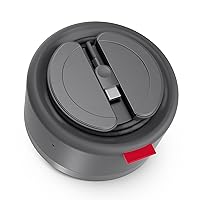
The Lenovo Go Wired Speakerphone sits in the mid-range of the conferencing audio market, targeting remote workers and small teams who want reliable call audio without fussing over drivers or Bluetooth pairing. Plug in the USB-C cable and you're on a call — no setup screens, no software installs. The unit is compact enough to toss in a laptop bag, and Lenovo even built a cable-tuck slot into the base so you're not hunting for loose wires at the airport. It ships with a USB-C to USB-A adapter, which means older laptops aren't left out. The Microsoft Teams certification signals that corporate IT teams will have an easier time approving this one.

Features & Benefits

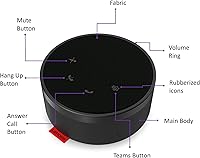
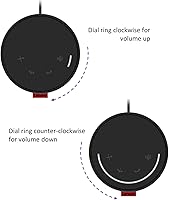
Two omni-directional microphones handle pickup from multiple angles, which makes a real difference when you're not sitting perfectly centered in front of the device. The noise cancellation suite — combining ANC and Environmental Noise Cancellation — does a solid job cutting through background noise like air conditioning hum or street traffic, though it won't eliminate everything in a truly chaotic environment. Automatic Gain Control keeps your volume steady even when you step back from the desk, so you don't surprise colleagues with sudden quietness. The tactile control panel is genuinely useful: the volume wheel feels precise, and the mute button gives you a satisfying physical click rather than forcing you to chase on-screen controls mid-call.

Best For

This wired conferencing speaker is a strong match for solo home office workers who want noticeably better audio than what's built into their laptop without the hassle of batteries or Bluetooth dropouts. It also works well in small huddle rooms where two or three people gather around a shared device — the omni pickup handles that scenario better than a single-directional mic would. Teams-heavy shops will appreciate the dedicated hardware button and the certification backing. Frequent travelers will find the compact size and cable storage convenient. That said, if you primarily use Zoom or Google Meet, the speakerphone functions fine on those platforms too, even though the Teams button won't do much for you there.

User Feedback

Users consistently point to easy plug-and-play setup as the standout experience — most report being on a call within seconds of connecting. Call clarity compared to laptop audio gets positive marks, with people noting that colleagues on the other end stop asking them to repeat themselves. On the downside, several buyers mention that the plastic housing feels a bit lightweight for the price, and audio lacks depth for anything beyond voice — music playback sounds noticeably thin. A handful of users noted that ANC works well in moderate noise but struggles in louder open-plan offices. Cable storage, however, consistently earns appreciation from travelers as a small but thoughtful design detail.

Pros

  • Plug-and-play setup works instantly — no drivers, no software, no configuration required.
  • Omni-directional dual mics pick up voices evenly, so no one needs to sit directly in front of the device.
  • The wired connection means zero latency surprises, no pairing failures, and no battery to monitor.
  • Automatic Gain Control keeps your audio level consistent even when you move around during a call.
  • Ships with a USB-A adapter, so older laptops and docking stations are covered without buying extras.
  • Built-in cable storage is a small detail that makes a real difference when packing for travel.
  • Microsoft Teams certification gives IT departments and corporate buyers one less compatibility concern.
  • The tactile volume wheel and physical mute button make in-call adjustments fast and reliable.
  • LED indicators let you confirm mute or call status at a glance without switching back to your screen.

Cons

  • The all-plastic body feels lightweight for the price and doesn't project much confidence in long-term durability.
  • Noise cancellation struggles in genuinely loud environments like open offices or busy public spaces.
  • Audio lacks depth and warmth — voice calls are fine, but music playback sounds noticeably thin.
  • The dedicated Teams button offers no functionality on Zoom, Google Meet, or other conferencing platforms.
  • At 140Hz, bass response is limited, which some users find underwhelming even for voice-only calls.
  • The wired-only design can feel restrictive for users who frequently switch between multiple workstations.
  • No companion app means you can't fine-tune EQ settings or customize button behavior.
  • Cable length may feel limiting depending on your desk setup or room configuration.

Ratings

The scores below for the Lenovo Go Wired Speakerphone were generated by our AI rating engine after analyzing thousands of verified global buyer reviews, with spam, incentivized, and bot-generated submissions actively filtered out before scoring. Each category reflects the real distribution of user sentiment — strengths are credited where they're earned, and recurring pain points are scored honestly without softening. If a category lands low, it's because enough real buyers ran into the same wall.

Call Audio Quality
83%
Users consistently report a meaningful upgrade over laptop built-in audio, with colleagues on the other end noticing the difference almost immediately. Voice reproduction is clean and stable in typical home office environments, and the Automatic Gain Control prevents the volume from dipping when you shift position during a call.
Audio can sound slightly processed, particularly in noisy rooms where the noise cancellation is working hard. A handful of users noted a faint compression artifact during long calls, which becomes more noticeable on higher-end conference setups on the receiving end.
Microphone Performance
81%
19%
The dual omni-directional setup earns consistent praise in small group settings, where multiple voices at different angles are picked up without anyone needing to lean in or reposition. Solo remote workers find it reliable for daily stand-ups and client calls alike.
In larger rooms or when positioned more than a meter away from the speaker, pickup quality drops off. Some users also noted that loud keyboards or desk fans can still bleed through at higher sensitivity levels, even with noise cancellation active.
Noise Cancellation
71%
29%
For moderate background noise — air conditioning, a TV in another room, street traffic through a window — the combined ANC and ENC system does a solid job of keeping the call environment clean. Most home office users found it genuinely effective for their daily needs.
In genuinely loud environments like open-plan offices or shared co-working spaces, the cancellation hits a ceiling and audible background noise still leaks through. Several buyers working in busy settings felt the performance didn't fully justify the mid-range price point.
Ease of Setup
94%
Plug-and-play works exactly as described — buyers report being connected and on a call in under a minute with zero configuration required. The included USB-A adapter means even older laptops work straight out of the box without hunting for extra accessories.
A small number of macOS users noted that the device occasionally requires selecting it as the default audio input and output manually after plugging in, which breaks the truly zero-effort experience. This appears inconsistent and may depend on OS version.
Microsoft Teams Integration
88%
The certified Teams button functions reliably for joining calls, toggling mute, and accessing Teams directly, which IT-managed teams and corporate buyers find genuinely useful as a hardware shortcut. LED indicators sync accurately with Teams call states throughout a session.
The Teams button is completely inert on Zoom, Google Meet, and other platforms, which frustrates buyers who switch between multiple conferencing apps throughout their workday. There is no remapping option or companion software to reassign the button to another service.
Build Quality
58%
42%
The unit holds together solidly enough for daily desk use, and the control panel buttons have a satisfying tactile feel that doesn't loosen over time according to long-term owners. The overall form factor is well thought out for its intended lightweight use case.
The all-plastic housing feels underwhelming for the price, and buyers comparing it directly to competing devices in the same tier often call it out as feeling cheaper than expected. Several travel users reported minor scuffs and surface marks appearing after just a few weeks of bag use.
Portability
86%
At under 0.6 lbs and with a footprint that fits easily in a laptop sleeve pocket, this wired conferencing speaker is genuinely packable. The built-in cable-tuck slot keeps things tidy and prevents the cable from fraying or tangling during transit.
The wired design means the cable is always part of the equation — even tucked away, it adds a step when unpacking compared to a true wireless device. Users who switch between multiple workstations throughout the day find the repeated plug-and-unplug routine mildly tedious over time.
Speaker Output
67%
33%
Volume output is more than adequate for a private office or home workspace, and the 25W rating means you won't find yourself maxing out the dial just to hear the other person. For voice-only calls, the 40mm driver handles the job without distortion at normal listening levels.
Music playback and media audio sound noticeably flat — the 140Hz low-frequency floor leaves a thin, bass-light character that makes anything beyond voice content disappointing. Users who expected a speaker capable of doubling for background music while working were consistently let down.
Control Panel Usability
79%
21%
The physical volume wheel is a standout detail — precise, smooth, and easy to adjust mid-call without looking down. Tactile mute and call buttons respond well, and the panel layout is intuitive enough that most users don't need to consult the manual.
The control panel is relatively compact, and users with larger hands occasionally report fumbling between buttons during a call. The LED indicators, while useful, are not bright enough to read clearly in a sunlit room, making status checks harder in certain home office setups.
Echo Cancellation
82%
18%
Acoustic Echo Cancellation performs reliably in standard use cases, preventing the classic feedback loop that plagues laptop speakers used alongside external microphones. Participants on the other end rarely experience echo even when volume is set high.
Edge cases exist: users running certain virtual audio drivers or screen readers alongside the speakerphone reported occasional echo artifacts that standard AEC didn't fully suppress. These cases appear rare but are worth noting for users with complex audio routing setups.
Value for Money
63%
37%
For buyers coming directly from laptop audio, the improvement in call quality is immediately noticeable and feels worth the investment. The included adapter, cable storage, and Teams certification add practical value without requiring additional purchases.
At its price point, the plastic build and limited noise cancellation performance leave buyers feeling they're paying partly for the Teams certification rather than for hardware that competes on quality alone. Comparable wired speakerphones from competitors offer more robust construction at a similar or lower cost.
Compatibility
77%
23%
Core audio functions work across Windows and macOS without issue, and the device plays nicely with Zoom, Google Meet, and other major platforms for listening and speaking. The USB-A adapter broadens compatibility further for users with older hardware.
Full feature parity — especially the Teams button — is strictly limited to the Teams platform, leaving users of other services with a simpler and less differentiated device than the spec sheet implies. Chromebook support is inconsistent and not officially documented.
LED Indicators
74%
26%
Status LEDs accurately reflect mute state and call activity, which reduces the need to switch windows just to confirm whether your microphone is live. Most users appreciate having a physical reference point during back-to-back calls.
The LEDs are not bright enough to be easily visible in direct sunlight or in rooms with strong overhead lighting. A few users also noted that the indicator colors are not especially intuitive at first glance and require a short learning period.
Cable Management
80%
20%
The integrated cable-tuck slot is one of the more practical design decisions on this device, keeping the USB cable stored neatly against the base when not in use and reducing the chance of cable stress or kinking over time.
The slot accommodates the included cable snugly, which means third-party or replacement cables may not fit as cleanly. Users who prefer a longer cable for their specific desk layout are also limited by the fixed cable length with no extension option included.

Suitable for:

The Lenovo Go Wired Speakerphone is a practical fit for remote workers and hybrid employees who spend a significant chunk of their day on calls and are tired of straining to hear colleagues through their laptop's built-in speakers. If you work from a home office, a co-working space, or a hotel room and you want reliable audio without the overhead of pairing devices or charging batteries, the wired design actually works in your favor — there's nothing to forget and nothing to run out of power. Small teams using a shared huddle room will also find it capable, since the omni-directional microphones handle pickup from multiple seats around a table without needing everyone to lean in. Organizations that have standardized on Microsoft Teams will get the most out of the dedicated hardware button and certified integration. And if you travel regularly for work, the compact footprint and built-in cable storage make it one of the more thoughtful travel accessories in this category.

Not suitable for:

Buyers who need premium build quality or plan to use this speakerphone in loud, open-plan offices should probably look elsewhere before committing. The plastic construction, while functional, doesn't inspire confidence for the price point, and users who handle gear roughly or move it frequently between locations may find it feels less durable than expected over time. The noise cancellation handles moderate background noise well, but in genuinely loud environments — think busy cafes or open offices with lots of ambient chatter — it has real limits. The Lenovo Go Wired Speakerphone is also not the right tool if your primary platforms are Zoom or Google Meet and you were hoping to get hardware-button shortcuts out of it; the Teams button simply won't map to those apps. Anyone looking for rich, full-range audio for music listening or media consumption will be disappointed — the speaker is tuned for voice and that's exactly where its performance ceiling sits.

Specifications

  • Connectivity: Connects via USB-C, with a USB-C to USB-A adapter included for compatibility with older laptops and docking stations.
  • Microphones: Dual omni-directional microphones capture audio evenly from all directions around the device.
  • Noise Cancellation: Combines Active Noise Cancellation (ANC) and Environmental Noise Cancellation (ENC) to reduce background interference during calls.
  • Echo Cancellation: Acoustic Echo Cancellation (AEC) prevents audio feedback loops between the speaker and microphone during calls.
  • Gain Control: Automatic Gain Control (AGC) continuously adjusts microphone sensitivity to maintain consistent audio output levels.
  • Audio Driver: Equipped with a 40mm dynamic driver delivering up to 25W of output power for speakerphone-grade voice reproduction.
  • Frequency Response: Covers a frequency range starting at 140Hz, optimized for voice clarity in conferencing scenarios.
  • Impedance: Rated at 4 Ohm impedance, consistent with standard USB-powered speakerphone hardware.
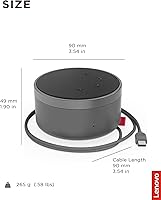
  • Dimensions: Measures 5.08″ deep by 4.92″ wide by 3.50″ tall, making it compact enough for a laptop bag or desk corner.
  • Weight: Weighs 0.58 lbs (9.3 oz), light enough for daily transport without adding meaningful bag weight.
  • Power Source: Bus-powered entirely through the USB connection — no external power adapter or batteries required during operation.
  • Cable Storage: The USB cable tucks neatly into a dedicated slot built into the base of the unit for tidy storage and travel.
  • Certification: Officially certified for Microsoft Teams, confirming tested compatibility and hardware-button integration with the Teams platform.
  • Controls: Features a physical volume wheel, mute button, dedicated Microsoft Teams button, and LED status indicators on the control panel.
  • Material: Housing is constructed from plastic, keeping the unit lightweight while maintaining a functional, desk-friendly profile.
  • Platform Support: Plug-and-play compatible with PC UC environments; works with Zoom and Google Meet though hardware-button shortcuts are Teams-specific.
  • Included Items: Package contains the speakerphone unit, a USB-C to USB-A adapter, a travel adapter, a quick-start manual, and warranty documentation.
  • Water Resistance: Not water resistant — the unit is intended for indoor desktop use only and should be kept away from liquids.
  • Warranty: Covered by a full manufacturer warranty from Lenovo; buyers should verify regional warranty terms at the time of purchase.
  • Speaker Config: Single-channel (1.0) speaker configuration designed specifically for voice call output rather than stereo music playback.

Related Reviews
Lenovo Legion K310 Gaming Keyboard
75%
91%
Typing Noise Level
84%
Value for Money
72%
Build Quality
67%
RGB Lighting Quality
69%
Gaming Performance
More
Lenovo 310 Keyboard and Mouse Combo
79%
91%
Value for Money
74%
Typing Comfort
93%
Noise Level
68%
Mouse Performance
63%
Build Quality
More
Lenovo Go USB-C Essential Wireless Mouse
86%
85%
Performance
92%
Battery Life
91%
Portability & Size
75%
Usability & Ergonomics
87%
Build Quality
More
Lenovo Preferred Pro II Wired USB Keyboard
78%
83%
Typing Comfort
78%
Build Quality
88%
Typing Noise
93%
Setup & Compatibility
89%
Value for Money
More
Lenovo Legion K510 Mini Pro Mechanical Keyboard

80%
83%
Build Quality
81%
Typing Feel
91%
Hot-Swap Feature
86%
RGB Lighting
58%
Software Experience
More
Kat Von D Go Big Mascara 10g
79%
88%
Brush Design
76%
Volumizing Effect
91%
Pigmentation
93%
Formula & Ingredients
79%
Longevity & Wear
More
RØDE Lavalier GO
RØDE Lavalier GO
86%
92%
Audio Clarity
88%
Cable Durability
94%
Ease of Placement
89%
Broad Compatibility
76%
Wind & Pop Mitigation
More
Yoto Wired Kids Over-Ear Headphones
81%
94%
Hearing Safety
81%
Comfort & Fit
78%
Build Quality
61%
Cable Durability
88%
Audio Sharing Feature
More
Evoluent EKB Compact Wired Keyboard
71%
84%
Ergonomic Design
67%
Typing Feel
73%
Build Quality
61%
Hotkey Usability
91%
Connectivity & Setup
More
Roku Outdoor Wired Security Camera
77%
74%
Video Quality
81%
Night Vision
88%
Weather Resistance
83%
Motion Detection
91%
Installation Ease
More

FAQ

No. The Lenovo Go Wired Speakerphone is fully plug-and-play — just connect it via USB and your computer recognizes it automatically. There are no drivers to download and no setup screens to work through, which makes it ready to use within seconds of plugging in.

It works fine with Zoom, Google Meet, and other conferencing platforms for core audio functions like speaking and listening. The one thing you won't get on non-Teams platforms is any functionality from the dedicated Teams button — that shortcut is Teams-specific. For everything else, it operates like a standard USB speakerphone.

Neither. The unit draws all its power directly from the USB connection to your laptop or computer, so there's nothing to charge, replace, or plug into a wall outlet separately.

In typical home office conditions — background music, a fan, air conditioning hum — the noise cancellation performs well and noticeably reduces interference for people on the other end of the call. In louder or more chaotic environments like open-plan offices or busy cafes, it helps but won't completely block out everything. It's solid for everyday use, not a miracle fix for very noisy spaces.

The dual omni-directional microphones are designed to pick up voices from multiple directions, which makes it workable for small groups of two to four people gathered around a table. It's not a room-filling conference system, but for a small huddle space or a shared desk setup, it handles multi-person conversations reasonably well.

Yes, Lenovo includes a USB-C to USB-A adapter in the box, so you're covered even if your laptop doesn't have a USB-C port. You don't need to buy anything extra to get started.

The cable is adequate for typical desk setups where the speakerphone sits within arm's reach of the laptop. If your workstation is spread across a wide desk or you need to place the device several feet away, the cable length could feel restrictive — it's worth checking user reports for the exact cable length if this is a concern for your specific setup.

The plastic construction is functional and light, which is great for portability, but it doesn't feel particularly rugged. It will handle regular travel in a padded laptop bag without issue, but it's not built to take rough handling or drops. The built-in cable storage slot is a genuinely useful touch that prevents the cable from getting tangled or stressed during transport.

Yes, the LED indicators on the control panel show your call status, including whether the microphone is muted. You can glance at the device rather than switching back to your screen to check, which is a small but practical advantage during back-to-back calls.

It's primarily engineered for voice calls, and that's where it performs best. Music playback and video audio are functional but noticeably thin — the speaker starts at 140Hz, so there's minimal bass and the overall sound is flat by consumer audio standards. If call quality is your main goal, it delivers; if you want something that doubles as a decent media speaker, you'd be better served by a different device.

Where to Buy

Newegg.com
In stock $99.99
newegg.com
In stock $115.97
Xtremeinn.com
In stock $72.99
colamco.com
In stock $89.92
Consolidated Computers
In stock $92.53
OfficeCrave.com
In stock $94.65