Overview

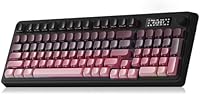
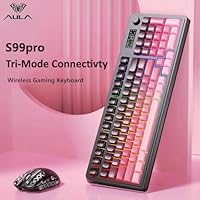
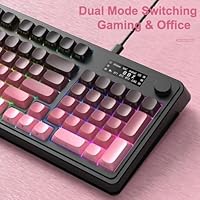
The AULA S99 Pro Wireless Membrane Keyboard enters a crowded budget market with a clear identity: a compact, retro-styled board aimed at hybrid workers and casual gamers who want wireless flexibility without spending much. The black-pink colorway and creamy aesthetic feel deliberate — this isn't trying to look like a serious gaming rig. At 99 keys, it occupies an interesting spot between a tenkeyless and a full-size layout, keeping a numpad while trimming footprint. Membrane switches keep things quiet and soft to the touch, which is a fair trade at this price tier. The small LED status screen is the real surprise — an uncommon inclusion at this level.
Features & Benefits

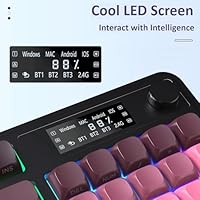
The headline feature on the S99 Pro is tri-mode connectivity — Bluetooth 5.0, a 2.4GHz wireless dongle, and USB-C wired, all supporting up to five paired devices simultaneously. In practice, that means your work laptop, home PC, and tablet can all stay connected, and you toggle between them with a quick key combo. The rotary knob manages both volume and RGB brightness without opening any software, which turns out to be more convenient than it sounds. The LED display gives a live readout of battery level, connection mode, and system compatibility — though it is fixed and cannot be customized. Every key supports macro programming via companion software, and 16 preset RGB effects cover most moods.

Best For

This tri-mode keyboard is a natural fit for people juggling multiple devices daily — a student bouncing between a school-issued Mac and a personal Windows PC, for example, or a remote worker who also keeps a tablet on the desk. Its quiet membrane typing and modest footprint make it a comfortable option in shared spaces where a loud clicky board would be antisocial. Casual gamers get RGB lighting and full macro support without crossing into mechanical territory. OS compatibility stretches across Windows, Mac, Android, iOS, and even Xbox and PlayStation consoles. Those drawn to the creamy retro aesthetic trend on a budget will find the black-pink colorway genuinely attractive in person.

User Feedback

People who pick up this wireless membrane keyboard tend to praise two things right away: how painless it is to hop between paired devices and how satisfying the rotary knob feels during everyday use. Both points hold up. On the other side, the plastic chassis gets mixed reviews — it's lightweight, which some users appreciate, but a few note slight flex when pressing hard on the corners. Battery life in wireless mode earns generally positive marks, with most reporting it lasting a solid workweek. Buyers coming from mechanical keyboards will feel the difference in keypress feedback, and that is simply the nature of membrane at this price. The LED screen's non-customizable readout also surprises a handful of users, so go in knowing it displays fixed info only.

Pros

  • Connects to up to five devices simultaneously and switches between them with a simple key combo.
  • Tri-mode connectivity covering Bluetooth 5.0, 2.4GHz wireless, and USB-C wired is rare at this price.
  • The rotary knob for volume and RGB control feels intuitive and saves constant trips into software menus.
  • A live LED display showing battery level and connection status is a genuinely useful and uncommon inclusion.
  • Compatible with Windows, Mac, Android, iOS, Xbox, PS4, and PS5 — broad enough for almost any setup.
  • Every key supports macro programming, giving casual gamers and productivity users real customization headroom.
  • Membrane switches keep the noise level low, making it a considerate choice for shared spaces.
  • The retro black-pink colorway and creamy aesthetic look more intentional and premium than the price suggests.
  • Two-stage tilt adjustment lets you find a comfortable typing angle without buying an accessory wrist rest.
  • Battery life in wireless mode holds up well through a typical workweek of moderate daily use.

Cons

  • Membrane switches feel noticeably soft and imprecise compared to mechanical alternatives, even budget ones.
  • The plastic chassis has some flex at the corners, which undermines confidence in long-term durability.
  • The LED display is fixed and non-customizable, so do not expect to show personal info or animated content.
  • The companion software for macro setup is not especially intuitive and has a real learning curve for new users.
  • At 2.35 pounds, the S99 Pro is not particularly lightweight for users who travel with their keyboard.
  • The 2.4GHz dongle adds a USB port obligation, which is a nuisance on laptops with limited ports.
  • RGB lighting, while plentiful, cannot be fully customized per-key without navigating the macro software.
  • No dedicated media keys beyond the knob, which limits quick-access controls for power users.

Ratings

The scores below for the AULA S99 Pro Wireless Membrane Keyboard were generated by our AI after analyzing thousands of verified global buyer reviews, with spam, bot-submitted, and incentivized feedback actively filtered out before any scoring was applied. Every category reflects a genuine balance of what real users praised and where they ran into frustration. Nothing here is softened to protect an overall average — if buyers had consistent complaints, that is reflected in the number.
Multi-Device Connectivity
88%
Buyers who juggle a work laptop, a home PC, and a tablet consistently call the five-device pairing one of the best features at this price. Switching between devices via FN combos is quick enough that most users stop thinking about it within a few days — it just becomes habit.
A small but vocal group found the key-combo switching unintuitive at first, especially when hopping between Bluetooth and 2.4GHz modes. A few users also reported occasional re-pairing hiccups after the keyboard sat idle for an extended period.
Wireless Stability
81%
19%
The 2.4GHz dongle mode earned consistent praise for its reliable, low-latency connection during everyday use and light gaming sessions. Most users reported zero noticeable input lag when connected via dongle, even across a desk with other wireless devices nearby.
Bluetooth performance was more variable, with some users noting occasional brief disconnections when the keyboard was more than a few feet from the paired device. This was most common on Android tablets, suggesting the Bluetooth implementation is better optimized for desktop operating systems.
Typing Feel
63%
37%
For users coming from cheap rubber-dome office keyboards, the S99 Pro feels like a step up — the keys are responsive enough for comfortable long typing sessions, and the quiet actuation is genuinely appreciated in shared workspaces and during late-night use.
Anyone familiar with mechanical switches will notice the mushiness almost immediately. The membrane actuation lacks a distinct tactile bump, which can cause slower typists to bottom out more than intended and leads to fatigue during extended typing-heavy work.
Build Quality
67%
33%
At this price tier, the chassis holds up better than expected for basic daily use. The keycaps feel reasonably solid, and the board sits flat on most desks without wobble, which matters for comfort over a long session.
The plastic body shows its budget origins under scrutiny — pressing firmly near the corners produces flex, and the overall feel does not inspire confidence for users who carry the board in a bag regularly. Long-term durability remains an open question past the six-month mark.
Rotary Knob
84%
The dual-mode knob for volume and RGB control is one of the most praised physical elements of the board. Users love being able to spin down the volume in one motion during a meeting or dim the lighting without unlocking their PC — small things that add up meaningfully.
The knob does not have a click-to-mute function, which several users specifically wished for. A handful also noted that switching the knob between volume and lighting mode requires a key combo that is not immediately obvious without reading the manual.
RGB Lighting
78%
22%
Sixteen preset effects with the full 16.8 million color range look genuinely vibrant in a dim room, and the ability to adjust brightness and speed directly from the knob means most users never need to open the software for lighting tweaks.
True per-key RGB customization requires navigating the companion software, which not all users bother learning. Some buyers also noted that a few of the preset effects look nearly identical in practice, trimming the effective variety down from what the spec sheet implies.
LED Status Display
72%
28%
Having a live readout of battery level and active connection mode on the board itself genuinely reduces the guesswork of wireless use. Users who regularly swap between Bluetooth and dongle modes found it especially useful for confirming which device is actually receiving input.
The screen cannot be customized in any way — it shows only its fixed set of system information, and that is all. Buyers who assumed it was a programmable display based on photos were consistently disappointed, making clear communication about this limitation critical before purchase.
Macro Customization
69%
31%
Having all keys available for macro assignment is a genuine advantage, particularly for users who want to bind complex game actions or automate repetitive productivity tasks. Once set up, macros perform reliably and survive reboots without needing to be reconfigured.
The companion software is the main friction point here — it is functional but not well-designed, and new users often spend an hour or more just working out basic recording. The interface is not localized well for English-speaking markets, which adds unnecessary confusion.
Battery Life
76%
24%
Most users found the battery lasted comfortably through a standard five-day workweek with moderate use and RGB at mid-brightness. That is a realistic and useful result for a desk-bound wireless keyboard that charges via USB-C.
Leaving the RGB lighting at full brightness cuts runtime noticeably, which catches some buyers off guard. There is no auto-sleep timer visible in the software settings, so users who forget to manually turn off the board can drain it overnight.
Software Experience
54%
46%
The software does cover the bases — macro recording, lighting customization, and key remapping are all present. For users willing to invest an hour or two learning it, the feature set is reasonably complete for a keyboard at this price.
The interface design feels unfinished, with inconsistent labeling and a layout that does not follow standard UI conventions. Several users reported the software failing to detect the keyboard on first launch, requiring an uninstall and reinstall to resolve.
Cross-Platform Compatibility
83%
Working across Windows, macOS, Android, iOS, and even PS4 and PS5 without needing separate drivers is a real selling point for multi-OS households. Students who switch between a Mac in class and a Windows gaming rig at home especially valued not having to reconfigure anything.
Mac compatibility is functional but not fully optimized — key labeling follows Windows conventions, so Mac-specific shortcuts require memorization or remapping. iOS and Android support is limited to basic typing input with no access to macro or lighting features on those platforms.
Aesthetic & Design
82%
18%
The retro creamy colorway with black-pink accents photographs beautifully and fits naturally into the desk-aesthetic trend popular with students and content creators. Multiple buyers mentioned that it looked noticeably more premium in person than they expected based on the price.
The aesthetic is quite specific — if you prefer a neutral or all-black look, this board is not designed for you. The pink accents are also printed rather than molded, raising some concern about whether they will wear visibly with heavy long-term use.
Ergonomics & Comfort
71%
29%
The two-stage tilt adjustment helps users dial in a comfortable angle, and the low-profile membrane keys reduce wrist strain compared to taller keycap profiles during long typing sessions. Most users reported no discomfort during standard eight-hour desk days.
There is no integrated wrist rest, and the board is not tall enough to pair naturally with most aftermarket rests. Users with larger hands occasionally noted that the 99-key compact layout felt slightly cramped during extended gaming sessions.
Value for Money
86%
Measured purely against what you get — tri-mode connectivity, a status display, a media knob, macro support, and broad OS compatibility — the feature-to-price ratio is hard to argue with. For budget-conscious buyers, this tri-mode keyboard punches well above its weight on paper.
The value equation shifts if typing feel is your top priority, since the membrane switches are the clearest area where the price shows. Buyers who later wished they had spent more on a budget mechanical often cite key feel as the main reason — it is the one spec where money does make a real difference.
Setup & Out-of-Box Experience
74%
26%
Wired and 2.4GHz modes are genuinely plug-and-play with no driver installation required for basic use. Most users had the keyboard working within two minutes of opening the box, which is exactly what the target audience needs.
The quick-start guide is minimal and does not clearly explain the FN key combinations for switching modes, which leads to early confusion. The included documentation also does not make it obvious that the software needs to be downloaded separately for macro and lighting customization.

Suitable for:

The AULA S99 Pro Wireless Membrane Keyboard is a strong match for anyone juggling multiple devices on a daily basis without wanting to pay a premium to do it. Think of the student who uses a Mac at school and a Windows desktop at home, or the remote worker who keeps a personal tablet on the same desk as a work laptop — this tri-mode keyboard handles all of that from a single device with quick key-combo switching. Quiet typists who share a workspace will appreciate the soft membrane action, which won't draw attention during calls or in open offices. Casual gamers dipping their toes into RGB and macro customization will find everything they need here without committing to a mechanical board. The retro creamy aesthetic and black-pink colorway also appeal to anyone building a cohesive, aesthetic desk setup on a budget, where looks matter as much as function.
Not suitable for:

The AULA S99 Pro Wireless Membrane Keyboard is not the right call for anyone who prioritizes tactile typing feedback above all else. If you have used a quality mechanical keyboard and rely on that distinct actuation feel to type accurately or quickly, membrane switches at this price tier will feel noticeably mushy by comparison — no amount of RGB will change that. Heavy competitive gamers who need precise, repeatable keystrokes under pressure should look elsewhere too. The plastic chassis, while passable, will not satisfy buyers who expect a solid, premium-feeling build. The companion software has a learning curve that may frustrate users who want plug-and-play macro setup, and the LED screen — while a nice touch — displays only fixed system information and cannot be personalized, which may disappoint anyone expecting a customizable display.
Specifications

  • Layout: 99-key compact layout that retains a numpad while maintaining a smaller footprint than a standard full-size keyboard.
  • Switch Type: Membrane switches designed for quiet, soft actuation suited to office environments and shared workspaces.
  • Connectivity: Three connection modes are supported: Bluetooth 5.0, 2.4GHz wireless via USB dongle, and wired USB-C.
  • Device Pairing: Up to five devices can be paired simultaneously, with mode switching handled via FN key combinations.
  • RGB Lighting: Supports 16.8 million colors across 16 preset lighting effects, with brightness and speed adjustable via knob or FN shortcuts.
  • Control Knob: Dual-mode rotary knob on the top-right adjusts system volume and RGB brightness without opening any software.
  • LED Display: A small built-in LED screen shows battery level, active connection mode, and system compatibility in real time; the display content is fixed and non-customizable.
  • Macro Support: All keys support macro programming through the companion desktop software, allowing complex action sequences to be mapped to a single key.
  • Tilt Adjustment: Two-stage rear brackets allow the keyboard angle to be adjusted for ergonomic comfort at the desk.
  • Dimensions: The keyboard measures 16.23″ in length, 7.28″ in width, and 2.03″ in height.
  • Weight: The unit weighs 2.35 pounds, which is typical for a full-featured compact wireless keyboard in this category.
  • OS Support: Compatible with Windows, macOS, Android, iOS, Xbox, PlayStation 4, and PlayStation 5 out of the box.
  • Color: Available in a Black Pink colorway with a retro creamy aesthetic across the keycap and chassis design.
  • Power: Powered by a rechargeable internal battery; one AA battery is included in the box for initial setup.
  • Wireless Protocol: The 2.4GHz wireless mode uses a USB nano-dongle receiver for a stable, low-latency connection to a single host device.
  • Bluetooth Version: Bluetooth 5.0 is used for wireless pairing, offering improved range and connection stability over older Bluetooth standards.
  • Cable Interface: Wired mode uses a USB-C connection, allowing the keyboard to function as a standard wired input device or charge while in use.
  • Compatible Devices: Works with gaming consoles, laptops, desktop PCs, smartphones, and tablets across multiple operating systems.

Related Reviews
AULA F75 Pro
AULA F75 Pro
82%
91%
Typing Sound & Feel
83%
Build Quality & Construction
89%
Hot-Swap & Customizability
86%
Wireless Performance
82%
Battery Life
More
Keychron B6 Pro
Keychron B6 Pro
80%
93%
Battery Life
88%
Wireless Connectivity
71%
Typing Experience
91%
Mac Compatibility
67%
Build Quality
More
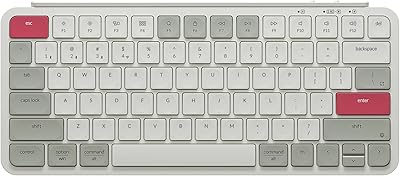
Alienware Pro Wireless Gaming Keyboard
87%
93%
Connectivity
89%
Customization (Hot-Swappable Switches)
91%
Ergonomics and Layout
88%
RGB Lighting
85%
Battery Life
More
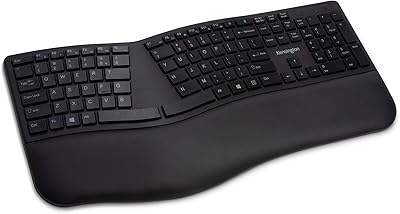
Keychron B1 Pro Wireless Bluetooth Keyboard
86%
88%
Overall Performance
91%
Typing Experience
93%
Battery Life
89%
Portability & Size
84%
Build Quality
More
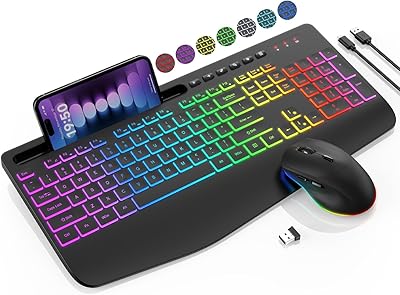
Kensington Pro Fit Ergonomic Wireless Keyboard Mouse
74%
78%
Ergonomic Design
74%
Keyboard Feel & Typing Experience
58%
Mouse Comfort & Usability
82%
Wireless Connectivity
88%
Security
More
Kensington Pro Fit Ergonomic Wireless Keyboard K75401US
85%
91%
Ergonomic Comfort
87%
Wireless Connectivity
90%
Key Quietness and Typing Experience
88%
Build Quality
84%
Ease of Setup
More
Womier RD75 Pro 75% Wireless Mechanical Keyboard
79%
91%
Build Quality
84%
Typing Feel
86%
Wireless Performance
73%
Battery Life
88%
Value for Money
More
SABLUTE KL3 Pro
SABLUTE KL3 Pro
76%
91%
Value for Money
83%
Typing Comfort
88%
Key Quietness
79%
RGB Lighting Quality
67%
Mouse Performance
More
GravaStar Mercury K1 Pro Mechanical Gaming Keyboard

80%
91%
Build Quality
88%
Typing Feel
86%
Switch Performance
79%
Wireless Reliability
74%
Battery Life
More
Arteck HW192 Wireless Keyboard and Mouse Combo
78%
78%
Build Quality
72%
Typing Experience
63%
Mouse Comfort & Ergonomics
81%
Battery Life
69%
Wireless Connectivity
More

FAQ

Yes, the S99 Pro stores up to five paired devices simultaneously. Switching between them is done with FN key combinations, so there is no need to re-pair every time. In practice it works well if you have a work laptop, a home PC, and a tablet all on your desk — each gets its own slot and you just tap through them.

For everyday typing and casual gaming, both modes feel responsive. The 2.4GHz dongle tends to offer a slightly more stable, lower-latency connection, which makes it the better pick if you are gaming. Bluetooth is more convenient for multi-device households since it does not occupy a USB port on every machine you connect to.

It works on macOS without any special setup. The key labeling follows a Windows layout, so Mac-specific keys like Command and Option are mapped to their Windows equivalents. Most buyers adapt quickly, and the macro software can help you remap keys to match Mac conventions if needed.

The screen displays battery level, which connection mode is active, and system compatibility information. It is a useful at-a-glance status panel, but it is not customizable — you cannot change what it shows or display personal text, animations, or artwork on it. Go in with that expectation and it is a genuinely handy feature; expect full control and you will be disappointed.

Membrane switches are softer and quieter than most mechanical switches, with less distinct tactile feedback at the actuation point. If you have never typed on a mechanical keyboard, the feel here will seem perfectly normal and comfortable. If you are used to tactile or clicky mechanicals, the mushier resistance will take adjustment, and some typists never fully warm to it.

Most users report the battery lasting through a full workweek of moderate daily use before needing a charge. Heavy use with RGB lighting on full brightness will drain it faster. Turning down the lighting or switching to a lower brightness level is an easy way to extend runtime significantly.

Yes, it has a dual-mode function. In one mode it controls system volume; in the other it adjusts RGB brightness. You toggle between the two modes with a key combination. It is one of the more satisfying physical controls on the keyboard and saves a lot of time compared to hunting through software menus.

It sits comfortably in the middle. It has all the gaming-facing features — RGB, full macro support, and low-latency 2.4GHz mode — but the membrane switches are not built for competitive, fast-paced play where precise actuation matters. Casual gamers and people who use the same keyboard for both work and gaming will find it a capable all-rounder.

It is functional but not the most intuitive software out there. Basic macro recording is straightforward once you find your footing, but creating complex lighting profiles or layered macros takes some patience. If you only plan to set up a few shortcuts and leave it, the learning curve is manageable. Power users who want deep customization should budget some time for trial and error.

The build quality is reasonable for the price tier. The chassis is plastic and feels light in hand, which suits portability but means there is some flex if you press firmly near the corners. It does not rattle or creak during normal typing sessions, and most buyers find it perfectly adequate day to day. If a rigid, premium-feeling chassis is a priority for you, this is not the board to reach for.