Overview

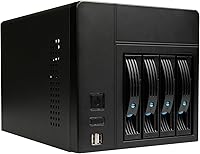
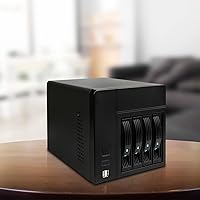
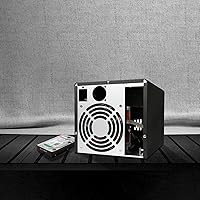
The AUDHEID K3 4-Bay Mini-ITX NAS Case is a compact, alloy steel chassis built for DIY home server enthusiasts who want full control over their storage hardware. Before buying, know that the board, CPU, RAM, and PSU are all sold separately — this is purely the enclosure. What you do get out of the box is a 12cm rear fan, four drive trays, SATA data cables, a back panel, and the necessary mounting hardware. At around 7 pounds, the alloy steel body feels surprisingly solid for its size, and the overall footprint is manageable enough to sit on a shelf or beside a router without dominating the space.

Features & Benefits

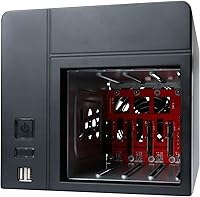
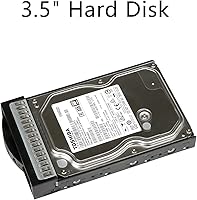
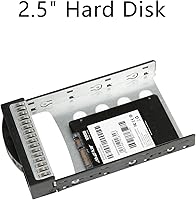
The K3 enclosure is built around the Mini-ITX standard, accepting motherboards up to 17x17cm alongside a Flex ATX power supply — a combination that keeps the internal layout tight but workable. Each of the four bays handles both 2.5-inch and 3.5-inch drives, so you're not locked into one drive format. A pair of USB 2.0 ports on the front panel saves you from crawling behind the unit every time you need to plug something in. The included 120mm rear fan runs quietly under normal NAS workloads, though if you plan to pack all four bays with spinning drives running around the clock, thermal headroom may become a consideration worth planning around.

Best For

This DIY storage case lands squarely in the hands of people who want to run their own storage stack — TrueNAS, Unraid, OMV — without paying for a closed system that dictates what software you use. It suits a first-time NAS builder just as well as someone repurposing an old Mini-ITX board they have sitting in a drawer. Small offices with modest shared-storage needs will find the four-bay capacity sufficient, and the price point makes it far less of a gamble than it might otherwise be. If you value picking every component yourself and want a chassis that stays out of your way, this enclosure fits that brief well.

User Feedback

Across buyer reviews, the metal build quality consistently draws praise — people expect flex at this size and price, and they don't get it. The quiet fan also earns good marks in day-to-day use. That said, not everything is smooth: some builders reported that 3.5-inch drive trays needed a little persuasion to seat correctly, and cable management space inside is genuinely tight once you run SATA cables to all four bays. It's the kind of case where planning your cable routing before you start saves real frustration. The overall rating hovers near 3.9 out of 5, which feels accurate — solid value with a mild assembly learning curve attached.

Pros

  • Solid alloy steel construction feels noticeably more rigid than plastic alternatives in the same price range.
  • Supports both 2.5-inch and 3.5-inch drives in every bay, so you can mix SSDs and HDDs freely.
  • The included 120mm rear fan runs quietly enough to live in a bedroom or home office without distraction.
  • Four drive trays, SATA cables, a back panel, and mounting screws all come in the box — a genuinely useful starter kit.
  • Mini-ITX and Flex ATX compatibility opens the door to a wide range of affordable, low-power board and PSU pairings.
  • Front-panel USB ports are a small but practical touch that saves reaching around the unit constantly.
  • The compact footprint fits neatly on a shelf, beside a router, or in a media cabinet without demanding dedicated rack space.
  • At its price point, the K3 enclosure competes well against significantly more expensive small-form-factor NAS chassis.
  • No proprietary OS lock-in means you run whatever storage software suits your setup best.

Cons

  • Motherboard, CPU, RAM, and PSU are all sold separately, so total build cost is considerably higher than the chassis price alone.
  • Flex ATX power supplies can be harder to source and more expensive than standard ATX units, adding an unexpected hurdle.
  • Internal cable routing space is tight with four drives populated — poor planning here leads to a cluttered, airflow-restricting build.
  • Some 3.5-inch drive trays require manual adjustment to seat correctly, which is annoying if you are swapping drives regularly.
  • A single rear fan provides limited thermal redundancy — there is no simple path to adding a second fan if temperatures creep up.
  • Only USB 2.0 on the front panel; builders wanting faster front-port transfer speeds will need to route USB 3.0 headers differently.
  • Assembly documentation is minimal, so first-time builders may need to rely on community forums to work through fitment questions.
  • The chassis dimensions mean it is not truly rack-mountable without a separate shelf adapter, which is an added cost for rack-oriented setups.

Ratings

The scores below for the AUDHEID K3 4-Bay Mini-ITX NAS Case were generated by our AI engine after analyzing verified buyer reviews from global markets, with spam, bot activity, and incentivized submissions actively filtered out. Each category reflects the honest consensus of real builders — home lab enthusiasts, small office users, and hardware hobbyists — who put this enclosure through its paces. Both the genuine strengths and the recurring frustrations are represented transparently so you can make a fully informed decision.

Build Quality
83%
The alloy steel body is the single most praised aspect of this enclosure across buyer feedback. Users consistently note that it feels far more solid than competing plastic chassis at a similar price, with no flex or creaking even when fully loaded with four drives. For a case that sits on a shelf and runs continuously, that physical confidence matters.
A few buyers noted that panel alignment was slightly off on their unit, requiring minor adjustments during assembly. The steel edges inside the chassis can also be sharp enough to nick fingers when routing cables — a small but recurring complaint that suggests finishing quality control is not perfectly consistent.
Value for Money
78%
22%
Buyers who understand what they are buying — a chassis only — consistently rate this as excellent value for a metal small-form-factor NAS enclosure. The included accessories like SATA cables and drive trays reduce the number of extra purchases needed to get started, which amplifies the perceived value for first-time builders on a tight budget.
The value equation shifts if you factor in the cost of a Flex ATX PSU, which is not included and typically costs more than a standard ATX unit. Buyers who were not expecting that additional expense occasionally felt the total build cost crept higher than anticipated based on the chassis price alone.
Drive Compatibility
81%
19%
Support for both 2.5-inch and 3.5-inch drives in every bay gives builders real flexibility — you can run a mix of SSDs for fast storage and spinning HDDs for bulk capacity without buying adapters or sacrificing a bay. Users running hybrid storage pools on TrueNAS or Unraid found this particularly useful.
Some 3.5-inch drives required manual tray adjustment to seat properly, and the fit appears to vary depending on drive brand and thickness. A handful of buyers reported the trays felt slightly loose with certain models, which introduced minor vibration noise during operation — not a dealbreaker, but worth knowing before populating all four bays.
Thermal Performance
67%
33%
For light NAS workloads — file sharing, media streaming, scheduled backups — the included 120mm rear fan keeps drive and board temperatures in a comfortable range. Users running two or three drives in a home environment reported no thermal concerns during normal daily use, and the fan noise at these workloads is impressively low.
Running all four bays continuously under heavier loads reveals the limits of a single-fan design. Several builders reported drive temperatures climbing into the upper-acceptable range during sustained transfers, and there is no straightforward path to adding supplemental cooling without modifying the case. The K3 enclosure is adequate for home use but should not be treated as a thermally robust 24/7 solution at full capacity.
Cable Management
54%
46%
The case does include SATA data cables and routes them reasonably for a two-drive build, which is a thoughtful inclusion that most competing budget chassis skip entirely. Builders who took time to plan their layout before assembly reported acceptably tidy results, especially when using right-angle SATA connectors.
Internal space becomes genuinely cramped once four SATA cables, power leads from a Flex PSU, and any front-panel header wires are all in play simultaneously. Multiple buyers flagged this as the single most frustrating part of the build experience, and restricted cable routing can also partially block airflow across drives — compounding the thermal concerns noted separately.
Assembly Experience
62%
38%
Builders with prior Mini-ITX or small-form-factor experience generally found assembly manageable and appreciated the logical layout of the motherboard tray and PSU bay. The included hardware kit covers most of what you need, reducing the number of trips to the hardware store mid-build.
Documentation is sparse to the point of being unhelpful for less experienced builders, and AUDHEID provides no detailed manual or online assembly guide. First-timers reported spending considerable time consulting community forums, and the tight internal tolerances leave little room for trial and error when fitting components for the first time.
Fan Noise
76%
24%
The 120mm rear fan is one of the more consistently praised aspects of this DIY storage case, particularly among users who run their NAS in living spaces or home offices where ambient noise matters. At idle or light load, most buyers describe it as genuinely unobtrusive — quieter than expected for a budget-tier inclusion.
Fan noise increases noticeably under sustained workloads or in warmer ambient conditions as the fan ramps up to compensate. A small number of users also reported a faint bearing rattle developing after several months of continuous operation, suggesting long-term fan durability may be a concern for always-on deployments.
Motherboard Fit
79%
21%
The motherboard tray accommodates the full 17x17cm Mini-ITX footprint without issue, and standoff placement is straightforward for anyone who has built an ITX system before. Users reported that popular NAS-oriented boards from ASRock and ASUS seated cleanly without clearance problems.
There is very little vertical clearance above the motherboard once the case is closed, so tall CPU coolers or large heatsinks are effectively off the table. This chassis strongly favors passive or low-profile cooling solutions, which limits CPU selection for anyone planning a more powerful or compute-heavy NAS configuration.
Front Panel Ports
58%
42%
Having two USB ports on the front panel is a practical convenience for a device that often lives tucked away on a shelf — being able to plug in a flash drive for a quick backup or initial OS install without moving the unit is genuinely useful in everyday NAS operation.
Both ports are USB 2.0, which is noticeably slow for any file transfer involving larger datasets. Builders who expected USB 3.0 for faster sneakernet transfers were disappointed, and there is no card reader or additional I/O on the front panel to compensate for the dated port standard.
Flex PSU Sourcing
51%
49%
The bottom-mounted Flex ATX bay is well-positioned and keeps the PSU out of the primary airflow path, which is a smart layout choice for a chassis this compact. Once a suitable Flex ATX unit is installed, the fit is clean and the cabling is manageable.
Flex ATX PSUs are a niche product category that many buyers are unfamiliar with, and options are limited compared to standard ATX units. Pricing is also typically higher per watt, and quality control on budget Flex ATX units is inconsistent — several builders flagged sourcing the right PSU as an unexpected research burden before the build could even begin.
Footprint & Placement
82%
18%
The overall dimensions make this mini-ITX NAS chassis easy to slot into a home network setup without dedicating significant space to it. Users frequently mention it fits neatly beside a router or modem stack, on a bookshelf, or inside an AV cabinet — exactly where a home NAS realistically ends up living.
While compact relative to tower cases, the enclosure is not truly small-form-factor enough to sit invisibly on a desk or inside a tight media center shelf without some planning. It also lacks native rack-mount compatibility, which rules it out for anyone building in a standard 19-inch rack environment without an additional shelf adapter.
Included Accessories
73%
27%
The inclusion of SATA data cables, four drive trays, mounting screws, and a rear fan means the out-of-box kit is more complete than many competing chassis at this price tier. For a first-time builder, having these parts bundled reduces the risk of forgetting a critical component at the point of purchase.
The SATA cables included are standard straight-connector types, which are awkward to route in the confined interior — right-angle alternatives would have been more practical. The drive trays also lack rubberized vibration dampening, which is a minor omission that becomes noticeable when running multiple spinning HDDs simultaneously.
Long-Term Durability
69%
31%
The steel construction inspires more confidence for long-term continuous operation than the plastic chassis it competes with, and buyers who have run the K3 enclosure for over a year report no structural degradation or panel warping. The build feels engineered to last rather than to merely survive the return window.
A subset of users flagged the included fan as the most likely component to fail over extended 24/7 use, with bearing noise reportedly appearing between six and eighteen months of continuous operation. Replacing it is straightforward mechanically, but it does suggest AUDHEID sources a budget-grade fan that may not be rated for indefinite always-on use.

Suitable for:

The AUDHEID K3 4-Bay Mini-ITX NAS Case is a strong fit for technically comfortable builders who want full ownership of their storage setup without paying a premium for a branded, closed-system appliance. If you're already running TrueNAS, Unraid, or OpenMediaVault on Mini-ITX hardware — or planning to — this chassis gives you a purpose-built home without forcing you into proprietary software or limited upgrade paths. It works equally well for someone repurposing a spare Mini-ITX board gathering dust, turning dormant hardware into a functional home media server or backup target. Small offices with modest shared-storage demands will also find four bays more than adequate for centralized file access, and the all-metal construction means it doesn't feel out of place in a semi-professional setting. Budget-conscious home lab enthusiasts who want a real enclosure rather than an improvised shelf build will find the value proposition here genuinely compelling.

Not suitable for:

The AUDHEID K3 4-Bay Mini-ITX NAS Case is not the right choice if you're expecting a plug-and-play experience — there is no included motherboard, CPU, RAM, or power supply, and sourcing Flex ATX PSUs in particular can add friction and cost for buyers unfamiliar with the form factor. Anyone planning to run four high-capacity spinning drives continuously at full utilization should be cautious, since a single 120mm rear fan is adequate for light-to-moderate NAS workloads but may not provide enough airflow headroom for thermally demanding, always-on configurations. If cable management is important to you, the internal space is genuinely tight once four SATA cables and a Flex PSU harness are in play, so meticulous builders may find the experience frustrating. Users who prefer a warranty-backed, support-included NAS appliance from brands like Synology or QNAP will be better served elsewhere — this enclosure rewards patience and hands-on comfort, not convenience.

Specifications

  • Brand: Manufactured and sold by AUDHEID, a brand focused on small-form-factor PC and storage enclosures.
  • Model: This chassis is designated the K3, part of AUDHEID's compact NAS enclosure lineup.
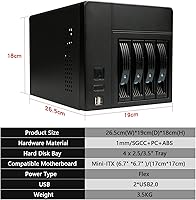
  • Dimensions: The enclosure measures 26.5 x 19 x 18 inches overall, providing a compact desktop or shelf-friendly footprint.
  • Weight: The assembled chassis weighs approximately 7 pounds, reflecting its all-metal construction without being unwieldy.
  • Material: The body is constructed from alloy steel, offering greater rigidity and passive heat conductivity compared to plastic alternatives.
  • Form Factor: Supports standard Mini-ITX motherboards up to 17x17cm in size — no larger board formats are compatible.
  • Drive Bays: Provides 4 independent drive bays, each capable of housing either a 2.5-inch or 3.5-inch SATA hard drive or SSD.
  • PSU Compatibility: Designed exclusively for Flex ATX power supplies mounted at the bottom of the chassis — standard ATX PSUs will not fit.
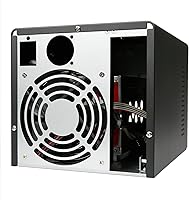
  • Cooling: Ships with one 120mm silent fan mounted at the rear of the chassis to exhaust warm air from the internal components.
  • Front Ports: Two USB 2.0 ports are located on the front panel for convenient peripheral or flash drive access.
  • Color: Available in black; no other color options are listed by the manufacturer.
  • PSU Mount: The power supply mounts at the bottom of the enclosure in a dedicated Flex ATX bay.
  • Included Items: Package contents include four drive trays, SATA data cables, one rear 120mm fan, a back panel, and assorted mounting screws.
  • Not Included: Motherboard, CPU, RAM, power supply, and storage drives are all sold separately and must be sourced independently.
  • Cooling Method: Thermal management relies entirely on active air cooling via the single included rear fan — no liquid cooling provisions are present.
  • Availability: This product has been available on Amazon since June 2, 2021, and carries an Amazon Best Sellers Rank of approximately 590 in Computer Cases.

Related Reviews
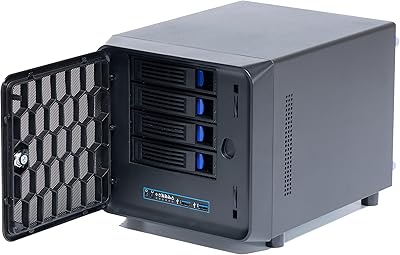
KCMconmey NAS-411 4+1 Bay DIY NAS Case
84%
85%
Ease of Setup
80%
Build Quality
70%
Cooling Performance
90%
Customization Options
88%
Drive Compatibility
More
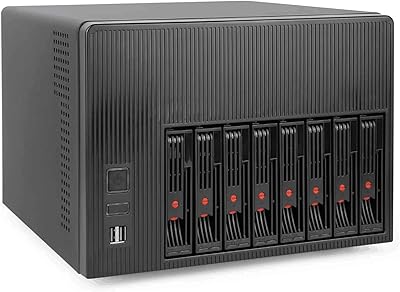
AUDHEID K7 8-Bay NAS Case
76%
83%
Build Quality
88%
Drive Bay Design
81%
Motherboard Compatibility
74%
Cooling Performance
77%
Noise Level
More
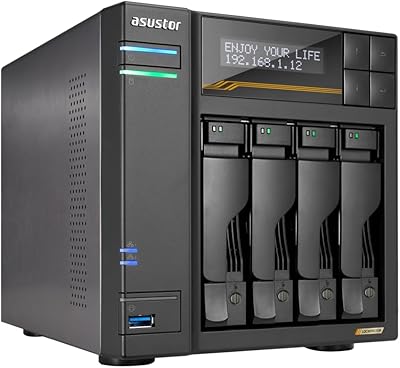
SilverStone DS380B Mini-ITX NAS Case
69%
93%
Drive Bay Capacity
88%
Hot-Swap Functionality
76%
Build Quality
41%
Cable Management
57%
Thermal Performance
More
Asustor Lockerstor 4 Gen3 AS6804T NAS

78%
93%
Raw Performance
91%
Network Throughput
89%
Memory & Data Integrity
87%
NVMe Cache Flexibility
88%
Build Quality
More
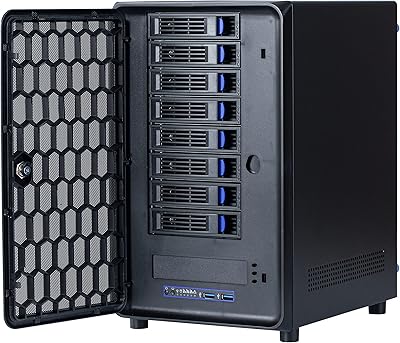
Asustor Drivestor 4 Pro AS3304T 4-Bay NAS
78%
88%
Network Performance
83%
Software & ADM Interface
74%
Media Playback & Transcoding
76%
App Ecosystem
57%
RAM & Multitasking
More
KCMconmey NAS-812 8+2 Bay NAS Case
68%
83%
Build Quality
81%
Hot-Swap Mechanism
78%
Value for Money
61%
Compatibility & Fit
52%
Ease of Assembly
More
Jonsbo N2 Mini-ITX NAS Case
72%
91%
Build Quality
93%
Storage Density
54%
Cable Management
68%
Cooling Performance
57%
CPU Cooler Compatibility
More
Asustor AS5404T 4-Bay NAS Enclosure
80%
88%
Build Quality
82%
Processing Performance
93%
NVMe Storage Flexibility
87%
Network Throughput
76%
Software Ecosystem (ADM OS)
More
Cooler Master NR200 Mini-ITX Case
85%
91%
Build Quality
88%
Cooling Performance
94%
GPU Compatibility
84%
Ease of Assembly
86%
Airflow Efficiency
More
TerraMaster F4-212 4-Bay NAS Enclosure
70%
76%
Value for Money
83%
Setup & Initial Configuration
61%
Software & OS Experience
67%
Performance & Responsiveness
42%
RAM & Expandability
More

FAQ

No — the AUDHEID K3 4-Bay Mini-ITX NAS Case is a bare enclosure only. You will need to source a Flex ATX PSU, a Mini-ITX motherboard, CPU, RAM, and your own storage drives separately. Make sure to budget for all of those components before ordering.

Unfortunately, no. The K3 enclosure is designed specifically for Flex ATX power supplies, which have a smaller footprint than standard ATX or SFX units. Flex ATX PSUs can be a bit harder to find than conventional options, so it is worth sourcing one before you commit to this chassis.

Yes, each of the four bays independently supports either a 2.5-inch or 3.5-inch drive, so you can freely mix SSDs and spinning disks across the four slots without any adapter bracket needed.

Most builders report the 120mm rear fan is genuinely quiet during typical NAS workloads — light file serving, backups, and media streaming. It is not silent, but it is unobtrusive enough for a home office or living space. If you plan to run all four drives under heavy sustained load, you may notice more noise from the drives themselves than from the fan.

For moderate workloads with one to three drives, the single 120mm fan provides adequate airflow. However, if you are running four large-capacity spinning drives continuously at high utilization, thermal headroom gets tighter. In that scenario, ambient room temperature and drive placement matter more, and you may want to monitor drive temperatures closely after building.

If you have built a standard PC before, this case is manageable, but it is not as forgiving as a full-tower. The internal space is tight once drives, cables, and the PSU harness are all in place. Planning your cable routing before you start — and using right-angle SATA connectors if possible — makes a real difference. Complete beginners may find the lack of detailed documentation a hurdle.

They do fit standard 3.5-inch drives, but some buyers have reported that the trays require a small amount of adjustment to seat properly depending on the specific drive model. It is not a major issue, but do not be alarmed if a tray feels slightly snug on the first install — a little patience and light pressure usually resolves it.

Absolutely — this mini-ITX NAS chassis is well suited to open-source NAS operating systems like TrueNAS, Unraid, or OpenMediaVault. There is no proprietary software or OS lock-in of any kind; the case is just an enclosure, and the software choice is entirely yours based on the motherboard and components you install.

Not natively. The K3 enclosure is a desktop-form chassis and does not include rack ears or a rack-mount kit. You could potentially use a universal rack shelf to mount it in a standard rack, but that requires a separate purchase and adds to the overall cost.

The all-metal construction is a genuine strength here — it feels more solid than you might expect at this price point. That said, purpose-built appliances from Synology or QNAP offer tighter overall fit and finish, dedicated hot-swap bays, and full manufacturer support. This DIY storage case trades some polish for flexibility and significantly lower upfront cost, which is exactly the trade-off most buyers in this category are consciously making.