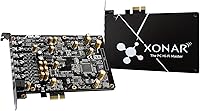
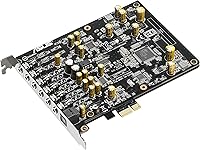
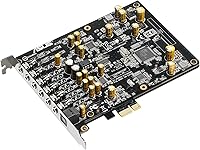
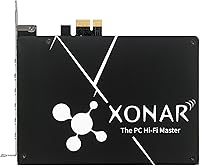

Overview

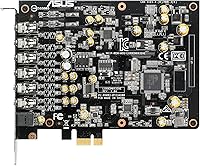
The Asus Xonar AE is a mid-range PCIe sound card that sits in a sweet spot between budget onboard audio and expensive audiophile hardware. Most modern motherboards include built-in audio, but that circuitry shares a board with power regulators, GPUs, and other noise-generating components — the result is often an audible hiss or flat, lifeless sound. This PCIe audio upgrade addresses that directly, pairing a C-Media 6632AE processor with a high-quality ESS DAC to handle the signal conversion. On paper, the specs look solid. The real question is always whether that translates to a meaningful difference in day-to-day listening, gaming, and communication — and here, the answer is mostly yes.

Features & Benefits

The most immediately noticeable upgrade is the 110dB signal-to-noise ratio delivered through the ESS DAC — in practical terms, that means quieter backgrounds, more detail in complex audio, and a noticeably cleaner headphone output. The built-in headphone amplifier handles impedances up to 150 ohms, which means headphones that often sound thin and underpowered from a motherboard jack finally get the drive they need. For gaming, 7.1 surround support adds real directional depth when the mix is good. The card also handles hi-res playback at 192kHz/24-bit, so music listeners are not left behind. An EMI shielding backplate physically blocks electrical interference from neighboring components — a small but thoughtful hardware detail that directly affects audio clarity.

Best For

This sound card hits its stride for PC gamers and headphone users who want a real hardware upgrade without paying flagship prices. If you own a pair of 80-ohm or higher impedance headphones — something like a Sennheiser HD 600 or similar — the onboard headphone amplifier here will drive them properly in a way most motherboards simply cannot. Desktop builders dealing with persistent audio interference or background hiss will notice an immediate improvement. It also works well for streamers and voice-chat users, since the mic input delivers a clean 103dB SNR that reduces noise pickup during recording. Windows 10 users get the best experience, as driver support is most stable on that platform.

User Feedback

Owners consistently praise the improvement over onboard audio — the cleaner headphone output in particular earns frequent mentions, with many noting it was an immediately noticeable change. The EMI backplate gets quiet appreciation from builders who had struggled with interference. That said, this PCIe audio upgrade is not without criticism. Driver reliability has been a recurring sore point, with some users reporting compatibility headaches after Windows updates. The Sonic Studio software is functional and consolidates controls well, but several buyers find it feels dated compared to competing software suites. Installation is generally straightforward, though a handful of users flag PCIe slot spacing as a minor concern in tighter builds. Overall, the hardware quality wins most people over — the software experience is more of a mixed bag.

Pros

  • Noticeable, immediate improvement over standard motherboard audio in both clarity and background noise.
  • The 150-ohm headphone amp properly drives mid-impedance audiophile headphones that onboard audio cannot.
  • EMI shielding backplate physically blocks electrical interference — a hardware fix, not a software workaround.
  • 110dB SNR output means quieter backgrounds and better detail retrieval during gaming and music listening.
  • 7.1 surround support adds real directional depth in gaming without requiring an external processor.
  • Hi-res 192kHz/24-bit playback support covers lossless music listeners without extra hardware.
  • Sonic Studio consolidates all audio controls — EQ, mic, effects — into a single, accessible interface.
  • Clean 103dB microphone input SNR is a genuine upgrade for streamers and voice-chat users.
  • Solid hardware build with a well-designed backplate that feels more premium than the price suggests.
  • Competitive value for buyers who want an internal ESS DAC and headphone amp without spending flagship prices.

Cons

  • Driver updates frequently break functionality, requiring reinstalls that frustrate users who just want things to work.
  • Sonic Studio software feels visually outdated and does not match the polish of competing audio suites.
  • Certain EQ and effect settings fail to persist correctly after a system restart, forcing repeated manual adjustments.
  • Windows 11 compatibility is inconsistent — not officially confirmed stable across all configurations.
  • Headphones above 150 ohms may not receive adequate amplification from the onboard headphone stage.
  • The one-year warranty is short for a component expected to live inside a PC for several years.
  • PCIe slot spacing near large GPUs can make physical installation awkward in tightly packed cases.
  • Virtual surround on headphones divides opinion — some users find the effect hollow rather than immersive.
  • Improvement over premium motherboard audio codecs is subtle enough to disappoint buyers upgrading from high-end boards.
  • Long-term driver support has not kept pace with OS updates, leaving some users stranded on outdated software.

Ratings

The Asus Xonar AE has been evaluated by our AI system after analyzing thousands of verified global user reviews, with spam, bot-generated, and incentivized feedback actively filtered out. Scores reflect honest buyer sentiment across real-world use cases — from gaming rigs to headphone listening setups — capturing both what this PCIe audio upgrade does well and where it genuinely falls short. Strengths and frustrations are weighted equally so you get a complete picture before buying.

Audio Output Quality
88%
Most users report a striking improvement over their motherboard audio — backgrounds are quieter, instrument separation is cleaner, and overall listening fatigue drops noticeably. The ESS DAC handles both gaming audio and music with a level of clarity that surprised buyers who were skeptical about the upgrade.
Some critical listeners feel the output, while clearly better than onboard, still lacks the warmth and dimensionality found in higher-end dedicated cards. At higher volumes, a small number of users detected minor coloration in the low-mids that purists found slightly off.
Headphone Amplifier Performance
86%
The 150-ohm headphone amplifier is a genuine highlight for owners of mid-to-high impedance headphones — headphones that sounded thin and flat from a motherboard jack come alive with proper volume and control. Users with Sennheiser and Beyerdynamic headphones in the 80–150 ohm range were particularly satisfied.
For headphones above 150 ohms, some users noted the amp stage starts to struggle and loses authority. It is also not a replacement for a proper external headphone DAC-amp if you are running 250-ohm or 300-ohm cans and expecting audiophile-grade performance.
Driver Stability & Reliability
61%
39%
On clean Windows 10 installations, the drivers install without incident for most users, and day-to-day stability is generally acceptable once everything is configured. Buyers who set it up and leave it alone tend to report fewer problems than those who update Windows frequently.
Driver reliability is the most common complaint across reviews — Windows updates have broken functionality for a notable number of users, requiring reinstallation or rollbacks. A handful of buyers on certain motherboard configurations reported persistent conflicts that took significant troubleshooting to resolve.
Software (Sonic Studio)
63%
37%
Sonic Studio consolidates EQ, surround virtualization, mic settings, and effects into a single interface, which buyers appreciate for not having to juggle multiple panels. The one-page layout makes basic configuration genuinely quick once you understand where everything lives.
The software feels visually dated compared to what competitors ship, and several users find the EQ options limited for serious audio tuning. A recurring frustration is that certain settings do not persist correctly after a system restart, forcing manual resets more often than they should.
Noise & Interference Reduction
87%
The EMI shielding backplate earns genuine praise from builders who had battled persistent background hiss from their previous onboard audio. In multi-GPU or densely packed builds, users specifically credited the shielding with eliminating the low-level whine that had plagued their setup for months.
A small number of users in very high-interference builds reported that electrical noise was reduced but not fully eliminated — likely a reflection of extreme cases rather than a flaw in the design. Those with cleaner, simpler builds typically experienced no residual interference at all.
Microphone Input Quality
74%
26%
The 103dB input SNR is respectable for a card at this price, and streamers and voice-chat users note that their recordings come through with noticeably less background noise compared to motherboard inputs. For casual content creation and Discord use, the mic input performs reliably.
It is not a substitute for a proper audio interface if you are doing serious voice work or podcast recording. Users running condenser mics expecting broadcast-level clarity were underwhelmed — this card handles basic communication tasks well but is not tuned for professional mic applications.
7.1 Surround Sound
76%
24%
Gamers running 7.1-capable speaker setups found positional audio noticeably more defined compared to onboard solutions, particularly in competitive titles where directional awareness matters. The surround implementation works well with compatible headsets when virtual surround is enabled in Sonic Studio.
Virtual surround on headphones gets mixed reactions — some users find it adds useful depth while others feel it introduces an artificial, slightly hollow quality to the soundstage. The experience varies enough across headphone models that it is worth testing before committing to that mode.
Hi-Res Audio Playback
79%
21%
Support for 192kHz/24-bit playback is a meaningful spec for music listeners who keep high-resolution audio files, and the card handles those formats without issue on compatible setups. Users who stream lossless audio noticed that playback felt cleaner and more dynamic than their onboard chip managed.
The real-world benefit of hi-res playback depends heavily on the rest of the audio chain — speakers, headphones, and source quality — and some users felt the difference was subtle enough to be negligible on their existing setup. It is a good-to-have feature rather than a primary selling point for most buyers.
Build & Hardware Design
83%
The card feels solid and well-constructed for its class — the EMI backplate in particular signals thoughtful engineering rather than cost-cutting. Buyers handling it during installation frequently comment that it feels more premium than they expected from a sub-$100 component.
The physical footprint is modest, and a few users in compact builds flagged that PCIe slot spacing near large GPUs made installation slightly awkward. Nothing that prevents installation, but worth checking clearance before ordering if your case is tightly packed.
Installation Ease
78%
22%
For most desktop builders, dropping the card into a PCIe slot and running the driver installer is genuinely straightforward — no unusual steps, no special configuration required out of the box. The included quick start guide covers the basics clearly enough for first-time sound card installers.
The installation experience deteriorates for a minority of users who hit driver conflicts or face compatibility quirks with specific motherboard models. These cases are not the norm, but they are documented often enough in community forums that it is worth checking your motherboard model against known compatibility reports first.
Value for Money
82%
18%
At its price point, this PCIe audio upgrade delivers hardware specifications — particularly the ESS DAC and headphone amp — that would cost considerably more to replicate with a standalone external DAC of comparable quality. For buyers primarily using a desktop PC, the internal form factor also means one less device on the desk.
The software and driver experience chips away at the overall value proposition — if you spend hours troubleshooting post-update driver failures, the cost-to-enjoyment ratio drops fast. Buyers who want a truly plug-and-play experience may find the occasional maintenance overhead frustrating relative to expectations.
Gaming Audio Performance
81%
19%
In practice, footstep cues, environmental audio, and directional gunfire all come through with more separation and clarity than typical onboard audio delivers. Competitive gamers who care about positional awareness in titles like tactical shooters found this a worthwhile upgrade within a reasonable budget.
The gains over a high-quality motherboard audio codec — like those found on premium Z-series boards — are less dramatic than the upgrade from a basic board. If your motherboard already ships with a decent audio solution, the gaming improvement may feel incremental rather than transformative.
Compatibility
69%
31%
The card works reliably across a wide range of standard ATX and mid-tower desktop builds on Windows 10, and most users slot it in without any compatibility friction. PCIe x1 through x4 slots are widely available, so finding a home for it is rarely a problem.
Windows 11 support is inconsistent based on user reports, and older operating systems are not officially supported at all. Some users on specific AMD or Intel platform configurations have reported intermittent issues that do not appear on other boards with otherwise identical setups.
Long-Term Reliability
73%
27%
A solid portion of buyers report using this sound card for two or more years without hardware failure — the physical build holds up, and the audio quality does not degrade over time. For a component that runs passively with no fans or moving parts, longevity is generally not a major concern.
Long-term reliability is more software than hardware for this card — the hardware outlasts the driver support cycle, and users on newer OS versions sometimes find themselves on outdated drivers with no update in sight. The one-year warranty also reflects a modest confidence window from the manufacturer.

Suitable for:

The Asus Xonar AE is a strong match for desktop PC users who are genuinely tired of the hiss, flatness, or interference that comes with typical motherboard audio. Gamers who care about positional accuracy — knowing exactly where footsteps or gunfire are coming from — will get a real, tangible improvement without needing to spend flagship money. It is particularly well-suited for headphone users running mid-to-high impedance cans in the 80–150 ohm range, since the built-in headphone amplifier finally gives those headphones the power they need to perform as intended. Desktop builders dealing with electrical noise from densely packed components will also appreciate the EMI shielding, which addresses interference at the hardware level rather than masking it in software. Streamers, voice-chat users, and light content creators who want a cleaner microphone input than their motherboard offers will find the 103dB input SNR a meaningful upgrade. If you are on Windows 10 and willing to manage occasional driver upkeep, this PCIe audio upgrade delivers hardware quality that genuinely punches above its price bracket.

Not suitable for:

Buyers expecting a completely hands-off, plug-and-play experience should temper their expectations — the Asus Xonar AE has a documented history of driver friction following Windows updates, and if you are not comfortable occasionally reinstalling or troubleshooting audio drivers, that recurring friction will wear on you fast. Audiophiles running 250-ohm or 300-ohm headphones who want a proper amp stage are better served by a dedicated external DAC-amp, as this card starts to lose authority at those impedance levels. If your motherboard already ships with a premium onboard audio codec — as many high-end Z-series boards do — the improvement from this sound card may feel incremental rather than transformative, making the upgrade harder to justify. Windows 11 users should also be cautious, as driver compatibility on that platform is inconsistent based on real user reports. Content creators who need broadcast-quality microphone performance will find this card insufficient — it handles casual voice communication well, but it is not a substitute for a proper audio interface. Laptop users and anyone without a desktop PCIe slot available are simply out of scope, as this is strictly an internal card for full-size desktop builds.

Specifications

  • Audio Processor: The card is powered by a C-Media 6632AE audio processor, which handles signal routing and digital audio processing on-board.
  • DAC: An ESS high-quality DAC handles digital-to-analog conversion, contributing directly to the card's clean output signal.
  • Output SNR: Front output delivers a 110dB signal-to-noise ratio (A-weighted), meaning the audio signal is significantly stronger than any residual background noise.
  • Headphone SNR: The dedicated headphone output achieves a 108dB SNR (A-weighted), maintaining strong signal clarity for personal listening.
  • Input SNR: The microphone and line input records at up to 103dB SNR (A-weighted), providing a clean capture path for voice and audio sources.
  • Headphone Amp: The built-in headphone amplifier supports headphone impedances up to 150 ohms, enabling proper drive for mid-to-high impedance audiophile headphones.
  • Max Resolution: The card supports audio playback and recording at up to 192kHz sample rate and 24-bit depth, covering hi-res audio formats.
  • Channel Support: Output supports up to 7.1 surround sound channels, compatible with multi-speaker setups and virtual surround for headphones via software.
  • Host Interface: The card uses a PCI Express interface and physically fits into a PCIe x1, x4, x8, or x16 slot on a standard desktop motherboard.
  • EMI Shielding: An exclusive EMI shielding backplate is included on the card to reduce electromagnetic interference from neighboring PCIe components inside the case.
  • Software: Sonic Studio is the companion software, providing EQ, surround virtualization, microphone noise reduction, and audio effects through a single-page control interface.
  • Platform: The card is officially supported on Windows 10; compatibility with other operating systems or Windows 11 is not officially guaranteed by the manufacturer.
  • Dimensions: The card measures 2.52 x 0.71 x 6.69 inches, making it a low-profile, single-slot design suitable for most standard desktop cases.
  • Weight: The card weighs 2.5 ounces, reflecting its compact and lightweight construction as a half-height PCIe add-in card.
  • Warranty: Asus provides a one-year limited manufacturer warranty covering defects in materials and workmanship from the date of purchase.
  • In The Box: The package includes the Xonar AE sound card itself and a printed quick start guide; no additional cables or software discs are included.
  • Manufacturer: The card is designed and manufactured by Asus, model number Xonar AE, and is not discontinued as of the current product listing.
  • Best Sellers Rank: The card holds a rank of number 7 in the Computer Internal Sound Cards category on Amazon, indicating strong sustained market demand.

Related Reviews
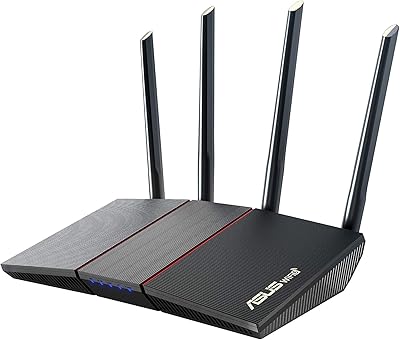
ASUS RT-AX55
ASUS RT-AX55
88%
91%
Wireless Speed
84%
Signal Coverage
88%
Device Handling Capacity
95%
Ease of Setup
90%
Security Features
More
ASUS ZenScreen MB249C 24″
88%
91%
Display Quality
95%
Portability
88%
Build Quality
90%
Connectivity Options
89%
Stand & Mount Flexibility
More
ASUS RT-AX57 Go
ASUS RT-AX57 Go
86%
94%
Setup & Installation
91%
WiFi Performance
97%
Portability
89%
VPN & Security Features
88%
Connectivity Options
More
ASUS Prime B550M-A Motherboard
84%
91%
Value for Money
89%
Build Quality
85%
Performance (Gaming)
93%
Ease of Installation
88%
Compatibility with AMD Ryzen Processors
More
ASUS ZenWiFi AX6600 (XT8)
89%
94%
Overall Performance
92%
Wi-Fi Coverage
95%
Setup & Installation
91%
App Usability
90%
Network Stability
More
ASUS VA27EQSB 27-inch Monitor
85%
85%
Overall Performance
90%
Display Quality
88%
Ergonomics & Comfort
83%
Connectivity Options
75%
Gaming Experience
More
ASUS Prime Z390-P Motherboard
84%
88%
Performance
91%
Build Quality & Durability
85%
Overclocking Capabilities
84%
PCIe Expansion Slots
87%
Cooling & Fan Control
More
ASUS VivoBook 17 F712DA Laptop
77%
75%
Display Quality
82%
Performance for Everyday Tasks
87%
Storage Flexibility (SSD + HDD)
69%
Keyboard Comfort
78%
Fingerprint Sensor Functionality
More
ASUS Vivobook 14 M1407KA-PS74
86%
93%
Performance
88%
Display Quality
85%
Battery Life
91%
Portability
82%
Build Quality
More
ASUS Zenbook 14 OLED 2024
87%
93%
Performance
95%
Display Quality
90%
Portability
78%
Battery Life
88%
Build Quality
More

FAQ

For most users, yes — the difference is real and noticeable, especially if your current motherboard produces any background hiss or buzz. The ESS DAC and 110dB SNR deliver a cleaner, quieter signal than the vast majority of onboard audio solutions. If your motherboard already has a premium audio codec, the gap will be smaller, but it is still there.

Officially, the card is supported on Windows 10. Windows 11 compatibility is inconsistent — some users report it working fine, while others have encountered driver issues. If you are on Windows 11, it is worth checking community forums for your specific motherboard and OS build before purchasing.

The built-in amp handles headphones up to 150 ohms comfortably, so the HD 650 at 300 ohms is pushing past its rated limit. For 250-ohm or 300-ohm headphones, you may find the amp stage adequate for casual listening but not ideal for maximum performance — a dedicated external headphone amp or DAC-amp would serve those headphones better.

Not at all — if you have installed a GPU or any PCIe card before, this is the same process. Slide the card into an available PCIe slot, secure it, install the drivers from the Asus website, and you are done. The included quick start guide covers the basics clearly enough for first-time builders.

The card uses a PCIe x4 connector but is backward and forward compatible with x1, x8, and x16 slots as well, since it only uses a fraction of the available bandwidth. Virtually any free PCIe slot on a modern desktop motherboard will work.

This is the most honest caveat about this PCIe audio upgrade: Windows updates have caused driver breakage for a meaningful number of users over the years. It is not universal, but it is common enough to mention. If you are comfortable occasionally reinstalling drivers or rolling back after a Windows update, it is manageable. If you want something completely hands-off, factor that in.

It depends on the headphone and personal preference. Some users find it adds convincing positional depth in competitive games, while others feel it introduces an artificial quality to the soundstage. It is worth experimenting with — you can toggle it off entirely in Sonic Studio if you prefer a clean stereo signal.

For casual streaming, Discord, and voice-chat, the 103dB input SNR is a genuine step up over most motherboard microphone inputs — your voice will come through cleaner with less background noise. For professional podcast recording or studio vocal work, this card is not the right tool; you would want a dedicated audio interface with phantom power instead.

Most users report no noticeable CPU or performance impact from running Sonic Studio in the background. It is a relatively lightweight application. A small number of users have reported occasional software quirks — like settings not saving after a restart — but these do not typically affect in-game performance.

In a standard mid-tower, installation is straightforward and clearance is rarely a problem. In smaller or more tightly packed cases, the main concern is whether a large GPU occupying adjacent slots leaves enough room for the card to sit flush. It is a slim, single-slot card, so physical size is not usually the issue — neighboring component clearance is.