
Overview

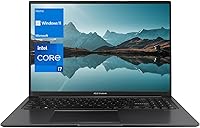
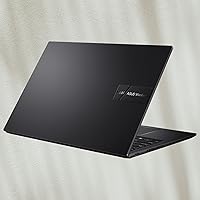
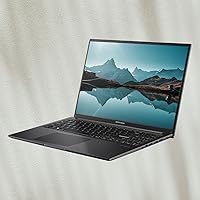
The ASUS Vivobook 16 1TB Laptop sits in an interesting spot — it's a mid-range 16-inch machine that stands out on paper, particularly with its 40GB of DDR4 RAM, which you rarely see at this price point. Most laptops in this range ship with 8GB or 16GB, so the extra headroom is genuinely useful for keeping dozens of browser tabs, Slack, and a few Office apps running without things slowing to a crawl. The display is a 16:10 FHD+ panel, giving you a bit more vertical space than a standard 1080p screen. Powering it all is an Intel Core i7-1255U — a capable, power-efficient chip designed for sustained everyday tasks, not raw horsepower. No dedicated GPU here, so creative professionals and gamers should look elsewhere.

Features & Benefits

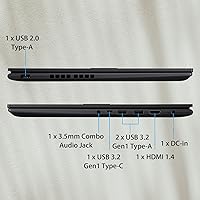
The 1TB PCIe M.2 SSD is one of this Vivobook 16's quiet wins — boot times are fast, file transfers feel snappy, and there is enough space to avoid juggling external drives for everyday use. The 40GB of RAM is likely 8GB soldered to the board plus a 32GB SO-DIMM, worth knowing before assuming it can be freely reconfigured later. The 16:10 aspect ratio screen adds real vertical space when scrolling through long documents or spreadsheets. Intel Iris Xe handles light photo edits and video calls comfortably. Wi-Fi 6 support means faster, more stable wireless on compatible routers. Port selection is solid: two full-speed USB-A ports, a Type-C, HDMI 1.4, and a combo audio jack cover most daily needs without a hub.

Best For

This ASUS laptop is a strong fit for college students and remote workers who keep a lot going at once — think 20-plus browser tabs, a video call running in the background, and a few documents open simultaneously. The generous memory makes that kind of multitasking comfortable in a way that 8GB or 16GB machines simply cannot match. Anyone upgrading from an older machine will notice the SSD speed difference immediately. That said, the 4.14-pound body and larger footprint make this more of a desk companion than a bag-friendly commuter machine. If you need dedicated graphics for gaming, video rendering, or serious photo work, this is simply not the right tool. As a dependable Windows 11 daily driver for home or small-office use, it holds its own.

User Feedback

Buyers consistently point to the RAM and storage combination as the main reason they chose this over competing models — getting 40GB with a fast 1TB drive at this tier feels like strong value. The SSD's responsiveness draws frequent praise, with many noting that Windows 11 boots quickly and apps launch without delay. Where feedback turns more mixed is around the display: a number of users find it adequate for everyday work but not bright or color-accurate enough for photo editing. Keyboard comfort earns mostly positive marks, though the trackpad gets a more split reaction. Fan noise occasionally comes up during extended workloads, though it rarely seems loud enough to be a dealbreaker. Battery life impressions tend to hover around five to seven hours of real-world use — workable, but not remarkable.

Pros

  • 40GB of RAM at this price tier is genuinely rare and makes heavy multitasking noticeably smoother than most competing laptops.
  • The 1TB PCIe SSD delivers fast boot times and responsive app launches that feel well above average for the price.
  • A 16:10 aspect ratio display gives meaningful extra vertical space, making long documents and web pages easier to work through.
  • Wi-Fi 6 support ensures faster, more reliable wireless connections on compatible routers, a useful future-proofing touch.
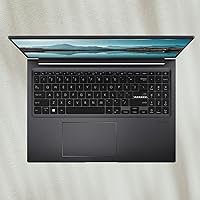
  • The numeric keypad is a practical addition for anyone who regularly works with numbers or accounting software.
  • Port selection covers everyday needs well, with two USB-A ports, a Type-C, HDMI, and a headphone jack all included.
  • Windows 11 Home comes pre-installed, so the machine is ready to use without additional operating system costs.
  • The thin-bezel display design makes the 16-inch screen feel less bulky than older laptops with the same panel size.

Cons

  • The 40GB RAM configuration is likely partly soldered to the motherboard, limiting how easily you can adjust or upgrade memory later.
  • Display brightness and color accuracy fall short for photo editing or color-sensitive work, according to multiple buyers.
  • The i7-1255U is a power-efficient chip, not a performance processor — sustained heavy workloads can expose its ceiling quickly.
  • Fan noise under extended loads has been noted by users, which can be distracting in quiet work environments.
  • Real-world battery life tends to land around five to seven hours, which may require carrying a charger for full-day use.
  • The trackpad has received mixed feedback, with some users finding it less precise or responsive than expected.
  • HDMI 1.4 rather than HDMI 2.0 limits external display output, which matters if you plan to connect a 4K monitor.
  • At 4.14 pounds with a larger chassis, this Vivobook 16 is not well-suited for users who need a portable, lightweight daily carry.
  • No dedicated GPU means tasks like video rendering, 3D modeling, or even GPU-accelerated machine learning are off the table entirely.

Ratings

The scores below were generated by AI after analyzing thousands of verified global user reviews for the ASUS Vivobook 16 1TB Laptop, with automated filtering applied to remove spam, duplicate submissions, and reviews flagged as incentivized or bot-generated. Every category reflects the genuine distribution of buyer sentiment — including the friction points that often get buried in star-rating summaries. Where this machine earns real praise and where it falls short are both represented here without sugar-coating.

Value for Money
88%
Buyers repeatedly note that landing 40GB of RAM and a 1TB PCIe SSD at this price tier feels like a genuine deal — configurations like this typically cost noticeably more from competing brands. For students and home workers comparing specs per dollar, this Vivobook 16 consistently punches above its weight class.
A small but vocal segment of buyers feel the value proposition weakens when they factor in the integrated-only graphics and HDMI 1.4 limitation, arguing that a slightly higher spend elsewhere buys meaningfully more capability. Those upgrading specifically for performance-heavy tasks tend to feel the trade-offs more acutely.
Multitasking Performance
84%
The 40GB of DDR4 RAM is the headline here, and in everyday use it delivers: juggling a video call, a browser with 25-plus tabs, a running spreadsheet, and background downloads rarely causes slowdowns that plague 8GB or 16GB rivals. Remote workers doing back-to-back Zoom sessions with multiple apps open consistently call this out as a standout quality.
The i7-1255U is an efficiency chip rather than a powerhouse, so users pushing into sustained CPU-heavy work — like compiling large projects or running multiple virtual machines — start to feel the ceiling. It handles bursts well, but prolonged heavy loads expose the processor's U-series limits.
Storage Speed
86%
The PCIe M.2 SSD makes a tangible difference in day-to-day use — Windows 11 boots in seconds, large files move quickly, and app launch times feel responsive in a way that older SATA-based drives simply cannot match. Users upgrading from aging HDD laptops describe the speed difference as one of the most immediately noticeable improvements.
A handful of technically-minded buyers note that the drive runs at PCIe x4 speeds but the memory speed is capped at 2400 MHz, which leaves some theoretical performance on the table. For most everyday users this is imperceptible, but enthusiasts comparing against higher-spec drives will notice the difference under sustained sequential workloads.
Display Quality
67%
33%
The 16:10 aspect ratio earns consistent appreciation from users who spend long hours in documents, emails, or web-based tools — the extra vertical height genuinely reduces the need to scroll constantly and makes the screen feel more spacious than a standard widescreen panel of the same size.
Display brightness and color accuracy are recurring complaints, particularly from users who occasionally work near windows or in well-lit rooms. Photographers and anyone doing even light color-sensitive work find the panel underwhelming, and several buyers describe wishing ASUS had invested more in screen quality at this price point.
Battery Life
61%
39%
For light, intermittent use — writing, browsing, watching the occasional video — this ASUS laptop manages to get through a reasonable portion of a workday before needing a top-up. Users who work near an outlet and treat portability as secondary are largely untroubled by the battery situation.
Real-world battery life consistently lands in the five-to-seven-hour range under typical mixed use, falling short of what buyers hoping for all-day unplugged productivity expect. Users attending full days of university lectures or working remotely from cafes find themselves charger-dependent, which undercuts the machine's otherwise solid daily-driver credentials.
Processor Speed
73%
27%
For the tasks this laptop is designed for — Office applications, video calls, light photo editing, and web-based tools — the i7-1255U handles things comfortably without frustrating lag. Everyday responsiveness is smooth, and the 10-core design means brief spikes in demand are absorbed without the machine grinding to a halt.
Sustained workloads quickly reveal the efficiency-over-performance nature of this chip: extended video exports, large Lightroom catalogs, or running developer toolchains cause the processor to throttle more noticeably than an H-series chip would. Buyers who misread the i7 branding as a guarantee of workstation-level performance tend to be the most disappointed.
Graphics Capability
41%
59%
Intel Iris Xe integrated graphics handle everyday visual tasks — 1080p video playback, light image editing in basic tools, and smooth video conferencing — without any issues. For the target audience of students and office workers, the graphics capability is entirely adequate for their actual daily needs.
Any buyer with even casual gaming ambitions or plans to work with GPU-accelerated creative software will find the integrated graphics a hard wall. Modern games at playable settings are largely off the table, and tasks like 4K video export, 3D rendering, or running machine learning models locally are simply not realistic on this hardware.
Keyboard Comfort
76%
24%
Most buyers report the keyboard holds up well for extended typing sessions, with enough key travel to feel substantial compared to the shallow decks found on many thin-and-light competitors. The inclusion of a numeric keypad is a genuine convenience bonus for spreadsheet-heavy users and anyone doing data entry regularly.
Some users note the key feedback feels slightly mushy compared to premium laptop keyboards, and the overall tactile experience does not quite satisfy buyers coming from high-end typing machines. The layout has also drawn minor criticism for cramped modifier keys on the right side to accommodate the numpad.
Trackpad Responsiveness
63%
37%
For casual navigation — browsing, clicking through documents, and general Windows use — the trackpad handles everyday tasks without causing frustration. Users who rely primarily on an external mouse report no issues and view the trackpad as a functional backup input device.
Precision-focused users and those who rely heavily on the trackpad for detailed work express consistent dissatisfaction with its accuracy and multi-gesture reliability. Compared to the trackpads found on premium ultrabooks, the Vivobook 16 1TB falls noticeably short in both smoothness and palm-rejection behavior.
Thermal Management
68%
32%
Under light to moderate workloads — the typical use case for this machine — thermals stay controlled and the chassis remains comfortable to the touch. The cooling system handles everyday productivity tasks without the laptop becoming unpleasant to use on a desk or lap.
Extended demanding sessions, such as long video calls combined with heavy background tasks, cause the fans to spin up audibly and the chassis around the keyboard to warm noticeably. In quiet environments like libraries or shared offices, the fan noise under load has been flagged as a distraction by multiple users.
Port Selection
74%
26%
The port lineup is genuinely practical for everyday work: two full-speed USB-A ports mean most wired peripherals connect without a hub, the combo audio jack handles headsets cleanly, and having both a Type-C and HDMI available simultaneously covers most desk setups without adapters.
The presence of a USB 2.0 port feels dated, and HDMI 1.4 rather than 2.0 limits anyone connecting a 4K display to 30Hz — a frustrating ceiling for users who were counting on a smooth external monitor experience. A Thunderbolt or DisplayPort option is absent entirely.
Build Quality
69%
31%
The chassis feels reasonably solid for a plastic-bodied laptop at this price, and the slim NanoEdge bezel design gives the machine a cleaner, more modern look than older budget laptops. Most buyers find the construction adequate for desk use and light portability without feeling like they compromised on durability.
Flex in the keyboard deck and lid has been noted by users who apply pressure during typing, and the plastic materials do show fingerprints and minor scuffs more readily than aluminum-bodied alternatives. Buyers expecting metal construction at this price point will need to adjust their expectations.
Wireless Connectivity
81%
19%
Wi-Fi 6 support gives this Vivobook 16 a meaningful edge over older laptops still running Wi-Fi 5 hardware — users on compatible routers report notably faster and more stable connections, which matters for video calls, cloud syncing, and remote desktop sessions.
The benefit is only realized if your router supports Wi-Fi 6, which not everyone has yet. Users on older home networking equipment see no difference compared to cheaper laptops, making this a forward-looking feature rather than an immediate universal win.
Setup & Out-of-Box Experience
79%
21%
Windows 11 Home comes pre-installed and ready to configure from first boot, and the fast SSD means the initial setup process moves along quickly without the prolonged wait that plagued older HDD-based laptops. Most buyers describe getting the machine ready to use within 15 to 20 minutes of unboxing.
Like most consumer Windows laptops, it ships with a collection of pre-installed bloatware that some users find irritating to remove. A few buyers also noted that the included documentation is minimal, which can leave less tech-savvy users uncertain about optimal configuration steps.

Suitable for:

The ASUS Vivobook 16 1TB Laptop is built for people whose daily work revolves around productivity rather than raw power — college students, remote workers, and home-office users who routinely have two dozen browser tabs open alongside Slack, Zoom, and a handful of Office documents will find the 40GB of RAM genuinely liberating compared to the 8GB or 16GB machines typically found at this price. If you are coming from a laptop that is four or five years old, the jump to a fast PCIe SSD alone will feel transformative: Windows 11 boots in seconds, apps snap open, and large file transfers no longer feel like a waiting game. The 16:10 display is a quiet but real upgrade for anyone who spends long hours reading documents or scrolling through spreadsheets, since the extra vertical height reduces constant scrolling fatigue. Buyers who work primarily from a desk and do not need to stuff this into a slim backpack daily will also appreciate the larger screen without being particularly bothered by the 4.14-pound weight. Small-business owners who need a dependable, no-fuss Windows machine with ample storage for client files, invoices, and communication tools will find this Vivobook covers those bases comfortably.

Not suitable for:

Anyone hoping to game, edit video, or work seriously in Lightroom or Photoshop should walk away — the ASUS Vivobook 16 1TB Laptop uses integrated Intel Iris Xe graphics, which simply cannot handle GPU-intensive tasks, and no amount of RAM compensates for the absence of a dedicated graphics card. The i7-1255U is an efficiency-focused U-series chip, so buyers expecting the kind of sustained performance you get from an H-series processor in a gaming or creator laptop will be disappointed under heavy computational loads like compiling large code bases or running virtual machines for extended periods. Students or professionals who commute daily and need a light, slim machine may find 4.14 pounds and a 14-inch footprint more cumbersome than expected after a few weeks of bag-carrying. The display, while functional for everyday tasks, has drawn criticism for limited brightness and mediocre color accuracy, making it a poor fit for photographers or designers who need reliable color reproduction. Battery life that realistically lands in the five-to-seven-hour range means heavy users will want a charger nearby, which further limits true on-the-go flexibility.

Specifications

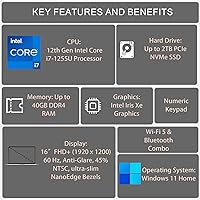
  • Processor: Intel Core i7-1255U with 10 cores, 12 threads, and a maximum turbo frequency of 4.7 GHz, built on a power-efficient U-series architecture.
  • RAM: 40GB DDR4 memory running at 2400 MHz, likely configured as 8GB soldered to the motherboard plus a 32GB SO-DIMM module.
  • Storage: 1TB PCIe x4 M.2 Solid State Drive offering fast boot times and ample space for documents, media, and applications.
  • Display: 16″ FHD+ IPS-level panel with a 1920x1200 resolution and a 16:10 aspect ratio, framed by slim NanoEdge bezels.
  • Graphics: Intel Iris Xe integrated graphics, suitable for everyday tasks, light photo work, and video calls, but not for gaming or GPU-intensive rendering.
  • Operating System: Windows 11 Home is pre-installed, providing access to the full Microsoft software ecosystem out of the box.
  • Wireless: Wi-Fi 6 (802.11ax) wireless networking delivers faster speeds and improved reliability on compatible routers compared to older Wi-Fi standards.
  • Ports: Connectivity includes 2x USB 3.2 Gen1 Type-A, 1x USB 3.2 Gen1 Type-C, 1x USB 2.0 Type-A, 1x HDMI 1.4, and 1x 3.5mm combo audio jack.
  • Weight: The laptop weighs 4.14 pounds, making it best suited for desk use or light commuting rather than all-day bag carrying.
  • Dimensions: The chassis measures 14.12 x 9.82 x 0.78 inches, providing a full-sized 16-inch experience in a reasonably slim profile.
  • Battery: A built-in Lithium Ion battery is included; real-world usage typically yields approximately five to seven hours depending on workload.
  • Keyboard: The full-sized keyboard includes a dedicated numeric keypad, useful for spreadsheet work and data entry tasks.
  • Audio: A 3.5mm combo audio jack supports both headphones and headsets with a single connector, covering standard audio peripheral needs.
  • Color & Build: Available in Black, with a plastic chassis construction that keeps weight manageable while maintaining a clean, understated appearance.
  • Model Number: The official model designation is ASUS F1605Z, which can be used to verify compatibility with accessories, drivers, and replacement parts.

Related Reviews
ASUS Vivobook 16 M1607KA (Ryzen AI 7 350, 16GB, 1TB)
74%
83%
Performance & Speed
76%
Display Quality
68%
Battery Life
61%
AI Features (Copilot+)
72%
Build Quality & Design
More
ASUS VivoBook 16 M1605YA-ES74 Laptop
86%
88%
Performance
91%
Display Quality
86%
Portability & Weight
80%
Battery Life
82%
Build Quality
More
ASUS VivoBook 15.6-inch Laptop
72%
88%
Value for Money
76%
Performance
91%
RAM & Multitasking
87%
Storage Speed
67%
Display Quality
More
ASUS Vivobook 15 F1502Z Touchscreen Laptop
71%
83%
Performance & Speed
81%
Touchscreen Responsiveness
89%
Storage & SSD Performance
66%
Display Quality
58%
Battery Life
More
ASUS Vivobook 16 M1607KA-DS54 Laptop
70%
83%
Display Quality
78%
Performance & Speed
74%
AI Features (Copilot+)
61%
Battery Life
81%
Build Quality & Design
More
ASUS ROG Zephyrus 2024 16″ Gaming Laptop
76%
94%
Display Quality
91%
Build Quality
83%
Gaming Performance
67%
Thermal Management
48%
RAM & Upgradeability
More
ASUS VivoBook 17 F712DA Laptop
68%
83%
Value for Money
58%
Display Quality
69%
Performance
51%
Battery Life
81%
Keyboard & Typing Experience
More
ASUS Vivobook S 15 Laptop
82%
93%
Display Quality
88%
Performance
91%
Portability
75%
Battery Life
85%
Build Quality
More
ASUS Chromebook 16 2-in-1 Touchscreen Laptop
74%
88%
Display Quality
81%
Convertible Versatility
83%
Performance & Speed
79%
Battery Life
76%
Build Quality
More
ASUS Vivobook S 14 OLED M5406WA
76%
94%
Display Quality
88%
Portability & Build
86%
CPU Performance
61%
Thermal Management & Fan Noise
67%
Battery Life
More

FAQ

This is worth understanding before you buy. The 40GB configuration is most likely made up of 8GB soldered directly to the motherboard and a 32GB SO-DIMM module in an upgradeable slot. That means you cannot remove the soldered portion, but you could theoretically swap the SO-DIMM if you wanted a different configuration — though for most users, 40GB is already more than enough headroom.

Yes, that is genuinely one of its strongest suits. Having 40GB of RAM means you can keep a video call, a spreadsheet, a browser with 20-plus tabs, and a couple of other apps open simultaneously without things grinding to a halt — something that trips up most laptops in this price range.

Honestly, no. It uses integrated Intel Iris Xe graphics, which simply cannot run modern games at playable settings. If gaming is a priority at all, you will want a laptop with a dedicated GPU. This machine is built for productivity work, not gaming.

For everyday tasks like document editing, web browsing, video calls, and streaming, the 16:10 FHD+ panel works well and the extra vertical height feels genuinely useful. Where it falls short is brightness and color accuracy, so if you are a photographer or designer who needs reliable color reproduction, you will likely find it underwhelming.

Based on user feedback, expect somewhere in the five-to-seven-hour range under typical mixed use, which includes browsing, documents, and occasional video calls. If you are doing anything more demanding, that number will drop. It is not a battery champion, so having a charger nearby for full workdays is a sensible habit.

There is one USB 3.2 Gen1 Type-C port included, but it is primarily for data and display purposes rather than charging. The laptop charges via its dedicated AC adapter, so you will need to use the included charger rather than relying on a USB-C power bank or dock for charging.

User feedback on the keyboard is generally positive — most people find it comfortable enough for extended work sessions. The inclusion of a numeric keypad is a nice bonus for anyone who works regularly with numbers. The trackpad gets more mixed reactions, with some users finding it less precise than expected, so it is worth keeping that in mind if trackpad accuracy matters to you.

Technically yes, via the HDMI port, but there is a catch: the HDMI port is version 1.4, which caps output at 4K at 30Hz rather than the smoother 60Hz you would get from HDMI 2.0. For a secondary productivity display, that is usually fine, but if you are a stickler for smooth refresh rates on a 4K screen, it is a limitation worth knowing about.

Some users have noted that the fan does spin up and become audible during sustained tasks like long video calls, large downloads, or anything that pushes the processor for an extended period. It does not appear to reach distracting levels for most people, but if you work in very quiet environments or are noise-sensitive, it is something to be aware of.

It is actually a solid fit for that use case. The generous memory handles the multitasking reality of student life — juggling research tabs, writing papers, attending online lectures, and running communication apps all at once. The 1TB SSD keeps files organized without constantly managing storage, and the larger 16:10 display is genuinely easier to work on for long study sessions. The main trade-off is the weight and size, which makes it more of a dorm-desk machine than an ultralight backpack companion.

Where to Buy

Best Buy
In stock $1,099.99
Walmart
In stock $1,209.00
Adorama
In stock $1,099.99
Newegg.com
In stock $1,299.99
Microless.com
In stock $1,218.90
SHI International
In stock $1,210.00
Abt Electronics & Appliances
In stock $1,099.99
Rackfinity.com
In stock $1,099.99
ASUS Store US
In stock $1,099.99