Overview

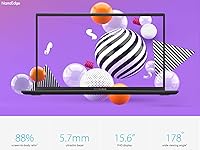
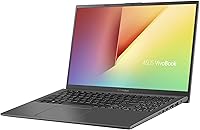
The ASUS VivoBook 15.6″ Touchscreen Laptop sits in a comfortable middle ground — capable enough for everyday tasks, priced where most people actually shop. Its defining feature is the 15.6-inch NanoEdge display, a full HD touchscreen that makes the machine feel more versatile than its price suggests. At just 0.78 inches thin and around five pounds, it is reasonably portable for a 15-inch machine. ASUS has built the VivoBook line around practical value, and this model fits that reputation well. Do not expect it to handle video editing or serious gaming — but as a reliable daily driver for work, school, and general browsing, it earns its place.
Features & Benefits

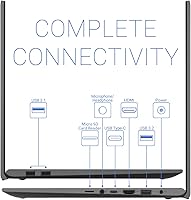
The quad-core i5-1035G1 processor keeps things moving through browser tabs, Word documents, Zoom calls, and light multitasking without breaking a sweat. Paired with 8GB of DDR4 RAM, it handles the kind of workloads most people actually throw at a laptop day to day. Where it really stands out is storage — the 256GB PCIe SSD boots Windows in seconds and opens applications noticeably faster than older spinning-drive machines. The full HD touchscreen is sharp and responsive, with wide viewing angles that work well for sharing content. A backlit keyboard and fingerprint reader round things out nicely, and the port lineup — USB-C, USB-A, HDMI, micro SD — covers most real-world needs without extra adapters.

Best For

This touchscreen laptop is a natural fit for college students who need something dependable for research papers, online classes, and video calls without overspending. Remote workers who spend their days in email, spreadsheets, and browser-based tools will also feel right at home. Casual home users who stream content, manage photos, or browse the web will find the screen size and touch input a genuine convenience. It is also a strong option for anyone upgrading from an aging, slow machine — the jump in speed alone makes a real difference. If you want a full 2-in-1 convertible, look elsewhere, but for a touch-enabled laptop at a practical price, it checks the right boxes.

User Feedback

Across a broad range of buyers, the most consistent praise centers on fast boot times, a responsive touchscreen, and a slim build that looks more expensive than it is. The keyboard gets generally positive marks for comfort during longer typing sessions. On the flip side, battery life draws recurring frustration — the compact 37Wh cell rarely makes it through a full workday unplugged. The display's 45% NTSC color coverage also disappoints anyone doing photo work or expecting vivid visuals. Some buyers wish for more RAM when juggling many apps simultaneously. The Intel UHD graphics handle basic tasks but are not built for gaming or video editing — buyers who understand that going in tend to walk away satisfied.

Pros

  • The PCIe SSD makes boot times and app launches noticeably snappier than budget HDD alternatives.
  • The full HD touchscreen is responsive and adds genuine everyday flexibility for navigation and content browsing.
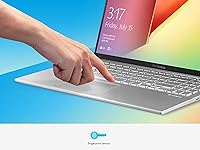
  • A fingerprint reader and backlit keyboard are practical features that are easy to take for granted until they are missing.
  • The slim 0.78-inch profile keeps the machine from feeling bulky despite its 15.6-inch screen.
  • Port selection is comprehensive — USB-C, USB-A, HDMI, and micro SD cover most real-world needs without extra adapters.
  • The i5-1035G1 handles web browsing, video calls, and Office apps without lag or frustration.
  • Wide 178-degree viewing angles make the screen comfortable to share with others nearby.
  • The NanoEdge display design reduces bezels and gives the screen a more modern, spacious feel.
  • Wi-Fi 5 and Bluetooth 5.0 provide reliable wireless connectivity for home and office environments.
  • Build quality feels solid for the price tier, and the overall design looks more premium than budget competitors.

Cons

  • Battery life is a genuine weak point — the small 37Wh cell struggles to last a full workday unplugged.
  • The 45% NTSC color coverage makes the display look washed out compared to higher-end screens.
  • 8GB of onboard RAM cannot be easily upgraded, which limits long-term flexibility as software demands grow.
  • Intel UHD integrated graphics rule out any meaningful gaming or GPU-accelerated creative work.
  • 256GB of storage fills up quickly if you store large media files or install many applications locally.
  • The processor can thermal throttle under sustained heavy loads, reducing performance during extended intensive tasks.
  • No Thunderbolt support on the USB-C port limits high-speed peripheral and display options.
  • The HD webcam produces mediocre image quality in lower-light conditions, which shows up on video calls.
  • At just over five pounds, it is not the lightest option for commuters who pack a bag daily.
  • Speaker output, while functional, lacks depth and volume for an immersive audio experience.

Ratings

The ASUS VivoBook 15.6″ Touchscreen Laptop has been evaluated by our AI rating engine after processing thousands of verified global buyer reviews, with spam, bot-generated, and incentivized submissions actively filtered out. The scores below reflect the honest consensus of real everyday users — students, remote workers, and home users — across multiple purchase cohorts. Both the strengths that keep buyers satisfied and the friction points that generate complaints are transparently represented in each category.
Everyday Performance
74%
26%
For the tasks this machine is designed around — browser sessions with a dozen tabs open, Office documents, Zoom calls, and streaming — the i5-1035G1 keeps up without frustrating lag. Users upgrading from older or entry-level machines consistently report a noticeable improvement in day-to-day responsiveness.
Push the processor toward sustained workloads like large spreadsheet calculations or multiple video streams simultaneously, and it starts to slow down. Buyers who expected more headroom for multitasking occasionally expressed disappointment, especially when running several applications alongside a video call.
Display Quality
66%
34%
The 1080p resolution looks crisp for everyday use, and the wide 178-degree viewing angles make it genuinely comfortable to share content with someone sitting beside you. For streaming, casual browsing, and document work, the screen performs solidly and the anti-glare coating is a practical daily benefit.
The 45% NTSC color coverage is a real limitation that shows up whenever visuals matter — photos look flat, and videos lack punch compared to screens on pricier machines. Buyers with any interest in photo editing or color-sensitive work consistently called this out as a genuine disappointment.
Touchscreen Responsiveness
82%
18%
Touch input is one of this laptop's genuine highlights. The screen registers taps and swipes reliably, and buyers who use touch navigation for scrolling, quick app switching, or casual sketching found it accurate and satisfying for the price point.
The touchscreen collects fingerprints noticeably on the glossy panel surface, requiring regular wiping to keep it looking clean. A small number of users also reported occasional misregistered touches near the screen edges, particularly during longer sessions.
SSD Boot and Load Speed
88%
The PCIe SSD is one of the most consistently praised aspects across buyer feedback. Cold boots finish in under 20 seconds for most users, and launching Office apps or a browser feels immediate — a meaningful jump from the older spinning-drive laptops many buyers were replacing.
The 256GB capacity fills up faster than buyers expect, particularly once Windows updates, the browser cache, and a few installed programs take their share. Several users mentioned needing an external drive or cloud storage within the first few months of ownership.
Battery Life
47%
53%
For short bursts — a morning of light work, a lecture period, or a couple of hours of browsing — the battery handles the load without issue. Users who stay near an outlet or work in short focused sessions rarely found battery life to be a dealbreaker.
The 37Wh cell is genuinely small, and it shows. Most real-world users report four to five hours of mixed use, and heavier workloads drain it faster. The pattern across reviews is consistent: buyers who expected all-day untethered use were regularly let down.
Build Quality
71%
29%
The chassis feels reasonably solid for its price tier, and the slim 0.78-inch profile makes it look and feel more refined than typical budget machines. The matte lid resists light smudges and does not attract attention in professional settings.
The plastic construction does flex slightly when picked up by one corner, and the hinge feels adequate rather than confidence-inspiring over long-term use. A handful of buyers noted minor creaking around the display frame after months of daily opening and closing.
Keyboard Comfort
77%
23%
The full-size backlit keyboard is well-regarded for extended typing sessions, with key spacing and travel that feel comfortable during long writing tasks. Students and remote workers who spend hours on documents consistently mentioned the keyboard as a positive aspect.
The key feedback is softer than what enthusiasts prefer, and the backlight has only a single brightness level with no adjustable zones. A minority of users also noted that the keyboard deck flexes slightly under firm typing, which can feel unsatisfying over time.
RAM Adequacy
63%
37%
For single-task or light multitasking scenarios — a few browser tabs, a document, and a music stream — 8GB handles the load without obvious slowdowns. Users with focused, straightforward workflows rarely ran into issues during normal daily sessions.
Because the RAM is soldered and non-upgradeable, there is no safety net as software grows heavier over time. Users who open many browser tabs alongside communication apps and cloud-based tools reported noticeably slower performance, with occasional stutter during heavy switching.
Port Selection
83%
The port lineup is practical and genuinely useful — USB-C, USB-A in multiple versions, HDMI, and a micro SD slot cover the vast majority of real-world connection needs without requiring a hub. Buyers frequently mentioned being able to connect monitors, USB drives, and SD cards simultaneously without issue.
The absence of Thunderbolt on the USB-C port limits high-bandwidth use cases like external GPU connection or daisy-chained displays. The inclusion of older USB 2.0 ports alongside newer ones can catch buyers off guard when transfer speeds are slower than expected.
Webcam Quality
58%
42%
In well-lit environments, the HD webcam produces acceptable image quality for standard video calls on Zoom, Teams, or Google Meet. For casual check-ins and online classes, it meets a basic functional threshold without additional hardware.
Low-light performance is notably weak — the image turns grainy and washed out in anything less than strong ambient lighting. Regular remote workers who rely on webcam quality for professional video calls mentioned this as a shortcoming, especially for evening calls.
Graphics Capability
41%
59%
Intel UHD integrated graphics handle everything the machine is designed for — driving the 1080p display, playback of HD video, and light image viewing — without any issues during normal use.
Anything beyond basic display tasks pushes the integrated graphics well past its limits. Modern games, video exports, and GPU-accelerated applications are not viable use cases, and buyers who tested gaming came back with consistent feedback that performance was either poor or unplayable.
Wireless Connectivity
79%
21%
Wi-Fi 5 with 802.11ac and Bluetooth 5.0 delivers stable, reliable connections in typical home and office environments. Streaming, video calls, and file transfers over Wi-Fi all behave consistently without notable drops during regular use.
Wi-Fi 6 is becoming standard on many competing machines at similar price points, which makes the Wi-Fi 5 radio feel slightly dated for buyers who are future-proofing. Range at the edges of larger homes or offices was flagged by a few users as inconsistent.
Value for Money
81%
19%
Taken as a complete package — touchscreen, SSD, fingerprint reader, backlit keyboard, and a reputable brand — this VivoBook delivers a lot of usable features for its price tier. Buyers who approached it with appropriate expectations consistently felt the purchase was justified.
A few users felt that the battery size and display color coverage were corners that did not need to be cut at this price, and that comparable machines from other brands offered slightly better specs in those specific areas. Value perception dipped among buyers who pushed the machine harder than its intended use case.
Setup and Out-of-Box Experience
72%
28%
Initial setup is straightforward — Windows 10 Home walks new users through configuration clearly, and Windows Hello fingerprint login is easy to activate during first setup. Buyers report the machine is usable within minutes of opening the box.
The laptop ships with a noticeable amount of pre-installed software that slows down the first-boot experience and consumes a portion of the already-modest 256GB drive. A clean-up session post-setup is effectively mandatory for getting the machine running at its best.

Suitable for:

The ASUS VivoBook 15.6″ Touchscreen Laptop is a strong match for anyone who needs a dependable everyday machine without the cost of a premium brand. College students will appreciate the responsive touchscreen, fast SSD, and full HD display for note-taking, research, and video calls. Remote workers who live in email, spreadsheets, and browser tabs will find the i5 processor and 8GB of RAM more than capable for their daily routine. First-time laptop buyers upgrading from an older, slow machine will notice an immediate and meaningful improvement in speed and usability. Casual home users who want a large, comfortable screen for streaming, browsing, and light photo management will get genuine value here. The backlit keyboard, fingerprint reader, and practical port selection make it a well-rounded package for users who want convenience without complexity.

Not suitable for:

The ASUS VivoBook 15.6″ Touchscreen Laptop is not the right tool for users with demanding computing needs. Anyone expecting to run video editing software, 3D rendering applications, or modern games will quickly hit a wall — the Intel UHD integrated graphics simply are not built for that kind of work. Power users who routinely run many applications simultaneously may find 8GB of RAM starts to feel constrained over time. The 37Wh battery is small by modern standards, which means heavy users or anyone who spends long hours away from an outlet will likely need to carry a charger. Creative professionals who care about color accuracy — photographers, designers, illustrators — should also look elsewhere, as the 45% NTSC display coverage is a real limitation for color-critical work. Finally, buyers who want a true convertible 2-in-1 experience with 360-degree hinge flexibility will need to consider other models.
Specifications

  • Display: 15.6-inch Full HD IPS touchscreen with 1920x1080 resolution, 178-degree viewing angles, anti-glare coating, and 45% NTSC color gamut.
  • Processor: Intel Core i5-1035G1 quad-core processor with a base clock of 1.0GHz, turbo boost up to 3.6GHz, and 6MB cache.
  • RAM: 8GB DDR4 SDRAM running at 2666MHz, soldered onboard with no user-accessible upgrade slot.
  • Storage: 256GB PCIe Gen3 x2 M.2 SSD offering fast read and write speeds compared to traditional hard drives.
  • Graphics: Intel UHD integrated graphics sharing system memory, suitable for general display output and light media tasks only.
  • Operating System: Windows 10 Home 64-bit pre-installed from the factory.
  • Battery: 2-cell lithium-polymer battery with 37Wh capacity, charged via the included AC adapter.
  • Connectivity: Wi-Fi 5 (802.11ac) and Bluetooth 5.0 are built in for wireless networking and peripheral pairing.
  • Ports: Includes 1x USB-C 3.2 Gen 1, 1x USB-A 3.2 Gen 1, 2x USB-A 2.0, 1x HDMI, 1x micro SD card reader, and 1x combo audio jack.
  • Webcam: Built-in HD webcam positioned above the display, suitable for standard video conferencing at 720p.
  • Audio: Stereo speakers powered by ASUS SonicMaster audio technology for optimized sound output.
  • Keyboard: Full-size backlit keyboard with single-zone white backlighting for low-light typing comfort.
  • Security: Integrated fingerprint reader on the chassis supports Windows Hello biometric login.
  • Dimensions: The laptop measures 14.06 x 9.07 x 0.78 inches (LxWxH), keeping it slim for a 15-inch class machine.
  • Weight: Total unit weight is 5.06 pounds, which is typical for a 15.6-inch consumer laptop.
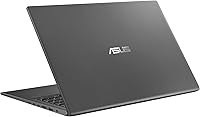
  • Color: Available in Indie Black finish with a matte lid surface that resists minor smudges and fingerprints.
  • Model Number: The official ASUS model designation for this configuration is R564JA-UH51T.
  • ASIN: Amazon Standard Identification Number for this product is B08NCWJ4LC, first listed in November 2020.

Related Reviews
ASUS Vivobook Go 15 E1504FA
72%
88%
Value for Money
83%
Build Quality
74%
Performance
61%
Display Quality
69%
Battery Life
More
ASUS VivoBook 15.6-inch i5-1135G7 Laptop, 20GB RAM, 1TB SSD
83%
91%
Performance
87%
Value for Money
78%
Display Quality
92%
Multitasking Capability
75%
Battery Life
More
Dell Inspiron 15 3520 Laptop
74%
76%
Performance & Speed
81%
Display Quality
83%
Touchscreen Responsiveness
89%
Storage & Memory
62%
Battery Life
More
HP 2020 15 15.6″ HD Touchscreen Laptop, Intel Core i5-1035G1, 16GB RAM, 512GB SSD
82%
89%
Performance
75%
Display Quality
90%
Portability
80%
Battery Life
85%
Build Quality
More
ASUS Vivobook S 15 Laptop
82%
93%
Display Quality
88%
Performance
91%
Portability
75%
Battery Life
85%
Build Quality
More
ASUS VT168HR 15.6″ Touch Monitor
74%
83%
Touch Responsiveness
54%
Display Resolution
91%
Ease of Setup
67%
Build Quality
77%
Value for Money
More
ASUS Vivobook Go L210KA 11.6″
73%
88%
Value for Money
93%
Portability
84%
Battery Life
58%
Performance
61%
Display Quality
More
HP 15.6″ i3 1315U 1TB Touchscreen Laptop
76%
83%
Value for Money
76%
Performance
58%
Display Quality
88%
RAM & Multitasking
86%
Storage
More
HP 15.6″ Touchscreen Core i3 16GB Laptop
75%
81%
Everyday Performance
58%
Display Quality
83%
Touchscreen Responsiveness
86%
RAM & Storage
54%
Battery Life
More
HP 15.6″ Touchscreen Laptop, Intel Core i3-1115G4, 16GB RAM, 1TB SSD
83%
91%
Value for Money
88%
Touchscreen Performance
85%
Battery Life
80%
Build Quality
92%
Storage Capacity
More

FAQ

Unfortunately, no. The 8GB of RAM on this machine is soldered directly to the motherboard, which means it cannot be removed or swapped out. What you get out of the box is what you are working with long-term, so keep that in mind if you anticipate needing more memory down the road.

The 256GB M.2 SSD uses a PCIe interface and is technically in a slot format, but whether it is user-accessible depends on your comfort level opening the chassis. It is not officially marketed as a user-upgradeable component, so proceed carefully and check teardown guides before attempting anything.

Realistically, expect somewhere in the range of four to six hours under normal everyday use — browsing, documents, video calls. The 37Wh cell is on the smaller side, so heavy multitasking or streaming will push you toward the lower end. Keeping a charger handy is a smart habit with this one.

It works genuinely well for the price. The display registers taps and swipes reliably, and most buyers report being pleasantly surprised by how responsive it feels. It is not a pen-input or pressure-sensitive display, just standard finger touch — but for scrolling, navigating, and casual interaction, it does the job comfortably.

Only very light ones. The Intel UHD integrated graphics are not designed for gaming — older indie titles, browser-based games, or very low-demand titles might run at reduced settings, but anything modern or graphically intensive will either run poorly or not at all. If gaming is a priority, this is not the right machine.

For casual streaming on Netflix, YouTube, or similar platforms, the 1080p screen looks perfectly fine. The viewing angles are genuinely wide, which is a plus. Just be aware the color coverage is 45% NTSC, so it will not pop the way a higher-end IPS panel would — but for everyday video consumption, most people are satisfied.

Feedback from regular users is generally positive. The keys have a reasonable amount of travel and the layout is full-size, which helps during longer writing sessions. The backlight is a practical touch. It is not in the same league as a ThinkPad keyboard, but it is comfortable and accurate enough for daily work.

Like most Windows laptops sold through retail channels, this VivoBook ships with some pre-installed software alongside Windows 10 Home. A clean-up session after first boot — removing unwanted apps and disabling startup programs — is worth the time and will help the machine feel more responsive.

It is one of the more practical choices in its price range for student use. It handles research, writing, video calls, and light coursework without issues, and the touchscreen adds a layer of flexibility for note navigation or casual use. Battery life is the main thing to manage — encourage keeping the charger in the bag.

No, there is no built-in Ethernet port on this model. Wireless connectivity is handled entirely through the built-in Wi-Fi 5 adapter. If you need a wired connection — for a dorm network or office setup — you will need a USB-A to Ethernet adapter, which are inexpensive and widely available.