Overview

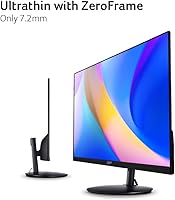
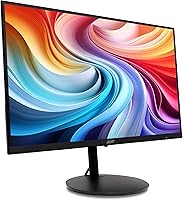
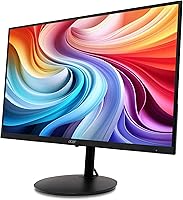
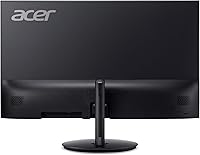
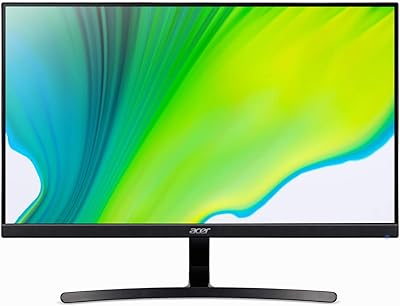
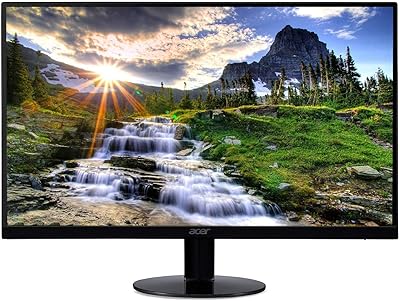
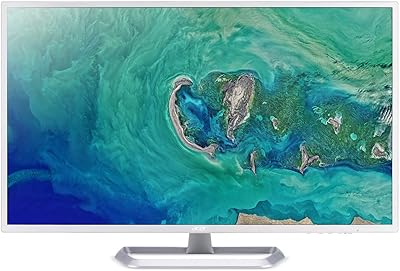
The Acer SH272 27-inch IPS Full HD Monitor launched in late 2024 as a straightforward option for anyone who wants a large screen without a significant outlay. Its zero-frame design gives the panel a clean, edge-to-edge look that feels more considered than the price suggests. That said, fitting 1080p across 27 inches puts pixel density around 82 PPI — noticeably softer than a QHD panel of the same size, so sharp text rendering is not this monitor's strongest suit. Where this Acer monitor earns its place is in dual-purpose use: handling spreadsheets and video calls during the day, then switching to casual gaming in the evening without requiring a second screen.
Features & Benefits

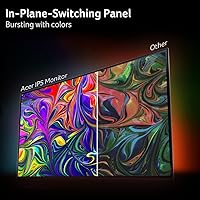
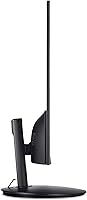
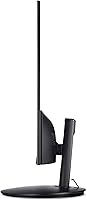
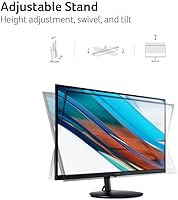
The IPS panel is the real foundation here — at this price, plenty of monitors still use TN panels that wash out badly when you shift your viewing angle even slightly. The SH272 avoids that with consistent color reproduction and solid off-axis visibility. The 120Hz refresh rate paired with Adaptive-Sync makes a genuine difference in motion clarity, especially coming from a standard 60Hz screen. Worth clarifying before you buy: the advertised 1ms figure refers to VRB response time, a backlight strobing technique rather than native pixel response — a common point of confusion. The matte coating handles glare well in lit rooms, and the stand supports tilt, swivel, and height adjustment, which is genuinely uncommon at this price tier.

Best For

This 27-inch IPS display makes the most sense for someone stepping up from a smaller or older 60Hz monitor who wants a noticeable improvement without a large spend. Students and remote workers get generous screen real estate, and the adjustable stand means dialing in the right ergonomic position is actually possible — no books required. Casual gamers will appreciate the 120Hz refresh and FreeSync support; it will not replace a dedicated gaming display, but it is a meaningful step up. The VGA port covers older hardware connections alongside HDMI for modern devices. If DisplayPort output or HDR is on your requirements list, this is not the right fit — but for everyday mixed use, it covers the bases well.

User Feedback

The ergonomic stand tends to be the first thing buyers call out positively — height and swivel adjustability surprises people who are used to fixed-tilt monitors at similar prices. Out-of-box image quality also draws praise, though users migrating from smaller or higher-resolution screens sometimes find text slightly soft at close distances, which is an honest trade-off to know about. Build quality is all plastic, which is expected here but worth noting if longevity is a concern. Some reviewers flag that peak brightness falls short in very sunlit rooms, and a handful mention colors feel slightly conservative without manual calibration. On the positive side, assembly is quick and stand stability consistently gets good marks once everything is locked into place.

Pros

  • IPS panel delivers consistent colors and wide viewing angles rarely found at this price tier.
  • 120Hz refresh rate makes motion in games and scrolling noticeably smoother than standard 60Hz screens.
  • The height-adjustable, swivel-capable stand is a practical ergonomic feature that most budget monitors skip.
  • Matte screen coating handles glare well in typical home or office lighting conditions.
  • FreeSync compatibility reduces screen tearing without requiring a premium GPU.
  • Zero-frame design maximizes the visible screen area and gives the setup a cleaner look.
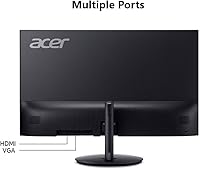
  • VGA and HDMI ports together cover a wide range of both older and modern hardware.
  • Straightforward assembly with a stable stand that holds its position once adjusted.
  • Solid screen size-to-price ratio makes it one of the more spacious options available at this budget.

Cons

  • 1080p resolution across 27 inches produces soft pixel density — text can look slightly fuzzy up close.
  • The 1ms spec refers to VRB backlight strobing, not native pixel response, which can mislead buyers.
  • No DisplayPort output limits compatibility with certain GPUs and daisy-chaining setups.
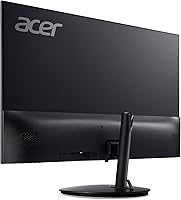
  • All-plastic construction feels noticeably lightweight and may not hold up as well over years of daily use.
  • Peak brightness falls short in sun-lit rooms and may require manual calibration to compensate.
  • No HDR support, which is increasingly common even on moderately priced competing displays.
  • Color accuracy out of the box can feel conservative and may need adjustment for accurate reproduction.
  • No USB hub or built-in ports, which adds cable clutter for users with multiple peripherals.

Ratings

The scores below reflect an AI-driven analysis of verified global buyer reviews for the Acer SH272 27-inch IPS Full HD Monitor, with spam, bot-generated, and incentivized feedback actively filtered out before scoring. Each category is rated independently, drawing on patterns across real owner experiences — from first-time setup to months of daily use. Strengths are recognized where they genuinely stand out, and recurring pain points are scored honestly, not smoothed over.

Value for Money
88%
Most buyers feel the SH272 punches above its price bracket, particularly when they compare it side-by-side with other 27-inch options in the same range. Getting an IPS panel, a 120Hz refresh rate, and a fully adjustable stand together at this cost is a combination that is genuinely hard to match.
A small segment of buyers who previously owned higher-resolution panels feel the 1080p image quality does not fully justify the spend, even at this price. Those expecting premium build materials alongside the feature set tend to come away feeling the trade-offs are more visible than the spec sheet suggests.
Image Quality
71%
29%
Color consistency across the IPS panel holds up well for everyday tasks — spreadsheets, web browsing, and casual video streaming all look solid without any obvious color shifting when viewed from the side. The matte coating keeps reflections controlled, which makes a real difference in office environments with overhead lighting.
The pixel density at 27 inches is moderate at best, and buyers moving from a smaller 1080p screen or a QHD display tend to notice softer text rendering almost immediately. A handful of reviewers also flagged that colors feel slightly muted out of the box and require manual adjustments to feel truly accurate.
Refresh Rate & Smoothness
83%
Upgrading from a 60Hz panel to this monitor's 120Hz refresh rate produces a noticeably cleaner experience in fast-moving scenes — casual gaming, scrolling, and even cursor movement all feel more responsive. The Adaptive-Sync implementation works reliably with AMD GPUs and keeps tearing well under control during gameplay.
Users running Nvidia cards without G-Sync compatibility sometimes report that the adaptive sync benefits are less consistent. At the higher end of competitive gaming expectations, 120Hz still trails the 144Hz or 165Hz options that exist at marginally higher price points.
Response Time Accuracy
62%
38%
For casual gaming and general use, the motion handling is clean enough that ghosting is not a visible problem in everyday sessions. Users playing slower-paced or mid-tempo games report a comfortable, artifact-free experience.
The 1ms figure refers to VRB — a backlight strobing technique — not native pixel response, and this distinction catches buyers off guard. In practice, the native panel response is closer to what you would expect from a standard IPS, and fast-action titles can reveal residual motion blur that the spec sheet implies should not exist.
Stand & Ergonomics
91%
This is one of the most commented-on positives across buyer reviews, and for good reason: tilt, swivel, and height adjustment together on a monitor at this price tier is rare. Office users in particular appreciate being able to align the screen precisely to eye level without relying on books or monitor risers.
The stand mechanism, while functionally excellent, uses lightweight plastic components that flex slightly under adjustment. A few buyers noted the height lock does not feel as firm as stands on pricier monitors, though functional failures were not widely reported.
Build Quality & Materials
66%
34%
The overall chassis looks clean and the zero-frame panel design gives the monitor a more premium appearance than the price implies. For a desk setup that will mostly stay in one place, the construction is solid enough for daily use without real concerns.
The all-plastic body is the most commonly noted build criticism. Buyers handling the monitor during assembly describe a noticeable flex in the rear casing, and the finish picks up smudges easily. Long-term durability relative to metal-chassis alternatives is a fair question mark.
Setup & Assembly
86%
Nearly every reviewer describes the out-of-box experience as quick and frustration-free — the stand clicks into the panel without tools, and the whole process from opening the box to a working display takes under ten minutes for most people. Cable management routing through the stand base is a small but appreciated detail.
The included documentation is minimal, which is fine for most users but can create confusion around port selection for buyers new to monitor connectivity. A small number of users reported the stand required more force than expected to seat fully during assembly.
Connectivity & Port Selection
67%
33%
Having both HDMI and VGA available covers a wide range of setups — particularly useful for users connecting a newer laptop via HDMI while keeping an older desktop linked through VGA simultaneously. For home office and casual use, two ports cover most scenarios without issue.
The absence of a DisplayPort input is a real gap for users with higher-end GPUs or multi-monitor workstations where DisplayPort daisy-chaining is standard. No USB hub functionality either, which buyers accustomed to mid-range monitors may find limiting.
Brightness & HDR
58%
42%
In controlled indoor lighting — a typical home office or bedroom setup — the brightness level is adequate for comfortable extended use. The matte panel coating helps the screen remain readable in moderately lit rooms without the peak brightness needing to be maxed out.
There is no HDR support, which is an expected omission at this price but still worth noting for buyers who stream HDR content. Several reviewers working near windows or in sunlit rooms flagged that the panel struggles to stay clearly visible under direct ambient light.
Color Accuracy
69%
31%
For general productivity tasks and casual content consumption, the color output is pleasant and consistent across the screen. The IPS panel delivers visibly better color uniformity than TN alternatives, especially noticeable when displaying gradients or photographic images.
Out-of-box calibration leans slightly cool and conservative, and buyers doing light photo editing report that colors need manual tuning before the results match what they see on a calibrated reference screen. It is not a color-accurate monitor for professional creative work.
Viewing Angles
82%
18%
The IPS panel holds up well when viewed from off-center positions, which matters in shared office spaces or when multiple people are watching the screen at once. Color and contrast stay consistent across a wide horizontal arc without the washed-out effect common on TN panels.
Vertical viewing angle is slightly more limited than horizontal, and users who position the screen significantly above or below eye level may notice a mild contrast shift. This is a characteristic of IPS panels generally, not specific to this model.
Glare & Reflections
79%
21%
The matte surface coating handles diffused ambient light well, and users in standard office environments report they rarely need to adjust screen angle to avoid a distracting reflection. It is a practical choice for rooms that are not fully light-controlled.
In environments with very strong directional light sources — a window directly behind the user or a bright desk lamp nearby — the matte coating softens but does not fully eliminate glare. Buyers expecting glossy-panel vibrancy will also find the matte finish slightly dulls perceived color saturation.
Gaming Performance
74%
26%
For the casual gaming audience this monitor targets, the experience holds up convincingly — 120Hz plus FreeSync keeps popular titles like racing games, RPGs, and shooters running smoothly without obvious tearing or judder. The screen size makes a real visual difference for immersion compared to a 24-inch alternative.
Competitive players who prioritize pixel response above all else will feel the limitations of the native panel response relatively quickly. The 1080p resolution also starts to show its ceiling in graphically detailed modern titles where texture sharpness matters.
On-Screen Display & Controls
61%
39%
The OSD menu covers all the standard adjustments — brightness, contrast, color temperature — and is organized clearly enough that most users find what they need without consulting the manual.
Navigation is handled through physical buttons on the rear of the panel, which are awkward to locate by feel without looking behind the screen. Several buyers describe the button placement as fiddly, especially when making quick adjustments in a dim room.
Desk Footprint & Aesthetics
77%
23%
The zero-frame design makes the SH272 look noticeably cleaner and more current than budget monitors with thick bezels. In a dual-monitor setup, the thin borders keep the gap between screens minimal, which buyers using two units side-by-side specifically called out as a plus.
The stand base has a moderately wide footprint that can feel intrusive on smaller desks. Users with limited desk depth reported the base occupies more real estate than they anticipated, leaving less room for a keyboard and peripheral layout they were comfortable with.

Suitable for:

The Acer SH272 27-inch IPS Full HD Monitor is a strong fit for anyone who needs a capable, large-screen display without spending heavily — particularly students, remote workers, and casual gamers who are stepping up from something smaller or older. If your current setup involves a 21-inch or 60Hz monitor, the jump to 27 inches with a 120Hz IPS panel will feel like a real improvement in both screen real estate and motion clarity. The fully adjustable stand — with height, tilt, and swivel — makes this a genuinely ergonomic choice for home office desks where posture and screen positioning matter. Households that still run older hardware will also appreciate the VGA port alongside HDMI, which removes the need for adapters. For anyone who splits their time between productivity work and light gaming, this display handles both without asking you to compromise on price.
Not suitable for:

Buyers who prioritize sharp, crisp text at close range will likely find the Acer SH272 27-inch IPS Full HD Monitor underwhelming, since spreading 1080p resolution across a 27-inch screen results in a noticeably lower pixel density than QHD alternatives. Competitive or enthusiast gamers will also want to look elsewhere — while 120Hz is a decent refresh rate, the absence of a true low native pixel response and no DisplayPort connectivity limits the monitor's ceiling for high-performance setups. Content creators who depend on accurate color grading or wide color gamut coverage should not rely on this panel, as it is not designed or calibrated for professional color work. Those who work in particularly bright environments may also find the peak brightness insufficient without manual adjustment. If HDR support is on your checklist, this display does not offer it.
Specifications

  • Panel Type: The display uses an IPS (In-Plane Switching) panel, which provides wider viewing angles and more consistent color reproduction compared to TN panels common at this price tier.
  • Screen Size: The visible screen area measures 27 inches diagonally, presented in a 16:9 widescreen aspect ratio.
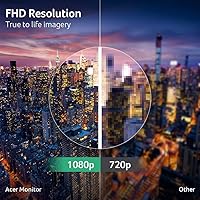
  • Resolution: Native resolution is 1920 x 1080 (Full HD), resulting in a pixel density of approximately 82 PPI across the 27-inch panel.
  • Refresh Rate: The panel supports refresh rates up to 120Hz, enabling smoother motion rendering compared to standard 60Hz displays.
  • Response Time: Rated at 1ms using VRB (Visual Response Boost), which is a backlight strobing method rather than a native gray-to-gray pixel transition measurement.
  • Sync Technology: Supports Adaptive-Sync and is certified FreeSync compatible, allowing the refresh rate to synchronize with a compatible AMD or integrated GPU to reduce screen tearing.
  • Screen Surface: The panel features a matte anti-glare coating that diffuses ambient light, making it more practical in brightly lit office or home environments.
  • Ports: Connectivity includes one HDMI port and one VGA port; there is no DisplayPort or USB-C input on this model.
  • Stand Adjustments: The included stand supports tilt, swivel, and height adjustment, providing ergonomic flexibility that is uncommon at this price point.
  • Design: The monitor features a zero-frame (edge-to-edge bezel) design on three sides, maximizing visible screen area and enabling cleaner multi-monitor setups.
  • Dimensions: With the stand attached, the unit measures approximately 24.1 inches wide, 18 inches tall, and 9.17 inches deep.
  • Weight: The complete unit including stand weighs 14.45 pounds, making it manageable for single-person desk setup and repositioning.
  • Aspect Ratio: The display uses a standard 16:9 widescreen aspect ratio, compatible with the vast majority of video content, games, and productivity software.
  • Manufacturer: This monitor is designed and manufactured by Acer, a Taiwanese multinational electronics company with a broad portfolio of consumer and professional displays.
  • Release Date: The SH272 G0bih was first made available in October 2024, positioning it as a recent entry-level offering in Acer's display lineup.

Related Reviews

ASUS VZ279HE 27-inch Full HD IPS Monitor
84%
92%
Value for Money
88%
Display Quality
91%
Eye Care Features
83%
Build Quality
89%
Design & Aesthetics
More
ASUS VA27ECPSN 27-inch Full HD IPS Monitor
87%
92%
Display Quality
88%
Ergonomics & Adjustability
89%
Color Accuracy
91%
Eye Comfort (Low Blue Light, Flicker-Free)
84%
Build Quality
More
Acer KB272 EBI 27-inch IPS Monitor
77%
83%
Image Quality
61%
Brightness & Contrast
84%
Refresh Rate & Smoothness
81%
AMD FreeSync Performance
76%
Response Time
More
Dell S2721HS 27-inch Full HD IPS Monitor
87%
94%
Display Quality
91%
Color Accuracy
85%
Build Quality
89%
Gaming Performance
92%
Design & Aesthetics
More
Acer K243Y 24-inch Full HD IPS Monitor
84%
91%
Value for Money
88%
Display Quality
80%
Performance for Gaming
86%
Color Accuracy
84%
Build Quality
More
Acer SB220Q 21.5-inch IPS Monitor
72%
84%
Image & Color Quality
88%
Value for Money
83%
Viewing Angles
74%
Refresh Rate & Smoothness
67%
Response Time
More
LG 27GL650F-B 27-Inch Full HD IPS Gaming Monitor
85%
92%
Display Quality
89%
Gaming Performance
85%
Build Quality
91%
Ergonomics & Adjustability
90%
Value for Money
More
Acer EZ321Q wi 31.5″ IPS Monitor
75%
93%
Screen Size Value
81%
Image & Color Accuracy
61%
Pixel Sharpness & Clarity
54%
Ergonomics & Stand Adjustability
88%
Design & Aesthetics
More
ASUS VA27DQ 27-inch Full HD Monitor
86%
91%
Display Quality
89%
Value for Money
88%
Color Accuracy
94%
Eye Comfort Features
85%
Connectivity Options
More
HP 27h 27-inch Full HD Monitor
76%
83%
Image Quality
81%
Build Quality
88%
Ergonomics & Adjustability
74%
Refresh Rate & Smoothness
58%
Built-in Speakers
More

FAQ

Yes, the HDMI port on the SH272 is compatible with current and last-generation PlayStation and Xbox consoles. Keep in mind that consoles typically output at 60Hz for most games, so the 120Hz capability will primarily benefit PC users with compatible hardware.

It is worth understanding what that spec actually means. The 1ms figure refers to VRB — Visual Response Boost — which is a backlight strobing technique that reduces motion blur perception, not a true gray-to-gray pixel transition time. Actual native pixel response on an IPS panel at this tier is typically closer to 4–6ms, which is still perfectly fine for casual gaming and general use.

At typical desk viewing distances of around 24 to 30 inches, most people find 1080p on a 27-inch screen acceptable for general use, but it does not have the crispness of a QHD or 4K panel at the same size. Text rendering in particular may appear slightly soft. If pixel sharpness is a priority for you — especially for fine text work — a 24-inch 1080p panel or a 27-inch 1440p display would serve you better.

Yes, in most cases. Nvidia GPUs from the GTX 10-series onward support Adaptive-Sync over HDMI, so FreeSync monitors like this one are generally compatible. You may need to enable it in the Nvidia Control Panel under the G-Sync Compatible settings, but it typically works without issues.

Assembly is straightforward — the stand attaches to the panel with a simple click-in mechanism and requires no tools in most cases. Most users report getting the monitor up and running in under ten minutes, and the stand locks in securely with no noticeable wobble once assembled.

No, the Acer SH272 27-inch IPS Full HD Monitor does not include a DisplayPort. Your connection options are limited to HDMI and VGA. For the vast majority of home and office users this is fine, but if you rely on DisplayPort for daisy-chaining monitors or need it for a specific workstation setup, this model is not the right fit.

Based on the product specifications, VESA mounting compatibility is not confirmed in the available product data for this model. If wall or arm mounting is important to your setup, it is worth verifying with Acer directly or checking the printed manual before purchasing.

The stand supports tilt, swivel, and height adjustment, which is genuinely unusual at this price point — many competitors at similar prices offer tilt only. For anyone spending long hours at a desk, being able to properly align the screen height with eye level reduces neck strain noticeably. It is one of the more practical features of this display.

For everyday streaming from Netflix, YouTube, or similar platforms, this 27-inch IPS display performs well. Colors are consistent, viewing angles are good enough for sharing the screen with someone beside you, and the matte coating keeps things comfortable under room lighting. The lack of HDR support means high-dynamic-range content will not look as vivid as on an HDR-capable screen, but for standard streaming it is a solid experience.

The SH272 ships with the monitor panel, the adjustable stand, a power cable, and typically an HDMI cable. Since VGA cables are less standardized in modern bundles, it is a good idea to have one on hand if you plan to use that connection. Always double-check the box contents listed on the retailer page, as bundle contents can occasionally vary by market.