Overview

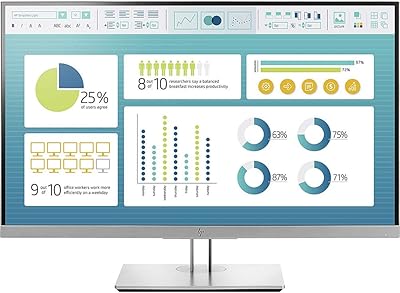
The HP 27h 27-inch Full HD Monitor sits in a practical sweet spot for hybrid and home office workers who want a dependable, well-built screen without overspending. HP has a long track record in the monitor market, and this office screen reflects that — solid construction, a reliable IPS panel, and a no-fuss setup experience. The IPS technology delivers accurate color reproduction and wide viewing angles that hold up well compared to similarly priced displays. Just be clear about what this is: a capable daily driver, not a display built for creative color work or high-refresh gaming.

Features & Benefits

The 75Hz refresh rate is a mild but noticeable improvement over the standard 60Hz panels common at this price range — scrolling through documents and spreadsheets just feels a little crisper. The built-in dual speakers are convenient for video calls or background audio, though they are not going to replace a dedicated speaker setup. What genuinely stands out is the ergonomics: 100mm of height adjustment plus tilt means you can actually dial in a comfortable position over a long workday. The three-sided micro-edge bezel looks clean on a desk, and the mix of HDMI, DisplayPort, and VGA port support means connecting older or newer hardware is rarely an issue.

Best For

This HP monitor is a natural fit for remote and hybrid workers who spend long hours in front of a screen and want something reliable without a lot of configuration fuss. If you are coming from a laptop display or an aging monitor, the jump in screen real estate and image quality will be immediately obvious. It also works well in compact home offices where ergonomic adjustability matters but desk space is limited. VGA support is a genuine plus for anyone still running older peripherals or legacy equipment. Corporate buyers will appreciate the EPEAT Gold certification and eco-conscious materials for procurement requirements.

User Feedback

With a 4.6-star average across over a thousand reviews, the 27h display earns consistent praise for its out-of-the-box image quality, straightforward assembly, and a stand that feels sturdier than expected at this price tier. Many buyers highlight the ergonomic adjustability as a genuine differentiator. On the downside, the glossy panel is a recurring point of frustration — users in bright rooms or near windows report noticeable reflections that can distract during the workday. The built-in speakers draw mixed opinions; most find them adequate for calls, but audio quality is nothing to get excited about. Long-term durability feedback looks positive, and most buyers feel the value holds up well after extended daily use.

Pros

  • IPS panel delivers accurate, consistent colors right out of the box with no calibration needed.
  • Wide viewing angles mean the image stays true even when viewed from the side.
  • 100mm height adjustment makes it easy to achieve a comfortable, ergonomic eye level.
  • Three-sided micro-edge bezel looks clean and pairs well in a dual-monitor setup.
  • HDMI, DisplayPort, and VGA ports cover both modern and legacy devices without adapters.
  • Built-in dual speakers handle video calls and casual audio without needing a separate device.
  • Assembly takes under five minutes with no tools required — stand clicks together intuitively.
  • EPEAT Gold and ENERGY STAR certifications satisfy corporate sustainability procurement requirements.
  • The 27h display earns strong long-term value ratings from buyers after extended daily use.
  • 75Hz refresh rate provides a noticeably smoother scrolling experience than standard 60Hz office monitors.

Cons

  • Glossy panel causes distracting reflections in bright rooms or near windows.
  • 1080p resolution on a 27-inch screen results in lower pixel density than sharper rival panels.
  • Built-in speakers sound thin and tinny — inadequate for anything beyond basic voice calls.
  • No USB hub ports means cable management stays messy compared to more desk-friendly rivals.
  • Stand offers no swivel or pivot, limiting flexibility for portrait-mode or lateral repositioning.
  • Bottom bezel is noticeably thicker than the other three sides, undermining the minimal design.
  • A small segment of long-term buyers report backlight or stand issues emerging after the first year.
  • Warranty and customer support experiences are inconsistent, with some buyers describing slow resolutions.
  • No matte screen option is available for users sensitive to glare.
  • Buyers prioritizing strict spec-per-dollar value may find competing no-name brands offer more for less.

Ratings

The HP 27h 27-inch Full HD Monitor has been assessed using AI analysis of thousands of verified global buyer reviews, with spam, bot-generated, and incentivized submissions actively filtered out to ensure the scores reflect genuine user experience. Across categories ranging from display quality to ergonomics, both the strengths and the frustrations that real buyers encounter day-to-day are transparently reflected in each score below.

Image Quality
83%
Most buyers are genuinely pleased with how the IPS panel looks right out of the box — colors appear accurate and natural for spreadsheets, video calls, and web browsing without any manual calibration. Wide viewing angles mean the picture stays consistent even when colleagues or family members are viewing from the side.
At 1080p on a 27-inch panel, pixel density is on the lower end, and users coming from high-res laptop screens sometimes notice a softness in fine text. It is a productivity display, not a color-accurate tool, so graphic designers and photo editors consistently report the color depth falls short of their needs.
Build Quality
81%
19%
The stand feels notably solid for a monitor in this price bracket — there is very little wobble when typing, which buyers consistently mention as a pleasant surprise. The overall chassis uses recycled plastics but does not feel cheap, and the fit-and-finish around the bezel and back panel is clean.
A handful of buyers have flagged that the plastic finish shows fingerprints and light scratches more readily than expected. A small but recurring group reported minor quality control inconsistencies, such as slight panel unevenness or a stand that needed extra adjustment out of the box.
Ergonomics & Adjustability
88%
The 100mm height range and tilt adjustment are genuinely useful for all-day desk work — buyers who set this up in home offices regularly highlight how easy it is to find a comfortable eye-level position without buying a separate monitor arm. It makes a real difference during long working sessions.
There is no pivot or swivel adjustment, which limits flexibility for users who want to rotate the display to portrait mode or reposition it laterally without moving the whole desk setup. A small number of users expected more range from the tilt function specifically.
Refresh Rate & Smoothness
74%
26%
The 75Hz IPS panel delivers a perceptibly smoother scrolling experience compared to standard 60Hz office monitors — users who spend hours reading long documents or browsing notice the difference, even if they cannot always name why the display feels more comfortable.
For anyone with even casual gaming or multimedia expectations, 75Hz is not particularly impressive, and buyers who bought this hoping for fluid motion in games report disappointment. It is a productivity upgrade, not a performance one, and the marketing around refresh rate can create slightly inflated expectations.
Built-in Speakers
58%
42%
Having speakers built into the monitor is genuinely convenient for video calls and the occasional YouTube video — buyers in home offices appreciate not needing a separate audio device cluttering the desk, and volume levels are adequate for a quiet room.
Audio quality is thin and lacks bass — buyers who use this monitor for anything beyond voice calls or basic background audio quickly find the sound underwhelming. Several reviewers noted that the speakers struggle to fill even a small room at higher volumes, and the audio can sound slightly tinny.
Port Selection
86%
Having HDMI, DisplayPort, and VGA on a single monitor at this price point is a practical advantage that buyers notice immediately. Users connecting older office desktops via VGA alongside a modern laptop via HDMI genuinely appreciate not needing adapters or a dock.
There are no USB hub ports, which would have made cable management much cleaner for a home office monitor. A few buyers running dual-monitor setups also noted they wished for a second HDMI input to avoid swapping cables when switching between devices.
Setup & Assembly
91%
Assembly is consistently described as one of the easiest buyers have experienced — the stand clicks together without tools in under five minutes, and the on-screen menu navigation via the joypad controller is intuitive enough that most users never consult the manual.
The included cable selection is basic, and a small number of buyers noted the stand attachment mechanism, while fast, does not offer a very confident click confirmation, leaving them briefly unsure whether it was fully locked in.
Bezel & Desk Aesthetics
79%
21%
The three-sided micro-edge bezel gives this office screen a noticeably cleaner look compared to older monitors with wide plastic frames. In side-by-side or stacked dual-monitor arrangements, the minimal border makes the overall setup look considerably more modern.
The bottom bezel is notably thicker than the other three sides, which is common but slightly breaks the minimal look the design is going for. Some buyers mention that up close, the lower chin draws the eye more than they expected from product photos.
Glare & Reflections
53%
47%
In a well-controlled lighting environment or a room where the primary light source is behind the user, the display performs fine and colors stay vibrant. Users in windowless offices or rooms with overhead diffuse lighting rarely flag reflections as a serious issue.
The glossy panel finish is one of the most frequently cited frustrations across buyer reviews. Users in home offices with windows behind them or to the side report that reflections can be genuinely distracting during the workday, and there is no matte coating option available for this model.
Color Accuracy
71%
29%
For standard office tasks — reading documents, browsing, watching streaming content — colors look natural and reasonably well-balanced without adjustment. IPS technology keeps the image consistent across different viewing positions, which is an advantage in shared desk environments.
Buyers with any color-sensitive work such as photo editing or design quickly find the panel lacks the coverage and precision they need. Out-of-the-box calibration is decent but not tight, and without hardware calibration tools, creative professionals will hit clear limitations.
Value for Money
84%
The overwhelming majority of long-term buyers feel the monitor delivers solid value — a recognizable brand, reliable IPS panel, ergonomic stand, and a broad port selection at a price that is hard to argue with for a primary work screen. The EPEAT Gold and ENERGY STAR certifications add corporate procurement value too.
Buyers who compare this directly against competing 27-inch IPS panels from lesser-known brands sometimes feel the HP brand premium is slightly baked into the price. For strictly spec-per-dollar comparisons, a few rivals edge it out on resolution or refresh rate at a similar cost.
Connectivity & Cable Management
67%
33%
Port placement on the rear is accessible enough for initial setup, and having three different input types means most users can connect their primary device without hunting for an adapter on day one.
Cable routing options are limited — there is no dedicated cable management channel in the stand, so wires tend to hang loosely behind the desk. Users with tidy, minimal setups find this a minor but persistent annoyance compared to monitors with integrated cable routing.
Long-Term Durability
78%
22%
The broader user base with 12 to 24 months of use largely reports no significant degradation in panel brightness or build integrity. HP's brand reliability track record appears to hold, with relatively few reports of premature failure across a large review pool.
A small but notable segment of buyers reported backlight issues or stand loosening appearing after the first year of heavy use. Warranty support experiences are mixed, with some users finding the process straightforward and others describing it as slow or frustrating.
On-Screen Display & Controls
77%
23%
The joypad control mechanism for navigating on-screen settings is more intuitive than the button arrays found on most competing monitors in this range. Brightness, contrast, and input switching can be done quickly once users spend a few minutes getting familiar with the layout.
The OSD menu structure itself is not the most logically organized, and finding less common settings like color temperature adjustment requires a few extra steps. A couple of reviewers noted the joypad feels slightly loose compared to the rest of the build quality.

Suitable for:

The HP 27h 27-inch Full HD Monitor is a strong match for remote and hybrid workers who spend most of their screen time on documents, spreadsheets, video calls, and general web browsing. If you are currently working off a laptop display and feeling the strain of a small screen, the jump to a 27-inch IPS panel with proper ergonomic adjustability will make an immediate, tangible difference to your daily comfort. The 100mm height adjustment is practical rather than gimmicky — it genuinely helps you set a healthy eye level without buying a separate arm. Home office users with compact desks will also appreciate the slim bezel design, which keeps the footprint visually light and pairs well in a dual-monitor arrangement. Budget-conscious buyers who want a recognizable, reliable brand rather than an unknown import will find this office screen delivers on that expectation without asking for a premium price. Corporate IT buyers will appreciate the EPEAT Gold and ENERGY STAR certifications, which smooth procurement approvals in organizations with sustainability requirements. Anyone still running older hardware with VGA outputs will also find the port versatility a practical, uncommon bonus.

Not suitable for:

The HP 27h 27-inch Full HD Monitor is not the right choice for buyers whose primary concern is display sharpness or color fidelity. At 1080p on a 27-inch panel, pixel density sits at the lower end of what looks crisp, and users accustomed to a high-resolution laptop screen may find text and fine detail slightly soft by comparison. Graphic designers, photo editors, or video producers who need reliable color accuracy and wide color gamut coverage should look elsewhere — this is fundamentally a productivity panel, not a creative tool. Gamers will also find the 27h display underwhelming; 75Hz is a mild improvement over 60Hz but falls well short of the 144Hz or higher refresh rates that make fast-paced gaming feel smooth. The glossy screen surface is a real limitation for anyone working in a bright room or near windows, as reflections can be genuinely distracting and there is no matte alternative available for this model. Finally, buyers who want a monitor with a built-in USB hub for clean cable management, or portrait-mode pivot capability, will find those features absent here.

Specifications

  • Screen Size: The display measures 27 inches diagonally, providing a comfortable amount of screen real estate for multitasking and document work.
  • Resolution: Native resolution is 1920x1080 (Full HD 1080p), delivering standard high-definition clarity across the full panel.
  • Panel Type: Uses an IPS (In-Plane Switching) panel, which provides accurate color reproduction and consistent image quality across wide viewing angles.
  • Refresh Rate: The panel runs at a 75Hz refresh rate, a step above the 60Hz baseline common in office monitors at this price range.
  • Aspect Ratio: Standard 16:9 widescreen aspect ratio, compatible with virtually all modern operating systems, video formats, and productivity applications.
  • Screen Surface: The panel features a glossy screen surface, which enhances color vibrancy but is more susceptible to reflections in bright or window-facing environments.
  • Bezel Design: Three-sided micro-edge bezel minimizes the border on the top and both sides, creating a cleaner look and reducing visual gaps in multi-monitor setups.
  • Height Adjustment: The stand supports up to 100mm of vertical height adjustment, allowing users to raise or lower the display to a comfortable ergonomic eye level.
  • Tilt Adjustment: Tilt adjustment is supported, letting users angle the panel forward or backward to reduce neck strain during extended work sessions.
  • Ports: Connectivity includes one HDMI port, one DisplayPort, and one VGA port, covering both modern and legacy device connections from a single monitor.
  • Built-in Speakers: Dual speakers are integrated directly into the monitor chassis, providing basic audio output for calls, video conferencing, and casual media playback.
  • Dimensions: The monitor with stand measures approximately 7.96 x 4.06 x 20.07 inches (L x W x H), keeping the overall footprint compact for most desk setups.
  • Weight: The complete unit including the stand weighs 12.54 pounds, making it manageable for a single person to assemble and reposition without assistance.
  • Recycled Materials: The chassis is constructed using 85% recycled ITE (Information Technology Equipment) plastics, reducing the environmental impact of manufacturing.
  • Certifications: Holds EPEAT Gold, ENERGY STAR, and TCO certifications, meeting recognized international standards for energy efficiency and environmental responsibility.
  • Voltage: Rated at 240 volts, with compatibility across standard power supplies used in most regions when paired with an appropriate regional power adapter.
  • Color: Available in black, with a uniform finish across the front bezel, stand, and rear panel housing.
  • Model Identifier: The official HP model designation is 27h, part of the HP Full HD Monitor product line first made available in July 2022.

Related Reviews
ASUS VA279HAE 27-inch Full HD Monitor
87%
91%
Display Quality
94%
Eye Care Technology
85%
Design and Build Quality
89%
Viewing Angles
92%
Value for Money
More
ASUS VA27DQ 27-inch Full HD Monitor
86%
91%
Display Quality
89%
Value for Money
88%
Color Accuracy
94%
Eye Comfort Features
85%
Connectivity Options
More
ASUS VZ279HE 27-inch Full HD IPS Monitor
84%
92%
Value for Money
88%
Display Quality
91%
Eye Care Features
83%
Build Quality
89%
Design & Aesthetics
More
ASUS VA27ECPSN 27-inch Full HD IPS Monitor
87%
92%
Display Quality
88%
Ergonomics & Adjustability
89%
Color Accuracy
91%
Eye Comfort (Low Blue Light, Flicker-Free)
84%
Build Quality
More
Dell S2721HS 27-inch Full HD IPS Monitor
87%
94%
Display Quality
91%
Color Accuracy
85%
Build Quality
89%
Gaming Performance
92%
Design & Aesthetics
More
MSI Optix MAG274R 27-inch Full HD 144Hz Gaming Monitor
84%
93%
Display Quality
89%
Gaming Performance
91%
Color Accuracy
77%
Build Quality
94%
Response Time
More
Philips 27-inch Class Thin Full HD 100Hz Monitor 271V8LB
86%
92%
Value for Money
89%
Display Quality
87%
Ease of Setup
91%
Eye Care Technology Effectiveness
80%
Build Quality
More
LG 27GL650F-B 27-Inch Full HD IPS Gaming Monitor
85%
92%
Display Quality
89%
Gaming Performance
85%
Build Quality
91%
Ergonomics & Adjustability
90%
Value for Money
More
ArcticPro AD22ZFA 22-inch FHD Monitor
72%
91%
Value for Money
86%
Picture Quality
78%
Refresh Rate & Motion Smoothness
74%
Build Quality & Design
61%
Ergonomics & Adjustability
More
HP V27i 27-inch FHD Monitor
85%
92%
Display Quality
89%
Eye Comfort
91%
Value for Money
85%
Build Quality
78%
Ergonomics
More

FAQ

Assembly is tool-free and typically takes under five minutes. The stand base attaches with a simple click mechanism, and the monitor itself slots onto the stand arm without screws. Most buyers report the process as one of the easiest they have experienced with a desktop monitor.

Honestly, this is one of the more common complaints from buyers, and it is worth taking seriously. The glossy panel surface looks vibrant in controlled lighting, but in bright rooms or with a window behind or beside you, reflections can be distracting enough to affect your work. If your desk gets a lot of natural light, you may want to consider a matte-panel alternative or invest in window blinds before committing to this screen.

Yes, the monitor includes a VGA port alongside HDMI and DisplayPort, which is increasingly rare at this price point. You can connect a legacy desktop via VGA while also using HDMI or DisplayPort for a second device if needed.

It can handle light or casual gaming — the 75Hz refresh rate is a modest step up from 60Hz and makes everyday motion feel slightly smoother. However, if fast-paced gaming is a priority, the 75Hz ceiling will quickly feel limiting compared to 144Hz or higher gaming monitors, and the IPS panel here is not optimized for low response times. Treat it as a productivity screen that handles casual gaming acceptably, not the other way around.

They are adequate for video calls and listening to background music at a reasonable volume in a quiet room. That said, the audio quality is noticeably thin — there is very little bass and the sound can feel hollow at higher volumes. If you watch a lot of video content or care about audio fidelity at all, a basic external speaker or headset will be a worthwhile addition.

At 27 inches, 1080p sits at a lower pixel density than smaller 1080p screens, so fine text can look slightly soft if you are close to the display or coming from a high-res laptop screen. For general office work, browsing, and video calls it looks perfectly acceptable. If you are pixel-sensitive or do any work that requires sharp fine detail, a 1440p panel at this size would be a more comfortable choice.

The 100mm height range is genuinely useful for day-to-day ergonomics. It gives you enough adjustment to raise the screen to a comfortable eye level whether you are seated in a standard office chair or a higher stool. What the stand does not do is pivot or swivel, so if you want to rotate the display to portrait orientation or shift it sideways without moving the base, you will need a VESA-compatible monitor arm instead.

Yes, the 27h display is VESA compatible, which means you can remove the included stand and attach it to a standard third-party monitor arm or wall mount. This is a useful option if you want more flexible positioning, a cleaner desk setup, or if you find the stand's tilt-and-height range insufficient for your specific ergonomic needs.

HP typically provides a standard one-year limited warranty on this display, which covers manufacturing defects under normal use conditions. Warranty support experiences reported by buyers are mixed — some describe straightforward resolutions, while others report slower response times or more friction in the claims process. Keeping your purchase receipt and registering the product on HP's website is advisable to make any future claim smoother.

It works well in dual-monitor configurations, primarily because the three-sided micro-edge bezel keeps the gap between two screens minimal and visually clean. The slim border on the top and sides means two of these placed side by side look considerably more cohesive than older monitors with wide plastic frames. Just keep in mind the single stand does not swivel, so precise alignment between two units may require minor base repositioning.