


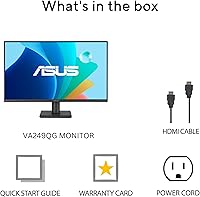
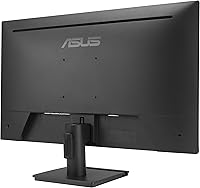
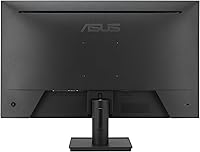
Overview

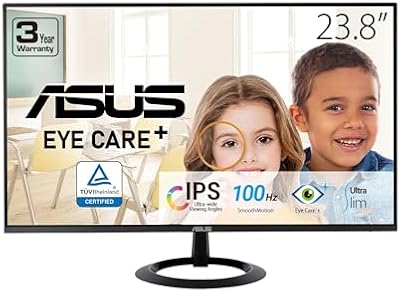
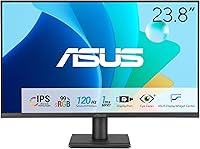
The ASUS VA249QG 24-inch IPS Monitor arrived in early 2025 and quickly climbed to a top-125 ranking among Amazon computer monitors — a solid debut for a display that only recently hit shelves. At this price tier, getting a frameless IPS panel is genuinely refreshing; most competitors at similar prices still ship with VA or TN screens that lose color accuracy at off-angles. Yes, 1080p is not the sharpest resolution available, but on a 23.8-inch screen it stays crisp and practical for the vast majority of home office tasks. The 3-year ASUS warranty adds real peace of mind that budget buyers rarely get.

Features & Benefits

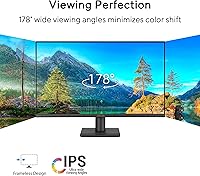
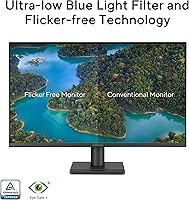
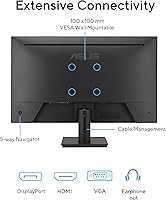
The VA249QG packs a legitimate feature set for its category. The IPS panel with 99% sRGB coverage means colors stay consistent whether you are editing photos, watching video, or reading documents — and the wide 178-degree viewing angle holds up even when someone glances at your screen from the side. Bumping the refresh rate to 120Hz with Adaptive-Sync support keeps scrolling smooth and removes the judder you notice on cheaper 60Hz panels. For anyone staring at a screen for six or eight hours, the flicker-free backlight combined with a low blue light filter makes a noticeable difference by late afternoon. HDMI, DisplayPort, and VGA ports round out a practical connectivity setup.

Best For

This 24-inch IPS display is a natural fit for remote workers and students who need reliable color and comfortable long-session viewing without spending heavily. Casual gamers will appreciate the 120Hz refresh rate — it is noticeably smoother than a standard 60Hz screen, though players chasing 144Hz or beyond should look elsewhere. The slim, frameless profile slots cleanly into minimalist desks and works especially well as a secondary productivity monitor. One underrated plus: VGA support means users upgrading from older hardware do not need a new graphics card just to run this display. ASUS also bundles a month of Adobe Creative Cloud access, a small but welcome addition.

User Feedback

With a 4.5-star average across more than 1,100 ratings, buyers are clearly satisfied overall. The most consistent praise covers out-of-box image quality — people note it looks bright and well-calibrated from the start, with no tedious adjustments needed. Setup also draws positive comments for being straightforward. On the downside, the built-in speakers are functional at best; anyone who cares about audio should plan on headphones or external speakers. The stand is the most polarizing element: it offers tilt but no height adjustment, which frustrates users who prefer a more ergonomic workstation. A handful of buyers also find the on-screen display menu a bit unintuitive to navigate at first.

Pros

  • IPS panel delivers accurate, consistent colors that hold up well at wide viewing angles.
  • 120Hz refresh rate makes everyday scrolling and light gaming noticeably smoother than standard 60Hz displays.
  • 99% sRGB color coverage is genuinely useful for photo editing and content work at this price point.
  • Flicker-free backlight and low blue light filter help reduce eye strain during long screen sessions.
  • Supports HDMI, DisplayPort, and VGA simultaneously, covering both modern and legacy devices.
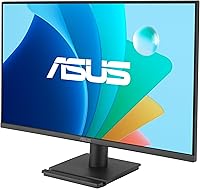
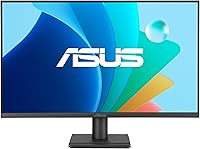
  • Frameless design keeps the look clean and works well in dual-monitor setups.
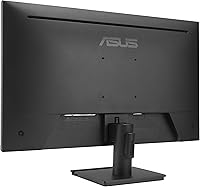
  • VESA mount compatibility adds flexibility for wall mounting or third-party monitor arms.
  • Out-of-box image quality draws consistent praise — most buyers report no need for extensive calibration.
  • The 3-year ASUS warranty offers better long-term protection than many competitors at this tier.
  • A complimentary month of Adobe Creative Cloud is a small but genuine bonus for new buyers.

Cons

  • Stand only tilts — no height or swivel adjustment, which limits ergonomic customization.
  • Built-in speakers are weak and should be considered a last resort, not a primary audio solution.
  • On-screen display menu has a learning curve and feels less intuitive than it should be.
  • No USB hub or built-in KVM functionality limits desk cable management options.
  • 1ms rating is MPRT, not GTG — competitive gamers may notice this distinction under demanding conditions.
  • No HDR support, which is increasingly common even on comparably priced displays.
  • Panel brightness may feel limiting in brightly lit rooms or near windows with direct sunlight.
  • At 1080p, pixel density is adequate but not sharp enough for users accustomed to higher-resolution screens.

Ratings

The ASUS VA249QG 24-inch IPS Monitor earns strong marks across most categories based on AI analysis of verified global buyer reviews, with spam, bot activity, and incentivized feedback actively filtered out before scoring. Across more than 1,100 ratings, the picture that emerges is consistently positive for everyday use, with a few honest limitations that buyers should weigh before committing. Both the standout strengths and the recurring pain points are reflected transparently in the scores below.

Image Quality
86%
Buyers regularly note that colors look vibrant and well-balanced straight out of the box, without needing manual calibration. The 99% sRGB coverage translates into accurate, natural-looking tones during document work, photo browsing, and video streaming — a genuine overachiever for this price bracket.
At 1080p on a 23.8-inch screen, users coming from higher-resolution displays may notice that fine text and detailed graphics lack the crispness they are used to. It is not a dealbreaker for most, but the gap becomes apparent in side-by-side comparisons with 1440p panels.
Color Accuracy
83%
The IPS panel's 99% sRGB coverage gives this display a meaningful edge over VA and TN competitors in the same tier. Graphic students and photo hobbyists report that colors stay consistent across the screen and hold up well at wide viewing angles, making it a practical choice for casual creative work.
The display does not cover wide-gamut color spaces like DCI-P3 or Adobe RGB, which limits its usefulness for professional video editors and print designers who need precise color matching beyond sRGB boundaries.
Refresh Rate & Smoothness
88%
The jump from a standard 60Hz panel to 120Hz is immediately noticeable during daily use — scrolling through documents, switching browser tabs, and navigating the desktop all feel perceptibly smoother. Casual gamers report that Adaptive-Sync eliminates the tearing they previously lived with, without requiring a high-end GPU.
For competitive gamers accustomed to 144Hz or higher, the 120Hz ceiling will feel like a step down. The refresh rate advantage is real but targeted squarely at general users rather than anyone chasing the fastest possible frame rates.
Eye Comfort
91%
The combination of a hardware-level flicker-free backlight and a low blue light filter is one of the most consistently praised aspects of this display. Remote workers and students who log six to eight hours of screen time daily report noticeably less eye fatigue by the end of the day compared to older monitors they replaced.
At higher brightness settings, some users with light sensitivity find the blue light filter insufficient on its own and still rely on additional software filters like Windows Night Light. The lowest brightness levels can also appear slightly uneven on certain units.
Build Quality
78%
22%
The frameless design gives the VA249QG a clean, modern look that holds up well in person. The plastic chassis feels solid enough for a desk monitor, and the stand does not wobble under normal typing or light desk activity, which buyers frequently mention as a baseline expectation at this price.
The overall construction is clearly cost-optimized — the materials feel noticeably lighter and less premium than monitors even a step up in price. A small number of buyers report minor flex in the panel surround when the display is adjusted, and the matte plastic finish attracts fingerprints around the OSD buttons.
Stand & Ergonomics
54%
46%
The stand assembles quickly without tools, and the tilt range is adequate for basic angle adjustments during everyday desk use. For buyers who plan to wall-mount the display using the VESA compatibility, the stand limitation becomes a non-issue entirely.
The stand only tilts — there is no height adjustment, swivel, or pivot, which frustrates buyers who need precise screen positioning for posture or accessibility reasons. Multiple users specifically call out that they had to add books or risers underneath the monitor to get it to a comfortable eye level, which feels like a workaround for a design gap.
Connectivity
89%
Having HDMI, DisplayPort, and VGA available simultaneously is genuinely useful and increasingly rare on budget monitors. Users upgrading from older desktops that only have VGA outputs appreciate not needing an adapter, and dual-monitor users value being able to switch inputs without replugging cables.
There is no USB hub on this display, which is a growing expectation even on mid-range monitors and would have added meaningful value for users managing multiple peripherals at their desk. The single HDMI port also limits options for users running multiple HDMI sources.
Gaming Performance
71%
29%
For casual and mid-level gaming, the VA249QG performs well above what the price suggests — Adaptive-Sync keeps frame delivery smooth, and 120Hz feels genuinely comfortable during action-heavy sequences in everyday titles. Users playing racing games, platformers, and MOBAs report a satisfying experience.
The 1ms MPRT specification is not the same as a true 1ms GTG response, and fast-paced shooters can reveal residual motion blur that a dedicated gaming panel would handle more cleanly. Serious gamers who prioritize response time accuracy over panel color quality will want to look at purpose-built alternatives.
Speaker Quality
41%
59%
The built-in speakers produce enough volume to be useful during a quick video call or for background audio when headphones are out of reach. For a monitor that does not market audio as a feature, having any speaker output at all is a minor convenience.
Multiple buyers describe the audio output as thin and tinny, with almost no low-end presence. Nearly every reviewer who comments on the speakers recommends treating them as a fallback option only — anyone who regularly watches video or listens to music at their desk will want a headphone or external speaker setup from day one.
Setup & Installation
93%
Unboxing and assembly consistently draw positive comments — the stand attaches with a single click mechanism, cable connections are clearly labeled, and the display powers on with a good default picture immediately. Most buyers report being up and running within five minutes, which matters for users who dread technical setup.
The OSD (on-screen display) menu navigation is the one setup-related friction point that comes up repeatedly. The button layout on the back of the monitor is not intuitive, and adjusting settings like brightness or input source takes a few attempts before it becomes muscle memory.
Value for Money
87%
Relative to what is available in this price tier, the VA249QG offers an unusual combination of IPS panel quality, 120Hz refresh rate, and a 3-year warranty — most competitors force buyers to sacrifice at least one of those three. The included one-month Adobe Creative Cloud access is a small but genuine addition that slightly sweetens the deal.
As higher-resolution 1440p monitors have dropped steadily in price, the value argument for a 1080p display narrows slightly for buyers willing to stretch their budget. At its current price point the VA249QG is competitive, but occasional sales on 27-inch 1440p panels can blur the decision.
Viewing Angles
84%
The 178-degree horizontal and vertical viewing angles are a direct benefit of the IPS panel technology, and buyers notice it in shared-screen situations — colleagues, family members, or students looking at the screen from the side report no significant color shift or brightness drop. It holds up well in collaborative desk setups.
While the angles are genuinely wide, there is a slight brightness falloff at extreme horizontal angles that becomes visible in very dark scenes or when the monitor is used in a dual-screen arrangement where one display is viewed more obliquely than the other.
Warranty & Support
82%
18%
A 3-year limited warranty is a meaningful differentiator at this price level, and buyers specifically mention it as a confidence factor in their purchase decision. ASUS has a well-established service network, and owners generally report reasonable response times on warranty claims.
Some users note that ASUS warranty support requires online registration and that the claims process can involve extended back-and-forth before a replacement or repair is authorized. The coverage terms are standard rather than exceptional, and on-site service is not included.
Brightness & Contrast
74%
26%
For indoor office environments and rooms with controlled lighting, the panel delivers adequate brightness that keeps content readable without eye strain. The matte coating helps manage reflections effectively, reducing the need to push brightness to uncomfortable levels in mixed-light rooms.
Users in bright rooms or near windows report that the maximum brightness can feel limiting during daytime hours, particularly when direct sunlight is involved. The IPS panel's native contrast ratio is also modest compared to VA alternatives, meaning dark scenes in movies or games can look slightly washed out rather than truly deep black.

Suitable for:

The ASUS VA249QG 24-inch IPS Monitor is a strong match for anyone who spends most of their day in front of a screen and wants accurate colors without a steep investment. Remote workers and students will appreciate the eye care features — the flicker-free backlight and low blue light filter are practical tools for reducing fatigue during long working hours, not just marketing checkboxes. Casual gamers who want a noticeable upgrade from a 60Hz panel will find the 120Hz refresh rate with Adaptive-Sync genuinely useful for everyday titles, even if this display was never designed to compete with dedicated gaming monitors. The versatile port selection — covering HDMI, DisplayPort, and VGA simultaneously — makes it an easy fit for users upgrading older machines or running a mixed hardware setup. People building a clean, minimal desk will also find the frameless design and VESA compatibility useful, since it wall-mounts neatly or sits flush in a dual-monitor arrangement without thick bezels breaking the visual flow.

Not suitable for:

Buyers with more demanding visual requirements will likely find this 24-inch IPS display underwhelming in certain areas. Creative professionals doing serious color grading or print work will want a monitor with wider color gamut coverage beyond 99% sRGB, such as DCI-P3 or Adobe RGB support. Competitive gamers who prioritize refresh rates above 120Hz or need a 1ms GTG response time rather than MPRT will be better served by a purpose-built gaming panel. The stand is a real limitation for ergonomics-conscious users — it offers only tilt adjustment, with no height or swivel movement, meaning anyone who needs precise screen positioning will likely need to budget for an aftermarket monitor arm. The built-in speakers, while present, are not a substitute for even a modest desktop speaker setup, so audio-focused buyers should factor that into their decision. Finally, users working at close range with dense text or fine design detail may find 1080p resolution at this screen size acceptable but not the crisp experience that a 1440p panel would offer.

Specifications

  • Panel Type: Uses an IPS (In-Plane Switching) panel, which provides consistent color accuracy and wide viewing angles compared to TN or VA alternatives.
  • Screen Size: The visible display area measures 23.8 inches diagonally, commonly marketed as a 24-inch class monitor.
  • Resolution: Native resolution is 1920x1080 Full HD, delivering a pixel density suitable for everyday work and media consumption at this screen size.
  • Refresh Rate: Supports a maximum refresh rate of 120Hz, enabling smoother motion during scrolling, video playback, and light gaming.
  • Response Time: Rated at 1ms MPRT (Moving Picture Response Time), which reflects motion blur reduction rather than the pixel transition time used in GTG measurements.
  • Color Coverage: Covers 99% of the sRGB color space, making it well-suited for general content work, photo viewing, and productivity tasks.
  • Viewing Angle: Offers 178-degree horizontal and vertical viewing angles, so image quality remains stable when viewed from the side or above.
  • Connectivity: Includes one HDMI port, one DisplayPort, one VGA port, and a 3.5mm headphone jack for broad device compatibility.
  • Adaptive Sync: Supports Adaptive-Sync (VRR), which synchronizes the monitor's refresh rate with compatible graphics cards to reduce screen tearing.
  • Eye Care: Features a flicker-free backlight and a low blue light filter to help reduce eye fatigue during extended use.
  • Speakers: Includes built-in speakers intended for basic audio needs; output quality is modest and best used as a fallback option.
  • VESA Mount: Compatible with standard VESA wall-mount brackets, giving users the option to free up desk space or use a third-party monitor arm.
  • Surface Finish: The screen has a matte anti-glare coating that helps reduce reflections in bright or mixed-lighting environments.
  • Aspect Ratio: Features a standard 16:9 widescreen aspect ratio, which is compatible with virtually all modern content formats and operating systems.
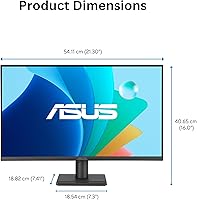
  • Dimensions: The monitor measures approximately 21.3 inches wide, 16 inches tall, and 7.4 inches deep with the stand attached.
  • Weight: Weighs 6.7 pounds with the stand, making it light enough to reposition or wall-mount without difficulty.
  • Warranty: Backed by a 3-year ASUS limited warranty, which covers manufacturing defects and is longer than many competing monitors in this price category.
  • Availability Date: First became available for purchase in February 2025, making it a recently launched product with an actively supported firmware and driver cycle.

Related Reviews
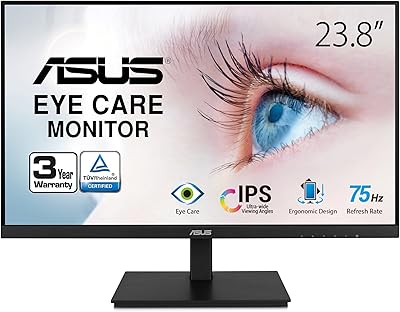
ASUS VA24DQSB 24-inch IPS Monitor

78%
93%
Ergonomic Adjustability
88%
IPS Panel Color Accuracy
61%
Brightness & Glare Handling
91%
Eye Comfort & Fatigue
84%
Build Quality & Stability
More
ViewSonic VG2448A 24-inch IPS Monitor
83%
93%
Ergonomic Adjustability
88%
Eye Comfort
86%
Connectivity & Port Selection
74%
Image Quality
81%
Build Quality
More
ASUS VZ24EHF 24-inch Eye Care Monitor
86%
91%
Value for Money
88%
Display Quality
93%
Eye Care Technology
86%
Refresh Rate & Performance
85%
Build Quality
More
ViewSonic VP2468a 24-Inch IPS Monitor
76%
93%
Color Accuracy
89%
Connectivity
61%
Resolution & Pixel Density
86%
Build Quality
91%
Ergonomics
More
ASUS BE24ECSBT 24-inch Touch Monitor
76%
83%
Touch Accuracy
91%
USB-C Connectivity
67%
Display Quality
88%
Build & Ergonomics
72%
Value for Money
More
HP Series 5 524sf 24-inch Monitor
75%
78%
Display Quality
71%
Color Accuracy
67%
Brightness
86%
Eye Comfort
74%
Build Quality
More
Dell P2419H 24-Inch IPS Monitor
84%
88%
Color Accuracy
91%
Viewing Angles
89%
Eye Comfort
93%
Stand Ergonomics
87%
Build Quality
More
Dell E2420H 24-inch FHD IPS Monitor
88%
88%
Display Quality
90%
Color Accuracy
87%
Viewing Angles
92%
Ease of Setup
91%
Energy Efficiency
More
Z-Edge U24I 24-inch IPS Monitor

85%
88%
Display Quality
92%
Value for Money
85%
Build Quality
84%
Gaming Performance
80%
Ergonomics & Design
More
KTC H24T27 24-inch QHD Gaming Monitor

68%
88%
Image Clarity
84%
Color Accuracy
74%
Gaming Performance
41%
HDR Quality
46%
Ergonomics & Adjustability
More

FAQ

Yes, the VA249QG covers a wide range of hardware thanks to its three video inputs: HDMI, DisplayPort, and VGA. VGA support is increasingly rare at this price point, so if you are running an older desktop or laptop that only has a VGA output, you are covered without needing an adapter.

For most people, yes. At 23.8 inches, 1080p sits at a pixel density where text and images look sharp enough for everyday work, browsing, and media. If you are doing detailed photo editing or working with very small UI elements, you might eventually notice the limits — but the average home office user or student will be perfectly comfortable with it.

Casual gaming, absolutely. The 120Hz refresh rate with Adaptive-Sync makes a real difference compared to a basic 60Hz panel — games feel more fluid and screen tearing is largely gone. That said, this is not a dedicated gaming monitor; it lacks features like a high native contrast ratio or 144Hz-plus refresh rates that serious gamers prioritize.

Both elements are hardware-level on this ASUS monitor. The flicker-free backlight uses DC dimming to eliminate the rapid on-off cycling that causes eye strain with cheaper screens. The low blue light filter physically adjusts the color output of the panel rather than just applying an orange software overlay, which tends to be more effective for long sessions.

No, the included stand only supports tilt adjustment. You can angle the screen slightly forward or backward, but there is no height, swivel, or pivot movement built in. If ergonomics matter to you, pairing this display with a separate VESA-compatible monitor arm is a practical solution since the back panel is VESA-ready.

The 1ms figure refers to MPRT — Moving Picture Response Time — which measures how long a pixel appears to linger during motion, not how fast a pixel physically transitions between colors. GTG (gray-to-gray) response time, which is a more direct hardware measurement, is not specified. For everyday use and casual gaming this distinction rarely matters, but competitive gamers should keep it in mind.

They work in a pinch — good enough for a video call or background audio when you do not have headphones handy. However, the output is thin and lacks bass, so anyone who watches video content or listens to music regularly at their desk will want to use headphones or a separate speaker set.

Most buyers report that it looks good without needing much adjustment — brightness is solid and colors appear reasonably calibrated from the start. The setup process is also straightforward: attach the stand, connect your cable, and it is ready to go. A few users mention that the on-screen display menu takes a little getting used to, but it is not a significant hurdle.

No, the VA249QG does not include HDR support. If you frequently watch HDR video or play HDR-enabled games and want that expanded brightness and contrast range, you will need to look at a different panel. For standard SDR content, the 99% sRGB coverage and IPS panel still produce a pleasant, accurate image.

Yes, ASUS includes a complimentary one-month subscription to Adobe Creative Cloud with purchase, valid through August 2026. It is a nice addition if you have been curious about Adobe apps, though it is a trial-length offer rather than an ongoing benefit, so factor that into your expectations.