Overview

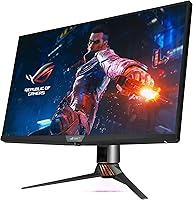
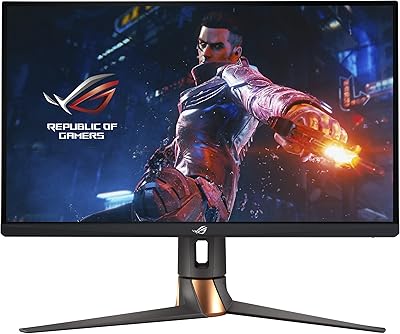
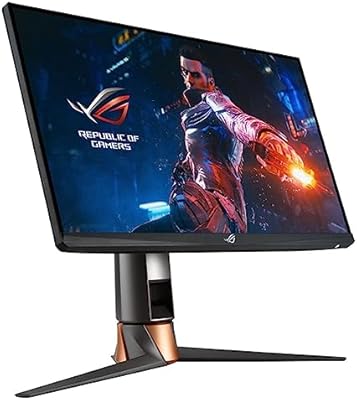
The ASUS ROG Swift PG32UQX 32″ Gaming Monitor is a flagship-tier display built for enthusiasts who refuse to compromise on HDR quality. Launched in 2021, this ROG monitor set a high bar with its Mini-LED backlighting — a technology that still separates it from standard IPS panels and most OLED alternatives in terms of raw brightness. Three years on, newer competitors have emerged, but the PG32UQX remains a serious contender for anyone prioritizing HDR fidelity above all else. The build quality is substantial and unmistakably ROG: heavy, well-constructed, and designed to anchor a premium desk setup. This is not a monitor you buy casually — it rewards buyers with the right hardware and the patience to configure it properly.
Features & Benefits

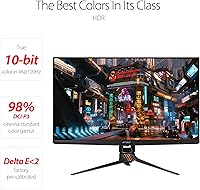
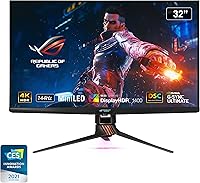
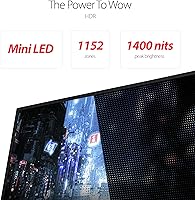
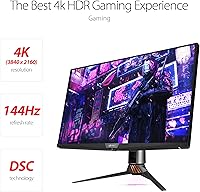
The headline spec is the 1152-zone FALD backlight, which delivers genuine DisplayHDR 1400 performance — not the DisplayHDR 400 or 600 labels common on budget panels. In practical terms, that means fire, explosions, and sunlit skies look actually bright and dimensional rather than washed out. Running native 4K at 144Hz is demanding: you will realistically need an RTX 3080-class GPU or better. G-Sync Ultimate adds variable overdrive that automatically reduces ghosting as frame rates fluctuate, going well beyond standard adaptive sync. The Quantum Dot IPS panel covers 98% DCI-P3, and the LiveDash OLED bar on the front bezel displays GPU stats or custom icons — more functional than gimmicky once you get used to it.

Best For

This ROG monitor makes the most sense for PC gamers running RTX 3080-tier hardware or better — anything less will struggle to push 4K at high frame rates consistently. Content creators benefit too, especially those doing color-graded work who can put the bundled Adobe Creative Cloud access to immediate use. It also works well as a home theater centerpiece, where the HDR brightness shines during cinematic content and console gaming. Buyers willing to invest in a display they won't feel the need to replace for years will find the value proposition stronger than it first appears. Competitive esports players chasing 240Hz or beyond, however, should look elsewhere — this display is built for fidelity, not raw speed.

User Feedback

Across more than 1,600 ratings, the PG32UQX holds a 4.4 out of 5, and positive feedback consistently highlights the same strengths: the HDR presentation is genuinely impressive, out-of-box color accuracy is excellent thanks to the included calibration report, and build quality feels appropriate for the price tier. On the critical side, buyers regularly flag the cost as a barrier and note that occasional blooming on dark scenes is noticeable — an inherent Mini-LED limitation rather than a defect. OSD navigation also draws recurring complaints for being cumbersome. With the monitor now several years into the market, long-term reliability reports are largely reassuring, though a handful of users have noted backlight uniformity concerns developing over time.

Pros

  • Genuine DisplayHDR 1400 performance with 1,152 local dimming zones — one of the most capable HDR implementations in a desktop monitor.
  • Peak brightness of 1,400 nits makes highlights in HDR content look distinctly vivid and three-dimensional.
  • G-Sync Ultimate goes beyond basic adaptive sync, actively reducing ghosting as frame rates shift during gameplay.
  • Ships with an individual color calibration report, so color accuracy is verified before it reaches your desk.
  • Quantum Dot IPS panel covers 98% DCI-P3, making it genuinely useful for creative and professional color work.
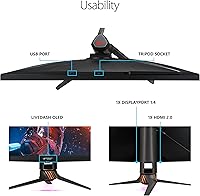
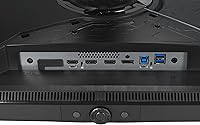
  • Robust connectivity covers DisplayPort 1.4 DSC, three HDMI 2.0 ports, and a USB 3.1 hub for multi-device setups.
  • Build quality is premium and substantial — this ROG monitor feels like it is built to last, not just to look good at launch.
  • The LiveDash OLED bar provides real-time GPU and CPU readouts without needing a secondary device or software overlay.
  • Holds a strong 4.4 out of 5 rating across more than 1,600 reviews, with consistent praise for HDR and color performance.
  • Multi-year ownership data is now available, and long-term reliability reports from early buyers are largely positive.

Cons

  • Running native 4K at 144Hz demands top-tier GPU hardware — mid-range cards will bottleneck the display significantly.
  • Mini-LED blooming around high-contrast edges is noticeable in dark scenes and is an inherent limitation of the technology.
  • The OSD menu is widely criticized as clunky and unintuitive, making picture calibration more tedious than it should be.
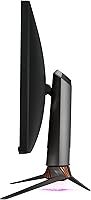
  • At 24 pounds, this Mini-LED display is heavy and difficult to reposition frequently on a desk.
  • Three HDMI ports are version 2.0 only, which limits 4K high-refresh input options from newer consoles and devices.
  • The price is among the highest in the consumer monitor category, making it a difficult purchase to justify for casual users.
  • A handful of long-term owners have reported backlight uniformity issues developing after extended use.
  • No built-in speakers, which may require additional purchases for users who do not already have a dedicated audio setup.
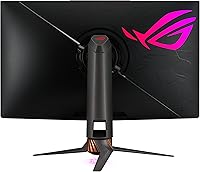
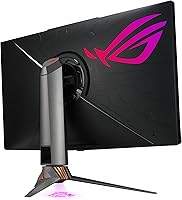
  • The ROG aesthetic is bold and polarizing — buyers who prefer understated design may find it visually overwhelming.

Ratings

The ASUS ROG Swift PG32UQX 32″ Gaming Monitor earns an overall strong reception from verified buyers, and the scores below reflect AI analysis of thousands of real-world reviews worldwide — with spam, bot activity, and incentivized feedback actively filtered out. Ratings capture both the genuine strengths that make this Mini-LED display a standout in its category and the frustrations that keep it from being universally recommended. Nothing here is softened: where users consistently struggled, the scores reflect that honestly.
HDR Performance
93%
Owners consistently describe the HDR experience as visibly different from anything they had used before — not just brighter, but more layered and convincing. Fire effects, sunlit landscapes, and neon-lit cityscapes in supported titles all draw specific praise for feeling genuinely three-dimensional rather than flat.
A portion of users note that HDR results vary significantly by game and content source — poorly mastered HDR titles can look no better than SDR, which occasionally leads to disappointment after such high expectations.
Peak Brightness
91%
The 1,400-nit ceiling is one of the most cited positives across long-form reviews, especially among users in moderately lit rooms who found previous monitors washed out during daytime sessions. Specular highlights in HDR content consistently draw praise for feeling punchy and impactful without eye strain at typical viewing distances.
Sustained full-screen brightness is lower than the peak figure, as is standard with Mini-LED panels, which catches some buyers off guard when they run brightness benchmarks rather than gaming content.
Color Accuracy
89%
The factory calibration report ships with each unit and users — particularly photographers and video editors — appreciate that out-of-box accuracy is verifiably documented rather than assumed. Coverage of the DCI-P3 color space draws consistent praise from creative professionals who use this display for both production work and evening gaming.
A small number of buyers report slight panel-to-panel variation despite the calibration report, suggesting the factory process is thorough but not perfectly uniform across every unit produced.
Build Quality
88%
The monitor's chassis and stand are frequently described as feeling appropriately premium for the price tier — solid, dense, and free of the flex or creak that plagues lighter plastic-framed competitors. The overall fit and finish draws particular praise from buyers who also own other ROG peripherals and value a coherent, well-matched desk setup.
The 24-pound weight, while a sign of solid construction, makes repositioning the display a two-person task for most users and rules out lighter VESA arms without careful load rating checks.
Local Dimming & Contrast
84%
With 1,152 independent dimming zones, the PG32UQX delivers noticeably tighter control over dark areas compared to competing displays with far fewer zones. Users gaming in dark environments specifically highlight how well the panel handles scenes that mix very bright and very dark elements simultaneously.
Blooming — the faint halo of backlight that appears around bright objects on dark backgrounds — is a recurring complaint among detail-oriented users, particularly in space exploration games and dark horror titles where the artifact is most visible.
Refresh Rate & Smoothness
82%
18%
At 144Hz in 4K, motion in supported titles is noticeably cleaner than 60Hz 4K panels, and users who have invested in an RTX 4080 or equivalent consistently report that the refresh rate ceiling feels well-matched to what their hardware can deliver in demanding open-world games.
Users pairing this display with anything below an RTX 3080 frequently report that they cannot sustain frame rates high enough to feel the difference from a 60Hz panel, making the 144Hz spec feel academic rather than practical for a meaningful segment of buyers.
G-Sync Ultimate
86%
Buyers upgrading from basic FreeSync or entry-level G-Sync monitors note a tangible reduction in ghosting during fast lateral movement in shooters and racing games. The variable overdrive adjustment — which automatically tunes pixel response as frame rates shift — is highlighted as a feature that works transparently without manual fiddling.
G-Sync Ultimate requires an NVIDIA GPU, which locks AMD users out entirely and limits the display's potential audience; a handful of buyers discovered this compatibility constraint only after purchase.
Value for Money
61%
39%
Buyers who hold onto displays for five or more years tend to rate value more generously, arguing that the combination of HDR fidelity, color accuracy, and build quality makes the total cost of ownership more defensible over a long ownership window than the sticker price initially suggests.
The price tier places this display in direct competition with newer Mini-LED and OLED alternatives that have launched since 2021, some of which offer comparable or superior specs at lower current market prices — a tension that repeatedly surfaces in recent reviews.
OSD & Menu Usability
53%
47%
Once users learn the joystick-based navigation layout and memorize the menu tree, routine adjustments become manageable, and a subset of technically inclined buyers appreciate the depth of calibration options available within the firmware.
The OSD is one of the most consistently criticized aspects across all review pools — new owners frequently describe the menu structure as unintuitive, with HDR and G-Sync settings buried in non-obvious locations. Firmware updates have not meaningfully resolved the underlying navigation design complaints.
Connectivity
77%
23%
The combination of DisplayPort 1.4 DSC, three HDMI ports, and a USB 3.1 hub covers most multi-device desktop configurations without requiring a separate hub, which users running a PC alongside a console or streaming device appreciate.
All three HDMI ports are version 2.0, capping console input at 4K 60Hz and preventing PS5 or Xbox Series X users from accessing 4K 120Hz — a limitation that feels increasingly dated compared to monitors that launched after 2022 with HDMI 2.1.
Anti-Glare Coating
79%
21%
The matte surface handles ambient light well in mixed-lighting environments, and users who game during daylight hours or in offices with overhead lighting cite noticeably fewer distracting reflections compared to glossy panels they previously owned.
Photographers and graphic designers occasionally note that the matte coating introduces a very slight texture that softens fine detail at close viewing distances — not severe, but noticeable when comparing directly against a high-quality glossy display.
Ergonomics & Stand
74%
26%
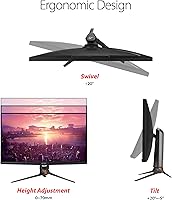
The stand supports height adjustment, tilt, and swivel, which covers the ergonomic needs of most seated desktop setups without requiring an immediate aftermarket arm purchase. The VESA compatibility with included mounting hardware is a practical bonus for users who prefer wall or arm mounting.
Lateral swivel range is limited compared to ultra-wide stands, and the monitor's significant weight means the stand can feel resistant when making fine height adjustments — some users report needing to fully loosen the tension mechanism to reposition smoothly.
Packaging & Unboxing
83%
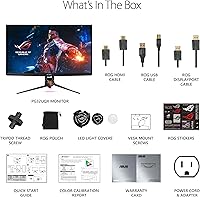
The unboxing experience draws consistent praise from buyers who value premium presentation — branded cables, a ROG pouch, stickers, and the color calibration report all contribute to an unboxing that feels proportionate to the price paid. The inclusion of both wall mount and tripod screws is a practical touch that owners appreciate.
The sheer volume of packaging materials, while protective, results in a very large box that some apartment-dwelling buyers found difficult to manage on delivery and cumbersome to dispose of.
Long-Term Reliability
76%
24%
With the display now several years into the market, a solid base of multi-year owners confirms that the majority of units hold up well over time with no degradation in color accuracy or backlight performance under normal use conditions.
A small but consistent minority of long-term owners report backlight uniformity shifts — visible as brighter or dimmer patches on solid-color screens — developing after extended use, which introduces some uncertainty for buyers expecting zero-maintenance longevity.
Software & Ecosystem Integration
71%
29%
Users embedded in the ASUS ROG ecosystem find that the LiveDash OLED bar integrates cleanly with Armoury Crate for real-time system monitoring, and the overall package feels cohesive alongside ROG peripherals and motherboards that share the same software platform.
Armoury Crate itself receives mixed feedback — some users report it running heavier than expected in the background, and occasional software conflicts with GPU overlay tools have been documented in community forums, requiring manual troubleshooting to resolve.

Suitable for:

The ASUS ROG Swift PG32UQX 32″ Gaming Monitor is built for a specific kind of buyer: someone who has invested in a high-end NVIDIA GPU — think RTX 3080 or newer — and wants a display that can actually justify that hardware. If HDR is a priority and you have been frustrated by monitors that claim HDR support but deliver dim, washed-out results, the 1400-nit Mini-LED backlight here is a meaningful step up from the DisplayHDR 400 and 600 panels that dominate the mainstream market. Content creators working in video editing or color grading will appreciate the Quantum Dot panel's wide color accuracy and the fact that it ships with a color calibration report — this is not a monitor you need to recalibrate out of the box. It also works well as a dual-purpose display for someone who games at a desk but wants cinematic HDR quality for films and console play in the same setup. Buyers who treat a monitor as a long-term investment and plan to hold onto a display for five or more years will find the build quality and performance ceiling here age better than mid-range alternatives.
Not suitable for:

The PG32UQX is a poor fit for anyone whose GPU cannot reliably push 4K frame rates — pairing this display with mid-range hardware means leaving most of its capability unused, and that is a difficult trade-off to justify at this price. Competitive players who prioritize frame rate above all else will find 144Hz underwhelming compared to the 240Hz or 360Hz panels now widely available in the esports segment. Mini-LED backlighting, despite its advantages, is not perfect: blooming — a soft halo of light around bright objects set against dark backgrounds — is a real and documented limitation of the technology, and buyers who are sensitive to this in dark-room gaming scenarios should be aware before purchasing. The OSD menu and firmware controls have drawn consistent criticism for being unintuitive, which can make fine-tuning the picture a frustrating experience. Budget-conscious buyers or anyone who needs a monitor primarily for productivity and general use will find the premium very hard to rationalize when more affordable displays cover everyday tasks just as well.

Specifications

  • Screen Size: The panel measures 32 inches diagonally, offering substantial screen real estate suited to immersive gaming and detailed creative work.
  • Resolution: Native resolution is 3840×2160 (4K UHD), delivering sharp image detail at standard desktop viewing distances.
  • Refresh Rate: The panel runs at up to 144Hz, enabling smoother motion in games compared to standard 60Hz or 75Hz displays.
  • Panel Type: Uses an IPS panel enhanced with Quantum Dot technology for wider color reproduction and improved viewing angles versus standard IPS.
  • Backlight: Mini-LED Full Array Local Dimming (FALD) backlight with 1,152 independent dimming zones controls brightness precisely across different areas of the screen.
  • Peak Brightness: Rated at 1,400 nits peak brightness, certified under the DisplayHDR 1400 standard for high-impact HDR performance.
  • HDR Certification: Holds DisplayHDR 1400 certification, which is among the highest tiers available and requires sustained full-screen brightness well above entry-level HDR panels.
  • Color Gamut: Covers 98% of the DCI-P3 color space, making it suitable for professional color-grading workflows and wide-gamut content consumption.
  • Adaptive Sync: G-Sync Ultimate certified, providing hardware-level variable refresh rate with additional features including variable overdrive and ultra-low latency mode.
  • Aspect Ratio: Standard 16:9 widescreen aspect ratio, compatible with all mainstream gaming and video content formats.
  • Screen Surface: Matte anti-glare coating reduces reflections under ambient lighting, reducing eye strain during extended sessions.
  • Connectivity: Inputs include one DisplayPort 1.4 DSC, three HDMI 2.0 ports, two USB 3.1 downstream ports, and one USB 2.0 port.
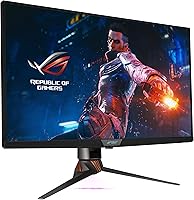
  • LiveDash Display: An OLED panel on the front bezel can show customizable icons or real-time system data such as CPU temperature and GPU utilization.
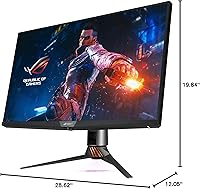
  • Dimensions: With stand attached, the monitor measures approximately 19.84 × 28.62 × 12.05 inches (L×W×H).
  • Weight: The unit weighs 24 pounds with stand, reflecting a robust and dense build construction.
  • Calibration Report: Each unit ships with an individual factory color calibration report documenting measured accuracy at the time of production.
  • In-Box Cables: Includes a ROG-branded HDMI cable, DisplayPort cable, and USB-A to USB-B cable, so no additional cables are required for initial setup.
  • Amazon Rating: Holds a 4.4 out of 5 star rating based on over 1,600 verified customer ratings on Amazon.

Related Reviews
ASUS ROG Swift PG32UQ 32-inch 4K HDR Gaming Monitor
89%
93%
Display Quality
90%
Gaming Performance
88%
Build Quality
92%
Color Accuracy
86%
Ease of Use/Ergonomics
More
ASUS ROG Swift PG32UCDM 32-inch OLED Monitor
82%
96%
Image Quality
93%
Motion Performance
94%
Color Accuracy
78%
HDR Performance
74%
Burn-In Risk & Longevity
More
ASUS ROG Swift PG278Q 27″ 1440P Gaming Monitor
86%
93%
Display Quality
91%
Gaming Performance (Refresh Rate & Response Time)
88%
Ergonomics (Adjustable Stand)
90%
G-SYNC Functionality
77%
Color Accuracy
More
ASUS ROG PG27AQDP 27-inch OLED Gaming Monitor
81%
97%
Refresh Rate Performance
96%
Panel Contrast & Black Levels
94%
Response Time & Motion Clarity
91%
Color Accuracy
63%
HDR Performance
More
ASUS ROG Swift PG38UQ 38-inch Gaming Monitor
80%
93%
Image Quality
81%
HDR Performance
94%
Console Compatibility
88%
Motion Clarity
91%
Color Accuracy
More
ASUS ROG Swift PG279QM 27-inch 1440p Gaming Monitor
86%
93%
Display Quality
95%
Performance for Gaming
89%
Build Quality
91%
Color Accuracy
72%
Ease of Setup
More
ASUS ROG Swift PG259QN 24.5” 360Hz Gaming Monitor
88%
93%
Performance
91%
Visual Quality
88%
Build Quality
87%
Ergonomics & Adjustability
89%
Connectivity Options
More
ASUS ROG Strix XG32WCS 32″ Gaming Monitor
79%
88%
Image Quality
91%
Motion Performance
76%
Color Accuracy
93%
Refresh Rate & Responsiveness
58%
Stand & Ergonomics
More
ASUS ROG Swift PG27AQDM-R 27-inch OLED Gaming Monitor

88%
94%
Display Quality
92%
Color Accuracy
91%
Refresh Rate and Response Time
88%
Build Quality
89%
Ease of Setup
More
ASUS ROG Swift PG27UCDM 27-inch Gaming Monitor
82%
96%
Image Quality
97%
Black Levels & Contrast
93%
Gaming Performance
91%
Color Accuracy
88%
Text Clarity
More

FAQ

Realistically, you want at least an RTX 3080 or equivalent to push 4K at frame rates that make 144Hz feel worthwhile. With a mid-range card you can still use the display, but you will often be running well below the panel's refresh rate ceiling, which makes it harder to justify the investment. An RTX 4080 or 4090 is the sweet spot for consistently high frame rates at this resolution.

It depends on the content and how sensitive you are to it. In scenes with bright objects — like a streetlight or explosion — set against a very dark background, you may see a faint halo of light around the bright element. It is less obvious than what older full-array LED monitors produced, but it is real and worth knowing about before you buy. For most gaming content and well-lit scenes, it is rarely distracting.

DisplayHDR 1400 is a meaningful certification here. Many monitors carry DisplayHDR 400 or 600 labels but deliver underwhelming results because those tiers set a low brightness floor and do not require local dimming. This panel hits 1,400 nits peak with 1,152 dimming zones, which produces HDR contrast that is visibly different — not just slightly brighter, but genuinely more dimensional in supported content.

Yes, though with limitations. Both consoles connect via HDMI, and the monitor has three HDMI 2.0 ports. The catch is that HDMI 2.0 caps out at 4K 60Hz, so you won't hit 4K 120Hz from a console the way you would on a display with HDMI 2.1. For console HDR gaming at 4K 60Hz, it still looks excellent — but if high-frame-rate console play is your main priority, check that your console's output matches what this port can handle.

It does, and arguably better than most gaming monitors. The Quantum Dot panel's wide DCI-P3 coverage and the factory calibration report give you a solid starting point for color-accurate work. The included Adobe Creative Cloud access is a bonus for new subscribers. Just keep in mind the matte coating softens fine texture detail slightly compared to a glossy professional display, which some photographers prefer.

The criticism is fair. Navigating the on-screen display involves a joystick and a set of menus that are not intuitively organized, especially when digging into HDR or G-Sync settings. It is not broken — everything is accessible — but it takes some time to learn the layout, and adjustments that should take seconds can take a few minutes until you are familiar with it.

Mini-LED and OLED each have real strengths. OLED delivers perfect per-pixel blacks with no blooming at all, which is a significant advantage in dark scenes. This Mini-LED display counters with higher sustained brightness, no risk of burn-in, and stronger performance in bright rooms. If you game in a dark environment and prioritize black levels, OLED is compelling. If you watch HDR content with bright highlights and want longevity without burn-in concerns, this display makes a strong case.

It is a small OLED screen on the front bezel that can display animated GIFs, custom logos, or live system stats like GPU temperature and CPU load. In practice, most users set it to system monitoring and leave it there. It is not a feature you buy the monitor for, but once it is configured it becomes a genuinely handy at-a-glance readout — especially useful if your GPU is buried in a case below the desk.

A small number of long-term owners have reported that backlight uniformity can degrade slightly over extended use — usually showing as brighter or dimmer patches when viewing a solid color full-screen. This appears to be relatively uncommon and is not unique to this display, but it is worth knowing that the PG32UQX has been on the market long enough for multi-year reliability data to exist. The majority of owners report no issues after years of use.

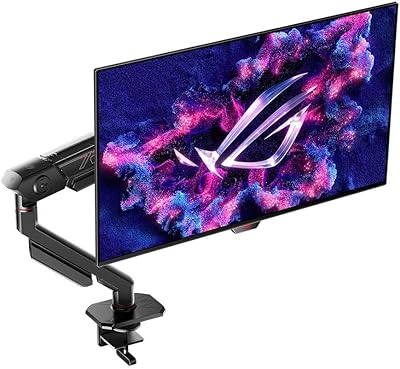
Yes, it supports VESA mounting — the package includes both wall mount and tripod screws, which is a thoughtful inclusion at this tier. The stock stand offers height, tilt, and swivel adjustments, which covers most ergonomic setups. At 24 pounds, you will want a sturdy VESA arm if you plan to mount it off the desk — make sure your arm is rated for the weight before purchasing.

Where to Buy