Overview

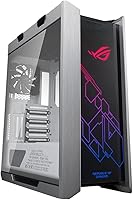
The ASUS ROG Strix Helios GX601 Mid-Tower Case is one of those rare enclosures where engineering ambition and aesthetics genuinely reinforce each other. In a market saturated with blacked-out towers, the white colorway stands out — not as a gimmick, but as a deliberate choice for builders who want a clean, light, or themed rig. It supports EATX motherboards, which already signals this is not a compact solution; clear your desk accordingly. LAN party regulars, RGB enthusiasts, and water-cooling hobbyists are the natural audience here. The price reflects the depth of feature and material quality — you are paying for substance, not just a striking exterior.
Features & Benefits

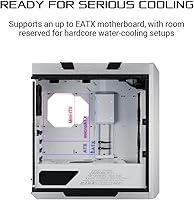
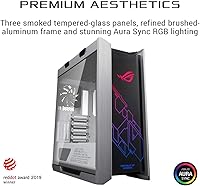
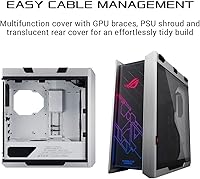
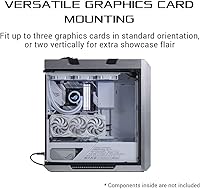
Three tempered-glass panels give this ROG Helios case a 270-degree view of your components — a real step up from enclosures that expose just one side. The brushed aluminum frame adds genuine rigidity; the flex and rattle common in cheaper steel builds simply are not present here. Cooling ambitions are well accommodated too: front radiator support up to 420mm means even aggressive custom loops have room to breathe. GPU flexibility is genuinely useful — mount three cards in standard orientation, or go vertical with two using the included riser bracket. The cable management system ties it together with a PSU shroud, translucent rear cover, and GPU holders that make tidy builds far less of a chore.

Best For

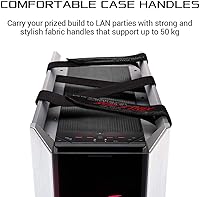
The Helios GX601 is built for a specific kind of builder, and knowing that upfront saves second-guessing. If you are planning a custom water-cooling loop, the 420mm front clearance is a meaningful advantage over mid-towers that force you to downsize your cooling setup. EATX users — often stuck hunting for cases that truly accommodate their boards without compromise — will find this one of the more capable options in the segment. White or light-themed builds benefit directly from the colorway. And if you haul your rig to LAN events, the fabric carry handles are more practical than they look, a thoughtful feature that most cases at this level still skip.

User Feedback

Across more than 1,500 ratings, this mid-tower holds a 4.6-star average — a score that, at that volume, reflects genuine owner satisfaction rather than a wave of early enthusiasm. Builders repeatedly highlight glass panel clarity and the cable management experience, noting the interior layout actually delivers rather than just photographing well. The honest caveat is weight: nearly 40 pounds empty is significant, and fully built it becomes a two-person job to shift. A handful of owners also flag the footprint as a real desk challenge. Those trade-offs are worth knowing, but for the audience this case targets, cooling headroom and build quality clearly win out.

Pros

  • Brushed aluminum frame feels noticeably more rigid and premium than steel-only cases in the same category.
  • Three tempered-glass panels deliver a genuine 270-degree view of your components — rare at any price point.
  • 420mm front radiator support gives serious water-cooling builds room to breathe without compromise.
  • The bundled vertical GPU riser bracket lets you mount and display a flagship card without buying extra accessories.
  • Cable management genuinely works as a system — the shroud, rear cover, and GPU holders all pull in the same direction.
  • Fabric carry handles are reinforced and functional, not just a cosmetic feature for LAN-going builders.
  • The white colorway stands out in a market dominated by black enclosures, ideal for themed or light-palette builds.
  • True EATX compatibility is rare in mid-towers — this ROG Helios case handles extended boards without modification.
  • Front I/O includes USB 3.1 Gen 2 Type-C alongside four USB 3.0 ports, keeping modern peripherals covered.
  • A 4.6-star average across more than 1,500 verified ratings reflects consistent, broad owner satisfaction.

Cons

  • At nearly 40 pounds empty, moving a fully built system solo is genuinely impractical and risks injury.
  • Three glass panels mean three fingerprint-collecting surfaces that require regular, somewhat tedious cleaning.
  • No acoustic dampening material is included, which is a noticeable omission given the premium price.
  • The large footprint demands serious desk space — buyers who skip measuring beforehand often regret it.
  • Airflow-only builds suffer compared to mesh-front alternatives, especially under heavy thermal loads.
  • Aura Sync integration only delivers full value inside the ASUS ecosystem — mixed-brand builds get limited benefit.
  • The rear cable chamber depth can feel limiting when routing thick custom-sleeved cables in complex builds.
  • White finish inconsistencies, though minor, have been flagged by a portion of owners on a case at this price tier.
  • Fan speed control cycles through presets only — builders wanting precise curves still need motherboard software.
  • The size and feature set are overkill for modest builds, making the value case difficult to justify below EATX or custom-loop configurations.

Ratings

The ASUS ROG Strix Helios GX601 Mid-Tower Case earns its reputation through consistent real-world performance across a wide and demanding builder community. The scores below were generated by AI after analyzing thousands of verified global owner reviews, with spam, incentivized, and bot-flagged submissions actively filtered out. Both what this case gets right and where it genuinely falls short are reflected without softening either side.
Build Quality & Materials
93%
The brushed aluminum frame is the first thing builders notice when unpacking — it feels categorically different from the thin steel shells common at lower price points. Panels align cleanly, hinges and latches hold firm, and nothing flexes under pressure during the build process.
A small number of owners reported minor cosmetic inconsistencies on the white finish, particularly around panel edges. These are not structural issues, but on a case at this price, surface-level imperfections are harder to overlook.
Tempered Glass Panels
91%
Three glass panels delivering near-270-degree visibility is genuinely rare at any price. Builders who invest in RGB components or custom loops get full visual payoff — the clarity is excellent and the panels feel thick and solid, not like an afterthought.
Three glass panels means three surfaces that collect fingerprints and dust. Regular maintenance is non-negotiable, and cleaning the interior side of the side panel requires partial disassembly, which a few owners found more tedious than expected.
Cooling Capability
88%
Front radiator support up to 420mm is the headline spec here, and it genuinely opens doors for ambitious custom water-cooling configurations that most mid-towers simply cannot accommodate. Builders running 360mm or 420mm radiators consistently report no clearance surprises.
Airflow-only builds relying on static pressure fans get a less compelling story — the large glass panel coverage restricts passive airflow compared to mesh-front alternatives. Builders not planning a liquid loop should factor this in.
Cable Management
89%
The combination of PSU shroud, translucent rear cable cover, and integrated GPU cable holders works as a real system rather than a collection of unrelated features. Builders who usually dread cable routing report the process feeling noticeably more controlled and less frustrating.
The rear cable chamber is not the deepest available at this size, which becomes a limitation if you are routing thick custom sleeved cables or managing a particularly dense power distribution setup. It handles standard builds well but tests patience on complex ones.
GPU Mounting Flexibility
84%
The bundled vertical GPU riser bracket is a practical inclusion that competitors often charge extra for. Being able to display a flagship graphics card vertically, fully visible through the side panel, is exactly the kind of feature showcase builders are paying for.
Vertical mounting requires the riser bracket and specific PCIe slot positioning that not all motherboards accommodate equally. A handful of users noted that achieving ideal vertical alignment took more trial and adjustment than the packaging implied.
Front I/O Panel
82%
18%
USB 3.1 Gen 2 Type-C is a welcome addition that future-proofs the front panel for modern peripherals. Having four USB 3.0 ports alongside it means you rarely need to reach around to the motherboard rear for common connections during a build or LAN session.
There are no USB 2.0 ports on the front panel, which is a minor inconvenience for anyone regularly connecting older peripherals or wireless dongles without a hub. It is a deliberate modern-forward design choice, but not universally appreciated.
RGB Lighting & Aura Sync
79%
21%
The integrated Aura Sync front lighting syncs reliably with ASUS motherboards and other Aura-compatible components, making unified RGB theming straightforward for builders already in the ASUS ecosystem. The dedicated front-panel RGB control button is a practical shortcut.
Outside the ASUS ecosystem, RGB synchronization requires third-party workarounds that vary in reliability. Builders mixing brands sometimes find the integrated lighting creates more coordination headaches than it solves, rather than simplifying their setup.
Portability & Carry Handles
76%
24%
Fabric ergonomic handles on a case this size are genuinely uncommon, and LAN party regulars call them out specifically as a reason they chose this over competitors. The handles are stitched and reinforced — they do not feel decorative.
The case weighs nearly 40 pounds empty. Add a full build with liquid cooling and the handles become a comfort aid rather than a portability solution — you are still moving something that realistically needs two people and a car with enough cargo space.
EATX Motherboard Compatibility
87%
True EATX support in a mid-tower form factor is a meaningful differentiator. Builders using extended ATX boards for workstation or high-end gaming builds consistently report that standoff placement, clearances, and overall fitment work without modification.
The large motherboard compatibility combined with the case dimensions means desk real estate requirements are substantial. Buyers who do not double-check their space before purchasing sometimes find this mid-tower occupies more surface area than expected.
Interior Layout & Space
81%
19%
The interior is well-organized for complex builds, with logical component zones that make planning a multi-GPU or full custom loop configuration feel manageable. Experienced builders appreciate that the layout anticipates real high-end build scenarios.
For simpler builds — a single GPU, air cooler, and modest cable run — the interior space can feel unnecessarily large and the case even harder to justify. The layout rewards complexity but does not scale down gracefully for modestly specced systems.
Noise Dampening
63%
37%
The aluminum and glass construction provides some passive damping compared to thin steel panels, and owners running quiet water-cooling loops report an acceptably subdued noise floor during normal operation.
There is no dedicated acoustic foam or sound-dampening material included, which is a noticeable omission at this price point. Builders expecting meaningful noise isolation are likely to be disappointed, particularly with high-RPM fan configurations.
Dust Filtration
71%
29%
Removable filters on key intake areas help keep the interior cleaner over time, and builders in dusty environments report them as genuinely easy to pop out and rinse. The bottom PSU filter in particular gets consistent positive mentions.
Filter coverage is not comprehensive across all intake paths, meaning some dust ingress is unavoidable during high-airflow operation. The glass-heavy design also obscures the need for cleaning until it becomes visually obvious from outside.
Fan Speed Control
77%
23%
A dedicated fan-speed control button on the front panel lets you adjust cooling performance without diving into BIOS or software — a small but genuinely useful convenience during LAN sessions or when switching between workloads.
The front-panel button cycles through preset speeds rather than offering granular control. Builders who prefer precise fan curve management will still need to rely on motherboard software, making this button a convenience shortcut rather than a replacement for proper fan control.
Value for Money
74%
26%
For builders who will actually use the premium features — triple glass panels, 420mm radiator support, vertical GPU mounting, aluminum construction — the price makes reasonable sense as a holistic package rather than a collection of add-ons.
If your build does not demand EATX support, a large radiator, or a showcase-first aesthetic, there are capable mid-towers at significantly lower prices that cover the essentials without compromise. The value case weakens considerably for more modest configurations.

Suitable for:

The ASUS ROG Strix Helios GX601 Mid-Tower Case is built for a specific kind of builder — one who treats their rig as a showpiece as much as a machine. If you are planning a custom water-cooling loop, the 420mm front radiator clearance removes the usual compromises that force builders to downsize their cooling ambitions inside a mid-tower. EATX motherboard users will find this one of the more naturally accommodating options in its class, with proper standoff placement and internal clearances that do not require workarounds. The white colorway makes it a natural anchor for clean, light-themed builds where visual cohesion across components actually matters to the builder. LAN party regulars will appreciate that the fabric carry handles are not decorative — they hold up to real transport use and make hauling a full build considerably less awkward. RGB enthusiasts in the ASUS ecosystem get Aura Sync integration that genuinely simplifies achieving a unified lighting theme across components.
Not suitable for:

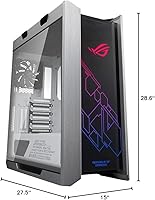
The ASUS ROG Strix Helios GX601 Mid-Tower Case is a harder sell the moment your build priorities shift away from showcasing and serious cooling. If you are working with a compact desk setup, the footprint — over 27 inches deep and nearly 29 inches tall — is not a minor inconvenience; it is a genuine spatial problem you need to measure for before buying. Builders who prefer airflow-optimized mesh-front cases will find the glass-heavy design a step backward in passive ventilation, especially for systems running high-TDP components without liquid cooling. The weight, approaching 40 pounds empty, means this mid-tower is not practical to move frequently — anyone hoping to regularly transport it solo will likely regret the choice. Builders on tighter budgets who only need standard ATX support and basic cooling will find the premium hard to justify when capable alternatives exist at considerably lower prices. And if your components are not ASUS-ecosystem aligned, the Aura Sync integration becomes a feature you are paying for but not meaningfully using.
Specifications

  • Case Type: Mid-Tower form factor designed to accommodate ATX and EATX motherboards within a large but desk-manageable chassis.
  • Dimensions: The case measures 27.5 x 15 x 28.6 inches (L x W x H), requiring substantial desk or floor space for placement.
  • Weight: The empty chassis weighs 39.7 pounds, a direct result of the brushed aluminum frame construction.
  • Motherboard Support: Compatible with ATX and EATX motherboard form factors, with standard ATX also fully supported without modification.
  • Panel Material: Three tempered glass panels cover the front, left side, and top, providing near-270-degree component visibility.
  • Frame Material: The structural chassis is constructed from brushed aluminum, offering significantly greater rigidity than standard steel enclosures.
  • Radiator Support: Supports front-mounted radiators up to 420mm, accommodating triple-fan custom water-cooling configurations.
  • GPU Mounting: Supports up to three graphics cards in standard horizontal orientation, or two cards mounted vertically using the included PCIe riser bracket.
  • Front I/O Ports: Front panel includes one USB 3.1 Gen 2 Type-C port and four USB 3.0 Type-A ports for high-speed peripheral connectivity.
  • PSU Mount: Power supply unit is bottom-mounted and concealed behind a full-length PSU shroud for a cleaner interior presentation.
  • RGB System: Integrated Aura Sync RGB lighting is built into the front panel, controllable via a dedicated button or ASUS Aura Sync software.
  • Fan Control: A dedicated front-panel button cycles through fan speed presets, allowing quick airflow adjustments without accessing BIOS or software.
  • Cable Management: A translucent rear cable cover, PSU shroud, and GPU cable holders form an integrated cable management system throughout the interior.
  • Carry Handles: Reinforced fabric ergonomic handles are mounted on the top of the chassis to assist with transport to LAN events or between locations.
  • Cooling Method: The chassis supports both air cooling and liquid cooling configurations, with dedicated mounting points for water-cooling pumps and reservoirs.
  • Color: Available in a White Edition finish, with the brushed aluminum frame and interior surfaces finished in white throughout.
  • Drive Bays: The interior supports multiple 2.5-inch SSD and 3.5-inch HDD mounting positions distributed across the chassis floor and rear drive cage.
  • Expansion Slots: The chassis provides seven expansion slots along the rear I/O panel, supporting full-length graphics cards and multi-slot add-in cards.

Related Reviews
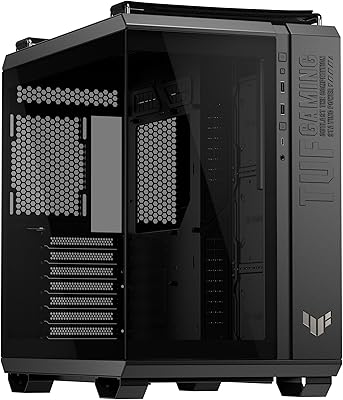
ASUS TUF Gaming GT502 Horizon ATX Mid-Tower PC Case
85%
93%
Cooling Performance
89%
Build Quality
85%
Ease of Setup
92%
Design & Aesthetics
76%
Space & Compatibility
More
Thermaltake Tower 600 Mid-Tower ATX Case
79%
91%
Build Quality
93%
Aesthetic Design
88%
Cable Management
94%
Cooling Capacity
71%
Installation Experience
More
KEDIERS P6 Mid Tower ATX PC Case
75%
88%
Aesthetic Design
71%
Build Quality
84%
Included Fans & Lighting
78%
Airflow & Thermal Performance
81%
Radiator & Cooling Support
More
ASUS ROG STRIX Z890-A GAMING WIFI
91%
96%
Performance Stability
94%
Overclocking Capability
92%
Thermal Management
90%
Build Quality
88%
Ease of Installation
More
HYTE Y70 Mid-Tower ATX Gaming Case
80%
93%
Build Quality
96%
Aesthetic Design
78%
Cooling Potential
91%
Vertical GPU Mounting
88%
Cable Management
More
HYTE Y40 Mid-Tower ATX Case
85%
89%
Design & Aesthetics
86%
Cooling Performance
91%
Cable Management
93%
Build Quality
72%
GPU Compatibility
More
ASUS ROG XG27AQDMG 27-inch OLED Gaming Monitor
79%
96%
Image Quality
93%
Refresh Rate Performance
48%
Glare & Reflections
91%
Response Time & Motion Clarity
67%
Burn-in Risk & Longevity
More
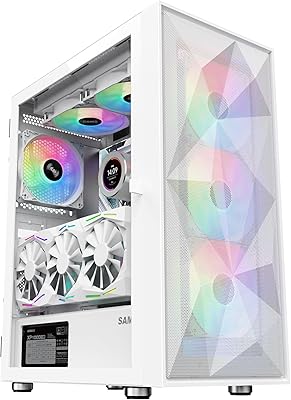
SAMA 3509 ATX Mid Tower PC Case
74%
88%
Value for Money
74%
Build Quality
81%
Airflow & Cooling Performance
67%
Pre-installed Fan Quality
86%
Tempered Glass Panel
More
COUGAR MX330-X Mid Tower Case
85%
88%
Cooling Performance
91%
Ease of Installation
85%
Build Quality
90%
Airflow & Ventilation
65%
Cable Management
More
SAMA V60 Mid Tower PC Case
80%
93%
Out-of-Box Cooling Value
78%
Airflow Performance
91%
AIO & Radiator Flexibility
88%
Tempered Glass & Aesthetics
71%
Build Quality & Materials
More

FAQ

Standard ATX boards fit without any issues — the EATX support just means the case is built large enough to accommodate extended boards if needed. If you are running a typical ATX setup, you will simply have a bit more interior breathing room, which is never a bad thing for cable routing and airflow.

The 420mm front radiator clearance is genuine and supports a full triple-140mm fan radiator configuration. You will want to plan your reservoir and pump placement carefully, but builders running large custom loops consistently report that the clearances work without modification. Just confirm your specific radiator thickness against the available front clearance before purchasing.

The handles are well-built and do their job, but this case weighs nearly 40 pounds empty. Once fully built with liquid cooling hardware, moving it solo is uncomfortable and risks damaging components or straining yourself. For LAN transport, treat this as a two-person job and bring a car with adequate cargo space.

The riser bracket for vertical GPU mounting is included in the box — you do not need to buy it separately. Keep in mind that vertical mounting positions your GPU closer to the side panel, so very thick triple-fan cards should be measured for clearance before committing to that orientation.

The front panel lighting has a dedicated control button that lets you cycle through colors and effects without any software, so basic RGB functionality works regardless of your motherboard brand. Seamless synchronization with other components, however, is designed around Aura Sync — outside that ecosystem, you will need third-party software like OpenRGB to coordinate lighting, with varying results.

This is honestly a weak point to be aware of. The three tempered glass panels restrict passive airflow considerably compared to mesh-front alternatives, meaning air-cooled builds have to work harder to move heat out. If you are not planning a liquid loop, a mesh-front case at a lower price point will likely give you better thermal performance under load.

Three glass panels means three surfaces collecting fingerprints and dust constantly — it is the honest trade-off for the visibility you get. The exterior is easy to wipe down with a microfiber cloth, but cleaning the interior side of the panels requires removing them, which adds some time to your maintenance routine. Budget for regular cleaning if you want it looking sharp consistently.

No, there is no acoustic foam or dedicated sound-dampening material included. The aluminum and glass construction provides some incidental damping compared to thin steel cases, but if low noise is a primary concern for your build, this mid-tower is not optimized for it. Pairing it with low-noise fans and a quiet water-cooling loop is the best path to a quiet system inside this chassis.

Owners are genuinely positive about it, which is not always the case when companies advertise cable management as a feature. The PSU shroud, rear cable cover, and GPU cable holders work together in a way that makes routing feel more planned and less improvised. That said, if you are running custom-sleeved cables with thick sheathing, the rear cable chamber can feel a little tight — standard modular PSU cables route comfortably.

At over 27 inches deep and nearly 29 inches tall, this is a genuinely large case that demands more space than a typical mid-tower. Most people place it on the floor rather than a desk, but even then, desk-adjacent clearance for the top panel and side ventilation matters. Measure your intended placement carefully before ordering — the number of owners who are surprised by the physical size suggests it is easy to underestimate from product photos.

Where to Buy