Overview

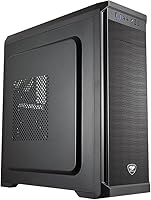
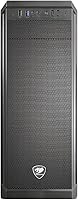
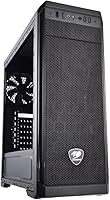
The Cougar MX330-X Mid Tower PC Case is Cougar's answer to builders who want a functional, no-drama chassis without spending a lot. It's constructed from a mix of metal and composite plastic — exactly what you'd expect at this price point, and honestly that's fine. The panels feel sturdy enough, the lines are clean, and nothing about the exterior feels flimsy under your hands. It supports Mini ITX, Micro ATX, and full ATX motherboards, so it covers the vast majority of standard builds with no hassle. Think of this Cougar mid-tower as a reliable starting point, not a showpiece — it does what it promises and doesn't pretend to be anything more.

Features & Benefits

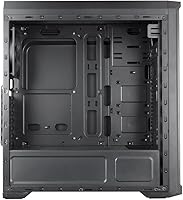
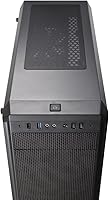
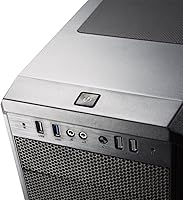
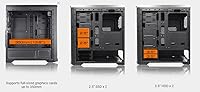
Storage flexibility is where the MX330-X chassis genuinely earns its keep. You get three 5.25-inch bays, three 3.5-inch bays, and three 2.5-inch bays — a rare combination that lets you mix optical drives, spinning hard drives, and SSDs without compromise. The front I/O panel is more practical than most budget cases: USB 3.0 and USB 2.0 ports sit alongside audio jacks, a built-in fan controller, and a quick-charge port that's genuinely handy day-to-day. Seven expansion slots leave room for larger graphics cards. The bottom-mounted PSU bay aids weight distribution and airflow — a small but meaningful design choice that you'll appreciate once everything is running.

Best For

This budget gaming case makes the most sense for first-time builders who want enough interior room to work comfortably without paying a premium for aesthetics. If your build involves older hardware — think spinning hard drives, optical drives, or a legacy expansion card — the generous bay count alone justifies the pick. It also suits home or office machines where the side panel stays closed and nobody needs a window into the build. Builders who want basic airflow control without buying a separate fan hub will appreciate the onboard controller. Just be clear-eyed: this is a strong starter chassis, not one you'll carry through multiple high-end upgrades.

User Feedback

With a 4.2-star average across nearly 500 ratings, buyers are broadly happy with this Cougar mid-tower given what it costs. Easy assembly and better-than-expected cable routing space come up repeatedly in positive reviews — both things that matter when you're building for the first time. On the downside, the case ships with limited included fans, and there's no tempered glass side panel for those who like to see their components. A handful of experienced builders flag the absence of tool-less drive mounting as a small annoyance. The takeaway from the community is consistent: great value as an entry-level build, but not the case you grow into when you're ready to upgrade seriously.

Pros

  • Supports Mini ITX, Micro ATX, and full ATX motherboards, covering nearly every standard build scenario.
  • Nine total drive bays give you rare storage flexibility at this price point.
  • The built-in fan controller saves you from buying a separate hub for basic airflow management.
  • Front quick-charge port is a genuinely useful daily convenience most budget cases skip entirely.
  • Seven expansion slots leave room for multi-card setups or larger GPUs without rearranging the layout.
  • Bottom-mounted PSU improves stability and keeps hot air moving in the right direction.
  • Cable routing space is better than expected, making cleanup manageable even for beginners.
  • Broad compatibility with standard ATX PS2 power supplies means no hunting for specialty units.
  • Assembly is straightforward, with a logical interior layout that doesn't punish first-time builders.
  • Clean, neutral exterior blends into any desk or office setup without drawing unwanted attention.

Cons

  • Ships with very few pre-installed fans, so adequate airflow requires additional purchases right away.
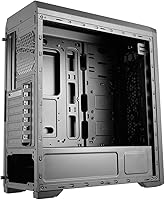
  • No tempered glass or windowed side panel option for builders who want to display their components.
  • Composite plastic sections feel noticeably less solid than cases in higher price brackets.
  • Lacks tool-less drive mounting, which slows down drive swaps and adds minor frustration over time.
  • Finish quality on panels is basic and can show fingerprints and smudges more than premium alternatives.
  • Not designed to scale with high-end upgrades, so you may outgrow it sooner than expected.
  • Limited included hardware and accessories mean small additional costs before the build is truly complete.
  • Front I/O port selection is functional but minimal compared to newer cases with USB-C connectivity.

Ratings

Our AI-generated scores for the Cougar MX330-X Mid Tower PC Case were produced by systematically analyzing verified buyer reviews from global markets, with spam, bot-submitted, and incentivized feedback actively filtered out before scoring. The ratings reflect a balanced synthesis of what real builders praised and where they ran into genuine frustration, with no artificial inflation. Both the standout strengths and the honest shortcomings of this budget gaming case are transparently represented in every category below.

Value for Money
88%
Buyers consistently express satisfaction with how much usable case they get for the asking price. The combination of nine total drive bays, a built-in fan controller, and a quick-charge port at this price tier genuinely surprises first-time builders who expected to sacrifice more.
A small segment of buyers feels the value equation weakens once they factor in the cost of additional fans needed to achieve proper airflow. Without those extras, the out-of-box experience feels slightly incomplete relative to competing cases at a similar price.
Build Quality
71%
29%
The steel panels feel solid and resist flexing during the build process, which gives most buyers enough confidence when installing heavy components. For a composite and metal construction at this price point, the overall rigidity exceeds what many users anticipated.
The plastic accents and front panel trim feel noticeably cheaper than the steel sections, and some buyers report minor sharp edges along internal chassis cutouts. Experienced builders accustomed to premium steel enclosures will immediately notice the material step-down.
Interior Layout
84%
The roomy interior makes it easy to work with larger hands, route cables without forcing connections, and seat full ATX boards without cramped maneuvering. Multiple builders specifically mention how stress-free the layout makes a first build feel.
The lack of tool-less drive mounting means installing storage requires screwdrivers and patience, which slows down the process noticeably. Builders who frequently swap drives between systems will find this a recurring inconvenience rather than a one-time trade-off.
Cable Management
79%
21%
The space behind the motherboard tray is more generous than buyers expect from a budget case, allowing for clean routing without excessive bundling or visible cable clutter. Several reviewers highlight this as the single biggest pleasant surprise of the build process.
The number of cable management anchor points and tie-down slots is limited, so achieving a truly tidy build takes extra effort and creativity. Builders aiming for a showcase-quality interior will likely need additional velcro straps or third-party cable organizers.
Airflow & Cooling
66%
34%
The bottom-mounted PSU placement and the built-in fan controller give builders a reasonable foundation for managing thermals without extra hardware purchases. The open drive bay layout allows air to move through the case with minimal obstruction when fans are properly positioned.
Shipping with very few pre-installed fans is the most commonly cited frustration, as it means the case cannot deliver adequate airflow out of the box for any meaningful gaming workload. Buyers planning a performance build should budget for at least two additional fans immediately.
Front I/O Usability
82%
18%
Having a USB 3.0 port, audio jacks, a fan controller knob, and a quick-charge port all accessible from the front panel makes daily use noticeably more convenient than cases that force you to reach around to the rear. The quick-charge port in particular draws consistent praise from buyers who keep phones at their desk.
The absence of a USB-C port on the front panel is an increasingly noticeable omission as modern peripherals and devices shift toward that connector. Builders with newer devices will find themselves relying on rear motherboard ports or adapters for USB-C connectivity.
Storage Flexibility
91%
Nine total drive bays across three form factors is genuinely rare at this price point and is a defining strength of this Cougar mid-tower. Builders migrating older spinning hard drives and optical drives into a new system find this case uniquely accommodating without any additional drive cages.
While the bay count is impressive, the lack of hot-swap or tool-less mechanisms makes actually populating those bays a more manual process than it needs to be. Users who need to add or swap drives regularly will feel the friction of a fully screw-mounted system.
Ease of Assembly
86%
First-time builders repeatedly describe the assembly process as intuitive and low-stress, crediting the clear interior layout and accessible standoff placement for making motherboard installation feel approachable. The forgiving interior dimensions leave enough room to correct mistakes without disassembling large sections.
The instruction manual included with the MX330-X chassis is sparse and assumes a degree of baseline knowledge that a true beginner may not yet have. A handful of buyers mention confusion during PSU installation and front panel header connection as points where better documentation would have helped.
Aesthetics & Exterior Design
62%
38%
The clean, all-black exterior with subtle styling keeps the case from looking out of place in either a gaming room or a home office. Buyers who prefer an understated look over aggressive RGB-heavy designs consistently describe the exterior as inoffensive and professional.
There is no windowed or tempered glass side panel option, so builders who invest in attractive components will have nothing to show for it. The plastic front fascia finish is prone to fingerprint smudging and lacks the premium texture feel that even some competing budget cases manage to achieve.
Expansion Headroom
77%
23%
Seven expansion slots provide genuine flexibility for adding a second GPU, a capture card, or other PCIe accessories without hitting a wall early in the system's life. This makes the MX330-X chassis more future-adaptable than its budget positioning might suggest.
While slot count is strong, the overall chassis size and cooling limitations mean that a heavily expanded build will strain the thermal management capabilities of the case. Buyers planning high-end multi-card or workstation configurations will likely need a more purpose-built enclosure before long.
Noise Levels
73%
27%
With a minimal fan configuration at stock, the case operates quietly for everyday computing tasks, and the fan controller allows builders to keep speeds low during light workloads. Buyers using this for a home office or media PC specifically appreciate the relatively quiet baseline operation.
Once additional fans are added and pushed toward higher speeds for gaming workloads, there is no acoustic dampening material in the panels to absorb vibration or fan noise. The result can be a noticeably louder system under load than buyers with noise-sensitive setups would prefer.
Compatibility Range
89%
Supporting Mini ITX through full ATX motherboards along with standard ATX PS2 power supplies means this budget gaming case works with an exceptionally wide range of off-the-shelf components. Buyers repurposing parts from older builds report almost no compatibility surprises during planning or assembly.
While motherboard and PSU compatibility is broad, there is limited official documentation on maximum GPU length and CPU cooler height clearances, which can leave buyers guessing during the planning stage. Builders pairing the case with very tall tower coolers or extra-long graphics cards should verify fit carefully before purchasing.
Durability Over Time
68%
32%
The steel sections of the chassis hold up well to repeated opening and closing, and buyers who have used the case for over a year report no significant structural degradation or panel warping. For a budget-tier enclosure, the core metal framework demonstrates reasonable longevity.
The plastic front panel clips and accents show wear more quickly than the steel body, with some long-term owners reporting minor cracking or loosening of the front fascia over time. The composite materials, while functional, do not inspire confidence for buyers who expect to keep a case through multiple builds spanning several years.

Suitable for:

The Cougar MX330-X Mid Tower PC Case is a natural fit for first-time builders who want a forgiving, roomy interior without the anxiety of a cramped workspace or a complicated build process. If you're putting together a budget gaming rig, a home office machine, or repurposing older components into a functional system, this Cougar mid-tower covers the practical bases without asking you to overpay for features you may not need. The generous mix of 5.25-inch, 3.5-inch, and 2.5-inch drive bays makes it especially well-suited to anyone migrating files from older spinning drives while also adding an SSD — a combination that's harder to accommodate in sleeker, more modern cases. Builders who want basic airflow management without buying a separate fan controller will find the built-in unit genuinely useful. It also works well in spaces where the case lives under a desk or in a corner, since its clean, understated look doesn't demand attention.

Not suitable for:

Builders who prioritize aesthetics, RGB lighting, or a windowed side panel to showcase their components will find this budget gaming case falls short of expectations straight out of the box. The Cougar MX330-X Mid Tower PC Case uses composite plastic alongside metal in its construction, and while it feels adequate, experienced builders used to premium steel enclosures will notice the difference in rigidity and finish quality. If you're planning a high-airflow build with multiple case fans, the limited number of included fans means you'll be spending extra on cooling before the system even powers on. Enthusiasts who rely on tool-less drive mounting for quick swaps will find the traditional screw-based setup a minor but recurring frustration. Anyone building a showcase rig or planning to upgrade the internals significantly over the next few years would be better served by investing in a more future-proof enclosure from the start.

Specifications

  • Form Factor: Mid Tower design accommodates a wide range of standard desktop builds without occupying excessive desk or floor space.
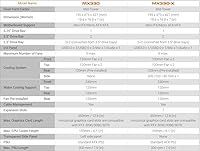
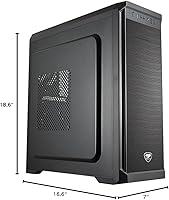
  • Dimensions: The case measures 7 x 16.8 x 18.6 inches (W x D x H), offering a compact footprint for a mid-tower chassis.
  • Weight: At 11 pounds empty, the chassis is light enough to reposition easily but sturdy enough to stay put during use.
  • Motherboard Support: Compatible with Mini ITX, Micro ATX, and full ATX motherboards, covering the vast majority of consumer desktop builds.
  • Drive Bays: Includes three 5.25-inch bays, three 3.5-inch bays, and three 2.5-inch bays for flexible mixed-storage configurations.
  • Expansion Slots: Seven expansion slots support multi-GPU setups or full-length graphics cards common in gaming and workstation builds.
  • Front USB: Front panel provides one USB 3.0 port and one USB 2.0 port for convenient peripheral and device connections.
  • Front Audio: Dedicated microphone and headphone jacks on the front panel allow direct headset connectivity without reaching to the rear.
  • Fan Controller: A built-in fan controller is integrated into the front I/O panel for basic speed adjustment without additional hardware.
  • Quick Charge Port: A front-facing quick-charge port enables fast charging of compatible mobile devices directly from the case.
  • PSU Compatibility: Accepts standard ATX PS2 power supply units, which are the most widely available PSU form factor on the market.
  • PSU Mount: Power supply is bottom-mounted to improve weight distribution and encourage cleaner airflow separation from other components.
  • Material: Construction combines steel panels with composite plastic accents, balancing structural rigidity with cost-effective manufacturing.
  • Color: Available in solid black with a clean, neutral finish that suits both gaming setups and office environments.
  • Brand: Manufactured by Cougar, a brand known for producing value-oriented gaming peripherals and PC cases since the mid-2000s.
  • Model: The model designation is MX330-X, part of Cougar's MX330 mid-tower family of budget-focused enclosures.

Related Reviews

SAMA V60 Mid Tower PC Case

80%
93%
Out-of-Box Cooling Value
78%
Airflow Performance
91%
AIO & Radiator Flexibility
88%
Tempered Glass & Aesthetics
71%
Build Quality & Materials
More
KEDIERS K4 ATX Mid Tower PC Case
80%
91%
Value for Money
93%
Aesthetic Design
74%
Build Quality
72%
Cooling Performance
84%
Ease of Assembly
More
Corsair 3000D Airflow Mid-Tower PC Case
81%
93%
Airflow Performance
88%
Build Quality & Materials
91%
Thermal Management Design
84%
Cable Management
61%
Included Fans Quality
More
SAMA NEVIEW 4503 Mid Tower PC Case
76%
91%
Value for Money
78%
Build Quality
83%
Airflow Performance
76%
ARGB Lighting
82%
Hardware Compatibility
More
SZSKYING CMSVB-1 Mid-Tower PC Gaming Case
74%
91%
Value for Money
88%
Included Fans
86%
Aesthetics & RGB
61%
Build Quality
74%
Airflow Performance
More
Corsair FRAME 4000D RS Mid-Tower Case
82%
91%
Airflow Performance
88%
Build Quality
86%
Modularity & Upgradability
83%
Fan Mounting System
78%
GPU Compatibility
More
Zalman S2 ATX Mid-Tower PC Case
76%
88%
Airflow Performance
63%
Build Quality
91%
Value for Money
86%
Ease of Assembly
84%
Cooling Expandability
More
ANSAITE W9 Mid-Tower ATX PC Case
77%
88%
Value for Money
91%
RGB & Lighting Performance
74%
Airflow & Cooling Capacity
63%
Build Quality & Materials
84%
Cable Management
More
darkFlash DS900 ATX Mid-Tower PC Case
75%
76%
Build Quality
83%
Cooling Potential
91%
Aesthetics & Visibility
88%
Value for Money
74%
Cable Management
More
SAMA S40 Mid Tower ATX PC Case

79%
88%
Airflow Performance
83%
Included Fan Quality
79%
Build Quality & Finish
92%
GPU Compatibility
61%
Cable Management
More

FAQ

Yes, the Cougar MX330-X Mid Tower PC Case officially supports full ATX, Micro ATX, and Mini ITX motherboards, so a standard ATX board will install without issue. Just double-check your specific board's dimensions against the 18.6-inch interior height to be safe.

The case ships with a minimal fan configuration, so most builders will want to add at least one or two additional case fans before considering airflow adequate for a gaming build. The built-in fan controller makes managing extra fans easy, but budget for the fans themselves separately.

Most standard and even some longer graphics cards will fit thanks to the seven expansion slots and a reasonably open interior layout. That said, always check your GPU's stated length against the case's internal GPU clearance spec before purchasing, as very long flagship cards can sometimes be a tight fit in this class of enclosure.

No, this budget gaming case does not include a tempered glass or windowed side panel — both side panels are solid. If showing off your build is important, you will want to look at a different chassis that specifically includes a window option.

No, the case does not come with a power supply. You will need to purchase a standard ATX PS2 form factor PSU separately, which is the most common type and easy to find at most price points.

Cable management is genuinely manageable in the MX330-X chassis, especially for a budget case. There is reasonable space behind the motherboard tray for routing cables, and user feedback consistently highlights this as a pleasant surprise given the price tier.

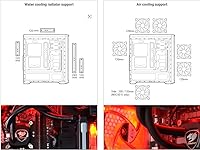
The MX330-X chassis is primarily designed for air cooling, so radiator support is limited and not officially highlighted as a feature. If liquid cooling is part of your build plan, you should verify specific radiator clearance dimensions before committing, as support can vary by radiator size.

The drive bays require conventional screw mounting rather than a tool-less system, which is the main trade-off at this price. It is not complicated, but it does mean you will need a screwdriver handy and a bit more patience than with premium tool-less designs.

The quick-charge port on the front I/O is designed to work with devices that support standard quick-charge protocols, but compatibility depends on your specific phone and the motherboard's USB header output. Most modern Android phones with quick-charge support will benefit from it, while iPhones may charge at standard speeds.

Honestly, this Cougar mid-tower is best approached as a starter chassis rather than a long-term home for multiple upgrade cycles. It serves entry-level builds very well, but if you anticipate significant upgrades — like high-end cooling, multiple drives, or premium components — you may find yourself wanting a more feature-rich enclosure within a couple of years.

Where to Buy